Ello folks.
First I apologize now as i've not slept much so my head isn't working too well .
I don't use the fast boot or boot manager myself and am still pretty lost in most area's of this bios. It's a scary sight the first time you see it.
Even asus mods recommend you don't use the in windows tool for flashing the bios. Did you set the bios to optimized defaults before flashing to the new bios? You should. I'm using bios 1301 and never had any problems.
The earlier bios's where .rom files but these newer one's are .cap. Before updating to the newer .cap bios's there is a change you have to make. ASUS Bios update - General-Motherboard - Motherboards-Memory
I recommend you start a thread on the ROG forums ASUS Republic of Gamers | The Choice of Champions – News, Guides, Overclocking, PC Gaming
These guys eat sleep and drink ROG bios's.
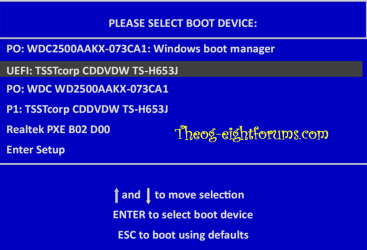
You have probably already tried but I'll ask anyway. During post hit the F8 button which will bring you to the boot menu. Select the drive to boot from and hit enter.
When you installed windows did you only have the drive that you were installing windows on connected? If more drives were connected then windows could have boot the MBR on a different disc. If you had more drives connected i recommend disconnecting all except the ssd you plan to install windows on and try again.
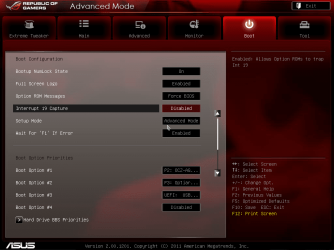
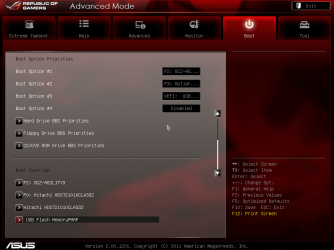
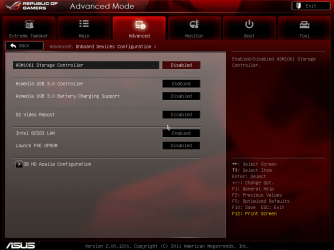
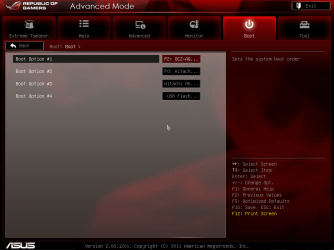
Here's a couple of screenies of our bios at stock settings. I'm really sorry i'm not much help but ROG bios is not soething i've delved right into.
The 3rd screeshot is the Asmedia sata port.
First I apologize now as i've not slept much so my head isn't working too well .
I don't use the fast boot or boot manager myself and am still pretty lost in most area's of this bios. It's a scary sight the first time you see it.
Even asus mods recommend you don't use the in windows tool for flashing the bios. Did you set the bios to optimized defaults before flashing to the new bios? You should. I'm using bios 1301 and never had any problems.
The earlier bios's where .rom files but these newer one's are .cap. Before updating to the newer .cap bios's there is a change you have to make. ASUS Bios update - General-Motherboard - Motherboards-Memory
I recommend you start a thread on the ROG forums ASUS Republic of Gamers | The Choice of Champions – News, Guides, Overclocking, PC Gaming
These guys eat sleep and drink ROG bios's.
You have probably already tried but I'll ask anyway. During post hit the F8 button which will bring you to the boot menu. Select the drive to boot from and hit enter.
When you installed windows did you only have the drive that you were installing windows on connected? If more drives were connected then windows could have boot the MBR on a different disc. If you had more drives connected i recommend disconnecting all except the ssd you plan to install windows on and try again.
Here's a couple of screenies of our bios at stock settings. I'm really sorry i'm not much help but ROG bios is not soething i've delved right into.
The 3rd screeshot is the Asmedia sata port.
Attachments
My Computer
At a glance
Win7 Home Premium x64 SP1i7 4770k8Gb Kingston HyperX Beast 2400MHz @2133MHz 11...MSI GTX 780ti Gaming Oc x2
- Computer type
- PC/Desktop
- Computer Manufacturer/Model Number
- Custom build
- OS
- Win7 Home Premium x64 SP1
- CPU
- i7 4770k
- Motherboard
- Asus maximus VI Hero
- Memory
- 8Gb Kingston HyperX Beast 2400MHz @2133MHz 11-12-11-30
- Graphics Card(s)
- MSI GTX 780ti Gaming Oc x2
- Sound Card
- Onboard ROG SupremeFX
- Monitor(s) Displays
- Asus VG248QE
- Screen Resolution
- 3840X1080 144Hz
- Hard Drives
- Samung Evo 256Gb, OCZ Agility4 128Gb
1x1TB hitachi storage
- PSU
- EVGA Supernova 1000w Platinum
- Case
- Corsair Air 540
- Cooling
- Corsair H100i
- Keyboard
- Coolermaster Quickfire Pro
- Mouse
- Corsair M65 RGB
- Internet Speed
- 74mb dwn/16up
- Antivirus
- MSE,Malwarebytes
- Browser
- Chrome

 no bios flash back either mate.


 )
)