Can't boot Windows 7 after printer uninstallation

kimouette

New member
Local time
2:21 PM
Messages
40
Hi everyone,

I recently bought a new printer so I decided to go ahead and uninstall my previous printer,s drivers (using uninstall from the control panel menu). The printer was uninstalled successfully but then I was asked to reboot my computer to complete the uninstallation process. So I did that, but now I'm stuck on the main black screen and Windows 7 wont boot!

The black screen I am talking about is the screen where you can see your harddrive's information, RAM, mouse initialized ect... This is also where I can choose to go to the setup menu. But normally, Windows 7 automatically boots after that screen disappears. Now it doesn't!

So I read many threads on this forum and tried to use the setup repair cd method AND the Windows 7 installation cd method, none of them works since my computer wont boot from any of them!

I went into the setup menu and made sure the DVD drive was in first position... it is! And I can clearly hear the sound of the cd spinning when I turn on my computer, but nothing seems to work!

Anyone here understands what's happening? Or knows what else I could try??

Thanks for your help!
Kim
 

My Computer My Computer

Computer Manufacturer/Model Number
Lenovo 3000 N200 (0769)
OS
Windows 7 Ultimate 32-bit SP1
CPU
Intel(R) Pentium(R) Dual CPU T2370 @ 1.73GHz
Motherboard
Lenovo IEL10
Memory
4096 MBytes (2X2 Gb)
Graphics Card(s)
Generic PnP Monitor on Mobile Intel 965 Express Chipset Fami
Sound Card
High Definition Audio Device
Monitor(s) Displays
Generic PnP Monitor on Mobile Intel 965 Express Chipset Fami
Screen Resolution
1280x800 pixels
Hard Drives
Internal : Western Digital Mobile/WD Scorpio®, 7200 RPM with 16 MB cache, Capacity : 488GB
When you get stuck on the BIOS boot process before W7 loads, as you have, it indicates a hardware issue. But you would normally get a message if the hard drive was not found.

Are all printers and other USB connected devices unplugged from the back of the computer? Do so, especially either of the printers.

If you are comfortable working inside your case you should also check to be sure the cables attached to your hard drive are connected correctly.

Try this also: repeatedly press the F8 key as the computer boots - those BIOS screens - and see if you can get to the Windows startup menu.
Choose "Normal Startup" first, then "Last known good configuration" next if you can get there.
 

My Computer My Computer

Computer type
PC/Desktop
Computer Manufacturer/Model Number
Home Built - Jan 2013
OS
Windows 7 64 Bit Home Premium SP1
CPU
i7-3820
Motherboard
Asus P9X79-PRO - Bios 4608
Memory
GSkill F3-14900CL9Q - 16GB
Graphics Card(s)
EVGA GeForce GTX660 - Driver 352.86
Sound Card
On board Realtek ALC898
Monitor(s) Displays
Acer S271HL
Screen Resolution
1920 x 1080
Hard Drives
#1- Samsung 840 Pro Series
#2- Western Digital WD1002FAEX Sata3 Black
#3- Western Digital WD1002FAEX Sata3 Black
PSU
Corsair CMPSU-850TX-V2 - 850 watt (by Seasonic)
Case
Corsair Obsidian 550D
Cooling
Standard 3 120mm case fans, Cooler Master Hyper 212 EVO
Keyboard
MS KC-0405
Mouse
Intellimouse 5-button
Internet Speed
56 Mbits/Sec (on a good day)
Antivirus
Avast & Malwarebytes
Browser
Firefox
Other Info
Asus DVD - DRW-24B1ST 24X
Are all printers and other USB connected devices unplugged from the back of the computer? Do so, especially either of the printers.
Yes they are. I have unplugged everything right after the first failure
If you are comfortable working inside your case you should also check to be sure the cables attached to your hard drive are connected correctly.
I wouldn,t mind doing that, but I'm pretty sure my hard drive is ok. When the BIOS screen appears, it reads my HDD information (Pentiuam dual T2370 1.74Ghz or something like that). It also checks the RAM (4000MB ram passed) ect...
repeatedly press the F8 key as the computer boots - those BIOS screens - and see if you can get to the Windows startup menu.
I tried to do that, but F8 doesn,t seem like a fonction on my computer. Is it possible that europeen computers use another key? Each time I press F8 on the BIOS screen I get a sound (a beep), which doesn,t sound right! And when all the information are shown (mouse initialized is the last thing written) F8 doesnt make any beep but it doesnt bring me anywhere
 

My Computer My Computer

Computer Manufacturer/Model Number
Lenovo 3000 N200 (0769)
OS
Windows 7 Ultimate 32-bit SP1
CPU
Intel(R) Pentium(R) Dual CPU T2370 @ 1.73GHz
Motherboard
Lenovo IEL10
Memory
4096 MBytes (2X2 Gb)
Graphics Card(s)
Generic PnP Monitor on Mobile Intel 965 Express Chipset Fami
Sound Card
High Definition Audio Device
Monitor(s) Displays
Generic PnP Monitor on Mobile Intel 965 Express Chipset Fami
Screen Resolution
1280x800 pixels
Hard Drives
Internal : Western Digital Mobile/WD Scorpio®, 7200 RPM with 16 MB cache, Capacity : 488GB
F8 is a Windows function - it bypasses the normal startup to give you additional options. I don't know why it would be different anywhere in the world.
So what you want to be doing is pressing the F8 key at the moment between when the BIOS boot finishes and Windows begins to load.
 

My Computer My Computer

Computer type
PC/Desktop
Computer Manufacturer/Model Number
Home Built - Jan 2013
OS
Windows 7 64 Bit Home Premium SP1
CPU
i7-3820
Motherboard
Asus P9X79-PRO - Bios 4608
Memory
GSkill F3-14900CL9Q - 16GB
Graphics Card(s)
EVGA GeForce GTX660 - Driver 352.86
Sound Card
On board Realtek ALC898
Monitor(s) Displays
Acer S271HL
Screen Resolution
1920 x 1080
Hard Drives
#1- Samsung 840 Pro Series
#2- Western Digital WD1002FAEX Sata3 Black
#3- Western Digital WD1002FAEX Sata3 Black
PSU
Corsair CMPSU-850TX-V2 - 850 watt (by Seasonic)
Case
Corsair Obsidian 550D
Cooling
Standard 3 120mm case fans, Cooler Master Hyper 212 EVO
Keyboard
MS KC-0405
Mouse
Intellimouse 5-button
Internet Speed
56 Mbits/Sec (on a good day)
Antivirus
Avast & Malwarebytes
Browser
Firefox
Other Info
Asus DVD - DRW-24B1ST 24X
That,s exactly what I did, but it doesn't do anything!

The only 2 options I have from there is either F1 (to enter setup menu) and F12 to enter the boot device selection menu.
F1 works, but F12 doesnt work. It gives me "Entering the boot device selection menu... " and nothing happens!

Anything I could try maybe from the setup menu? which seems to be the only thing working right now!
 

My Computer My Computer

Computer Manufacturer/Model Number
Lenovo 3000 N200 (0769)
OS
Windows 7 Ultimate 32-bit SP1
CPU
Intel(R) Pentium(R) Dual CPU T2370 @ 1.73GHz
Motherboard
Lenovo IEL10
Memory
4096 MBytes (2X2 Gb)
Graphics Card(s)
Generic PnP Monitor on Mobile Intel 965 Express Chipset Fami
Sound Card
High Definition Audio Device
Monitor(s) Displays
Generic PnP Monitor on Mobile Intel 965 Express Chipset Fami
Screen Resolution
1280x800 pixels
Hard Drives
Internal : Western Digital Mobile/WD Scorpio®, 7200 RPM with 16 MB cache, Capacity : 488GB
Yours is an uncommon problem, as I am sure you already know.

I have asked others on the forum to take a look. I'm sure someone who has seen this behavior before will take a look.
 

My Computer My Computer

Computer type
PC/Desktop
Computer Manufacturer/Model Number
Home Built - Jan 2013
OS
Windows 7 64 Bit Home Premium SP1
CPU
i7-3820
Motherboard
Asus P9X79-PRO - Bios 4608
Memory
GSkill F3-14900CL9Q - 16GB
Graphics Card(s)
EVGA GeForce GTX660 - Driver 352.86
Sound Card
On board Realtek ALC898
Monitor(s) Displays
Acer S271HL
Screen Resolution
1920 x 1080
Hard Drives
#1- Samsung 840 Pro Series
#2- Western Digital WD1002FAEX Sata3 Black
#3- Western Digital WD1002FAEX Sata3 Black
PSU
Corsair CMPSU-850TX-V2 - 850 watt (by Seasonic)
Case
Corsair Obsidian 550D
Cooling
Standard 3 120mm case fans, Cooler Master Hyper 212 EVO
Keyboard
MS KC-0405
Mouse
Intellimouse 5-button
Internet Speed
56 Mbits/Sec (on a good day)
Antivirus
Avast & Malwarebytes
Browser
Firefox
Other Info
Asus DVD - DRW-24B1ST 24X
That,s exactly what I did, but it doesn't do anything!

The only 2 options I have from there is either F1 (to enter setup menu) and F12 to enter the boot device selection menu.
F1 works, but F12 doesnt work. It gives me "Entering the boot device selection menu... " and nothing happens!

Anything I could try maybe from the setup menu? which seems to be the only thing working right now!
If I understand right your F1 takes you to set up menu- for Bios?
So I'm not sure what you refer to as set up menu.

Bios is "Delete" key on mine.

Anyway if you can get into Bios check to make sure your hard drive is recognized.
If it is check the boot order and make sure hard drive is listed.
CD/DVD is usually first then hard drive second.
That way you can boot a CD if necessary.
If no CD is detected it goes to the hard drive to boot so hard drive should be at least second in the list.

Worth a check if you can get into Bios.
 

My Computer My Computer

Computer Manufacturer/Model Number
Hopalong/ Godzilla
OS
Windows7 Pro 64bit SP-1; Windows XP Pro 32bit
CPU
Intel Core i7-870 Lynnfield 2.93GHz LGA 1156 95W Quad-Core
Motherboard
ASUS P7P55D-E PRO
Memory
8GB@1400MHz Crucial Ballistix DDR3-1600 4x2GB
Graphics Card(s)
ASUS ENGTX460 DirectCU/2DI/1GD5 1GB 256-bit GDDR5
Sound Card
VIA Onboard
Monitor(s) Displays
Asus VS248H-P 24"; Samsung SyncMaster 941BW 19"ws
Screen Resolution
1920x1080; 1440x900
Hard Drives
Samsung 830 120GB SSD
Intel 320 120GB SSD
Western Digital Caviar Black WD7501AALS 750GB 7200 RPM SATA 3.0Gb/s
Western Digital Caviar Black WD6401AALS 640GB 7200 RPM SATA 3.0Gb/s
PSU
COOLER MASTER Silent Pro RS850-AMBAJ3-US 850W Modular
Case
COOLER MASTER HAF 932 RC-932-KKN5-GP Black
Cooling
Scythe "Mugen-2 Rev.B" (2 ScytheKaze-Jyuni PWM fans)
Keyboard
Logitech K-320
Mouse
Kensington
Antivirus
Avast Inernet Suite
Browser
IE 9 ; Chrome
Ok maybe I was calling "bios screen" something that is not called that way!
I have to apologize, I'm french so I'm not completely used to these terms.

Instead I'll show you guys what I am talking about (sorry for the bad image quality I'm using a super cheap cell phone!)

This is (a portion of) the main black screen I was talking about. This is where I can choose from F1 (setup menu) or F12. Windows normally boots right after that page is shown
Main-ok.jpg

F8 nor DELETE keys work for me

If I press F1, here is the HDD info I can see:
Bios-hdd-info.jpg

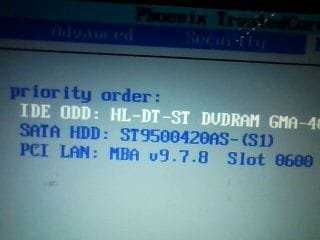
If I choose the "boot section", this is what I see :
bios-boot-order.jpg

So "normally" if I insert my Windows CD installation, it should be the first thing launched... but like I said, it doesn't work!
 

My Computer My Computer

Computer Manufacturer/Model Number
Lenovo 3000 N200 (0769)
OS
Windows 7 Ultimate 32-bit SP1
CPU
Intel(R) Pentium(R) Dual CPU T2370 @ 1.73GHz
Motherboard
Lenovo IEL10
Memory
4096 MBytes (2X2 Gb)
Graphics Card(s)
Generic PnP Monitor on Mobile Intel 965 Express Chipset Fami
Sound Card
High Definition Audio Device
Monitor(s) Displays
Generic PnP Monitor on Mobile Intel 965 Express Chipset Fami
Screen Resolution
1280x800 pixels
Hard Drives
Internal : Western Digital Mobile/WD Scorpio®, 7200 RPM with 16 MB cache, Capacity : 488GB
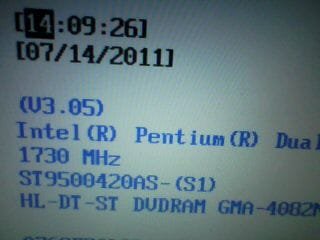
This is bizarre....from your BIOS I can see that your DVD drive is 1st boot order, yet it doesn't boot from a Windows 7 DVD? Is this DVD a retail version or OEM Rescue Disk?

What options do you see on the F1 Setup menu you mentioned?

Regards,
Golden
 

My Computer My Computer

Computer type
PC/Desktop
Computer Manufacturer/Model Number
Golden Mk. I.4
OS
Windows 10 Pro x64 ; Xubuntu x64
CPU
Intel i7 860 @ 2.80 GHz O/C'ed to 4.0GHz
Motherboard
Gigabyte P55A-UD3R Rev.1. Award BIOS F13
Memory
16GB Corsair Vengance DDR3 @ 661 MHz Dual Channel (9-9-9-24)
Graphics Card(s)
EVGA NVidia GTX 560 1024MB
Sound Card
Realtek Integrated
Monitor(s) Displays
Dual Samsung SyncMaster 2494HS
Screen Resolution
1920*1080 and 1920*1080
Hard Drives
1*Samsung 840 EVO 120GB SSD;
1*OCZ Vertex 2 60GB SSD;
2*Samsung F3 SpinPoint 1TB in RAID0;
1*Samsung F1 SpinPoint 1TB;
2*Western Digital 1TB External USB 3.0
1*Western Digital 500GB External USB 3.0
1*Seagate 500GB External USB 2.0
PSU
Thermaltake ToughPower QFan 750W
Case
Thermaltake Element S VK60001W2Z
Cooling
Corsair H60 Water Cooling, 2*230mm and 2*80mm case fans
Keyboard
Logitech G110
Mouse
Logitech MX518
Yes DVD is listed first in your picture.
SATA HDD is showing second in your last picture.

Also if you are on a wireless keyboard many times they will not give all the functions when running on the Bios firmware as you are now.
The Windows driver is not recognized properly.
Several times I have had to use my wired/plug-in keyboard when there is a problem with Windows for all "F" keys to work.
If you are using a wireless keyboard try a wired/plug-in keyboard and see if all the keys work.

If it works you can then enter F8 Step 3 here > http://www.sevenforums.com/tutorials/666-advanced-boot-options.html
 

My Computer My Computer

Computer Manufacturer/Model Number
Hopalong/ Godzilla
OS
Windows7 Pro 64bit SP-1; Windows XP Pro 32bit
CPU
Intel Core i7-870 Lynnfield 2.93GHz LGA 1156 95W Quad-Core
Motherboard
ASUS P7P55D-E PRO
Memory
8GB@1400MHz Crucial Ballistix DDR3-1600 4x2GB
Graphics Card(s)
ASUS ENGTX460 DirectCU/2DI/1GD5 1GB 256-bit GDDR5
Sound Card
VIA Onboard
Monitor(s) Displays
Asus VS248H-P 24"; Samsung SyncMaster 941BW 19"ws
Screen Resolution
1920x1080; 1440x900
Hard Drives
Samsung 830 120GB SSD
Intel 320 120GB SSD
Western Digital Caviar Black WD7501AALS 750GB 7200 RPM SATA 3.0Gb/s
Western Digital Caviar Black WD6401AALS 640GB 7200 RPM SATA 3.0Gb/s
PSU
COOLER MASTER Silent Pro RS850-AMBAJ3-US 850W Modular
Case
COOLER MASTER HAF 932 RC-932-KKN5-GP Black
Cooling
Scythe "Mugen-2 Rev.B" (2 ScytheKaze-Jyuni PWM fans)
Keyboard
Logitech K-320
Mouse
Kensington
Antivirus
Avast Inernet Suite
Browser
IE 9 ; Chrome
This is bizarre....from your BIOS I can see that your DVD drive is 1st boot order, yet it doesn't boot from a Windows 7 DVD? Is this DVD a retail version or OEM Rescue Disk?

What options do you see on the F1 Setup menu you mentioned?

Regards,
Golden
I'm not sure the disk will work.

If disk is pre SP1 and he has SP1 installed now?

Brink told me you needed to make a post SP1 Repair/recovery disk.
That is what I understood so I did for mine.

Post #73-74
http://www.sevenforums.com/tutorials/2083-system-repair-disc-create-8.html


Golden
I'm not an expert on this type problem.
Finding what I can to help.

Where is Brink when you need him. ;)
 

My Computer My Computer

Computer Manufacturer/Model Number
Hopalong/ Godzilla
OS
Windows7 Pro 64bit SP-1; Windows XP Pro 32bit
CPU
Intel Core i7-870 Lynnfield 2.93GHz LGA 1156 95W Quad-Core
Motherboard
ASUS P7P55D-E PRO
Memory
8GB@1400MHz Crucial Ballistix DDR3-1600 4x2GB
Graphics Card(s)
ASUS ENGTX460 DirectCU/2DI/1GD5 1GB 256-bit GDDR5
Sound Card
VIA Onboard
Monitor(s) Displays
Asus VS248H-P 24"; Samsung SyncMaster 941BW 19"ws
Screen Resolution
1920x1080; 1440x900
Hard Drives
Samsung 830 120GB SSD
Intel 320 120GB SSD
Western Digital Caviar Black WD7501AALS 750GB 7200 RPM SATA 3.0Gb/s
Western Digital Caviar Black WD6401AALS 640GB 7200 RPM SATA 3.0Gb/s
PSU
COOLER MASTER Silent Pro RS850-AMBAJ3-US 850W Modular
Case
COOLER MASTER HAF 932 RC-932-KKN5-GP Black
Cooling
Scythe "Mugen-2 Rev.B" (2 ScytheKaze-Jyuni PWM fans)
Keyboard
Logitech K-320
Mouse
Kensington
Antivirus
Avast Inernet Suite
Browser
IE 9 ; Chrome
kimouette

We are trying to help.
We will see if we can get more experienced people to assist.

Mike
 

My Computer My Computer

Computer Manufacturer/Model Number
Hopalong/ Godzilla
OS
Windows7 Pro 64bit SP-1; Windows XP Pro 32bit
CPU
Intel Core i7-870 Lynnfield 2.93GHz LGA 1156 95W Quad-Core
Motherboard
ASUS P7P55D-E PRO
Memory
8GB@1400MHz Crucial Ballistix DDR3-1600 4x2GB
Graphics Card(s)
ASUS ENGTX460 DirectCU/2DI/1GD5 1GB 256-bit GDDR5
Sound Card
VIA Onboard
Monitor(s) Displays
Asus VS248H-P 24"; Samsung SyncMaster 941BW 19"ws
Screen Resolution
1920x1080; 1440x900
Hard Drives
Samsung 830 120GB SSD
Intel 320 120GB SSD
Western Digital Caviar Black WD7501AALS 750GB 7200 RPM SATA 3.0Gb/s
Western Digital Caviar Black WD6401AALS 640GB 7200 RPM SATA 3.0Gb/s
PSU
COOLER MASTER Silent Pro RS850-AMBAJ3-US 850W Modular
Case
COOLER MASTER HAF 932 RC-932-KKN5-GP Black
Cooling
Scythe "Mugen-2 Rev.B" (2 ScytheKaze-Jyuni PWM fans)
Keyboard
Logitech K-320
Mouse
Kensington
Antivirus
Avast Inernet Suite
Browser
IE 9 ; Chrome
This is bizarre....from your BIOS I can see that your DVD drive is 1st boot order, yet it doesn't boot from a Windows 7 DVD? Is this DVD a retail version or OEM Rescue Disk?

What options do you see on the F1 Setup menu you mentioned?
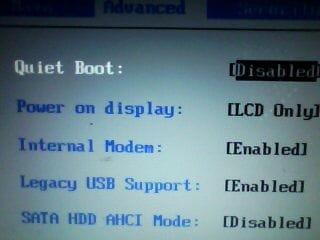
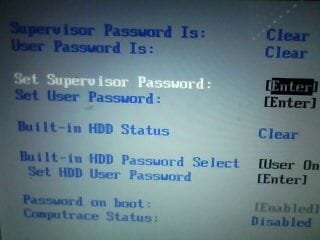
Here are the other options I have:
DSC00045.jpg
DSC00046.jpg
To answer your question, my computer does NOT boot my orginal Windows 7 DVD. The other disk I have been trying to boot with is called "system repair disk": a disk I've been creating following that tutorial : Créer un disque de réparation système
Also if you are on a wireless keyboard many times they will not give all the functions when running on the Bios firmware as you are now.
I'm using a laptop here. So the keyboard is integrated, not wireless

Hopalong X, what does pre SP1 mean?

Maybe some parts of my hardware are broken, but that would be a weird coincidence. What really initiated the problem is the uninstallation of my printer. Since I was asked to reboot my computer to complete the uninstallation, I guess something is trying to be ran and prevents my computer from launching anything else (dvd drive, windows 7, just anything else than that damn printer,s driver)
 

My Computer My Computer

Computer Manufacturer/Model Number
Lenovo 3000 N200 (0769)
OS
Windows 7 Ultimate 32-bit SP1
CPU
Intel(R) Pentium(R) Dual CPU T2370 @ 1.73GHz
Motherboard
Lenovo IEL10
Memory
4096 MBytes (2X2 Gb)
Graphics Card(s)
Generic PnP Monitor on Mobile Intel 965 Express Chipset Fami
Sound Card
High Definition Audio Device
Monitor(s) Displays
Generic PnP Monitor on Mobile Intel 965 Express Chipset Fami
Screen Resolution
1280x800 pixels
Hard Drives
Internal : Western Digital Mobile/WD Scorpio®, 7200 RPM with 16 MB cache, Capacity : 488GB
SP1 is reference to- Windows 7 Service Pack1
So "Pre" is before SP1 was installed.

I didn't know it was a laptop.
 

My Computer My Computer

Computer Manufacturer/Model Number
Hopalong/ Godzilla
OS
Windows7 Pro 64bit SP-1; Windows XP Pro 32bit
CPU
Intel Core i7-870 Lynnfield 2.93GHz LGA 1156 95W Quad-Core
Motherboard
ASUS P7P55D-E PRO
Memory
8GB@1400MHz Crucial Ballistix DDR3-1600 4x2GB
Graphics Card(s)
ASUS ENGTX460 DirectCU/2DI/1GD5 1GB 256-bit GDDR5
Sound Card
VIA Onboard
Monitor(s) Displays
Asus VS248H-P 24"; Samsung SyncMaster 941BW 19"ws
Screen Resolution
1920x1080; 1440x900
Hard Drives
Samsung 830 120GB SSD
Intel 320 120GB SSD
Western Digital Caviar Black WD7501AALS 750GB 7200 RPM SATA 3.0Gb/s
Western Digital Caviar Black WD6401AALS 640GB 7200 RPM SATA 3.0Gb/s
PSU
COOLER MASTER Silent Pro RS850-AMBAJ3-US 850W Modular
Case
COOLER MASTER HAF 932 RC-932-KKN5-GP Black
Cooling
Scythe "Mugen-2 Rev.B" (2 ScytheKaze-Jyuni PWM fans)
Keyboard
Logitech K-320
Mouse
Kensington
Antivirus
Avast Inernet Suite
Browser
IE 9 ; Chrome
Tonight I'll take out the hdd and back up all my personal files on another computer using my hdd adaptor kit (I'll keep my fingers crossed until then... if my hdd is dead... that would be a nightmare!!!). But then I dont know what I'll do. Let,s say I have copied my files and now I want to do complete reinstall of Windows 7, how will I boot the dvd anyway?

What a terrible situation!! All I wanted was to uninstall my printer,s drivers!!
 

My Computer My Computer

Computer Manufacturer/Model Number
Lenovo 3000 N200 (0769)
OS
Windows 7 Ultimate 32-bit SP1
CPU
Intel(R) Pentium(R) Dual CPU T2370 @ 1.73GHz
Motherboard
Lenovo IEL10
Memory
4096 MBytes (2X2 Gb)
Graphics Card(s)
Generic PnP Monitor on Mobile Intel 965 Express Chipset Fami
Sound Card
High Definition Audio Device
Monitor(s) Displays
Generic PnP Monitor on Mobile Intel 965 Express Chipset Fami
Screen Resolution
1280x800 pixels
Hard Drives
Internal : Western Digital Mobile/WD Scorpio®, 7200 RPM with 16 MB cache, Capacity : 488GB
Just as a suggestion. If you have access to another computer, follow this tutorial and see if you can boot from a USB drive. You will need your installation disk and a 4GB USB drive.
 

My Computers My Computers

System One System Two

  • Computer type
    PC/Desktop
    Computer Manufacturer/Model Number
    ALWAYS UNDER CONSTRUCTION
    OS
    Windows 11 Pro
    CPU
    Ryzen 9 5900X
    Motherboard
    Asus X570 Crosshair Viii Hero
    Memory
    32GB G Skill DDR4-3600
    Graphics Card(s)
    EVGA RTX 3080 FTW 3 Ultra
    Sound Card
    On Board/Sennheiser PC37X Headset
    Monitor(s) Displays
    3 X Asus 27"
    Screen Resolution
    2560x1440
    Hard Drives
    2 X 1 TB NVME drives
    PSU
    EVGA 850
    Case
    Phanteks Eclipse P400A
    Cooling
    EVGA 280 AIO
    Keyboard
    Logitech G510s/ Logitech G13
    Mouse
    Logitech G502
    Internet Speed
    24/1
    Antivirus
    ESET/MBAM Pro/SAS Pro
    Browser
    Chrome/ Firefox/ Edge
  • Computer type
    Laptop
    System Manufacturer/Model Number
    Dell 16 Plus
    OS
    Windows 11 Pro
    CPU
    Intel Ultra 9 288V
    Memory
    32 GB LPDDR5X 8533
    Monitor(s) Displays
    16" Mini-LED HDR600 Touch 90 Hz
    Screen Resolution
    2560X1600
    Hard Drives
    1 TB NVME
Try ENABLED for SATA HDD AHCI Mode.
 

My Computer My Computer

OS
ME/XP/Vista/Win7
Just as a suggestion. If you have access to another computer, follow this tutorial and see if you can boot from a USB drive. You will need your installation disk and a 4GB USB drive.
I'll try that, after backing up my data of course :)
Try ENABLED for SATA HDD AHCI Mode.
I enabled it but it doesn't change anything. Still cant boot from dvd.
 

My Computer My Computer

Computer Manufacturer/Model Number
Lenovo 3000 N200 (0769)
OS
Windows 7 Ultimate 32-bit SP1
CPU
Intel(R) Pentium(R) Dual CPU T2370 @ 1.73GHz
Motherboard
Lenovo IEL10
Memory
4096 MBytes (2X2 Gb)
Graphics Card(s)
Generic PnP Monitor on Mobile Intel 965 Express Chipset Fami
Sound Card
High Definition Audio Device
Monitor(s) Displays
Generic PnP Monitor on Mobile Intel 965 Express Chipset Fami
Screen Resolution
1280x800 pixels
Hard Drives
Internal : Western Digital Mobile/WD Scorpio®, 7200 RPM with 16 MB cache, Capacity : 488GB
If it were me, I would boot into bios, load Optimized Defaults (usually F9), set the boot order to CD/DVD first and HD second and try it again.
 

My Computers My Computers

System One System Two

  • Computer type
    PC/Desktop
    Computer Manufacturer/Model Number
    ALWAYS UNDER CONSTRUCTION
    OS
    Windows 11 Pro
    CPU
    Ryzen 9 5900X
    Motherboard
    Asus X570 Crosshair Viii Hero
    Memory
    32GB G Skill DDR4-3600
    Graphics Card(s)
    EVGA RTX 3080 FTW 3 Ultra
    Sound Card
    On Board/Sennheiser PC37X Headset
    Monitor(s) Displays
    3 X Asus 27"
    Screen Resolution
    2560x1440
    Hard Drives
    2 X 1 TB NVME drives
    PSU
    EVGA 850
    Case
    Phanteks Eclipse P400A
    Cooling
    EVGA 280 AIO
    Keyboard
    Logitech G510s/ Logitech G13
    Mouse
    Logitech G502
    Internet Speed
    24/1
    Antivirus
    ESET/MBAM Pro/SAS Pro
    Browser
    Chrome/ Firefox/ Edge
  • Computer type
    Laptop
    System Manufacturer/Model Number
    Dell 16 Plus
    OS
    Windows 11 Pro
    CPU
    Intel Ultra 9 288V
    Memory
    32 GB LPDDR5X 8533
    Monitor(s) Displays
    16" Mini-LED HDR600 Touch 90 Hz
    Screen Resolution
    2560X1600
    Hard Drives
    1 TB NVME
Hello, in any of the screens you see is there an option for System recovery or something to that effect? try entering that, but be aware that will revert your system to out of the box condition erasing all of your data and programs.
 

My Computer My Computer

Computer type
PC/Desktop
Computer Manufacturer/Model Number
Home Built Desktop By DataTech
OS
Windows 7 Ultimate X64 SP1
CPU
Intel i5-2550K, Differing ~4.4-4.8GHz No built in GPU
Motherboard
ASUS P8Z68-V PRO/GEN3
Memory
16GB G.Skill Sniper 1866MHz @ 2133MHz 2x8GB
Graphics Card(s)
ASUS GTX650TIB-DC2OC-2GD5, (650TI Boost)
Sound Card
Onboard Realtek 5-1
Monitor(s) Displays
Samsung P2570HD
Screen Resolution
1920x1080
Hard Drives
Samsung 840 Pro 256GB SSD for OS, 500GB Seagate Constellation (Enterprise drive) for Data
PSU
Corsair HX650W
Case
Inwin Dragon Rider
Cooling
Hyper 212 EVO w/two Noctua fans, push-pull, @1300 RPM
Keyboard
E-Z Eyes, bright yellow keys with large characters
Mouse
steelseries SENSEI Laser Pro Gaming
Internet Speed
48-51Mbs Mbs down, 11 Mbs up Xfinity Cable
Antivirus
Norton Internet Security 2013
Browser
IE 10, Opera, Pale Moon if needed
Other Info
4 case fans, LG BluRay-RE, ASUS DVD-RW, Mr. Fusion power supply, 1.21 gigawatts.
Back
Top