
Can't boot Windows 7 after printer uninstallation

All the options I have are on the pictures I showed you. Nothing like system recovery.

In the setup menu I've reset all settings to default though, but it doesn't change a thing.. except that now I have to press the "Lenovo care button" to enter the black screen since the main screen is now white with the big lenovo logo. But Windows and the dvd still won,t load.
 

My Computer My Computer

Computer Manufacturer/Model Number
Lenovo 3000 N200 (0769)
OS
Windows 7 Ultimate 32-bit SP1
CPU
Intel(R) Pentium(R) Dual CPU T2370 @ 1.73GHz
Motherboard
Lenovo IEL10
Memory
4096 MBytes (2X2 Gb)
Graphics Card(s)
Generic PnP Monitor on Mobile Intel 965 Express Chipset Fami
Sound Card
High Definition Audio Device
Monitor(s) Displays
Generic PnP Monitor on Mobile Intel 965 Express Chipset Fami
Screen Resolution
1280x800 pixels
Hard Drives
Internal : Western Digital Mobile/WD Scorpio®, 7200 RPM with 16 MB cache, Capacity : 488GB

My Computer My Computer

OS
ME/XP/Vista/Win7
Since this is a Lenovo, then an idea would be to go to the Lenovo forum and to Lenovo support and see what info the have on your model.

Your problem is NOT Windows 7.

What you can do to look at your hard disk and extract data from there is go to a machine with Win 7 on that is a 32bit system if yours is 32 bit or go toa machine with Win 7 on it that is 64 bit if yours is 64 bit.

Once at that machine, you will do two things:
1. Make a SYSTEM REPAIR DISC. A system repair disc is NOT a system restore disc.

2. Put the contents of the System Repair Disc onto a correctly prepared USB stick.

Take that USB stick back to your laptop and see if you can boot from the USB stick.

[FONT=&quot]DISC - CREATE A SYSTEM REPAIR DISC[/FONT]
START | type System Repair | Enter key | Create Disc button
=========================================================
===========================================================


PUT SYSTEM REPAIR DISC ON A USB STICK


TWO STEPS
1. Prepare the USB stick
2. Put contents of System Repair Disc on USB stick.

STEP ONE * PREPARE UFD (USB FLASH DRIVE)

Run CMD.EXE as administrator
Type following commands and hit ENTER key after each command.
· DISKPART starts the DiskPart program
· LIST DISK shows numeral assigned to disks
note the numeral assigned to your usb stick
The numeral 2 will be used in this example
· SELECT DISK 2
· DETAIL DISK the info shown will confirm the correctness of your selection
· CLEAN ALL the entire usb stick will be overwritten with zeros
· CREATE PARTITION PRIMARY create a primary partition on the USB stick
· FORMAT FS=NTFS format the partition
· ACTIVE the partition can contain operating system startup files
· ASSIGN the next available letter is assigned to the USB stick
· EXIT exit from the DISKPART program
· EXIT exit from the command shell

STEP TWO – PUT SYSTEM REPAIR DISC ON UFD

Using Windows Explorer,
Copy M:\boot to E:\
Copy M:\sources to E:\
Copy M:\bootmgr to E:\
where M:\ is your CD/DVD drive
where E:\ is your UFD

Easiest is to simply drag from M:\ to E:\ and choose “copy”
 

My Computer My Computer

Computer Manufacturer/Model Number
Toshiba Satellite S875D-S7239 laptop
OS
MS Windows 7 Ultimate SP1 64-bit
CPU
AMD A10-4600M
Motherboard
AMD Pumori (Socket FT1)
Memory
6.00 GB Dual-Channel DDR3 @ 798MHz (11-11-12-28)
Graphics Card(s)
AMD Radeon HD 7660G
Sound Card
High Definition Audio Device
Monitor(s) Displays
Generic PnP Monitor (1600x900@60Hz)
Screen Resolution
1600x900@60Hz
Hard Drives
SSD 119GB Corsair CSSD-V128GB2 ATA Device
Keyboard
Standard PS/2 Keyboard
Mouse
HP Wireless Optical Mobile Mouse Model FHA-3410
Internet Speed
What the local pub, local coffee shop offers.
Other Info
Optical Drive:MATSHITA BD-CMB UJ160B ATA Device


Also have an Asus ha1002xp netbook with Win 7 Ultimate installed.
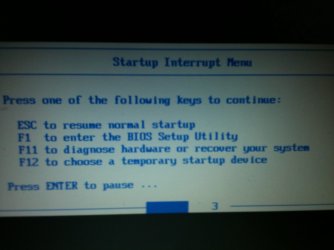
Seems like the "Product Recovery program" is not on my computer and I dont necesseraly wish to contact Lenovo to buy a CD. I found the menu where it should normally be lauched though (F11)
IMG_0376.JPG
but it brings me on a black screen and nothing happens

F12 (to choose a temporary startup device) also brings me on a black screen

so F1 remains my only option

My harddrive is fine, I just did a backup of all my personal data using my hdd kit.
I have another hardrive that I wish to use for a system image recovery.
I found the tutorial here : http://www.sevenforums.com/tutorials/675-system-image-recovery.html but since I cant launch Windows 7 nor open a command prompt at boot, I have no idea how I can manage to recover from my other HDD.

I'll try the suggestion made earlier (the USB Windows 7 installation key drive) but I doubt my computer will allow me to boot from the usb key (just like it fails with the DVD)... but I'll give it a try
:cry:

Edit : oops no I cant use the USB method since it requires to launch a command promp :mad:
 

My Computer My Computer

Computer Manufacturer/Model Number
Lenovo 3000 N200 (0769)
OS
Windows 7 Ultimate 32-bit SP1
CPU
Intel(R) Pentium(R) Dual CPU T2370 @ 1.73GHz
Motherboard
Lenovo IEL10
Memory
4096 MBytes (2X2 Gb)
Graphics Card(s)
Generic PnP Monitor on Mobile Intel 965 Express Chipset Fami
Sound Card
High Definition Audio Device
Monitor(s) Displays
Generic PnP Monitor on Mobile Intel 965 Express Chipset Fami
Screen Resolution
1280x800 pixels
Hard Drives
Internal : Western Digital Mobile/WD Scorpio®, 7200 RPM with 16 MB cache, Capacity : 488GB
Maybe I should mention that my other computer is a Powerbook (so a Mac) which doesn't allow me a create a system repair disc.
 

My Computer My Computer

Computer Manufacturer/Model Number
Lenovo 3000 N200 (0769)
OS
Windows 7 Ultimate 32-bit SP1
CPU
Intel(R) Pentium(R) Dual CPU T2370 @ 1.73GHz
Motherboard
Lenovo IEL10
Memory
4096 MBytes (2X2 Gb)
Graphics Card(s)
Generic PnP Monitor on Mobile Intel 965 Express Chipset Fami
Sound Card
High Definition Audio Device
Monitor(s) Displays
Generic PnP Monitor on Mobile Intel 965 Express Chipset Fami
Screen Resolution
1280x800 pixels
Hard Drives
Internal : Western Digital Mobile/WD Scorpio®, 7200 RPM with 16 MB cache, Capacity : 488GB
In your bios see if there is an option to boot from a legacy device. Make sure that is enabled. Also, In the screenshot above it says F11 to diagnose hardware. You may want to attempt that. If it works we will at least know if it is a hardware problem as I suspect it is. When you get the USB made, go back to that same screen and choose F12. That may get you to boot to the USB.
 

My Computers My Computers

System One System Two

  • Computer type
    PC/Desktop
    Computer Manufacturer/Model Number
    ALWAYS UNDER CONSTRUCTION
    OS
    Windows 11 Pro
    CPU
    Ryzen 9 5900X
    Motherboard
    Asus X570 Crosshair Viii Hero
    Memory
    32GB G Skill DDR4-3600
    Graphics Card(s)
    EVGA RTX 3080 FTW 3 Ultra
    Sound Card
    On Board/Sennheiser PC37X Headset
    Monitor(s) Displays
    3 X Asus 27"
    Screen Resolution
    2560x1440
    Hard Drives
    2 X 1 TB NVME drives
    PSU
    EVGA 850
    Case
    Phanteks Eclipse P400A
    Cooling
    EVGA 280 AIO
    Keyboard
    Logitech G510s/ Logitech G13
    Mouse
    Logitech G502
    Internet Speed
    24/1
    Antivirus
    ESET/MBAM Pro/SAS Pro
    Browser
    Chrome/ Firefox/ Edge
  • Computer type
    Laptop
    System Manufacturer/Model Number
    Dell 16 Plus
    OS
    Windows 11 Pro
    CPU
    Intel Ultra 9 288V
    Memory
    32 GB LPDDR5X 8533
    Monitor(s) Displays
    16" Mini-LED HDR600 Touch 90 Hz
    Screen Resolution
    2560X1600
    Hard Drives
    1 TB NVME
Like I said I have another hdd that I can plug with a usb cable and that hdd is a complete system image of my computer 3 months ago. Cant I do anything with that?
 

My Computer My Computer

Computer Manufacturer/Model Number
Lenovo 3000 N200 (0769)
OS
Windows 7 Ultimate 32-bit SP1
CPU
Intel(R) Pentium(R) Dual CPU T2370 @ 1.73GHz
Motherboard
Lenovo IEL10
Memory
4096 MBytes (2X2 Gb)
Graphics Card(s)
Generic PnP Monitor on Mobile Intel 965 Express Chipset Fami
Sound Card
High Definition Audio Device
Monitor(s) Displays
Generic PnP Monitor on Mobile Intel 965 Express Chipset Fami
Screen Resolution
1280x800 pixels
Hard Drives
Internal : Western Digital Mobile/WD Scorpio®, 7200 RPM with 16 MB cache, Capacity : 488GB
May be your hard drive bit the dust since nothing has worked, and should have. I believe you'd need to get to windows to use your image. Your CD drive doesn't work so a Partition Wizard boot disk won't work either. I'm stumped. If you can do it, you can try replacing your hard drive and see what happens when trying to boot.

You can also try plugging in the USB drive and booting.

All of this happened just by uninstalling printer software and rebooting?
 

My Computer My Computer

Computer type
PC/Desktop
Computer Manufacturer/Model Number
Home Built Desktop By DataTech
OS
Windows 7 Ultimate X64 SP1
CPU
Intel i5-2550K, Differing ~4.4-4.8GHz No built in GPU
Motherboard
ASUS P8Z68-V PRO/GEN3
Memory
16GB G.Skill Sniper 1866MHz @ 2133MHz 2x8GB
Graphics Card(s)
ASUS GTX650TIB-DC2OC-2GD5, (650TI Boost)
Sound Card
Onboard Realtek 5-1
Monitor(s) Displays
Samsung P2570HD
Screen Resolution
1920x1080
Hard Drives
Samsung 840 Pro 256GB SSD for OS, 500GB Seagate Constellation (Enterprise drive) for Data
PSU
Corsair HX650W
Case
Inwin Dragon Rider
Cooling
Hyper 212 EVO w/two Noctua fans, push-pull, @1300 RPM
Keyboard
E-Z Eyes, bright yellow keys with large characters
Mouse
steelseries SENSEI Laser Pro Gaming
Internet Speed
48-51Mbs Mbs down, 11 Mbs up Xfinity Cable
Antivirus
Norton Internet Security 2013
Browser
IE 10, Opera, Pale Moon if needed
Other Info
4 case fans, LG BluRay-RE, ASUS DVD-RW, Mr. Fusion power supply, 1.21 gigawatts.
If the F11 option is not working, is the HD showing BIOS?
 

My Computer My Computer

OS
ME/XP/Vista/Win7
If showing the BIOS means that I can read infos about my HDD while in setup (F11), than yes it does : http://www.sevenforums.com/general-...after-printer-uninstallation.html#post1490420
May be your hard drive bit the dust since nothing has worked, and should have. I believe you'd need to get to windows to use your image. Your CD drive doesn't work so a Partition Wizard boot disk won't work either. I'm stumped. If you can do it, you can try replacing your hard drive and see what happens when trying to boot.

You can also try plugging in the USB drive and booting.
I doubt that my HDD is causing all this. I bought it couple of months ago and it never showed any signs of weakness. Plus, I just plugged it into my Mac and recovered all the data I wanted so it does work correctly.

I'm currently trying the USB thing. I found an iso of Windows 7 32bit and also found the command lines needed to create a bootable USB key with a Mac (yes everything is complicated) and the iso is currently being transfered on the usb key. This is taking forever! But after that I'll plug it into my PC, go to setup and check if I have any option and then I'll try to boot with it!

I'll post my results as soon as I can
All of this happened just by uninstalling printer software and rebooting?
Unbelievable but YES. That stupid HP driver really messed up my computer!
 

My Computer My Computer

Computer Manufacturer/Model Number
Lenovo 3000 N200 (0769)
OS
Windows 7 Ultimate 32-bit SP1
CPU
Intel(R) Pentium(R) Dual CPU T2370 @ 1.73GHz
Motherboard
Lenovo IEL10
Memory
4096 MBytes (2X2 Gb)
Graphics Card(s)
Generic PnP Monitor on Mobile Intel 965 Express Chipset Fami
Sound Card
High Definition Audio Device
Monitor(s) Displays
Generic PnP Monitor on Mobile Intel 965 Express Chipset Fami
Screen Resolution
1280x800 pixels
Hard Drives
Internal : Western Digital Mobile/WD Scorpio®, 7200 RPM with 16 MB cache, Capacity : 488GB
Test your HD using maker's diagnostics/repair CD extended scan which will autostart on its own: HD Diagnostic

You can write your Win7 DVD to USB flash stick using Ultra ISO trial version: on File tab select Open DVD, on Bootable select Write Disk Image, Format, Write. Boot under USB or HD. From Repair console on second screen run Startup Repair repeatedly.

You can retrieve your files if the flashstick boots: Copy & Paste - in Windows Recovery Console. If not Paragon Rescue CD will autostart without having to boot it. Paragon rescue disk; change drive letter; recover data

You can then wipe the HD using free Partition Wizard bootable CD which will also autostart on its own.

Now the Win7 DVD will also autostart on its own to clean reinstall:
Reinstalling Windows 7
 
Thanks Greg, I forgot the Paragon atack. :o
 

My Computer My Computer

Computer type
PC/Desktop
Computer Manufacturer/Model Number
Home Built Desktop By DataTech
OS
Windows 7 Ultimate X64 SP1
CPU
Intel i5-2550K, Differing ~4.4-4.8GHz No built in GPU
Motherboard
ASUS P8Z68-V PRO/GEN3
Memory
16GB G.Skill Sniper 1866MHz @ 2133MHz 2x8GB
Graphics Card(s)
ASUS GTX650TIB-DC2OC-2GD5, (650TI Boost)
Sound Card
Onboard Realtek 5-1
Monitor(s) Displays
Samsung P2570HD
Screen Resolution
1920x1080
Hard Drives
Samsung 840 Pro 256GB SSD for OS, 500GB Seagate Constellation (Enterprise drive) for Data
PSU
Corsair HX650W
Case
Inwin Dragon Rider
Cooling
Hyper 212 EVO w/two Noctua fans, push-pull, @1300 RPM
Keyboard
E-Z Eyes, bright yellow keys with large characters
Mouse
steelseries SENSEI Laser Pro Gaming
Internet Speed
48-51Mbs Mbs down, 11 Mbs up Xfinity Cable
Antivirus
Norton Internet Security 2013
Browser
IE 10, Opera, Pale Moon if needed
Other Info
4 case fans, LG BluRay-RE, ASUS DVD-RW, Mr. Fusion power supply, 1.21 gigawatts.
Hi again. Just got back in from work. Glad to see you got more help.

From everything you've said it certainly seems like a hardware failure, and my feeling is it is on the motherboard - probably the SATA controller. That would explain the laptop not recognizing any drives, Hard drive or DVD.

There is hope however that the issue could be in the BIOS (the BIOS is the basic instruction set that makes a computer function and use all it's parts. The screens you see when you press F1 takes you into the BIOS setup. This is where you can change the settings for how the computer uses it's parts.)

Sometimes the BIOS settings get corrupted - and while rare, software can do it - and the computer will not start. A common fix is to restore the BIOS to original default settings. On a desktop this is accomplished by performing a CLR CMOS. A laptop is done differently.

Try this:

  • Turn off the laptop
  • Unplug the power supply
  • Remove the laptop battery
  • Press and hold the POWER button down for a good 20-30 seconds (to drain all power from the motherboard)
  • Then reconnect everything and try to startup again.
If the laptop will not recognize the Hard drive or any bootable CD/DVD after this then I must suspect the hardware problem.

Also: see if you have or can borrow any bootable CD/DVD - even a Windows XP CD and try it. You just want to know if a CD/DVD can be recognized.
 

My Computer My Computer

Computer type
PC/Desktop
Computer Manufacturer/Model Number
Home Built - Jan 2013
OS
Windows 7 64 Bit Home Premium SP1
CPU
i7-3820
Motherboard
Asus P9X79-PRO - Bios 4608
Memory
GSkill F3-14900CL9Q - 16GB
Graphics Card(s)
EVGA GeForce GTX660 - Driver 352.86
Sound Card
On board Realtek ALC898
Monitor(s) Displays
Acer S271HL
Screen Resolution
1920 x 1080
Hard Drives
#1- Samsung 840 Pro Series
#2- Western Digital WD1002FAEX Sata3 Black
#3- Western Digital WD1002FAEX Sata3 Black
PSU
Corsair CMPSU-850TX-V2 - 850 watt (by Seasonic)
Case
Corsair Obsidian 550D
Cooling
Standard 3 120mm case fans, Cooler Master Hyper 212 EVO
Keyboard
MS KC-0405
Mouse
Intellimouse 5-button
Internet Speed
56 Mbits/Sec (on a good day)
Antivirus
Avast & Malwarebytes
Browser
Firefox
Other Info
Asus DVD - DRW-24B1ST 24X
TVeblen, thanks for pointing out the motherboard. I think we can clearly see the problem now. I followed your suggestion and guess what? Ever since I drained out all the energy from the motherboard, the computer simply wont power up now!! It's either that or, the power adapter died while I was draining the power out of the mother board... that would just be the weirdess coincidence

Anyway, I had the time to test the usb method, I even went into the BIOS and change the boot order to make sure the USB drive was in first position, but of course the computer wouldn,t let me boot from the USB key.

Just in case someone has a Mac and wants to created a bootable windows 7 for a flash drive... find a free Windows7 image somewhere on the net (.iso) and follow that procedure :
1. Open a Terminal (under Utilities) 2. Run diskutil list and determine the device node assigned to your flash media (e.g. /dev/disk2)
3. Run diskutil unmountDisk /dev/diskN (replace N with the disk number from the last command; in the previous example, N would be 2)
4. Execute sudo dd if=/path/to/downloaded.iso of=/dev/diskN bs=1m (replace /path/to/downloaded.iso with the path where the image file is located; for example, ./windows7.iso)
5. Run diskutil eject /dev/diskN and remove your flash media when the command completes (this can take a few hours on slower drives)
Now that I cant even power up my computer, I guess I can just take the RAM and the HDD out of it (I changed them recently, they were pretty expensive) and find myself a new laptop. :cry:
 

My Computer My Computer

Computer Manufacturer/Model Number
Lenovo 3000 N200 (0769)
OS
Windows 7 Ultimate 32-bit SP1
CPU
Intel(R) Pentium(R) Dual CPU T2370 @ 1.73GHz
Motherboard
Lenovo IEL10
Memory
4096 MBytes (2X2 Gb)
Graphics Card(s)
Generic PnP Monitor on Mobile Intel 965 Express Chipset Fami
Sound Card
High Definition Audio Device
Monitor(s) Displays
Generic PnP Monitor on Mobile Intel 965 Express Chipset Fami
Screen Resolution
1280x800 pixels
Hard Drives
Internal : Western Digital Mobile/WD Scorpio®, 7200 RPM with 16 MB cache, Capacity : 488GB
Just a thought...did you replace the battery?
Hey, I've done silly stuff too. :sarc:

Like trying to power up my PC after a hardware change, with no power cable or leaving something disconnected inside.:o
 

My Computer My Computer

Computer type
PC/Desktop
Computer Manufacturer/Model Number
Home Built Desktop By DataTech
OS
Windows 7 Ultimate X64 SP1
CPU
Intel i5-2550K, Differing ~4.4-4.8GHz No built in GPU
Motherboard
ASUS P8Z68-V PRO/GEN3
Memory
16GB G.Skill Sniper 1866MHz @ 2133MHz 2x8GB
Graphics Card(s)
ASUS GTX650TIB-DC2OC-2GD5, (650TI Boost)
Sound Card
Onboard Realtek 5-1
Monitor(s) Displays
Samsung P2570HD
Screen Resolution
1920x1080
Hard Drives
Samsung 840 Pro 256GB SSD for OS, 500GB Seagate Constellation (Enterprise drive) for Data
PSU
Corsair HX650W
Case
Inwin Dragon Rider
Cooling
Hyper 212 EVO w/two Noctua fans, push-pull, @1300 RPM
Keyboard
E-Z Eyes, bright yellow keys with large characters
Mouse
steelseries SENSEI Laser Pro Gaming
Internet Speed
48-51Mbs Mbs down, 11 Mbs up Xfinity Cable
Antivirus
Norton Internet Security 2013
Browser
IE 10, Opera, Pale Moon if needed
Other Info
4 case fans, LG BluRay-RE, ASUS DVD-RW, Mr. Fusion power supply, 1.21 gigawatts.
LOL!!

Oh my god!! LOL. Is there a camera in my living room?
LOL! I cant stop laughing.

Britton, you were right! lol

I replaced the battery, but the god damn power adapter was'nt connected to the wall plug :o
If you saw my living room, you would understand how something that stupid can happend : cables, external hdd, USB adapters, printers, boxes, usb cables, cds and dvds, mouses and power adapters are hanging all over my living room, seriously you have to watch where to put your feet!

Ok so I'm back to square 1. The computer cannot boot the USB nor the DVD nor Windows 7.

Did I mention that you guys are great? Really, Thanks for all the suggestion, lots of solution have been pointed out. But I think all I can do now is bring my laptop to a technician and ask him to test my motherboard. If that part is the problem, I'll just buy a new computer, if he finds something else that I can replace for a good price, I'll buy it.

Thanks everyone!!
 

My Computer My Computer

Computer Manufacturer/Model Number
Lenovo 3000 N200 (0769)
OS
Windows 7 Ultimate 32-bit SP1
CPU
Intel(R) Pentium(R) Dual CPU T2370 @ 1.73GHz
Motherboard
Lenovo IEL10
Memory
4096 MBytes (2X2 Gb)
Graphics Card(s)
Generic PnP Monitor on Mobile Intel 965 Express Chipset Fami
Sound Card
High Definition Audio Device
Monitor(s) Displays
Generic PnP Monitor on Mobile Intel 965 Express Chipset Fami
Screen Resolution
1280x800 pixels
Hard Drives
Internal : Western Digital Mobile/WD Scorpio®, 7200 RPM with 16 MB cache, Capacity : 488GB
*Whistles innocently* :roflmao:See?

Anyway, can you try Gregrocker's idea using Paragon? sound like a good approach.
 

My Computer My Computer

Computer type
PC/Desktop
Computer Manufacturer/Model Number
Home Built Desktop By DataTech
OS
Windows 7 Ultimate X64 SP1
CPU
Intel i5-2550K, Differing ~4.4-4.8GHz No built in GPU
Motherboard
ASUS P8Z68-V PRO/GEN3
Memory
16GB G.Skill Sniper 1866MHz @ 2133MHz 2x8GB
Graphics Card(s)
ASUS GTX650TIB-DC2OC-2GD5, (650TI Boost)
Sound Card
Onboard Realtek 5-1
Monitor(s) Displays
Samsung P2570HD
Screen Resolution
1920x1080
Hard Drives
Samsung 840 Pro 256GB SSD for OS, 500GB Seagate Constellation (Enterprise drive) for Data
PSU
Corsair HX650W
Case
Inwin Dragon Rider
Cooling
Hyper 212 EVO w/two Noctua fans, push-pull, @1300 RPM
Keyboard
E-Z Eyes, bright yellow keys with large characters
Mouse
steelseries SENSEI Laser Pro Gaming
Internet Speed
48-51Mbs Mbs down, 11 Mbs up Xfinity Cable
Antivirus
Norton Internet Security 2013
Browser
IE 10, Opera, Pale Moon if needed
Other Info
4 case fans, LG BluRay-RE, ASUS DVD-RW, Mr. Fusion power supply, 1.21 gigawatts.
I downloaded the "rk_free_e.exe" from their website but since I'm using a Mac I'm not sure how to complete the procedure. I think I'm supposed to execute that file before burning it on a CD... Is that it? Or should I simply burn an image disc with the exe file ?
 

My Computer My Computer

Computer Manufacturer/Model Number
Lenovo 3000 N200 (0769)
OS
Windows 7 Ultimate 32-bit SP1
CPU
Intel(R) Pentium(R) Dual CPU T2370 @ 1.73GHz
Motherboard
Lenovo IEL10
Memory
4096 MBytes (2X2 Gb)
Graphics Card(s)
Generic PnP Monitor on Mobile Intel 965 Express Chipset Fami
Sound Card
High Definition Audio Device
Monitor(s) Displays
Generic PnP Monitor on Mobile Intel 965 Express Chipset Fami
Screen Resolution
1280x800 pixels
Hard Drives
Internal : Western Digital Mobile/WD Scorpio®, 7200 RPM with 16 MB cache, Capacity : 488GB
I don't know. Greg is the guru on that kind of stuff, hopefully he'll chime in again for you. I've not used it myself, but many here have.
I would think the MAC should burn the CD for you. His links may have more info in them. I would expect the file would install some software which would then guide you to the disk creation.
 

My Computer My Computer

Computer type
PC/Desktop
Computer Manufacturer/Model Number
Home Built Desktop By DataTech
OS
Windows 7 Ultimate X64 SP1
CPU
Intel i5-2550K, Differing ~4.4-4.8GHz No built in GPU
Motherboard
ASUS P8Z68-V PRO/GEN3
Memory
16GB G.Skill Sniper 1866MHz @ 2133MHz 2x8GB
Graphics Card(s)
ASUS GTX650TIB-DC2OC-2GD5, (650TI Boost)
Sound Card
Onboard Realtek 5-1
Monitor(s) Displays
Samsung P2570HD
Screen Resolution
1920x1080
Hard Drives
Samsung 840 Pro 256GB SSD for OS, 500GB Seagate Constellation (Enterprise drive) for Data
PSU
Corsair HX650W
Case
Inwin Dragon Rider
Cooling
Hyper 212 EVO w/two Noctua fans, push-pull, @1300 RPM
Keyboard
E-Z Eyes, bright yellow keys with large characters
Mouse
steelseries SENSEI Laser Pro Gaming
Internet Speed
48-51Mbs Mbs down, 11 Mbs up Xfinity Cable
Antivirus
Norton Internet Security 2013
Browser
IE 10, Opera, Pale Moon if needed
Other Info
4 case fans, LG BluRay-RE, ASUS DVD-RW, Mr. Fusion power supply, 1.21 gigawatts.
Ok I did it
The file was burn correctly (using Virtual PC on my Mac). Then inserted the cd in my Lenovo, powered the pc, but I'm still stuck on the Lenovo welcome page and the cd stops spinning after couple of seconds and nothing happens.
Greg mentionned something about changing the drive letter. Can I do that from the BIOS page?
 

My Computer My Computer

Computer Manufacturer/Model Number
Lenovo 3000 N200 (0769)
OS
Windows 7 Ultimate 32-bit SP1
CPU
Intel(R) Pentium(R) Dual CPU T2370 @ 1.73GHz
Motherboard
Lenovo IEL10
Memory
4096 MBytes (2X2 Gb)
Graphics Card(s)
Generic PnP Monitor on Mobile Intel 965 Express Chipset Fami
Sound Card
High Definition Audio Device
Monitor(s) Displays
Generic PnP Monitor on Mobile Intel 965 Express Chipset Fami
Screen Resolution
1280x800 pixels
Hard Drives
Internal : Western Digital Mobile/WD Scorpio®, 7200 RPM with 16 MB cache, Capacity : 488GB
Back
Top