Solved Computer Slow/Locking up - spam found in temporary folder !!

STU9000

New member
Member
VIP
Local time
3:35 AM
Messages
300
C;\users\owner\appdata\local\microsoft\windows\temporary internet files\content.ie5

and in there was about 250MB of folders all containing the same two pictures, of an album cover that I own (hundreds of them) and a few webpages linking to chrome.

I discovered this anomaly just now when I was running CCleaner, which I had to run in diagnostic mode. Soon as I put it into that everything runs smooth again. Recently it's been getting slower and slower, and it's never been like this since I got it.

So I am just deleting a few things and trying to get to the bottom of it.

Thinking about doing a complete system restore, but that would involve a million updates probably...

Also wondering if I have a virus and looking to run MSE in safe mode at some point. I had about 8 updates pending for a couple of days so maybe that will have fixed the issue.

I had to initially turn the computer off by holding down the power this time, and I've never had to do that before, and when I started it up again in safe mode the problem appeared to be still there, ie. it just seemed to lock up every time I tried to do anything. Managed to restart from there though and have tried a few things. I need to look into this urgently and find out if I have some not not so good malware.

I also looked at internet explorers events log as that is where I discovered the spam folders, and it appears to have been communicating a lot using nvstreamsvc which is something to do with NVidia graphics dirvers, I'm hearing that they have started putting out bloatware.

Maybe I should uninstal MSE and use AVAST instead I heard that MSE is not as good anymore and that everyone uses Avast now?
 

My Computer

Computer Manufacturer/Model Number
SONY VAIO PCG-81312M
OS
Windows 7 Home Premium 64
CPU
Intel Core i7-2630QM
Memory
4GB
Graphics Card(s)
NVidia GeForce with Cuda
Hard Drives
Hitachi 500GB
This thing is running lightning fast in diagnostic mode! must have been something or things running in the back ground that I don't need, and I reckon it's probably something to do with NVidia.

Is it possible to set it to only employ applications that I need, there must be some processes running in the background that I don't need to have most of the time that are slowing things down. I don't understand what they are all though.

I have a lot of stuff installed on this, I need to get rid of some of it I think.
 

My Computer

Computer Manufacturer/Model Number
SONY VAIO PCG-81312M
OS
Windows 7 Home Premium 64
CPU
Intel Core i7-2630QM
Memory
4GB
Graphics Card(s)
NVidia GeForce with Cuda
Hard Drives
Hitachi 500GB
Hi,
Antivirus opinions tend to vary ;)
But one thing that is common is that not one antivirus is a silver bullet,
Now days most threats are Malware and none specialize is that threat,
So no matter which antivirus is being used you do need a product like this,
Run the Custom scan Not the threat scan,
http://www.malwarebytes.org/products/malwarebytes_free

At your current state I would also like to see what this scanner comes up with,
Review Jacee’s instructions to run Adwcleaner here on post#7,
Ignore the title of the thread,
http://www.sevenforums.com/system-security/316404-instant-savings-app.html
Or download it from bleepingcomputer.com
Screen shot of the download button to use for Adwcleaner
http://www.bleepingcomputer.com/download/adwcleaner/

This is also an awesome free utility,
Temp files delete,
Run this as administrator and Start the scanner,
Shut your machine down after it finishes,
http://www.geekstogo.com/forum/files/file/187-tfc-temp-file-cleaner-by-oldtimer/
 

My Computer

Computer type
PC/Desktop
Computer Manufacturer/Model Number
Custom assembled by me :}
OS
Win-7-Pro64bit 7-H-Prem-64bit
CPU
i7-5930K 2nd i9-9940x both water blocked VRM's too
Motherboard
ASUS SABERTOOTH X99 2nd ASUS x299 Apex
Memory
Trident-z 3200C14 2nd Trident-z 3600C16
Graphics Card(s)
EVGA 1080ti ftw3 2nd Titan Xp both water blocked
Sound Card
Built-in Realtek
Monitor(s) Displays
1-AOC G2460PG 24"G-Sync 144Hz/ 2nd 1-ASUS VG248QE 24" 144Hz
Screen Resolution
1920 x 1080 144Hz
Hard Drives
2-Samsung M.2 Evo & Evo Plus
2-Samsung 850 EVO 500GB SSD's/ 3-2.5 W.D. Black 1tb-&3-1tb/3-3.5 WD Black 1tb hdd's
PSU
EVGA SuperNOVA 1000-P2 2nd 1200-P2
Case
2-Corsair Obsidian Series 450D Black ATX Mid Tower
Cooling
Custom water loops
Keyboard
Logitech G710+/ 2nd Logitech G910
Mouse
2-RedDragon M901 Perdition 16400 dpi Gaming mouse = wired
Internet Speed
Comcast Ping 19ms 89.31mbps download speed 6.12mbps upload
Antivirus
Malwarebytes Pro/ Superantispyware Pro
Browser
FireFox & Pale moon
Other Info
2nd ASUS X299 Apex/Intel i9-9940x with Custom water loop/7H-Prem-x64/Corsair 450D case/Ram Trident-z 3600C16 4x8gb / Samsung970Evo plus 500gb SSD/Dual ssd EZ swap evo/PSU EVGA SuperNova 1200w-P2 80+Platinum/GPU Titan Xp /8-ML-140 on push-pull on 2-280GTX rads
OK I ran malwarebytes and it deleted some stuff.

Two things called pup.optional.sweetim and...

..it's still running.

OK finished now got about 10 of them all in quarantine, waiting to be dealt with. Agh what are they get them off me!

I also don't know if this was a custom scan or a threat scan, I can't see anywhere in the option to set that.
 
Last edited:

My Computer

Computer Manufacturer/Model Number
SONY VAIO PCG-81312M
OS
Windows 7 Home Premium 64
CPU
Intel Core i7-2630QM
Memory
4GB
Graphics Card(s)
NVidia GeForce with Cuda
Hard Drives
Hitachi 500GB
This is what adwcleaner detected, more sweet IM stuff and a few other things

# AdwCleaner v3.212 - Report created 13/06/2014 at 17:37:37
# Updated 05/06/2014 by Xplode
# Operating System : Windows 7 Home Premium Service Pack 1 (64 bits)
# Username : Owner - OWNER-VAIO
# Running from : C:\Users\Owner\Downloads\AdwCleaner.exe
# Option : Scan

***** [ Services ] *****


***** [ Files / Folders ] *****

File Found : C:\Users\Owner\AppData\Roaming\Mozilla\Firefox\Profiles\xltmmy9p.default-1384281180295\user.js
Folder Found : C:\Program Files (x86)\SweetIM

***** [ Shortcuts ] *****


***** [ Registry ] *****

Key Found : HKCU\Software\Microsoft\Windows\CurrentVersion\Ext\Settings\{DEDAF650-12B8-48F5-A843-BBA100716106}
Key Found : HKCU\Software\Microsoft\Windows\CurrentVersion\Ext\Stats\{DEDAF650-12B8-48F5-A843-BBA100716106}
Key Found : HKCU\Software\SweetIM
Key Found : [x64] HKCU\Software\SweetIM
Key Found : HKLM\SOFTWARE\Classes\AppID\{6536801B-F50C-449B-9476-093DFD3789E3}
Key Found : HKLM\SOFTWARE\Classes\AppID\BabylonHelper.EXE
Key Found : HKLM\SOFTWARE\Classes\CLSID\{1AA60054-57D9-4F99-9A55-D0FBFBE7ECD3}
Key Found : HKLM\SOFTWARE\Classes\Prod.cap
Key Found : HKLM\SOFTWARE\Google\Chrome\Extensions\dhkplhfnhceodhffomolpfigojocbpcb
Key Found : HKLM\SOFTWARE\Microsoft\Tracing\Babylon_RASAPI32
Key Found : HKLM\SOFTWARE\Microsoft\Tracing\Babylon_RASMANCS
Key Found : HKLM\SOFTWARE\Microsoft\Tracing\BabylonTC_RASAPI32
Key Found : HKLM\SOFTWARE\Microsoft\Tracing\BabylonTC_RASMANCS
Key Found : HKLM\SOFTWARE\Microsoft\Tracing\BingBar_RASMANCS
Key Found : HKLM\SOFTWARE\Microsoft\Tracing\sweetim_rasapi32
Key Found : HKLM\SOFTWARE\Microsoft\Tracing\sweetim_rasmancs
Key Found : HKLM\SOFTWARE\Microsoft\Tracing\sweetimsetup_rasapi32
Key Found : HKLM\SOFTWARE\Microsoft\Tracing\sweetimsetup_rasmancs
Key Found : HKLM\SOFTWARE\Microsoft\Tracing\updatealbrechto_RASAPI32
Key Found : HKLM\SOFTWARE\Microsoft\Tracing\updatealbrechto_RASMANCS
Key Found : HKLM\Software\SweetIM
Key Found : [x64] HKLM\SOFTWARE\DeviceVM
Key Found : [x64] HKLM\SOFTWARE\Microsoft\Windows\CurrentVersion\Uninstall\SearchProtect

***** [ Browsers ] *****

-\\ Internet Explorer v11.0.9600.17126


-\\ Mozilla Firefox v30.0 (en-GB)

[ File : C:\Users\Owner\AppData\Roaming\Mozilla\Firefox\Profiles\xltmmy9p.default-1384281180295\prefs.js ]

Line Found : user_pref("plugin.state.npconduitfirefoxplugin", 0);

-\\ Google Chrome v35.0.1916.153

[ File : C:\Users\Owner\AppData\Local\Google\Chrome\User Data\Default\preferences ]

Found [Startup_urls] : hxxps://mail.google.com/mail/ca/u/0/?shva=1#inbox

*************************

AdwCleaner[R0].txt - [2585 octets] - [13/06/2014 17:37:37]

########## EOF - C:\AdwCleaner\AdwCleaner[R0].txt - [2645 octets] ##########
 

My Computer

Computer Manufacturer/Model Number
SONY VAIO PCG-81312M
OS
Windows 7 Home Premium 64
CPU
Intel Core i7-2630QM
Memory
4GB
Graphics Card(s)
NVidia GeForce with Cuda
Hard Drives
Hitachi 500GB
Hi thanks for the information,
Please go to Uninstall a program and on the top right next to the "?" question mark,
Change the page view to List,
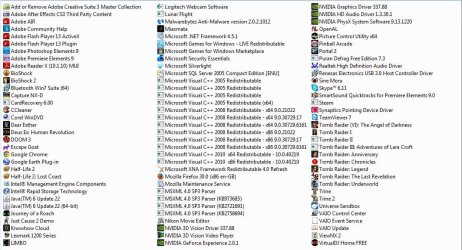
Then take screen shots of the list, hopefully list view will allow you to get all of the program in one screen shot,
If not take another one for a complete list,

Malwarebytes should shoe across the top "Scan" go to that section ;)
Cheers.
 

My Computer

Computer type
PC/Desktop
Computer Manufacturer/Model Number
Custom assembled by me :}
OS
Win-7-Pro64bit 7-H-Prem-64bit
CPU
i7-5930K 2nd i9-9940x both water blocked VRM's too
Motherboard
ASUS SABERTOOTH X99 2nd ASUS x299 Apex
Memory
Trident-z 3200C14 2nd Trident-z 3600C16
Graphics Card(s)
EVGA 1080ti ftw3 2nd Titan Xp both water blocked
Sound Card
Built-in Realtek
Monitor(s) Displays
1-AOC G2460PG 24"G-Sync 144Hz/ 2nd 1-ASUS VG248QE 24" 144Hz
Screen Resolution
1920 x 1080 144Hz
Hard Drives
2-Samsung M.2 Evo & Evo Plus
2-Samsung 850 EVO 500GB SSD's/ 3-2.5 W.D. Black 1tb-&3-1tb/3-3.5 WD Black 1tb hdd's
PSU
EVGA SuperNOVA 1000-P2 2nd 1200-P2
Case
2-Corsair Obsidian Series 450D Black ATX Mid Tower
Cooling
Custom water loops
Keyboard
Logitech G710+/ 2nd Logitech G910
Mouse
2-RedDragon M901 Perdition 16400 dpi Gaming mouse = wired
Internet Speed
Comcast Ping 19ms 89.31mbps download speed 6.12mbps upload
Antivirus
Malwarebytes Pro/ Superantispyware Pro
Browser
FireFox & Pale moon
Other Info
2nd ASUS X299 Apex/Intel i9-9940x with Custom water loop/7H-Prem-x64/Corsair 450D case/Ram Trident-z 3600C16 4x8gb / Samsung970Evo plus 500gb SSD/Dual ssd EZ swap evo/PSU EVGA SuperNova 1200w-P2 80+Platinum/GPU Titan Xp /8-ML-140 on push-pull on 2-280GTX rads
Sorry I'm not really following, do you want me to post the list of programs?
 

Attachments

  • uninstalprogs.JPG
    uninstalprogs.JPG
    130.2 KB · Views: 3

My Computer

Computer Manufacturer/Model Number
SONY VAIO PCG-81312M
OS
Windows 7 Home Premium 64
CPU
Intel Core i7-2630QM
Memory
4GB
Graphics Card(s)
NVidia GeForce with Cuda
Hard Drives
Hitachi 500GB
Hi yes good job,
I don't see any of the listing adwcleaner found,
Still waiting for what the custom scan finds in malwarebytes,

I would also like you to run JRT,
Junkware Removal Tool Download
Cheers.
 

My Computer

Computer type
PC/Desktop
Computer Manufacturer/Model Number
Custom assembled by me :}
OS
Win-7-Pro64bit 7-H-Prem-64bit
CPU
i7-5930K 2nd i9-9940x both water blocked VRM's too
Motherboard
ASUS SABERTOOTH X99 2nd ASUS x299 Apex
Memory
Trident-z 3200C14 2nd Trident-z 3600C16
Graphics Card(s)
EVGA 1080ti ftw3 2nd Titan Xp both water blocked
Sound Card
Built-in Realtek
Monitor(s) Displays
1-AOC G2460PG 24"G-Sync 144Hz/ 2nd 1-ASUS VG248QE 24" 144Hz
Screen Resolution
1920 x 1080 144Hz
Hard Drives
2-Samsung M.2 Evo & Evo Plus
2-Samsung 850 EVO 500GB SSD's/ 3-2.5 W.D. Black 1tb-&3-1tb/3-3.5 WD Black 1tb hdd's
PSU
EVGA SuperNOVA 1000-P2 2nd 1200-P2
Case
2-Corsair Obsidian Series 450D Black ATX Mid Tower
Cooling
Custom water loops
Keyboard
Logitech G710+/ 2nd Logitech G910
Mouse
2-RedDragon M901 Perdition 16400 dpi Gaming mouse = wired
Internet Speed
Comcast Ping 19ms 89.31mbps download speed 6.12mbps upload
Antivirus
Malwarebytes Pro/ Superantispyware Pro
Browser
FireFox & Pale moon
Other Info
2nd ASUS X299 Apex/Intel i9-9940x with Custom water loop/7H-Prem-x64/Corsair 450D case/Ram Trident-z 3600C16 4x8gb / Samsung970Evo plus 500gb SSD/Dual ssd EZ swap evo/PSU EVGA SuperNova 1200w-P2 80+Platinum/GPU Titan Xp /8-ML-140 on push-pull on 2-280GTX rads
I posted the results of a scan with adwcleaner, but like I said i don't know if it was custom or threat, I can't where to set that in preferences.
 

My Computer

Computer Manufacturer/Model Number
SONY VAIO PCG-81312M
OS
Windows 7 Home Premium 64
CPU
Intel Core i7-2630QM
Memory
4GB
Graphics Card(s)
NVidia GeForce with Cuda
Hard Drives
Hitachi 500GB
Hi,
Open Malwarebytes,
Scan is listed across the top,
Then select the drive to be scanned = usually C drive,
View attachment 321600
 
Last edited:

My Computer

Computer type
PC/Desktop
Computer Manufacturer/Model Number
Custom assembled by me :}
OS
Win-7-Pro64bit 7-H-Prem-64bit
CPU
i7-5930K 2nd i9-9940x both water blocked VRM's too
Motherboard
ASUS SABERTOOTH X99 2nd ASUS x299 Apex
Memory
Trident-z 3200C14 2nd Trident-z 3600C16
Graphics Card(s)
EVGA 1080ti ftw3 2nd Titan Xp both water blocked
Sound Card
Built-in Realtek
Monitor(s) Displays
1-AOC G2460PG 24"G-Sync 144Hz/ 2nd 1-ASUS VG248QE 24" 144Hz
Screen Resolution
1920 x 1080 144Hz
Hard Drives
2-Samsung M.2 Evo & Evo Plus
2-Samsung 850 EVO 500GB SSD's/ 3-2.5 W.D. Black 1tb-&3-1tb/3-3.5 WD Black 1tb hdd's
PSU
EVGA SuperNOVA 1000-P2 2nd 1200-P2
Case
2-Corsair Obsidian Series 450D Black ATX Mid Tower
Cooling
Custom water loops
Keyboard
Logitech G710+/ 2nd Logitech G910
Mouse
2-RedDragon M901 Perdition 16400 dpi Gaming mouse = wired
Internet Speed
Comcast Ping 19ms 89.31mbps download speed 6.12mbps upload
Antivirus
Malwarebytes Pro/ Superantispyware Pro
Browser
FireFox & Pale moon
Other Info
2nd ASUS X299 Apex/Intel i9-9940x with Custom water loop/7H-Prem-x64/Corsair 450D case/Ram Trident-z 3600C16 4x8gb / Samsung970Evo plus 500gb SSD/Dual ssd EZ swap evo/PSU EVGA SuperNova 1200w-P2 80+Platinum/GPU Titan Xp /8-ML-140 on push-pull on 2-280GTX rads
Running it now but it's taking ages. I selected everything and ran it, maybe things I didn't need to scan..
 

My Computer

Computer Manufacturer/Model Number
SONY VAIO PCG-81312M
OS
Windows 7 Home Premium 64
CPU
Intel Core i7-2630QM
Memory
4GB
Graphics Card(s)
NVidia GeForce with Cuda
Hard Drives
Hitachi 500GB
Going to be all night at this rate, I take it I don't need to scan all my files and folders?
 

My Computer

Computer Manufacturer/Model Number
SONY VAIO PCG-81312M
OS
Windows 7 Home Premium 64
CPU
Intel Core i7-2630QM
Memory
4GB
Graphics Card(s)
NVidia GeForce with Cuda
Hard Drives
Hitachi 500GB
That probably took longer than it needed to, but anyway here are the results of the custom log where I selected e v e r y t h i n g . .

File System: NTFS
User: Owner

Scan Type: Custom Scan
Result: Completed
Objects Scanned: 579491
Time Elapsed: 3 hr, 36 min, 19 sec

Memory: Enabled
Startup: Enabled
Filesystem: Enabled
Archives: Enabled
Rootkits: Enabled
Heuristics: Enabled
PUP: Warn
PUM: Warn

Processes: 0
(No malicious items detected)

Modules: 0
(No malicious items detected)

Registry Keys: 5
PUP.Optional.SweetIM.A, HKU\S-1-5-21-546675599-697883350-1242438441-1000-{ED1FC765-E35E-4C3D-BF15-2C2B11260CE4}-0\SOFTWARE\MICROSOFT\WINDOWS\CURRENTVERSION\EXT\SETTINGS\{DEDAF650-12B8-48F5-A843-BBA100716106}, , [19993c37b3c8a591ccd63c06d131f907],
PUP.Optional.SweetIM.A, HKU\S-1-5-21-546675599-697883350-1242438441-1000-{ED1FC765-E35E-4C3D-BF15-2C2B11260CE4}-0\SOFTWARE\MICROSOFT\WINDOWS\CURRENTVERSION\EXT\STATS\{DEDAF650-12B8-48F5-A843-BBA100716106}, , [19993c37b3c8a591ccd63c06d131f907],
PUP.Optional.SweetIM.A, HKLM\SOFTWARE\WOW6432NODE\SWEETIM, , [d5ddbcb7334847efe026bc1bb54ebd43],
PUP.Optional.TidyNetwork.A, HKU\S-1-5-21-546675599-697883350-1242438441-1000-{ED1FC765-E35E-4C3D-BF15-2C2B11260CE4}-0\SOFTWARE\APPDATALOW\SOFTWARE\TidyNetwork, , [bdf59fd495e683b36fcd1c9c48ba6799],
PUP.Optional.SweetIM.A, HKU\S-1-5-21-546675599-697883350-1242438441-1000-{ED1FC765-E35E-4C3D-BF15-2C2B11260CE4}-0\SOFTWARE\SWEETIM, , [59598fe48af149ed4cb9e6f12fd49070],

Registry Values: 2
PUP.Optional.SweetIM.A, HKLM\SOFTWARE\WOW6432NODE\SWEETIM|simapp_id, {1A94FCCA-04C9-42B7-AC41-1ADE276A3895}, , [d5ddbcb7334847efe026bc1bb54ebd43]
PUP.Optional.SweetIM.A, HKU\S-1-5-21-546675599-697883350-1242438441-1000-{ED1FC765-E35E-4C3D-BF15-2C2B11260CE4}-0\SOFTWARE\SWEETIM|simapp_id, {1A94FCCA-04C9-42B7-AC41-1ADE276A3895}, , [59598fe48af149ed4cb9e6f12fd49070]

Registry Data: 0
(No malicious items detected)

Folders: 3
PUP.Optional.SweetIM.A, C:\Program Files (x86)\SweetIM\Toolbars, , [832fafc4631888ae04941f699969b050],
PUP.Optional.SweetIM.A, C:\Program Files (x86)\SweetIM\Toolbars\Internet Explorer, , [832fafc4631888ae04941f699969b050],
PUP.Optional.SweetIM.A, C:\Program Files (x86)\SweetIM\Toolbars\Internet Explorer\Microsoft.VC90.CRT, , [832fafc4631888ae04941f699969b050],

Files: 0
(No malicious items detected)

Physical Sectors: 0
(No malicious items detected)


(end)
 

My Computer

Computer Manufacturer/Model Number
SONY VAIO PCG-81312M
OS
Windows 7 Home Premium 64
CPU
Intel Core i7-2630QM
Memory
4GB
Graphics Card(s)
NVidia GeForce with Cuda
Hard Drives
Hitachi 500GB
Whole thing is screwed now. I clicked quarantine to quarantine (I thought) some of the PUPs and it removed them completely, I restarted and then nothing was working because I had it in diagnostic start up mode I think so I eventually managed to get it back to normal start up, restarted and then things I don't want to start up were starting it and it's really slow.

Thought it was going to be restore disk time there for a moment.

So what now?
 
Last edited:

My Computer

Computer Manufacturer/Model Number
SONY VAIO PCG-81312M
OS
Windows 7 Home Premium 64
CPU
Intel Core i7-2630QM
Memory
4GB
Graphics Card(s)
NVidia GeForce with Cuda
Hard Drives
Hitachi 500GB
Going to be all night at this rate, I take it I don't need to scan all my files and folders?

Hi you take it wrong,
Not scanning your files and folders ?
Adding scan with Rootkit is a long scan,
Your really need to Not use your computer while scans are running for best results and to speed them up a bit,
Deselect rootkit and repeat the scan booting normally as in Not using safe startup/ safe mode with networking or anything like that,
It shouldn't matter if your computer is slow browsing... because you shouldn't be using it ;)
Cheers.
 

My Computer

Computer type
PC/Desktop
Computer Manufacturer/Model Number
Custom assembled by me :}
OS
Win-7-Pro64bit 7-H-Prem-64bit
CPU
i7-5930K 2nd i9-9940x both water blocked VRM's too
Motherboard
ASUS SABERTOOTH X99 2nd ASUS x299 Apex
Memory
Trident-z 3200C14 2nd Trident-z 3600C16
Graphics Card(s)
EVGA 1080ti ftw3 2nd Titan Xp both water blocked
Sound Card
Built-in Realtek
Monitor(s) Displays
1-AOC G2460PG 24"G-Sync 144Hz/ 2nd 1-ASUS VG248QE 24" 144Hz
Screen Resolution
1920 x 1080 144Hz
Hard Drives
2-Samsung M.2 Evo & Evo Plus
2-Samsung 850 EVO 500GB SSD's/ 3-2.5 W.D. Black 1tb-&3-1tb/3-3.5 WD Black 1tb hdd's
PSU
EVGA SuperNOVA 1000-P2 2nd 1200-P2
Case
2-Corsair Obsidian Series 450D Black ATX Mid Tower
Cooling
Custom water loops
Keyboard
Logitech G710+/ 2nd Logitech G910
Mouse
2-RedDragon M901 Perdition 16400 dpi Gaming mouse = wired
Internet Speed
Comcast Ping 19ms 89.31mbps download speed 6.12mbps upload
Antivirus
Malwarebytes Pro/ Superantispyware Pro
Browser
FireFox & Pale moon
Other Info
2nd ASUS X299 Apex/Intel i9-9940x with Custom water loop/7H-Prem-x64/Corsair 450D case/Ram Trident-z 3600C16 4x8gb / Samsung970Evo plus 500gb SSD/Dual ssd EZ swap evo/PSU EVGA SuperNova 1200w-P2 80+Platinum/GPU Titan Xp /8-ML-140 on push-pull on 2-280GTX rads
It's working fine now, but for how long, and why did malwarebytes assume that I wanted it to reset al my start up program settings? Come to think of it, that was probably me that did that.

I do a root scan next time I am away for a while and see what that come up with. Can I run an MSE root scan as well at the same time?

Edit by root MSE scan I think I mean run it in safe mode.
 

My Computer

Computer Manufacturer/Model Number
SONY VAIO PCG-81312M
OS
Windows 7 Home Premium 64
CPU
Intel Core i7-2630QM
Memory
4GB
Graphics Card(s)
NVidia GeForce with Cuda
Hard Drives
Hitachi 500GB
Screen shot of the download button to use for Adwcleaner[/COLOR][/SIZE][/FONT][/URL]
http://www.bleepingcomputer.com/download/adwcleaner/

Yep, nearly got fooled by the advert banner at first.

This is also an awesome free utility,
Temp files delete,
Run this as administrator and Start the scanner,
Shut your machine down after it finishes,
http://www.geekstogo.com/forum/files/file/187-tfc-temp-file-cleaner-by-oldtimer/

Do i really need that if I already have CCleaner?

CCleaner also keeps inviting me to update, but it seems to want money now.
 

My Computer

Computer Manufacturer/Model Number
SONY VAIO PCG-81312M
OS
Windows 7 Home Premium 64
CPU
Intel Core i7-2630QM
Memory
4GB
Graphics Card(s)
NVidia GeForce with Cuda
Hard Drives
Hitachi 500GB
Hi,
I have no experience with ccleaner,

I prefer TFC because it has no adds it's just a great little free tool that deletes allot of java crap/ temp files...

Ccleaner has more features but windows has some of the same built in I prefer to use,
So TFC certainly will not hurt anything run it and see what it finds and see if ccleaner is doing it's job ;)

It's better to run Full scans all folders/ files/ and drives at least once with what ever scanner you use,
Rootkit is optional but do not exclude anywhere for best results,
Be prepared to wait and Do Not use the machine during these scans,
Cheers.
 

My Computer

Computer type
PC/Desktop
Computer Manufacturer/Model Number
Custom assembled by me :}
OS
Win-7-Pro64bit 7-H-Prem-64bit
CPU
i7-5930K 2nd i9-9940x both water blocked VRM's too
Motherboard
ASUS SABERTOOTH X99 2nd ASUS x299 Apex
Memory
Trident-z 3200C14 2nd Trident-z 3600C16
Graphics Card(s)
EVGA 1080ti ftw3 2nd Titan Xp both water blocked
Sound Card
Built-in Realtek
Monitor(s) Displays
1-AOC G2460PG 24"G-Sync 144Hz/ 2nd 1-ASUS VG248QE 24" 144Hz
Screen Resolution
1920 x 1080 144Hz
Hard Drives
2-Samsung M.2 Evo & Evo Plus
2-Samsung 850 EVO 500GB SSD's/ 3-2.5 W.D. Black 1tb-&3-1tb/3-3.5 WD Black 1tb hdd's
PSU
EVGA SuperNOVA 1000-P2 2nd 1200-P2
Case
2-Corsair Obsidian Series 450D Black ATX Mid Tower
Cooling
Custom water loops
Keyboard
Logitech G710+/ 2nd Logitech G910
Mouse
2-RedDragon M901 Perdition 16400 dpi Gaming mouse = wired
Internet Speed
Comcast Ping 19ms 89.31mbps download speed 6.12mbps upload
Antivirus
Malwarebytes Pro/ Superantispyware Pro
Browser
FireFox & Pale moon
Other Info
2nd ASUS X299 Apex/Intel i9-9940x with Custom water loop/7H-Prem-x64/Corsair 450D case/Ram Trident-z 3600C16 4x8gb / Samsung970Evo plus 500gb SSD/Dual ssd EZ swap evo/PSU EVGA SuperNova 1200w-P2 80+Platinum/GPU Titan Xp /8-ML-140 on push-pull on 2-280GTX rads
Will let you know.

Should I switch to Avast from MSE then? Is that no longer a reliable anti-virus checker?
 

My Computer

Computer Manufacturer/Model Number
SONY VAIO PCG-81312M
OS
Windows 7 Home Premium 64
CPU
Intel Core i7-2630QM
Memory
4GB
Graphics Card(s)
NVidia GeForce with Cuda
Hard Drives
Hitachi 500GB
Review my first post,
To sum up,
There's is no antivirus in existence that covers all threat types,
If there were we would all be using it ;)
Avast/ MSE/....... neither have silver bullets against malware ;)
Cheers.
 

My Computer

Computer type
PC/Desktop
Computer Manufacturer/Model Number
Custom assembled by me :}
OS
Win-7-Pro64bit 7-H-Prem-64bit
CPU
i7-5930K 2nd i9-9940x both water blocked VRM's too
Motherboard
ASUS SABERTOOTH X99 2nd ASUS x299 Apex
Memory
Trident-z 3200C14 2nd Trident-z 3600C16
Graphics Card(s)
EVGA 1080ti ftw3 2nd Titan Xp both water blocked
Sound Card
Built-in Realtek
Monitor(s) Displays
1-AOC G2460PG 24"G-Sync 144Hz/ 2nd 1-ASUS VG248QE 24" 144Hz
Screen Resolution
1920 x 1080 144Hz
Hard Drives
2-Samsung M.2 Evo & Evo Plus
2-Samsung 850 EVO 500GB SSD's/ 3-2.5 W.D. Black 1tb-&3-1tb/3-3.5 WD Black 1tb hdd's
PSU
EVGA SuperNOVA 1000-P2 2nd 1200-P2
Case
2-Corsair Obsidian Series 450D Black ATX Mid Tower
Cooling
Custom water loops
Keyboard
Logitech G710+/ 2nd Logitech G910
Mouse
2-RedDragon M901 Perdition 16400 dpi Gaming mouse = wired
Internet Speed
Comcast Ping 19ms 89.31mbps download speed 6.12mbps upload
Antivirus
Malwarebytes Pro/ Superantispyware Pro
Browser
FireFox & Pale moon
Other Info
2nd ASUS X299 Apex/Intel i9-9940x with Custom water loop/7H-Prem-x64/Corsair 450D case/Ram Trident-z 3600C16 4x8gb / Samsung970Evo plus 500gb SSD/Dual ssd EZ swap evo/PSU EVGA SuperNova 1200w-P2 80+Platinum/GPU Titan Xp /8-ML-140 on push-pull on 2-280GTX rads
Back
Top