Solved Computer Slow/Locking up - spam found in temporary folder !!

I realise that, just trying to get a feel for what's the best options are these days. I'm starting to hear MSE is not so good anymore. I don't really know how they work or how they identify threats but maybe they all work in pretty much the same way and it comes down to how up to date they are. MSE seems to have plenty of updates.
 

My Computer My Computer

Computer Manufacturer/Model Number
SONY VAIO PCG-81312M
OS
Windows 7 Home Premium 64
CPU
Intel Core i7-2630QM
Memory
4GB
Graphics Card(s)
NVidia GeForce with Cuda
Hard Drives
Hitachi 500GB
Some people seem to like Avast here,
Some prior Avast users have switched to Panda,

I've always used MSE but I also use the Premium version of Malwarebytes not the free version,
I also use the Pro version of SAS/ superantispyware/ not the free version but the free version is perfectly fine,

I believe the biggest deal is although sometimes money is tight mbam is worth the costs,
At one time you could pay for a lifetime license for Mbam and not pay a penny more,
Now they have gone to a yearly subscription business model = costs of success,
I believe there might still be some lifetime licenses out there on Newegg.com ...
Cheers.
 

My Computer My Computer

Computer type
PC/Desktop
Computer Manufacturer/Model Number
Custom assembled by me :}
OS
Win-7-Pro64bit 7-H-Prem-64bit
CPU
i7-5930K 2nd i9-9940x both water blocked VRM's too
Motherboard
ASUS SABERTOOTH X99 2nd ASUS x299 Apex
Memory
Trident-z 3200C14 2nd Trident-z 3600C16
Graphics Card(s)
EVGA 1080ti ftw3 2nd Titan Xp both water blocked
Sound Card
Built-in Realtek
Monitor(s) Displays
1-AOC G2460PG 24"G-Sync 144Hz/ 2nd 1-ASUS VG248QE 24" 144Hz
Screen Resolution
1920 x 1080 144Hz
Hard Drives
2-Samsung M.2 Evo & Evo Plus
2-Samsung 850 EVO 500GB SSD's/ 3-2.5 W.D. Black 1tb-&3-1tb/3-3.5 WD Black 1tb hdd's
PSU
EVGA SuperNOVA 1000-P2 2nd 1200-P2
Case
2-Corsair Obsidian Series 450D Black ATX Mid Tower
Cooling
Custom water loops
Keyboard
Logitech G710+/ 2nd Logitech G910
Mouse
2-RedDragon M901 Perdition 16400 dpi Gaming mouse = wired
Internet Speed
Comcast Ping 19ms 89.31mbps download speed 6.12mbps upload
Antivirus
Malwarebytes Pro/ Superantispyware Pro
Browser
FireFox & Pale moon
Other Info
2nd ASUS X299 Apex/Intel i9-9940x with Custom water loop/7H-Prem-x64/Corsair 450D case/Ram Trident-z 3600C16 4x8gb / Samsung970Evo plus 500gb SSD/Dual ssd EZ swap evo/PSU EVGA SuperNova 1200w-P2 80+Platinum/GPU Titan Xp /8-ML-140 on push-pull on 2-280GTX rads
Deselect rootkit and repeat the scan booting normally as in Not using safe startup/ safe mode with networking or anything like that,
It shouldn't matter if your computer is slow browsing... because you shouldn't be using it ;)
Cheers.

So Should I start up in safe mode, turn of any networks and run it in there while I am away, deselecting 'scan for rootkits whatever that means. Could I run MSE at the same time?

Not sure what you mean, not in safe mode, or in safe but not with networking...
 

My Computer My Computer

Computer Manufacturer/Model Number
SONY VAIO PCG-81312M
OS
Windows 7 Home Premium 64
CPU
Intel Core i7-2630QM
Memory
4GB
Graphics Card(s)
NVidia GeForce with Cuda
Hard Drives
Hitachi 500GB
There might be a bit of confusion,
Clean boot is not safe mode it's clean boot,
http://www.sevenforums.com/tutorials/179159-troubleshoot-application-conflicts-performing-clean-startup.html
But starting normally does not mean startup using clean boot,

Safe mode and safe mode with networking are diagnostic startups,
http://www.sevenforums.com/tutorials/69585-safe-mode.html
Which I have not said to use safe mode or safe mode with networking either,

How many scanners you run at one time is up to you,
Although running more than one scanner at a time is not recommended they might clash with each other and actually do little good in detecting anything,

Rootkit is an Option in the Malwarebytes scanner only that I know of,
Use it if you wish but it does extend a scan a long time,

Do not use your computer while any scans are scanning,
That's the last I have to say about the above subjects,
Cheers.
 

My Computer My Computer

Computer type
PC/Desktop
Computer Manufacturer/Model Number
Custom assembled by me :}
OS
Win-7-Pro64bit 7-H-Prem-64bit
CPU
i7-5930K 2nd i9-9940x both water blocked VRM's too
Motherboard
ASUS SABERTOOTH X99 2nd ASUS x299 Apex
Memory
Trident-z 3200C14 2nd Trident-z 3600C16
Graphics Card(s)
EVGA 1080ti ftw3 2nd Titan Xp both water blocked
Sound Card
Built-in Realtek
Monitor(s) Displays
1-AOC G2460PG 24"G-Sync 144Hz/ 2nd 1-ASUS VG248QE 24" 144Hz
Screen Resolution
1920 x 1080 144Hz
Hard Drives
2-Samsung M.2 Evo & Evo Plus
2-Samsung 850 EVO 500GB SSD's/ 3-2.5 W.D. Black 1tb-&3-1tb/3-3.5 WD Black 1tb hdd's
PSU
EVGA SuperNOVA 1000-P2 2nd 1200-P2
Case
2-Corsair Obsidian Series 450D Black ATX Mid Tower
Cooling
Custom water loops
Keyboard
Logitech G710+/ 2nd Logitech G910
Mouse
2-RedDragon M901 Perdition 16400 dpi Gaming mouse = wired
Internet Speed
Comcast Ping 19ms 89.31mbps download speed 6.12mbps upload
Antivirus
Malwarebytes Pro/ Superantispyware Pro
Browser
FireFox & Pale moon
Other Info
2nd ASUS X299 Apex/Intel i9-9940x with Custom water loop/7H-Prem-x64/Corsair 450D case/Ram Trident-z 3600C16 4x8gb / Samsung970Evo plus 500gb SSD/Dual ssd EZ swap evo/PSU EVGA SuperNova 1200w-P2 80+Platinum/GPU Titan Xp /8-ML-140 on push-pull on 2-280GTX rads
I just ran it again like you said while I was out and it didn't pick up anything, Objects Infected: 0.
 

My Computer My Computer

Computer Manufacturer/Model Number
SONY VAIO PCG-81312M
OS
Windows 7 Home Premium 64
CPU
Intel Core i7-2630QM
Memory
4GB
Graphics Card(s)
NVidia GeForce with Cuda
Hard Drives
Hitachi 500GB
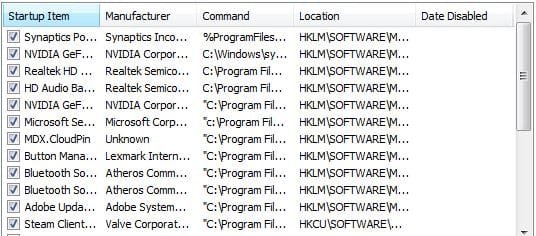
Click Start and type in the search box,
msconfig
Click on the suggestion on top or hit the Enter key,
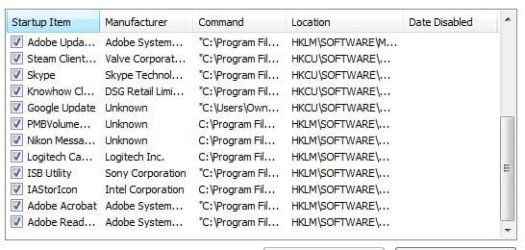
Go to the Startup section and take some screen shots for a complete list,
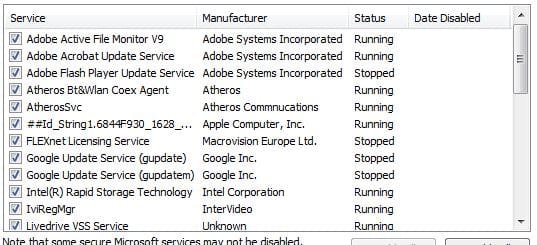
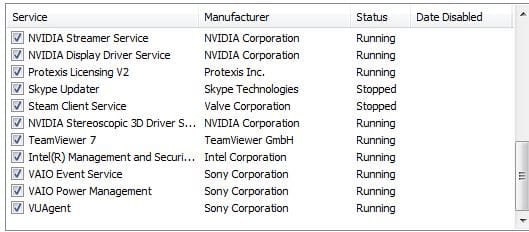
Go to the Services section and on the bottom left Check the box to Hide All Microsoft services,
Repeat the screen shots,
 

My Computer My Computer

Computer type
PC/Desktop
Computer Manufacturer/Model Number
Custom assembled by me :}
OS
Win-7-Pro64bit 7-H-Prem-64bit
CPU
i7-5930K 2nd i9-9940x both water blocked VRM's too
Motherboard
ASUS SABERTOOTH X99 2nd ASUS x299 Apex
Memory
Trident-z 3200C14 2nd Trident-z 3600C16
Graphics Card(s)
EVGA 1080ti ftw3 2nd Titan Xp both water blocked
Sound Card
Built-in Realtek
Monitor(s) Displays
1-AOC G2460PG 24"G-Sync 144Hz/ 2nd 1-ASUS VG248QE 24" 144Hz
Screen Resolution
1920 x 1080 144Hz
Hard Drives
2-Samsung M.2 Evo & Evo Plus
2-Samsung 850 EVO 500GB SSD's/ 3-2.5 W.D. Black 1tb-&3-1tb/3-3.5 WD Black 1tb hdd's
PSU
EVGA SuperNOVA 1000-P2 2nd 1200-P2
Case
2-Corsair Obsidian Series 450D Black ATX Mid Tower
Cooling
Custom water loops
Keyboard
Logitech G710+/ 2nd Logitech G910
Mouse
2-RedDragon M901 Perdition 16400 dpi Gaming mouse = wired
Internet Speed
Comcast Ping 19ms 89.31mbps download speed 6.12mbps upload
Antivirus
Malwarebytes Pro/ Superantispyware Pro
Browser
FireFox & Pale moon
Other Info
2nd ASUS X299 Apex/Intel i9-9940x with Custom water loop/7H-Prem-x64/Corsair 450D case/Ram Trident-z 3600C16 4x8gb / Samsung970Evo plus 500gb SSD/Dual ssd EZ swap evo/PSU EVGA SuperNova 1200w-P2 80+Platinum/GPU Titan Xp /8-ML-140 on push-pull on 2-280GTX rads
Annoyingly wont let me maximise the window so had to take several screen shots.

here's what you asked for anyway. I guess there are a few start up programs I need to turn off in there (again), especially Steam I only play games every once in a while, which means every time I feel like gaming I have to wait for the Steam client to update... again. Highly irritating.
 

Attachments

  • start1.JPG
    start1.JPG
    41.3 KB · Views: 15
  • start2.JPG
    start2.JPG
    41 KB · Views: 15
  • serv1.JPG
    serv1.JPG
    37.8 KB · Views: 15
  • serv2.JPG
    serv2.JPG
    34.1 KB · Views: 15
  • serv3.JPG
    serv3.JPG
    32 KB · Views: 15

My Computer My Computer

Computer Manufacturer/Model Number
SONY VAIO PCG-81312M
OS
Windows 7 Home Premium 64
CPU
Intel Core i7-2630QM
Memory
4GB
Graphics Card(s)
NVidia GeForce with Cuda
Hard Drives
Hitachi 500GB
Thanks weird looking msconfig screen shots,
I see 2 Intel management and security listings in services
You also seem to have Norton and MSE installed,
ixcz_device Unknown
LiveDrive VSS Unknown
##ID_string..... Apple computer ?
And a few other Unknowns

Go to Uninstall a program on the top right next to the Question mark change the page view to details and post more screen shots,
Make sure the installed date is viewable,
Post when things started acting up,
Cheers.
 

My Computer My Computer

Computer type
PC/Desktop
Computer Manufacturer/Model Number
Custom assembled by me :}
OS
Win-7-Pro64bit 7-H-Prem-64bit
CPU
i7-5930K 2nd i9-9940x both water blocked VRM's too
Motherboard
ASUS SABERTOOTH X99 2nd ASUS x299 Apex
Memory
Trident-z 3200C14 2nd Trident-z 3600C16
Graphics Card(s)
EVGA 1080ti ftw3 2nd Titan Xp both water blocked
Sound Card
Built-in Realtek
Monitor(s) Displays
1-AOC G2460PG 24"G-Sync 144Hz/ 2nd 1-ASUS VG248QE 24" 144Hz
Screen Resolution
1920 x 1080 144Hz
Hard Drives
2-Samsung M.2 Evo & Evo Plus
2-Samsung 850 EVO 500GB SSD's/ 3-2.5 W.D. Black 1tb-&3-1tb/3-3.5 WD Black 1tb hdd's
PSU
EVGA SuperNOVA 1000-P2 2nd 1200-P2
Case
2-Corsair Obsidian Series 450D Black ATX Mid Tower
Cooling
Custom water loops
Keyboard
Logitech G710+/ 2nd Logitech G910
Mouse
2-RedDragon M901 Perdition 16400 dpi Gaming mouse = wired
Internet Speed
Comcast Ping 19ms 89.31mbps download speed 6.12mbps upload
Antivirus
Malwarebytes Pro/ Superantispyware Pro
Browser
FireFox & Pale moon
Other Info
2nd ASUS X299 Apex/Intel i9-9940x with Custom water loop/7H-Prem-x64/Corsair 450D case/Ram Trident-z 3600C16 4x8gb / Samsung970Evo plus 500gb SSD/Dual ssd EZ swap evo/PSU EVGA SuperNova 1200w-P2 80+Platinum/GPU Titan Xp /8-ML-140 on push-pull on 2-280GTX rads
I have no idea how Norton managed to get on there. I downloaded GIMP a while back and ended up with a load of crapware that took me ages to get rid of, and maybe some of which is still there. I was careful (I thought) and made sure all the right and wrong boxes were ticked or unticked and somehow it still managed to spam up my computer.

Also decided to try adblock on Chrome recently owing to the ads on some pages getting too distracting, ie. gifs and noisy ones. I always avoided them because I find it's less trouble to just put up with the odd 5 second ad on youtube than have to contend with computer slowing down/locking up- always been my experience with them. Besides, sometimes the adverts do actually alert me to something interesting. I thought they might work better on my new computer but apparently not, so bear in my I MEANT TO SAY BEFORE that my computer locking up the other day might have been due to that. It has been slowing down a lot lately though.

Why are the screenshots weird?

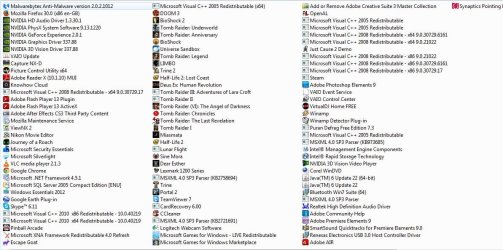
Should I uninstal this Norton program? It isn't showing up on my list of installed programs, it never has. If it had I would have zapped it straight away, I regularly check my recent installations.

There's quite a lot on there so I've organised them as a list because otherwise it would be 4 pages, but they are ordered in reverse chronological order. If you need exact date then let me know. hard to say when exactly things have been acting up, but the GIMP incident was around just after 7th january 2014. I have included the first page showing dates.

The fan has been a bit noisy for a while, especially playing games but I put that down to there being lots of programs installed and maybe I need to clean the fan inside. That's been > a year like that, it's not too bad, not as bad as my mac.

 

Attachments

  • installed.JPG
    installed.JPG
    133.8 KB · Views: 2
  • insalpage1.JPG
    insalpage1.JPG
    105.3 KB · Views: 0

My Computer My Computer

Computer Manufacturer/Model Number
SONY VAIO PCG-81312M
OS
Windows 7 Home Premium 64
CPU
Intel Core i7-2630QM
Memory
4GB
Graphics Card(s)
NVidia GeForce with Cuda
Hard Drives
Hitachi 500GB
Might not be Norton it just says Synaptics so I see it's your pointing device
I believe your Java is Way out of date buddy,
Java is up to version 7 not 6 as your showing,
Uninstall both java listings,
Cheers
 

My Computer My Computer

Computer type
PC/Desktop
Computer Manufacturer/Model Number
Custom assembled by me :}
OS
Win-7-Pro64bit 7-H-Prem-64bit
CPU
i7-5930K 2nd i9-9940x both water blocked VRM's too
Motherboard
ASUS SABERTOOTH X99 2nd ASUS x299 Apex
Memory
Trident-z 3200C14 2nd Trident-z 3600C16
Graphics Card(s)
EVGA 1080ti ftw3 2nd Titan Xp both water blocked
Sound Card
Built-in Realtek
Monitor(s) Displays
1-AOC G2460PG 24"G-Sync 144Hz/ 2nd 1-ASUS VG248QE 24" 144Hz
Screen Resolution
1920 x 1080 144Hz
Hard Drives
2-Samsung M.2 Evo & Evo Plus
2-Samsung 850 EVO 500GB SSD's/ 3-2.5 W.D. Black 1tb-&3-1tb/3-3.5 WD Black 1tb hdd's
PSU
EVGA SuperNOVA 1000-P2 2nd 1200-P2
Case
2-Corsair Obsidian Series 450D Black ATX Mid Tower
Cooling
Custom water loops
Keyboard
Logitech G710+/ 2nd Logitech G910
Mouse
2-RedDragon M901 Perdition 16400 dpi Gaming mouse = wired
Internet Speed
Comcast Ping 19ms 89.31mbps download speed 6.12mbps upload
Antivirus
Malwarebytes Pro/ Superantispyware Pro
Browser
FireFox & Pale moon
Other Info
2nd ASUS X299 Apex/Intel i9-9940x with Custom water loop/7H-Prem-x64/Corsair 450D case/Ram Trident-z 3600C16 4x8gb / Samsung970Evo plus 500gb SSD/Dual ssd EZ swap evo/PSU EVGA SuperNova 1200w-P2 80+Platinum/GPU Titan Xp /8-ML-140 on push-pull on 2-280GTX rads
I believe your Java is Way out of date buddy,
Java is up to version 7 not 6 as your showing,
Uninstall both java listings,
Cheers

Uninstall and then reinstall the latest version? Why not just update it?
 

My Computer My Computer

Computer Manufacturer/Model Number
SONY VAIO PCG-81312M
OS
Windows 7 Home Premium 64
CPU
Intel Core i7-2630QM
Memory
4GB
Graphics Card(s)
NVidia GeForce with Cuda
Hard Drives
Hitachi 500GB
It's so out of date ;)
By the way the first programs list has no installed dates :(
 

My Computer My Computer

Computer type
PC/Desktop
Computer Manufacturer/Model Number
Custom assembled by me :}
OS
Win-7-Pro64bit 7-H-Prem-64bit
CPU
i7-5930K 2nd i9-9940x both water blocked VRM's too
Motherboard
ASUS SABERTOOTH X99 2nd ASUS x299 Apex
Memory
Trident-z 3200C14 2nd Trident-z 3600C16
Graphics Card(s)
EVGA 1080ti ftw3 2nd Titan Xp both water blocked
Sound Card
Built-in Realtek
Monitor(s) Displays
1-AOC G2460PG 24"G-Sync 144Hz/ 2nd 1-ASUS VG248QE 24" 144Hz
Screen Resolution
1920 x 1080 144Hz
Hard Drives
2-Samsung M.2 Evo & Evo Plus
2-Samsung 850 EVO 500GB SSD's/ 3-2.5 W.D. Black 1tb-&3-1tb/3-3.5 WD Black 1tb hdd's
PSU
EVGA SuperNOVA 1000-P2 2nd 1200-P2
Case
2-Corsair Obsidian Series 450D Black ATX Mid Tower
Cooling
Custom water loops
Keyboard
Logitech G710+/ 2nd Logitech G910
Mouse
2-RedDragon M901 Perdition 16400 dpi Gaming mouse = wired
Internet Speed
Comcast Ping 19ms 89.31mbps download speed 6.12mbps upload
Antivirus
Malwarebytes Pro/ Superantispyware Pro
Browser
FireFox & Pale moon
Other Info
2nd ASUS X299 Apex/Intel i9-9940x with Custom water loop/7H-Prem-x64/Corsair 450D case/Ram Trident-z 3600C16 4x8gb / Samsung970Evo plus 500gb SSD/Dual ssd EZ swap evo/PSU EVGA SuperNova 1200w-P2 80+Platinum/GPU Titan Xp /8-ML-140 on push-pull on 2-280GTX rads
Java was installed 3 years ago, so I suppose it's well out of date. Do I really need it, lot of people recommending that I just get rid of it, but I want to know if I need if for anything.

Like I said there are four pages of installed programs so takes time to snap them and load them here, do you need to see the dates of everything?
 

My Computer My Computer

Computer Manufacturer/Model Number
SONY VAIO PCG-81312M
OS
Windows 7 Home Premium 64
CPU
Intel Core i7-2630QM
Memory
4GB
Graphics Card(s)
NVidia GeForce with Cuda
Hard Drives
Hitachi 500GB
Well you do you a sheet load of games installed plus no telling how many you play online ?
Best I can say is run with it disabled/ Keep it up to date if you do have it installed and read this,
http://www.java.com/en/download/faq/remove_olderversions.xml
Interesting reads,
http://securitygarden.blogspot.com/2013/01/java-zero-day-again-time-to.html
http://blogs.technet.com/b/mmpc/archive/2013/04/16/how-to-protect-your-computer-against-dangerous-java-applets.aspx
Dates would usually show a pattern.
 

My Computer My Computer

Computer type
PC/Desktop
Computer Manufacturer/Model Number
Custom assembled by me :}
OS
Win-7-Pro64bit 7-H-Prem-64bit
CPU
i7-5930K 2nd i9-9940x both water blocked VRM's too
Motherboard
ASUS SABERTOOTH X99 2nd ASUS x299 Apex
Memory
Trident-z 3200C14 2nd Trident-z 3600C16
Graphics Card(s)
EVGA 1080ti ftw3 2nd Titan Xp both water blocked
Sound Card
Built-in Realtek
Monitor(s) Displays
1-AOC G2460PG 24"G-Sync 144Hz/ 2nd 1-ASUS VG248QE 24" 144Hz
Screen Resolution
1920 x 1080 144Hz
Hard Drives
2-Samsung M.2 Evo & Evo Plus
2-Samsung 850 EVO 500GB SSD's/ 3-2.5 W.D. Black 1tb-&3-1tb/3-3.5 WD Black 1tb hdd's
PSU
EVGA SuperNOVA 1000-P2 2nd 1200-P2
Case
2-Corsair Obsidian Series 450D Black ATX Mid Tower
Cooling
Custom water loops
Keyboard
Logitech G710+/ 2nd Logitech G910
Mouse
2-RedDragon M901 Perdition 16400 dpi Gaming mouse = wired
Internet Speed
Comcast Ping 19ms 89.31mbps download speed 6.12mbps upload
Antivirus
Malwarebytes Pro/ Superantispyware Pro
Browser
FireFox & Pale moon
Other Info
2nd ASUS X299 Apex/Intel i9-9940x with Custom water loop/7H-Prem-x64/Corsair 450D case/Ram Trident-z 3600C16 4x8gb / Samsung970Evo plus 500gb SSD/Dual ssd EZ swap evo/PSU EVGA SuperNova 1200w-P2 80+Platinum/GPU Titan Xp /8-ML-140 on push-pull on 2-280GTX rads
Do you want all the dates then? java was installed on 25/04/2011.

Only game I play online is Scrabble. I have turned off java on all my browsers apart from IE which I never use, because I can't see how to disable it.

Word on the street is Java is not more or less insecure than any other language, it's just the browser plugins. I thought I had disabled them all a while back but I suppose one up date and it could have reset everything...
 

My Computer My Computer

Computer Manufacturer/Model Number
SONY VAIO PCG-81312M
OS
Windows 7 Home Premium 64
CPU
Intel Core i7-2630QM
Memory
4GB
Graphics Card(s)
NVidia GeForce with Cuda
Hard Drives
Hitachi 500GB

My Computer My Computer

Computer Manufacturer/Model Number
SONY VAIO PCG-81312M
OS
Windows 7 Home Premium 64
CPU
Intel Core i7-2630QM
Memory
4GB
Graphics Card(s)
NVidia GeForce with Cuda
Hard Drives
Hitachi 500GB
Chrome has Java built in so no I wouldn't add any chrome type java plugins,
The out of date java pertains to Internet explorer and possibly Firefox,
If you don't use either Firefox or Internet explorer than you wouldn't need the java at all,
Cheers.
 

My Computer My Computer

Computer type
PC/Desktop
Computer Manufacturer/Model Number
Custom assembled by me :}
OS
Win-7-Pro64bit 7-H-Prem-64bit
CPU
i7-5930K 2nd i9-9940x both water blocked VRM's too
Motherboard
ASUS SABERTOOTH X99 2nd ASUS x299 Apex
Memory
Trident-z 3200C14 2nd Trident-z 3600C16
Graphics Card(s)
EVGA 1080ti ftw3 2nd Titan Xp both water blocked
Sound Card
Built-in Realtek
Monitor(s) Displays
1-AOC G2460PG 24"G-Sync 144Hz/ 2nd 1-ASUS VG248QE 24" 144Hz
Screen Resolution
1920 x 1080 144Hz
Hard Drives
2-Samsung M.2 Evo & Evo Plus
2-Samsung 850 EVO 500GB SSD's/ 3-2.5 W.D. Black 1tb-&3-1tb/3-3.5 WD Black 1tb hdd's
PSU
EVGA SuperNOVA 1000-P2 2nd 1200-P2
Case
2-Corsair Obsidian Series 450D Black ATX Mid Tower
Cooling
Custom water loops
Keyboard
Logitech G710+/ 2nd Logitech G910
Mouse
2-RedDragon M901 Perdition 16400 dpi Gaming mouse = wired
Internet Speed
Comcast Ping 19ms 89.31mbps download speed 6.12mbps upload
Antivirus
Malwarebytes Pro/ Superantispyware Pro
Browser
FireFox & Pale moon
Other Info
2nd ASUS X299 Apex/Intel i9-9940x with Custom water loop/7H-Prem-x64/Corsair 450D case/Ram Trident-z 3600C16 4x8gb / Samsung970Evo plus 500gb SSD/Dual ssd EZ swap evo/PSU EVGA SuperNova 1200w-P2 80+Platinum/GPU Titan Xp /8-ML-140 on push-pull on 2-280GTX rads
I think there are pros and cons to the built in Chrome java plugin. Things going slow after Java 7 update... :/

So this version of Java that was chrome://plugins before I uninstalled Java 6 was the version in my computer and not the one in Chrome then? (confused)
 

My Computer My Computer

Computer Manufacturer/Model Number
SONY VAIO PCG-81312M
OS
Windows 7 Home Premium 64
CPU
Intel Core i7-2630QM
Memory
4GB
Graphics Card(s)
NVidia GeForce with Cuda
Hard Drives
Hitachi 500GB
Just restarted with start up programs removed and it still took ages. Ran CCleaner again another folder full of spam growing in temporary internet files in IE again. Last lot were saved at 19.00 so will check back in a while to see if there are anymore.

Should I delete all the crap that adwcleaner found? there was a lot and maybe some it I need...
 

My Computer My Computer

Computer Manufacturer/Model Number
SONY VAIO PCG-81312M
OS
Windows 7 Home Premium 64
CPU
Intel Core i7-2630QM
Memory
4GB
Graphics Card(s)
NVidia GeForce with Cuda
Hard Drives
Hitachi 500GB
Adwcleaner would usually find nothing you would want,
Neither would MBAM or SAS
Cheers.
 

My Computer My Computer

Computer type
PC/Desktop
Computer Manufacturer/Model Number
Custom assembled by me :}
OS
Win-7-Pro64bit 7-H-Prem-64bit
CPU
i7-5930K 2nd i9-9940x both water blocked VRM's too
Motherboard
ASUS SABERTOOTH X99 2nd ASUS x299 Apex
Memory
Trident-z 3200C14 2nd Trident-z 3600C16
Graphics Card(s)
EVGA 1080ti ftw3 2nd Titan Xp both water blocked
Sound Card
Built-in Realtek
Monitor(s) Displays
1-AOC G2460PG 24"G-Sync 144Hz/ 2nd 1-ASUS VG248QE 24" 144Hz
Screen Resolution
1920 x 1080 144Hz
Hard Drives
2-Samsung M.2 Evo & Evo Plus
2-Samsung 850 EVO 500GB SSD's/ 3-2.5 W.D. Black 1tb-&3-1tb/3-3.5 WD Black 1tb hdd's
PSU
EVGA SuperNOVA 1000-P2 2nd 1200-P2
Case
2-Corsair Obsidian Series 450D Black ATX Mid Tower
Cooling
Custom water loops
Keyboard
Logitech G710+/ 2nd Logitech G910
Mouse
2-RedDragon M901 Perdition 16400 dpi Gaming mouse = wired
Internet Speed
Comcast Ping 19ms 89.31mbps download speed 6.12mbps upload
Antivirus
Malwarebytes Pro/ Superantispyware Pro
Browser
FireFox & Pale moon
Other Info
2nd ASUS X299 Apex/Intel i9-9940x with Custom water loop/7H-Prem-x64/Corsair 450D case/Ram Trident-z 3600C16 4x8gb / Samsung970Evo plus 500gb SSD/Dual ssd EZ swap evo/PSU EVGA SuperNova 1200w-P2 80+Platinum/GPU Titan Xp /8-ML-140 on push-pull on 2-280GTX rads
Back
Top