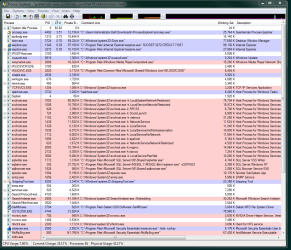
Cpu stuck @ 100%

robert1117

New member
Local time
5:40 AM
Messages
12
I have let so many issues build to the point almost to the point where I don’t know where to start, however I will try to limit this query to one of most troublesome of the bunch…

According to several different “gadget” CPU meters, and my accompanying vacant stare, my RAM & CPU usage is off the scale most of the time. The problem ranges from sluggish, to frozen, to complete program failure. Using Process Explorer, I have identified and stopped most of the recognizable process/service memory pigs and extraneous startup programs/services with modest success.

Relatively high demand programs such as MS Outlook Enterprise 7 will ramp its RAM usage up to 500 MB and iexplore.exe can hit 250 MB with ease. Without opening IE8, it is not unusual to have 2-10 “iexplore.exe” processes listed as running with widely ranging demands on processing power. Several other “critical” MS processes are similarly affected. The single biggest collective offender seems to be ‘svchost.exe ‘processes, of which at least 15 are running as I type.
If I create another user (with or without administrative authority), they run perfectly well for a few days or so, and then begin to succumb.

I have tried Sophos, CA and Kaspersky internet security suites with varying results, but never uncovered a smoking gun. Have dabbled with Malewarebytes Anti-Malware, Ad-Aware, Glary’s, Spybot, etc, but they seems to offer only superficial assistance. They lack the heft I seek to snare the White Whale I am certain lies deep. Nice bells and whistles though. I have since returned to MS Security Essentials.
So far, Windows 7 Ultimate has been quite good at fixing itself. At least for a while.
In response, I have either done or refrained from doing some of the following:

1. managed add-ons
2. with just enough knowledge of the registry to hang myself, without specific instructions, it remains generally off-limits
3. limited or killed many optional startups
4. use CCleaner almost obsessively
5. defrag regularly enough to remain at or below 2-3%
6. done the hokey- pokey AND spun myself around
…and several additional well-intended solutions.

In the interest of time and space, I will end this is disjointed request with my plea, which is not so much completed as abandoned….

Thank you very much for any assistance and a Happy Holiday season!

- Robert 1117

SYSTEM OVERVIEW
OS Name Microsoft Windows 7 Ultimate
Version 6.1.7600 Build 7600
System Type X86-based PC
Processor Intel(R) Pentium(R) D CPU 2.66GHz, 2660 Mhz, 2 Core(s), 2 Logical Processor(s)
BIOS Version/Date Dell Inc. 2.3.2, 3/30/2007
SMBIOS Version 2.3
Windows Directory C:\Windows
System Directory C:\Windows\system32
Boot Device \Device\HarddiskVolume1
Hardware Abstraction Layer Version = "6.1.7600.16385"
Installed Physical Memory (RAM) 4.00 GB
Total Physical Memory 3.00 GB
Available Physical Memory 1.95 GB
Total Virtual Memory 5.93 GB
Available Virtual Memory 4.73 GB
Page File Space 2.93 GB
Page File C:\pagefile.sys

(Oh…I have almost zero experience with forum. If I commit a simple or egregious affront to protocol, bring it to my attention by all means; but please do try to be kind. Also, allow me to apologize in advance for the worst offences. )
---------------------------------------------------------------
 

My Computer

Computer Manufacturer/Model Number
Dell DM061
OS
Windows 7 Ultimate 32bit
CPU
Intel Pentium D 805 / SmithField 90nm Technology
Motherboard
Dell Inc. 0WG864 (Microprocessor)
Memory
4 GB DDR (3 GB usable)
Graphics Card(s)
GeForce 7300 LE
Monitor(s) Displays
Dell 2007WFP / Westinghouse LCM-19v7
Hard Drives
Seagate 180 GB internal
Toshiba 300 GB external
Welcome
Right click on the bottom task bar
Bring up task manager
click on process
click on show process from all users
give us a screen shot
 

My Computer

Computer type
PC/Desktop
Computer Manufacturer/Model Number
Dell XPS 420
OS
Windows 10, Home Clean Install
CPU
Intel Core2 processsor Q8200(2.33Ghz 1333FSB) Quad Core Tech
Motherboard
Dell
Memory
6 gb
Graphics Card(s)
ATI Radeon 256MB HD3650
Sound Card
Intergrated 7.1 Channel Audio
Monitor(s) Displays
Dell SP2009W 20"
Hard Drives
640 GB Serial ATA Hard drive
Cooling
Fan
Keyboard
Dell USB Keyboard
Mouse
Dell Premium Optical USB
Internet Speed
DSL 2.85
Thanks...

I'm trying.
 

My Computer

Computer Manufacturer/Model Number
Dell DM061
OS
Windows 7 Ultimate 32bit
CPU
Intel Pentium D 805 / SmithField 90nm Technology
Motherboard
Dell Inc. 0WG864 (Microprocessor)
Memory
4 GB DDR (3 GB usable)
Graphics Card(s)
GeForce 7300 LE
Monitor(s) Displays
Dell 2007WFP / Westinghouse LCM-19v7
Hard Drives
Seagate 180 GB internal
Toshiba 300 GB external
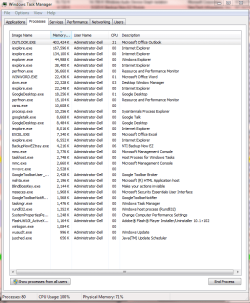
Pardon the delay.
 

Attachments

  • process.PNG
    process.PNG
    36.6 KB · Views: 97

My Computer

Computer Manufacturer/Model Number
Dell DM061
OS
Windows 7 Ultimate 32bit
CPU
Intel Pentium D 805 / SmithField 90nm Technology
Motherboard
Dell Inc. 0WG864 (Microprocessor)
Memory
4 GB DDR (3 GB usable)
Graphics Card(s)
GeForce 7300 LE
Monitor(s) Displays
Dell 2007WFP / Westinghouse LCM-19v7
Hard Drives
Seagate 180 GB internal
Toshiba 300 GB external
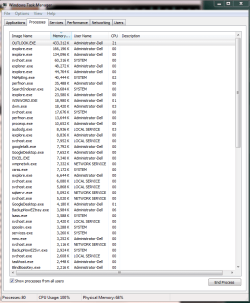
a little better...
 

Attachments

  • first half....PNG
    first half....PNG
    32.3 KB · Views: 66
  • 2nd half.PNG
    2nd half.PNG
    31.2 KB · Views: 43

My Computer

Computer Manufacturer/Model Number
Dell DM061
OS
Windows 7 Ultimate 32bit
CPU
Intel Pentium D 805 / SmithField 90nm Technology
Motherboard
Dell Inc. 0WG864 (Microprocessor)
Memory
4 GB DDR (3 GB usable)
Graphics Card(s)
GeForce 7300 LE
Monitor(s) Displays
Dell 2007WFP / Westinghouse LCM-19v7
Hard Drives
Seagate 180 GB internal
Toshiba 300 GB external
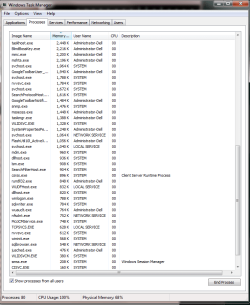
Very sorry to waste your time. These are illegible.
 

My Computer

Computer Manufacturer/Model Number
Dell DM061
OS
Windows 7 Ultimate 32bit
CPU
Intel Pentium D 805 / SmithField 90nm Technology
Motherboard
Dell Inc. 0WG864 (Microprocessor)
Memory
4 GB DDR (3 GB usable)
Graphics Card(s)
GeForce 7300 LE
Monitor(s) Displays
Dell 2007WFP / Westinghouse LCM-19v7
Hard Drives
Seagate 180 GB internal
Toshiba 300 GB external
Wel,l then you can do it for me.
Click on the top where it says cpu
That will bring the high users on top
Then look for the process that are using the high amounts Total should be 100%
You are showing me about 20%

Then tomorrow we can look and see if there is a problem.
 

My Computer

Computer type
PC/Desktop
Computer Manufacturer/Model Number
Dell XPS 420
OS
Windows 10, Home Clean Install
CPU
Intel Core2 processsor Q8200(2.33Ghz 1333FSB) Quad Core Tech
Motherboard
Dell
Memory
6 gb
Graphics Card(s)
ATI Radeon 256MB HD3650
Sound Card
Intergrated 7.1 Channel Audio
Monitor(s) Displays
Dell SP2009W 20"
Hard Drives
640 GB Serial ATA Hard drive
Cooling
Fan
Keyboard
Dell USB Keyboard
Mouse
Dell Premium Optical USB
Internet Speed
DSL 2.85
If not still up use Ctrl+Shift+Esc to bring the task manager back up and kill the Outlook.exe by right clicking and selecting End Process Tree. I have had to do this in the past for runaway applications and it works very effectively
 

My Computer

Computer Manufacturer/Model Number
Samsung Chronos 7
OS
windows 7 Pro 64Bit
CPU
2.2 GHz Intel Core i7-2675QM
Memory
8GB
Graphics Card(s)
Intel HD Graphics 3000/Radeon HD 6490M
Sound Card
Realtek High Definition Audio
Monitor(s) Displays
Built in LCD and external Dell 22 inch LCD
Screen Resolution
1600x900
Hard Drives
1 TB HDD
Internet Speed
20 MBPS Down 1500 KBPS Up
Thanks for the suggestion. When I'm trying to kick it back down, Outlook is in the 1st group to go. Often the biggest offenders are processess critical to staying logged in. However, I've killed several of those selectively in the past (Windows search index, etc).
The number of "svchost.exe" seems large to me, but I have nothing to base that on. In addition, when using Sysinternals Process Explorer and hover over each one in the process column, the list of services/processes in each one seems more than legitimate.
I can log on and immediately it goes to 100%+. Even after trimming startup to the bone. So odd.
At times after holding pinned at max usage, it will drop to 5-20% without any noticeable change in the process list. It's as if someone was playing a practical joke. Nevermind some of the other oddities like the mouse cursor moving around on its own. Not wildly, but as if going from window to window. I have been dealing with this and other very bizarre events for several months now.
It returns to "normal" just often enough to avoid having to post in a forum or otherwise seek assistance.

Finally, as even this post is beginning to indicate, it becomes a wordy process (without knowing all the 'shorthand' speak) to explain and still remains vaguely unclear.

Although I do incremental backupss daily and complete backup weekly, surely I'm only backing up the problem tself. Attemps at restore points never give an option more that a couple of day back. At this point I am desperate but not very hopeful.
 

My Computer

Computer Manufacturer/Model Number
Dell DM061
OS
Windows 7 Ultimate 32bit
CPU
Intel Pentium D 805 / SmithField 90nm Technology
Motherboard
Dell Inc. 0WG864 (Microprocessor)
Memory
4 GB DDR (3 GB usable)
Graphics Card(s)
GeForce 7300 LE
Monitor(s) Displays
Dell 2007WFP / Westinghouse LCM-19v7
Hard Drives
Seagate 180 GB internal
Toshiba 300 GB external
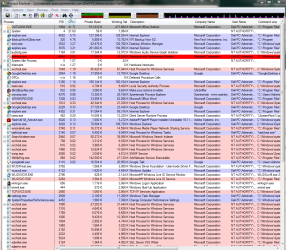
Screenshots now (2 pages) from Process Explorer. Thank you, gentlemen.
 

Attachments

  • procex 1.PNG
    procex 1.PNG
    87 KB · Views: 79
  • procex 2.PNG
    procex 2.PNG
    95 KB · Views: 34

My Computer

Computer Manufacturer/Model Number
Dell DM061
OS
Windows 7 Ultimate 32bit
CPU
Intel Pentium D 805 / SmithField 90nm Technology
Motherboard
Dell Inc. 0WG864 (Microprocessor)
Memory
4 GB DDR (3 GB usable)
Graphics Card(s)
GeForce 7300 LE
Monitor(s) Displays
Dell 2007WFP / Westinghouse LCM-19v7
Hard Drives
Seagate 180 GB internal
Toshiba 300 GB external
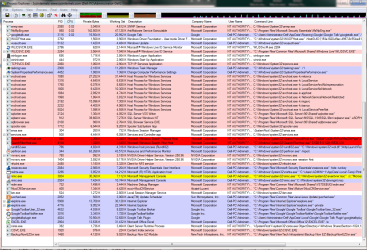
Screenshots now (2 pages) from Process Explorer. Thank you, gentlemen.

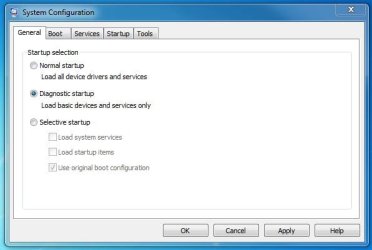
Click on the start orb and type msconfig in the search box. Click on msconfig.exe, Select Diagnostic startup click Apply then click OK. Restart with the prompt and see if the issue is still there.
 

Attachments

  • Capture1.JPG
    Capture1.JPG
    29 KB · Views: 6
  • Capture2.JPG
    Capture2.JPG
    19.7 KB · Views: 4

My Computer

Computer Manufacturer/Model Number
Samsung Chronos 7
OS
windows 7 Pro 64Bit
CPU
2.2 GHz Intel Core i7-2675QM
Memory
8GB
Graphics Card(s)
Intel HD Graphics 3000/Radeon HD 6490M
Sound Card
Realtek High Definition Audio
Monitor(s) Displays
Built in LCD and external Dell 22 inch LCD
Screen Resolution
1600x900
Hard Drives
1 TB HDD
Internet Speed
20 MBPS Down 1500 KBPS Up
OK Im back
IM familiar with using the clean boot. Start with that
How to troubleshoot a problem by performing a clean boot in Windows Vista or in Windows 7

If clean boot starts at 100% usage, try in safe mode.
We want to determine the cause.

Outlook has a high cpu usage too. Remove that from start up or turn it off.
Disconnect from the internet, lets make sure that it is not something really bad

Rerun malwarebytes. Full scan and updated
 
Last edited:

My Computer

Computer type
PC/Desktop
Computer Manufacturer/Model Number
Dell XPS 420
OS
Windows 10, Home Clean Install
CPU
Intel Core2 processsor Q8200(2.33Ghz 1333FSB) Quad Core Tech
Motherboard
Dell
Memory
6 gb
Graphics Card(s)
ATI Radeon 256MB HD3650
Sound Card
Intergrated 7.1 Channel Audio
Monitor(s) Displays
Dell SP2009W 20"
Hard Drives
640 GB Serial ATA Hard drive
Cooling
Fan
Keyboard
Dell USB Keyboard
Mouse
Dell Premium Optical USB
Internet Speed
DSL 2.85
0710 CT - Thankful

Today will be a tad busy. However, I have all the 'pieces' to try and narrow this down with the startup limitations.

I have also discovered in the meantime, additional unattributed "iexplore.exe" that will not die. All are the 'SCODEF:XXXX CREDAT:XXXXX' variety. Using PID and Command Line, I'm confident I'll be able to begin the slaughter.

With a full magazine of information, I'm anxious to return and finish the assault on these resource hoarders, but alas, the pre-Thanksgiving preparations force me to wait until hopefully later today.

Once again, I can't thank you enough for the valuable input and will check email and this forum until this annoyance is a memory. Then I can move on to other perplexing issues. Having worked alone on this stuff for so long, continually reinventing the wheel and searching dark alleys, it's amazing to see the prompt, solid assistance to seemingly pop out of nowhere. More knowledge in a few hours than weeks or months of trial and error.

This is really a time to give Thanks. For those about to feast...

Ciao.

- RW
 
Last edited:

My Computer

Computer Manufacturer/Model Number
Dell DM061
OS
Windows 7 Ultimate 32bit
CPU
Intel Pentium D 805 / SmithField 90nm Technology
Motherboard
Dell Inc. 0WG864 (Microprocessor)
Memory
4 GB DDR (3 GB usable)
Graphics Card(s)
GeForce 7300 LE
Monitor(s) Displays
Dell 2007WFP / Westinghouse LCM-19v7
Hard Drives
Seagate 180 GB internal
Toshiba 300 GB external
It's not going to help tremendously but uninstall all of that google stuff for starters.

You may also want to look into BootVis since many of your processes seem to be running on startup you can shave some stuff off there.

If you dont use BackUpNow any longer remove that too.

And Lastly, try running Outlook in safe mode. See if it still eats all of that ram to run. If it doesnt then you know you have a plugin or something that is causing this. In the "search Programs and Files' box on start menu type in "outlook.exe /safe"
 

My Computer

Computer Manufacturer/Model Number
Custom
OS
Windows 8 Professional
CPU
AMD Phenom II X6
Motherboard
ASUS
Memory
8 GB
Graphics Card(s)
XFX ATI Radeon 4890
Monitor(s) Displays
Dual 22" LCD
Screen Resolution
1680x1050
Hard Drives
PC Drives

HD0 = Crucial SSD 128gb Sata III
HD1 = 300gb (Seagate Barracuda)

NAS

HD0 = 1.5TB (Maxtor) Raid1
HD1 = 1.5TB (Maxtor) Raid1
HD2 = 1TB (Segate) Raid5
HD3 = 1TB (Segate) Raid5
HD4 = 1TB (Segate) Raid5
HD5 = 1TB (Segate) Raid5
PSU
750 watt
Mouse
Razr Mamba
Internet Speed
50 down 35 up FIOS
Problem Solved...

Apologies for the delay. Holiday season, etc, etc...

My failure to keep a detailed log of my repair efforts clouds the picture of exactly which step(s) finally tamed my overactive CPU; however the general indicators/culprits remain clear. Without question, the success is completely as a result of suggestions presented within this thread.

If my CPU was human, one might have suggested Ritalin. However, it appears the strongest indicator(s) of success point to Outlook and the massive number of startup processes.

While boot time was never a huge factor (actually my "racing" CPU gave the impression it couldn't wait to get into the game), and I've used machines where, while waiting for a full boot up, you could go make and eat a sandwich...at your friend's house across town. Then the ‘welcome’ screen would appear, like clockwork, while reading the last paragraph of an un-translated copy of War & Peace.

In this case, disabling add-ons in Outlook is the most likely remedy. Observing Outlook’s activity in Process Explorer, you could see a steady increase in resources. It would begin by consuming approximately 250MB and ramp up to nearly 0.5GB. Now Outlook is holding steady in the 90MB range. One curious change: UAC now asks for permission to open the program. I did not notice its absence until its appearance.

There is one phenomena that seems to defy explanation; at least to me. When all meters indicated CPU usage pegged off the scale, it would require killing several heavy hitter processes, including Outlook, to bring demand down to even 90%. This would seem to push the scale back toward the elimination of extraneous startups.

Perhaps the largest lesson learned here, excluding the fix itself, is the need to develop the patience to detail the recovery process so those that follow might possibly be spared from having to reinvent the wheel. Fortunately, they may only have to look at the posts contained here.

Clearly the answer(s) to my predicament lies within this thread, and for that I am indebted to each and every one of you.

Thank you.
 

My Computer

Computer Manufacturer/Model Number
Dell DM061
OS
Windows 7 Ultimate 32bit
CPU
Intel Pentium D 805 / SmithField 90nm Technology
Motherboard
Dell Inc. 0WG864 (Microprocessor)
Memory
4 GB DDR (3 GB usable)
Graphics Card(s)
GeForce 7300 LE
Monitor(s) Displays
Dell 2007WFP / Westinghouse LCM-19v7
Hard Drives
Seagate 180 GB internal
Toshiba 300 GB external
The answer has to be in Process Explorer. It show usage at any given point in time.
How about completely unattach the net. See if it is the source. Not turn off, unattach.
 

My Computer

Computer type
PC/Desktop
Computer Manufacturer/Model Number
Dell XPS 420
OS
Windows 10, Home Clean Install
CPU
Intel Core2 processsor Q8200(2.33Ghz 1333FSB) Quad Core Tech
Motherboard
Dell
Memory
6 gb
Graphics Card(s)
ATI Radeon 256MB HD3650
Sound Card
Intergrated 7.1 Channel Audio
Monitor(s) Displays
Dell SP2009W 20"
Hard Drives
640 GB Serial ATA Hard drive
Cooling
Fan
Keyboard
Dell USB Keyboard
Mouse
Dell Premium Optical USB
Internet Speed
DSL 2.85
I'm unsure how to "unattach the net" (or I'm unfamiliar with the term), however, as requested, here is a Process Explorer screen shot following the fix:
 

Attachments

  • Process Explorer Postscript.PNG
    Process Explorer Postscript.PNG
    104.5 KB · Views: 12

My Computer

Computer Manufacturer/Model Number
Dell DM061
OS
Windows 7 Ultimate 32bit
CPU
Intel Pentium D 805 / SmithField 90nm Technology
Motherboard
Dell Inc. 0WG864 (Microprocessor)
Memory
4 GB DDR (3 GB usable)
Graphics Card(s)
GeForce 7300 LE
Monitor(s) Displays
Dell 2007WFP / Westinghouse LCM-19v7
Hard Drives
Seagate 180 GB internal
Toshiba 300 GB external
If you are connected to the net by cable, unattach the cable.
 

My Computer

Computer type
PC/Desktop
Computer Manufacturer/Model Number
Dell XPS 420
OS
Windows 10, Home Clean Install
CPU
Intel Core2 processsor Q8200(2.33Ghz 1333FSB) Quad Core Tech
Motherboard
Dell
Memory
6 gb
Graphics Card(s)
ATI Radeon 256MB HD3650
Sound Card
Intergrated 7.1 Channel Audio
Monitor(s) Displays
Dell SP2009W 20"
Hard Drives
640 GB Serial ATA Hard drive
Cooling
Fan
Keyboard
Dell USB Keyboard
Mouse
Dell Premium Optical USB
Internet Speed
DSL 2.85
I'm still chuckling at my ignorance. What else could "competely unattach the net" mean? pfffftttt. I suppose sounding stupid helps keep a person humble. I am a living, breathing example of the quote in your "signature". I'm just hoping my five minutes is up soon. It is comforting to know that there is assistance
available for the feeble minded. Otherwise, I'd be SOL. Now, if everyone's eyes have quit rolling...

This screenshot is after...ahem, unattaching the net, which in my case meant simply pulling the wireless USB adapter (sheesh):
 

Attachments

  • procex postscript.nonet.PNG
    procex postscript.nonet.PNG
    61.5 KB · Views: 9

My Computer

Computer Manufacturer/Model Number
Dell DM061
OS
Windows 7 Ultimate 32bit
CPU
Intel Pentium D 805 / SmithField 90nm Technology
Motherboard
Dell Inc. 0WG864 (Microprocessor)
Memory
4 GB DDR (3 GB usable)
Graphics Card(s)
GeForce 7300 LE
Monitor(s) Displays
Dell 2007WFP / Westinghouse LCM-19v7
Hard Drives
Seagate 180 GB internal
Toshiba 300 GB external
That screen shot looks fine
Lets see if memory is actaully ok
Run for 8 passes. Check each slot with a good stick, when done

Download and test RAM with Memtest 86. Test each RAM stick separately, for 6 passes. Then with a known good stick test each RAM slot.
Memtest86
 

My Computer

Computer type
PC/Desktop
Computer Manufacturer/Model Number
Dell XPS 420
OS
Windows 10, Home Clean Install
CPU
Intel Core2 processsor Q8200(2.33Ghz 1333FSB) Quad Core Tech
Motherboard
Dell
Memory
6 gb
Graphics Card(s)
ATI Radeon 256MB HD3650
Sound Card
Intergrated 7.1 Channel Audio
Monitor(s) Displays
Dell SP2009W 20"
Hard Drives
640 GB Serial ATA Hard drive
Cooling
Fan
Keyboard
Dell USB Keyboard
Mouse
Dell Premium Optical USB
Internet Speed
DSL 2.85
Back
Top