Custom startup ?

XP Pro is on HDD-0, so install to that ? :)
 

My Computer

Computer Manufacturer/Model Number
Home Build
OS
Windows 7 Ultimate RC1 / XP Black 2009
CPU
Core2Duo E8400
Motherboard
MSI
Memory
3GB
Graphics Card(s)
ATI Radeon HD 3850
Hard Drives
W/D 250GB x2
Case
Thermaltake Tsunami Dream
Keyboard
Logitech G15
Mouse
Razer Death Adder
Internet Speed
6.5 - 7 MB
XP Pro is on HDD-0, so install to that ? :)

Hmm.. tricky, I'd try XP first since it is HDD0 (ment 0 in last post, not 1 lol). If that doesn't work try it on 7 then.
 

My Computer

Computer Manufacturer/Model Number
Custom | Whitebox
OS
Windows 7 Ultimate, OS X 10.7, Ubuntu 11.04
CPU
Intel E6750 @ 3.80GHz
Motherboard
Gigabyte GA-EP45-UD3L (Revision 1.1)
Memory
2x2GB & 2x1GB (6GB) OCZ Reaper 1066MHz @ 1080MHz
Graphics Card(s)
EVGA nVidia GTX 260 896mb (216 Core) FTW Edition
Sound Card
Realtek ALC888
Monitor(s) Displays
21" VIZIO TV
Screen Resolution
1680x1050 @ 60Hz
Hard Drives
Western Digital WD6401AALS - 640GB
Hitachi HDP725016GLA380 - 160GB
PSU
Corsair 750W
Case
NZXT Nemesis Elite
Cooling
Thermaltake SpinQ
Keyboard
Logitech Wireless S520
Mouse
Logitech Wireless S520 - Microsoft Wireless Arc Mouse
Internet Speed
Download: 20mbps, Upload: 3mbps
OK will do that bit L8r 2day (need to sleep first) thanks hon
Kiss-On-Cheek.gif
 

My Computer

Computer Manufacturer/Model Number
Home Build
OS
Windows 7 Ultimate RC1 / XP Black 2009
CPU
Core2Duo E8400
Motherboard
MSI
Memory
3GB
Graphics Card(s)
ATI Radeon HD 3850
Hard Drives
W/D 250GB x2
Case
Thermaltake Tsunami Dream
Keyboard
Logitech G15
Mouse
Razer Death Adder
Internet Speed
6.5 - 7 MB
OK will do that bit L8r 2day (need to sleep first) thanks hon
Kiss-On-Cheek.gif

Lol, not a problem. I should be sleep as well though I am too lazy to go to sleep.
 

My Computer

Computer Manufacturer/Model Number
Custom | Whitebox
OS
Windows 7 Ultimate, OS X 10.7, Ubuntu 11.04
CPU
Intel E6750 @ 3.80GHz
Motherboard
Gigabyte GA-EP45-UD3L (Revision 1.1)
Memory
2x2GB & 2x1GB (6GB) OCZ Reaper 1066MHz @ 1080MHz
Graphics Card(s)
EVGA nVidia GTX 260 896mb (216 Core) FTW Edition
Sound Card
Realtek ALC888
Monitor(s) Displays
21" VIZIO TV
Screen Resolution
1680x1050 @ 60Hz
Hard Drives
Western Digital WD6401AALS - 640GB
Hitachi HDP725016GLA380 - 160GB
PSU
Corsair 750W
Case
NZXT Nemesis Elite
Cooling
Thermaltake SpinQ
Keyboard
Logitech Wireless S520
Mouse
Logitech Wireless S520 - Microsoft Wireless Arc Mouse
Internet Speed
Download: 20mbps, Upload: 3mbps
I been work all night, knakered now :D
 

My Computer

Computer Manufacturer/Model Number
Home Build
OS
Windows 7 Ultimate RC1 / XP Black 2009
CPU
Core2Duo E8400
Motherboard
MSI
Memory
3GB
Graphics Card(s)
ATI Radeon HD 3850
Hard Drives
W/D 250GB x2
Case
Thermaltake Tsunami Dream
Keyboard
Logitech G15
Mouse
Razer Death Adder
Internet Speed
6.5 - 7 MB
I been work all night, knakered now :D

There is a new word, knakered =P

Well sleep well and let us know if it works with XP or not. :)
 

My Computer

Computer Manufacturer/Model Number
Custom | Whitebox
OS
Windows 7 Ultimate, OS X 10.7, Ubuntu 11.04
CPU
Intel E6750 @ 3.80GHz
Motherboard
Gigabyte GA-EP45-UD3L (Revision 1.1)
Memory
2x2GB & 2x1GB (6GB) OCZ Reaper 1066MHz @ 1080MHz
Graphics Card(s)
EVGA nVidia GTX 260 896mb (216 Core) FTW Edition
Sound Card
Realtek ALC888
Monitor(s) Displays
21" VIZIO TV
Screen Resolution
1680x1050 @ 60Hz
Hard Drives
Western Digital WD6401AALS - 640GB
Hitachi HDP725016GLA380 - 160GB
PSU
Corsair 750W
Case
NZXT Nemesis Elite
Cooling
Thermaltake SpinQ
Keyboard
Logitech Wireless S520
Mouse
Logitech Wireless S520 - Microsoft Wireless Arc Mouse
Internet Speed
Download: 20mbps, Upload: 3mbps
Just to confirm this, yes you would be better off installing on XP as that would mean that none of the Windows 7 files are in use and you can then gain full access to alter them from XP and you will probably need to take ownership again from XP.

The other alternative is install Restorator on Windows 7 and make a copy of imageres.dll on your desktop and make the changes you want and save it and then put in in the c:/ directory for easy access, then load XP and replace the original.

Always make sure you have backed it up somewhere incase you have any problems and system restore points are always useful as well.
 

My Computer

Computer Manufacturer/Model Number
Home Brew
OS
Windows 7 Ultimate Vista Ultimate x64
CPU
Core 2 Duo E8500 3.16Ghz @ 3.8Ghz
Motherboard
eVGA 750i FTW
Memory
2x2Gigs Patriot PC2-6400 LL
Graphics Card(s)
Inno3D GeForce GTX260 216 SP
Monitor(s) Displays
ASUS VW222U 22" 2ms Response time
Screen Resolution
1680x1050
Hard Drives
SATA 150GB
SATA II 250GB
USB IDE 750GB Ext.
PSU
HYTEC 600W & Thermaltake 650W Toughpower Power Exp
Case
Thermaltake Armor LCS (Liquid Cooling System)
Cooling
Liquid Cooling System
Keyboard
Logitech G15 Gaming Keyboard
Mouse
Logitech G9 Gaming Mouse
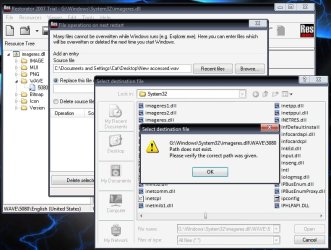
Restorator don't seem to be able to do the change, i can place the Wave file i want to use in to the WAVE folder but it wont overwrite the Windows 7 Startup Sound and if i try to delete the windows Sound it deletes the whole folder, so looks like i need to install Restorator to Windows 7 ?

Is Restorator not replacing the file on startup because the file to replace is on another Hard Drive ?
 

Attachments

  • 416debca.jpg
    416debca.jpg
    74 KB · Views: 12
  • ae86c7ae.jpg
    ae86c7ae.jpg
    12.8 KB · Views: 5

My Computer

Computer Manufacturer/Model Number
Home Build
OS
Windows 7 Ultimate RC1 / XP Black 2009
CPU
Core2Duo E8400
Motherboard
MSI
Memory
3GB
Graphics Card(s)
ATI Radeon HD 3850
Hard Drives
W/D 250GB x2
Case
Thermaltake Tsunami Dream
Keyboard
Logitech G15
Mouse
Razer Death Adder
Internet Speed
6.5 - 7 MB
From the look of your screen shot, you have saved it but it's not replacing the original and instead it has saved it as imageres1.dll and I can also see another one there with imageres2.dll, what this means is that you haven't taken ownership of the file you are trying to replace and given yourself full control.

Download the Take ownership context menu shortcut and right click on imageres.dll and select Take Ownership from the menu and then you should be able to save it.

Take Ownership Shortcut
 

My Computer

Computer Manufacturer/Model Number
Home Brew
OS
Windows 7 Ultimate Vista Ultimate x64
CPU
Core 2 Duo E8500 3.16Ghz @ 3.8Ghz
Motherboard
eVGA 750i FTW
Memory
2x2Gigs Patriot PC2-6400 LL
Graphics Card(s)
Inno3D GeForce GTX260 216 SP
Monitor(s) Displays
ASUS VW222U 22" 2ms Response time
Screen Resolution
1680x1050
Hard Drives
SATA 150GB
SATA II 250GB
USB IDE 750GB Ext.
PSU
HYTEC 600W & Thermaltake 650W Toughpower Power Exp
Case
Thermaltake Armor LCS (Liquid Cooling System)
Cooling
Liquid Cooling System
Keyboard
Logitech G15 Gaming Keyboard
Mouse
Logitech G9 Gaming Mouse
apologies for the late reply Mr GRiM, Thank you i will be trying this again in the morning :)

Thanks Cindy X
 

My Computer

Computer Manufacturer/Model Number
Home Build
OS
Windows 7 Ultimate RC1 / XP Black 2009
CPU
Core2Duo E8400
Motherboard
MSI
Memory
3GB
Graphics Card(s)
ATI Radeon HD 3850
Hard Drives
W/D 250GB x2
Case
Thermaltake Tsunami Dream
Keyboard
Logitech G15
Mouse
Razer Death Adder
Internet Speed
6.5 - 7 MB
Back
Top