
You are using an out of date browser. It may not display this or other websites correctly.
You should upgrade or use an alternative browser.
You should upgrade or use an alternative browser.
disk 1 is unknown, not initialized, unallocated
- Thread starter jenny123
- Start date

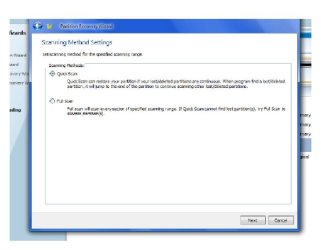
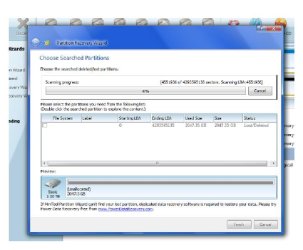

It could take a while. Let us know when it has finished. 
My Computer
- Computer type
- PC/Desktop
- Computer Manufacturer/Model Number
- Self built custom
- OS
- 64-bit Windows 11 Pro for Workstations
- CPU
- Intel i7-8700K OC'd to 5 GHz
- Motherboard
- ASUS ROG Maximus XI Formula Z390
- Memory
- 64 GB (4x16GB) G.SKILL TridentZ RGB DDR4 3600 MHz
- Graphics Card(s)
- ASUS ROG-STRIX-GTX1080TI-O11G-GAMING
- Sound Card
- Integrated
- Monitor(s) Displays
- 2 x Samsung Odyssey G7 27"
- Screen Resolution
- 2560x1440
- Hard Drives
- 1TB Samsung 990 PRO M.2,
4TB Samsung 990 PRO PRO M.2,
TerraMaster F8 SSD Plus NAS
- PSU
- Seasonic Prime Titanium 850W
- Case
- Thermaltake Core P3
- Cooling
- Corsair Hydro H115i
- Keyboard
- Logitech wireless K800
- Mouse
- Logitech MX Master 4
- Internet Speed
- 2 Gb/s Download and 100 Mb/s Upload
- Antivirus
- Malwarebyte Anti-Malware Premium
- Browser
- Google Chrome
- Other Info
- Logitech Z625 speaker system,
Logitech BRIO 4K Pro webcam,
HP Color LaserJet Pro MFP M477fdn,
APC SMART-UPS RT 1000 XL - SURT1000XLI,
Galaxy S23 Plus phone
Not anytime soon.
My Computer
- Computer type
- PC/Desktop
- Computer Manufacturer/Model Number
- Self built custom
- OS
- 64-bit Windows 11 Pro for Workstations
- CPU
- Intel i7-8700K OC'd to 5 GHz
- Motherboard
- ASUS ROG Maximus XI Formula Z390
- Memory
- 64 GB (4x16GB) G.SKILL TridentZ RGB DDR4 3600 MHz
- Graphics Card(s)
- ASUS ROG-STRIX-GTX1080TI-O11G-GAMING
- Sound Card
- Integrated
- Monitor(s) Displays
- 2 x Samsung Odyssey G7 27"
- Screen Resolution
- 2560x1440
- Hard Drives
- 1TB Samsung 990 PRO M.2,
4TB Samsung 990 PRO PRO M.2,
TerraMaster F8 SSD Plus NAS
- PSU
- Seasonic Prime Titanium 850W
- Case
- Thermaltake Core P3
- Cooling
- Corsair Hydro H115i
- Keyboard
- Logitech wireless K800
- Mouse
- Logitech MX Master 4
- Internet Speed
- 2 Gb/s Download and 100 Mb/s Upload
- Antivirus
- Malwarebyte Anti-Malware Premium
- Browser
- Google Chrome
- Other Info
- Logitech Z625 speaker system,
Logitech BRIO 4K Pro webcam,
HP Color LaserJet Pro MFP M477fdn,
APC SMART-UPS RT 1000 XL - SURT1000XLI,
Galaxy S23 Plus phone

My Computer
- Computer type
- PC/Desktop
- OS
- window 7

- Local time
- 5:41 PM
- Messages
- 5,915
I really do not know how significant the Bad disk classification by PW is. We have to wait and see till the scan ends.
At this rate I presume that it may take another 6 hours to complete and that means I can go to sleep. I shall be back again after 6 hours that is at 07:35 PM your time.
If the scan finishes by then post a screenshot.
As to what to expect, if successful, you will see the complete details of the hard drive, including the File system.
If not a Full scan has to be done which will again take much more time. But we shall decide on it after the quick scan is complete.
When the quick scan is complete, just double click on the partition found and see whether the partition explorer shows all your files. We shall decide upon finishing the process or go in for a full scan at that time.
Hold on till I come back 0735 PM your time.
At this rate I presume that it may take another 6 hours to complete and that means I can go to sleep
. I shall be back again after 6 hours that is at 07:35 PM your time.If the scan finishes by then post a screenshot.
As to what to expect, if successful, you will see the complete details of the hard drive, including the File system.
If not a Full scan has to be done which will again take much more time. But we shall decide on it after the quick scan is complete.
When the quick scan is complete, just double click on the partition found and see whether the partition explorer shows all your files. We shall decide upon finishing the process or go in for a full scan at that time.
Hold on till I come back 0735 PM your time.
My Computer
- OS
- Windows 7 Home Premium 32 bit
- Local time
- 5:41 PM
- Messages
- 5,915
When you come online, please post a screenshot of the progress.
On completing the scan, if it shows the files on double clicking it, we shall take a plunge. You will close the Partition Explorer and click on Finish.
If not, you will perform a full scan, or read what is said on the screen "If MiiniTool Partition Wizard cannot find your lost partition, dedicated data recovery software is required to restore your data." So the hunt will continue.
Since you have a large 2TB drive, whatever program is used it will take an irritatingly long scan time. You have to leave it to do and carry on with your normal schedule, instead of sitting in front of the computer and twiddling your fingers.
Let us hope for the best now.
On completing the scan, if it shows the files on double clicking it, we shall take a plunge. You will close the Partition Explorer and click on Finish.
If not, you will perform a full scan, or read what is said on the screen "If MiiniTool Partition Wizard cannot find your lost partition, dedicated data recovery software is required to restore your data." So the hunt will continue.
Since you have a large 2TB drive, whatever program is used it will take an irritatingly long scan time. You have to leave it to do and carry on with your normal schedule, instead of sitting in front of the computer and twiddling your fingers.
Let us hope for the best now.
My Computer
- OS
- Windows 7 Home Premium 32 bit

- Local time
- 5:41 PM
- Messages
- 5,915
Ok, there was a similar query in Seagate forum - my 500GB shows as 2GB in Disk management, cannot see it in My computer. The moderator had advised that he should get the data recovered with a Data Recovery program and then try to format the drive. So we are on the right track.
Based on the information given now, I do not rule out a defective interface card inside the casing which may have caused all this problem. Is the drive still under warranty?
If not the usual suggested procedure is to take out the drive out of its casing and try it in another external case or connect it internally on a computer and see everything is fine with the HDD per se. If everything is fine with the HDD itself, you should be able to get the data back in a jiffy. But then I would think, you have to get it done by a qualified and competent professional.
Let us see as we chug along.
If the scan does not complete by your usual retiring time, just don't wait for it. Go and sleep. We can see it in your morning and my evening.
Based on the information given now, I do not rule out a defective interface card inside the casing which may have caused all this problem. Is the drive still under warranty?
If not the usual suggested procedure is to take out the drive out of its casing and try it in another external case or connect it internally on a computer and see everything is fine with the HDD per se. If everything is fine with the HDD itself, you should be able to get the data back in a jiffy. But then I would think, you have to get it done by a qualified and competent professional.
Let us see as we chug along.
If the scan does not complete by your usual retiring time, just don't wait for it. Go and sleep. We can see it in your morning and my evening.
My Computer
- OS
- Windows 7 Home Premium 32 bit
Similar threads
- Replies
- 1
- Views
- 4K
- Replies
- 7
- Views
- 4K

- Replies
- 2
- Views
- 3K
- Replies
- 0
- Views
- 2K