
You are using an out of date browser. It may not display this or other websites correctly.
You should upgrade or use an alternative browser.
You should upgrade or use an alternative browser.
disk 1 is unknown, not initialized, unallocated
- Thread starter jenny123
- Start date


- Local time
- 3:56 AM
- Messages
- 5,915
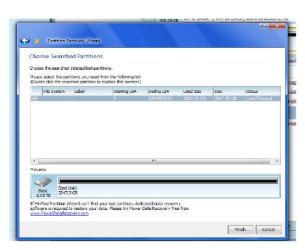
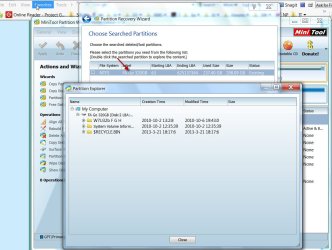
No, your HDD partition has not been found. It is still giving wrong information. File System, Label, Starting LBA etc., not shown. Still showing wrong size. Just double click on it and see whether your files are shown.(That is just for our information. Even if your files are shown you will close the partition Explorer and click on cancel.)
Just click on cancel to abort.
Just click on cancel to abort.
My Computer
- OS
- Windows 7 Home Premium 32 bit
Now what? I double click and nothing happen. I click cancel. Does this mean I lost my data? It's not fixable?
Thanks again, I actual just put my 8 month old to sleep, I am exhausted. I will be awake 6 am my time to feed him, maybe then you have a solution? Please tell me I can get all my pics back!
Thanks again, I actual just put my 8 month old to sleep, I am exhausted. I will be awake 6 am my time to feed him, maybe then you have a solution? Please tell me I can get all my pics back!
My Computer
- Computer type
- PC/Desktop
- OS
- window 7
- Local time
- 3:56 AM
- Messages
- 5,915
Now what? I double click and nothing happen. I click cancel. Does this mean I lost my data? It's not fixable?
Thanks again, I actual just put my 8 month old to sleep, I am exhausted. I will be awake 6 am my time to feed him, maybe then you have a solution? Please tell me I can get all my pics back!
No, it does not mean you have lost any data. It is still not accessible.
We have only scanned the drive to see whether we can find the lost partition, and have not written anything on it. So do not worry about any data loss.
We may have to try another dedicated Recovery software as indicated in Partition Wizard itself.
I would recommend PhotoRec - which is absolutely safe since there is no way you can write to the disk even by mistake - but it will take excruciatingly long scanning time - may be days in this case. PhotoRec ignores the file system and goes after the underlying data. And so it has a greater chance of recovery than other Recovery software and it is that feature which calls for a time consuming deep scan.
Just go through this:
http://www.sevenforums.com/software/193467-guide-using-photorec-recovery-software.html
and this
http://www.sevenforums.com/software/271545-best-recovery-software-windows-7-a-2.html#post2263441
The other easy way is to take out the hard drive and check as I had stated.
"Based on the information given now, I do not rule out a defective interface card inside the casing which may have caused all this problem. Is the drive still under warranty?
If not the usual suggested procedure is to take out the drive out of its casing and try it in another external case or connect it internally on a computer and see everything is fine with the HDD per se. If everything is fine with the HDD itself, you should be able to get the data back in a jiffy. But then I would think, you have to get it done by a qualified and competent professional."
Now you may have to decide which way you want to go: PhotoRec and if it fails, a professional service or straight away to a professional service to get the HDD out, check and recover if the HDD is OK. ( I would think that mechanically the HDD is ok and it is the electronics that may have failed)
( I know, as a lady, you may not be able to do it yourself. Even I would hesitate to break open the case and take the HDD out.)
Last edited:
My Computer
- OS
- Windows 7 Home Premium 32 bit
But based on what it's going on now, do you think photorec will fix it, ah mean is there a good chance? Or you think i should just bring it to professional and have them take out hdd? And say if inbring it to the store, what do I tell them?
My Computer
- Computer type
- PC/Desktop
- OS
- window 7
- Local time
- 3:56 AM
- Messages
- 5,915
In Data Recovery, and especially in this case where it seems to be a hardware (electronics) failure, it is difficult to predict success or failure with a Recovery software. We have to try and take the result as we come across. ( Only precaution to take is that we do not write anything to the HDD till we recover - which we have taken.)
I was literally baffled by the bad drive report by the Partition Wizard for if it were only a first sector damage - a minor and easily correctable corruption - the drive would have shown as Unallocated or RAW, the only scenario which I had encountered so far. It was only much later that you reported that the actual capacity was only 500GB and only then I could link it to a hardware fault. Still we were on the right track for we have to try as much as possible using a Recovery software hoping against hope.
Will PhotoRec, overshadow the faulty electronics and recover the data successfully? All I can say is we have to try out and see - remember hoping against hope. It depends on your willingness to go through another long drawn process with patience and endurance.
About the faulty electronics, suspected now:
It can be in two areas.
1. There is an interface card inside the enclosure sitting between the actual HDD and the connector. This card is made by HP. If this card is faulty, then the HDD itself can be assumed to be fine. In this case taking out the HDD, placing it in another HDD external enclosure or connecting it to another computer with a Sata to USB connector will immediately give access to the HDD and all your data can be retrieved in a jiffy.
2. There is an electronics card in the actual HDD itself. If that card has failed, then replacing that card to access the HDD is a long call, which I am afraid you cannot pursue. ( Some adventurists do pursue that course, trying to find out the same model HDD and the one produced in the same batch and do a card transplant.) The only option for you here is to return the HDD to a professional data recovery service and retrieve the data which will cost you a bomb.
So, IMO, you have two options.
1. Try PhotoRec, if you have the patience and endurance.
2. If you can find a professional and reliable computer service center near you, tell them that you suspect that the interface card has turned faulty and will they be able to take the HDD out and retrieve the data from it - by putting it in another external enclosure or with a SATA to USB cable. If they can do it in your presence, all the more better. If you speak authoritatively and dictate, there is less chance of your getting ripped off.
If the data cannot be retrieved under option 2, the card in the HDD is faulty. Requires a professional data recovery center to retrieve the data.
I was literally baffled by the bad drive report by the Partition Wizard for if it were only a first sector damage - a minor and easily correctable corruption - the drive would have shown as Unallocated or RAW, the only scenario which I had encountered so far. It was only much later that you reported that the actual capacity was only 500GB and only then I could link it to a hardware fault. Still we were on the right track for we have to try as much as possible using a Recovery software hoping against hope.
Will PhotoRec, overshadow the faulty electronics and recover the data successfully? All I can say is we have to try out and see - remember hoping against hope.
It depends on your willingness to go through another long drawn process with patience and endurance.About the faulty electronics, suspected now:
It can be in two areas.
1. There is an interface card inside the enclosure sitting between the actual HDD and the connector. This card is made by HP. If this card is faulty, then the HDD itself can be assumed to be fine. In this case taking out the HDD, placing it in another HDD external enclosure or connecting it to another computer with a Sata to USB connector will immediately give access to the HDD and all your data can be retrieved in a jiffy.
2. There is an electronics card in the actual HDD itself. If that card has failed, then replacing that card to access the HDD is a long call, which I am afraid you cannot pursue. ( Some adventurists do pursue that course, trying to find out the same model HDD and the one produced in the same batch and do a card transplant.) The only option for you here is to return the HDD to a professional data recovery service and retrieve the data which will cost you a bomb.
So, IMO, you have two options.
1. Try PhotoRec, if you have the patience and endurance.
2. If you can find a professional and reliable computer service center near you, tell them that you suspect that the interface card has turned faulty and will they be able to take the HDD out and retrieve the data from it - by putting it in another external enclosure or with a SATA to USB cable. If they can do it in your presence, all the more better. If you speak authoritatively and dictate, there is less chance of your getting ripped off.
If the data cannot be retrieved under option 2, the card in the HDD is faulty. Requires a professional data recovery center to retrieve the data.
Last edited:
My Computer
- OS
- Windows 7 Home Premium 32 bit
Ok, let me think . Anyhow , did you check out the program my friend give me? He say it is pretty good, but then again if compare to photorec , and photorec is better then I use photorec
Btw, based on the scenario, if I do option one, will I recover ALL data? Or just partial?
And say if I choose option 2, will it guaranteed to safe my data? If so, I'll just choose option 2 rather wait and find out I still have to open it. But say if I didn't have to open it (option2), and I brought it there and they did (option 2) , will they ruin anything?
I feel like what I wrote sound confusing, but do you know what I'm trying to say?
Btw, based on the scenario, if I do option one, will I recover ALL data? Or just partial?
And say if I choose option 2, will it guaranteed to safe my data? If so, I'll just choose option 2 rather wait and find out I still have to open it. But say if I didn't have to open it (option2), and I brought it there and they did (option 2) , will they ruin anything?
I feel like what I wrote sound confusing, but do you know what I'm trying to say?
My Computer
- Computer type
- PC/Desktop
- OS
- window 7
- Local time
- 3:56 AM
- Messages
- 5,915
Ok, let me think . Anyhow , did you check out the program my friend give me? He say it is pretty good, but then again if compare to photorec , and photorec is better then I use photorec
Btw, based on the scenario, if I do option one, will I recover ALL data? Or just partial?
And say if I choose option 2, will it guaranteed to safe my data? If so, I'll just choose option 2 rather wait and find out I still have to open it. But say if I didn't have to open it (option2), and I brought it there and they did (option 2) , will they ruin anything?
I feel like what I wrote sound confusing, but do you know what I'm trying to say?
I haven't checked on Easy Recovery Professional yet. I shall perhaps check tonight and post my impression tom morning.(Whole afternoon, I slept off.
)If PhotoRec is successful, you can be rest assured that it will do its best better than other recovery programs. That's what user Stiverrom has indicated here after trying so many other programs. http://www.sevenforums.com/software/271545-best-recovery-software-windows-7-a-2.html#post2263441 ( I am not a Data Recovery Professional
 and have to go by User experiences. Incidentally, I learnt from your experience that if Partition Wizard reports a bad drive, then the drive indeed is faulty.)
I understood what you said. Professionals can handle the HDDs better with due precautions than ordinary users. On that premise, your data will not be affected in anyway unless they drop it.
My Computer
- OS
- Windows 7 Home Premium 32 bit
Ok, thank you.
Just an update jumanji, they did whatever you said but its still unallocated. So now they are running a recovery software to see what happen. I don't think I have luck.
Just an update jumanji, they did whatever you said but its still unallocated. So now they are running a recovery software to see what happen. I don't think I have luck.
Last edited:
My Computer
- Computer type
- PC/Desktop
- OS
- window 7
- Local time
- 3:56 AM
- Messages
- 5,915
OK, that is really bad luck. I share your disappointment and agony since I have been part of this game since the beginning.
BTW, what recovery software are they using? Have they put the HDD in another external case or using a sata to USB cable or connected it internally to a computer? Just curious. ( Yep, we are all learning from your experience)
Though not relevant now, I checked EasyRecovery Professional, have even installed it and ran a mock trial to recover deleted files on my external HDD. I cancelled the scan after a few minutes, to see what files it had recovered. It could show many of the many years old photos too. But then many recovery programs can do that. So not surprising.
But the point here is that it is not a freeware. The trial version will only show the recovered data. You cannot copy it to another media. You have to buy a license and activate it for that. Home $79 and Professional $149.

I would rather use Partition Wizard/TestDisk/PhotoRec which are free.
Do keep us posted of the developments. Hope they will be successful in the recovery effort and bring joy to you.
Good luck.
BTW, what recovery software are they using? Have they put the HDD in another external case or using a sata to USB cable or connected it internally to a computer? Just curious. ( Yep, we are all learning from your experience
)Though not relevant now, I checked EasyRecovery Professional, have even installed it and ran a mock trial to recover deleted files on my external HDD. I cancelled the scan after a few minutes, to see what files it had recovered. It could show many of the many years old photos too. But then many recovery programs can do that. So not surprising.
But the point here is that it is not a freeware. The trial version will only show the recovered data. You cannot copy it to another media. You have to buy a license and activate it for that. Home $79 and Professional $149.
I would rather use Partition Wizard/TestDisk/PhotoRec which are free.
Do keep us posted of the developments. Hope they will be successful in the recovery effort and bring joy to you.
Good luck.
My Computer
- OS
- Windows 7 Home Premium 32 bit
Yes, they told me they did both. But no luck, so now they are running a recovery program on it.
Question: say they open it and did what they did and then run a recovery program on it as they say they are doing now, and does re over some data. Can I still run another recovery program on it? I think my friend has the software (EasyRecovery)
Also, are all recovery software the same. I mean can one software recover something another software can't?
Now I'm wondering, can I get any data back? I'm so sad, I just had my first son in August last year and all his new born pics are in there, plus all my pictures with my husband when we were dating (12 years) are in there too
But thank you anyhow, you try your best to help me and I really appreciate everything! Just curious, I read something bout freezing the hard drive, what you think , lol
Question: say they open it and did what they did and then run a recovery program on it as they say they are doing now, and does re over some data. Can I still run another recovery program on it? I think my friend has the software (EasyRecovery)
Also, are all recovery software the same. I mean can one software recover something another software can't?
Now I'm wondering, can I get any data back? I'm so sad, I just had my first son in August last year and all his new born pics are in there, plus all my pictures with my husband when we were dating (12 years) are in there too
But thank you anyhow, you try your best to help me and I really appreciate everything! Just curious, I read something bout freezing the hard drive, what you think , lol
My Computer
- Computer type
- PC/Desktop
- OS
- window 7
- Local time
- 3:56 AM
- Messages
- 5,915
All or most recovery programs take care not to write anything afresh on the drive being recovered. So the original data will still remain and yes, that will leave you free to try other programs too.
Technically, different recovery programs use different algorithms to recover the data. In a given situation (because of the large no. of variables involved) a particular program may succeed while another one may fail. That particular program may fail in a different case. There is no one size fits all.
But certain programs stand out, since most users have found that these helped.
In the freeware category, the one's I had mentioned are good picks.
The data read by the mechanical heads is processed by the electronics. If the electronics had failed, no recovery program will be able to recover. If the electronics is replaced your drive will come alive and can be read. No need for any recovery program. But changing a inbuilt-electronics card of a HDD is difficult. That is where you will have to send it to a Professional Data Recovery Service.
The freezing technique comes in where there is a mechanical fault and the reading heads get stuck.
With a mechanical fault the drive would not read at all. In your case there is no mechanical fault needing the freezer treatment to free the jammed parts..
Technically, different recovery programs use different algorithms to recover the data. In a given situation (because of the large no. of variables involved) a particular program may succeed while another one may fail. That particular program may fail in a different case. There is no one size fits all.
But certain programs stand out, since most users have found that these helped.
In the freeware category, the one's I had mentioned are good picks.
The data read by the mechanical heads is processed by the electronics. If the electronics had failed, no recovery program will be able to recover. If the electronics is replaced your drive will come alive and can be read. No need for any recovery program. But changing a inbuilt-electronics card of a HDD is difficult. That is where you will have to send it to a Professional Data Recovery Service.
The freezing technique comes in where there is a mechanical fault and the reading heads get stuck.
With a mechanical fault the drive would not read at all. In your case there is no mechanical fault needing the freezer treatment to free the jammed parts..
Last edited:
My Computer
- OS
- Windows 7 Home Premium 32 bit
Similar threads
- Replies
- 1
- Views
- 4K
- Replies
- 7
- Views
- 4K

- Replies
- 2
- Views
- 3K
- Replies
- 0
- Views
- 2K