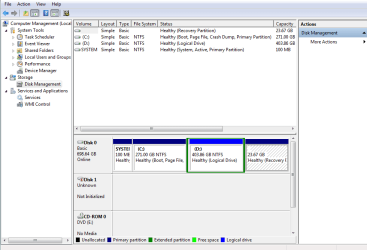
disk 1 is unknown, not initialized, unallocated

Hi,

We haven't heard anything from you on how things are going. Was the computer service point able to recover the data using FileScavenger?

Now I have some good news for you. After a relentless Google search, exactly two years back one user had reported that when Partition Wizard reported a bad disk, could not find the partition, he cancelled the process and then tried MiniTool Power Data Recovery which recovered all the files for him intact. Download free data recovery software and data recovery boot disk from Power Data Recovery.

At that point of time it was totally free but now the free version can only retrieve 1GB of data.

This does confirm that there is a possibility of recovering the data using other Data Recovery Software in this situation.

Based on this, I would suggest the following:

If the FileScavenger did not recover any data, ask them to try the demo version of EasyRecovery Professional.

The advantage as I had already reported in my post #75 is immediately after starting the scan, the left side pane shows the files recoverable as the scan progresses. So let them run the scan for an hour. They can then cancel the scan. You can view whether your photos show up and if it does, then take your drive to your friend who has the licensed version, run the scan fully and then copy all that to an external drive.

Once again, I wish you all good luck.

EDIT: I saw your post after posting. The posts crossed.Try the above.
 

My Computer My Computer

OS
Windows 7 Home Premium 32 bit
With the new board, let them run Partition Wizard. If it still reports bad disk or even unallocated, let them try EasyRecovery Professional.

If it does not show it as a bad drive or unallocated,( i.e., the replaced card has only made the situation worse) go back to the old board and check.( Honestly, I never thought they would change the HDD card. Results may be unpredictable depending upon how matching that card is or not.)

The effort is to get it back to the previous condition.

Once it is ensured, try EasyRecovery as suggested.
 
Last edited:

My Computer My Computer

OS
Windows 7 Home Premium 32 bit
They say they try the easy recovery professional but that it doesn't even show my drive. After changing the board, he say no luck. I ask whether its the same thing when I brought it in to him, he say yes ( unallocated, not initialize, showing as 2tb, plug in show that there is a drive but does not recognize it, light still on)

Now, I'm worried if I keep on trying all these stuff will I be making it worse? Because if so, should I just send it in to a company, I don't want to do all this stuff to it and make it worse and it's harder for them to recover the data.
I just can't believe that running recovery program didn't recover anything

I really don't know what else to do. What happen to the person that you research? Same problem as mine? Also, when is it that you CAN NOT recover data? Is it my case?

Just want to say thank you again for going out more then you did to try to help me. Can't thank you enough even tho I didn't recover anything "yet". Lol, there is still hope right? Hahahah
 

My Computer My Computer

Computer type
PC/Desktop
OS
window 7
1. Rarely ever two cases can be alike in all respects and that is what makes data recovery at home a tiresome task. ( There is another OP here trying all sorts of Recovery programs to retrieve the data and yet another with a "Bad disk" and at last count, he was scanning with Partition Wizard. Hasn't yet returned.)

The point I caught after reading the successful OP's experience was that PW did show it as a bad drive and still he managed to retrieve all data. .( In his case, it showed the correct capacity.)

Can't Access External Hard Drive - MajorGeeks Support Forums

I wish I had seen this thread earlier. I would have then stopped you from handing it over to a computer service point and asked you to straightaway try EasyRecovery on your friend's computer.

2. Now what is to be done? Ask them to put it back as it was and sit with them and check it still shows in Windows Disk Management , the way it was in your screenshot at post #4. Then give the drive to your friend to try EasyRecovery.

3. As long as there is no mechanical damage, and you can feel the platters spinning inside without making any creeking noises, the data can easily be retrieved by a competent Professional Data Recovery agency. If you want to go that route, raise your query under General Discussions subforum here as to who that could be there in U.S.A.
 

My Computer My Computer

OS
Windows 7 Home Premium 32 bit
When you say feel it spinning, I don't recall it vibrating like a normal external hard drive. It makes light beeping sound when I plug it in and ones the computer see the drive , the beeping sound stop and the computer say the new software successful instal but then again not showing under my computer.

Are you saying they might have damage it even more by opening it, or switching hard drive board?

If platter not spinning, it means yhe hard drive is definitely DONE?
 

My Computer My Computer

Computer type
PC/Desktop
OS
window 7
If everything shows up as it was before after putting back the original HDD board, no damage has been done.

There would be no mechanical damage, even if they had changed the board.

In your case, I would think mechanically your drive is still good.

Ask your friend to run EasyRecovery.
 

My Computer My Computer

OS
Windows 7 Home Premium 32 bit
They have ran the EasyRecovery and they say my drive don't even show under that program. Not sure what they meant.

But now 2 things for clarification:
If I keep running all these program on it and do all these stuff to it, will I make matter worse?
Second, like I said, the drive make no vibration and i don't feel it spinning, just light beeping in the beginning. Does that mean its damage? I'm not sure if I am using the terms correctly. I get confuse with damage ,defective and corrupted. I don't even know what mines is consider.

I'm getting he drive back tomorrow. If trying all these program on the drive don't make matter worse then I try what you say. But if I'm making it worse by doing more damage then it is ( at least that's what I'm thinking) then i think I'll just send it in and hope I didn't do much damage and they can recover my data

Also. I might have ask you this, but if I send it to these company , what are the chances they can recover my stuff based on what happen to my drive? After all if I'm paying maybe $1000+ ?
 

My Computer My Computer

Computer type
PC/Desktop
OS
window 7
Please get the drive tomorrow, connect it to your PC, run Partition Wizard. Post a screenshot of how it looks like. If it looks same as before , go ahead with Easy Recovery. You yourself can download the demo version and try it. That process will not damage your drive in any way. So do not be overanxious.
 

My Computer My Computer

OS
Windows 7 Home Premium 32 bit
Hi jumanji,
I finally got my drive back. Should I run the recovery program you posted? Or can you post me the link you try with EasyRecovery?
 

My Computer My Computer

Computer type
PC/Desktop
OS
window 7
Hi,
First run Partition Wizard and post a screenshot so that we can confirm that the drive is as it was before - as in your screenshot at post #30
 

My Computer My Computer

OS
Windows 7 Home Premium 32 bit
It looks the same, do I run the scan again

Not sure if this matter, my comp is a vista not window 7
 

My Computer My Computer

Computer type
PC/Desktop
OS
window 7
hi jumanji,

i dont think i should continue right?
 

Attachments

  • pic 10.jpg
    pic 10.jpg
    148.8 KB · Views: 49

My Computer My Computer

Computer type
PC/Desktop
OS
window 7
1.You said in Partition Wizard the external hard disk looked exactly as before.

For my own satisfaction and information, I would like to see the screenshot.
(Your previous screenshots were nice but now it is different and difficult to read though not impossible.)

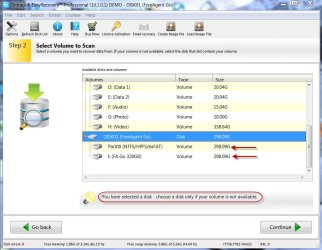
2. You have selected the Disk. And it clearly says select the disk only if volumes are not available. So if volumes are available, select volumes and check.

11-05-2013 22-17-51.jpg

3. As one who had never used that software, I dare not give an opinion on the error message and give you a positive or negative answer. This is a commercial software. They also do Data Recovery Service as I gather from their website. So when you use the demo version, they may blow up even non-fatal minor inconsistencies and redirect you to their business. ( This is purely my perception :)) Since your friend has the licenced version you may try it on his/her PC. If you still get that message, I would like you to throw it open for other senior and capable experts here for their opinion, especially those resident in your country and in the know. ( I was trying to read some reviews on it, but couldn't find any time.)

In that direction, I would advise you to raise this issue, perhaps in the General Discussion sub-forum/Software sub-forum ( let the moderators decide where it should go after you post :D) where it will get their attention. You may refer your last post in this thread or this thread itself there.
EDIT: If you are not averse to spending on a data recovery service, you may seek your opinion stating that fact since it will have a major bearing on any advice offered.
 

My Computer My Computer

OS
Windows 7 Home Premium 32 bit
Hi all,

I think I'm suffering the same fate as Jenny. I recently bought a Samsung 1TB M3 external HDD and now whenever I connect it, it makes a quiet clicking noise for a few seconds. The computer recognises it's being plugged in, however it doesn't appear in My Computer. When I go to Computer Management, under Device Manager it only shows as Disk Drive and in Disk Management it comes up as "Disk 1, Unknown, Not Initialized".

I've uninstalled the device, then plugged it back in. The "USB Mass Storage" driver installs but then the "Samsung Portable USB Storage" always fails.

Anyone have anything that could possibly help please? I have a lot of data on there, but it's only the pictures that I really am after!
 

Attachments

  • Capture.PNG
    Capture.PNG
    22.4 KB · Views: 5

My Computer My Computer

Computer type
PC/Desktop
OS
Windows 7 Pro x64
I still haven't fix it yet, im still debating whether to send it in to professional. Iraajv does your show the correct mb? My drive is a 500 mb storage, but it shows as 2tb.
 

My Computer My Computer

Computer type
PC/Desktop
OS
window 7
same problem with my sata hdd

guys from yesterday same problem with my HDD I tryed all the recovery method told above no use:rolleyes:
 

My Computer My Computer

Computer type
PC/Desktop
Computer Manufacturer/Model Number
HP
OS
WIN 7 64BIT
CPU
I3
Memory
3GB
Hard Drives
360
Antivirus
AVAST
Browser
CROME
is this problem solved yet? I have the same problem with my WD 1T hardisk, my gosh it took me 3 days to quick scan no result at all~ Pls tell me is it work dont want to waste another 4 days to do full scan~~ :(
 

My Computer My Computer

Computer type
Laptop
Computer Manufacturer/Model Number
sony E Series VPCEG18FG
OS
windows 7
CPU
i5 -2410 M 2.3Ghz
Memory
4GB
Hard Drives
500GB
Hi grazcy,

Welcome to SevenForums.

Please start a new thread and explain your problem ab-initio including what all you have tried to resolve the issue and the results.

Nobody - that includes me the principal actor here in this thread :) - is going to look into the old thread and check how similar is your problem to that of this thread starter and give you any helping hand. Even I do not remember what all has happened in this thread. I only have a vague memory of it. Yes, it was a long thread.

When you start a new thread and explain your problem in detail, you are likely to get more attention and help from the experts here.
 

My Computer My Computer

OS
Windows 7 Home Premium 32 bit
I wanna know is jenny problem solved?
 

My Computer My Computer

Computer type
Laptop
Computer Manufacturer/Model Number
sony E Series VPCEG18FG
OS
windows 7
CPU
i5 -2410 M 2.3Ghz
Memory
4GB
Hard Drives
500GB
Back
Top