disk 1 is unknown, not initialized, unallocated

Internal drive? External drive? Please mention the exact model name/Number - something like My book/Passport/WDBUZG0010BBK-EESN. Read it from the drive label.

Was it working earlier? From when did it became inaccessible?

Was it formatted as a GPT drive or MBR?

On a hinch, I would say your WD drive appears to be a goner but let us get all the details.

Why are you taking a camera snap shot? Can you not take a snapshot with Windows Snipping tool and upload it?

Also post a screenshot of Windows Disk Management. http://www.sevenforums.com/tutorials/274797-disk-management-post-screen-capture-image.html

Snipping Tool: How to Use the Snipping Tool in Vista

With all the above info, I would suggest that you start a new thread. Nobody looks into an old thread. Further I am off from Seven Forums for the next one or two months and a new thread will be visible to many members who can help, even if I am unable to look into it. ( If you specifically ask for jumanji, others may abstain :D )
 

My Computer My Computer

OS
Windows 7 Home Premium 32 bit
What happened to Jenny?

Did Jenny ever solve the problem with her hard disk? It's been 3 years since that happened but I don't recall reading a post where she reported of the problem being solved. Anyway I came across this post just a couple days ago as a 1 TB disk developed the same problem as described in this forum. It was the internal disk of a ALL IN ONE computer which had it's LCD screen damaged. I took the disk out of the computer and attached it to an external USB cable system and connected to another computer to copy the files. To my surprise, the disk showed up as unallocated on the other computer and this is how I came to this thread. I might mention that I tried everything Jumanji (very helpful person) posted without success as the disk was conected externally. Once I connected the disk internally to the other computer everything worked! The hard disk was back to normal, all partitons were recovered and restored with all files in them. Used the MiniTool Partition Wizard. Also through this thread I used the MiniTool Power Data Recovery successfully to recover all files on a damaged (turned RAW) 2 GB micro SD memory card.

Many thanks!
 

My Computer My Computer

Computer type
Laptop
Computer Manufacturer/Model Number
Dell
OS
Windows 7 Professional 64 bits
CPU
Core i5 2.5 GHz
Motherboard
Intel
Memory
4 GB
Graphics Card(s)
Intel
Hard Drives
650 GB
Antivirus
AVG
Browser
Chrome, Edge, Mozilla
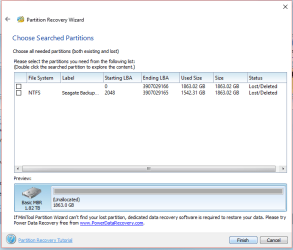
I am facing the same issue...I followed all the steps posted above but my partition wizard displays two sections. What shall I do?
 

Attachments

  • partition wizard.PNG
    partition wizard.PNG
    16.6 KB · Views: 48

My Computer My Computer

Computer type
Laptop
Computer Manufacturer/Model Number
HP
OS
Windows 10 Home Single Language
Don't do anything. Just cancel and close Partition Wizard. In all likelihood we can recover the data, That is my first instinct on seeing the screenshot.

Please start a new thread giving full details of the HDD and also post a screenshot how your drive looks like in Windows Disk Management. Follow the guidelines here. http://www.sevenforums.com/tutorials/274797-disk-management-post-screen-capture-image.html

I shall see you in the new thread. ( Will take sometime )
 

My Computer My Computer

OS
Windows 7 Home Premium 32 bit
Nice to see the post here. With the help of Jumanji, many disk partition problems can be fixed I think. :)
 

My Computer My Computer

Computer type
PC/Desktop
OS
Windows 7 Ultimate x64
jumanji is neither a wizard nor a blizzard :D . Please check your other thread. ( was out of station last three days but still was following that thread on my mobile )
 

My Computer My Computer

OS
Windows 7 Home Premium 32 bit
Back
Top