Dual Boot - Windows 7 and Linux

How to Correctly Setup a Dual Boot with Windows 7 and LinuxMint13

   Information
Historically, dual booting Windows and a Linux distribution was fraught with risks due to the propensity of the Linux GRUB loader to interfere with and corrupt the Windows bootloader. This often left the Windows installation unbootable, which then required several complex steps in order to rescue the Windows installation.

In recent distributions, the Linux GRUB loader has now been updated to GRUB2, which tends not to have an adverse effect on the Windows bootloader. This tutorial will show you the easiest method to successfully dual-boot Windows 7 and Linux, using the LinuxMint13 Cinnamon distribution as an example. This method has also been tested on, and works with, Ubuntu 12.04 and Fedora 17.

Please note the goal of this tutorial is to show you how to dual-boot correctly without compromising your Windows 7 installation. Whilst the fundamentals of installing a Linux distribution are briefly covered for the purposes of this tutorial, more detail on how to use Linux are outside its scope and will not be covered. For more information on using Linux distributions, you are welcome to visit the LinuxMint, Ubuntu or Fedora sites.

   Warning
Note that this technique will only work on a computer that uses Legacy BIOS - it will not work on a computer that uses UEFI.

Please take careful note : If you currently:

  • Use, or plan to use, Windows Bitlocker Drive Encryption, or

  • Require access to OEM installation recovery functionality,
then you cannot use the methods outlined in this tutorial, and should not proceed any further.

The reasons for this are that this dual-boot technique requires you to delete the 100MB System Reserved partition. Without this partition, both Bitlocker Drive Encryption, and the Recovery functions employed by OEM's accessed during Windows boot, will no longer work.


:note: Requirements:
In order to undertake this tutorial, you will need the following :

Hardware:-

  • 1Gb or larger USB thumb/flash drive (to hold your bootable Partition Wizard and LinuxMint13 installation)
Software:-


Knowledge or skills:-

  • Creating bootable versions of Partition Wizard and LinuxMint13 on either CD, DVD or USB

  • Booting a computer from either a CD/DVD or USB drive.

  • Manipulating (deleting, moving and re-sizing) Windows NTFS disk partitions


:note: Before you begin : Insurance against mistakes

Mistakes made during partition manipulation can render your system unbootable. In order to protect yourself against such inadvertent mistakes, I strongly recommend you create an image of your current system prior to commencing with this tutorial.

Please refer to either of this tutorial for help on imaging your system:http://www.sevenforums.com/tutorials/73828-imaging-free-macrium.html
In the event that you do make a mistake, the image you created will allow you to revert to your original installation with a minimum of fuss. This step is important, especially for novices - don't be tempted to skip it.


Part A - Create the bootable Partition Wizard and Linux USB

YUMI can support several bootable ISO's concurrently, so its advantageous to install both Partition Wizard and LinuxMint13 to the USB flash drive, one after the other.

Step 1
Download YUMI, Partition Wizard and LinuxMint13 from the links provided earlier.

Step 2
Insert your USB flash drive into the computer, and then run YUMI.

Step 3
On the YUMI interface, do the following:

- select the drive letter corresponding to the USB flash drive
- place a tick in the Format Drive box (the USB flash will be formatted to FAT32)
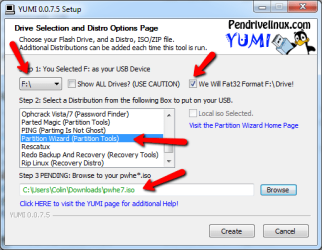
- scroll down the distribution list and select Partition Wizard (Partition Tools)
- browse to locate and select the Partition Wizard ISO you downloaded earlier

The completed panel should look very similar to that shown below.m1.png
Step 4
Click the Create button to install Partition Wizard to the USB flash drive.

   Warning
Take note of the format warning message that is displayed - the entire USB flash drive will be formatted to the required FAT32 format, so double check to see that the correct USB device is selected.

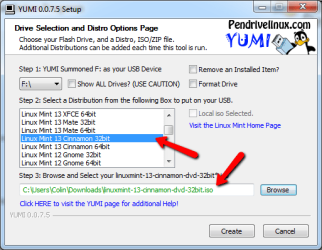
Once complete, you will be asked whether you wish to install another ISO/Distro. Click Yes, and then select the LinuxMint13 ISO as shown below. Clickm2.png
Click the Create button to write the install LinuxMint13 to the USB flash drive. Once complete, exit YUMI. For ease of reference, we will simply refer to this flash drive as the YUMI flash drive from here on in.

You have now completed Part A of the tutorial.


Part B - Manipulate the Windows 7 Partitions

Prior to installing LinuxMint13, you need to make changes to the existing Windows 7 partitions. Specifically, you need to perform these steps:

  1. Copy the Windows boot manager to the System C: partition
  2. Delete the 100MB System Reserved partition
  3. Resize the System partition (C: drive) into the unallocated space after deleting the System Reserved partition
  4. Create unallocated space for the LinuxMint13 installation by shrinking the Data partition (F: drive)
All this can be accomplished using EasyBCD, and the Partition Wizard installation on the USB flash drive.

If you are unfamiliar with Partition Wizard, then I recommend reading this tutorial before proceeding further:http://www.sevenforums.com/tutorials/93322-partition-wizard-use-bootable-cd.html
   Note
For the purposes of this tutorial, we will assume you have a reasonably common Windows 7 partition layout, as shown below, and comprising of:

  • Primary 100MB System Reserved partition, and

  • Primary System partition (C: drive), and

  • Logical Data partition (F: drive)
pw_start.png
   Tip
If your partition layout is different, and you aren't sure how to proceed, then reply to this tutorial seeking advice. Be sure to include a screen capture of your Windows 7 disk management screen that clearly shows your partition layout.


Step 1 - Copy boot manager to System C: partition
Install EasyBCD to your computer. Run EasyBCD and now follow the very simple steps explained in the short tutorial below, to copy the Windows 7 boot manager from the 100MB System Reserved partition to the System C: partition:http://www.sevenforums.com/tutorials/209885-bootmgr-move-c-easybcd.html
Once you have performed this step, close EasyBCD.

Check to ensure that the boot manager has been copied correctly by examining the partition layout in the Windows Disk Management screen. Your System C: partition status should now include the Boot option under the partition status, as shown in the example below.m3.png
Close the Disk Management screen when you have verified that the Boot status is correct.

Step 2 - Delete the 100MB System Reserved partition
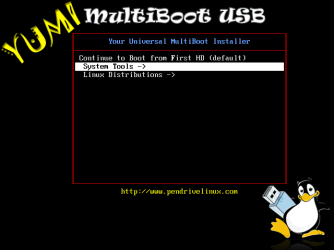
Insert the YUMI flash drive into your computer, and boot from it. Run Partition Wizard by selecting it from the System Tools menu, as shown below.yy1.png
yy2.png
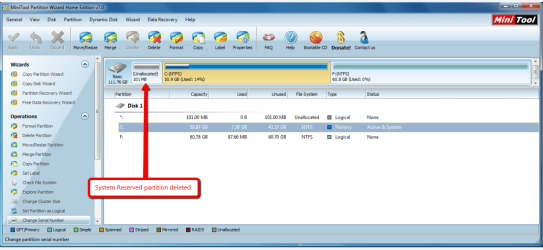
Once Partition Wizard has opened, delete the 100MB System Reserved Partition - you will now have 100MB unallocated space sitting to the left of your System partition, as shown below.pww2.png
Step 3 - Resize the System partition into the unallocated space
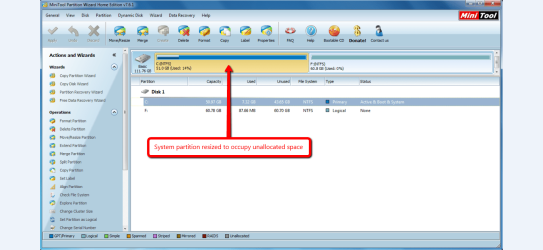
Stretch the System partition to the left, into the unallocated space created in step 2 above, so that you only have a System partition and Data partition as shown below.pww3.png
Step 4 - Create unallocated space for the LinuxMint13 installation
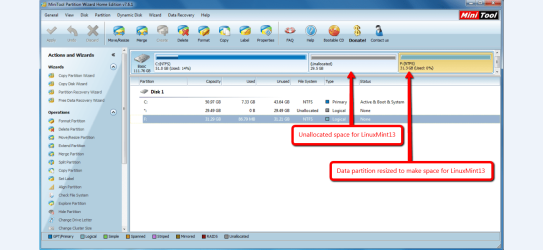
Shrink the Data partition to the right, thereby creating unallocated space between the System partition and Data partition, as shown below. This unallocated space is where LinuxMint13 will be installed too.pww4.png
   Tip
You can also shrink the System partition, or use combinations of resizing both the System partition and Data partition to create the unallocated space for the LinuxMint13 installation. LinuxMint13 requires a minimum of 8.6GB, but I usually assign more space for updates, data etc.

Reboot your system to complete the partition manipulation.

You have now completed Part B of the tutorial.


Part C - Install LinuxMint13

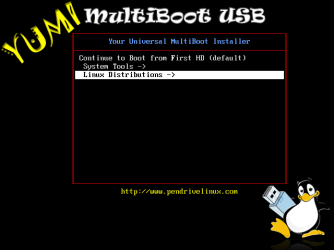
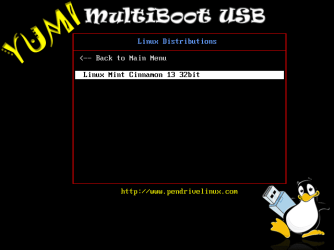
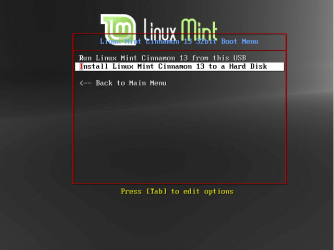
Insert the YUMI flash drive into your computer, and boot from it. Run the LinuxMint13 boot menu/installer by selecting it from from the Linux Distributions menu, as shown below.lx00.png
lx01.png
From the LinuxMint boot menu, choose to install to a hard disk, as shown below.lx02.png
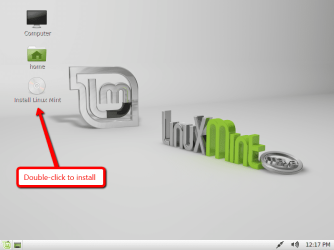
Once the LinuxMint13 desktop loads, select the Install Linux Mint option by double-clicking it, as shown below.lx03.png
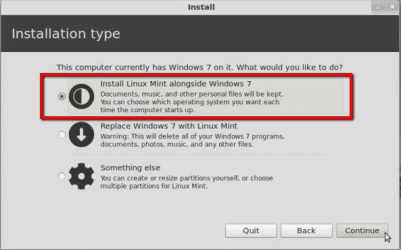
Follow the the prompts to select your language. When prompted to select your installation type, be sure to choose the option labelled Install Linux Mint alongside Windows 7, as shown below.lx1.png
LinuxMint13 will now be installed into the unallocated space created in PART B of the tutorial. Whilst installation is proceeding, follow the remainder of the prompt screens to specify your locality, keyboard layout and machine name and user account details.

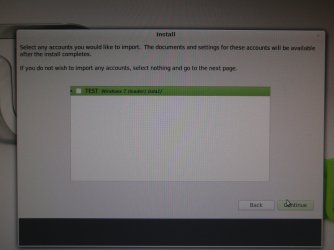
You will be prompted as to whether you wish to import any existing Windows 7 account details (contacts, favorites, bookmarks etc.) into the LinuxMint13 installation (as shown below) - highlight the listed Windows 7 option shown and and click Continue to do that, or simply click Continue to skip this step.PA280042.jpg
Once installation has been completed, you will be prompted to reboot your system as shown below.lx09.png
Once your system reboots, you will be presented with the Linux GRUB screen - don't panic, this is perfectly normal. PART D of this tutorial will show you how to easily customise your boot order.

You have now completed PART C of the tutorial.


Part D - Customise the Windows 7/LinuxMint13 boot order

   Note
The boot screen images in this part of the tutorial use Ubuntu as an example - this is simply for convenience for the tutorial. The boot screens for LinuxMint13 will look very similar, obviously with the word Ubuntu replaced by the word LinuxMint13.

EasyBCD allows you to easily customise the boot sequence so that the familiar Windows boot screen is the screen from which you select the operating system to boot.

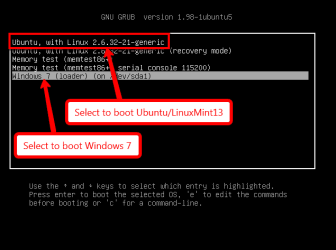
When you first boot your PC after installing LinuxMint13, you will be presented with the GRUB screen, as shown below.boot1.png
Select the Windows 7 option to boot in Windows as normal, and then run EasyBCD.

Now complete the following steps :

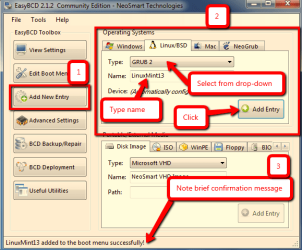
Step 1 - Add the LinuxMint13 boot entry
Replicate the steps shown in the image below to add the LinuxMint13 boot entry. Take note of the confirmation message that appears briefly at the bottom of the panel.ecb1.png
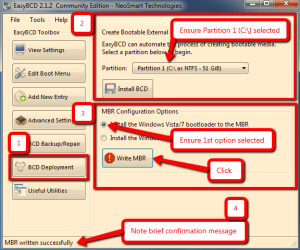
Step 2 - Add the Windows 7 boot entry
Replicate the steps shown in the image below to write the Windows 7 bootloader.Take note of the confirmation message that appears briefly at the bottom of the panel.ecb2.png
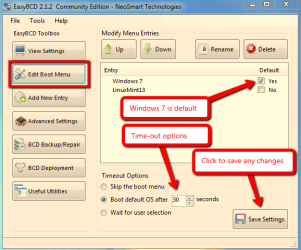
Step 3 - Review the Windows 7 / LinuxMint13 boot sequence
Review the default boot options, and make any changes if you wish.ecb3.png
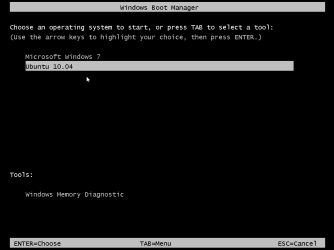
Close EasyBCD and reboot your computer. You will now see the Windows 7 boot screen with the Windows 7 and LinuxMint13 boot options (Ubuntu is shown in this example).boot2.png
If you select the Windows 7 option, your computer will boot into Windows 7 as normal. If you select the LinuxMint13 option, then the GRUB boot screen will appear, and from that you select the LinuxMint13 option to boot it, as shown below.boot1.png
You have now completed the entire tutorial.

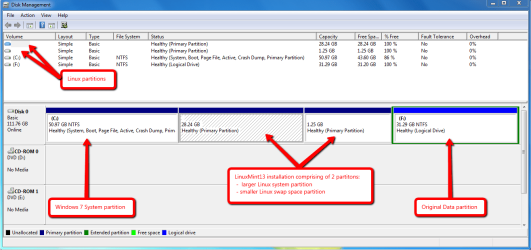
This is how the dual-boot installation look in Windows 7 Disk Manager - note the blank entries marked with arrows : Windows cannot read the format of Linux partitions.dm1.png
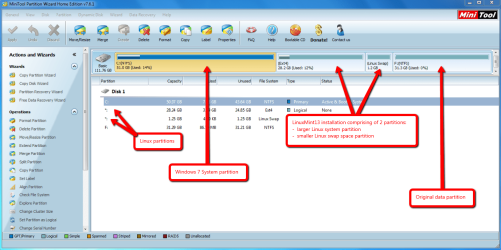
And this is how the dual-boot installation looks in Partition Wizard.pwx.png
   Tip
If you ever wish to remove the LinuxMint13 partitions, simple delete them using Partition Wizard - your Windows installation will be unaffected since the boot manager still resides on the first partition of the disk. Be sure to reset the boot entry using EasyBCD for aesthetics using Step 4 and Step 5 here.


Thats all there is to it : dual-booting Windows 7 and LinuxMint13 the easy way!

Regards,
Golden

 
Last edited:
Remove System Reserved allows the Windows bootloader to show the Linux boot option. I could never get it to do that until I removed System Reserved.
 

My Computer My Computer

Computer type
PC/Desktop
Computer Manufacturer/Model Number
Golden Mk. I.4
OS
Windows 10 Pro x64 ; Xubuntu x64
CPU
Intel i7 860 @ 2.80 GHz O/C'ed to 4.0GHz
Motherboard
Gigabyte P55A-UD3R Rev.1. Award BIOS F13
Memory
16GB Corsair Vengance DDR3 @ 661 MHz Dual Channel (9-9-9-24)
Graphics Card(s)
EVGA NVidia GTX 560 1024MB
Sound Card
Realtek Integrated
Monitor(s) Displays
Dual Samsung SyncMaster 2494HS
Screen Resolution
1920*1080 and 1920*1080
Hard Drives
1*Samsung 840 EVO 120GB SSD;
1*OCZ Vertex 2 60GB SSD;
2*Samsung F3 SpinPoint 1TB in RAID0;
1*Samsung F1 SpinPoint 1TB;
2*Western Digital 1TB External USB 3.0
1*Western Digital 500GB External USB 3.0
1*Seagate 500GB External USB 2.0
PSU
Thermaltake ToughPower QFan 750W
Case
Thermaltake Element S VK60001W2Z
Cooling
Corsair H60 Water Cooling, 2*230mm and 2*80mm case fans
Keyboard
Logitech G110
Mouse
Logitech MX518
Remove System Reserved allows the Windows bootloader to show the Linux boot option. I could never get it to do that until I removed System Reserved.

Very true :)
All Linux would be able to do is install along side and that is way too cozy ;)
 

My Computer My Computer

Computer type
PC/Desktop
Computer Manufacturer/Model Number
Custom assembled by me :}
OS
Win-7-Pro64bit 7-H-Prem-64bit
CPU
i7-5930K 2nd i9-9940x both water blocked VRM's too
Motherboard
ASUS SABERTOOTH X99 2nd ASUS x299 Apex
Memory
Trident-z 3200C14 2nd Trident-z 3600C16
Graphics Card(s)
EVGA 1080ti ftw3 2nd Titan Xp both water blocked
Sound Card
Built-in Realtek
Monitor(s) Displays
1-AOC G2460PG 24"G-Sync 144Hz/ 2nd 1-ASUS VG248QE 24" 144Hz
Screen Resolution
1920 x 1080 144Hz
Hard Drives
2-Samsung M.2 Evo & Evo Plus
2-Samsung 850 EVO 500GB SSD's/ 3-2.5 W.D. Black 1tb-&3-1tb/3-3.5 WD Black 1tb hdd's
PSU
EVGA SuperNOVA 1000-P2 2nd 1200-P2
Case
2-Corsair Obsidian Series 450D Black ATX Mid Tower
Cooling
Custom water loops
Keyboard
Logitech G710+/ 2nd Logitech G910
Mouse
2-RedDragon M901 Perdition 16400 dpi Gaming mouse = wired
Internet Speed
Comcast Ping 19ms 89.31mbps download speed 6.12mbps upload
Antivirus
Malwarebytes Pro/ Superantispyware Pro
Browser
FireFox & Pale moon
Other Info
2nd ASUS X299 Apex/Intel i9-9940x with Custom water loop/7H-Prem-x64/Corsair 450D case/Ram Trident-z 3600C16 4x8gb / Samsung970Evo plus 500gb SSD/Dual ssd EZ swap evo/PSU EVGA SuperNova 1200w-P2 80+Platinum/GPU Titan Xp /8-ML-140 on push-pull on 2-280GTX rads
Thank you both very much.
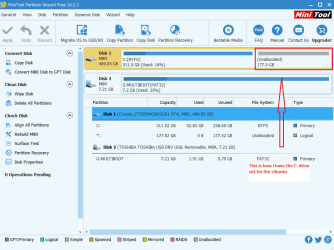
Could you, pretty please, also comment on my confusion in the second question and the screenie.
As well as implications for (not imminent) need to install windows 10 and triple-boot.
 

My Computer My Computer

Computer type
Laptop
Computer Manufacturer/Model Number
Lenovo thinkpad 430s
OS
Win 7 Pro 64-bit pro, win10 pro 1903, linux mint 18.3
Memory
12g
Graphics Card(s)
Nvidia
Sound Card
Realtek
Hard Drives
Western digital spinner
Cooling
Efficient builtin fans, stands on airy lego-like structure
Mouse
Logitec wireless
Browser
SeaMonkey current buid on 7 a, Opera v12 on win7, edge on 10
Other Info
Win7sp1 pro, win10-1903 pro, linux mint 18.3 triple boot

My Computer My Computer

Computer type
PC/Desktop
Computer Manufacturer/Model Number
Custom assembled by me :}
OS
Win-7-Pro64bit 7-H-Prem-64bit
CPU
i7-5930K 2nd i9-9940x both water blocked VRM's too
Motherboard
ASUS SABERTOOTH X99 2nd ASUS x299 Apex
Memory
Trident-z 3200C14 2nd Trident-z 3600C16
Graphics Card(s)
EVGA 1080ti ftw3 2nd Titan Xp both water blocked
Sound Card
Built-in Realtek
Monitor(s) Displays
1-AOC G2460PG 24"G-Sync 144Hz/ 2nd 1-ASUS VG248QE 24" 144Hz
Screen Resolution
1920 x 1080 144Hz
Hard Drives
2-Samsung M.2 Evo & Evo Plus
2-Samsung 850 EVO 500GB SSD's/ 3-2.5 W.D. Black 1tb-&3-1tb/3-3.5 WD Black 1tb hdd's
PSU
EVGA SuperNOVA 1000-P2 2nd 1200-P2
Case
2-Corsair Obsidian Series 450D Black ATX Mid Tower
Cooling
Custom water loops
Keyboard
Logitech G710+/ 2nd Logitech G910
Mouse
2-RedDragon M901 Perdition 16400 dpi Gaming mouse = wired
Internet Speed
Comcast Ping 19ms 89.31mbps download speed 6.12mbps upload
Antivirus
Malwarebytes Pro/ Superantispyware Pro
Browser
FireFox & Pale moon
Other Info
2nd ASUS X299 Apex/Intel i9-9940x with Custom water loop/7H-Prem-x64/Corsair 450D case/Ram Trident-z 3600C16 4x8gb / Samsung970Evo plus 500gb SSD/Dual ssd EZ swap evo/PSU EVGA SuperNova 1200w-P2 80+Platinum/GPU Titan Xp /8-ML-140 on push-pull on 2-280GTX rads
Hello Colin I am going to do this and have downloaded the 64bit version of 18.2 (Cinnamon) is this ok to use as opposed to the 32bit version ie is there an advantage to the 32bit version for some reason and do I have to use EasyBCD as I have a friend who installed this on his machine and we cannot uninstall it - it has been used to arrange the boot order and is proving to be a battle to uninstall.
 

My Computer My Computer

Computer type
PC/Desktop
Computer Manufacturer/Model Number
Own build (new) Desk1 / Asus ROG Win 7 / Desk2 1st build
OS
Desk1 7 Home Prem / Desk2 10 Pro / Main lap Asus ROG 10 Pro 2 laptop Toshiba 7 Pro Asus P2520 7 & 10
CPU
Desk1 i5 3750K / Laptop i7 GTX 860M / Desk2 i5 2500
Motherboard
Desk1 Asus P877-V / Desk2 Gigabyte H67 UD3H / Laptop ?
Memory
Desk1 8GB (1866) / Desk2 16GB (1333) / Laptop 8Gb DDR3
Graphics Card(s)
Desk 1& 2NVidia GTX 650 & Laptops on board Intel
Sound Card
Desk 1 & 2 -XONAR DG Realtek High Def audio Laptop
Monitor(s) Displays
Desk 1 Benq HD 2450 / Desk2 Philips 24" / Laptop 17.5"
Screen Resolution
1920x1080 D1 & D2 & Laptop 1
Hard Drives
Desk1 Samsung 120GB 830 SSD
Asus ROG 256GB 850 Pro SSD
Desk2 Samsung 840 256 SSD
Toshiba 120GB EVO
PSU
Desk 1 Corsair HX 1050/ Laptop ? / Desk 2 Corsair HX 650
Case
Desk 1 Cooler HAF XM ? Toshiba laptop / Desk2 Coolermaster
Cooling
Fans on all Desk1 -2 Desk2 - all Coolermasters 5 Laptop ?
Keyboard
Desk 1 MS Sidewinder X6 Desk 2 MS Sidewinder X 4
Mouse
Desk 1&2 - Gigabyte MS 900 gamer - laptop - Logitec wireless
Internet Speed
ADSL2+
Other Info
One other Desktop (tester) and spare Toshba laptop both with SSD's
Running Kaspersky 2016 ISS on all machines config'd identically
Logitec audio stereo systems on each machine (x3)
Canon MG5250MFC
Router/modem TP-Link running WPA2SK
If I were you, I would use a virtual machine.
 

My Computer My Computer

Computer type
PC/Desktop
Computer Manufacturer/Model Number
Golden Mk. I.4
OS
Windows 10 Pro x64 ; Xubuntu x64
CPU
Intel i7 860 @ 2.80 GHz O/C'ed to 4.0GHz
Motherboard
Gigabyte P55A-UD3R Rev.1. Award BIOS F13
Memory
16GB Corsair Vengance DDR3 @ 661 MHz Dual Channel (9-9-9-24)
Graphics Card(s)
EVGA NVidia GTX 560 1024MB
Sound Card
Realtek Integrated
Monitor(s) Displays
Dual Samsung SyncMaster 2494HS
Screen Resolution
1920*1080 and 1920*1080
Hard Drives
1*Samsung 840 EVO 120GB SSD;
1*OCZ Vertex 2 60GB SSD;
2*Samsung F3 SpinPoint 1TB in RAID0;
1*Samsung F1 SpinPoint 1TB;
2*Western Digital 1TB External USB 3.0
1*Western Digital 500GB External USB 3.0
1*Seagate 500GB External USB 2.0
PSU
Thermaltake ToughPower QFan 750W
Case
Thermaltake Element S VK60001W2Z
Cooling
Corsair H60 Water Cooling, 2*230mm and 2*80mm case fans
Keyboard
Logitech G110
Mouse
Logitech MX518
Ok might just give that try when I get this broadband fixed - NBN say no more eh?:sarc:
 

My Computer My Computer

Computer type
PC/Desktop
Computer Manufacturer/Model Number
Own build (new) Desk1 / Asus ROG Win 7 / Desk2 1st build
OS
Desk1 7 Home Prem / Desk2 10 Pro / Main lap Asus ROG 10 Pro 2 laptop Toshiba 7 Pro Asus P2520 7 & 10
CPU
Desk1 i5 3750K / Laptop i7 GTX 860M / Desk2 i5 2500
Motherboard
Desk1 Asus P877-V / Desk2 Gigabyte H67 UD3H / Laptop ?
Memory
Desk1 8GB (1866) / Desk2 16GB (1333) / Laptop 8Gb DDR3
Graphics Card(s)
Desk 1& 2NVidia GTX 650 & Laptops on board Intel
Sound Card
Desk 1 & 2 -XONAR DG Realtek High Def audio Laptop
Monitor(s) Displays
Desk 1 Benq HD 2450 / Desk2 Philips 24" / Laptop 17.5"
Screen Resolution
1920x1080 D1 & D2 & Laptop 1
Hard Drives
Desk1 Samsung 120GB 830 SSD
Asus ROG 256GB 850 Pro SSD
Desk2 Samsung 840 256 SSD
Toshiba 120GB EVO
PSU
Desk 1 Corsair HX 1050/ Laptop ? / Desk 2 Corsair HX 650
Case
Desk 1 Cooler HAF XM ? Toshiba laptop / Desk2 Coolermaster
Cooling
Fans on all Desk1 -2 Desk2 - all Coolermasters 5 Laptop ?
Keyboard
Desk 1 MS Sidewinder X6 Desk 2 MS Sidewinder X 4
Mouse
Desk 1&2 - Gigabyte MS 900 gamer - laptop - Logitec wireless
Internet Speed
ADSL2+
Other Info
One other Desktop (tester) and spare Toshba laptop both with SSD's
Running Kaspersky 2016 ISS on all machines config'd identically
Logitec audio stereo systems on each machine (x3)
Canon MG5250MFC
Router/modem TP-Link running WPA2SK
You don't need NBN to run a virtual machine....
 

My Computer My Computer

Computer type
PC/Desktop
Computer Manufacturer/Model Number
Golden Mk. I.4
OS
Windows 10 Pro x64 ; Xubuntu x64
CPU
Intel i7 860 @ 2.80 GHz O/C'ed to 4.0GHz
Motherboard
Gigabyte P55A-UD3R Rev.1. Award BIOS F13
Memory
16GB Corsair Vengance DDR3 @ 661 MHz Dual Channel (9-9-9-24)
Graphics Card(s)
EVGA NVidia GTX 560 1024MB
Sound Card
Realtek Integrated
Monitor(s) Displays
Dual Samsung SyncMaster 2494HS
Screen Resolution
1920*1080 and 1920*1080
Hard Drives
1*Samsung 840 EVO 120GB SSD;
1*OCZ Vertex 2 60GB SSD;
2*Samsung F3 SpinPoint 1TB in RAID0;
1*Samsung F1 SpinPoint 1TB;
2*Western Digital 1TB External USB 3.0
1*Western Digital 500GB External USB 3.0
1*Seagate 500GB External USB 2.0
PSU
Thermaltake ToughPower QFan 750W
Case
Thermaltake Element S VK60001W2Z
Cooling
Corsair H60 Water Cooling, 2*230mm and 2*80mm case fans
Keyboard
Logitech G110
Mouse
Logitech MX518
No I was just mentioning the NBN because it is the bane of my computing at the moment and they think it is the modem gone bad:(
 

My Computer My Computer

Computer type
PC/Desktop
Computer Manufacturer/Model Number
Own build (new) Desk1 / Asus ROG Win 7 / Desk2 1st build
OS
Desk1 7 Home Prem / Desk2 10 Pro / Main lap Asus ROG 10 Pro 2 laptop Toshiba 7 Pro Asus P2520 7 & 10
CPU
Desk1 i5 3750K / Laptop i7 GTX 860M / Desk2 i5 2500
Motherboard
Desk1 Asus P877-V / Desk2 Gigabyte H67 UD3H / Laptop ?
Memory
Desk1 8GB (1866) / Desk2 16GB (1333) / Laptop 8Gb DDR3
Graphics Card(s)
Desk 1& 2NVidia GTX 650 & Laptops on board Intel
Sound Card
Desk 1 & 2 -XONAR DG Realtek High Def audio Laptop
Monitor(s) Displays
Desk 1 Benq HD 2450 / Desk2 Philips 24" / Laptop 17.5"
Screen Resolution
1920x1080 D1 & D2 & Laptop 1
Hard Drives
Desk1 Samsung 120GB 830 SSD
Asus ROG 256GB 850 Pro SSD
Desk2 Samsung 840 256 SSD
Toshiba 120GB EVO
PSU
Desk 1 Corsair HX 1050/ Laptop ? / Desk 2 Corsair HX 650
Case
Desk 1 Cooler HAF XM ? Toshiba laptop / Desk2 Coolermaster
Cooling
Fans on all Desk1 -2 Desk2 - all Coolermasters 5 Laptop ?
Keyboard
Desk 1 MS Sidewinder X6 Desk 2 MS Sidewinder X 4
Mouse
Desk 1&2 - Gigabyte MS 900 gamer - laptop - Logitec wireless
Internet Speed
ADSL2+
Other Info
One other Desktop (tester) and spare Toshba laptop both with SSD's
Running Kaspersky 2016 ISS on all machines config'd identically
Logitec audio stereo systems on each machine (x3)
Canon MG5250MFC
Router/modem TP-Link running WPA2SK
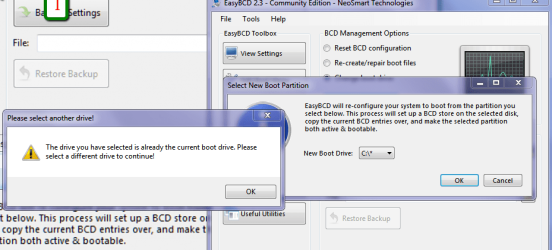
Hello Colin now mate I have got to the EasyBCD part and am stuck with what is in the pic I am asking you because I don't know if Wolfgang is still around as you know we haven't heard from him for some time.

So far I have made the Yumi stick and I have got Ubuntu on it as I prefer it to Mint. The partitioning bit I have already done as I have Partition Wizard already on my machine.

Now I am also asking if I am on the right track because I tried this on my tester machine No1 - it booted to Ubuntu and then after asking me to reboot the whole machine has become unusable I cannot even get into the BIOS and I don't want my 7 test machine No 2 ending up in the same situation.
 

Attachments

  • BCD.PNG
    BCD.PNG
    55.4 KB · Views: 53
  • BCD 2.PNG
    BCD 2.PNG
    28.1 KB · Views: 49

My Computer My Computer

Computer type
PC/Desktop
Computer Manufacturer/Model Number
Own build (new) Desk1 / Asus ROG Win 7 / Desk2 1st build
OS
Desk1 7 Home Prem / Desk2 10 Pro / Main lap Asus ROG 10 Pro 2 laptop Toshiba 7 Pro Asus P2520 7 & 10
CPU
Desk1 i5 3750K / Laptop i7 GTX 860M / Desk2 i5 2500
Motherboard
Desk1 Asus P877-V / Desk2 Gigabyte H67 UD3H / Laptop ?
Memory
Desk1 8GB (1866) / Desk2 16GB (1333) / Laptop 8Gb DDR3
Graphics Card(s)
Desk 1& 2NVidia GTX 650 & Laptops on board Intel
Sound Card
Desk 1 & 2 -XONAR DG Realtek High Def audio Laptop
Monitor(s) Displays
Desk 1 Benq HD 2450 / Desk2 Philips 24" / Laptop 17.5"
Screen Resolution
1920x1080 D1 & D2 & Laptop 1
Hard Drives
Desk1 Samsung 120GB 830 SSD
Asus ROG 256GB 850 Pro SSD
Desk2 Samsung 840 256 SSD
Toshiba 120GB EVO
PSU
Desk 1 Corsair HX 1050/ Laptop ? / Desk 2 Corsair HX 650
Case
Desk 1 Cooler HAF XM ? Toshiba laptop / Desk2 Coolermaster
Cooling
Fans on all Desk1 -2 Desk2 - all Coolermasters 5 Laptop ?
Keyboard
Desk 1 MS Sidewinder X6 Desk 2 MS Sidewinder X 4
Mouse
Desk 1&2 - Gigabyte MS 900 gamer - laptop - Logitec wireless
Internet Speed
ADSL2+
Other Info
One other Desktop (tester) and spare Toshba laptop both with SSD's
Running Kaspersky 2016 ISS on all machines config'd identically
Logitec audio stereo systems on each machine (x3)
Canon MG5250MFC
Router/modem TP-Link running WPA2SK
Hiyya Colin before I query something a happy Christmas to you and yours from myself and mine.

Now mate I am getting into Linux more and more and wanted to dual boot Mint 18.3 Cinnamon which I have a on a Yumi stick and have used to trial the Mint on another machine so I know it works.

But I set my BIOS to boot from it after setting Secure boot to other OS and partitioning the drive etc but I cannot get the Yumi drive to boot.

Any ideas on this or is it not possible to boot the version of Mint I have on the stick I should say it is 64bit version or is there something I am possibly missing.
 

My Computer My Computer

Computer type
PC/Desktop
Computer Manufacturer/Model Number
Own build (new) Desk1 / Asus ROG Win 7 / Desk2 1st build
OS
Desk1 7 Home Prem / Desk2 10 Pro / Main lap Asus ROG 10 Pro 2 laptop Toshiba 7 Pro Asus P2520 7 & 10
CPU
Desk1 i5 3750K / Laptop i7 GTX 860M / Desk2 i5 2500
Motherboard
Desk1 Asus P877-V / Desk2 Gigabyte H67 UD3H / Laptop ?
Memory
Desk1 8GB (1866) / Desk2 16GB (1333) / Laptop 8Gb DDR3
Graphics Card(s)
Desk 1& 2NVidia GTX 650 & Laptops on board Intel
Sound Card
Desk 1 & 2 -XONAR DG Realtek High Def audio Laptop
Monitor(s) Displays
Desk 1 Benq HD 2450 / Desk2 Philips 24" / Laptop 17.5"
Screen Resolution
1920x1080 D1 & D2 & Laptop 1
Hard Drives
Desk1 Samsung 120GB 830 SSD
Asus ROG 256GB 850 Pro SSD
Desk2 Samsung 840 256 SSD
Toshiba 120GB EVO
PSU
Desk 1 Corsair HX 1050/ Laptop ? / Desk 2 Corsair HX 650
Case
Desk 1 Cooler HAF XM ? Toshiba laptop / Desk2 Coolermaster
Cooling
Fans on all Desk1 -2 Desk2 - all Coolermasters 5 Laptop ?
Keyboard
Desk 1 MS Sidewinder X6 Desk 2 MS Sidewinder X 4
Mouse
Desk 1&2 - Gigabyte MS 900 gamer - laptop - Logitec wireless
Internet Speed
ADSL2+
Other Info
One other Desktop (tester) and spare Toshba laptop both with SSD's
Running Kaspersky 2016 ISS on all machines config'd identically
Logitec audio stereo systems on each machine (x3)
Canon MG5250MFC
Router/modem TP-Link running WPA2SK
You might be better off using a VM for Linux.
 

My Computer My Computer

Computer type
PC/Desktop
Computer Manufacturer/Model Number
Golden Mk. I.4
OS
Windows 10 Pro x64 ; Xubuntu x64
CPU
Intel i7 860 @ 2.80 GHz O/C'ed to 4.0GHz
Motherboard
Gigabyte P55A-UD3R Rev.1. Award BIOS F13
Memory
16GB Corsair Vengance DDR3 @ 661 MHz Dual Channel (9-9-9-24)
Graphics Card(s)
EVGA NVidia GTX 560 1024MB
Sound Card
Realtek Integrated
Monitor(s) Displays
Dual Samsung SyncMaster 2494HS
Screen Resolution
1920*1080 and 1920*1080
Hard Drives
1*Samsung 840 EVO 120GB SSD;
1*OCZ Vertex 2 60GB SSD;
2*Samsung F3 SpinPoint 1TB in RAID0;
1*Samsung F1 SpinPoint 1TB;
2*Western Digital 1TB External USB 3.0
1*Western Digital 500GB External USB 3.0
1*Seagate 500GB External USB 2.0
PSU
Thermaltake ToughPower QFan 750W
Case
Thermaltake Element S VK60001W2Z
Cooling
Corsair H60 Water Cooling, 2*230mm and 2*80mm case fans
Keyboard
Logitech G110
Mouse
Logitech MX518
Ok Colin I have tried the Virtual Box and it was a dead loss as it reckoned I did not ' have a 64bit processor in th e machine and so I might just go with a VM after I have completed a little experiment installing the Linus directly to that second partition it is a clone so if it doesn't work I will try you suggestion I was hoping that I wouldn't have to go to great lengths for this but if I have then so be it.

Thanks for you reply anyway it's not a big deal anyhow because I am going Linux now in any case as 10 just isn't for me I am afraid.
 

My Computer My Computer

Computer type
PC/Desktop
Computer Manufacturer/Model Number
Own build (new) Desk1 / Asus ROG Win 7 / Desk2 1st build
OS
Desk1 7 Home Prem / Desk2 10 Pro / Main lap Asus ROG 10 Pro 2 laptop Toshiba 7 Pro Asus P2520 7 & 10
CPU
Desk1 i5 3750K / Laptop i7 GTX 860M / Desk2 i5 2500
Motherboard
Desk1 Asus P877-V / Desk2 Gigabyte H67 UD3H / Laptop ?
Memory
Desk1 8GB (1866) / Desk2 16GB (1333) / Laptop 8Gb DDR3
Graphics Card(s)
Desk 1& 2NVidia GTX 650 & Laptops on board Intel
Sound Card
Desk 1 & 2 -XONAR DG Realtek High Def audio Laptop
Monitor(s) Displays
Desk 1 Benq HD 2450 / Desk2 Philips 24" / Laptop 17.5"
Screen Resolution
1920x1080 D1 & D2 & Laptop 1
Hard Drives
Desk1 Samsung 120GB 830 SSD
Asus ROG 256GB 850 Pro SSD
Desk2 Samsung 840 256 SSD
Toshiba 120GB EVO
PSU
Desk 1 Corsair HX 1050/ Laptop ? / Desk 2 Corsair HX 650
Case
Desk 1 Cooler HAF XM ? Toshiba laptop / Desk2 Coolermaster
Cooling
Fans on all Desk1 -2 Desk2 - all Coolermasters 5 Laptop ?
Keyboard
Desk 1 MS Sidewinder X6 Desk 2 MS Sidewinder X 4
Mouse
Desk 1&2 - Gigabyte MS 900 gamer - laptop - Logitec wireless
Internet Speed
ADSL2+
Other Info
One other Desktop (tester) and spare Toshba laptop both with SSD's
Running Kaspersky 2016 ISS on all machines config'd identically
Logitec audio stereo systems on each machine (x3)
Canon MG5250MFC
Router/modem TP-Link running WPA2SK
Just to let you know Colin my experiment worked I just slipped Mint into the partition I made for it and booted form a disk.

It isn't the prettiest of boot ups but at least I can run both now.
 

My Computer My Computer

Computer type
PC/Desktop
Computer Manufacturer/Model Number
Own build (new) Desk1 / Asus ROG Win 7 / Desk2 1st build
OS
Desk1 7 Home Prem / Desk2 10 Pro / Main lap Asus ROG 10 Pro 2 laptop Toshiba 7 Pro Asus P2520 7 & 10
CPU
Desk1 i5 3750K / Laptop i7 GTX 860M / Desk2 i5 2500
Motherboard
Desk1 Asus P877-V / Desk2 Gigabyte H67 UD3H / Laptop ?
Memory
Desk1 8GB (1866) / Desk2 16GB (1333) / Laptop 8Gb DDR3
Graphics Card(s)
Desk 1& 2NVidia GTX 650 & Laptops on board Intel
Sound Card
Desk 1 & 2 -XONAR DG Realtek High Def audio Laptop
Monitor(s) Displays
Desk 1 Benq HD 2450 / Desk2 Philips 24" / Laptop 17.5"
Screen Resolution
1920x1080 D1 & D2 & Laptop 1
Hard Drives
Desk1 Samsung 120GB 830 SSD
Asus ROG 256GB 850 Pro SSD
Desk2 Samsung 840 256 SSD
Toshiba 120GB EVO
PSU
Desk 1 Corsair HX 1050/ Laptop ? / Desk 2 Corsair HX 650
Case
Desk 1 Cooler HAF XM ? Toshiba laptop / Desk2 Coolermaster
Cooling
Fans on all Desk1 -2 Desk2 - all Coolermasters 5 Laptop ?
Keyboard
Desk 1 MS Sidewinder X6 Desk 2 MS Sidewinder X 4
Mouse
Desk 1&2 - Gigabyte MS 900 gamer - laptop - Logitec wireless
Internet Speed
ADSL2+
Other Info
One other Desktop (tester) and spare Toshba laptop both with SSD's
Running Kaspersky 2016 ISS on all machines config'd identically
Logitec audio stereo systems on each machine (x3)
Canon MG5250MFC
Router/modem TP-Link running WPA2SK
Back
Top