Enable test mode to solve USB problems?

In post #253, I'm not sure what you are saying about you don't need to make changes if you are the owner. I am the owner as administrator as far as I can tell from right clicking but what do you mean that you don't have to make any changes.
It looks like this guy just renamed some files to "old" so the computer would install new ones with signed drivers. That's what I thought we might want to try. I think ComputerGeek wanted to explore that a little further first. Seems like it wouldn't hurt anything to try it.
 

My Computer

Computer type
PC/Desktop
Computer Manufacturer/Model Number
HP Pavilian DV7-7012 notebook
OS
Windows 7 Home Premium 64 bit
CPU
3rd generation Intel Core i7-3610QM Processor
Motherboard
2.30GHz
Memory
8GB DDR3 1600MHz RAM (2 DIMM); 750GB 7200RPM hard drive
Graphics Card(s)
2GB (2048MB) NVIDIA GeForce GT 650M GDDR5 Graphics
Hard Drives
750GB 7200RPM hard drive with HP ProtectSmart Hard Drive Protection
Antivirus
Microsoft
Browser
Firefox, Chrome, Microsoft
Post #254. Yes. Code 28.
 

My Computer

Computer type
PC/Desktop
Computer Manufacturer/Model Number
HP Pavilian DV7-7012 notebook
OS
Windows 7 Home Premium 64 bit
CPU
3rd generation Intel Core i7-3610QM Processor
Motherboard
2.30GHz
Memory
8GB DDR3 1600MHz RAM (2 DIMM); 750GB 7200RPM hard drive
Graphics Card(s)
2GB (2048MB) NVIDIA GeForce GT 650M GDDR5 Graphics
Hard Drives
750GB 7200RPM hard drive with HP ProtectSmart Hard Drive Protection
Antivirus
Microsoft
Browser
Firefox, Chrome, Microsoft
My mouse worked on one of the USB3 ports. Then I
plugged it into my USB2 port and it worked. Then I plugged it back into the USB3 port
and it did not work. Then I plugged it back into my USB2 port and it worked. Now it only works on the USB2 port works (with driver signing off on boot up). Nothing works in the USB3 ports.
That's what I thought you said before. Thanks for explaining it again - never hurts to make sure the other member read your pervious post.

The question in there was: Is the mouse a USB 3.0 mouse or a USB 2.0 mouse?
Implying that if is a USB 2.0 mouse, I would not expect it to work ong the USB 3.0 port.
How can you tell?
The model is probably on the underbelly - checking the mfrs website should tell you.

A restart is not always obvious to some people - that's why I ask a direct question. Thanks - the machine was restarted.
In post# 242 you posted a fix found in a link Jerry referenced. I suggested that the security be checked first to see if that might be causing the issue. I like to look first and change only if required, that's all. Sorry if I wasn't clear.
Think of it the same way you looked for a KB in the installed updates when Jerry asked you to install a certain update. You found that the update was already installed.

We're entering some deep territory with that fix. Do you have a backup? Windows is fairly resilient but it can be broken - if you read the last sentence of the fix, the person who posted it said "oops - I deleted it". Some things can be recovered from an oops, some can't.

Jerry said he'd feel better if he walked you through it. Please give him the chance to look at the data.
Thanks for the confirmation - code 28 on the USB 3.0 host controller. Means no driver installed.

Continued in next post.
 
Last edited:

My Computer

Computer type
Laptop
Computer Manufacturer/Model Number
HP Pavilion dv6-6c10us
OS
x64 (6.3.9600) Win8.1 Pro & soon dual boot x64 (6.1.7601) Win7_SP1 HomePrem
CPU
AMD A6-3420M APU with Radeon(tm) HD Graphics
Motherboard
Hewlett-Packard 1805
Memory
6.00 GB
Graphics Card(s)
AMD Radeon(TM) HD 6520G
Sound Card
(1) AMD High Definition Audio Device (2) IDT High Definiti
Monitor(s) Displays
HP W2072a 20" LCD (1600 x 900) @ 60 Hz
Screen Resolution
1366 x 768 x 32 bits (4294967296 colors) @ 60 Hz
Hard Drives
ST640LM0 00 HM641JI SATA Disk Device
Keyboard
Logitech k520 wireless KB
Mouse
Logitech m320 wireless mouse (bundled with KB)
Internet Speed
15/5 | 54 MB Wireless 'n'
Antivirus
Realtime: Defender or Avast | On-demand: Malwarebytes, ESET
Browser
IE 11 on Win8, IE 10 on win 7
Other Info
Media: [Gimp, Audacity, VLC] || Comm: [WEmail 2012, Skype] || Productivity: [OpenOffice,| Textpad] || Utils: [Sysinternals, cCleaner, Speccy, Defraggler]
I did want you to try the scalpel and hatchet post# 256

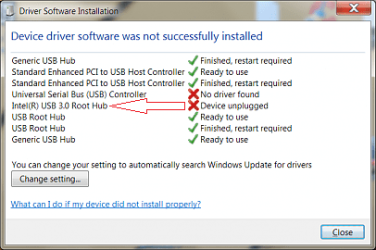
You tell Windows to show more information in DevMgr by setting the environment variable.
Then turn view hidden devise in DevMgr and look for the ghost 3.0 USB Root Hub
x.png

These are shorthand, the full instructions are in the post linked above.

This process can get frustrating - there are a few things that might help
1) Disable Signature Enforcement (DSE) is a per session setting (I checked). If you restart your machine it is reset, ie. it is enabled again.

2) A failed device install might make any subsequent installs fail as well, so there might be a series of install, fail, check. or install - partial success, check, uninstall

3) As a rule I restart when hardware is involved (I'll try to remember my own rule and ask you to restart - there might be times it isn't necessary). - this means you might have to go back and DSE if it wasn't done when the machine was restarted.

4) There are a number of possible solutions offered below that. An updated driver from HP, and an updated drive from Intel. Each of these drivers if unsuccessful at first should be tried with DSE .

This could mean 3 tries or a bunch more if you have to redo a step.

It's a slow methodical process. I get frustrated at times doing this, especially if I miss a step. I scratch my head and ask "Why didn't that work"? then I remember that I didn't uninstall first or I forgot to set an option .... - it happens :(


Start with the scalpel part and post the results. Who knows, that could be it , the unplugged Root Hub is stepping on the USB controller install.

Bill
 

My Computer

Computer type
Laptop
Computer Manufacturer/Model Number
HP Pavilion dv6-6c10us
OS
x64 (6.3.9600) Win8.1 Pro & soon dual boot x64 (6.1.7601) Win7_SP1 HomePrem
CPU
AMD A6-3420M APU with Radeon(tm) HD Graphics
Motherboard
Hewlett-Packard 1805
Memory
6.00 GB
Graphics Card(s)
AMD Radeon(TM) HD 6520G
Sound Card
(1) AMD High Definition Audio Device (2) IDT High Definiti
Monitor(s) Displays
HP W2072a 20" LCD (1600 x 900) @ 60 Hz
Screen Resolution
1366 x 768 x 32 bits (4294967296 colors) @ 60 Hz
Hard Drives
ST640LM0 00 HM641JI SATA Disk Device
Keyboard
Logitech k520 wireless KB
Mouse
Logitech m320 wireless mouse (bundled with KB)
Internet Speed
15/5 | 54 MB Wireless 'n'
Antivirus
Realtime: Defender or Avast | On-demand: Malwarebytes, ESET
Browser
IE 11 on Win8, IE 10 on win 7
Other Info
Media: [Gimp, Audacity, VLC] || Comm: [WEmail 2012, Skype] || Productivity: [OpenOffice,| Textpad] || Utils: [Sysinternals, cCleaner, Speccy, Defraggler]
I can do better on ownership: System files and drivers are owned by System or TrustedInstaller.
Your id is part of the Administrators group which has less control over system files and device drivers.
There are registry keys that you can not change without a lot of security changes.

The reason I suggest check first is because the files referenced in the fix are base USB 2.0 files.
Your USB 2.0 device is functioning - so why go through the exercise?

Jerry might have some feedback on that, I'm pretty sure that's why he asked you to wait for him to walk you though it.

Bill
.
 

My Computer

Computer type
Laptop
Computer Manufacturer/Model Number
HP Pavilion dv6-6c10us
OS
x64 (6.3.9600) Win8.1 Pro & soon dual boot x64 (6.1.7601) Win7_SP1 HomePrem
CPU
AMD A6-3420M APU with Radeon(tm) HD Graphics
Motherboard
Hewlett-Packard 1805
Memory
6.00 GB
Graphics Card(s)
AMD Radeon(TM) HD 6520G
Sound Card
(1) AMD High Definition Audio Device (2) IDT High Definiti
Monitor(s) Displays
HP W2072a 20" LCD (1600 x 900) @ 60 Hz
Screen Resolution
1366 x 768 x 32 bits (4294967296 colors) @ 60 Hz
Hard Drives
ST640LM0 00 HM641JI SATA Disk Device
Keyboard
Logitech k520 wireless KB
Mouse
Logitech m320 wireless mouse (bundled with KB)
Internet Speed
15/5 | 54 MB Wireless 'n'
Antivirus
Realtime: Defender or Avast | On-demand: Malwarebytes, ESET
Browser
IE 11 on Win8, IE 10 on win 7
Other Info
Media: [Gimp, Audacity, VLC] || Comm: [WEmail 2012, Skype] || Productivity: [OpenOffice,| Textpad] || Utils: [Sysinternals, cCleaner, Speccy, Defraggler]
1) fyi> Using the last set of data i requestd, I checked for any inconsistency between the USB 2.0 driver run-time files installed on your computer vs. the "golden" set of USB 2.0 driver files kept in the Windows DriverStore. I did not see an inconsistency

2)Re: The user who posted they deleted/renamed their run-time driver files and then did a reinstall - they, effectively, caused a fresh of files from the DriverStore to be copied and replace the deleted run-time files. I took a different approach. But since i didn't see any difference between your 2.0 run-time files vs. their counterparts in the DriverStore (for the matching driver version), I don't think deleting/renaming files like they did will help at all - since the DriverStore copies are the same

That said, I'll leave you a Slartybart to consider:
> Currently, you at least have working computer with working USB ports (albeit only 2.0 ports and with signature enforcement disabled)
> I think you're energies may best be focused on preparing for that reinstall in May.

With that, I'm going to leave you in Slarty's capable hands as how you guys want to proceed from here. Wish I could have been of more help (for your near term problem) but better at least knowing you only need deal with current conditions a few more months.

G'luck and happy (er, happier) computing, in the future! :)
 

My Computer

Computer type
PC/Desktop
Computer Manufacturer/Model Number
Dell Optiplex 360 and Optiplex 755
OS
Desk 1: Win 7 Pro x32; Desk 2: Windows 10 x64
Hard Drives
500GB Crucial SSD in both Desktops
Other Info
Buffalo 6TB NAS, Raid 1
.....
With that, I'm going to leave you in Slarty's capable hands as how you guys want to proceed from here. Wish I could have been of more help (for your near term problem) but better at least knowing you only need deal with current conditions a few more months.

G'luck and happy (er, happier) computing, in the future! :)
Thanks Jerry, I appreciate your help.

There are only a few things left before I let this beat me.

Then I can go over the housekeeping chores with Sheila (WU, SP/RP, ADI, Startup - stuff turned off to prevent thrashing).

Bill
.
 

My Computer

Computer type
Laptop
Computer Manufacturer/Model Number
HP Pavilion dv6-6c10us
OS
x64 (6.3.9600) Win8.1 Pro & soon dual boot x64 (6.1.7601) Win7_SP1 HomePrem
CPU
AMD A6-3420M APU with Radeon(tm) HD Graphics
Motherboard
Hewlett-Packard 1805
Memory
6.00 GB
Graphics Card(s)
AMD Radeon(TM) HD 6520G
Sound Card
(1) AMD High Definition Audio Device (2) IDT High Definiti
Monitor(s) Displays
HP W2072a 20" LCD (1600 x 900) @ 60 Hz
Screen Resolution
1366 x 768 x 32 bits (4294967296 colors) @ 60 Hz
Hard Drives
ST640LM0 00 HM641JI SATA Disk Device
Keyboard
Logitech k520 wireless KB
Mouse
Logitech m320 wireless mouse (bundled with KB)
Internet Speed
15/5 | 54 MB Wireless 'n'
Antivirus
Realtime: Defender or Avast | On-demand: Malwarebytes, ESET
Browser
IE 11 on Win8, IE 10 on win 7
Other Info
Media: [Gimp, Audacity, VLC] || Comm: [WEmail 2012, Skype] || Productivity: [OpenOffice,| Textpad] || Utils: [Sysinternals, cCleaner, Speccy, Defraggler]
Thank you, ComputerGeek, for spending so much time on this difficult problem.

Bill, I will pick this up in the morning when I have more energy! Spent a hard morning in the field painting a picture of an old bridge. Then had a little drink in the afternoon that kind of did me in.
 

My Computer

Computer type
PC/Desktop
Computer Manufacturer/Model Number
HP Pavilian DV7-7012 notebook
OS
Windows 7 Home Premium 64 bit
CPU
3rd generation Intel Core i7-3610QM Processor
Motherboard
2.30GHz
Memory
8GB DDR3 1600MHz RAM (2 DIMM); 750GB 7200RPM hard drive
Graphics Card(s)
2GB (2048MB) NVIDIA GeForce GT 650M GDDR5 Graphics
Hard Drives
750GB 7200RPM hard drive with HP ProtectSmart Hard Drive Protection
Antivirus
Microsoft
Browser
Firefox, Chrome, Microsoft
There is no ghost hub as far as I can see and I did check in registry to make sure the code was installed.
 

Attachments

  • no ghost hub jan 19.png
    no ghost hub jan 19.png
    94.8 KB · Views: 1

My Computer

Computer type
PC/Desktop
Computer Manufacturer/Model Number
HP Pavilian DV7-7012 notebook
OS
Windows 7 Home Premium 64 bit
CPU
3rd generation Intel Core i7-3610QM Processor
Motherboard
2.30GHz
Memory
8GB DDR3 1600MHz RAM (2 DIMM); 750GB 7200RPM hard drive
Graphics Card(s)
2GB (2048MB) NVIDIA GeForce GT 650M GDDR5 Graphics
Hard Drives
750GB 7200RPM hard drive with HP ProtectSmart Hard Drive Protection
Antivirus
Microsoft
Browser
Firefox, Chrome, Microsoft
Last edited:

My Computer

Computer type
Laptop
Computer Manufacturer/Model Number
HP Pavilion dv6-6c10us
OS
x64 (6.3.9600) Win8.1 Pro & soon dual boot x64 (6.1.7601) Win7_SP1 HomePrem
CPU
AMD A6-3420M APU with Radeon(tm) HD Graphics
Motherboard
Hewlett-Packard 1805
Memory
6.00 GB
Graphics Card(s)
AMD Radeon(TM) HD 6520G
Sound Card
(1) AMD High Definition Audio Device (2) IDT High Definiti
Monitor(s) Displays
HP W2072a 20" LCD (1600 x 900) @ 60 Hz
Screen Resolution
1366 x 768 x 32 bits (4294967296 colors) @ 60 Hz
Hard Drives
ST640LM0 00 HM641JI SATA Disk Device
Keyboard
Logitech k520 wireless KB
Mouse
Logitech m320 wireless mouse (bundled with KB)
Internet Speed
15/5 | 54 MB Wireless 'n'
Antivirus
Realtime: Defender or Avast | On-demand: Malwarebytes, ESET
Browser
IE 11 on Win8, IE 10 on win 7
Other Info
Media: [Gimp, Audacity, VLC] || Comm: [WEmail 2012, Skype] || Productivity: [OpenOffice,| Textpad] || Utils: [Sysinternals, cCleaner, Speccy, Defraggler]
Thank you, ComputerGeek, for spending so much time on this difficult problem.

Bill, I will pick this up in the morning when I have more energy! Spent a hard morning in the field painting a picture of an old bridge. Then had a little drink in the afternoon that kind of did me in.
You're calling the shots - thanks for letting me know.

I'm glad you said painting a picture of a bridge and not painting a bridge :)

Get a good night's rest and ask any questions about what's next. I had a few tings to write down (brain dump) so I'm sure it's confusing.

I'll check back tomorrow,

Bill
.
 

My Computer

Computer type
Laptop
Computer Manufacturer/Model Number
HP Pavilion dv6-6c10us
OS
x64 (6.3.9600) Win8.1 Pro & soon dual boot x64 (6.1.7601) Win7_SP1 HomePrem
CPU
AMD A6-3420M APU with Radeon(tm) HD Graphics
Motherboard
Hewlett-Packard 1805
Memory
6.00 GB
Graphics Card(s)
AMD Radeon(TM) HD 6520G
Sound Card
(1) AMD High Definition Audio Device (2) IDT High Definiti
Monitor(s) Displays
HP W2072a 20" LCD (1600 x 900) @ 60 Hz
Screen Resolution
1366 x 768 x 32 bits (4294967296 colors) @ 60 Hz
Hard Drives
ST640LM0 00 HM641JI SATA Disk Device
Keyboard
Logitech k520 wireless KB
Mouse
Logitech m320 wireless mouse (bundled with KB)
Internet Speed
15/5 | 54 MB Wireless 'n'
Antivirus
Realtime: Defender or Avast | On-demand: Malwarebytes, ESET
Browser
IE 11 on Win8, IE 10 on win 7
Other Info
Media: [Gimp, Audacity, VLC] || Comm: [WEmail 2012, Skype] || Productivity: [OpenOffice,| Textpad] || Utils: [Sysinternals, cCleaner, Speccy, Defraggler]
There is no ghost hub as far as I can see and I did check in registry to make sure the code was installed.
Huh, how about that....

Keep in mind that DriveCleanup removes ghost entries - just though I'd mention the order thing. If you run DriveCleanup then look in DevMgr, you won't ever see a ghost. Ghosts come from devices that were once connected to the machine, but have been disconnected or replaced by other hardware.

USBs are notorious for ghosts, people connect printers, mice, ext disk drives, etc... and then disconnect them. That leaves a 'breadcrumb for the next time the device is connected to the same port

Ok try this tomorrow, Launch DevMgr,
Click the View menu and
Click Show Hidden Devices

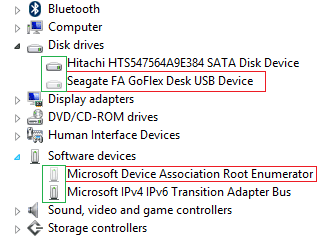
Then expand each category until you see a ghost entry. Here's a shot from my machine - your devices will be different. Look closely at the icons - the one next to the red boxed device is slightly faded compared to the one above or below it.
GhostDevs.png
 

My Computer

Computer type
Laptop
Computer Manufacturer/Model Number
HP Pavilion dv6-6c10us
OS
x64 (6.3.9600) Win8.1 Pro & soon dual boot x64 (6.1.7601) Win7_SP1 HomePrem
CPU
AMD A6-3420M APU with Radeon(tm) HD Graphics
Motherboard
Hewlett-Packard 1805
Memory
6.00 GB
Graphics Card(s)
AMD Radeon(TM) HD 6520G
Sound Card
(1) AMD High Definition Audio Device (2) IDT High Definiti
Monitor(s) Displays
HP W2072a 20" LCD (1600 x 900) @ 60 Hz
Screen Resolution
1366 x 768 x 32 bits (4294967296 colors) @ 60 Hz
Hard Drives
ST640LM0 00 HM641JI SATA Disk Device
Keyboard
Logitech k520 wireless KB
Mouse
Logitech m320 wireless mouse (bundled with KB)
Internet Speed
15/5 | 54 MB Wireless 'n'
Antivirus
Realtime: Defender or Avast | On-demand: Malwarebytes, ESET
Browser
IE 11 on Win8, IE 10 on win 7
Other Info
Media: [Gimp, Audacity, VLC] || Comm: [WEmail 2012, Skype] || Productivity: [OpenOffice,| Textpad] || Utils: [Sysinternals, cCleaner, Speccy, Defraggler]
"Then expand each category until you see a ghost entry. Here's a shot from my machine - your devices will be different. Look closely at the icons - the one next to the red boxed device is slightly faded compared to the one above or below it."

I did this and don't see anything at all that is lighter than the others.
 

My Computer

Computer type
PC/Desktop
Computer Manufacturer/Model Number
HP Pavilian DV7-7012 notebook
OS
Windows 7 Home Premium 64 bit
CPU
3rd generation Intel Core i7-3610QM Processor
Motherboard
2.30GHz
Memory
8GB DDR3 1600MHz RAM (2 DIMM); 750GB 7200RPM hard drive
Graphics Card(s)
2GB (2048MB) NVIDIA GeForce GT 650M GDDR5 Graphics
Hard Drives
750GB 7200RPM hard drive with HP ProtectSmart Hard Drive Protection
Antivirus
Microsoft
Browser
Firefox, Chrome, Microsoft
Ok, please read post# 270 and ask for clarification or amplification on anything that isn't crystal clear. This is my last best effort for the USB 3.0 device.

Please also tell me your mouse mfr & model - I'll look at the mfr site for details. I need to know in order to answer your quandary about it not working on USB 3.0 ports. It won't work on a USB 3.0 port if the mouse is a USB 2.0 device. Why did it once? It shouldn't have, unless it IS a USB 3.0 device.

Thanks.
 
Last edited:

My Computer

Computer type
Laptop
Computer Manufacturer/Model Number
HP Pavilion dv6-6c10us
OS
x64 (6.3.9600) Win8.1 Pro & soon dual boot x64 (6.1.7601) Win7_SP1 HomePrem
CPU
AMD A6-3420M APU with Radeon(tm) HD Graphics
Motherboard
Hewlett-Packard 1805
Memory
6.00 GB
Graphics Card(s)
AMD Radeon(TM) HD 6520G
Sound Card
(1) AMD High Definition Audio Device (2) IDT High Definiti
Monitor(s) Displays
HP W2072a 20" LCD (1600 x 900) @ 60 Hz
Screen Resolution
1366 x 768 x 32 bits (4294967296 colors) @ 60 Hz
Hard Drives
ST640LM0 00 HM641JI SATA Disk Device
Keyboard
Logitech k520 wireless KB
Mouse
Logitech m320 wireless mouse (bundled with KB)
Internet Speed
15/5 | 54 MB Wireless 'n'
Antivirus
Realtime: Defender or Avast | On-demand: Malwarebytes, ESET
Browser
IE 11 on Win8, IE 10 on win 7
Other Info
Media: [Gimp, Audacity, VLC] || Comm: [WEmail 2012, Skype] || Productivity: [OpenOffice,| Textpad] || Utils: [Sysinternals, cCleaner, Speccy, Defraggler]
It is a Logitech mini mouse m/n M-UV55a P/N 830695-0000.

I have a bathtub full of vertical blinds to wash before getting to post 270. :)
 

My Computer

Computer type
PC/Desktop
Computer Manufacturer/Model Number
HP Pavilian DV7-7012 notebook
OS
Windows 7 Home Premium 64 bit
CPU
3rd generation Intel Core i7-3610QM Processor
Motherboard
2.30GHz
Memory
8GB DDR3 1600MHz RAM (2 DIMM); 750GB 7200RPM hard drive
Graphics Card(s)
2GB (2048MB) NVIDIA GeForce GT 650M GDDR5 Graphics
Hard Drives
750GB 7200RPM hard drive with HP ProtectSmart Hard Drive Protection
Antivirus
Microsoft
Browser
Firefox, Chrome, Microsoft
That's ok - take your time ... no rush.

I'll look at the mouse information.

Thanks for the link to the mouse - I really appreciate it.

+edit
I have Logitech equip and have visited their site before. I don't like what they've done to the place.
I found no useful information. All it said about the mouse was USB - no version (USB2 / USB3)
I still say that the mouse is only USB 2.0 ready. Mice and KBs don't need the throughput of USB 3.0 and it's more expensive to make a mouse or KB that supports USB 3.0.

I just wanted to make sure, there are newer Mice/KBs that are USB3. There is really no information available for you model
You'll just have to trust me on this one ;)
A USB 3 device can be plugged into either a 2.0 or 3.0 port and it will work
A USB 2 device can ONLY be plugged into a 2.0 port
.​
-edit
 
Last edited:

My Computer

Computer type
Laptop
Computer Manufacturer/Model Number
HP Pavilion dv6-6c10us
OS
x64 (6.3.9600) Win8.1 Pro & soon dual boot x64 (6.1.7601) Win7_SP1 HomePrem
CPU
AMD A6-3420M APU with Radeon(tm) HD Graphics
Motherboard
Hewlett-Packard 1805
Memory
6.00 GB
Graphics Card(s)
AMD Radeon(TM) HD 6520G
Sound Card
(1) AMD High Definition Audio Device (2) IDT High Definiti
Monitor(s) Displays
HP W2072a 20" LCD (1600 x 900) @ 60 Hz
Screen Resolution
1366 x 768 x 32 bits (4294967296 colors) @ 60 Hz
Hard Drives
ST640LM0 00 HM641JI SATA Disk Device
Keyboard
Logitech k520 wireless KB
Mouse
Logitech m320 wireless mouse (bundled with KB)
Internet Speed
15/5 | 54 MB Wireless 'n'
Antivirus
Realtime: Defender or Avast | On-demand: Malwarebytes, ESET
Browser
IE 11 on Win8, IE 10 on win 7
Other Info
Media: [Gimp, Audacity, VLC] || Comm: [WEmail 2012, Skype] || Productivity: [OpenOffice,| Textpad] || Utils: [Sysinternals, cCleaner, Speccy, Defraggler]
I'm stuck on this part:
"Install the USB chipset from ...
the location changes for different drivers, only install one driver in each iteration of the #InstallDevice process
#1: C:\SwSetup\sp56164
#2: %USERPROFILE%\Downloads\Intel(R)_USB_3.0_eXtensible_Host_Controller_Driver\setup.exe"

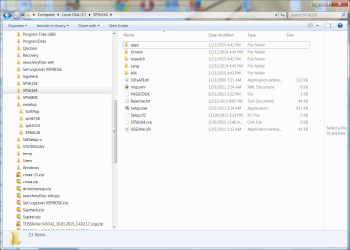
Don't understand what you are telling me to do. Also, sp56164 is a folder under C:\ It is not under SwSetup. See screenshot.
At this point, device manager looks the same as earlier today.
 

Attachments

  • location of sp56164 jan 20.png
    location of sp56164 jan 20.png
    251.8 KB · Views: 1

My Computer

Computer type
PC/Desktop
Computer Manufacturer/Model Number
HP Pavilian DV7-7012 notebook
OS
Windows 7 Home Premium 64 bit
CPU
3rd generation Intel Core i7-3610QM Processor
Motherboard
2.30GHz
Memory
8GB DDR3 1600MHz RAM (2 DIMM); 750GB 7200RPM hard drive
Graphics Card(s)
2GB (2048MB) NVIDIA GeForce GT 650M GDDR5 Graphics
Hard Drives
750GB 7200RPM hard drive with HP ProtectSmart Hard Drive Protection
Antivirus
Microsoft
Browser
Firefox, Chrome, Microsoft
Yeah, sorry about that. I thought my notation might through you for a loop.

I don't know why the SPxxxxx folders are on C:\. The HP installer does give your the option to change the location, but every HP Service Paq I've ever installed wants to go into c:\swsetup

It looks like all of the things you've downloaded during this project are also on C:\

I'll rewrite the instructions one for each driver instead of trying to shorthand with a 'goto'

While I'm doing that, could you look in each of the SPxxxxx folders and let me know what the readme (if no readme, maybe an HTML) says
Don't worry about looking in the SWsetup-x folder. I count 6 SPxxxxx folders in your screen shot.
Something like
SP56164 - USB 3.0 driver

is fine. I don't recall doing that many downloads or installs from HP.

Thanks,

Bill
.
 

My Computer

Computer type
Laptop
Computer Manufacturer/Model Number
HP Pavilion dv6-6c10us
OS
x64 (6.3.9600) Win8.1 Pro & soon dual boot x64 (6.1.7601) Win7_SP1 HomePrem
CPU
AMD A6-3420M APU with Radeon(tm) HD Graphics
Motherboard
Hewlett-Packard 1805
Memory
6.00 GB
Graphics Card(s)
AMD Radeon(TM) HD 6520G
Sound Card
(1) AMD High Definition Audio Device (2) IDT High Definiti
Monitor(s) Displays
HP W2072a 20" LCD (1600 x 900) @ 60 Hz
Screen Resolution
1366 x 768 x 32 bits (4294967296 colors) @ 60 Hz
Hard Drives
ST640LM0 00 HM641JI SATA Disk Device
Keyboard
Logitech k520 wireless KB
Mouse
Logitech m320 wireless mouse (bundled with KB)
Internet Speed
15/5 | 54 MB Wireless 'n'
Antivirus
Realtime: Defender or Avast | On-demand: Malwarebytes, ESET
Browser
IE 11 on Win8, IE 10 on win 7
Other Info
Media: [Gimp, Audacity, VLC] || Comm: [WEmail 2012, Skype] || Productivity: [OpenOffice,| Textpad] || Utils: [Sysinternals, cCleaner, Speccy, Defraggler]
:ar: Disconnect all USB devices
Restart your machine
F8 to Advanced Boot menu
:ar: Disable Driver Signature Enforcement
exit Advanced boot - saving changes
Continue boot to Windows

:ar: Run the DriveCleanup utility (not cCleaner)
Check DevMgr
If the USB 3.0 is working, great, if it is under Other Devices (code 28) - that's OK too
If however, it is partially installed (not working) but it IS under the Universal Serial Bus category - uninstall it / remove software

Install the USB chipset from ...
C:\sp56164\setup

Check DevMgr
Post a screen shot.
Stop if the USB 3.0 devices are reported as working in DevMgr.
+AddStep
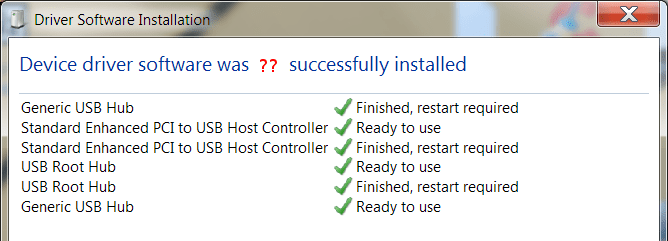
DriverSWinstall.png
If the Device Installation window was not displayed
Right click on the USB 3.0 device
Click Scan for hardware changes
-AddStep
 

My Computer

Computer type
Laptop
Computer Manufacturer/Model Number
HP Pavilion dv6-6c10us
OS
x64 (6.3.9600) Win8.1 Pro & soon dual boot x64 (6.1.7601) Win7_SP1 HomePrem
CPU
AMD A6-3420M APU with Radeon(tm) HD Graphics
Motherboard
Hewlett-Packard 1805
Memory
6.00 GB
Graphics Card(s)
AMD Radeon(TM) HD 6520G
Sound Card
(1) AMD High Definition Audio Device (2) IDT High Definiti
Monitor(s) Displays
HP W2072a 20" LCD (1600 x 900) @ 60 Hz
Screen Resolution
1366 x 768 x 32 bits (4294967296 colors) @ 60 Hz
Hard Drives
ST640LM0 00 HM641JI SATA Disk Device
Keyboard
Logitech k520 wireless KB
Mouse
Logitech m320 wireless mouse (bundled with KB)
Internet Speed
15/5 | 54 MB Wireless 'n'
Antivirus
Realtime: Defender or Avast | On-demand: Malwarebytes, ESET
Browser
IE 11 on Win8, IE 10 on win 7
Other Info
Media: [Gimp, Audacity, VLC] || Comm: [WEmail 2012, Skype] || Productivity: [OpenOffice,| Textpad] || Utils: [Sysinternals, cCleaner, Speccy, Defraggler]
Read 279, ask for clarification or amplification.

Didn't I already do this?
Yes, but I think there was a misunderstanding on DSE (I know I wasn't sure until I checked)
I also added some steps as a catchall - DriveCleanup BEFORE install
Removing a partial install
and forcing a Driver Software Installation.

I'm hoping one of these added steps will correct the issue and the driver will install
The hail Mary will be the driver from Intel - I will post that after I see how 279 goes.

Note: the actual Driver Software Installation window you might see will be different.

Bill
.
 

My Computer

Computer type
Laptop
Computer Manufacturer/Model Number
HP Pavilion dv6-6c10us
OS
x64 (6.3.9600) Win8.1 Pro & soon dual boot x64 (6.1.7601) Win7_SP1 HomePrem
CPU
AMD A6-3420M APU with Radeon(tm) HD Graphics
Motherboard
Hewlett-Packard 1805
Memory
6.00 GB
Graphics Card(s)
AMD Radeon(TM) HD 6520G
Sound Card
(1) AMD High Definition Audio Device (2) IDT High Definiti
Monitor(s) Displays
HP W2072a 20" LCD (1600 x 900) @ 60 Hz
Screen Resolution
1366 x 768 x 32 bits (4294967296 colors) @ 60 Hz
Hard Drives
ST640LM0 00 HM641JI SATA Disk Device
Keyboard
Logitech k520 wireless KB
Mouse
Logitech m320 wireless mouse (bundled with KB)
Internet Speed
15/5 | 54 MB Wireless 'n'
Antivirus
Realtime: Defender or Avast | On-demand: Malwarebytes, ESET
Browser
IE 11 on Win8, IE 10 on win 7
Other Info
Media: [Gimp, Audacity, VLC] || Comm: [WEmail 2012, Skype] || Productivity: [OpenOffice,| Textpad] || Utils: [Sysinternals, cCleaner, Speccy, Defraggler]
Back
Top