Enable test mode to solve USB problems?

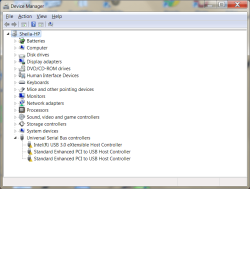
Still no luck. Driver installed fine but on reboot the USBs don't work. Codes 52
 

Attachments

  • no usbs again after usb3 install jan 20.png
    no usbs again after usb3 install jan 20.png
    104.3 KB · Views: 2

My Computer

Computer type
PC/Desktop
Computer Manufacturer/Model Number
HP Pavilian DV7-7012 notebook
OS
Windows 7 Home Premium 64 bit
CPU
3rd generation Intel Core i7-3610QM Processor
Motherboard
2.30GHz
Memory
8GB DDR3 1600MHz RAM (2 DIMM); 750GB 7200RPM hard drive
Graphics Card(s)
2GB (2048MB) NVIDIA GeForce GT 650M GDDR5 Graphics
Hard Drives
750GB 7200RPM hard drive with HP ProtectSmart Hard Drive Protection
Antivirus
Microsoft
Browser
Firefox, Chrome, Microsoft
Just so I'm clear on the status.
The Intel diver was installed after uninstalling the driver from HP
DSE was disabled for the install of the Intel driver
No issue with the install itself
A restart caused the issue to resurface - all USB devices report code 52

I'm not sure if the restart was a normal boot or you disabled DSE.

If it was a normal boot - that was a good test because you want your system to behave normally.​

Try another restart and disable DSE this time. Hopefully, the system reports all devices working.

I'm looking again at your DevManView output. There are a lot of things that are suspect, and if we can address them if you want. It's easy, but tedious. It might not affect the status though, only making the change will you know for sure.

The USB drivers are good (I think they're good anyway), but something steps on them on a normal boot. The trouble is I can't determine what that something is. I can focus on the USB devices, but it might be any of the drivers - it would take too much of your time to try testing all of the drivers. (there is something else to try - I'll post that next)

The one that stood out is Datacolor Spyder4 - something to do with your art methinks. Can you tell me a little about that? A drawing pad perhaps?

Thanks,

Bill
.
 

My Computer

Computer type
Laptop
Computer Manufacturer/Model Number
HP Pavilion dv6-6c10us
OS
x64 (6.3.9600) Win8.1 Pro & soon dual boot x64 (6.1.7601) Win7_SP1 HomePrem
CPU
AMD A6-3420M APU with Radeon(tm) HD Graphics
Motherboard
Hewlett-Packard 1805
Memory
6.00 GB
Graphics Card(s)
AMD Radeon(TM) HD 6520G
Sound Card
(1) AMD High Definition Audio Device (2) IDT High Definiti
Monitor(s) Displays
HP W2072a 20" LCD (1600 x 900) @ 60 Hz
Screen Resolution
1366 x 768 x 32 bits (4294967296 colors) @ 60 Hz
Hard Drives
ST640LM0 00 HM641JI SATA Disk Device
Keyboard
Logitech k520 wireless KB
Mouse
Logitech m320 wireless mouse (bundled with KB)
Internet Speed
15/5 | 54 MB Wireless 'n'
Antivirus
Realtime: Defender or Avast | On-demand: Malwarebytes, ESET
Browser
IE 11 on Win8, IE 10 on win 7
Other Info
Media: [Gimp, Audacity, VLC] || Comm: [WEmail 2012, Skype] || Productivity: [OpenOffice,| Textpad] || Utils: [Sysinternals, cCleaner, Speccy, Defraggler]
"Just so I'm clear on the status.
The Intel diver was installed after uninstalling the driver from HP
DSE was disabled for the install of the Intel driver
No issue with the install itself
A restart caused the issue to resurface - all USB devices report code 52

I'm not sure if the restart was a normal boot or you disabled DSE.

If it was a normal boot - that was a good test because you want your system to behave normally."

Yes to all of the above with DSE disabled. Everything was fine until the normal reboot.

Datacolor Spyder4 is a device that calibrates your computer monitor. It is used for photography to get the best match between how the photo looks on your monitor vs how it will look when printed. When the computer boots up, Spyder4 gives you a message that the calibration is still correct. I don't remember seeing the message come up lately on reboots.
I'll restart now.
 

My Computer

Computer type
PC/Desktop
Computer Manufacturer/Model Number
HP Pavilian DV7-7012 notebook
OS
Windows 7 Home Premium 64 bit
CPU
3rd generation Intel Core i7-3610QM Processor
Motherboard
2.30GHz
Memory
8GB DDR3 1600MHz RAM (2 DIMM); 750GB 7200RPM hard drive
Graphics Card(s)
2GB (2048MB) NVIDIA GeForce GT 650M GDDR5 Graphics
Hard Drives
750GB 7200RPM hard drive with HP ProtectSmart Hard Drive Protection
Antivirus
Microsoft
Browser
Firefox, Chrome, Microsoft
Booted up with DSE disabled and everything works fine again. Spyder didn't give me a message. I don't have the device down here so I can't test anything.

I'm satisfied with how things are working now in case you want to give up on it. It isn't that big a deal to disable DSE on boot up. I don't shut it down very often. It only shuts down with automatic updates, which are disabled right now.
 

My Computer

Computer type
PC/Desktop
Computer Manufacturer/Model Number
HP Pavilian DV7-7012 notebook
OS
Windows 7 Home Premium 64 bit
CPU
3rd generation Intel Core i7-3610QM Processor
Motherboard
2.30GHz
Memory
8GB DDR3 1600MHz RAM (2 DIMM); 750GB 7200RPM hard drive
Graphics Card(s)
2GB (2048MB) NVIDIA GeForce GT 650M GDDR5 Graphics
Hard Drives
750GB 7200RPM hard drive with HP ProtectSmart Hard Drive Protection
Antivirus
Microsoft
Browser
Firefox, Chrome, Microsoft
Thanks,

re: Spyder - I started digging deeper and looked at anything USB. Not necessarily looking for an error message, just things that might have some effect on another device. I wasn't familiar with that device so I asked.

If you're ok with it, then I'm ok with it.

I would like to do some housekeeping before you re-enable the things we disabled.

Please open an elevated command prompt and issue the following commands:
C:
cd \
set > %USERPROFILE%\Downloads\envSet.txt
dir /a > %USERPROFILE%\Downloads\listDriveC.txt
exit​
There won't be any output on the screen, it's being redirected to the files.

%USERPROFILE% is an environment variable that points to your User folder. Both outputs are written to the User sub-folder, Downloads. The '%' define the word to be a variable.
C: makes sure you're on the C: drive
cd \ makes sure you're at the root of C:
set reports all environment variables.
dir lists the files on C:\

Why? We made quite a mess on C:\ - lots of output files, a few install files, a copy of Swsetup. These are no longer necessary and I'm willing to build a cleanup batch file for you.

Then I suggest that you defrag your drive. Piriform Defraggler is my favorite, but the Windows built in defrag works fine too, it takes a few more iterations that Defraggler to get the best results.

After that, you can put the other things back in order.

As always, this is your thread, your machine, and your time. If you don't want to do more (other than put things back in order), that's what you want to do :)

It has been a real pleasure working through this issue with you Sheila. I enjoyed the challenge.

I would grade you very high on trouble shooting if this were a course (it almost is really!).
Not only were you able to keep track of some very technical and new information, you weren't crabby once ;)

The thread will be here - leave it unsolved for now. You have a workaround, but that's not the same thing as solved.

Things disabled:

System Configuration (msconfig / Clean startup Services and Startup tabs)
Most of this is junk anyway - I don't run anything at startup except the touchpad, and that's only to use the extra feature of turning off the touchpad when a USB mouse is connected.
The application will load what it needs, the items in this just pre-load things to make them appear faster when launched.
One exception might be an Anti-Virus program (some do check at boot) so you would want that enabled. The rest - not so much​
Hibernation - probably should be turned back on
- and -
System Protection - probably should be turned back on
I don't use either and there's always a debate on the added value. In your case, with no viable backup, I recommend both be on.

Windows Update - another area of debate.
The way it is currently set is fine as long as you manually check for updates. The "Hey there's a Windows Update" alerts still come through and most updates come on the 2nd Tuesday of every month. Checking every day - is it necessary? Some say yes.

Device Installation settings - probably want to set this back to automatic

That's not too bad really. A little dusting of C:\ and some decisions on how you operate your machine.
All you really have to remember is the DSE workaround.

When you get back north, you should do a clean install - that will solve the issue completely

Best Regards

Bill
.

 

My Computer

Computer type
Laptop
Computer Manufacturer/Model Number
HP Pavilion dv6-6c10us
OS
x64 (6.3.9600) Win8.1 Pro & soon dual boot x64 (6.1.7601) Win7_SP1 HomePrem
CPU
AMD A6-3420M APU with Radeon(tm) HD Graphics
Motherboard
Hewlett-Packard 1805
Memory
6.00 GB
Graphics Card(s)
AMD Radeon(TM) HD 6520G
Sound Card
(1) AMD High Definition Audio Device (2) IDT High Definiti
Monitor(s) Displays
HP W2072a 20" LCD (1600 x 900) @ 60 Hz
Screen Resolution
1366 x 768 x 32 bits (4294967296 colors) @ 60 Hz
Hard Drives
ST640LM0 00 HM641JI SATA Disk Device
Keyboard
Logitech k520 wireless KB
Mouse
Logitech m320 wireless mouse (bundled with KB)
Internet Speed
15/5 | 54 MB Wireless 'n'
Antivirus
Realtime: Defender or Avast | On-demand: Malwarebytes, ESET
Browser
IE 11 on Win8, IE 10 on win 7
Other Info
Media: [Gimp, Audacity, VLC] || Comm: [WEmail 2012, Skype] || Productivity: [OpenOffice,| Textpad] || Utils: [Sysinternals, cCleaner, Speccy, Defraggler]
Here are the files. I hope I did these right. I assume you wanted the output files.
 

Attachments

My Computer

Computer type
PC/Desktop
Computer Manufacturer/Model Number
HP Pavilian DV7-7012 notebook
OS
Windows 7 Home Premium 64 bit
CPU
3rd generation Intel Core i7-3610QM Processor
Motherboard
2.30GHz
Memory
8GB DDR3 1600MHz RAM (2 DIMM); 750GB 7200RPM hard drive
Graphics Card(s)
2GB (2048MB) NVIDIA GeForce GT 650M GDDR5 Graphics
Hard Drives
750GB 7200RPM hard drive with HP ProtectSmart Hard Drive Protection
Antivirus
Microsoft
Browser
Firefox, Chrome, Microsoft
Here are the files. I hope I did these right. I assume you wanted the output files.
Thanks, having the files certainly does help. I should have asked :)

Looks good. I'll do what I said I'd do and post the batch file in a bit.
Do you want any of the output or tools you've used? They're also on your thread so won't lose them completely if I remove them in the batch file

I want you to review the batch file before executing. I have some questions (logmein...) and you might have some questions. but that's probably tomorrow.

Thanks,

Bill
.
 

My Computer

Computer type
Laptop
Computer Manufacturer/Model Number
HP Pavilion dv6-6c10us
OS
x64 (6.3.9600) Win8.1 Pro & soon dual boot x64 (6.1.7601) Win7_SP1 HomePrem
CPU
AMD A6-3420M APU with Radeon(tm) HD Graphics
Motherboard
Hewlett-Packard 1805
Memory
6.00 GB
Graphics Card(s)
AMD Radeon(TM) HD 6520G
Sound Card
(1) AMD High Definition Audio Device (2) IDT High Definiti
Monitor(s) Displays
HP W2072a 20" LCD (1600 x 900) @ 60 Hz
Screen Resolution
1366 x 768 x 32 bits (4294967296 colors) @ 60 Hz
Hard Drives
ST640LM0 00 HM641JI SATA Disk Device
Keyboard
Logitech k520 wireless KB
Mouse
Logitech m320 wireless mouse (bundled with KB)
Internet Speed
15/5 | 54 MB Wireless 'n'
Antivirus
Realtime: Defender or Avast | On-demand: Malwarebytes, ESET
Browser
IE 11 on Win8, IE 10 on win 7
Other Info
Media: [Gimp, Audacity, VLC] || Comm: [WEmail 2012, Skype] || Productivity: [OpenOffice,| Textpad] || Utils: [Sysinternals, cCleaner, Speccy, Defraggler]
Thank you for doing this for me. I think I would like to keep the virus/malware-type programs because I might want to run them now and then. I probably won't look at the output files, so you can get rid of those.
 

My Computer

Computer type
PC/Desktop
Computer Manufacturer/Model Number
HP Pavilian DV7-7012 notebook
OS
Windows 7 Home Premium 64 bit
CPU
3rd generation Intel Core i7-3610QM Processor
Motherboard
2.30GHz
Memory
8GB DDR3 1600MHz RAM (2 DIMM); 750GB 7200RPM hard drive
Graphics Card(s)
2GB (2048MB) NVIDIA GeForce GT 650M GDDR5 Graphics
Hard Drives
750GB 7200RPM hard drive with HP ProtectSmart Hard Drive Protection
Antivirus
Microsoft
Browser
Firefox, Chrome, Microsoft
I compromised - the batch file moves the files and directories to your a sub-folder in your Downloads folder

View attachment SFcleanup.bat

First it assigns DnldLoc as a variable that points to filesFromC in your Downloads folder
Then it makes the sub-folder Downloads\filesFromC\

There is no checking done in the batch file, so it should only be executed once
You might have to answer y if the batch file needs confirmation.
Ctrl+C breaks out of the batch file

Here are the commands in the batch file
Please look at them and ask about anything.

basically it is move commands (for files) and Robocopy commands (for directories)

Code:
set DnldLoc=%USERPROFILE%\Downloads\filesFromC\
md %DnldLoc%
@echo ------------------
@echo moving files
@echo.
move "C:\7601usbfix.exe" %DnldLoc%
move "C:\7z938.exe" %DnldLoc%
move "C:\crnaa (2).zip" %DnldLoc%
move "C:\crnaa.zip" %DnldLoc%
move "C:\drivecleanup.zip" %DnldLoc%
move "C:\HPSupportSolutionsFramework-en-11.51.0048.msi" %DnldLoc%
move "C:\mbam-setup-2.0.4.1028.exe" %DnldLoc%
move "C:\MicrosoftFixit.WinUSB.RNP.1343057827150648.1.1.Run.exe" %DnldLoc%
move "C:\NOELs Instructions.txt" %DnldLoc%
move "C:\searchmyfiles-x64.zip" %DnldLoc%
move "C:\Set LogLevel VERBOSE.zip" %DnldLoc%
move "C:\Sigcheck.zip" %DnldLoc%
move "C:\sigtest.txt" %DnldLoc%
move "C:\Sigtest.zip" %DnldLoc%
move "C:\sp56156.exe" %DnldLoc%
move "C:\sp56164.exe" %DnldLoc%
move "C:\sp57274.exe" %DnldLoc%
move "C:\spsetup127.exe" %DnldLoc%
move "C:\TDSSKiller.3.0.0.42_16.01.2015_13.56.52_log.txt" %DnldLoc%
move "C:\TDSSKiller.3.0.0.42_16.01.2015_14.02.17_log.txt" %DnldLoc%
move "C:\TDSSKiller.3.0.0.42_16.01.2015_14.02.17_log.zip" %DnldLoc%
move "C:\TDSSKiller.3.0.0.42_16.01.2015_16.02.04_log.txt" %DnldLoc%
move "C:\TDSSKiller.3.0.0.42_16.01.2015_16.02.04_log.zip" %DnldLoc%
move "C:\tdsskiller.exe" %DnldLoc%
move "C:\VEW.exe" %DnldLoc%
move "C:\VEW.txt" %DnldLoc%
move "C:\Windows7-USB-DVD-Download-Tool-Installer-en-US.exe" %DnldLoc%
@echo ------------------
@echo moving directories
@echo.
Robocopy "AdwCleaner" %DnldLoc% /E /MOVE /DCOPY:DAT
Robocopy "crnaa" %DnldLoc% /E /MOVE /DCOPY:DAT
Robocopy "drivecleanup" %DnldLoc% /E /MOVE /DCOPY:DAT
Robocopy "searchmyfiles-x64" %DnldLoc% /E /MOVE /DCOPY:DAT
Robocopy "Set LogLevel VERBOSE" %DnldLoc% /E /MOVE /DCOPY:DAT
Robocopy "Sigcheck" %DnldLoc% /E /MOVE /DCOPY:DAT
Robocopy "SP56158" %DnldLoc% /E /MOVE /DCOPY:DAT
Robocopy "SP56164" %DnldLoc% /E /MOVE /DCOPY:DAT
Robocopy "SP56808" %DnldLoc% /E /MOVE /DCOPY:DAT
Robocopy "swsetup" %DnldLoc% /E /MOVE /DCOPY:DAT
Robocopy "SWSetup-x" %DnldLoc% /E /MOVE /DCOPY:DAT
@echo ------------------
@echo moving completed
@echo.

When you're satisfied that it looks good (files and directories chosen),

Open a Command Prompt (standard is fine) and enter the following
C:
cd \
%USERPROFILE%\Downloads\SFcleanup​
I did not redirect the output - so if you need me to look at something, you'll need to copy the command prompt window
Right click the Command Prompt title bar, pick edit, pick select all, then pick copy
Paste that into Notepad and attach the txt file to a post (tip: you don't need to zip txt files ;))

I 'tested' it using mock files on my machine since I don't have the real files. I checked it 3 times for typos - I'm pretty sure I didn't make any. Another pair of eyes never hurts, even if the eyes don't know what they're looking at.

the command structure's are
move "file" %destination%
Robocopy "directory" %destination% /E /MOVE /DCOPY:DAT

if you see a missing " or missing % please let me know

The other thing you could do is just use the source filenames and folders (the names in parenthesis directly after the command) in the code box as a reference and use Windows Explorer to make a folder in Downloads, and then drag the stuff off of C:\ to the new folder. Your choice.

Bill
.
 
Last edited:

My Computer

Computer type
Laptop
Computer Manufacturer/Model Number
HP Pavilion dv6-6c10us
OS
x64 (6.3.9600) Win8.1 Pro & soon dual boot x64 (6.1.7601) Win7_SP1 HomePrem
CPU
AMD A6-3420M APU with Radeon(tm) HD Graphics
Motherboard
Hewlett-Packard 1805
Memory
6.00 GB
Graphics Card(s)
AMD Radeon(TM) HD 6520G
Sound Card
(1) AMD High Definition Audio Device (2) IDT High Definiti
Monitor(s) Displays
HP W2072a 20" LCD (1600 x 900) @ 60 Hz
Screen Resolution
1366 x 768 x 32 bits (4294967296 colors) @ 60 Hz
Hard Drives
ST640LM0 00 HM641JI SATA Disk Device
Keyboard
Logitech k520 wireless KB
Mouse
Logitech m320 wireless mouse (bundled with KB)
Internet Speed
15/5 | 54 MB Wireless 'n'
Antivirus
Realtime: Defender or Avast | On-demand: Malwarebytes, ESET
Browser
IE 11 on Win8, IE 10 on win 7
Other Info
Media: [Gimp, Audacity, VLC] || Comm: [WEmail 2012, Skype] || Productivity: [OpenOffice,| Textpad] || Utils: [Sysinternals, cCleaner, Speccy, Defraggler]
Thanks for doing this for me, Bill!

I'm HappyRightNow!
 

My Computer

Computer type
PC/Desktop
Computer Manufacturer/Model Number
HP Pavilian DV7-7012 notebook
OS
Windows 7 Home Premium 64 bit
CPU
3rd generation Intel Core i7-3610QM Processor
Motherboard
2.30GHz
Memory
8GB DDR3 1600MHz RAM (2 DIMM); 750GB 7200RPM hard drive
Graphics Card(s)
2GB (2048MB) NVIDIA GeForce GT 650M GDDR5 Graphics
Hard Drives
750GB 7200RPM hard drive with HP ProtectSmart Hard Drive Protection
Antivirus
Microsoft
Browser
Firefox, Chrome, Microsoft
You're most welcome.

HappyRightNow - hahahahahahahahaha

I'm glad, I'm glad, I'm glad
I'm so glad.....


Before reverting the changes made during trouble shooting,
please run a few iterations of Windows defrag.

Hibernation and Restore Points use disk space and the defrag will be better without those files on the disk.

This will probably take a while, so overnight is a good plan

In windows Exlorer
Right click on C:\
select properties
press the tools tab
press the [Defragment] button (might just be Defrag)
A new window is presented showing your partitions (drives)
Select the C:\ drive
press the [Defragment] button (might just be Defrag) in that window.
it will churn for as long as it takes.

I determine the effectiveness of the operation by the number of passes it executes.
If it only executes 3 or 4 passes, that's pretty good - that's what I try to get down to.

I've seen it as high as 12 passes on my machine. It takes a few executions to get it down to an acceptable fragmentation level.
I think I said 5 passes was good enough when it started at 12. You'll be hard pressed to get it to one and it's not worth the time. As soon as anything gets written to the disk, fragmentation begins again. That's why it should be scheduled once a week (you'll see the place to check that)

Run one execution of defrag tonight, another on Friday night and a third on Saturday night. See how many passes it takes on Sunday morning or afternoon.
 

My Computer

Computer type
Laptop
Computer Manufacturer/Model Number
HP Pavilion dv6-6c10us
OS
x64 (6.3.9600) Win8.1 Pro & soon dual boot x64 (6.1.7601) Win7_SP1 HomePrem
CPU
AMD A6-3420M APU with Radeon(tm) HD Graphics
Motherboard
Hewlett-Packard 1805
Memory
6.00 GB
Graphics Card(s)
AMD Radeon(TM) HD 6520G
Sound Card
(1) AMD High Definition Audio Device (2) IDT High Definiti
Monitor(s) Displays
HP W2072a 20" LCD (1600 x 900) @ 60 Hz
Screen Resolution
1366 x 768 x 32 bits (4294967296 colors) @ 60 Hz
Hard Drives
ST640LM0 00 HM641JI SATA Disk Device
Keyboard
Logitech k520 wireless KB
Mouse
Logitech m320 wireless mouse (bundled with KB)
Internet Speed
15/5 | 54 MB Wireless 'n'
Antivirus
Realtime: Defender or Avast | On-demand: Malwarebytes, ESET
Browser
IE 11 on Win8, IE 10 on win 7
Other Info
Media: [Gimp, Audacity, VLC] || Comm: [WEmail 2012, Skype] || Productivity: [OpenOffice,| Textpad] || Utils: [Sysinternals, cCleaner, Speccy, Defraggler]
Back
Top