Encoding Speed

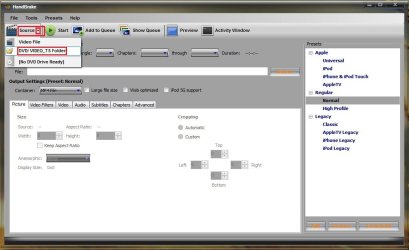
The decryptor you use should decrypt all the vobs in a video-ts folder . Handbrake can recode a full movie from such a folder . Click on source, and select video-ts folder, and browse to the target location of your decryptor.

This option works fine for me .
 

Attachments

  • Untitled.jpg
    Untitled.jpg
    57 KB · Views: 3

My Computer

Computer type
PC/Desktop
Computer Manufacturer/Model Number
Self Assembled
OS
Microsoft Windows 10 Pro Insider Preview 64-bit
CPU
Intel(R) Core(TM) i3-4130 CPU @ 3.40GHz
Motherboard
Gigabyte Technology Co., Ltd. B85M-D3H
Memory
Corsair Vengence 4GB x2 (8.00GB Dual-Channel DDR3 @ 798MHz)
Graphics Card(s)
2047MB GeForce GTS 450 (ZOTAC International)
Sound Card
Onboard (Realtek High Definition Audio)
Monitor(s) Displays
LG Flatron E2040T
Screen Resolution
1600x900
Hard Drives
Western Digital 1 TB
Seagate 500 GB
PSU
Corsair VS550
Case
Cooler Master K380
Cooling
Cooler Master Seidon 120V Plus
Keyboard
Logitech MK260r
Mouse
Logitech MK260r
Internet Speed
PMPL Broadband
Antivirus
Windows Defender + MBAM
Browser
Firefox
Other Info
Dell Studio 15" Laptop
I'm not ignoring anyone, it's just that I found another stack of movies that I'm feeding to DVDFab, and that going to take a bit before trying anything else.
 

My Computer

Computer Manufacturer/Model Number
DIY
OS
W7x64 Pro, SuSe 12.1/** W7 x64 Pro, XP MCE
CPU
Phenom II 1090T w/Noctua NH-D14 /**4400+ X2 w/CM Hyper TX 3
Motherboard
ASRock 890FX Deluxe 4/**A8N-SLI
Memory
2 x 2GB Patriot PGS34g1600LLKA/**4x1GB Corsair VS
Graphics Card(s)
EVGA GTX460 SC/**EVGA 8800GTS
Sound Card
Asus Xonar D2X/**Xonar D1
Monitor(s) Displays
Acer X233H, Dell E152FPc /**LG M237-WD
Screen Resolution
1920x1080 & 1024x768/**1980x1080
Hard Drives
WDC 2TB, 1.5TB, 1TB, 500GB,Seagate 500GB , Maxtor 80GB /**500GB Seagate & WDC 1TB Black
PSU
CM RS600 w/ APC BX1000G/**Antec 500 TP w/ APC BX1000
Case
HAF922/**Antec 1040IIB
Cooling
3x200mm, 1x140 and 1x120mm/**5x80mm fans
Keyboard
Logitech Media USB/**Saitek Eclipse
Mouse
Cordless Trackman Wheel/**Ditto
Internet Speed
3.3Mbps
Other Info
SB 560 5.1 w/ Sennheiser RS140/**Creative T20 speakers, Dvico FusionHDTV7 Gold RT, Cisco E3000, HP 5510V AIO, Linksys E3000, Belkin F5U237 hub and **F5D8055 adapter
(** = 2nd rig)
Did you go through the tutortial I wrote up?

It will walk you through step by step how to create a MP4 or MKV from a DVD folder.

When you decrypty the DVD to the HD, with AnyDVD or DVDFab, it will be in pieces and quite large. Its simply the DVD itself without protection.

That entire process is simply removing the protection and writing to the HD to be easier to work with. Theres no recoding at all being done.


Converting an orginal DVD --> MKV or MP4 is all you need to do.
When you get into recoding multiple times, the final video will look really bad.

Try this:
Open MeGUI.
In tools, click on File Inder
In that complete folder you ripped to the HD, choose the very first .99GB .VOB file.
Que the job, and then run it.

In the Avisynth script that pops up, click on the filters Tab, and then press the analyse button.
When its done, go back to the I/O tab, and just check the clever Anamorphic Encoding button, and then save the script.

MeGUI should have your script and audio imported now.

For now, in the Encoder Setting choose Unrestricted DXVA , and press config.
In that Window, for Modes Choose Automated 2 Pass
Then set the Bitrate to 1500

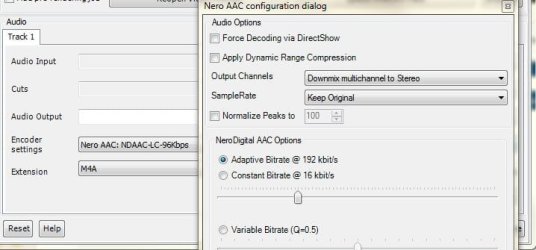
For Audio choose Nero LC96kbp and press the Config.
You can change it to Down mix to stereo if you choose or keep the 5.1 track.
If you downmix to stereo, an Adaptive Bitrate of around 192 or 226 will be good for now.
((You may need to DL the NERO encoder, its all free))

Then just press Auto Encode, and choose what Container you want, (MP4 or MKV) , a save location and start it.

You can adjust all these values higher or lower later, but this should be a pretty quick encode that will get you started and learning whats going on.

I think that I have followed you up to a point, but it wasn't that easy for an old man like myself, because while your instructions appear to be accurate, they leave out mentioning which screen an action is to be taken, so my head is spinning some, from screen blur.

I've been playing with this for a while now, and am foundering at the last step, which should be the simplest...Where and what do you push/select to cause it to start encoding? The AutoEncode button just opens the configuration screen.
 

My Computer

Computer Manufacturer/Model Number
DIY
OS
W7x64 Pro, SuSe 12.1/** W7 x64 Pro, XP MCE
CPU
Phenom II 1090T w/Noctua NH-D14 /**4400+ X2 w/CM Hyper TX 3
Motherboard
ASRock 890FX Deluxe 4/**A8N-SLI
Memory
2 x 2GB Patriot PGS34g1600LLKA/**4x1GB Corsair VS
Graphics Card(s)
EVGA GTX460 SC/**EVGA 8800GTS
Sound Card
Asus Xonar D2X/**Xonar D1
Monitor(s) Displays
Acer X233H, Dell E152FPc /**LG M237-WD
Screen Resolution
1920x1080 & 1024x768/**1980x1080
Hard Drives
WDC 2TB, 1.5TB, 1TB, 500GB,Seagate 500GB , Maxtor 80GB /**500GB Seagate & WDC 1TB Black
PSU
CM RS600 w/ APC BX1000G/**Antec 500 TP w/ APC BX1000
Case
HAF922/**Antec 1040IIB
Cooling
3x200mm, 1x140 and 1x120mm/**5x80mm fans
Keyboard
Logitech Media USB/**Saitek Eclipse
Mouse
Cordless Trackman Wheel/**Ditto
Internet Speed
3.3Mbps
Other Info
SB 560 5.1 w/ Sennheiser RS140/**Creative T20 speakers, Dvico FusionHDTV7 Gold RT, Cisco E3000, HP 5510V AIO, Linksys E3000, Belkin F5U237 hub and **F5D8055 adapter
(** = 2nd rig)
That is correct.

At that part, MeGUI simply wants to know what container you want to use. Choose either MP4 or MKV, whichever you prefer.

Also, check the box that says Use my settings, and it will use all the video settings you used.


Since you configured the Video encoder, bitrates etc, setting everything up:
Also cjhoose the pulldown option, to 'Use My settings"

Then start the encoder.


Alternatively, if your having issues with MeGUI, Handbrake works very similar but might possibly be a bit easier.
 

My Computer

Computer Manufacturer/Model Number
Custom (Self Build)
OS
Windows 7 Home Premium 64bit
CPU
Intel Core i7 2700k
Motherboard
eVGA P67 SLI
Memory
8GB Mushkin Redline Ridgebacks @1866
Graphics Card(s)
EVGA GTX570 SC
Sound Card
XiFi Titanium HD
Monitor(s) Displays
LG W2453V
Screen Resolution
1920x1080
Hard Drives
Intel 320 80GB -- Intel X25-V 40GB --WD Black 1TB x2 -- WD Blue 640GB
PSU
Seasonic x750
Case
Corsair 600T SE White
Cooling
eVGA Superclocked CPU Cooler
Keyboard
Saitek Cyborg
Antivirus
Kaspersky
Browser
IE
Other Info
LG BD/DVD
Since you configured the Video encoder, bitrates etc, setting everything up:
Also cjhoose the pulldown option, to 'Use My settings"
I dropped every window on the Automatic Encoding screen, and I find nothing that says "Use My Settings"...why not?
 

My Computer

Computer Manufacturer/Model Number
DIY
OS
W7x64 Pro, SuSe 12.1/** W7 x64 Pro, XP MCE
CPU
Phenom II 1090T w/Noctua NH-D14 /**4400+ X2 w/CM Hyper TX 3
Motherboard
ASRock 890FX Deluxe 4/**A8N-SLI
Memory
2 x 2GB Patriot PGS34g1600LLKA/**4x1GB Corsair VS
Graphics Card(s)
EVGA GTX460 SC/**EVGA 8800GTS
Sound Card
Asus Xonar D2X/**Xonar D1
Monitor(s) Displays
Acer X233H, Dell E152FPc /**LG M237-WD
Screen Resolution
1920x1080 & 1024x768/**1980x1080
Hard Drives
WDC 2TB, 1.5TB, 1TB, 500GB,Seagate 500GB , Maxtor 80GB /**500GB Seagate & WDC 1TB Black
PSU
CM RS600 w/ APC BX1000G/**Antec 500 TP w/ APC BX1000
Case
HAF922/**Antec 1040IIB
Cooling
3x200mm, 1x140 and 1x120mm/**5x80mm fans
Keyboard
Logitech Media USB/**Saitek Eclipse
Mouse
Cordless Trackman Wheel/**Ditto
Internet Speed
3.3Mbps
Other Info
SB 560 5.1 w/ Sennheiser RS140/**Creative T20 speakers, Dvico FusionHDTV7 Gold RT, Cisco E3000, HP 5510V AIO, Linksys E3000, Belkin F5U237 hub and **F5D8055 adapter
(** = 2nd rig)
Im sorry.

I meant check the box, No Target Size (Use Profile Settings)

This way, the settings you choose in the Video Configuration will be used.

Apologies.

After you start getting the hang of it, you can start using the bitrate calculator to accuratly set bitrate hit a desired target file size, while maintaining certain quality settings.


Then just pick your prefered container, MP4 or MKV.
Just a FYI, if your total file size exceeds 4GB, its best to use MKV.
Anything below 4GB, MKV or MP4 is fine.


Just to clarify a bit about the Use Profile Settings & File Size options:

Bitrate will not impact Quality but will also determine the final file size.

If you tell the AutoEncoder to hit a certain size, many of the settings in the encoder will be overlooked.
For example, it will use a 1 pass Constant Quality setting to hit that file size.

IMHO, you get better quality using a Automated 2 pass encode, and adjust bit rate to find a happy place between file size & quality. You also are not restricting the encoder, other than the average bitrate to use.
 

My Computer

Computer Manufacturer/Model Number
Custom (Self Build)
OS
Windows 7 Home Premium 64bit
CPU
Intel Core i7 2700k
Motherboard
eVGA P67 SLI
Memory
8GB Mushkin Redline Ridgebacks @1866
Graphics Card(s)
EVGA GTX570 SC
Sound Card
XiFi Titanium HD
Monitor(s) Displays
LG W2453V
Screen Resolution
1920x1080
Hard Drives
Intel 320 80GB -- Intel X25-V 40GB --WD Black 1TB x2 -- WD Blue 640GB
PSU
Seasonic x750
Case
Corsair 600T SE White
Cooling
eVGA Superclocked CPU Cooler
Keyboard
Saitek Cyborg
Antivirus
Kaspersky
Browser
IE
Other Info
LG BD/DVD
Okay, I'm still tripping at the finish line. I found the checkbox for No Target Size and selected it, then selected the Queue button, which took me back to the main screen. At that point, if I select the AutoEncode button, it take me back again to the Automatic Encode screen. If I select the One-Click button, it opens a new screen, which appears to be designed to circumvent many of the steps already taken, bit selecting the Go button does nothing more than take me once more to the main screen.

I'm going in circles and getting dizzy. How do I get the to start actually encoding?
 

My Computer

Computer Manufacturer/Model Number
DIY
OS
W7x64 Pro, SuSe 12.1/** W7 x64 Pro, XP MCE
CPU
Phenom II 1090T w/Noctua NH-D14 /**4400+ X2 w/CM Hyper TX 3
Motherboard
ASRock 890FX Deluxe 4/**A8N-SLI
Memory
2 x 2GB Patriot PGS34g1600LLKA/**4x1GB Corsair VS
Graphics Card(s)
EVGA GTX460 SC/**EVGA 8800GTS
Sound Card
Asus Xonar D2X/**Xonar D1
Monitor(s) Displays
Acer X233H, Dell E152FPc /**LG M237-WD
Screen Resolution
1920x1080 & 1024x768/**1980x1080
Hard Drives
WDC 2TB, 1.5TB, 1TB, 500GB,Seagate 500GB , Maxtor 80GB /**500GB Seagate & WDC 1TB Black
PSU
CM RS600 w/ APC BX1000G/**Antec 500 TP w/ APC BX1000
Case
HAF922/**Antec 1040IIB
Cooling
3x200mm, 1x140 and 1x120mm/**5x80mm fans
Keyboard
Logitech Media USB/**Saitek Eclipse
Mouse
Cordless Trackman Wheel/**Ditto
Internet Speed
3.3Mbps
Other Info
SB 560 5.1 w/ Sennheiser RS140/**Creative T20 speakers, Dvico FusionHDTV7 Gold RT, Cisco E3000, HP 5510V AIO, Linksys E3000, Belkin F5U237 hub and **F5D8055 adapter
(** = 2nd rig)
Ahh OK.
Yes all you have done is set everything up and told MeGUI what you want done. From the AutoEncode MEnu, once you press Que, it has accepted the job and just waiting for you to tell it to start, OR add more item,s to the job list.

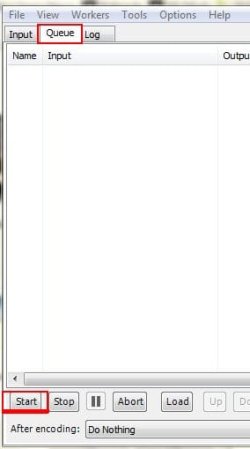
To start Encoding, once you Queue the job, you need to click on the Queue tab in Megui's main Window.

Here you will find all the encoding jobs you have set up.
Press the Start button at the bopttom of this Window to start encoding all your jobs
.
With a 2 Pass type encode setting, each Queue (or each movie) should have 4 seperate jobs in its Queue.
1st, Encode Audio
2nd, 1st APss video Encode
3rd, 2nd Pass Video Encode
and 4th, Muxing them into a file type of your choice.

If you have Queed the job multiple times, there may be more entried. You can, if you want, delete all but the top 4.


The is good for something like:
Lets say you have 3 DVDs you want to encode.
You can set them all up, and each can have its own video/audio encoding settings.

Once you have all your Movies setup, Queued, and ready to encode, just press start.
MeGUI will then Encode all of you files for you, in order you Queued them

TBH, Im not sure if theres a limit to how many jobs can be Prepped.
Ive had 3 movies, and 24, 45min Season Episodes in Queue before, and it encoded them all.
 

Attachments

  • Capture.JPG
    Capture.JPG
    12.9 KB · Views: 2

My Computer

Computer Manufacturer/Model Number
Custom (Self Build)
OS
Windows 7 Home Premium 64bit
CPU
Intel Core i7 2700k
Motherboard
eVGA P67 SLI
Memory
8GB Mushkin Redline Ridgebacks @1866
Graphics Card(s)
EVGA GTX570 SC
Sound Card
XiFi Titanium HD
Monitor(s) Displays
LG W2453V
Screen Resolution
1920x1080
Hard Drives
Intel 320 80GB -- Intel X25-V 40GB --WD Black 1TB x2 -- WD Blue 640GB
PSU
Seasonic x750
Case
Corsair 600T SE White
Cooling
eVGA Superclocked CPU Cooler
Keyboard
Saitek Cyborg
Antivirus
Kaspersky
Browser
IE
Other Info
LG BD/DVD
Okay, I've deleted the extra jobs that were queued, but I still have 5, instead of 4 steps listed. The extra one is labeled idx. If that means what I think, that has to do with subtitles...correct?

EDIT: I deleted the idx step, and pressed the Start button, but as far as I can see, nothing is happening. That idx step was labeled job 1, so now the list starts with job 2...does there have to be a job 1 for it to know what to do?
 

My Computer

Computer Manufacturer/Model Number
DIY
OS
W7x64 Pro, SuSe 12.1/** W7 x64 Pro, XP MCE
CPU
Phenom II 1090T w/Noctua NH-D14 /**4400+ X2 w/CM Hyper TX 3
Motherboard
ASRock 890FX Deluxe 4/**A8N-SLI
Memory
2 x 2GB Patriot PGS34g1600LLKA/**4x1GB Corsair VS
Graphics Card(s)
EVGA GTX460 SC/**EVGA 8800GTS
Sound Card
Asus Xonar D2X/**Xonar D1
Monitor(s) Displays
Acer X233H, Dell E152FPc /**LG M237-WD
Screen Resolution
1920x1080 & 1024x768/**1980x1080
Hard Drives
WDC 2TB, 1.5TB, 1TB, 500GB,Seagate 500GB , Maxtor 80GB /**500GB Seagate & WDC 1TB Black
PSU
CM RS600 w/ APC BX1000G/**Antec 500 TP w/ APC BX1000
Case
HAF922/**Antec 1040IIB
Cooling
3x200mm, 1x140 and 1x120mm/**5x80mm fans
Keyboard
Logitech Media USB/**Saitek Eclipse
Mouse
Cordless Trackman Wheel/**Ditto
Internet Speed
3.3Mbps
Other Info
SB 560 5.1 w/ Sennheiser RS140/**Creative T20 speakers, Dvico FusionHDTV7 Gold RT, Cisco E3000, HP 5510V AIO, Linksys E3000, Belkin F5U237 hub and **F5D8055 adapter
(** = 2nd rig)
Okay, I've deleted the extra jobs that were queued, but I still have 5, instead of 4 steps listed. The extra one is labeled idx. If that means what I think, that has to do with subtitles...correct?

EDIT: I deleted the idx step, and pressed the Start button, but as far as I can see, nothing is happening. That idx step was labeled job 1, so now the list starts with job 2...does there have to be a job 1 for it to know what to do?

I believe so Yes.

Ive never added a subtitle in the Queue though, so Im not sure how it handles them.
You really only need the Audio, 2 video, and Muxing pass in that Queue.

If I want or need them, I just Mux them in with the MKV muxer option in the tools menu after.

--EDIT--
As longs as its the 4 steps as I mentioned earlier it shouldnt matter.
Make sure you didnt get an error.

For example, if you choose Nero AAC for Audio but do not have the encoder for it (its a seperate DL) will error out.

BTW, if you choose to change the Audio for example, you just clear the entire Queue, go back to main page and choose your new Audio settings.
Then Auto Encode, Queue the entire job again and start it.
You do not have to remake the AVIsynth script, ULESS, you want to change the video itself.
 

My Computer

Computer Manufacturer/Model Number
Custom (Self Build)
OS
Windows 7 Home Premium 64bit
CPU
Intel Core i7 2700k
Motherboard
eVGA P67 SLI
Memory
8GB Mushkin Redline Ridgebacks @1866
Graphics Card(s)
EVGA GTX570 SC
Sound Card
XiFi Titanium HD
Monitor(s) Displays
LG W2453V
Screen Resolution
1920x1080
Hard Drives
Intel 320 80GB -- Intel X25-V 40GB --WD Black 1TB x2 -- WD Blue 640GB
PSU
Seasonic x750
Case
Corsair 600T SE White
Cooling
eVGA Superclocked CPU Cooler
Keyboard
Saitek Cyborg
Antivirus
Kaspersky
Browser
IE
Other Info
LG BD/DVD
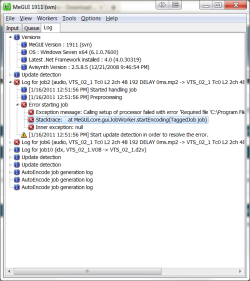
I went over to the log screen, and found an error message stating that it couldn't start due to Nero AacEnc.exe being missing from the MeGui directory. You mentioned something about this earlier, but I thought that you were talking about Nero Recode...Obviously not. So how do I correct this?
 

My Computer

Computer Manufacturer/Model Number
DIY
OS
W7x64 Pro, SuSe 12.1/** W7 x64 Pro, XP MCE
CPU
Phenom II 1090T w/Noctua NH-D14 /**4400+ X2 w/CM Hyper TX 3
Motherboard
ASRock 890FX Deluxe 4/**A8N-SLI
Memory
2 x 2GB Patriot PGS34g1600LLKA/**4x1GB Corsair VS
Graphics Card(s)
EVGA GTX460 SC/**EVGA 8800GTS
Sound Card
Asus Xonar D2X/**Xonar D1
Monitor(s) Displays
Acer X233H, Dell E152FPc /**LG M237-WD
Screen Resolution
1920x1080 & 1024x768/**1980x1080
Hard Drives
WDC 2TB, 1.5TB, 1TB, 500GB,Seagate 500GB , Maxtor 80GB /**500GB Seagate & WDC 1TB Black
PSU
CM RS600 w/ APC BX1000G/**Antec 500 TP w/ APC BX1000
Case
HAF922/**Antec 1040IIB
Cooling
3x200mm, 1x140 and 1x120mm/**5x80mm fans
Keyboard
Logitech Media USB/**Saitek Eclipse
Mouse
Cordless Trackman Wheel/**Ditto
Internet Speed
3.3Mbps
Other Info
SB 560 5.1 w/ Sennheiser RS140/**Creative T20 speakers, Dvico FusionHDTV7 Gold RT, Cisco E3000, HP 5510V AIO, Linksys E3000, Belkin F5U237 hub and **F5D8055 adapter
(** = 2nd rig)
Ok here what you need to do. (BTW its worth the ffort, as Neros AAC is quite good IMHO)

Go here and download the encoder.
Nero - Download the Nero AAC Codec

Unzip it. Theres only 1 file you need.
It is inside the Win32 folder of that package, and its called:

neroaacenc

That the only thing you need.

Next go to your tools folder in MeGui's install location.
By default this is:
C\ Program Files (x86) \ MeGui \ Tools

Inside the tools folder make a new folder called (Nero)
Then put that neroaacenc file you downloaded into it.


The only other thing you need to do, is tell MeGUI where it is.

In MeGUIs main window, click Options at the top, then choose Settings.

In the Window that pops up, click on the External Program Settings Tab.
Then,in the Nero section, click the little box to the right, and browse to the location you put the NEroaacenc.
(( C/ Program Files (x86) / MeGUI / Tools/ Nero / neroaacenc.exe ))


And thats it.

Also, while you are in this section, in the Extra Config Tab, you can click on Choose Auto Encoder Default settings.
here you can change the defaults to your liking.
For example, always use a MKV and Use Profile settings.
 

My Computer

Computer Manufacturer/Model Number
Custom (Self Build)
OS
Windows 7 Home Premium 64bit
CPU
Intel Core i7 2700k
Motherboard
eVGA P67 SLI
Memory
8GB Mushkin Redline Ridgebacks @1866
Graphics Card(s)
EVGA GTX570 SC
Sound Card
XiFi Titanium HD
Monitor(s) Displays
LG W2453V
Screen Resolution
1920x1080
Hard Drives
Intel 320 80GB -- Intel X25-V 40GB --WD Black 1TB x2 -- WD Blue 640GB
PSU
Seasonic x750
Case
Corsair 600T SE White
Cooling
eVGA Superclocked CPU Cooler
Keyboard
Saitek Cyborg
Antivirus
Kaspersky
Browser
IE
Other Info
LG BD/DVD
Okay, that's done, but going to the start button, just as before, nothing happens. I rechecked the log, and it appears that the errors that are shown are exactly as they were before, so I'm still lost. I've included a screenshot, if it helps:
 

Attachments

  • log.png
    log.png
    29.2 KB · Views: 4

My Computer

Computer Manufacturer/Model Number
DIY
OS
W7x64 Pro, SuSe 12.1/** W7 x64 Pro, XP MCE
CPU
Phenom II 1090T w/Noctua NH-D14 /**4400+ X2 w/CM Hyper TX 3
Motherboard
ASRock 890FX Deluxe 4/**A8N-SLI
Memory
2 x 2GB Patriot PGS34g1600LLKA/**4x1GB Corsair VS
Graphics Card(s)
EVGA GTX460 SC/**EVGA 8800GTS
Sound Card
Asus Xonar D2X/**Xonar D1
Monitor(s) Displays
Acer X233H, Dell E152FPc /**LG M237-WD
Screen Resolution
1920x1080 & 1024x768/**1980x1080
Hard Drives
WDC 2TB, 1.5TB, 1TB, 500GB,Seagate 500GB , Maxtor 80GB /**500GB Seagate & WDC 1TB Black
PSU
CM RS600 w/ APC BX1000G/**Antec 500 TP w/ APC BX1000
Case
HAF922/**Antec 1040IIB
Cooling
3x200mm, 1x140 and 1x120mm/**5x80mm fans
Keyboard
Logitech Media USB/**Saitek Eclipse
Mouse
Cordless Trackman Wheel/**Ditto
Internet Speed
3.3Mbps
Other Info
SB 560 5.1 w/ Sennheiser RS140/**Creative T20 speakers, Dvico FusionHDTV7 Gold RT, Cisco E3000, HP 5510V AIO, Linksys E3000, Belkin F5U237 hub and **F5D8055 adapter
(** = 2nd rig)
Ok, did you clear all the jobs in Queue, and restart them? I would recommend doing that at this point.
But before you Queue it again, click the Options Tab at the top of the main MeGUI screen, and choose update.
Update everything if there are some available. (right click / check all / to install multiple updates in each pop up)

The only thing you'll need to double check and change is the Audio setting, before going to the Auto Encode section.

Also, I would suggest configuring your Nero Encoder like the snip below for now.
 

Attachments

  • Capture.JPG
    Capture.JPG
    37.8 KB · Views: 3

My Computer

Computer Manufacturer/Model Number
Custom (Self Build)
OS
Windows 7 Home Premium 64bit
CPU
Intel Core i7 2700k
Motherboard
eVGA P67 SLI
Memory
8GB Mushkin Redline Ridgebacks @1866
Graphics Card(s)
EVGA GTX570 SC
Sound Card
XiFi Titanium HD
Monitor(s) Displays
LG W2453V
Screen Resolution
1920x1080
Hard Drives
Intel 320 80GB -- Intel X25-V 40GB --WD Black 1TB x2 -- WD Blue 640GB
PSU
Seasonic x750
Case
Corsair 600T SE White
Cooling
eVGA Superclocked CPU Cooler
Keyboard
Saitek Cyborg
Antivirus
Kaspersky
Browser
IE
Other Info
LG BD/DVD
I think that it is finally working. I wasn't too sure, because it sat idly for quite a while with the message saying that it was preprocessing...please wait. I suspect that delay was due to the fact that I have an ongoing encode being process in another program at the moment, which is using a majority of the CPU. However it finally began. so now I have to wait to see the result.
 

My Computer

Computer Manufacturer/Model Number
DIY
OS
W7x64 Pro, SuSe 12.1/** W7 x64 Pro, XP MCE
CPU
Phenom II 1090T w/Noctua NH-D14 /**4400+ X2 w/CM Hyper TX 3
Motherboard
ASRock 890FX Deluxe 4/**A8N-SLI
Memory
2 x 2GB Patriot PGS34g1600LLKA/**4x1GB Corsair VS
Graphics Card(s)
EVGA GTX460 SC/**EVGA 8800GTS
Sound Card
Asus Xonar D2X/**Xonar D1
Monitor(s) Displays
Acer X233H, Dell E152FPc /**LG M237-WD
Screen Resolution
1920x1080 & 1024x768/**1980x1080
Hard Drives
WDC 2TB, 1.5TB, 1TB, 500GB,Seagate 500GB , Maxtor 80GB /**500GB Seagate & WDC 1TB Black
PSU
CM RS600 w/ APC BX1000G/**Antec 500 TP w/ APC BX1000
Case
HAF922/**Antec 1040IIB
Cooling
3x200mm, 1x140 and 1x120mm/**5x80mm fans
Keyboard
Logitech Media USB/**Saitek Eclipse
Mouse
Cordless Trackman Wheel/**Ditto
Internet Speed
3.3Mbps
Other Info
SB 560 5.1 w/ Sennheiser RS140/**Creative T20 speakers, Dvico FusionHDTV7 Gold RT, Cisco E3000, HP 5510V AIO, Linksys E3000, Belkin F5U237 hub and **F5D8055 adapter
(** = 2nd rig)
Something must be wrong, because it began processing at ~2FPS, and even after the other encoder finished it's job, it is slowly rising on speed, but it is only at ~ 8FPS, with an estimate of finishing in ~4:15:00. From what you said at the outset, I expected a lot more speed than this.

EDIT: Another aspect is that it started out set at low priority, but I moved that up to above normal priority, but I'm not sure that helped or not. The CPU is running at 100%, with MeGUI taking 80% of that.
 

My Computer

Computer Manufacturer/Model Number
DIY
OS
W7x64 Pro, SuSe 12.1/** W7 x64 Pro, XP MCE
CPU
Phenom II 1090T w/Noctua NH-D14 /**4400+ X2 w/CM Hyper TX 3
Motherboard
ASRock 890FX Deluxe 4/**A8N-SLI
Memory
2 x 2GB Patriot PGS34g1600LLKA/**4x1GB Corsair VS
Graphics Card(s)
EVGA GTX460 SC/**EVGA 8800GTS
Sound Card
Asus Xonar D2X/**Xonar D1
Monitor(s) Displays
Acer X233H, Dell E152FPc /**LG M237-WD
Screen Resolution
1920x1080 & 1024x768/**1980x1080
Hard Drives
WDC 2TB, 1.5TB, 1TB, 500GB,Seagate 500GB , Maxtor 80GB /**500GB Seagate & WDC 1TB Black
PSU
CM RS600 w/ APC BX1000G/**Antec 500 TP w/ APC BX1000
Case
HAF922/**Antec 1040IIB
Cooling
3x200mm, 1x140 and 1x120mm/**5x80mm fans
Keyboard
Logitech Media USB/**Saitek Eclipse
Mouse
Cordless Trackman Wheel/**Ditto
Internet Speed
3.3Mbps
Other Info
SB 560 5.1 w/ Sennheiser RS140/**Creative T20 speakers, Dvico FusionHDTV7 Gold RT, Cisco E3000, HP 5510V AIO, Linksys E3000, Belkin F5U237 hub and **F5D8055 adapter
(** = 2nd rig)
Preprocessing Audio is normally if you are using the 'Normalize Peaks" , "Apply Dynamic Compression" options, or both. This is normal.
If these 2 features are disabled, ther will be no pre-processing.
Totally optional if you want to use these features or not. If you do, it'll just add 2 or 3 minutes to the Audio encode process.


As far as the video, It may be soley due to the setting in the Encoders Profile.
My guess is that for 1, slow 1st pass is enabled. This has changed to be "On" by default now if I remember correctly. (I actually totally forgot about this)

This option does offers a bit more accuracy, but the overall result is not at all worth the significant increase in encoding time. At least IMHO.
You can gain quality elsewhere, without nearly as much of a hit.


Being as I am unsure what profile you are using, and the fact they do get updated from time to time, Ill post what I think is a fairly good comprimise between speed and quality. At least to get you started for now. You can then tweak to your hearts content once you start getting the hang of everything.


Start with the profile MAXCompatability (DXVA)

At the main screen, Click "Show Advanced Settings"
Change Mode to 'Automated 2 pass"
Set Bitrate to 1500 for now.

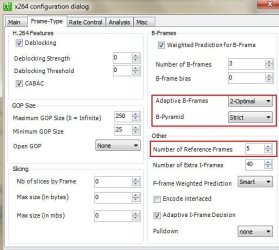
Capture1.JPG


In the FRAME TYPE Tab:

Change Ref. frames to 5
And set your Adaptive B-Frames to, 2 Optimal, and Strict for the B-Pyramid.
Capture2.JPG

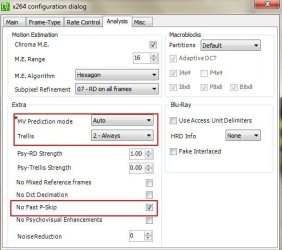
Next, in the ANALASYS Tab:

Change MV Prediction to 'Auto"
Trellis = Always

And I would recommend checking 'No Fast Pskip" (It help reduce blockiness on solid colrs such as a sky)
Capture3.JPG


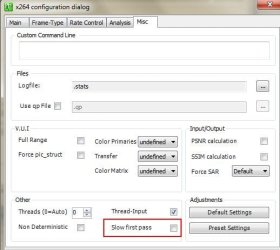
And lastsly, on the MISC tab:

This is the biggest single setting, to gain a boost in total encoding time.
Uncheck Slow First Pass.
Capture4.JPG


You really should change the settings in the MAIN tab and also the MISC tab I recommended.
this will speed things up.

The rest of the settings I am suggesting will help improve quality a little bit, at a slight impact to encoding time. Although it shouldn't be that much.
If you do not want to try these at this point, at least uncheck 'slow first pass" and make the changes on the main tab.


There are, many options that can be tweaked to get even better quality encodes, at the cost of some encoding time.
However, this should be fairly quick, with good results.
Also, trying to change threads setting on this Tab will not speed anuything up, but may actually make it slower.
I would recommend just leaving it @ 0 (Auto)


Remember, if you change these settings, you need to completely clear all items in Queue, Then re-Queue the job so the new settings will take effect.
No need to re-make the AVIsynth script, unless you just want to.

Also, running another encoder along side MeGUI will slow it down. The x264 encoder will use all available power it can.
Normal Priority is what it usually runs at I believe. It may have lowered itself due to other process using alot of CPU time.

 

My Computer

Computer Manufacturer/Model Number
Custom (Self Build)
OS
Windows 7 Home Premium 64bit
CPU
Intel Core i7 2700k
Motherboard
eVGA P67 SLI
Memory
8GB Mushkin Redline Ridgebacks @1866
Graphics Card(s)
EVGA GTX570 SC
Sound Card
XiFi Titanium HD
Monitor(s) Displays
LG W2453V
Screen Resolution
1920x1080
Hard Drives
Intel 320 80GB -- Intel X25-V 40GB --WD Black 1TB x2 -- WD Blue 640GB
PSU
Seasonic x750
Case
Corsair 600T SE White
Cooling
eVGA Superclocked CPU Cooler
Keyboard
Saitek Cyborg
Antivirus
Kaspersky
Browser
IE
Other Info
LG BD/DVD
Okay, but my first impression of it is somewhat discouraging, therefore I'm going to put MeGUI on the back burner, and tinker with it later, because all that it has done so far is to cost time. Even though I consider WinX DVD Ripper to be slow, after using DVDFab, in contrast to what I have seen so far, it is a real speed demon. It normally runs at between 75-90FPS, and somehow, I can't see MeGUI even approaching that. Considering the extra steps and complexity of MeGUI, I can't see it's advantage.
 

My Computer

Computer Manufacturer/Model Number
DIY
OS
W7x64 Pro, SuSe 12.1/** W7 x64 Pro, XP MCE
CPU
Phenom II 1090T w/Noctua NH-D14 /**4400+ X2 w/CM Hyper TX 3
Motherboard
ASRock 890FX Deluxe 4/**A8N-SLI
Memory
2 x 2GB Patriot PGS34g1600LLKA/**4x1GB Corsair VS
Graphics Card(s)
EVGA GTX460 SC/**EVGA 8800GTS
Sound Card
Asus Xonar D2X/**Xonar D1
Monitor(s) Displays
Acer X233H, Dell E152FPc /**LG M237-WD
Screen Resolution
1920x1080 & 1024x768/**1980x1080
Hard Drives
WDC 2TB, 1.5TB, 1TB, 500GB,Seagate 500GB , Maxtor 80GB /**500GB Seagate & WDC 1TB Black
PSU
CM RS600 w/ APC BX1000G/**Antec 500 TP w/ APC BX1000
Case
HAF922/**Antec 1040IIB
Cooling
3x200mm, 1x140 and 1x120mm/**5x80mm fans
Keyboard
Logitech Media USB/**Saitek Eclipse
Mouse
Cordless Trackman Wheel/**Ditto
Internet Speed
3.3Mbps
Other Info
SB 560 5.1 w/ Sennheiser RS140/**Creative T20 speakers, Dvico FusionHDTV7 Gold RT, Cisco E3000, HP 5510V AIO, Linksys E3000, Belkin F5U237 hub and **F5D8055 adapter
(** = 2nd rig)
It is rather complex, especially at first. But it does have its advantages in the long run.
IMHO, the end product just looks better than most.

It does take a bit to learn and get used to, but once you start learning it, its not as overwhelming as it first appears.


As far as speed goes, I understand wanting it to encode faster.
That 1 setting, 'Slow First Pass" will certainly slow thing down alot, and not really worth the trade off. So by disbaling it, it will speed up.

IMO, when it comes to Video Encoding, faster is not always better though. The faster it goes through the process the less accurate the results will be.

Still, too slow without noticeable results isn't good either :)


In the end, everyone has thier own preference on what they think is best.
If you ever decide to go back to this, and want some help, I'll be glad to help you out.
 

My Computer

Computer Manufacturer/Model Number
Custom (Self Build)
OS
Windows 7 Home Premium 64bit
CPU
Intel Core i7 2700k
Motherboard
eVGA P67 SLI
Memory
8GB Mushkin Redline Ridgebacks @1866
Graphics Card(s)
EVGA GTX570 SC
Sound Card
XiFi Titanium HD
Monitor(s) Displays
LG W2453V
Screen Resolution
1920x1080
Hard Drives
Intel 320 80GB -- Intel X25-V 40GB --WD Black 1TB x2 -- WD Blue 640GB
PSU
Seasonic x750
Case
Corsair 600T SE White
Cooling
eVGA Superclocked CPU Cooler
Keyboard
Saitek Cyborg
Antivirus
Kaspersky
Browser
IE
Other Info
LG BD/DVD
If I were in the position of taking my time with each DVD, then I might agree with you. But since I'm in the process of encoding several hundred DVDs at one time, I want to get the job done. Afterward, if some of the movies are not up to snuff, then I might go back and spend more time on each of them. I have not checked the output on each and every encode, but I know that many, if not most of them have the same quality as if being viewed directly from the DVD...some are not so good, but then what was on the DVD wasn't necessarily so good either, since many of my movies are of old classics.

Even if I did decide to redo a movie, I doubt that I would have the patience to use MeGUI, unless the performance was considerably better than what it was with this attempt, but either way, I appreciate your help, it has been a learning experience.

EDIT: There is one more thing I would like to ask...previously, you mentioned using a bitrate calculator. I did a little Googling, and what I found were online calculators, which is okay, except that it was not clear as to how to use them. The reason that I'm interested is because of the fact that not only you suggested using 1500Kbps for video, but WinX DVD uses that by default also, yet DVDFab either uses a rate determined by the DVD, or calculates it for itself, and is always less than that number, yet I seem to get better results with DVDFab. Can you elaborate on this?
 

My Computer

Computer Manufacturer/Model Number
DIY
OS
W7x64 Pro, SuSe 12.1/** W7 x64 Pro, XP MCE
CPU
Phenom II 1090T w/Noctua NH-D14 /**4400+ X2 w/CM Hyper TX 3
Motherboard
ASRock 890FX Deluxe 4/**A8N-SLI
Memory
2 x 2GB Patriot PGS34g1600LLKA/**4x1GB Corsair VS
Graphics Card(s)
EVGA GTX460 SC/**EVGA 8800GTS
Sound Card
Asus Xonar D2X/**Xonar D1
Monitor(s) Displays
Acer X233H, Dell E152FPc /**LG M237-WD
Screen Resolution
1920x1080 & 1024x768/**1980x1080
Hard Drives
WDC 2TB, 1.5TB, 1TB, 500GB,Seagate 500GB , Maxtor 80GB /**500GB Seagate & WDC 1TB Black
PSU
CM RS600 w/ APC BX1000G/**Antec 500 TP w/ APC BX1000
Case
HAF922/**Antec 1040IIB
Cooling
3x200mm, 1x140 and 1x120mm/**5x80mm fans
Keyboard
Logitech Media USB/**Saitek Eclipse
Mouse
Cordless Trackman Wheel/**Ditto
Internet Speed
3.3Mbps
Other Info
SB 560 5.1 w/ Sennheiser RS140/**Creative T20 speakers, Dvico FusionHDTV7 Gold RT, Cisco E3000, HP 5510V AIO, Linksys E3000, Belkin F5U237 hub and **F5D8055 adapter
(** = 2nd rig)
Back
Top