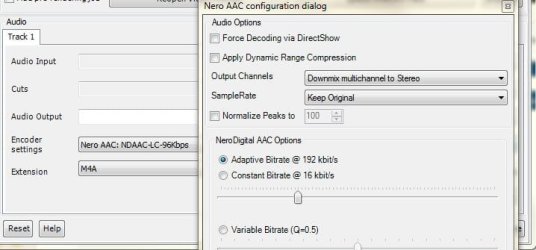
Preprocessing Audio is normally if you are using the 'Normalize Peaks" , "Apply Dynamic Compression" options, or both. This is normal.
If these 2 features are disabled, ther will be no pre-processing.
Totally optional if you want to use these features or not. If you do, it'll just add 2 or 3 minutes to the Audio encode process.
As far as the video, It may be soley due to the setting in the Encoders Profile.
My guess is that for 1, slow 1st pass is enabled. This has changed to be "On" by default now if I remember correctly. (I actually totally forgot about this)
This option does offers a bit more accuracy, but the overall result is not at all worth the significant increase in encoding time. At least IMHO.
You can gain quality elsewhere, without nearly as much of a hit.
Being as I am unsure what profile you are using, and the fact they do get updated from time to time, Ill post what I think is a fairly good comprimise between speed and quality. At least to get you started for now. You can then tweak to your hearts content once you start getting the hang of everything.
Start with the profile MAXCompatability (DXVA)
At the main screen, Click "Show Advanced Settings"
Change Mode to 'Automated 2 pass"
Set Bitrate to 1500 for now.

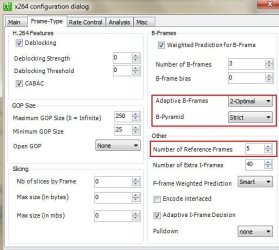
In the FRAME TYPE Tab:
Change Ref. frames to 5
And set your Adaptive B-Frames to, 2 Optimal, and Strict for the B-Pyramid.
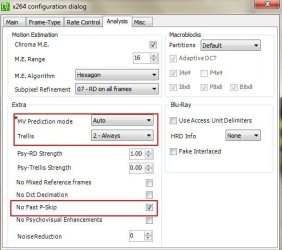
Next, in the ANALASYS Tab:
Change MV Prediction to 'Auto"
Trellis = Always
And I would recommend checking 'No Fast Pskip" (It help reduce blockiness on solid colrs such as a sky)
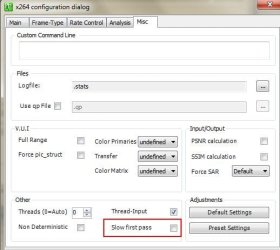
And lastsly, on the MISC tab:
This is the
biggest single setting, to gain a boost in total encoding time.
Uncheck Slow First Pass.
You really should change the settings in the MAIN tab and also the MISC tab I recommended.
this will speed things up.
The rest of the settings I am suggesting will help improve quality a little bit, at a slight impact to encoding time. Although it shouldn't be that much.
If you do not want to try these at this point, at least uncheck 'slow first pass" and make the changes on the main tab.
There are, many options that can be tweaked to get even better quality encodes, at the cost of some encoding time.
However, this should be fairly quick, with good results.
Also, trying to change threads setting on this Tab will not speed anuything up, but may actually make it slower.
I would recommend just leaving it @ 0 (Auto)
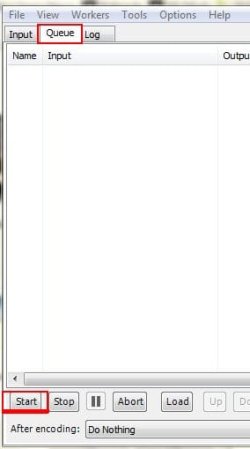
Remember, if you change these settings, you need to completely clear all items in Queue, Then re-Queue the job so the new settings will take effect.
No need to re-make the AVIsynth script, unless you just want to.
Also, running another encoder along side MeGUI will slow it down. The x264 encoder will use all available power it can.
Normal Priority is what it usually runs at I believe. It may have lowered itself due to other process using alot of CPU time.