Folder Icon - Change Windows 7 Default Folder Icon

How to Change the Windows 7 Default Folder Icon

   Information
This will show you how to change all of the default yellow folder icons in Windows Explorer to any custom icon that you want instead in Windows 7.

User Folder icons will not be affected by this.
   Note
If you have thumbnails turned on, then only empty folders will have the new icon displayed in Windows Explorer when the folder view is set to anything other than Small icons, Details, or List. Otherwise the folders will have a thumbnail preview icon when the folder is not empty instead. When the folder view is set to Small icons, Details, or List, then all folders will display the new icon since they are small icons.
Thumbnails_On.jpg
If you have thumbnails turned off, then all folders will have the new icon display no matter what the folder view is set to in Windows Explorer.
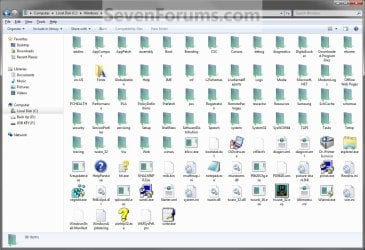
Thumbnails_Off.jpg

   Warning

  • You can only do this while logged in to a administrator account.
  • This will affect all user account's folder icons on the computer.
EXAMPLE: Folder Icon
NOTE: This is Windows Explorer with the default folder icon (left screenshot) and a custom folder icon (right screenshot). This is with the folder view is set to Details.
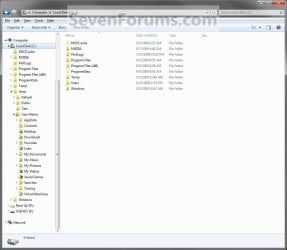
Default.jpg

After.jpg


OPTION ONE

Change the Default Folder Icon


1. Open the Start Menu, then type regedit in the search line and press Enter.

2. If prompted by UAC, then click on Yes.

3. In regedit, navigate to: (See screenshot below)
HKEY_LOCAL_MACHINE\SOFTWARE\Microsoft\Windows\CurrentVersion\Explorer
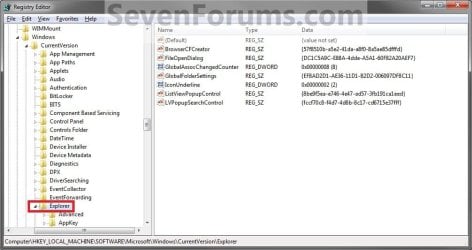
Reg1.jpg
4. In the left pane, right click on the Explorer key, and click on New and Key in the context menu. (See screenshot above)

5. Type Shell Icons and press Enter. (See screenshot below)
NOTE: If Shell Icons is already here, then you can skip steps 4 and 5.
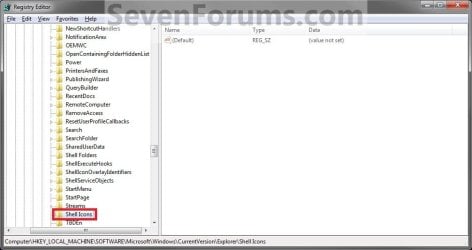
Reg2.jpg
6. In the right pane of Shell Icons, right click on a empty space, and click on New and String Value. Type 3 and press enter. (See screenshot below)
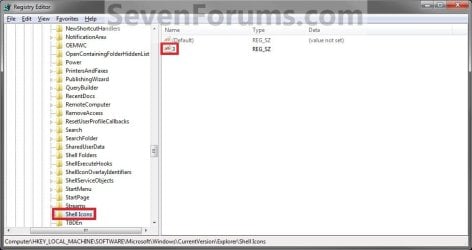
Reg3B.jpg
7. Right click on the number for the folder type, and click on Modify. (See screenshot above)

8. To Use a Custom Icon of Your Own


   Note

  • Be sure to unblock the icon file.
  • Be sure save the icon file in a location that all user account's can access (ex: c:\Users\Public\My Pictures) so the icon will be able to be viewed in their account as well.
  • You must use a 256x256 pixel icon .ico file for it to display properly in all icon sizes in Windows Explorer.
A) In the Modify window, type in the full path of the icon that you want to use within quotes and click on OK. (see screenshot below step 9E)
NOTE: If you change the icon's location (path), then you must also change the location here in step 8 as well for the folder to still display that icon in Windows Explorer.
"full path of the icon file with file extension"
FOR EXAMPLE:
"G:\Windows 7 PNG Files\My_Folder.ico"
B) Go to step 10.
9. To Use another Icon Included in Windows 7
A) Download and install the free program IconViewer for your 32-bit or 64-bit Windows 7.
NOTE: This program will add a Icons tab to files (ex: imageres.dll) that contain a icon library in them so you can see the icons available in it.

B) In Windows Explorer, navigate to C:\Windows\System32\imageres.dll and right click on imageres.dll, click on Properties, and click on the Icons tab.
NOTE: You can use any of the Windows 7 files that include icons in them that you want though. This is just the most common one.

C) Scroll through the icons and make note of the icon number of the one you want to use to replace the default folder icon with, then close the properties window. (see screenshot below)
NOTE: For example, icon number 190 for the green folder icon.
Icon_Viewer.jpg
D) In the Modify window, type in the location below, and click on OK. (see screenshot below)
(full path of the Windows 7 file with file extension),-####
FOR EXAMPLE:
C:\Windows\System32\imageres.dll,-190
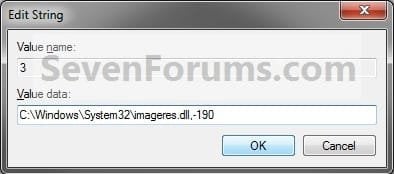
Modify.jpg
10. The registry will now look similar to this with your icon path under the Data column in the right pane instead. (See screenshot below)
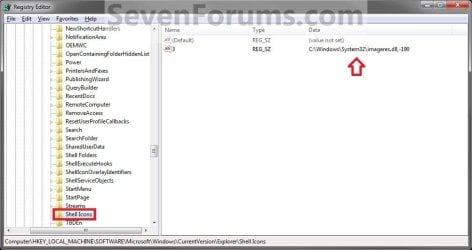
Reg4.jpg
11. If you have 64-bit Windows 7 Installed
   Note
To also change the default folder icon in the "Open" and "Save as" type dialog windows as well in 64-bit Windows 7, you will also need to do this step.

If you have a 32-bit Windows 7 installed, then skip this step and continue on to step 12 instead.

A) In Regedit, go to the location below:
HKEY_LOCAL_MACHINE\SOFTWARE\Wow6432Node\Microsoft\Windows\CurrentVersion\explorer
B) Repeat steps 4 to 10 above using the same settings you used with the location from step 3.
12. Close Regedit.

13. Log off and Log on, or restart the computer to apply the new folder icon.
NOTE: Since you changed the default Folder icon, you might would like to change the Open Folder icon as well in the navigation pane to have them all changed.


OPTION TWO

To Restore the Default Folder Icon


NOTE: This option assumes that you did OPTION ONE above to change the default folder icon.
1. Open the Start Menu, then type regedit in the search line and press Enter.

2. If prompted by UAC, then click on Yes.

3. In regedit, navigate to: (see screenshot below)
HKEY_LOCAL_MACHINE\SOFTWARE\Microsoft\Windows\CurrentVersion\Explorer\Shell Icons
4. In the right pane of Shell Icons, right click on 3 and click on Delete. (see screenshot below)
Reg4.jpg
5. Click on Yes. (see screenshot below)

Confirm.jpg
6. If you have 64-bit Windows 7 Installed
   Note
To also restore the default folder icon in the "Open" and "Save as" type dialog windows as well in 64-bit Windows 7, you will also need to do this step.

If you have a 32-bit Windows 7 installed, then skip this step and continue on to step 7 instead.

A) In Regedit, go to the location below:
HKEY_LOCAL_MACHINE\SOFTWARE\Wow6432Node\Microsoft\Windows\CurrentVersion\explorer\Shell Icons
B) Repeat steps 4 and 5 above.
7. Close Regedit.

8. Log off and Log on, or restart the computer to restore the default yellow folder icon.
That's it,
Shawn


Last edited:
You're welcome Captain Shyam. :)
 

My Computer

Computer type
PC/Desktop
Computer Manufacturer/Model Number
Self built custom
OS
64-bit Windows 11 Pro for Workstations
CPU
Intel i7-8700K OC'd to 5 GHz
Motherboard
ASUS ROG Maximus XI Formula Z390
Memory
64 GB (4x16GB) G.SKILL TridentZ RGB DDR4 3600 MHz
Graphics Card(s)
ASUS ROG-STRIX-GTX1080TI-O11G-GAMING
Sound Card
Integrated
Monitor(s) Displays
2 x Samsung Odyssey G7 27"
Screen Resolution
2560x1440
Hard Drives
1TB Samsung 990 PRO M.2,
4TB Samsung 990 PRO PRO M.2,
TerraMaster F8 SSD Plus NAS
PSU
Seasonic Prime Titanium 850W
Case
Thermaltake Core P3
Cooling
Corsair Hydro H115i
Keyboard
Logitech wireless K800
Mouse
Logitech MX Master 4
Internet Speed
2 Gb/s Download and 100 Mb/s Upload
Antivirus
Malwarebyte Anti-Malware Premium
Browser
Google Chrome
Other Info
Logitech Z625 speaker system,
Logitech BRIO 4K Pro webcam,
HP Color LaserJet Pro MFP M477fdn,
APC SMART-UPS RT 1000 XL - SURT1000XLI,
Galaxy S23 Plus phone
Too bad the pictures dont show as thumbnails in the folder. :(
 

My Computer

OS
windows 7
Thanks dude, i already test for my win7...its work properly :D:D:D
 

My Computer

OS
Windows 7 Ultimate 32bit
You're most welcome Mavericks, and welcome to Seven Forums. :)
 

My Computer

Computer type
PC/Desktop
Computer Manufacturer/Model Number
Self built custom
OS
64-bit Windows 11 Pro for Workstations
CPU
Intel i7-8700K OC'd to 5 GHz
Motherboard
ASUS ROG Maximus XI Formula Z390
Memory
64 GB (4x16GB) G.SKILL TridentZ RGB DDR4 3600 MHz
Graphics Card(s)
ASUS ROG-STRIX-GTX1080TI-O11G-GAMING
Sound Card
Integrated
Monitor(s) Displays
2 x Samsung Odyssey G7 27"
Screen Resolution
2560x1440
Hard Drives
1TB Samsung 990 PRO M.2,
4TB Samsung 990 PRO PRO M.2,
TerraMaster F8 SSD Plus NAS
PSU
Seasonic Prime Titanium 850W
Case
Thermaltake Core P3
Cooling
Corsair Hydro H115i
Keyboard
Logitech wireless K800
Mouse
Logitech MX Master 4
Internet Speed
2 Gb/s Download and 100 Mb/s Upload
Antivirus
Malwarebyte Anti-Malware Premium
Browser
Google Chrome
Other Info
Logitech Z625 speaker system,
Logitech BRIO 4K Pro webcam,
HP Color LaserJet Pro MFP M477fdn,
APC SMART-UPS RT 1000 XL - SURT1000XLI,
Galaxy S23 Plus phone
Disable Folder Thumbnails

Hello Shawn,
This is a great tutorial, it worked like a charm on my Windows 7-64 Home Premium :)

But I was wondering if there was a way to disable thumbnails only in folder icons (I want to disable folder thumbnails, not file/image thumbnails) so I can only see the custom folder icons I chose, not the yellow default ones with thumbnails of files which are inside the folders :o
 

My Computer

OS
Windows 7 Home Premium (64-bit)
Hello Shrantellatessa, and welcome to Seven Forums.

I'm afraid that it's currently all thumbnails turned off to see all of your custom folder icons. There may be a 3rd party program that will allow this, but I'm not aware of one yet. :(
 

My Computer

Computer type
PC/Desktop
Computer Manufacturer/Model Number
Self built custom
OS
64-bit Windows 11 Pro for Workstations
CPU
Intel i7-8700K OC'd to 5 GHz
Motherboard
ASUS ROG Maximus XI Formula Z390
Memory
64 GB (4x16GB) G.SKILL TridentZ RGB DDR4 3600 MHz
Graphics Card(s)
ASUS ROG-STRIX-GTX1080TI-O11G-GAMING
Sound Card
Integrated
Monitor(s) Displays
2 x Samsung Odyssey G7 27"
Screen Resolution
2560x1440
Hard Drives
1TB Samsung 990 PRO M.2,
4TB Samsung 990 PRO PRO M.2,
TerraMaster F8 SSD Plus NAS
PSU
Seasonic Prime Titanium 850W
Case
Thermaltake Core P3
Cooling
Corsair Hydro H115i
Keyboard
Logitech wireless K800
Mouse
Logitech MX Master 4
Internet Speed
2 Gb/s Download and 100 Mb/s Upload
Antivirus
Malwarebyte Anti-Malware Premium
Browser
Google Chrome
Other Info
Logitech Z625 speaker system,
Logitech BRIO 4K Pro webcam,
HP Color LaserJet Pro MFP M477fdn,
APC SMART-UPS RT 1000 XL - SURT1000XLI,
Galaxy S23 Plus phone
Hi Shawn,

I followed this tutorial a few days ago with complete success. Thanks for that. I decided to change the libraries icons and control panel ones as well. Using the corresponding tutorials found on this site. All went fine except now my default folder icon and open folder icons are no longer visible. I get the icon of a file that windows doesn't recognize. I hope you know which one I mean. The only icons that remain are the ones I changed individually. I went back into regedit and under 3 and 4 and the correct path is still there.

If someone wanted to change most/all of the folders in windows, is there a particular order they should be done in? (i.e. control panel, libraries, default, etc.)

Or is there a common reason why the icons would no longer be visible.

Thanks for the help,

Tye
 

My Computer

OS
Windows 7 Ultimate 32 bit
CPU
AMD Phenom 8450 Triple Core 2.1GHz
Motherboard
MSI MS-7388
Memory
Corsair 4GB
Graphics Card(s)
ATI Radeon HD3650 1GB
Sound Card
Onboard 7.1
Monitor(s) Displays
Samsung 24" LCD - Philips 42" LCD
Screen Resolution
1600 x 900 32bit @60Hz
Hard Drives
Maxtor 120GB IDE - Hitachi 1TB SATA
PSU
650w
Hello Tye,

Um, not sure why you are getting this. The libraries and Control Panel icons have nothing to do with the default folder and open folder icons.

Try undoing the default folder and open folder, then restart the computer to see if they go back to default. Afterwards, try changing them again.
 

My Computer

Computer type
PC/Desktop
Computer Manufacturer/Model Number
Self built custom
OS
64-bit Windows 11 Pro for Workstations
CPU
Intel i7-8700K OC'd to 5 GHz
Motherboard
ASUS ROG Maximus XI Formula Z390
Memory
64 GB (4x16GB) G.SKILL TridentZ RGB DDR4 3600 MHz
Graphics Card(s)
ASUS ROG-STRIX-GTX1080TI-O11G-GAMING
Sound Card
Integrated
Monitor(s) Displays
2 x Samsung Odyssey G7 27"
Screen Resolution
2560x1440
Hard Drives
1TB Samsung 990 PRO M.2,
4TB Samsung 990 PRO PRO M.2,
TerraMaster F8 SSD Plus NAS
PSU
Seasonic Prime Titanium 850W
Case
Thermaltake Core P3
Cooling
Corsair Hydro H115i
Keyboard
Logitech wireless K800
Mouse
Logitech MX Master 4
Internet Speed
2 Gb/s Download and 100 Mb/s Upload
Antivirus
Malwarebyte Anti-Malware Premium
Browser
Google Chrome
Other Info
Logitech Z625 speaker system,
Logitech BRIO 4K Pro webcam,
HP Color LaserJet Pro MFP M477fdn,
APC SMART-UPS RT 1000 XL - SURT1000XLI,
Galaxy S23 Plus phone
I deleted the entries in regedit. I'll wait a couple of days, then post results.

Thanks,

Tye
 

My Computer

OS
Windows 7 Ultimate 32 bit
CPU
AMD Phenom 8450 Triple Core 2.1GHz
Motherboard
MSI MS-7388
Memory
Corsair 4GB
Graphics Card(s)
ATI Radeon HD3650 1GB
Sound Card
Onboard 7.1
Monitor(s) Displays
Samsung 24" LCD - Philips 42" LCD
Screen Resolution
1600 x 900 32bit @60Hz
Hard Drives
Maxtor 120GB IDE - Hitachi 1TB SATA
PSU
650w
I used a icon changer and it changed the icon and I deleted the program (and forgot what it was called) and I tried doing the steps and I did but i still have to use the icon it changed it to and half of them are the same as default and the rest are different

help??

Thanks Jack,
 

My Computer

Computer Manufacturer/Model Number
7600
OS
Windows 7 Home Premium
CPU
Pentium(R) Dual-Core E5300 @ 2.60GHz
Motherboard
ASUS P5KPL-AM/PS
Memory
4GB RAM
Graphics Card(s)
NVIDIA GeForce 9500 GT
Monitor(s) Displays
Benq 22"
Screen Resolution
1920 x 1080
Hard Drives
600GB NTFS HDD WD, 1TB External HDD HP simple save , 1TB External WD HDD, 250GB External WD HDD.
Case
Cooler Master Scout
Keyboard
Razer Lycosa
Mouse
Razer Imperator
Other Info
Windows®. Life without Walls™.

Love Steam
Hi,

New here and just wondering if there is a more efficient way to change the folder/document icons? Say by copying/cutting/paste method?

Thanks!
 

My Computer

Computer Manufacturer/Model Number
Apple Macbook Pro 15"
OS
Windows 7 & OS X Snow Leopard
CPU
2.66 GHz Intel i7
Memory
4 GB
Graphics Card(s)
Intel HD Graphics / NVIDIA GeForce GT 330M
Monitor(s) Displays
15" LCD backlit HD display
Hard Drives
500GB 5400 rpm
can i see inside your Shell Folders (the one above) Shell Icon
 

My Computer

Computer Manufacturer/Model Number
7600
OS
Windows 7 Home Premium
CPU
Pentium(R) Dual-Core E5300 @ 2.60GHz
Motherboard
ASUS P5KPL-AM/PS
Memory
4GB RAM
Graphics Card(s)
NVIDIA GeForce 9500 GT
Monitor(s) Displays
Benq 22"
Screen Resolution
1920 x 1080
Hard Drives
600GB NTFS HDD WD, 1TB External HDD HP simple save , 1TB External WD HDD, 250GB External WD HDD.
Case
Cooler Master Scout
Keyboard
Razer Lycosa
Mouse
Razer Imperator
Other Info
Windows®. Life without Walls™.

Love Steam
Hello Jack,

Here you go.

Shell_Folders.jpg
 

My Computer

Computer type
PC/Desktop
Computer Manufacturer/Model Number
Self built custom
OS
64-bit Windows 11 Pro for Workstations
CPU
Intel i7-8700K OC'd to 5 GHz
Motherboard
ASUS ROG Maximus XI Formula Z390
Memory
64 GB (4x16GB) G.SKILL TridentZ RGB DDR4 3600 MHz
Graphics Card(s)
ASUS ROG-STRIX-GTX1080TI-O11G-GAMING
Sound Card
Integrated
Monitor(s) Displays
2 x Samsung Odyssey G7 27"
Screen Resolution
2560x1440
Hard Drives
1TB Samsung 990 PRO M.2,
4TB Samsung 990 PRO PRO M.2,
TerraMaster F8 SSD Plus NAS
PSU
Seasonic Prime Titanium 850W
Case
Thermaltake Core P3
Cooling
Corsair Hydro H115i
Keyboard
Logitech wireless K800
Mouse
Logitech MX Master 4
Internet Speed
2 Gb/s Download and 100 Mb/s Upload
Antivirus
Malwarebyte Anti-Malware Premium
Browser
Google Chrome
Other Info
Logitech Z625 speaker system,
Logitech BRIO 4K Pro webcam,
HP Color LaserJet Pro MFP M477fdn,
APC SMART-UPS RT 1000 XL - SURT1000XLI,
Galaxy S23 Plus phone
how do i get it back to normal folder look ive done that and log out in (didnt work) i tried again turn off on (didnt work) i tried again rebooted (didnt work) help??

Thanks Jack,
 

My Computer

Computer Manufacturer/Model Number
7600
OS
Windows 7 Home Premium
CPU
Pentium(R) Dual-Core E5300 @ 2.60GHz
Motherboard
ASUS P5KPL-AM/PS
Memory
4GB RAM
Graphics Card(s)
NVIDIA GeForce 9500 GT
Monitor(s) Displays
Benq 22"
Screen Resolution
1920 x 1080
Hard Drives
600GB NTFS HDD WD, 1TB External HDD HP simple save , 1TB External WD HDD, 250GB External WD HDD.
Case
Cooler Master Scout
Keyboard
Razer Lycosa
Mouse
Razer Imperator
Other Info
Windows®. Life without Walls™.

Love Steam
Jack,

You can try to see if OPTION TWO in the tutorial may be able to restore the default folder icon. If not, you could do a system restore using a restore point dated before you made the change with the 3rd party program.
 

My Computer

Computer type
PC/Desktop
Computer Manufacturer/Model Number
Self built custom
OS
64-bit Windows 11 Pro for Workstations
CPU
Intel i7-8700K OC'd to 5 GHz
Motherboard
ASUS ROG Maximus XI Formula Z390
Memory
64 GB (4x16GB) G.SKILL TridentZ RGB DDR4 3600 MHz
Graphics Card(s)
ASUS ROG-STRIX-GTX1080TI-O11G-GAMING
Sound Card
Integrated
Monitor(s) Displays
2 x Samsung Odyssey G7 27"
Screen Resolution
2560x1440
Hard Drives
1TB Samsung 990 PRO M.2,
4TB Samsung 990 PRO PRO M.2,
TerraMaster F8 SSD Plus NAS
PSU
Seasonic Prime Titanium 850W
Case
Thermaltake Core P3
Cooling
Corsair Hydro H115i
Keyboard
Logitech wireless K800
Mouse
Logitech MX Master 4
Internet Speed
2 Gb/s Download and 100 Mb/s Upload
Antivirus
Malwarebyte Anti-Malware Premium
Browser
Google Chrome
Other Info
Logitech Z625 speaker system,
Logitech BRIO 4K Pro webcam,
HP Color LaserJet Pro MFP M477fdn,
APC SMART-UPS RT 1000 XL - SURT1000XLI,
Galaxy S23 Plus phone
Hi brink its me from folder options

hey brink I don't remember when I did that folder 3rd party change can you help me
by letting me know how to get a screen shot as well

Thanks Jack,
 

My Computer

Computer Manufacturer/Model Number
7600
OS
Windows 7 Home Premium
CPU
Pentium(R) Dual-Core E5300 @ 2.60GHz
Motherboard
ASUS P5KPL-AM/PS
Memory
4GB RAM
Graphics Card(s)
NVIDIA GeForce 9500 GT
Monitor(s) Displays
Benq 22"
Screen Resolution
1920 x 1080
Hard Drives
600GB NTFS HDD WD, 1TB External HDD HP simple save , 1TB External WD HDD, 250GB External WD HDD.
Case
Cooler Master Scout
Keyboard
Razer Lycosa
Mouse
Razer Imperator
Other Info
Windows®. Life without Walls™.

Love Steam

My Computer

Computer type
PC/Desktop
Computer Manufacturer/Model Number
Self built custom
OS
64-bit Windows 11 Pro for Workstations
CPU
Intel i7-8700K OC'd to 5 GHz
Motherboard
ASUS ROG Maximus XI Formula Z390
Memory
64 GB (4x16GB) G.SKILL TridentZ RGB DDR4 3600 MHz
Graphics Card(s)
ASUS ROG-STRIX-GTX1080TI-O11G-GAMING
Sound Card
Integrated
Monitor(s) Displays
2 x Samsung Odyssey G7 27"
Screen Resolution
2560x1440
Hard Drives
1TB Samsung 990 PRO M.2,
4TB Samsung 990 PRO PRO M.2,
TerraMaster F8 SSD Plus NAS
PSU
Seasonic Prime Titanium 850W
Case
Thermaltake Core P3
Cooling
Corsair Hydro H115i
Keyboard
Logitech wireless K800
Mouse
Logitech MX Master 4
Internet Speed
2 Gb/s Download and 100 Mb/s Upload
Antivirus
Malwarebyte Anti-Malware Premium
Browser
Google Chrome
Other Info
Logitech Z625 speaker system,
Logitech BRIO 4K Pro webcam,
HP Color LaserJet Pro MFP M477fdn,
APC SMART-UPS RT 1000 XL - SURT1000XLI,
Galaxy S23 Plus phone
Its me again this is what my folder looks like and I cant change it back to default.

Can you email me or something with the default windows 7 icon.

what if i delete the all the things in explorer will that change it back to default??
 
Last edited by a moderator:

My Computer

Computer Manufacturer/Model Number
7600
OS
Windows 7 Home Premium
CPU
Pentium(R) Dual-Core E5300 @ 2.60GHz
Motherboard
ASUS P5KPL-AM/PS
Memory
4GB RAM
Graphics Card(s)
NVIDIA GeForce 9500 GT
Monitor(s) Displays
Benq 22"
Screen Resolution
1920 x 1080
Hard Drives
600GB NTFS HDD WD, 1TB External HDD HP simple save , 1TB External WD HDD, 250GB External WD HDD.
Case
Cooler Master Scout
Keyboard
Razer Lycosa
Mouse
Razer Imperator
Other Info
Windows®. Life without Walls™.

Love Steam
Jack,

Here's the default Windows 7 folder icon in a ZIP file. However, you will not have thumbnail previews if you apply the icon using the tutorial.

View attachment Default_Open_Folder.zip

If the icon changing program is uninstalled, then a repair install will fix this for you without losing anything else.
 

My Computer

Computer type
PC/Desktop
Computer Manufacturer/Model Number
Self built custom
OS
64-bit Windows 11 Pro for Workstations
CPU
Intel i7-8700K OC'd to 5 GHz
Motherboard
ASUS ROG Maximus XI Formula Z390
Memory
64 GB (4x16GB) G.SKILL TridentZ RGB DDR4 3600 MHz
Graphics Card(s)
ASUS ROG-STRIX-GTX1080TI-O11G-GAMING
Sound Card
Integrated
Monitor(s) Displays
2 x Samsung Odyssey G7 27"
Screen Resolution
2560x1440
Hard Drives
1TB Samsung 990 PRO M.2,
4TB Samsung 990 PRO PRO M.2,
TerraMaster F8 SSD Plus NAS
PSU
Seasonic Prime Titanium 850W
Case
Thermaltake Core P3
Cooling
Corsair Hydro H115i
Keyboard
Logitech wireless K800
Mouse
Logitech MX Master 4
Internet Speed
2 Gb/s Download and 100 Mb/s Upload
Antivirus
Malwarebyte Anti-Malware Premium
Browser
Google Chrome
Other Info
Logitech Z625 speaker system,
Logitech BRIO 4K Pro webcam,
HP Color LaserJet Pro MFP M477fdn,
APC SMART-UPS RT 1000 XL - SURT1000XLI,
Galaxy S23 Plus phone
Back
Top