Freeze&unable to boot, fixed, good for a while:Bad HDD or Bad Windows?
I would like to know whether my problems will go away if I change my HDD with some bad sectors to 128GB SSD ? Or, they can be the problems of Windows 7, and they are likely to happen again even I change to SSD ?
I found this thread where the computer suddenly becomes very slow even with SSD.
http://www.sevenforums.com/performance-maintenance/319456-pc-slowing-down-crawl.html
Your answer will help me decide whether I should buy 128GB SSD now, or I have more time to save up for 256GB SSD. I would like buy Samsung 840 Pro which cost more than other model.
You can read all the story and test results below, including my system info.
Thank you!
--------------------------------
My laptop always keeps freezing and sometimes does not boot at all until I have to do System Image Recovery.
(My System Image Recovery was done right after cleaning up Factory Bloatware, and installed few programs including Lightroom 4, Chrome, MSE, Calibre, HP Printer Solution Center)
Then, it will be good for a while until the same things happen again. At first, my laptop was good for 6 months after System Image Recovery. Then, it stayed good for only 3 months, and just 1 month the last time it happened.
The last time was the most severe one. One week ago my computer kept freezing for a few days, and then it would not boot at all. There was a flash of blue screen during boot, and a screen asking to choose between system repair and boot normally.
When I chose boot normally, there was a flashing cursor for so long (more than 5 min), then a flash of blue screen, and the same screen asking to choose between system repair and boot normally.
When I chose system repair, the system recovery options showed up. The system restore didn't work. System image recovery found the image in my external HDD after 30 min of searching, started to run for another 30 min without going anywhere until the error came up.
I tried F9 to do Factory Restore. It said it cannot boot, or something like that and back to the same screen with a choice to choose between system repair and boot normally. I tried installing Windows 7 from a boot DVD, it ran and then said something like some files missing.
I ended up using Ubuntu Boot CD to back up everything from Drive . I installed Ubuntu in the same partition of Windows, and then reinstalled Windows 7 from the same DVD. This time I was able to install Windows 7. Windows boot DVD formatted all the HDD and I was able to use my System Image Recovery. Now, my computer seems to work again, but I don't know for how long.
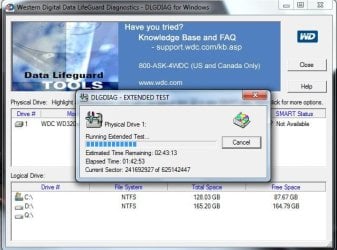
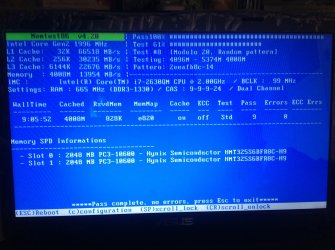
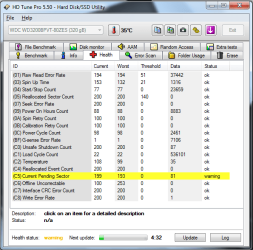
I did a lot of tests for both RAM and HDD. RAM is good, but I found Bad Sectors in HDD. My HDD passed short test, but not Long Test.
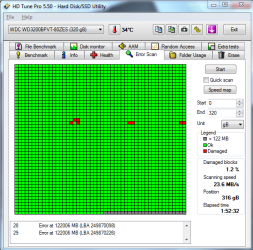
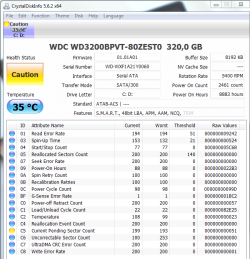
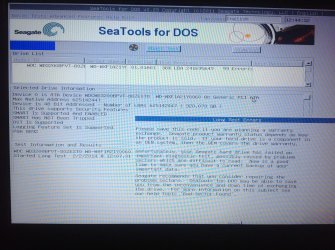
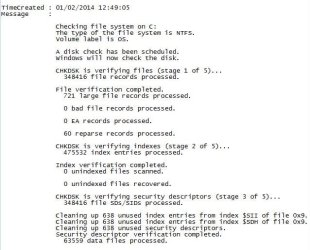
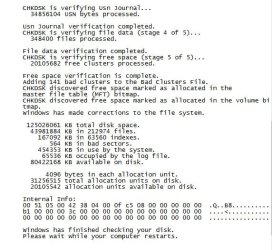
Checkdisk result
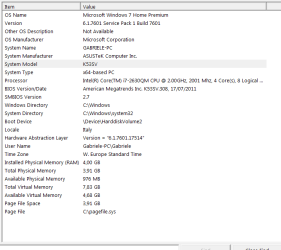
Here is my system info.
I would like to know whether my problems will go away if I change my HDD with some bad sectors to 128GB SSD ? Or, they can be the problems of Windows 7, and they are likely to happen again even I change to SSD ?
I found this thread where the computer suddenly becomes very slow even with SSD.
http://www.sevenforums.com/performance-maintenance/319456-pc-slowing-down-crawl.html
Your answer will help me decide whether I should buy 128GB SSD now, or I have more time to save up for 256GB SSD. I would like buy Samsung 840 Pro which cost more than other model.
You can read all the story and test results below, including my system info.
Thank you!
--------------------------------
My laptop always keeps freezing and sometimes does not boot at all until I have to do System Image Recovery.
(My System Image Recovery was done right after cleaning up Factory Bloatware, and installed few programs including Lightroom 4, Chrome, MSE, Calibre, HP Printer Solution Center)
Then, it will be good for a while until the same things happen again. At first, my laptop was good for 6 months after System Image Recovery. Then, it stayed good for only 3 months, and just 1 month the last time it happened.
The last time was the most severe one. One week ago my computer kept freezing for a few days, and then it would not boot at all. There was a flash of blue screen during boot, and a screen asking to choose between system repair and boot normally.
When I chose boot normally, there was a flashing cursor for so long (more than 5 min), then a flash of blue screen, and the same screen asking to choose between system repair and boot normally.
When I chose system repair, the system recovery options showed up. The system restore didn't work. System image recovery found the image in my external HDD after 30 min of searching, started to run for another 30 min without going anywhere until the error came up.
I tried F9 to do Factory Restore. It said it cannot boot, or something like that and back to the same screen with a choice to choose between system repair and boot normally. I tried installing Windows 7 from a boot DVD, it ran and then said something like some files missing.
I ended up using Ubuntu Boot CD to back up everything from Drive
. I installed Ubuntu in the same partition of Windows, and then reinstalled Windows 7 from the same DVD. This time I was able to install Windows 7. Windows boot DVD formatted all the HDD and I was able to use my System Image Recovery. Now, my computer seems to work again, but I don't know for how long.I did a lot of tests for both RAM and HDD. RAM is good, but I found Bad Sectors in HDD. My HDD passed short test, but not Long Test.
Checkdisk result
Here is my system info.
My Computer
At a glance
Windows 7 Home Premium 64biti7-2630QM4GB
- Computer type
- Laptop
- Computer Manufacturer/Model Number
- Asus
- OS
- Windows 7 Home Premium 64bit
- CPU
- i7-2630QM
- Motherboard
- K53SV
- Memory
- 4GB
- Hard Drives
- WD3200BPVT
- Antivirus
- MSE
- Browser
- Chrome