Solved Huge rebot time

Guys, I just remembered something about Avast! Turn off Deep Scan [or is it deepscan?] -- the option that if clicked that tells Avast to scan each and every file that is called up into memory or into action or simply read. I forgot to mention this earlier. I'm not talking about the regular Scans that can be scheduled or run on demand. I think it's in Settings, it's the deep scan by itself. I'm not at home, so I do have not Avast in front of me.
 

My Computer

Computer type
PC/Desktop
Computer Manufacturer/Model Number
Antec desktop; Acer Aspire laptops
OS
Windows 7 Professional 64-bit
CPU
Desktop i5; Acers i5 & i7
Memory
desktop 16GB; 1 Acer 8GB & 1 Acer 16GB
Hard Drives
1TB split into 2 equal partitions [OS and data] usable by RJS
Internet Speed
AT&T DSL
Browser
FF, GChrome, msIE
Other Info
Windows 7 Firewall, Emsisoft AM/AV, MSE [scan-only], SpywareBlaster, Ruiware/BillP combine
Removing Avast and installing MSE or Panda was for testing purposes ;)
 

My Computer

Computer type
PC/Desktop
Computer Manufacturer/Model Number
Custom assembled by me :}
OS
Win-7-Pro64bit 7-H-Prem-64bit
CPU
i7-5930K 2nd i9-9940x both water blocked VRM's too
Motherboard
ASUS SABERTOOTH X99 2nd ASUS x299 Apex
Memory
Trident-z 3200C14 2nd Trident-z 3600C16
Graphics Card(s)
EVGA 1080ti ftw3 2nd Titan Xp both water blocked
Sound Card
Built-in Realtek
Monitor(s) Displays
1-AOC G2460PG 24"G-Sync 144Hz/ 2nd 1-ASUS VG248QE 24" 144Hz
Screen Resolution
1920 x 1080 144Hz
Hard Drives
2-Samsung M.2 Evo & Evo Plus
2-Samsung 850 EVO 500GB SSD's/ 3-2.5 W.D. Black 1tb-&3-1tb/3-3.5 WD Black 1tb hdd's
PSU
EVGA SuperNOVA 1000-P2 2nd 1200-P2
Case
2-Corsair Obsidian Series 450D Black ATX Mid Tower
Cooling
Custom water loops
Keyboard
Logitech G710+/ 2nd Logitech G910
Mouse
2-RedDragon M901 Perdition 16400 dpi Gaming mouse = wired
Internet Speed
Comcast Ping 19ms 89.31mbps download speed 6.12mbps upload
Antivirus
Malwarebytes Pro/ Superantispyware Pro
Browser
FireFox & Pale moon
Other Info
2nd ASUS X299 Apex/Intel i9-9940x with Custom water loop/7H-Prem-x64/Corsair 450D case/Ram Trident-z 3600C16 4x8gb / Samsung970Evo plus 500gb SSD/Dual ssd EZ swap evo/PSU EVGA SuperNova 1200w-P2 80+Platinum/GPU Titan Xp /8-ML-140 on push-pull on 2-280GTX rads
I uninstalled KB2823324 but just wondering as windows update is set to auto .. shouldn't it download this again on next update/scheduled update check?

BTW I forgot to answer the question about dropping, yes infact I did, but about an year ago ... i never had these issues back then.

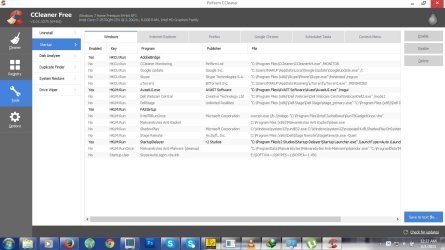
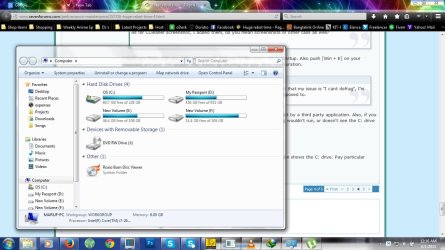
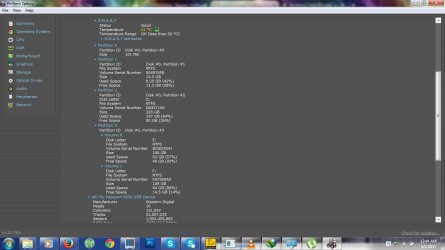
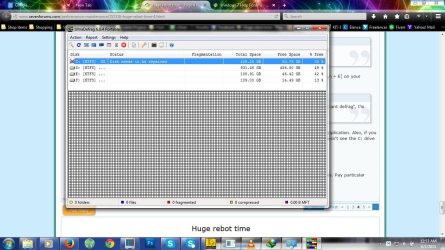
Also I installed ultra defrag (ultradefrag-portable-6.0.4.bin.i386) .. it suggests that the disk needs to be repaired and speccy, attached are the screenshots you requested.
 

Attachments

  • ccleaner-startup.jpg
    ccleaner-startup.jpg
    95.3 KB · Views: 2
  • drive-con.jpg
    drive-con.jpg
    117.6 KB · Views: 2
  • Speccy-smart.jpg
    Speccy-smart.jpg
    74.5 KB · Views: 3
  • ultra defrag.jpg
    ultra defrag.jpg
    190.5 KB · Views: 1

My Computer

OS
Windows 7 Home Premium, Version 6.1 (Build 7601: Service Pack 1)
Yep until you Hide the update it will reappear
It will already download and will install as soon as you restart or shut down,

So changing windows update setting is mandatory ;)
 

My Computer

Computer type
PC/Desktop
Computer Manufacturer/Model Number
Custom assembled by me :}
OS
Win-7-Pro64bit 7-H-Prem-64bit
CPU
i7-5930K 2nd i9-9940x both water blocked VRM's too
Motherboard
ASUS SABERTOOTH X99 2nd ASUS x299 Apex
Memory
Trident-z 3200C14 2nd Trident-z 3600C16
Graphics Card(s)
EVGA 1080ti ftw3 2nd Titan Xp both water blocked
Sound Card
Built-in Realtek
Monitor(s) Displays
1-AOC G2460PG 24"G-Sync 144Hz/ 2nd 1-ASUS VG248QE 24" 144Hz
Screen Resolution
1920 x 1080 144Hz
Hard Drives
2-Samsung M.2 Evo & Evo Plus
2-Samsung 850 EVO 500GB SSD's/ 3-2.5 W.D. Black 1tb-&3-1tb/3-3.5 WD Black 1tb hdd's
PSU
EVGA SuperNOVA 1000-P2 2nd 1200-P2
Case
2-Corsair Obsidian Series 450D Black ATX Mid Tower
Cooling
Custom water loops
Keyboard
Logitech G710+/ 2nd Logitech G910
Mouse
2-RedDragon M901 Perdition 16400 dpi Gaming mouse = wired
Internet Speed
Comcast Ping 19ms 89.31mbps download speed 6.12mbps upload
Antivirus
Malwarebytes Pro/ Superantispyware Pro
Browser
FireFox & Pale moon
Other Info
2nd ASUS X299 Apex/Intel i9-9940x with Custom water loop/7H-Prem-x64/Corsair 450D case/Ram Trident-z 3600C16 4x8gb / Samsung970Evo plus 500gb SSD/Dual ssd EZ swap evo/PSU EVGA SuperNova 1200w-P2 80+Platinum/GPU Titan Xp /8-ML-140 on push-pull on 2-280GTX rads
I'll try that .. just one question could this possibly remove my files in C drive or any other drive for that matter?

Not likely, but when a disk starts misbehaving, anything is possible.

The process tests the drives ability to read and write data, if there is a problem, it moves the data to a good location on the platter and marks the old location as bad so that location isn't used.

If the drive is REALLY bad there isn't a good location to move the data. I don't think your drive is in that situation, but you won't know until you can clear the dirty bit.

Do you have the install disc? You can use that instead of a Repair disc to run chkdsk.

Boot the install disc, and slect Repair , the select Command prompt - the rest of the instructions are the same as my previous post (skip the part for creating the Repair disc).

Running chkdsk without options does more than just report. I have one drive that refuses to be 'clean'. I've tried manually flipping the readonly, offline, and dirty bit flags, but the only way to 'fix' that drive is to run a readonly chkdsk (no options)

If that gets your drive visible again (I forget where you showed the C: drive not shown), then definitively run a chkdsk /f. Hold off on the /r option until later - let's see how far you get.

PlatypusKnight mentioned an update specific to Dell machines that might have some bearing on the issue, I'm not aware of anything like that, but will research it and defer to that member.

Bill
.
 

My Computer

Computer type
Laptop
Computer Manufacturer/Model Number
HP Pavilion dv6-6c10us
OS
x64 (6.3.9600) Win8.1 Pro & soon dual boot x64 (6.1.7601) Win7_SP1 HomePrem
CPU
AMD A6-3420M APU with Radeon(tm) HD Graphics
Motherboard
Hewlett-Packard 1805
Memory
6.00 GB
Graphics Card(s)
AMD Radeon(TM) HD 6520G
Sound Card
(1) AMD High Definition Audio Device (2) IDT High Definiti
Monitor(s) Displays
HP W2072a 20" LCD (1600 x 900) @ 60 Hz
Screen Resolution
1366 x 768 x 32 bits (4294967296 colors) @ 60 Hz
Hard Drives
ST640LM0 00 HM641JI SATA Disk Device
Keyboard
Logitech k520 wireless KB
Mouse
Logitech m320 wireless mouse (bundled with KB)
Internet Speed
15/5 | 54 MB Wireless 'n'
Antivirus
Realtime: Defender or Avast | On-demand: Malwarebytes, ESET
Browser
IE 11 on Win8, IE 10 on win 7
Other Info
Media: [Gimp, Audacity, VLC] || Comm: [WEmail 2012, Skype] || Productivity: [OpenOffice,| Textpad] || Utils: [Sysinternals, cCleaner, Speccy, Defraggler]
Try booting to Safe mode with networking to create the Repair disc

I also suggest running in safe mode for the duration of the trouble shooting.
 

My Computer

Computer type
Laptop
Computer Manufacturer/Model Number
HP Pavilion dv6-6c10us
OS
x64 (6.3.9600) Win8.1 Pro & soon dual boot x64 (6.1.7601) Win7_SP1 HomePrem
CPU
AMD A6-3420M APU with Radeon(tm) HD Graphics
Motherboard
Hewlett-Packard 1805
Memory
6.00 GB
Graphics Card(s)
AMD Radeon(TM) HD 6520G
Sound Card
(1) AMD High Definition Audio Device (2) IDT High Definiti
Monitor(s) Displays
HP W2072a 20" LCD (1600 x 900) @ 60 Hz
Screen Resolution
1366 x 768 x 32 bits (4294967296 colors) @ 60 Hz
Hard Drives
ST640LM0 00 HM641JI SATA Disk Device
Keyboard
Logitech k520 wireless KB
Mouse
Logitech m320 wireless mouse (bundled with KB)
Internet Speed
15/5 | 54 MB Wireless 'n'
Antivirus
Realtime: Defender or Avast | On-demand: Malwarebytes, ESET
Browser
IE 11 on Win8, IE 10 on win 7
Other Info
Media: [Gimp, Audacity, VLC] || Comm: [WEmail 2012, Skype] || Productivity: [OpenOffice,| Textpad] || Utils: [Sysinternals, cCleaner, Speccy, Defraggler]
@gabe22 Thanks for the screenshots. Can you open Speccy again and tell me what kind of drive your HDD is. I can see your SMART status is good, so that's a plus.

I also suggest running in safe mode for the duration of the trouble shooting.
I agree with @slartybart. Before booting into safe mode though, please ensure that the windows update we discussed earlier has been removed, and has been hidden.

Please download the Ultimate Windows Tweaker. You can find it here:
http://www.thewindowsclub.com/ultimate-windows-tweaker-v2-a-tweak-ui-for-windows-7-vista

Unzip and then run the .exe.

Click the [User Accounts & UAC] tab and click [Restore Defaults] at the bottom.
Please click the [Additional Tweaks] tab and check the box beside [Disable Hibernation].
Reboot the computer. See if the issues have resolved themselves. (I doubt this will be the case.) Check if UltraDefrag still reports that your C: drive needs repair. If it does not, run a defrag.

Then, please boot into safe mode.


Once there, please click the [Start] button and type cmd. Right click [cmd.exe] and then click [Run as administrator].

Please type:

Code:
sfc /scannow
Allow that to complete. Let me know if it identifies any integrity violations, and if it repaired them.

Thereafter please type

Code:
chkdsk
It should run in read only mode.

Let me know what the results are. Screenshot would be preferable.

If it runs for you, please then type

Code:
chkdsk /f
Let me know what the results are. Screenshot would be preferable.
 

My Computer

Computer type
Laptop
Computer Manufacturer/Model Number
HP
OS
Dual Boot Win 8.1 x64; Win 7 SP1 x64
CPU
i7-3610QM @ 2.3 GHz
Motherboard
Hewlett-Packard 181C (U3E1)
Memory
8 GB Dual-Channel DDR3 @ 798MHz
Graphics Card(s)
Intel HD Graphics 4000
Hard Drives
Hitachi HTS547575A9E384 SCSI Disk Device;
WD Elements 1042 USB Device
Antivirus
Microsoft Security Essentials; Comodo Firewall w/ Defense +
Please follow this tutorial to provide the current operating environment of your machine.
http://www.sevenforums.com/tutorials/311593-speccy-publish-snapshot-your-system-specs.html

PlatypusKnight: Just a friendly - Windows Seven really doesn't require 3rd party Tweaker pgms. There are a lot of tutorials that show members how to safely affect changes. See the ones below and bookmark them so you can use them later. It takes a while to find them, even if you search, this might help.

What is it that you want Tweaker to do?
I see set UAC to default and disable hibernation - these are easy to do without a 3rd party pgm
http://www.sevenforums.com/tutorials/299-user-account-control-uac-change-notification-settings.html
http://www.sevenforums.com/tutorials/819-hibernate-enable-disable.html

Please follow the instructions in OPTION TWO of http://www.sevenforums.com/tutorials/1538-sfc-scannow-command-system-file-checker.html

Copy C:\Windows\Logs\CBS\CBS.log to your Desktop (it is a protected file so you cannot attach the original)

Attach the copy of the entire CBS.log to a new post.

Thanks

It's not that you said anything that was incorrect, it's just that the tutorials really help both members (they get the step-by-step instructions and the data needed gets posted without too much trouble - sometimes you do have to remind another member that there's a step they missed ;).
 

My Computer

Computer type
Laptop
Computer Manufacturer/Model Number
HP Pavilion dv6-6c10us
OS
x64 (6.3.9600) Win8.1 Pro & soon dual boot x64 (6.1.7601) Win7_SP1 HomePrem
CPU
AMD A6-3420M APU with Radeon(tm) HD Graphics
Motherboard
Hewlett-Packard 1805
Memory
6.00 GB
Graphics Card(s)
AMD Radeon(TM) HD 6520G
Sound Card
(1) AMD High Definition Audio Device (2) IDT High Definiti
Monitor(s) Displays
HP W2072a 20" LCD (1600 x 900) @ 60 Hz
Screen Resolution
1366 x 768 x 32 bits (4294967296 colors) @ 60 Hz
Hard Drives
ST640LM0 00 HM641JI SATA Disk Device
Keyboard
Logitech k520 wireless KB
Mouse
Logitech m320 wireless mouse (bundled with KB)
Internet Speed
15/5 | 54 MB Wireless 'n'
Antivirus
Realtime: Defender or Avast | On-demand: Malwarebytes, ESET
Browser
IE 11 on Win8, IE 10 on win 7
Other Info
Media: [Gimp, Audacity, VLC] || Comm: [WEmail 2012, Skype] || Productivity: [OpenOffice,| Textpad] || Utils: [Sysinternals, cCleaner, Speccy, Defraggler]
Guys I think I have some good news .. finally!

When I tried to reboot in safe mode using advanced boot option (F8 Key) .. I thought to try out windows repair option again and this time it worked.

It found error on disk drive and next it said if the fix worked, system should restart fine, which it did ..
Also I just ran ultradefrag and it doesn't show any messages on C drive status.
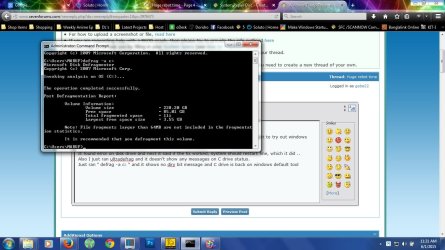
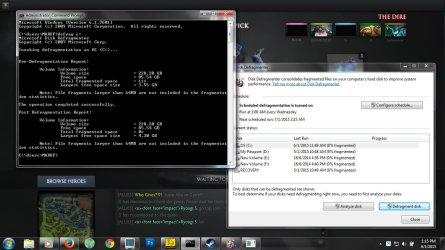
Just ran " defrag -a c: " and it shows no diry bit message and C drive is back on windows default tool (screenshot attached)

Now I'm gonna run a full chkdsk scan on all drives and defrag too, will post back the results afterwards.

@ Callender

I installed Soluto ... I'm failry new to this, can you please advise what info do you need? and how do I send them to you?

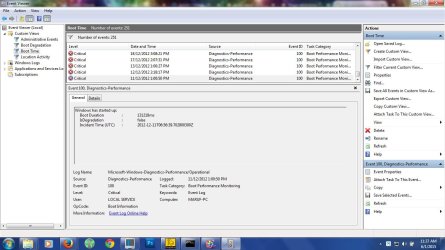
***** Also I was checking the custom boot time event viewer that we created and it seem to have all my boot log ... it seems my systems very first boot time(I'm not 100% certain but its very likely that it is the first boot/2nd boot) is listed and the strange thing is .. it seem to have taken quite a while for a brand new system with clean windows and almost nothing installed (compared to its present status) .. screenshot attached ... please advise how to fix this slow boot (if possible)

@ Slartybart

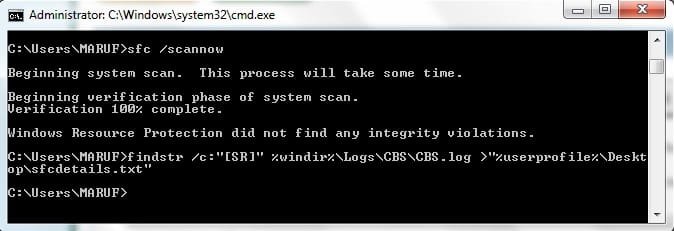
Do you still need the CBS log file?
 

Attachments

  • defrag C-1st.jpg
    defrag C-1st.jpg
    123.1 KB · Views: 4
  • first boot.jpg
    first boot.jpg
    117.1 KB · Views: 1

My Computer

OS
Windows 7 Home Premium, Version 6.1 (Build 7601: Service Pack 1)
If you ran SFC and there were no errors, nope. But if there were errors on the command prompt window, then yep

Not sure if there were errors reported? - post the CBS file
pack it into a compressed folder (zip)
There are size limits on the upload - if it's too big after putting it a zip folder, let me know and I'll think of something.

are those 2012 dates on the disk performance event log entries? You might have had a disk problem for a while - it's hard to tell without looking in the event. Not important for me at the moment.

Glad you could get going again, but there's probably more to do ... even if it's housekeeping.

Bill
 

My Computer

Computer type
Laptop
Computer Manufacturer/Model Number
HP Pavilion dv6-6c10us
OS
x64 (6.3.9600) Win8.1 Pro & soon dual boot x64 (6.1.7601) Win7_SP1 HomePrem
CPU
AMD A6-3420M APU with Radeon(tm) HD Graphics
Motherboard
Hewlett-Packard 1805
Memory
6.00 GB
Graphics Card(s)
AMD Radeon(TM) HD 6520G
Sound Card
(1) AMD High Definition Audio Device (2) IDT High Definiti
Monitor(s) Displays
HP W2072a 20" LCD (1600 x 900) @ 60 Hz
Screen Resolution
1366 x 768 x 32 bits (4294967296 colors) @ 60 Hz
Hard Drives
ST640LM0 00 HM641JI SATA Disk Device
Keyboard
Logitech k520 wireless KB
Mouse
Logitech m320 wireless mouse (bundled with KB)
Internet Speed
15/5 | 54 MB Wireless 'n'
Antivirus
Realtime: Defender or Avast | On-demand: Malwarebytes, ESET
Browser
IE 11 on Win8, IE 10 on win 7
Other Info
Media: [Gimp, Audacity, VLC] || Comm: [WEmail 2012, Skype] || Productivity: [OpenOffice,| Textpad] || Utils: [Sysinternals, cCleaner, Speccy, Defraggler]
@ Slartybart

I attached the log you requested.

"are those 2012 dates on the disk performance event log entries? You might have had a disk problem for a while - it's hard to tell without looking in the event. Not important for me at the moment."
* If you need more info to evaluate if its hardware issue etc .. let me know what info you need

@ PlatypusKnight

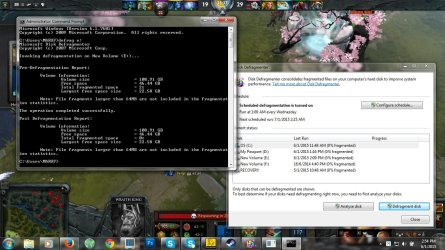
Attached defrag screenshots ... And ran chkdsk /f on all 3 other drive except C as it won't scan while windows active, so I tried chkdsk /r on C and it won't scan while windows active, screenshot attached.

So does this mean system drives error/dirty bit is fixed now?
Also uac default didn't revert the before login screen change(modification that i made), can we fix this somehow
I think this is necessary for the c chkdsk scan

Also although one problem solved, system boot/shutdown is still slow as it was .. maybe a little better .. can we possibly make it faster? both shutdown and system start
 

Attachments

  • sfc-scan.jpg
    sfc-scan.jpg
    22.7 KB · Views: 22
  • defrag-f.jpg
    defrag-f.jpg
    140.6 KB · Views: 1
  • defrag-e.jpg
    defrag-e.jpg
    153.3 KB · Views: 1
  • defrag-d.jpg
    defrag-d.jpg
    119 KB · Views: 1
  • defrag-c.jpg
    defrag-c.jpg
    123.1 KB · Views: 1
  • sfcdetails.txt
    sfcdetails.txt
    81.7 KB · Views: 2

My Computer

OS
Windows 7 Home Premium, Version 6.1 (Build 7601: Service Pack 1)
@gabe22 CONGRATULATIONS.

You cleared the dirtybit. Good job eliminating that hurdle.

What is your startup time like now? What does the Startup Delayer log look like and what does the pre-Windows boot look like?

So does this mean system drives error/dirty bit is fixed now?
Also uac default didn't revert the before login screen change(modification that i made), can we fix this somehow
I think this is necessary for the c chkdsk scan
No. It's not necessary at all. Most times chkdsk /f will not run from a command prompt and you have to use the scheduler from the GUI. That's been my experience these last 6 months.

To determine whether you have a hard drive issue please use this software and run an Extended test:
WD Support / Downloads / Mobile & AV-25 / WD Black

Please DO NOT check any [repair] options. Just let me know the results of the Extended test.

Are you comfortable opening the back of the laptop to take out the memory?

It would be good if you would unseat, and reseat the RAM modules you have in the computer. If you have compressed air, that would also be a good time to blow out the dust that's sure to have collected under there.

If you're not comfortable doing that, please let me know.

Please post the results of the Western Digital Data Lifeguard Diagnostic and we'll continue from there.

Congratulations again. You're on the home stretch now.
 

My Computer

Computer type
Laptop
Computer Manufacturer/Model Number
HP
OS
Dual Boot Win 8.1 x64; Win 7 SP1 x64
CPU
i7-3610QM @ 2.3 GHz
Motherboard
Hewlett-Packard 181C (U3E1)
Memory
8 GB Dual-Channel DDR3 @ 798MHz
Graphics Card(s)
Intel HD Graphics 4000
Hard Drives
Hitachi HTS547575A9E384 SCSI Disk Device;
WD Elements 1042 USB Device
Antivirus
Microsoft Security Essentials; Comodo Firewall w/ Defense +
PlatypusKnight: Just a friendly - Windows Seven really doesn't require 3rd party Tweaker pgms. There are a lot of tutorials that show members how to safely affect changes. See the ones below and bookmark them so you can use them later. It takes a while to find them, even if you search, this might help.

No offense taken @Slartybart. I use the tools I understand. I don't, however, dispute that the methods you're familiar with are superior. Thank you for sharing those. It'll make my life easier. I bookmarked these two tutorials, and I'll probably stalk you around the forum now so I can gather more. I hope you don't mind. I like learning, the more I learn, the more I can help.


What is it that you want Tweaker to do?
I see set UAC to default and disable hibernation - these are easy to do without a 3rd party pgm
http://www.sevenforums.com/tutorials/299-user-account-control-uac-change-notification-settings.html
http://www.sevenforums.com/tutorials/819-hibernate-enable-disable.html
No. The UAC wasn't my primary objective, although it would have been a beneficial side effect.
What I wanted to do was eliminate any alteration @gabe22 made to the preboot. Restore the boot to default.

@gabe22 said this:

1. Dell screen (a bar fills up here in few seconds), then to the next screen
2. Black screen (I've made modifications to windows like years ago to remove the windows default screen here using some article found in google, which actually make the loading a bit faster)
**** Now here in this screen sometimes it gets stuck, as in nothing happens and sometimes it takes like 2-3min and then it gets to the windows login screen.
3. Windows login screen
4. and then it takes about given 26-30 seconds to have all programs ready.
in a previous post.

If you know of a way to revert that, that would be great.
 

My Computer

Computer type
Laptop
Computer Manufacturer/Model Number
HP
OS
Dual Boot Win 8.1 x64; Win 7 SP1 x64
CPU
i7-3610QM @ 2.3 GHz
Motherboard
Hewlett-Packard 181C (U3E1)
Memory
8 GB Dual-Channel DDR3 @ 798MHz
Graphics Card(s)
Intel HD Graphics 4000
Hard Drives
Hitachi HTS547575A9E384 SCSI Disk Device;
WD Elements 1042 USB Device
Antivirus
Microsoft Security Essentials; Comodo Firewall w/ Defense +
@gabe

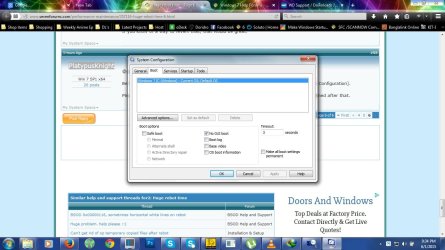
Before you do anything can you click the [Start] button, type sys and then click [System Configuration].

Please screenshot and post the [Boot] tab. Feel free to follow the rest of the steps I outlined after that.
 

My Computer

Computer type
Laptop
Computer Manufacturer/Model Number
HP
OS
Dual Boot Win 8.1 x64; Win 7 SP1 x64
CPU
i7-3610QM @ 2.3 GHz
Motherboard
Hewlett-Packard 181C (U3E1)
Memory
8 GB Dual-Channel DDR3 @ 798MHz
Graphics Card(s)
Intel HD Graphics 4000
Hard Drives
Hitachi HTS547575A9E384 SCSI Disk Device;
WD Elements 1042 USB Device
Antivirus
Microsoft Security Essentials; Comodo Firewall w/ Defense +
2. Black screen (I've made modifications to windows like years ago to remove the windows default screen here using some article found in google, which actually make the loading a bit faster)
**** Now here in this screen sometimes it gets stuck, as in nothing happens and sometimes it takes like

Does anyone know any methods to revert the above changes to default ? (I know I messed up by making that change in the first place and I lost the websites url that I used to make the change, anyhow I think this part is connected to system scan before windows start, although the dirty bit is gone(seems so) but I would like to be able to run system scans)

@ PlatypusKnight

About opening laptop, I'm dont know much about laptops hardware ... never opened one and never even seen someone open one .. so I would rather not but if it helps with testing, you can tell me what needs to be done and I'll try to find someone experienced to try out the suggested tests but only if its really necessary (I would rather not open the system unless I really have to ...).

And Here is the sys boot screenshot you requested and on another note, when I visited boot tab, I think remember bits .... I'm quite sure I did something here to make that pre boot screen go away(but I could be wrong) ... its just memory flash, nothing precise, just thought it might help

After I finish scan on WD lifeguard, I'll post back the results here.
 

Attachments

  • sys-boot.jpg
    sys-boot.jpg
    116.2 KB · Views: 2

My Computer

OS
Windows 7 Home Premium, Version 6.1 (Build 7601: Service Pack 1)
WD lifeguard extended test finished, result passed, no errors
 

My Computer

OS
Windows 7 Home Premium, Version 6.1 (Build 7601: Service Pack 1)
Removing Avast and installing MSE or Panda was for testing purposes ;)
Ahhh, I missed that part! You're right - disabling and/or removing some things really help testing.
 

My Computer

Computer type
PC/Desktop
Computer Manufacturer/Model Number
Antec desktop; Acer Aspire laptops
OS
Windows 7 Professional 64-bit
CPU
Desktop i5; Acers i5 & i7
Memory
desktop 16GB; 1 Acer 8GB & 1 Acer 16GB
Hard Drives
1TB split into 2 equal partitions [OS and data] usable by RJS
Internet Speed
AT&T DSL
Browser
FF, GChrome, msIE
Other Info
Windows 7 Firewall, Emsisoft AM/AV, MSE [scan-only], SpywareBlaster, Ruiware/BillP combine
And Here is the sys boot screenshot you requested and on another note, when I visited boot tab, I think remember bits .... I'm quite sure I did something here to make that pre boot screen go away(but I could be wrong) ... its just memory flash, nothing precise, just thought it might help

Ahhh my psychic powers still work.

;)

Uncheck the [No GUI Boot] option and we should have undone the changes you made.


although the dirty bit is gone(seems so) but I would like to be able to run system scans

You should be able to run chkdsk scans now.

Open an elevated command prompt and type chkdsk with no modifiers. Just chkdsk and hit enter.

Does it run chkdsk?


Look at these youtube videos and see if you would still be apprehensive about unseating and reseating the RAM.

https://www.youtube.com/watch?v=D1oTz-F6xME
https://www.youtube.com/watch?v=pcBwnb8rENQ

Basically all I want you to do is take out the RAM that's already there and put it back in, and make sure it's seated properly.
After that, I'd recommend you run a Memory Test, but not before you properly reseat the RAM.
 

My Computer

Computer type
Laptop
Computer Manufacturer/Model Number
HP
OS
Dual Boot Win 8.1 x64; Win 7 SP1 x64
CPU
i7-3610QM @ 2.3 GHz
Motherboard
Hewlett-Packard 181C (U3E1)
Memory
8 GB Dual-Channel DDR3 @ 798MHz
Graphics Card(s)
Intel HD Graphics 4000
Hard Drives
Hitachi HTS547575A9E384 SCSI Disk Device;
WD Elements 1042 USB Device
Antivirus
Microsoft Security Essentials; Comodo Firewall w/ Defense +
No offense taken @Slartybart. I use the tools I understand. I don't, however, dispute that the methods you're familiar with are superior. Thank you for sharing those. It'll make my life easier. I bookmarked these two tutorials, and I'll probably stalk you around the forum now so I can gather more. I hope you don't mind. I like learning, the more I learn, the more I can help.
.....

Cool!

Yeah, I think everyone does the same thing ... comes in with a working set of tools and uses them to help other members. Don't shy away from using what you know works, I'm sure many of the tools are the same ones in many of the tutorials. There's always new and perhaps better tools members bring in with them or suggest in the course of troubleshooting.

The real power in the tutorials is that you don't have to type the instructions for a particular tool every time you suggest it. ;)

Stalk away, my friend - it might be easier though if when you come across a thread that interests you, search the tutorial section for the tool you want to suggest - it's probably there somewhere. Just like any other search, you have to find the right words to find what you want. After a while, you'll bookmark your favorite ones.

:tip: I built about 30 Post templates so I don't have to search either the tutorials or my bookmarks. What's a Post Template you ask? Basically a boilerplate post for a specific subject, you have to Go Advanced when you post to access the dropdown box in the menu above the text entry field - you'll see it.

:tip: If you see a post by any member and want to build a template from it, hit the quote button and grab the text, then create a new template and paste the text into it - adapt it to your own. I've found that it's easier to work in the standard editor (toggle the editor in the upper right hand area of the post editor - there are 2 choices; WYSIWYG and Standard)

Well that was a lot of off topic text :)
I should read what Gabe has been doing and where the issue stands now.

Bill
.
 

My Computer

Computer type
Laptop
Computer Manufacturer/Model Number
HP Pavilion dv6-6c10us
OS
x64 (6.3.9600) Win8.1 Pro & soon dual boot x64 (6.1.7601) Win7_SP1 HomePrem
CPU
AMD A6-3420M APU with Radeon(tm) HD Graphics
Motherboard
Hewlett-Packard 1805
Memory
6.00 GB
Graphics Card(s)
AMD Radeon(TM) HD 6520G
Sound Card
(1) AMD High Definition Audio Device (2) IDT High Definiti
Monitor(s) Displays
HP W2072a 20" LCD (1600 x 900) @ 60 Hz
Screen Resolution
1366 x 768 x 32 bits (4294967296 colors) @ 60 Hz
Hard Drives
ST640LM0 00 HM641JI SATA Disk Device
Keyboard
Logitech k520 wireless KB
Mouse
Logitech m320 wireless mouse (bundled with KB)
Internet Speed
15/5 | 54 MB Wireless 'n'
Antivirus
Realtime: Defender or Avast | On-demand: Malwarebytes, ESET
Browser
IE 11 on Win8, IE 10 on win 7
Other Info
Media: [Gimp, Audacity, VLC] || Comm: [WEmail 2012, Skype] || Productivity: [OpenOffice,| Textpad] || Utils: [Sysinternals, cCleaner, Speccy, Defraggler]
Back
Top