I need help for a weird problem.

As an experiment ... disable Eset (in services) and reboot. Is it the same slow boot up?

Done, and it still is terrible !
 

My Computer

Computer Manufacturer/Model Number
Acer Aspire 6920g
OS
MS Windows 7 Home Premium 64-bit
CPU
Intel Mobile Core 2 Duo T5750 @ 2.00GHz
Motherboard
Acer Aspire 6920 (U2E1)
Memory
4.0GB Dual-Channel DDR2 @ 332MHz (5-5-5-15)
Graphics Card(s)
512MB GeForce 9500M GS (Acer Incorporated [ALI])
Screen Resolution
Generic PnP Monitor @ 1366x768
Hard Drives
313GB Western Digital WDC WD3200BEVT-22ZCT0 (IDE)
Other Info
optical drive : MATSHITA BD-CMB UJ-120 ATA Device

My Computer

Computer type
PC/Desktop
Computer Manufacturer/Model Number
Bruce ... somewhere in his 40's
OS
Windows 7 Ultimate 32bit SP1
CPU
Intel(R) Core(TM)2 Quad CPU @ 2.40GHz, 2400 MHz
Motherboard
INTEL/D975XBX2
Memory
4 GB
Graphics Card(s)
ATI Radeon HD 2600 Pro
Monitor(s) Displays
Samsung SyncMaster 914v
Screen Resolution
1280 x 1024
Hard Drives
2/500GB each ... ST3500630AS ATA Device.
One is not connected
PSU
Rocketfish 700 W
Case
G.Skill Gigabyte Chassis
Keyboard
Standard PS/2 Keyboard
Mouse
Microsoft PS/2 Mouse
Internet Speed
DSL
Antivirus
Avira Internet Security
Browser
IE 11
Other Info
ATI HDMI Audio

My Computer

Computer Manufacturer/Model Number
Acer Aspire 6920g
OS
MS Windows 7 Home Premium 64-bit
CPU
Intel Mobile Core 2 Duo T5750 @ 2.00GHz
Motherboard
Acer Aspire 6920 (U2E1)
Memory
4.0GB Dual-Channel DDR2 @ 332MHz (5-5-5-15)
Graphics Card(s)
512MB GeForce 9500M GS (Acer Incorporated [ALI])
Screen Resolution
Generic PnP Monitor @ 1366x768
Hard Drives
313GB Western Digital WDC WD3200BEVT-22ZCT0 (IDE)
Other Info
optical drive : MATSHITA BD-CMB UJ-120 ATA Device
I'm reading something on the 1.16 bios update in this site :

Acer 6920G Bios Updated 1.16v released

and it looks like I need to use a bootable USB flashdrive ??

Looks hella complicated


Es-tu certain qu'il faille seulement cliquer sur le .exe comme ça ?
(are you sure that I only have to click on the .exe?)

edit : I'm more concerned about the 3minute extra than the few seconds my new programs delay during startup :P

I've download it for you and extract it to run.

There's Two folders "DOS" & "windows" + read me.doc, go in the "windows" one and double clik on the "WinPhlash.exe".

Which program/driver have you installed that had made it slowing up the boot?
 

My Computer

Computer type
PC/Desktop
Computer Manufacturer/Model Number
Custom Build
OS
Windows 7 Professional SP1 - x64 [Non-UEFI Boot]
CPU
Ivy Bridge Core i5 3570K (Delidded)
Motherboard
Asus P8Z77-V LE PLUS
Memory
G.Skill "Ares" DDR3 PC3-12800 - 1600MHz (16Gb)
Graphics Card(s)
Asus Dual-RX480-O4G
Sound Card
Creative Sound Blaster Z w/5.1 sound system
Monitor(s) Displays
Asus IPS 23"
Screen Resolution
16/9
Hard Drives
Internal:
500Go Sata 6Gb/s (x2)
500Go Sata 3Gb/s (x2)
SSD 60Go Sata 6Gb/s
PSU
In Win C 900W Series 80+ Platinum
Case
Thermaltake Chaser A71
Cooling
Custom Water Cooling Loop
Keyboard
Cooler Master QuickFire XTi
Mouse
Razer Imperator 2012 (4G)
Antivirus
MSE
Browser
IE 11.0.xxx Rtm
Other Info
"Raid0" with Intel Smart Response Technology (HDD/SSD)
Have you been to BlackViper's suggestions on Service Configurations?
Windows 7 Service Configurations by Black Viper

WOW, now it takes 12 minutes to boot = / with the "safe" config.


@ NoN

I have this error while running as admin:
errorekg.png
 

My Computer

Computer Manufacturer/Model Number
Acer Aspire 6920g
OS
MS Windows 7 Home Premium 64-bit
CPU
Intel Mobile Core 2 Duo T5750 @ 2.00GHz
Motherboard
Acer Aspire 6920 (U2E1)
Memory
4.0GB Dual-Channel DDR2 @ 332MHz (5-5-5-15)
Graphics Card(s)
512MB GeForce 9500M GS (Acer Incorporated [ALI])
Screen Resolution
Generic PnP Monitor @ 1366x768
Hard Drives
313GB Western Digital WDC WD3200BEVT-22ZCT0 (IDE)
Other Info
optical drive : MATSHITA BD-CMB UJ-120 ATA Device
Did you do a 'clean' install or an update from Vista?
 

My Computer

Computer type
PC/Desktop
Computer Manufacturer/Model Number
Bruce ... somewhere in his 40's
OS
Windows 7 Ultimate 32bit SP1
CPU
Intel(R) Core(TM)2 Quad CPU @ 2.40GHz, 2400 MHz
Motherboard
INTEL/D975XBX2
Memory
4 GB
Graphics Card(s)
ATI Radeon HD 2600 Pro
Monitor(s) Displays
Samsung SyncMaster 914v
Screen Resolution
1280 x 1024
Hard Drives
2/500GB each ... ST3500630AS ATA Device.
One is not connected
PSU
Rocketfish 700 W
Case
G.Skill Gigabyte Chassis
Keyboard
Standard PS/2 Keyboard
Mouse
Microsoft PS/2 Mouse
Internet Speed
DSL
Antivirus
Avira Internet Security
Browser
IE 11
Other Info
ATI HDMI Audio
Did you do a 'clean' install or an update from Vista?

update from vista gave a 45s boot

then weird stuff started happening when I troubleshooted startup so I did a clean install but never got lower than 4 minutes boot with normal configs
 

My Computer

Computer Manufacturer/Model Number
Acer Aspire 6920g
OS
MS Windows 7 Home Premium 64-bit
CPU
Intel Mobile Core 2 Duo T5750 @ 2.00GHz
Motherboard
Acer Aspire 6920 (U2E1)
Memory
4.0GB Dual-Channel DDR2 @ 332MHz (5-5-5-15)
Graphics Card(s)
512MB GeForce 9500M GS (Acer Incorporated [ALI])
Screen Resolution
Generic PnP Monitor @ 1366x768
Hard Drives
313GB Western Digital WDC WD3200BEVT-22ZCT0 (IDE)
Other Info
optical drive : MATSHITA BD-CMB UJ-120 ATA Device
Go here and download the application ... what's running in the start up that you could manually start yourself?
Autoruns for Windows
 

My Computer

Computer type
PC/Desktop
Computer Manufacturer/Model Number
Bruce ... somewhere in his 40's
OS
Windows 7 Ultimate 32bit SP1
CPU
Intel(R) Core(TM)2 Quad CPU @ 2.40GHz, 2400 MHz
Motherboard
INTEL/D975XBX2
Memory
4 GB
Graphics Card(s)
ATI Radeon HD 2600 Pro
Monitor(s) Displays
Samsung SyncMaster 914v
Screen Resolution
1280 x 1024
Hard Drives
2/500GB each ... ST3500630AS ATA Device.
One is not connected
PSU
Rocketfish 700 W
Case
G.Skill Gigabyte Chassis
Keyboard
Standard PS/2 Keyboard
Mouse
Microsoft PS/2 Mouse
Internet Speed
DSL
Antivirus
Avira Internet Security
Browser
IE 11
Other Info
ATI HDMI Audio
Go here and download the application ... what's running in the start up that you could manually start yourself?
Autoruns for Windows

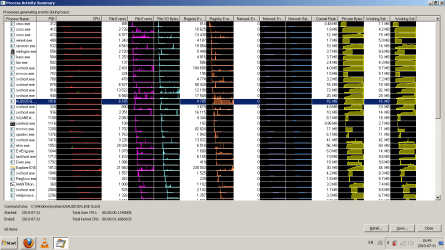
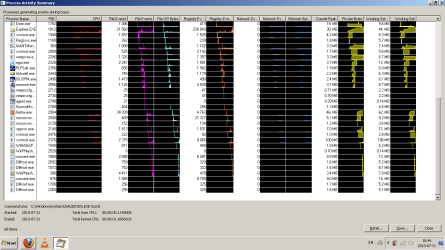
I would like to show you guys the log from Process Monitor, but it's 300Mb = /
edit : hah! i found a rudimentary way to show you guys with excel. sorry if it's compact.


btw it's back at 4mins for bootup
 

Attachments

My Computer

Computer Manufacturer/Model Number
Acer Aspire 6920g
OS
MS Windows 7 Home Premium 64-bit
CPU
Intel Mobile Core 2 Duo T5750 @ 2.00GHz
Motherboard
Acer Aspire 6920 (U2E1)
Memory
4.0GB Dual-Channel DDR2 @ 332MHz (5-5-5-15)
Graphics Card(s)
512MB GeForce 9500M GS (Acer Incorporated [ALI])
Screen Resolution
Generic PnP Monitor @ 1366x768
Hard Drives
313GB Western Digital WDC WD3200BEVT-22ZCT0 (IDE)
Other Info
optical drive : MATSHITA BD-CMB UJ-120 ATA Device
Sounds like you have something that's trying to load at boot that's giving you the trouble you're having.
 

My Computer

Computer type
PC/Desktop
Computer Manufacturer/Model Number
Bruce ... somewhere in his 40's
OS
Windows 7 Ultimate 32bit SP1
CPU
Intel(R) Core(TM)2 Quad CPU @ 2.40GHz, 2400 MHz
Motherboard
INTEL/D975XBX2
Memory
4 GB
Graphics Card(s)
ATI Radeon HD 2600 Pro
Monitor(s) Displays
Samsung SyncMaster 914v
Screen Resolution
1280 x 1024
Hard Drives
2/500GB each ... ST3500630AS ATA Device.
One is not connected
PSU
Rocketfish 700 W
Case
G.Skill Gigabyte Chassis
Keyboard
Standard PS/2 Keyboard
Mouse
Microsoft PS/2 Mouse
Internet Speed
DSL
Antivirus
Avira Internet Security
Browser
IE 11
Other Info
ATI HDMI Audio
here are the p/s
 

Attachments

  • ps1 log .png
    ps1 log .png
    29.9 KB · Views: 15
  • ps2 log .png
    ps2 log .png
    28.4 KB · Views: 9

My Computer

Computer Manufacturer/Model Number
Acer Aspire 6920g
OS
MS Windows 7 Home Premium 64-bit
CPU
Intel Mobile Core 2 Duo T5750 @ 2.00GHz
Motherboard
Acer Aspire 6920 (U2E1)
Memory
4.0GB Dual-Channel DDR2 @ 332MHz (5-5-5-15)
Graphics Card(s)
512MB GeForce 9500M GS (Acer Incorporated [ALI])
Screen Resolution
Generic PnP Monitor @ 1366x768
Hard Drives
313GB Western Digital WDC WD3200BEVT-22ZCT0 (IDE)
Other Info
optical drive : MATSHITA BD-CMB UJ-120 ATA Device
Very strange, mine is 2.03 mb :confused:

Under Options make sure the following options are select
[*]Verify Code Signatures
[*]Hide Signed Microsoft Entries
Click File > Refresh
Click File > Save As
Save it to the desktop as autoruns.txt
Post the contents of autoruns.txt as a reply to this topic
 

My Computer

Computer type
PC/Desktop
Computer Manufacturer/Model Number
Bruce ... somewhere in his 40's
OS
Windows 7 Ultimate 32bit SP1
CPU
Intel(R) Core(TM)2 Quad CPU @ 2.40GHz, 2400 MHz
Motherboard
INTEL/D975XBX2
Memory
4 GB
Graphics Card(s)
ATI Radeon HD 2600 Pro
Monitor(s) Displays
Samsung SyncMaster 914v
Screen Resolution
1280 x 1024
Hard Drives
2/500GB each ... ST3500630AS ATA Device.
One is not connected
PSU
Rocketfish 700 W
Case
G.Skill Gigabyte Chassis
Keyboard
Standard PS/2 Keyboard
Mouse
Microsoft PS/2 Mouse
Internet Speed
DSL
Antivirus
Avira Internet Security
Browser
IE 11
Other Info
ATI HDMI Audio
here's the autorun


thanks alot for the help!
 

Attachments

My Computer

Computer Manufacturer/Model Number
Acer Aspire 6920g
OS
MS Windows 7 Home Premium 64-bit
CPU
Intel Mobile Core 2 Duo T5750 @ 2.00GHz
Motherboard
Acer Aspire 6920 (U2E1)
Memory
4.0GB Dual-Channel DDR2 @ 332MHz (5-5-5-15)
Graphics Card(s)
512MB GeForce 9500M GS (Acer Incorporated [ALI])
Screen Resolution
Generic PnP Monitor @ 1366x768
Hard Drives
313GB Western Digital WDC WD3200BEVT-22ZCT0 (IDE)
Other Info
optical drive : MATSHITA BD-CMB UJ-120 ATA Device
Sorry I didn't give you the full instructions ... I thought I did, but I guess my post got lost :confused:

Double click on autoruns.exe to start Autoruns. Wait for it to finish scanning
Under Options make sure the following options are slected

[*]Verify Code Signatures
[*]Hide Signed Microsoft Entries
Click File > Refresh
Click File > Save As

Save it to the desktop as autoruns.txt
Post the contents of autoruns.txt as a reply
 

My Computer

Computer type
PC/Desktop
Computer Manufacturer/Model Number
Bruce ... somewhere in his 40's
OS
Windows 7 Ultimate 32bit SP1
CPU
Intel(R) Core(TM)2 Quad CPU @ 2.40GHz, 2400 MHz
Motherboard
INTEL/D975XBX2
Memory
4 GB
Graphics Card(s)
ATI Radeon HD 2600 Pro
Monitor(s) Displays
Samsung SyncMaster 914v
Screen Resolution
1280 x 1024
Hard Drives
2/500GB each ... ST3500630AS ATA Device.
One is not connected
PSU
Rocketfish 700 W
Case
G.Skill Gigabyte Chassis
Keyboard
Standard PS/2 Keyboard
Mouse
Microsoft PS/2 Mouse
Internet Speed
DSL
Antivirus
Avira Internet Security
Browser
IE 11
Other Info
ATI HDMI Audio
LOL! Now where did the echo come from :roflmao:
 

My Computer

Computer type
PC/Desktop
Computer Manufacturer/Model Number
Bruce ... somewhere in his 40's
OS
Windows 7 Ultimate 32bit SP1
CPU
Intel(R) Core(TM)2 Quad CPU @ 2.40GHz, 2400 MHz
Motherboard
INTEL/D975XBX2
Memory
4 GB
Graphics Card(s)
ATI Radeon HD 2600 Pro
Monitor(s) Displays
Samsung SyncMaster 914v
Screen Resolution
1280 x 1024
Hard Drives
2/500GB each ... ST3500630AS ATA Device.
One is not connected
PSU
Rocketfish 700 W
Case
G.Skill Gigabyte Chassis
Keyboard
Standard PS/2 Keyboard
Mouse
Microsoft PS/2 Mouse
Internet Speed
DSL
Antivirus
Avira Internet Security
Browser
IE 11
Other Info
ATI HDMI Audio

My Computer

Computer type
PC/Desktop
Computer Manufacturer/Model Number
Bruce ... somewhere in his 40's
OS
Windows 7 Ultimate 32bit SP1
CPU
Intel(R) Core(TM)2 Quad CPU @ 2.40GHz, 2400 MHz
Motherboard
INTEL/D975XBX2
Memory
4 GB
Graphics Card(s)
ATI Radeon HD 2600 Pro
Monitor(s) Displays
Samsung SyncMaster 914v
Screen Resolution
1280 x 1024
Hard Drives
2/500GB each ... ST3500630AS ATA Device.
One is not connected
PSU
Rocketfish 700 W
Case
G.Skill Gigabyte Chassis
Keyboard
Standard PS/2 Keyboard
Mouse
Microsoft PS/2 Mouse
Internet Speed
DSL
Antivirus
Avira Internet Security
Browser
IE 11
Other Info
ATI HDMI Audio

My Computer

Computer Manufacturer/Model Number
Acer Aspire 6920g
OS
MS Windows 7 Home Premium 64-bit
CPU
Intel Mobile Core 2 Duo T5750 @ 2.00GHz
Motherboard
Acer Aspire 6920 (U2E1)
Memory
4.0GB Dual-Channel DDR2 @ 332MHz (5-5-5-15)
Graphics Card(s)
512MB GeForce 9500M GS (Acer Incorporated [ALI])
Screen Resolution
Generic PnP Monitor @ 1366x768
Hard Drives
313GB Western Digital WDC WD3200BEVT-22ZCT0 (IDE)
Other Info
optical drive : MATSHITA BD-CMB UJ-120 ATA Device
This is showing too "File not found: C:\Users\Learn2\AppData\Local\Temp\esihdrv.sys"
http://www.greatis.com/appdata/d/e/esihdrv.sys.htmIs
Did you pay for Eset or download it from a crack? Your computer is trying to find what it can't find ... no wonder the boot time is so slow :zip:
 

My Computer

Computer type
PC/Desktop
Computer Manufacturer/Model Number
Bruce ... somewhere in his 40's
OS
Windows 7 Ultimate 32bit SP1
CPU
Intel(R) Core(TM)2 Quad CPU @ 2.40GHz, 2400 MHz
Motherboard
INTEL/D975XBX2
Memory
4 GB
Graphics Card(s)
ATI Radeon HD 2600 Pro
Monitor(s) Displays
Samsung SyncMaster 914v
Screen Resolution
1280 x 1024
Hard Drives
2/500GB each ... ST3500630AS ATA Device.
One is not connected
PSU
Rocketfish 700 W
Case
G.Skill Gigabyte Chassis
Keyboard
Standard PS/2 Keyboard
Mouse
Microsoft PS/2 Mouse
Internet Speed
DSL
Antivirus
Avira Internet Security
Browser
IE 11
Other Info
ATI HDMI Audio
This is showing too "File not found: C:\Users\Learn2\AppData\Local\Temp\esihdrv.sys"
http://www.greatis.com/appdata/d/e/esihdrv.sys.htmIs
Did you pay for Eset or download it from a crack? Your computer is trying to find what it can't find ... no wonder the boot time is so slow :zip:

I don't have a crack for Eset, I didn't even think it was possible!

What is the file my comp is looking for ? The boot was slow even before I installed Eset
 

My Computer

Computer Manufacturer/Model Number
Acer Aspire 6920g
OS
MS Windows 7 Home Premium 64-bit
CPU
Intel Mobile Core 2 Duo T5750 @ 2.00GHz
Motherboard
Acer Aspire 6920 (U2E1)
Memory
4.0GB Dual-Channel DDR2 @ 332MHz (5-5-5-15)
Graphics Card(s)
512MB GeForce 9500M GS (Acer Incorporated [ALI])
Screen Resolution
Generic PnP Monitor @ 1366x768
Hard Drives
313GB Western Digital WDC WD3200BEVT-22ZCT0 (IDE)
Other Info
optical drive : MATSHITA BD-CMB UJ-120 ATA Device
First download TFC by Old Timer TFC - Temp File Cleaner by OldTimer - Geeks to Go! and save it to your desktop.
Save any unsaved work. TFC will close ALL open programs including your browser!
Double-click on TFC.exe to run it. If you are using Vista/Windows 7 right-click on the file and choose Run As Administrator.
Click the Start button to begin the cleaning process and let it run uninterrupted to completion.

Important! If TFC prompts you to reboot, please do so immediately. If not prompted, manually reboot the machine anyway to ensure a complete clean.
TFC (Temp File Cleaner) will clear out all temp folders for all user accounts (temp, IE temp, java, FF, Opera, Chrome, Safari), including Administrator, All Users, LocalService, NetworkService, and any other accounts in the user folder. It also cleans out the %systemroot%\temp folder and checks for .tmp files in the %systemdrive% root folder, %systemroot%, and the system32 folder (both 32bit and 64bit on 64bit OSs).
It shows the amount removed for each location found (in bytes) and the total removed (in MB). Before running, it will stop Explorer and all other running apps. When finished, if a reboot is required the user must reboot to finish clearing any in-use temp files.

NOTE***TFC only cleans temp folders. TFC will not clean URL history, prefetch, or cookies. Depending on how often someone cleans their temp folders, their system hardware, and how many accounts are present, it can take anywhere from a few seconds to a minute or more.
TFC will completely clear all temp files where other temp file cleaners may fail. TFC requires a reboot immediately after running. Be sure to save any unsaved work before running TFC

Next,

Download Malwarebytes' Anti-Malware to your desktop
|MG| Malwarebytes Anti-Malware 1.46 Download
* Double-click mbam-setup.exe and follow the prompts to install the program.
* At the end, be sure a checkmark is placed next to Update Malwarebytes' Anti-Malware and Launch Malwarebytes' Anti-Malware, then click Finish.
* If an update is found, it will download and install the latest version.
* Once the program has loaded, select Perform full scan, then click Scan.
* When the scan is complete, click OK, then Show Results to view the results.
* Be sure that everything is checked, and click Remove Selected.
* When completed, a log will open in Notepad. Please save it to a convenient location. Copy and Paste that log into your next reply.

 

My Computer

Computer type
PC/Desktop
Computer Manufacturer/Model Number
Bruce ... somewhere in his 40's
OS
Windows 7 Ultimate 32bit SP1
CPU
Intel(R) Core(TM)2 Quad CPU @ 2.40GHz, 2400 MHz
Motherboard
INTEL/D975XBX2
Memory
4 GB
Graphics Card(s)
ATI Radeon HD 2600 Pro
Monitor(s) Displays
Samsung SyncMaster 914v
Screen Resolution
1280 x 1024
Hard Drives
2/500GB each ... ST3500630AS ATA Device.
One is not connected
PSU
Rocketfish 700 W
Case
G.Skill Gigabyte Chassis
Keyboard
Standard PS/2 Keyboard
Mouse
Microsoft PS/2 Mouse
Internet Speed
DSL
Antivirus
Avira Internet Security
Browser
IE 11
Other Info
ATI HDMI Audio
Back
Top