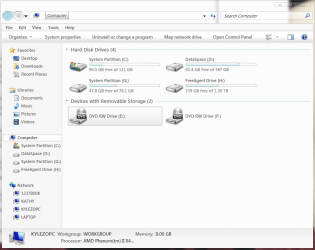
I have Windows 7 Home x64 on a 500GB HDD, partitioned to 78GB C: (for OS) and 387GB D: (for user libraries, programs, etc).
What I want to accomplish, ultimately, is to clone the C partition to the new SSD (120GB) and keep it at a 120GB partition, and expand the D: to take up the entire 500GB HDD for data. Then I will be back to C: for OS (120GB SSD) and D: for data (500GB HDD) I first used DriveImage XML to backup C: and restore to H: (the letter assigned to the SSD after my external HDD and optical drives), then attempt to boot from H:. Well, that did not go well. It either booted from C: anyways (even if I took C: off the boot list in UEFI BIOS), or, when I physically unplugged the disk, said that I must "Reboot and select proper boot device or insert boot medial in selected boot device and press key", yadda yadda. So, I try the diskpart/DIXML method 15 more times, with no success of course. I also try this random method, as well as reading tons of other guides and info pages, before I decide to just give up and use Paragon Migrate OS to SSD (I enjoy learning new things and doing them myself, but when it's impossible...). I clean the SSD using diskpart from an elevated cmd prompt, and I let Paragon do everything - I just point to my OS install, point to the SSD, and click GO.
Apparently Paragon thought everything was fine. I follow the next instructions to restart, get into BIOS, change boot order - system boots from C:, not H:. Awesome, lovely. I unplug C: HDD to force system to boot from HDD: "Reboot and select proper boot device or insert boot medial in selected boot device and press key.". Ok, so apparently there are no boot files in the disk image that Paragon created/moved. So now I'm out of ideas. I was planning to boot from the new OS, change C: on the HDD to some random letter (X , and change H: to C:, then format X: and expand D: over the top of X:. Not happening T_T
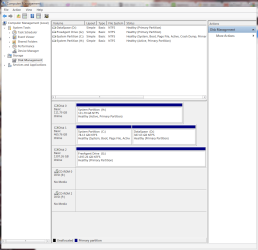
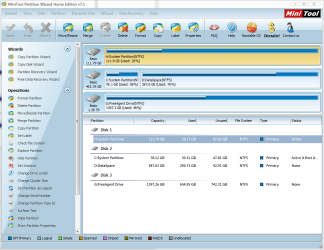
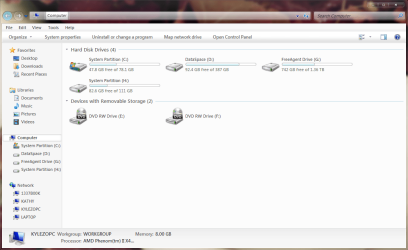
I'll attach some screenshots to help out.
What I want to accomplish, ultimately, is to clone the C partition to the new SSD (120GB) and keep it at a 120GB partition, and expand the D: to take up the entire 500GB HDD for data. Then I will be back to C: for OS (120GB SSD) and D: for data (500GB HDD) I first used DriveImage XML to backup C: and restore to H: (the letter assigned to the SSD after my external HDD and optical drives), then attempt to boot from H:. Well, that did not go well. It either booted from C: anyways (even if I took C: off the boot list in UEFI BIOS), or, when I physically unplugged the disk, said that I must "Reboot and select proper boot device or insert boot medial in selected boot device and press key", yadda yadda. So, I try the diskpart/DIXML method 15 more times, with no success of course. I also try this random method, as well as reading tons of other guides and info pages, before I decide to just give up and use Paragon Migrate OS to SSD (I enjoy learning new things and doing them myself, but when it's impossible...). I clean the SSD using diskpart from an elevated cmd prompt, and I let Paragon do everything - I just point to my OS install, point to the SSD, and click GO.
Apparently Paragon thought everything was fine. I follow the next instructions to restart, get into BIOS, change boot order - system boots from C:, not H:. Awesome, lovely. I unplug C: HDD to force system to boot from HDD: "Reboot and select proper boot device or insert boot medial in selected boot device and press key.". Ok, so apparently there are no boot files in the disk image that Paragon created/moved. So now I'm out of ideas. I was planning to boot from the new OS, change C: on the HDD to some random letter (X
, and change H: to C:, then format X: and expand D: over the top of X:. Not happening T_TI'll attach some screenshots to help out.
Attachments
Last edited:
My Computer
- Computer Manufacturer/Model Number
- Self built
- OS
- Windows 7 Home x64
- CPU
- AMD Phenom II x4 960T 'Zosma'
- Motherboard
- ASRock 990FX Extreme 4
- Memory
- Patriot Signature 2x4GB 1600
- Graphics Card(s)
- Sapphire Radeon HD 6870
- Sound Card
- Onboard
- Monitor(s) Displays
- Dell SP2309W
- Screen Resolution
- 2048x1152
- Hard Drives
- Seagate 500GB 7200RPM internal HDD
Kingston HyperX 3k 120GB
- PSU
- Corsair CX500
- Case
- Sigma Aluminum
- Cooling
- 4x120mm case fans; stock CPU HSF; NB 20mm fan; passive SB HS
- Internet Speed
- Garbage