Installation SSD

Here's a new one - I go into BIOS to look at boot order, make sure everything is fine, discard changes and exit so I don't have to power cycle & insterted DVD. It gives me the prompt to press a key to boot from DVD - then I see the Windows Boot Manager screen: Windows Setup [EMS Enabled]. I'm now in way over my level of technical expertise cuz I've never seen that one before.

Thanks for the tip on PW bootable - I will use that just to be safe. If I ever get to that point... haha
 

My Computer

Computer Manufacturer/Model Number
Self built
OS
Windows 7 Home x64
CPU
AMD Phenom II x4 960T 'Zosma'
Motherboard
ASRock 990FX Extreme 4
Memory
Patriot Signature 2x4GB 1600
Graphics Card(s)
Sapphire Radeon HD 6870
Sound Card
Onboard
Monitor(s) Displays
Dell SP2309W
Screen Resolution
2048x1152
Hard Drives
Seagate 500GB 7200RPM internal HDD
Kingston HyperX 3k 120GB
PSU
Corsair CX500
Case
Sigma Aluminum
Cooling
4x120mm case fans; stock CPU HSF; NB 20mm fan; passive SB HS
Internet Speed
Garbage
Spoke too soon again.

Took the DVD out, and select proper boot device error pops up. Now, even with the HDD unplugged, I can only boot with the DVD IN the system. That makes absolutely no sense to me. SSD > DVD boot order results in "press any key to boot from CD/DVD" which kicks me into SSD OS when it times out. taking DVD out also removes that prompt and renders the system unbootable. I bet if I plugged in the HDD it would work fine.... sigh

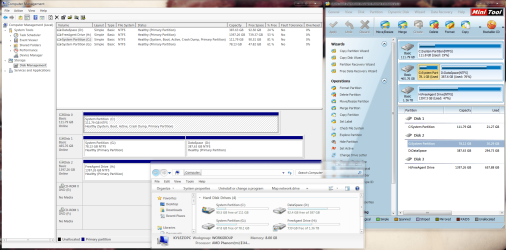
Please post back another screenshot of your maximized Disk Mgmt drive map with listings.

Try a few more Startup Repairs as this is what is required when only DVD will boot the system. Make sure C is marked Active.

Since you'll need PW CD anyway, burn it now using WIndows Img Burner, boot into it to check the Active flag and that disk will boot correctly, click on HD # to highlight it, from Disk tab select Rebuild MBR, Apply.

If Startup Repair or Rebuild MBR will not repair MBR then wipe the SSD with Diskpart Clean Command from DVD Command line (Press Shift + F10 at first screen), then reimage again with HD unplugged if possible.
 
I don't think I can re image with the HDD unplugged. I could use a boot CD I have with DIXML on it and make a new clone of the old HDD OS partition, and restore it to the SSD from there I suppose.

here's a new SS. The save button on the Snip tool did nothing. File > Save As also did nothing. When I tried to close it and it asked me if I wanted to save it, I clicked yes, and it closed with no prompt. I had to shift + printscreen and copy paste in Paint - luckily that allowed me to save the file. Sounds like a gutted OS...

I did 3 more startup repairs all in a row before I read your post, and before this screenshot.
 

Attachments

  • MSDM2.png
    MSDM2.png
    39.9 KB · Views: 11

My Computer

Computer Manufacturer/Model Number
Self built
OS
Windows 7 Home x64
CPU
AMD Phenom II x4 960T 'Zosma'
Motherboard
ASRock 990FX Extreme 4
Memory
Patriot Signature 2x4GB 1600
Graphics Card(s)
Sapphire Radeon HD 6870
Sound Card
Onboard
Monitor(s) Displays
Dell SP2309W
Screen Resolution
2048x1152
Hard Drives
Seagate 500GB 7200RPM internal HDD
Kingston HyperX 3k 120GB
PSU
Corsair CX500
Case
Sigma Aluminum
Cooling
4x120mm case fans; stock CPU HSF; NB 20mm fan; passive SB HS
Internet Speed
Garbage
It looks correct.

If it won't repair or rebuild as I suggested then do the Paragon app over again as it normally works well. This time immediately unplug the HD, setting SSD to boot first, if necessary mark Active and run Repairs.

If that fails I would either try Macrium, Acronis cloning app which comes free with any WD or Seagate in the mix, or Win7 backup imaging.

You can also Clean Reinstall - Factory OEM Windows 7 (same steps for retail) which may be the best choice anyway.
 
Hmm. Rebuilt MBR from PW boot CD...restarted. Can boot to SSD from PW boot CD to, but not by itself. Repair boot.ini = "The bootable partition does not contain boot.ini file". Looks like I am going to have to start from scratch...if I'm lucky enough that my HDD is still bootable.

edit: plugged in the HDD, took out boot CD, selected HDD from boot list = running OS from SSD. I'm not quite smart enough to know what this means, but it's got something to do with the boot instructions being corrupted or missing from the SSD, right? Cuz whatever it is that is present in the HDD, the Windows 7 DVD, and the PW boot CD is enough to get the SSD up and running.

I'll give Paragon another go. I already tried windows backup imaging....besides the fact that the image (a whopping <30GB) took over an hour to write, it didn't work...for the reasons I listed in my OP. Maybe I'll give it another go.
 

My Computer

Computer Manufacturer/Model Number
Self built
OS
Windows 7 Home x64
CPU
AMD Phenom II x4 960T 'Zosma'
Motherboard
ASRock 990FX Extreme 4
Memory
Patriot Signature 2x4GB 1600
Graphics Card(s)
Sapphire Radeon HD 6870
Sound Card
Onboard
Monitor(s) Displays
Dell SP2309W
Screen Resolution
2048x1152
Hard Drives
Seagate 500GB 7200RPM internal HDD
Kingston HyperX 3k 120GB
PSU
Corsair CX500
Case
Sigma Aluminum
Cooling
4x120mm case fans; stock CPU HSF; NB 20mm fan; passive SB HS
Internet Speed
Garbage
Marked old OS partition on HDD as inactive. Gonna try Paragon again. here's a SS for kicks:
 

Attachments

  • Capture.PNG
    Capture.PNG
    143.9 KB · Views: 7

My Computer

Computer Manufacturer/Model Number
Self built
OS
Windows 7 Home x64
CPU
AMD Phenom II x4 960T 'Zosma'
Motherboard
ASRock 990FX Extreme 4
Memory
Patriot Signature 2x4GB 1600
Graphics Card(s)
Sapphire Radeon HD 6870
Sound Card
Onboard
Monitor(s) Displays
Dell SP2309W
Screen Resolution
2048x1152
Hard Drives
Seagate 500GB 7200RPM internal HDD
Kingston HyperX 3k 120GB
PSU
Corsair CX500
Case
Sigma Aluminum
Cooling
4x120mm case fans; stock CPU HSF; NB 20mm fan; passive SB HS
Internet Speed
Garbage
Thank you for the reminder. Does it matter if I do it from shift + F10 in WinRE or just from elevated cmd?
 

My Computer

Computer Manufacturer/Model Number
Self built
OS
Windows 7 Home x64
CPU
AMD Phenom II x4 960T 'Zosma'
Motherboard
ASRock 990FX Extreme 4
Memory
Patriot Signature 2x4GB 1600
Graphics Card(s)
Sapphire Radeon HD 6870
Sound Card
Onboard
Monitor(s) Displays
Dell SP2309W
Screen Resolution
2048x1152
Hard Drives
Seagate 500GB 7200RPM internal HDD
Kingston HyperX 3k 120GB
PSU
Corsair CX500
Case
Sigma Aluminum
Cooling
4x120mm case fans; stock CPU HSF; NB 20mm fan; passive SB HS
Internet Speed
Garbage
You can wipe SSD from HD if you get it started by running Repairs.

You can't wipe SSD from its own Command Line, of course - only the Road Runner can erase himself.

Either Shift + F10 or System Recovery Options
 
HDD will boot without SSD plugged in, with the help of Windows DVD. I was gonna just plug in the SSD and do the OS clone with Paragon that way, but...why clone an OS that wont even boot? I'd really like to fix this...I'll run Startup repair on the HDD a few times and see if I can boot the HDD after. If so, I'll do the Paragon thing after that.

Wait...is that what you just said? haha
 

My Computer

Computer Manufacturer/Model Number
Self built
OS
Windows 7 Home x64
CPU
AMD Phenom II x4 960T 'Zosma'
Motherboard
ASRock 990FX Extreme 4
Memory
Patriot Signature 2x4GB 1600
Graphics Card(s)
Sapphire Radeon HD 6870
Sound Card
Onboard
Monitor(s) Displays
Dell SP2309W
Screen Resolution
2048x1152
Hard Drives
Seagate 500GB 7200RPM internal HDD
Kingston HyperX 3k 120GB
PSU
Corsair CX500
Case
Sigma Aluminum
Cooling
4x120mm case fans; stock CPU HSF; NB 20mm fan; passive SB HS
Internet Speed
Garbage
Ok, ran startup repair 6 times on HDD...no joy. What the hell is going on, if I can boot into the SSD when the HDD is plugged in, or either one with DVDs, but none of them by themselves? If I can boot into the SSD with the HDD there HAS to be a way to fix it...and I'm not clean installing...it will take me longer to reinstall all my applications than all the time I'd save in 10 years using an SSD. There's got to be something I can do if the HDD will allow me to boot the SSD...right? I'm not sure what to do next. I guess I'll find an image DiXML image from the other day and put that back on the HDD...
 

My Computer

Computer Manufacturer/Model Number
Self built
OS
Windows 7 Home x64
CPU
AMD Phenom II x4 960T 'Zosma'
Motherboard
ASRock 990FX Extreme 4
Memory
Patriot Signature 2x4GB 1600
Graphics Card(s)
Sapphire Radeon HD 6870
Sound Card
Onboard
Monitor(s) Displays
Dell SP2309W
Screen Resolution
2048x1152
Hard Drives
Seagate 500GB 7200RPM internal HDD
Kingston HyperX 3k 120GB
PSU
Corsair CX500
Case
Sigma Aluminum
Cooling
4x120mm case fans; stock CPU HSF; NB 20mm fan; passive SB HS
Internet Speed
Garbage
My image restore from the DiXML backup failed spectacularly, and I have no idea why. It took a very long time because the image was stored on a separate partition on the same drive, but when I tried to boot up it froze on the GUI "windows" animation boot screen, and restarted. I ran a startup repair on it with a result of "windows cannot repair this problem automatically" and when I got back into my OS using the copy on the SSD, I noticed that WinRE had actually removed the letter assigned to the HDD OS partition. I'm not really sure what to do next - that backup image appears to be extremely unreliable and it really shouldn't be. I'm going to move it to an external drive, as I imagine the problem could be related to the image being on the same physical disk (I'm quite sure that's why the restore took so long in any case).

Until I can get the restore sorted out, Paragon is out of the question. What's really odd is that, even totally hosed, the HDD still allows the SSD to boot if I don't have a boot CD in the drive. The bottom line here is that something between the boot prompt from the DVD/CD and the actual OS booting up is where the problem is. I know it's got to be the MBR or boot files or something, but rebuilding the MBR didn't work. Unfortunately, Paragon doesn't store images anywhere, so the only clean image I have is somehow corrupted, and since it's not working on the HDD I'm loathe to try it on the SSD. My only other option is to wipe the SSD from shift + F10 diskpart in WinRE, put in a recovery boot environment disk like Bart PE or something, and restore the DiXML image to the SSD after wiping it. But if the image didn't work on the HDD, why should it work on the SSD? The boot files are all stored in the image as well, yes? So how is it not working...?

I've got an Acronis image as well, so I'll try to put that on the old HDD OS partition next. Gee, I've only been working on this for...about 12 hours now. It's so simple, a child could do it...
 

My Computer

Computer Manufacturer/Model Number
Self built
OS
Windows 7 Home x64
CPU
AMD Phenom II x4 960T 'Zosma'
Motherboard
ASRock 990FX Extreme 4
Memory
Patriot Signature 2x4GB 1600
Graphics Card(s)
Sapphire Radeon HD 6870
Sound Card
Onboard
Monitor(s) Displays
Dell SP2309W
Screen Resolution
2048x1152
Hard Drives
Seagate 500GB 7200RPM internal HDD
Kingston HyperX 3k 120GB
PSU
Corsair CX500
Case
Sigma Aluminum
Cooling
4x120mm case fans; stock CPU HSF; NB 20mm fan; passive SB HS
Internet Speed
Garbage
The Acronis image proved workable..but now I'm just kind of back to where I was. I can boot from the HDD using a bootable CD/DVD (still have no idea why/how this works) but when I boot up without it, I get the same boot media error. If I insert a bootable CD/DVD when I have the error prompt, it takes me to a failed to start error screen: winload.exe application is missing or corrupt (0xc000000e). Gonna use startup repair for the 900th time, I'm positive it will start doing something someday...
 

My Computer

Computer Manufacturer/Model Number
Self built
OS
Windows 7 Home x64
CPU
AMD Phenom II x4 960T 'Zosma'
Motherboard
ASRock 990FX Extreme 4
Memory
Patriot Signature 2x4GB 1600
Graphics Card(s)
Sapphire Radeon HD 6870
Sound Card
Onboard
Monitor(s) Displays
Dell SP2309W
Screen Resolution
2048x1152
Hard Drives
Seagate 500GB 7200RPM internal HDD
Kingston HyperX 3k 120GB
PSU
Corsair CX500
Case
Sigma Aluminum
Cooling
4x120mm case fans; stock CPU HSF; NB 20mm fan; passive SB HS
Internet Speed
Garbage
Did you wipe the SSD first with Diskpart to overwrite the boot sector code? This is an unusual enough issue I'd also contact tech support for the SSD (included for first year) to see if the issue is known to them, and to have them help confirm the chip's integrity so you're set for RMA if necessary.

You can always give another partition including OS a letter in Disk Mgmt so it can be seen in Explorer: Drive Letter - Add, Change, or Remove in Windows 7 - Windows 7 Forums

Your concern about reinstalling a 30gb OS installation makes me wonder if this OS or image isn't corrupt if it's been hoarded too long. Win7 is extremely easy to reinstall when necessary to overcome apparent corruption such as this. It takes 20 minutes then after less than an hour's Updates (including needed drivers) you can pace Program reinstalls over time as needed to watch how they affect performance better. You also have the support here of the recognized top experts in the field on Reinstalls.

In your case even doing a quick reinstall to only the wiped SSD would at least tell you if that will allow it to boot independently. If not I'd RMA it - if so you can build out the install over time as shown in Clean Reinstall - Factory OEM Windows 7
 
Well, you've been grand, and indeed I most likely will just drop all hope of cloning and imaging, as it's not working and I've got some seriously fudged boot sectors not apparently. Mostly, at this point, I just want to solve the problem for curiosities' sake. I've gotta know how the drives can boot each other, but neither can boot alone without a CD...I love a good mystery. Beyond that...I'll probably just clean install. I've got a reference image so I know exactly where/what to do if I start fresh...I just really don't want to re tweak all the little things that aren't obvious in the file structure: all the little customizations here and there.

One thing I haven't tried is booting onto the HDD, and restoring the older images to the SSD (wiping first). I'll give that a shot next. Booting into the HDD should be simple enough if I unplug the SSD and plug it back in once I'm running in the OS.

edit: I wanted to add, after the Acronis image, I have 2 OS's to choose from - 2 Windows installs. WinRE represents them as my 80GB partition, and an [Unknown] 0GB partition. I don't know what to think about that...it certainly isn't showing up in any partition utility I've got.

Oh, and to answer your concern, it's not a very old installation - couple of months - the corruption is very clearly from this foray into cloning and repairing. That's what caused all this.
 

My Computer

Computer Manufacturer/Model Number
Self built
OS
Windows 7 Home x64
CPU
AMD Phenom II x4 960T 'Zosma'
Motherboard
ASRock 990FX Extreme 4
Memory
Patriot Signature 2x4GB 1600
Graphics Card(s)
Sapphire Radeon HD 6870
Sound Card
Onboard
Monitor(s) Displays
Dell SP2309W
Screen Resolution
2048x1152
Hard Drives
Seagate 500GB 7200RPM internal HDD
Kingston HyperX 3k 120GB
PSU
Corsair CX500
Case
Sigma Aluminum
Cooling
4x120mm case fans; stock CPU HSF; NB 20mm fan; passive SB HS
Internet Speed
Garbage
Well, restored DiXML image to the SSD after wiping...got a "boot device is inaccessible" error, and in PW boot environment, I fixed MBR > no change. So I 'set partition as windows boot partition' > cannot find Windows directory. Explore the volume > everything looks totally normal, like a regular windows OS partition file structure.

WinRE Startup Repair: 1st go went fine, it restarted to "finish". I ran it again > Windows cannot repair this computer automatically. Problem Signature 05: ExternalMedia / Problem Signature 07: MissingOsLoader... So I ran bootrec.exe /fixmbr and /fixboot on it. I also ran /scanos and /rebuildbcd but it found 0 Windows installations. When I restarted, it got to the GUI boot screen, and then froze and restarted. So I went back into WinRE and re-ran startup repair > found and fixed 'unspecified changes to system configuration'. I'm now looking at a "Windows 7 Home Premium (Recovered)" installation and running startup repair a few more times.

It's fine if boot sectors are corrupted, or whatever. What puzzles me is, why aren't my images working even after cleaning with diskpart? And if this is a hardware problem, I'm sorry, but it's quite far fetched to think that both the new drive and the old one failed at the same exact time. I swear something else is going on here...it's just beyond my level of knowledge :(

Anyways, after running startup repair a few more times, the boot sequence continues to fail on the boot GUI animation screen. Plugged back in the HDD and, while I still have 2 Windows installations on this disk somehow, one of them erroring out, the other still boots. So I'll wipe the SSD again and try the Acronis image on it.
 

My Computer

Computer Manufacturer/Model Number
Self built
OS
Windows 7 Home x64
CPU
AMD Phenom II x4 960T 'Zosma'
Motherboard
ASRock 990FX Extreme 4
Memory
Patriot Signature 2x4GB 1600
Graphics Card(s)
Sapphire Radeon HD 6870
Sound Card
Onboard
Monitor(s) Displays
Dell SP2309W
Screen Resolution
2048x1152
Hard Drives
Seagate 500GB 7200RPM internal HDD
Kingston HyperX 3k 120GB
PSU
Corsair CX500
Case
Sigma Aluminum
Cooling
4x120mm case fans; stock CPU HSF; NB 20mm fan; passive SB HS
Internet Speed
Garbage
Acronis image > /scanos = 0 installs found > startup repair = cannot repair automatically / boot prompt shows 2 windows installs > first one = winload.exe missing or corrupt > second one boots fine WITH CD/DVD help. So, somehow both my images are not working even though I created them before I had any issues. Which makes zero sense. Now I'm gonna boot onto the HDD, wipe the SSD, and clean install on there (ugh). Just to see if it's even POSSIBLE anymore for me to boot my computer.
 

My Computer

Computer Manufacturer/Model Number
Self built
OS
Windows 7 Home x64
CPU
AMD Phenom II x4 960T 'Zosma'
Motherboard
ASRock 990FX Extreme 4
Memory
Patriot Signature 2x4GB 1600
Graphics Card(s)
Sapphire Radeon HD 6870
Sound Card
Onboard
Monitor(s) Displays
Dell SP2309W
Screen Resolution
2048x1152
Hard Drives
Seagate 500GB 7200RPM internal HDD
Kingston HyperX 3k 120GB
PSU
Corsair CX500
Case
Sigma Aluminum
Cooling
4x120mm case fans; stock CPU HSF; NB 20mm fan; passive SB HS
Internet Speed
Garbage
There's no point in RMAing this drive if the same problem is also affecting the HDD. Obviously, the problem is independent of the hardware.

I clean installed from the DVD onto the wiped SSD (cleaned with diskpart). Booted into Windows fine. I removed the DVD and restarted - Bam - boot media error.
 

My Computer

Computer Manufacturer/Model Number
Self built
OS
Windows 7 Home x64
CPU
AMD Phenom II x4 960T 'Zosma'
Motherboard
ASRock 990FX Extreme 4
Memory
Patriot Signature 2x4GB 1600
Graphics Card(s)
Sapphire Radeon HD 6870
Sound Card
Onboard
Monitor(s) Displays
Dell SP2309W
Screen Resolution
2048x1152
Hard Drives
Seagate 500GB 7200RPM internal HDD
Kingston HyperX 3k 120GB
PSU
Corsair CX500
Case
Sigma Aluminum
Cooling
4x120mm case fans; stock CPU HSF; NB 20mm fan; passive SB HS
Internet Speed
Garbage
Well.

I feel like an idiot, but I think I figured the problem out: AHCI turned on in BIOS for that SSD. I think my images were made before I installed AHCI drivers or something. As a last ditch, I turned IDE on and removed the DVD - booted normally. Now there is hope for me to get the images working on the SSD. I'm gonna go read up on PROPERLY configuing AHCI now.

Let this be a lesson to you, internet - be a bit more careful and meticulous when making major system changes. BIOS settings are quite independent of OS disk images.... >.>

Had I turned on a verbose boot mode, I'm quite sure I would have seen the freeze and restart on the GUI boot screen happen during a storage driver loading. In any case, I'm quite sure I've earned a few new grey hairs and I'm not proud. Gonna try to get this sorted out once and for all now...

The strange thing is, I'm quite sure I made the switch to AHCI correctly - made my registry changes, rebooted, changed BIOS settings, and installed drivers automatically. I think the problem came in when I started restoring images that didn't have AHCI drivers in them. At least, in IDE mode, I can get up and running before switching up to AHCI.
 

My Computer

Computer Manufacturer/Model Number
Self built
OS
Windows 7 Home x64
CPU
AMD Phenom II x4 960T 'Zosma'
Motherboard
ASRock 990FX Extreme 4
Memory
Patriot Signature 2x4GB 1600
Graphics Card(s)
Sapphire Radeon HD 6870
Sound Card
Onboard
Monitor(s) Displays
Dell SP2309W
Screen Resolution
2048x1152
Hard Drives
Seagate 500GB 7200RPM internal HDD
Kingston HyperX 3k 120GB
PSU
Corsair CX500
Case
Sigma Aluminum
Cooling
4x120mm case fans; stock CPU HSF; NB 20mm fan; passive SB HS
Internet Speed
Garbage
Back
Top