Solved installing new SSD hard drive.

budfrench

New member
I have a new hard drive on it's way. It is a SSD so naturally I want my Win 7 Installation on it. I have purchased 6 total licences for Windows 7. Currently using 3 , I donot know if I have a remaining unused licence. I don't want to have to buy it again. What is the easiest way for me to do this installation. (I am using an upgrade disk otherwise , this probably wouldn't even be an issue.) I really would like to start fresh also.
 

My Computer

Computer Manufacturer/Model Number
homebuilt
OS
win & 64 bit
CPU
AMD phenomII x3
Motherboard
Asus M2N68-AM
Memory
4 g
Graphics Card(s)
Saphire vaporX 5700HD
Sound Card
onboard
Monitor(s) Displays
I-Inc iF251H
Hard Drives
seagate 250G
PSU
unknown
Case
unknown
Cooling
Mastercooler
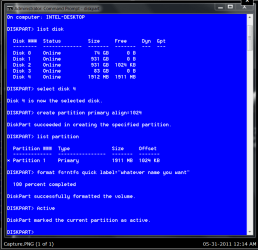
The best way is to do a clean install. Clean install with an upgrade disk. you may want to follow this tutorial on prepare HDD/SSD for reinstall. You will not need to run the 'clean all' command as you have a new SSD. also go to the part about alignment. Recommend disconnect all other hard drives except the SSD, and install the SSD to port 0. Boot from the installation DVD. at the first window, do not select your language, hold down shift and press F10 and a command window will appear. This is how I do mine. I did this for an example. You will have only 1 hard drive so will probably select disk 0.

formatting SSD.PNG

Then you will type 'exit' and press enter, twice and will be back at the language window. Proceed as usual but do not format the drive as you already have done that.
 

My Computers

System One System Two

  • Computer type
    PC/Desktop
    Computer Manufacturer/Model Number
    ALWAYS UNDER CONSTRUCTION
    OS
    Windows 11 Pro
    CPU
    Ryzen 9 5900X
    Motherboard
    Asus X570 Crosshair Viii Hero
    Memory
    32GB G Skill DDR4-3600
    Graphics Card(s)
    EVGA RTX 3080 FTW 3 Ultra
    Sound Card
    On Board/Sennheiser PC37X Headset
    Monitor(s) Displays
    3 X Asus 27"
    Screen Resolution
    2560x1440
    Hard Drives
    2 X 1 TB NVME drives
    PSU
    EVGA 850
    Case
    Phanteks Eclipse P400A
    Cooling
    EVGA 280 AIO
    Keyboard
    Logitech G510s/ Logitech G13
    Mouse
    Logitech G502
    Internet Speed
    24/1
    Antivirus
    ESET/MBAM Pro/SAS Pro
    Browser
    Chrome/ Firefox/ Edge
  • Computer type
    Laptop
    System Manufacturer/Model Number
    Dell 16 Plus
    OS
    Windows 11 Pro
    CPU
    Intel Ultra 9 288V
    Memory
    32 GB LPDDR5X 8533
    Monitor(s) Displays
    16" Mini-LED HDR600 Touch 90 Hz
    Screen Resolution
    2560X1600
    Hard Drives
    1 TB NVME
You shouldn't have to buy a new license just because you are installing a new hard drive. You will likely have to reactivate Windows.


The upgrade disc will work as well as a "full" version. You might have to make a simple registry change after the install to get it activated.

Installation on a new SSD is very simple--no different than a regular hard drive. Windows 7 will recognize that it is an SSD and make a few necessary adjustments.

Unplug any other hard drives you may have in the PC before you begin.

Decide on your partition plans and back up your data before you start.
 

My Computer

Computer type
PC/Desktop
Computer Manufacturer/Model Number
Ignatz Special; 4 speed manual gearbox; factory air conditioning; one of one
OS
Windows 7 Home Premium SP1, 64-bit
CPU
Intel Skylake i5-6600K, not overclocked
Motherboard
AsRock Z170M Extreme 4, micro ATX
Memory
8 GB HyperX DDR4-2666 (2 x 4 GB)
Graphics Card(s)
none; graphics are integrated on CPU
Sound Card
onboard: Realtek ALC1150; external: USB Behringer UF0-202
Monitor(s) Displays
Dell S2340M 23 inch IPS
Screen Resolution
1600 x 900
Hard Drives
System: Crucial MX100 series SSD, 128 GB;
Data: Samsung Spinpoint 103SJ, 1 TB;
Backup: WD Caviar Green WD30EZRX-00D8PB0, 3 TB
PSU
Rosewill SilentNight 500 watt fanless, semi-modular
Case
Antec Solo II
Cooling
Noctua NH-U12S; Noctua F12 intake, Noctua S12A exhaust
Keyboard
Microsoft 200 6JH-00001 USB
Mouse
Dell or Microsoft optical wired; USB
Antivirus
Microsoft Security Essentials and Malwarebytes Premium
Browser
Pale Moon
Other Info
All fans PWM; speeds at idle: CPU circa 500 rpm; intake circa 600 rpm; exhaust circa 600 rpm; CPU temps 27 idle and 47 C load in a warm room (27 C/81 F) when running Intel Extreme Tuning Utility stress test.
Thanks for the help. I am now confident I will be able to get the drive installed with windows.
 

My Computer

Computer Manufacturer/Model Number
homebuilt
OS
win & 64 bit
CPU
AMD phenomII x3
Motherboard
Asus M2N68-AM
Memory
4 g
Graphics Card(s)
Saphire vaporX 5700HD
Sound Card
onboard
Monitor(s) Displays
I-Inc iF251H
Hard Drives
seagate 250G
PSU
unknown
Case
unknown
Cooling
Mastercooler
Back
Top