Solved Installing new SSD & keeping Win7 on HDD

7isntheaven

New member
Local time
1:28 PM
Messages
16
Hello, I'm getting a Samsung 850 Pro 512 SATA SSD today (should have went with ssd 5 years ago) & after reading up on everything about going from hdd os to ssd os for a few days now, in advance of installing it, I'm curious as to if I can use Win7 (from a Home Premium 64-bit retail DVD) to dual-boot using both drives? Why would I? Because I'd like to keep the OS installed on the HDD and be able to boot from it easily using the F11 boot device menu (never from changing boot order in BIOS) on startup to choose the hdd to boot to if needed, in case the SSD has or develops problems later on. Also about activation, if ssd install turns out well and once the OS on the SSD is validated by MS (before reconnecting the HDD later on I would assume) and then I choose to boot to the HDD os if the ssd fails, will I run into any product activation problems with the product key licensing or using the OS on the HDD from another drive letter, or is it 'illegal' to use the same OS activation key if in fact, I can dual-boot to both drives?

I mean it's not a big deal if I can't dual-boot for whatever reason (only one active partition, product activation, soft or hardware issues, etc.) but I keep thinking it would be a good backup plan (along with regular backups to an external drive) to be able to keep using Win7 on the hdd in case the ssd ever fails. And also, is it ok to leave Windows installed on the HDD for a few weeks (if advised that I should never use it to boot to) before removing it? And is it as simple as deleting the folders from Explorer or should I just reformat the partition to remove all traces? And will I be able to delete the 100mb system partition from Win7 on the hdd once I boot to the ssd drive from Explorer, since they're 'system files'? have a 1Tb WD SATA Black HDD partitioned into 250G for windows (C) & the rest as a data storage partition (E). Thanks!
 

My Computer My Computer

At a glance

Windows 7 HP x64AMD Phenom II X6 1100T BECorsair XMS3 12GB (4x2GB) (2x2GB) DC DDR3 1333HzEVGA Geforce GTX 950 FTW
Computer type
PC/Desktop
Computer Manufacturer/Model Number
custom bulid
OS
Windows 7 HP x64
CPU
AMD Phenom II X6 1100T BE
Motherboard
ECS A890GXM-A v2.0 Black Series
Memory
Corsair XMS3 12GB (4x2GB) (2x2GB) DC DDR3 1333Hz
Graphics Card(s)
EVGA Geforce GTX 950 FTW
Sound Card
Realtek ALC892 8-Channel HD Audio
Monitor(s) Displays
Viewsonic VX2253 - 22" Flat panel - 144Hz
Screen Resolution
1920x1080 (native)
Hard Drives
Samsung 850 Pro 512GB
WD Caviar Black 1TB SATA 7200rpm
PSU
500w Thermaltake TR2
Case
Thermaltake Armor A90
Cooling
2 x 20" Walmart Wind Machines on HIGH
Internet Speed
Spectrum 300/30
Antivirus
Norton 360
Browser
IE 11
I am fairly sure you'd need 2 Windows licenses if you want to dual boot Windows 7 on 2 different drives installed at the same time in one PC.

Imaging is a much simpler way to have an OS backed up. You can typically be back up and running in 30 minutes and you haven't tied up your spare drive in the meantime.

You don't want to have your "System Reserved" partition on a different drive than your C partition. The way to avoid that is to have only one drive connected when you install Windows.

In your situation, I would:

1: plan on using the SSD as my OS drive, with the system reserved partition on that same SSD.

2: install Windows to the SSD with only the SSD connected.

3: if you have confirmed that the SSD will boot your PC with the HD disconnected, then re-connect the HD and delete the OS partition from it. Then add that reclaimed space to the data partition on that drive. You might be able to do that with Windows Disk Management or you might have to use a tool such as Partition Wizard.
 

My Computer My Computer

At a glance

Windows 7 Home Premium SP1, 64-bitIntel Skylake i5-6600K, not overclocked8 GB HyperX DDR4-2666 (2 x 4 GB)none; graphics are integrated on CPU
Computer type
PC/Desktop
Computer Manufacturer/Model Number
Ignatz Special; 4 speed manual gearbox; factory air conditioning; one of one
OS
Windows 7 Home Premium SP1, 64-bit
CPU
Intel Skylake i5-6600K, not overclocked
Motherboard
AsRock Z170M Extreme 4, micro ATX
Memory
8 GB HyperX DDR4-2666 (2 x 4 GB)
Graphics Card(s)
none; graphics are integrated on CPU
Sound Card
onboard: Realtek ALC1150; external: USB Behringer UF0-202
Monitor(s) Displays
Dell S2340M 23 inch IPS
Screen Resolution
1600 x 900
Hard Drives
System: Crucial MX100 series SSD, 128 GB;
Data: Samsung Spinpoint 103SJ, 1 TB;
Backup: WD Caviar Green WD30EZRX-00D8PB0, 3 TB
PSU
Rosewill SilentNight 500 watt fanless, semi-modular
Case
Antec Solo II
Cooling
Noctua NH-U12S; Noctua F12 intake, Noctua S12A exhaust
Keyboard
Microsoft 200 6JH-00001 USB
Mouse
Dell or Microsoft optical wired; USB
Antivirus
Microsoft Security Essentials and Malwarebytes Premium
Browser
Pale Moon
Other Info
All fans PWM; speeds at idle: CPU circa 500 rpm; intake circa 600 rpm; exhaust circa 600 rpm; CPU temps 27 idle and 47 C load in a warm room (27 C/81 F) when running Intel Extreme Tuning Utility stress test.
That's what I thought. I plan on installing with just the SSD connected. BIOS is already set to AHCI mode. I understand about not being able to dual-boot only having one product key. So much for that half-baked backup strategy. I have Acronis True Image software I can install & use (from the WD-branded type), will that be better to use to make system images with or will Win7 imaging be good enough? I wasn't asking about changing or moving the system reserved partition on the HDD once I have Win7 up & running from the SSD, just if I can delete it from Windows Explorer from the OS on the SSD once I reconnect the HDD, since it's special system files. In other words, once the SSD OS is booted, can I simply delete the system reserved part along with the Windows system folders on the HDD or will I need to reformat the 250GB part to get rid of the reserved folder to clear up space on it? Thanks for the quick reply.
 

My Computer My Computer

At a glance

Windows 7 HP x64AMD Phenom II X6 1100T BECorsair XMS3 12GB (4x2GB) (2x2GB) DC DDR3 1333HzEVGA Geforce GTX 950 FTW
Computer type
PC/Desktop
Computer Manufacturer/Model Number
custom bulid
OS
Windows 7 HP x64
CPU
AMD Phenom II X6 1100T BE
Motherboard
ECS A890GXM-A v2.0 Black Series
Memory
Corsair XMS3 12GB (4x2GB) (2x2GB) DC DDR3 1333Hz
Graphics Card(s)
EVGA Geforce GTX 950 FTW
Sound Card
Realtek ALC892 8-Channel HD Audio
Monitor(s) Displays
Viewsonic VX2253 - 22" Flat panel - 144Hz
Screen Resolution
1920x1080 (native)
Hard Drives
Samsung 850 Pro 512GB
WD Caviar Black 1TB SATA 7200rpm
PSU
500w Thermaltake TR2
Case
Thermaltake Armor A90
Cooling
2 x 20" Walmart Wind Machines on HIGH
Internet Speed
Spectrum 300/30
Antivirus
Norton 360
Browser
IE 11
see comments in bold

I have Acronis True Image software I can install & use (from the WD-branded type), will that be better to use to make system images with or will Win7 imaging be good enough?

I would use Acronis rather than Windows, but I would prefer Macrium Reflect Free to Acronis.

The bigger and FAR more important point is that you know how to use your imaging application, it's shortcomings, it's nuances, it's menus, etc. The worst thing you can do is make an image and then say to yourself, "well, that's done. I'll figure out how the restoration process works when the time comes." Bad move.


I wasn't asking about changing or moving the system reserved partition on the HDD once I have Win7 up & running from the SSD, just if I can delete it from Windows Explorer from the OS on the SSD once I reconnect the HDD, since it's special system files.

No, you would NOT delete it from Windows Explorer if "from" means "using".

You delete it via Windows Disk Management, which will result in a bunch of "unoccupied space". You then add that unoccupied space to the data partition. You most likely would have to use Partition Wizard to add the space to the data partition.


In other words, once the SSD OS is booted, can I simply delete the system reserved part along with the Windows system folders or will I need to reformat the 250GB part to get rid of the reserved folder to clear up space on it?

After the SSD is booted, you can reconnect the HDD and delete any partition you want from it. Presumably, you'd delete the System Reserved partition and the OS partition, leaving only the data partition. Then add the space from those 2 partitions to the data partition.

You wouldn't delete "Windows system folders". You'd delete the entire operating system partition on that drive--what would be C if you were booting from it. As well as the System Reserved partition.

You don't need to "reformat" anything. Just delete partitions and then add the space they previously occupied to the data partition.

If you want, you can install Windows to the SSD and not even have a System Reserved partition on it. That's what I do. It doesn't really matter, but I just like the idea of one partition on each of my drives--it appeals to my sense of order.
 

My Computer My Computer

At a glance

Windows 7 Home Premium SP1, 64-bitIntel Skylake i5-6600K, not overclocked8 GB HyperX DDR4-2666 (2 x 4 GB)none; graphics are integrated on CPU
Computer type
PC/Desktop
Computer Manufacturer/Model Number
Ignatz Special; 4 speed manual gearbox; factory air conditioning; one of one
OS
Windows 7 Home Premium SP1, 64-bit
CPU
Intel Skylake i5-6600K, not overclocked
Motherboard
AsRock Z170M Extreme 4, micro ATX
Memory
8 GB HyperX DDR4-2666 (2 x 4 GB)
Graphics Card(s)
none; graphics are integrated on CPU
Sound Card
onboard: Realtek ALC1150; external: USB Behringer UF0-202
Monitor(s) Displays
Dell S2340M 23 inch IPS
Screen Resolution
1600 x 900
Hard Drives
System: Crucial MX100 series SSD, 128 GB;
Data: Samsung Spinpoint 103SJ, 1 TB;
Backup: WD Caviar Green WD30EZRX-00D8PB0, 3 TB
PSU
Rosewill SilentNight 500 watt fanless, semi-modular
Case
Antec Solo II
Cooling
Noctua NH-U12S; Noctua F12 intake, Noctua S12A exhaust
Keyboard
Microsoft 200 6JH-00001 USB
Mouse
Dell or Microsoft optical wired; USB
Antivirus
Microsoft Security Essentials and Malwarebytes Premium
Browser
Pale Moon
Other Info
All fans PWM; speeds at idle: CPU circa 500 rpm; intake circa 600 rpm; exhaust circa 600 rpm; CPU temps 27 idle and 47 C load in a warm room (27 C/81 F) when running Intel Extreme Tuning Utility stress test.
I've converted/transferred from one storage device to another several times.
Personally i keep the original HD as-is until i'm sure the new HD/SSD works correctly.
It could be days, weeks, months before i can be sure everything works for me.
I don't use the old HD, or dual-boot, but i keep it as-is "just-in-case".
I just keep as a "recovery option" (backup plan), the same as you are asking about.

When i'm convinced the new device works, i run a Diskpart Clean on the old HD.
That removes everything, including all partitions and the MBR, so it can't boot.
Then I re-partition that old HD as I want, usually a single partition for Data or Backups.

Here is a tutorial for Diskpart Clean:
http://www.sevenforums.com/tutorials/52129-disk-clean-clean-all-diskpart-command.html

If you only delete folders and partitions, some traces of the old bootable OS remain.
That could cause problems, someday, somehow, from what i've read and learned.
 

My Computer My Computer

At a glance

Multi-Boot W7_Pro_x64 W8.1_Pro_x64 W10_Pro_x6...AMD Athlon II x4 6206GB GSkill DDR2 800AMD 4670 GPU + AMD 4200 IGP
Computer type
PC/Desktop
Computer Manufacturer/Model Number
home built
OS
Multi-Boot W7_Pro_x64 W8.1_Pro_x64 W10_Pro_x64 +Linux_VMs +Chromium_VM
CPU
AMD Athlon II x4 620
Motherboard
Gigabyte GA-MA785G-UD3H
Memory
6GB GSkill DDR2 800
Graphics Card(s)
AMD 4670 GPU + AMD 4200 IGP
Sound Card
on board Realtek ALC889A
Monitor(s) Displays
RCA 40" LCD TV, Insignia 32" LCD TV, HP 15" LCD monitor
Screen Resolution
1680 x 1050
Hard Drives
OCZ Vertex 3 120GB,
Samsung F3 1TB (3),
Several others - WD, Seagate, Hitachi, ...
PSU
Corsair 500 W
Case
Rosewill mid tower
Cooling
CM 90mm rifle
Keyboard
Gyration wireless, Logitech wireless, Dell USB wired
Mouse
Gyration wireless, Logitech wireless, V7 USB wired
Internet Speed
Spectrum - 100Mbps D / 10Mbps U
Antivirus
Avast, MBAM3, EMET, WinPatrol
Browser
Pale Moon, Firefox, IE
Other Info
2 multi-boot PC's
Mainly HTPC/Office/Gen purpose (no gaming).
Trendnet USB KVM.
LG DVD burner/Blue Ray Player.
Tray system for removable SATA backup drives.

Not currently OCd, under-volted.
I use Hybrid sleep, rarely re-boot or shutdown.

Hauppauge HD-PVR, Avermedia PCIe TV Tuner, Hauppauge PCI TV Tuner.
Yea, thanks Dave, that's what I plan on, just keeping Windows on the HDD while I see if all goes well for a few weeks. I should be able to use the 2nd, non-OS partition on the HDD I use just for data/storage only (I hope?) After calling around, it seems I can't even buy the one I want in a brick & mortar store in my city/region. Have to order it through Samsung/Amazon/etc. I don't understand what the other poster meant by "I don't even use a system reserved partition." I thought that was a mandatory deal when installing Win7? Thanks.
 

My Computer My Computer

At a glance

Windows 7 HP x64AMD Phenom II X6 1100T BECorsair XMS3 12GB (4x2GB) (2x2GB) DC DDR3 1333HzEVGA Geforce GTX 950 FTW
Computer type
PC/Desktop
Computer Manufacturer/Model Number
custom bulid
OS
Windows 7 HP x64
CPU
AMD Phenom II X6 1100T BE
Motherboard
ECS A890GXM-A v2.0 Black Series
Memory
Corsair XMS3 12GB (4x2GB) (2x2GB) DC DDR3 1333Hz
Graphics Card(s)
EVGA Geforce GTX 950 FTW
Sound Card
Realtek ALC892 8-Channel HD Audio
Monitor(s) Displays
Viewsonic VX2253 - 22" Flat panel - 144Hz
Screen Resolution
1920x1080 (native)
Hard Drives
Samsung 850 Pro 512GB
WD Caviar Black 1TB SATA 7200rpm
PSU
500w Thermaltake TR2
Case
Thermaltake Armor A90
Cooling
2 x 20" Walmart Wind Machines on HIGH
Internet Speed
Spectrum 300/30
Antivirus
Norton 360
Browser
IE 11
You need the files normally found on System Reserved. Those files are needed to boot.

You don't need System Reserved.

You can install without System Reserved and the files normally found on System Reserved will be put on C.

It takes a minute or so to do during the installation.

Boot from the Windows 7 installation disc.

Hit Shift F10 at the first screen where you are asked to choose a language.

A command prompt will appear. Type diskpart at that prompt.

Type in the following commands one by one, followed by the Enter key to create a partition (text in parentheses are comments only):

list disk (to show the ID number of the hard disk to partition, normally Disk 0)

select disk 0 (change 0 to another number if applicable)

clean (this wipes the drive of anything on it; not needed on a brand new drive)

create partition primary (this will create one primary partition covering the entire drive; if you instead want to create a primary partition of 80 GB, add “size=80000” after the word “primary”)

select partition 1 (this selects the partition you just made)

active (this marks that partition active)

format fs=ntfs quick (this formats that partition)

exit (this quits the diskpart program)

exit (this closes the command prompt window)

Continue Windows 7 installation as usual. Remember to highlight and select the partition just created when you come to the partition screen asking you "where do you want to install Windows?”.
 

My Computer My Computer

At a glance

Windows 7 Home Premium SP1, 64-bitIntel Skylake i5-6600K, not overclocked8 GB HyperX DDR4-2666 (2 x 4 GB)none; graphics are integrated on CPU
Computer type
PC/Desktop
Computer Manufacturer/Model Number
Ignatz Special; 4 speed manual gearbox; factory air conditioning; one of one
OS
Windows 7 Home Premium SP1, 64-bit
CPU
Intel Skylake i5-6600K, not overclocked
Motherboard
AsRock Z170M Extreme 4, micro ATX
Memory
8 GB HyperX DDR4-2666 (2 x 4 GB)
Graphics Card(s)
none; graphics are integrated on CPU
Sound Card
onboard: Realtek ALC1150; external: USB Behringer UF0-202
Monitor(s) Displays
Dell S2340M 23 inch IPS
Screen Resolution
1600 x 900
Hard Drives
System: Crucial MX100 series SSD, 128 GB;
Data: Samsung Spinpoint 103SJ, 1 TB;
Backup: WD Caviar Green WD30EZRX-00D8PB0, 3 TB
PSU
Rosewill SilentNight 500 watt fanless, semi-modular
Case
Antec Solo II
Cooling
Noctua NH-U12S; Noctua F12 intake, Noctua S12A exhaust
Keyboard
Microsoft 200 6JH-00001 USB
Mouse
Dell or Microsoft optical wired; USB
Antivirus
Microsoft Security Essentials and Malwarebytes Premium
Browser
Pale Moon
Other Info
All fans PWM; speeds at idle: CPU circa 500 rpm; intake circa 600 rpm; exhaust circa 600 rpm; CPU temps 27 idle and 47 C load in a warm room (27 C/81 F) when running Intel Extreme Tuning Utility stress test.
If you install Windows into unallocated space it will create a System Reserved partition for the bootloader, and a C partition for Windows.

If you create a partition before installing Windows and install Windows to that partition, the bootloader and Windows will be in the C partition, there will not be a System Reserved partition.

Either way works, it's up to the person installing the OS if they want or don't want a System Reserved partition created for the bootloader.
 

My Computer My Computer

At a glance

Multi-Boot W7_Pro_x64 W8.1_Pro_x64 W10_Pro_x6...AMD Athlon II x4 6206GB GSkill DDR2 800AMD 4670 GPU + AMD 4200 IGP
Computer type
PC/Desktop
Computer Manufacturer/Model Number
home built
OS
Multi-Boot W7_Pro_x64 W8.1_Pro_x64 W10_Pro_x64 +Linux_VMs +Chromium_VM
CPU
AMD Athlon II x4 620
Motherboard
Gigabyte GA-MA785G-UD3H
Memory
6GB GSkill DDR2 800
Graphics Card(s)
AMD 4670 GPU + AMD 4200 IGP
Sound Card
on board Realtek ALC889A
Monitor(s) Displays
RCA 40" LCD TV, Insignia 32" LCD TV, HP 15" LCD monitor
Screen Resolution
1680 x 1050
Hard Drives
OCZ Vertex 3 120GB,
Samsung F3 1TB (3),
Several others - WD, Seagate, Hitachi, ...
PSU
Corsair 500 W
Case
Rosewill mid tower
Cooling
CM 90mm rifle
Keyboard
Gyration wireless, Logitech wireless, Dell USB wired
Mouse
Gyration wireless, Logitech wireless, V7 USB wired
Internet Speed
Spectrum - 100Mbps D / 10Mbps U
Antivirus
Avast, MBAM3, EMET, WinPatrol
Browser
Pale Moon, Firefox, IE
Other Info
2 multi-boot PC's
Mainly HTPC/Office/Gen purpose (no gaming).
Trendnet USB KVM.
LG DVD burner/Blue Ray Player.
Tray system for removable SATA backup drives.

Not currently OCd, under-volted.
I use Hybrid sleep, rarely re-boot or shutdown.

Hauppauge HD-PVR, Avermedia PCIe TV Tuner, Hauppauge PCI TV Tuner.
Thank you both for helping, along with the clear instructions on how to use the cmd to set a partition before installing, I really appreciate it. Now if I'm understanding correctly, I would have to create a partition on the new ssd before installing Win7 from DVD if I do not want a system reserved partition on the new ssd, or I can just have Win7 do all that during install and have it just create a system reserved partition, correct? Does it make any difference to performance or security, such as help preventing malware from accessing it (I do use AV) if it's in a system reserved part? It's 512GB and I will just have the OS and a few select programs) unless I'm not aware of some other way(s) for better performance.

After just ordering it from Amazon, I was looking at my Armor A90 case user guide .pdf & low & behold it actually supports one 2.5" drive at the very bottom of the other 6 - 3.5" hdd bays. DOH! I never expected that on a 5 year old case. I added a Sabrent 2.5 to 3.5 adapter bracket to my order ($6.99). Oh well, I'll probably end up using it if I buy another 2.5 ssd at some point down the road.

Also, when I go to boot up for the very first time on the ssd, should I leave my Ethernet connection unplugged while I optimize the drive so Windows Updates doesn't pester me or sneak in any unwanted drivers before I disable auto-update? I am not looking forward to having them hanging up trying to install them over & over up again...took me 3 days of research to get WU working & getting them all installed! Strangely, after installing IE11, WU worked perfectly on the HDD..what the ....?

Since my BIOS is already set to ahci, will I need to hit whatever F-key (10?) during setup to install additional drivers "from floppy" which I don't have, or can I just point Win to the AMD & mobo drivers if I copy any needed drivers to a USB stick, or just install everything after booting into Windows, like I believe I did before? I c.r.a.f.t. I'm 60 years old lol. Sorry for all the questions, I'm no wizard and it's been quite awhile since I've installed or re-installed an OS. Samsung includes the Magician software that helps you optimize the ssd, but iirc (unlikely) I think you have to install it in Windows to use it, but I do not know for sure. Thanks once again!

Edit: Is it me? I wanted to highlight/copy/paste the cmd instructions above to Notepad but it will not highlight with the mouse...guess I'll just take a screenshot.
 
Last edited:

My Computer My Computer

At a glance

Windows 7 HP x64AMD Phenom II X6 1100T BECorsair XMS3 12GB (4x2GB) (2x2GB) DC DDR3 1333HzEVGA Geforce GTX 950 FTW
Computer type
PC/Desktop
Computer Manufacturer/Model Number
custom bulid
OS
Windows 7 HP x64
CPU
AMD Phenom II X6 1100T BE
Motherboard
ECS A890GXM-A v2.0 Black Series
Memory
Corsair XMS3 12GB (4x2GB) (2x2GB) DC DDR3 1333Hz
Graphics Card(s)
EVGA Geforce GTX 950 FTW
Sound Card
Realtek ALC892 8-Channel HD Audio
Monitor(s) Displays
Viewsonic VX2253 - 22" Flat panel - 144Hz
Screen Resolution
1920x1080 (native)
Hard Drives
Samsung 850 Pro 512GB
WD Caviar Black 1TB SATA 7200rpm
PSU
500w Thermaltake TR2
Case
Thermaltake Armor A90
Cooling
2 x 20" Walmart Wind Machines on HIGH
Internet Speed
Spectrum 300/30
Antivirus
Norton 360
Browser
IE 11
Now if I'm understanding correctly, I would have to create a partition on the new ssd before installing Win7 from DVD if I do not want a system reserved partition on the new ssd, or I can just have Win7 do all that during install and have it just create a system reserved partition, correct? Does it make any difference to performance or security, such as help preventing malware from accessing it (I do use AV) if it's in a system reserved part? It's 512GB and I will just have the OS and a few select programs) unless I'm not aware of some other way(s) for better performance.

Yes, you understand correctly.
I've never heard or seen it makes any difference for performance or security, either way.

With all the issues i've read about recently with Win 7 updates, i can't comment on your other questions.
Many people have reported problems with Win 7 updates, especially on clean installs.
I don't know what is the best approach, hopefully someone else can give better help.
 

My Computer My Computer

At a glance

Multi-Boot W7_Pro_x64 W8.1_Pro_x64 W10_Pro_x6...AMD Athlon II x4 6206GB GSkill DDR2 800AMD 4670 GPU + AMD 4200 IGP
Computer type
PC/Desktop
Computer Manufacturer/Model Number
home built
OS
Multi-Boot W7_Pro_x64 W8.1_Pro_x64 W10_Pro_x64 +Linux_VMs +Chromium_VM
CPU
AMD Athlon II x4 620
Motherboard
Gigabyte GA-MA785G-UD3H
Memory
6GB GSkill DDR2 800
Graphics Card(s)
AMD 4670 GPU + AMD 4200 IGP
Sound Card
on board Realtek ALC889A
Monitor(s) Displays
RCA 40" LCD TV, Insignia 32" LCD TV, HP 15" LCD monitor
Screen Resolution
1680 x 1050
Hard Drives
OCZ Vertex 3 120GB,
Samsung F3 1TB (3),
Several others - WD, Seagate, Hitachi, ...
PSU
Corsair 500 W
Case
Rosewill mid tower
Cooling
CM 90mm rifle
Keyboard
Gyration wireless, Logitech wireless, Dell USB wired
Mouse
Gyration wireless, Logitech wireless, V7 USB wired
Internet Speed
Spectrum - 100Mbps D / 10Mbps U
Antivirus
Avast, MBAM3, EMET, WinPatrol
Browser
Pale Moon, Firefox, IE
Other Info
2 multi-boot PC's
Mainly HTPC/Office/Gen purpose (no gaming).
Trendnet USB KVM.
LG DVD burner/Blue Ray Player.
Tray system for removable SATA backup drives.

Not currently OCd, under-volted.
I use Hybrid sleep, rarely re-boot or shutdown.

Hauppauge HD-PVR, Avermedia PCIe TV Tuner, Hauppauge PCI TV Tuner.
System reserved part

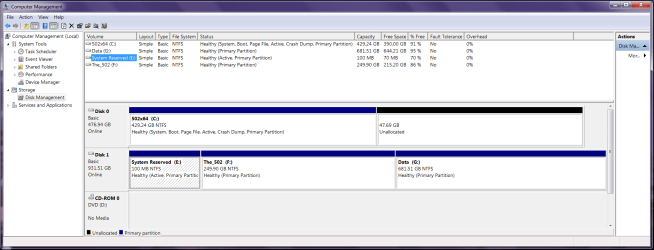
C: is the new 512GB SSD with Windows 7 which I now use. I have over-provisioned it for 10% (default). I formatted it to ntfs & partitioned it by using diskpart commands by hitting Shift/F10 during the OS install before installing the OS, because I didn't want a separate part for 'system reserved', but how can I tell if the E: system reserved part is indeed the one that is safe to delete that was for the Win7 boot on the F: drive? I know it should be because it was there before installing new ssd, but in disk management I cannot find out how or where to check if the E: is indeed for the F: hdd os boot part?

What I want to do, now that I'm satisfied that the new SSD is stable is delete E: & F: then extend the G: to it's full 1TB size in disk management. And is there a way to tell for certain that the E:system reserved is for the F: hdd part os boot?
 

Attachments

  • Disk_mngmt.png
    Disk_mngmt.png
    49.7 KB · Views: 5

My Computer My Computer

At a glance

Windows 7 HP x64AMD Phenom II X6 1100T BECorsair XMS3 12GB (4x2GB) (2x2GB) DC DDR3 1333HzEVGA Geforce GTX 950 FTW
Computer type
PC/Desktop
Computer Manufacturer/Model Number
custom bulid
OS
Windows 7 HP x64
CPU
AMD Phenom II X6 1100T BE
Motherboard
ECS A890GXM-A v2.0 Black Series
Memory
Corsair XMS3 12GB (4x2GB) (2x2GB) DC DDR3 1333Hz
Graphics Card(s)
EVGA Geforce GTX 950 FTW
Sound Card
Realtek ALC892 8-Channel HD Audio
Monitor(s) Displays
Viewsonic VX2253 - 22" Flat panel - 144Hz
Screen Resolution
1920x1080 (native)
Hard Drives
Samsung 850 Pro 512GB
WD Caviar Black 1TB SATA 7200rpm
PSU
500w Thermaltake TR2
Case
Thermaltake Armor A90
Cooling
2 x 20" Walmart Wind Machines on HIGH
Internet Speed
Spectrum 300/30
Antivirus
Norton 360
Browser
IE 11
Everything looks good for booting with only Disk 0 connected.
To be absolutely sure, can you turn off the PC, disconnect Disk 1, re-boot, and make sure it boots and runs Windows with Disk 0 only ?

Personally i would extend C to include all the unallocated space.
10% free space is the minimum before getting a warning.
I would not let my OS drive get down to 20% free space before doing something.
MS updates will use space, so for the next Patch Tuesday updates, expect to have less than 10%.
I don't store User data on my C drive.
 

My Computer My Computer

At a glance

Multi-Boot W7_Pro_x64 W8.1_Pro_x64 W10_Pro_x6...AMD Athlon II x4 6206GB GSkill DDR2 800AMD 4670 GPU + AMD 4200 IGP
Computer type
PC/Desktop
Computer Manufacturer/Model Number
home built
OS
Multi-Boot W7_Pro_x64 W8.1_Pro_x64 W10_Pro_x64 +Linux_VMs +Chromium_VM
CPU
AMD Athlon II x4 620
Motherboard
Gigabyte GA-MA785G-UD3H
Memory
6GB GSkill DDR2 800
Graphics Card(s)
AMD 4670 GPU + AMD 4200 IGP
Sound Card
on board Realtek ALC889A
Monitor(s) Displays
RCA 40" LCD TV, Insignia 32" LCD TV, HP 15" LCD monitor
Screen Resolution
1680 x 1050
Hard Drives
OCZ Vertex 3 120GB,
Samsung F3 1TB (3),
Several others - WD, Seagate, Hitachi, ...
PSU
Corsair 500 W
Case
Rosewill mid tower
Cooling
CM 90mm rifle
Keyboard
Gyration wireless, Logitech wireless, Dell USB wired
Mouse
Gyration wireless, Logitech wireless, V7 USB wired
Internet Speed
Spectrum - 100Mbps D / 10Mbps U
Antivirus
Avast, MBAM3, EMET, WinPatrol
Browser
Pale Moon, Firefox, IE
Other Info
2 multi-boot PC's
Mainly HTPC/Office/Gen purpose (no gaming).
Trendnet USB KVM.
LG DVD burner/Blue Ray Player.
Tray system for removable SATA backup drives.

Not currently OCd, under-volted.
I use Hybrid sleep, rarely re-boot or shutdown.

Hauppauge HD-PVR, Avermedia PCIe TV Tuner, Hauppauge PCI TV Tuner.
E is "system reserved" in name only---because that's the name originally assigned to it. It is no longer your system partition. If you kept it, you could give it some other name.

Your system partition is C. It says "system" in the description beside it. That means it contains your boot files--which had previously been on E.

As long as the PC will boot with only C connected, you look to be in good shape.
 

My Computer My Computer

At a glance

Windows 7 Home Premium SP1, 64-bitIntel Skylake i5-6600K, not overclocked8 GB HyperX DDR4-2666 (2 x 4 GB)none; graphics are integrated on CPU
Computer type
PC/Desktop
Computer Manufacturer/Model Number
Ignatz Special; 4 speed manual gearbox; factory air conditioning; one of one
OS
Windows 7 Home Premium SP1, 64-bit
CPU
Intel Skylake i5-6600K, not overclocked
Motherboard
AsRock Z170M Extreme 4, micro ATX
Memory
8 GB HyperX DDR4-2666 (2 x 4 GB)
Graphics Card(s)
none; graphics are integrated on CPU
Sound Card
onboard: Realtek ALC1150; external: USB Behringer UF0-202
Monitor(s) Displays
Dell S2340M 23 inch IPS
Screen Resolution
1600 x 900
Hard Drives
System: Crucial MX100 series SSD, 128 GB;
Data: Samsung Spinpoint 103SJ, 1 TB;
Backup: WD Caviar Green WD30EZRX-00D8PB0, 3 TB
PSU
Rosewill SilentNight 500 watt fanless, semi-modular
Case
Antec Solo II
Cooling
Noctua NH-U12S; Noctua F12 intake, Noctua S12A exhaust
Keyboard
Microsoft 200 6JH-00001 USB
Mouse
Dell or Microsoft optical wired; USB
Antivirus
Microsoft Security Essentials and Malwarebytes Premium
Browser
Pale Moon
Other Info
All fans PWM; speeds at idle: CPU circa 500 rpm; intake circa 600 rpm; exhaust circa 600 rpm; CPU temps 27 idle and 47 C load in a warm room (27 C/81 F) when running Intel Extreme Tuning Utility stress test.
Thanks for the quick replies. David, you said "Personally i would extend C to include all the unallocated space. 10% free space is the minimum before getting a warning." That is for over-provisioning the SSD in the Samsung Magician software, so I would not want to change it because it allows improved performance and extends the life of the sdd, correct? What do you mean by 'before getting a warning'? And as I asked, can I now safely delete E: & F: and then extend the new unallocated spaces into G: partition using disk management to have the whole part as the original 1Tb WD hdd, since I will not be using the hdd as any boot drive?
 

My Computer My Computer

At a glance

Windows 7 HP x64AMD Phenom II X6 1100T BECorsair XMS3 12GB (4x2GB) (2x2GB) DC DDR3 1333HzEVGA Geforce GTX 950 FTW
Computer type
PC/Desktop
Computer Manufacturer/Model Number
custom bulid
OS
Windows 7 HP x64
CPU
AMD Phenom II X6 1100T BE
Motherboard
ECS A890GXM-A v2.0 Black Series
Memory
Corsair XMS3 12GB (4x2GB) (2x2GB) DC DDR3 1333Hz
Graphics Card(s)
EVGA Geforce GTX 950 FTW
Sound Card
Realtek ALC892 8-Channel HD Audio
Monitor(s) Displays
Viewsonic VX2253 - 22" Flat panel - 144Hz
Screen Resolution
1920x1080 (native)
Hard Drives
Samsung 850 Pro 512GB
WD Caviar Black 1TB SATA 7200rpm
PSU
500w Thermaltake TR2
Case
Thermaltake Armor A90
Cooling
2 x 20" Walmart Wind Machines on HIGH
Internet Speed
Spectrum 300/30
Antivirus
Norton 360
Browser
IE 11
512 GB for an OS drive is overkill in my opinion, but what`s done is done.

I would leave the unallocated space alone, I dedicated 18.75 GB on my 850 256 GB (C is 220 GB) for over provisioning, but as long as you have free space, you`re good.

If you have some place to temporarily store the data from Disk 1, I would format the entire drive, then put your data back on.

Or just delete E and F and extend G, like you`ve said :)

Windows will/might not let you format the System Reserved partition because it`s marked active, it must be marked inactive, use Partition Wizard to do that, you can install it on your ssd and do it.

https://www.partitionwizard.com/free-partition-manager.html

As David said in post #12, your new OS on the SSD must boot on it`s own. From the DM shot it looks good.
 

My Computer My Computer

At a glance

Windows 10 Pro x64Intel Core i7 6700KGSkill TridentZ RGB 16GB 3600 16-16-16-36EVGA GTX 980 Ti SC x2
Computer type
PC/Desktop
Computer Manufacturer/Model Number
Skylake Special #666
OS
Windows 10 Pro x64
CPU
Intel Core i7 6700K
Motherboard
Asus Sabertooth Z170 Mark 1
Memory
GSkill TridentZ RGB 16GB 3600 16-16-16-36
Graphics Card(s)
EVGA GTX 980 Ti SC x2
Sound Card
Realtek High Definition
Monitor(s) Displays
AOC G2460PG
Screen Resolution
1920 x 1080 144Hz
Hard Drives
Samsung 860 Pro 256GB, Seagate Barracuda 4TB x2
PSU
EVGA 1000 P2, EVGA White Custom Braided Cables
Case
Corsair Vengeance C70 Gunmetal Black
Cooling
Corsair H100i v2, Corsair ML120 x2, Thermal Grizzly Kryonaut
Keyboard
Logitech G910 Orion Spectrum
Mouse
Logitech G700s
Internet Speed
Verizon Fios Quantum Gateway 75/75
Antivirus
Windows Defender, Malwarebytes Free 3.8.3
Browser
Chrome
Other Info
Corsair SP120 x4, LG Blu-ray Drive, Durabrand HT-395 100 Watt Dolby Digital Amp, Corsair H2100 Wireless 7.1 Headset
What do you mean by 'before getting a warning'?

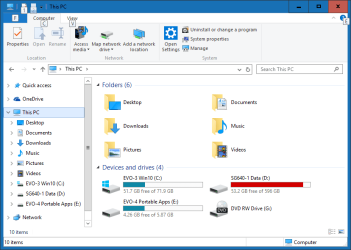
In Windows (file) Explorer if a partition is RED that's the warning i see.
There may be better ways to get a warning, but i check my space often enough in Explorer, so this works for me.
I copied enough to my Data partition to show this warning - this partition now has less than 10% free space.

My print below is while Running Win 10, so I clicked on "This PC".
In Win 7 open Windows (file) Explorer and click on "Computer" to see a similar display.

If you see RED, it's a warning.
For an OS partition, some programs may not work correctly, or at all, with less than 10% free space.

SpaceWarning.png
 

My Computer My Computer

At a glance

Multi-Boot W7_Pro_x64 W8.1_Pro_x64 W10_Pro_x6...AMD Athlon II x4 6206GB GSkill DDR2 800AMD 4670 GPU + AMD 4200 IGP
Computer type
PC/Desktop
Computer Manufacturer/Model Number
home built
OS
Multi-Boot W7_Pro_x64 W8.1_Pro_x64 W10_Pro_x64 +Linux_VMs +Chromium_VM
CPU
AMD Athlon II x4 620
Motherboard
Gigabyte GA-MA785G-UD3H
Memory
6GB GSkill DDR2 800
Graphics Card(s)
AMD 4670 GPU + AMD 4200 IGP
Sound Card
on board Realtek ALC889A
Monitor(s) Displays
RCA 40" LCD TV, Insignia 32" LCD TV, HP 15" LCD monitor
Screen Resolution
1680 x 1050
Hard Drives
OCZ Vertex 3 120GB,
Samsung F3 1TB (3),
Several others - WD, Seagate, Hitachi, ...
PSU
Corsair 500 W
Case
Rosewill mid tower
Cooling
CM 90mm rifle
Keyboard
Gyration wireless, Logitech wireless, Dell USB wired
Mouse
Gyration wireless, Logitech wireless, V7 USB wired
Internet Speed
Spectrum - 100Mbps D / 10Mbps U
Antivirus
Avast, MBAM3, EMET, WinPatrol
Browser
Pale Moon, Firefox, IE
Other Info
2 multi-boot PC's
Mainly HTPC/Office/Gen purpose (no gaming).
Trendnet USB KVM.
LG DVD burner/Blue Ray Player.
Tray system for removable SATA backup drives.

Not currently OCd, under-volted.
I use Hybrid sleep, rarely re-boot or shutdown.

Hauppauge HD-PVR, Avermedia PCIe TV Tuner, Hauppauge PCI TV Tuner.
Thanks, I should never get to the point where it shows red, I'm just installing limited programs & data to the OS part & monitor it daily. Is the system reserved part still marked 'active' because I simply disconnected it when installing Win7 on the new ssd? And can't I simply use an elevated command prompt & use diskpart commands to mark it inactive before I delete & expand it through disk management?
 

My Computer My Computer

At a glance

Windows 7 HP x64AMD Phenom II X6 1100T BECorsair XMS3 12GB (4x2GB) (2x2GB) DC DDR3 1333HzEVGA Geforce GTX 950 FTW
Computer type
PC/Desktop
Computer Manufacturer/Model Number
custom bulid
OS
Windows 7 HP x64
CPU
AMD Phenom II X6 1100T BE
Motherboard
ECS A890GXM-A v2.0 Black Series
Memory
Corsair XMS3 12GB (4x2GB) (2x2GB) DC DDR3 1333Hz
Graphics Card(s)
EVGA Geforce GTX 950 FTW
Sound Card
Realtek ALC892 8-Channel HD Audio
Monitor(s) Displays
Viewsonic VX2253 - 22" Flat panel - 144Hz
Screen Resolution
1920x1080 (native)
Hard Drives
Samsung 850 Pro 512GB
WD Caviar Black 1TB SATA 7200rpm
PSU
500w Thermaltake TR2
Case
Thermaltake Armor A90
Cooling
2 x 20" Walmart Wind Machines on HIGH
Internet Speed
Spectrum 300/30
Antivirus
Norton 360
Browser
IE 11
Most likely you can mark it inactive in Disk Management.

If it was marked active at one time, I think it will remain marked active until you deliberately mark it inactive.

It's not going to become active just because you disconnected it when you installed Windows 7 on an SSD.
 

My Computer My Computer

At a glance

Windows 7 Home Premium SP1, 64-bitIntel Skylake i5-6600K, not overclocked8 GB HyperX DDR4-2666 (2 x 4 GB)none; graphics are integrated on CPU
Computer type
PC/Desktop
Computer Manufacturer/Model Number
Ignatz Special; 4 speed manual gearbox; factory air conditioning; one of one
OS
Windows 7 Home Premium SP1, 64-bit
CPU
Intel Skylake i5-6600K, not overclocked
Motherboard
AsRock Z170M Extreme 4, micro ATX
Memory
8 GB HyperX DDR4-2666 (2 x 4 GB)
Graphics Card(s)
none; graphics are integrated on CPU
Sound Card
onboard: Realtek ALC1150; external: USB Behringer UF0-202
Monitor(s) Displays
Dell S2340M 23 inch IPS
Screen Resolution
1600 x 900
Hard Drives
System: Crucial MX100 series SSD, 128 GB;
Data: Samsung Spinpoint 103SJ, 1 TB;
Backup: WD Caviar Green WD30EZRX-00D8PB0, 3 TB
PSU
Rosewill SilentNight 500 watt fanless, semi-modular
Case
Antec Solo II
Cooling
Noctua NH-U12S; Noctua F12 intake, Noctua S12A exhaust
Keyboard
Microsoft 200 6JH-00001 USB
Mouse
Dell or Microsoft optical wired; USB
Antivirus
Microsoft Security Essentials and Malwarebytes Premium
Browser
Pale Moon
Other Info
All fans PWM; speeds at idle: CPU circa 500 rpm; intake circa 600 rpm; exhaust circa 600 rpm; CPU temps 27 idle and 47 C load in a warm room (27 C/81 F) when running Intel Extreme Tuning Utility stress test.
I couldn't mark it as inactive in DM, 'mark as active' was the only option in there. I did get it marked as inactive using the diskpart inactive command at the prompt. I rebooted & all is well. The SSD & OS is stable (a week running now) & the performance increase (boot times, opening programs, browsing, etc.) really is jaw-dropping compared to the sata HDD. I did go from IGP to a 950 GTX and installed 8GB more RAM before installing the new SSD a week earlier, so my 5+ year old mobo/system seems (to me) like it's brand new now. I guess by the time I get Win7 tweaked & know it like the back of my hand, it'll be time to move on once again.

Would you all just back up the data on the HDD & use diskpart clean command on it to remove all traces of the OS & system reserved parts or will just deleting & expanding them both into G: remove all traces of the OS? DavidE mentioned earlier that just deleting OS & system reserved parts instead of reformatting will not get rid of 'all' traces & may cause problems if I decide use it to boot/dual-boot with in the future? Thanks again.
 

My Computer My Computer

At a glance

Windows 7 HP x64AMD Phenom II X6 1100T BECorsair XMS3 12GB (4x2GB) (2x2GB) DC DDR3 1333HzEVGA Geforce GTX 950 FTW
Computer type
PC/Desktop
Computer Manufacturer/Model Number
custom bulid
OS
Windows 7 HP x64
CPU
AMD Phenom II X6 1100T BE
Motherboard
ECS A890GXM-A v2.0 Black Series
Memory
Corsair XMS3 12GB (4x2GB) (2x2GB) DC DDR3 1333Hz
Graphics Card(s)
EVGA Geforce GTX 950 FTW
Sound Card
Realtek ALC892 8-Channel HD Audio
Monitor(s) Displays
Viewsonic VX2253 - 22" Flat panel - 144Hz
Screen Resolution
1920x1080 (native)
Hard Drives
Samsung 850 Pro 512GB
WD Caviar Black 1TB SATA 7200rpm
PSU
500w Thermaltake TR2
Case
Thermaltake Armor A90
Cooling
2 x 20" Walmart Wind Machines on HIGH
Internet Speed
Spectrum 300/30
Antivirus
Norton 360
Browser
IE 11
If it gives you peace of mind, use clean. It takes only a few seconds.

If you are extra extra worried, use clean all instead of clean. It will take a few hours.
 

My Computer My Computer

At a glance

Windows 7 Home Premium SP1, 64-bitIntel Skylake i5-6600K, not overclocked8 GB HyperX DDR4-2666 (2 x 4 GB)none; graphics are integrated on CPU
Computer type
PC/Desktop
Computer Manufacturer/Model Number
Ignatz Special; 4 speed manual gearbox; factory air conditioning; one of one
OS
Windows 7 Home Premium SP1, 64-bit
CPU
Intel Skylake i5-6600K, not overclocked
Motherboard
AsRock Z170M Extreme 4, micro ATX
Memory
8 GB HyperX DDR4-2666 (2 x 4 GB)
Graphics Card(s)
none; graphics are integrated on CPU
Sound Card
onboard: Realtek ALC1150; external: USB Behringer UF0-202
Monitor(s) Displays
Dell S2340M 23 inch IPS
Screen Resolution
1600 x 900
Hard Drives
System: Crucial MX100 series SSD, 128 GB;
Data: Samsung Spinpoint 103SJ, 1 TB;
Backup: WD Caviar Green WD30EZRX-00D8PB0, 3 TB
PSU
Rosewill SilentNight 500 watt fanless, semi-modular
Case
Antec Solo II
Cooling
Noctua NH-U12S; Noctua F12 intake, Noctua S12A exhaust
Keyboard
Microsoft 200 6JH-00001 USB
Mouse
Dell or Microsoft optical wired; USB
Antivirus
Microsoft Security Essentials and Malwarebytes Premium
Browser
Pale Moon
Other Info
All fans PWM; speeds at idle: CPU circa 500 rpm; intake circa 600 rpm; exhaust circa 600 rpm; CPU temps 27 idle and 47 C load in a warm room (27 C/81 F) when running Intel Extreme Tuning Utility stress test.
Back
Top