Latest Internet Explorer 9 Release

Yeah I have google as my default and then bing and youtube as the other two.
 

My Computer My Computer

Computer Manufacturer/Model Number
HP
OS
Windows 7

My Computer My Computer

Computer Manufacturer/Model Number
Toshiba L355D
OS
Windows 7 Ultimate x64 SP1
CPU
Core2 Duo
Motherboard
Intel
Memory
4 GB
Graphics Card(s)
GM965 on-board
Sound Card
RealTek on-board
Monitor(s) Displays
19"+17"(laptop)
Screen Resolution
1440x900 (x 2)
Hard Drives
500GB Ext. 200GB Internal
PSU
N/A
Case
N/A
Cooling
N/A

My Computer My Computer

Computer Manufacturer/Model Number
Custom
OS
Windows 8 Professional 64-bit
CPU
Intel Core i3-2100
Motherboard
ASRock Intel Z68M/USB3
Memory
4GB
Graphics Card(s)
GeForece GTX 550 Ti
Screen Resolution
1680 x 1050
PSU
750w
Yeah that is what I see also. I don't know what it could be.
 

My Computer My Computer

Computer Manufacturer/Model Number
HP
OS
Windows 7
Yeah that is what I see also. I don't know what it could be.
Got me stumped. Sorry. But, as you know, there's a lot of smart folks 'round these parts! :)
 

My Computer My Computer

Computer Manufacturer/Model Number
Toshiba L355D
OS
Windows 7 Ultimate x64 SP1
CPU
Core2 Duo
Motherboard
Intel
Memory
4 GB
Graphics Card(s)
GM965 on-board
Sound Card
RealTek on-board
Monitor(s) Displays
19"+17"(laptop)
Screen Resolution
1440x900 (x 2)
Hard Drives
500GB Ext. 200GB Internal
PSU
N/A
Case
N/A
Cooling
N/A
Yeah that is what I see also. I don't know what it could be.
Try disabling other tool-bars and leave Bing as the only enabled one. Then restart the browser and try again.
 

My Computer My Computer

Computer Manufacturer/Model Number
Custom
OS
Windows 8 Professional 64-bit
CPU
Intel Core i3-2100
Motherboard
ASRock Intel Z68M/USB3
Memory
4GB
Graphics Card(s)
GeForece GTX 550 Ti
Screen Resolution
1680 x 1050
PSU
750w
I set bing as my default and it still did not work.
 

My Computer My Computer

Computer Manufacturer/Model Number
HP
OS
Windows 7
I set bing as my default and it still did not work.
Did you disable other toolbars in Internet Explorer 9 "Addons"? Select settings, then click "Manage Add-ons".
 

My Computer My Computer

Computer Manufacturer/Model Number
Custom
OS
Windows 8 Professional 64-bit
CPU
Intel Core i3-2100
Motherboard
ASRock Intel Z68M/USB3
Memory
4GB
Graphics Card(s)
GeForece GTX 550 Ti
Screen Resolution
1680 x 1050
PSU
750w
Got it worked out. Had to end task on the install. Then end task on something like iecore. About 6 instances of that. I got smart and closed everything like sidebar gadgets and all programs.
It installed in 15 seconds.
All gadgets work :D
Maxthon 2 works beautifully! :cool:
I started installing this at 601PM EST. 30min later still not done. Just says downloading required updates. Doesn't look like anything is downloading.
How fast did it install for you guys and how much does it need to download?
It took me about three minutes.

Thx looks like mine is stuck at about 66%.
Made an image just in case...
 

My Computer My Computer

Computer type
PC/Desktop
Computer Manufacturer/Model Number
Made by Dixon Butz
OS
Win7 Win 10, Win 8.1
CPU
AMD FX-8350, Corsair H100i
Motherboard
ASUS Crosshair V Formula-Z
Memory
16GB G.SKILL Ripjaws DDR3
Graphics Card(s)
EVGA GTX 980, EVGA GTX 860
Sound Card
Denon x4200 Dolby AMOS!
Monitor(s) Displays
65" Samsung 4K, +3 27inch
Screen Resolution
4K, 1080x3
Hard Drives
2TB Samsung hd204ui

1X Samsung 850 SSD
PSU
1000w EVGA, 2000VA UPS, 1000VA UPS and many others
Case
Lian Li
Cooling
Corsair H100i
Keyboard
Logitech K800
Mouse
Logitech Couch Mouse
Internet Speed
Gigabit!
Antivirus
Defender
Browser
Slimjet Chrome
Yeah I have no other toolbars. I can tell something is not right because when I type into the address bar the google or bing logo does not even show up next to where I am typing.

 

My Computer My Computer

Computer Manufacturer/Model Number
HP
OS
Windows 7
Yeah I have no other toolbars. I can tell something is not right because when I type into the address bar the google or bing logo does not even show up next to where I am typing.


Type a search....did you click the little blue link "Turn on search suggestions" in the box that pops down?
 

My Computer My Computer

Computer type
PC/Desktop
Computer Manufacturer/Model Number
Alienware Aurora ALX R4
OS
Windows 10 Pro (x64)
CPU
Intel Core i7-3930K (3.2GHz - 4.5GHz)
Motherboard
Alienware Aurora-R4 x79
Memory
4x Samsung 4GB PC3-12800 DDR3 (16GB 1600MHz)
Graphics Card(s)
Nvidia Geforce GTX 690
Sound Card
SteelSeries Siberia Elite
Monitor(s) Displays
Dell UltraSharp U3011
Screen Resolution
2560x1600
Hard Drives
Samsung 850 Pro 256 GB, Seagate 1TB Desktop Hybrid HDD, 2x Western Digital 4TB Green HDD
PSU
875W Some Dell PSU <.<
Case
Alienware Aurora ALX
Cooling
Custom Liquid Cooling (EK CPU & GPU blocks) dual EK 480RAD
Keyboard
Logitech G710+ Mechanical
Mouse
Logitech G700s
Internet Speed
Verizon Fios (50 mbps average)
Other Info
Server: Intel NUC D54250WYK: i5-4250U, 16GB, 256 GB mSATA, Windows Server 2012 R2
lsufrontier, I'm sure someone here will help get it figured out. I cannot seem to replicate the issue short of explicitly turning off "search suggestions."

As an aside; Holy Cow, what a mem hog IE9 x64 is! Four tabs open shows this:

Screenshot_4.jpg

whereas FF 4.0b7pre x64 with 6 tabs open shows this:

Screenshot_5.jpg
 

My Computer My Computer

Computer Manufacturer/Model Number
Toshiba L355D
OS
Windows 7 Ultimate x64 SP1
CPU
Core2 Duo
Motherboard
Intel
Memory
4 GB
Graphics Card(s)
GM965 on-board
Sound Card
RealTek on-board
Monitor(s) Displays
19"+17"(laptop)
Screen Resolution
1440x900 (x 2)
Hard Drives
500GB Ext. 200GB Internal
PSU
N/A
Case
N/A
Cooling
N/A
*Sigh...* And memory usuage matters why?
*says the person with only 2GB on main and 1GB on netbook*
 

My Computer My Computer

Computer type
PC/Desktop
Computer Manufacturer/Model Number
Alienware Aurora ALX R4
OS
Windows 10 Pro (x64)
CPU
Intel Core i7-3930K (3.2GHz - 4.5GHz)
Motherboard
Alienware Aurora-R4 x79
Memory
4x Samsung 4GB PC3-12800 DDR3 (16GB 1600MHz)
Graphics Card(s)
Nvidia Geforce GTX 690
Sound Card
SteelSeries Siberia Elite
Monitor(s) Displays
Dell UltraSharp U3011
Screen Resolution
2560x1600
Hard Drives
Samsung 850 Pro 256 GB, Seagate 1TB Desktop Hybrid HDD, 2x Western Digital 4TB Green HDD
PSU
875W Some Dell PSU <.<
Case
Alienware Aurora ALX
Cooling
Custom Liquid Cooling (EK CPU & GPU blocks) dual EK 480RAD
Keyboard
Logitech G710+ Mechanical
Mouse
Logitech G700s
Internet Speed
Verizon Fios (50 mbps average)
Other Info
Server: Intel NUC D54250WYK: i5-4250U, 16GB, 256 GB mSATA, Windows Server 2012 R2
yeah thanks for your help. I appreciate it. Also that is the problem, nothing pops down when I search. There is no box that pops down like usual.
 

My Computer My Computer

Computer Manufacturer/Model Number
HP
OS
Windows 7
Yeah I have no other toolbars. I can tell something is not right because when I type into the address bar the google or bing logo does not even show up next to where I am typing.
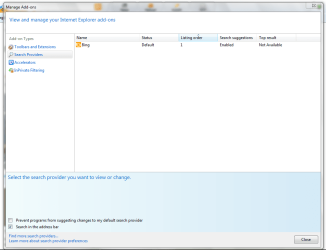
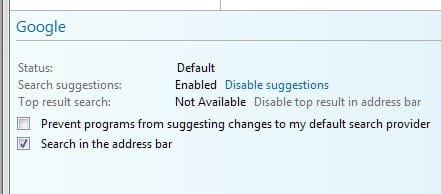
Go to "Manage Add-ons" then onto the screen that's in the attachment.

As you can see there on the bottom, that tick mark should be ticked, ""Search in the address bar".
 

Attachments

  • Capture.PNG
    Capture.PNG
    30 KB · Views: 1

My Computer My Computer

Computer Manufacturer/Model Number
Custom
OS
Windows 8 Professional 64-bit
CPU
Intel Core i3-2100
Motherboard
ASRock Intel Z68M/USB3
Memory
4GB
Graphics Card(s)
GeForece GTX 550 Ti
Screen Resolution
1680 x 1050
PSU
750w
It's checked.
 

My Computer My Computer

Computer Manufacturer/Model Number
HP
OS
Windows 7
*Sigh...* And memory usuage matters why?
*says the person with only 2GB on main and 1GB on netbook*
LOL! I hear ya! I've got 4 GB but I run AutoCad Archtectural Desktop 2011 x64 alongside my browser often with 6 or more tabs open. Toss in Outlook, Excel, Access (job tracking and billing database) and the occasional Word doc and knowing Win 7 takes 1.13 GB just at start up, well, memory can become an issue at times. ;)
 

My Computer My Computer

Computer Manufacturer/Model Number
Toshiba L355D
OS
Windows 7 Ultimate x64 SP1
CPU
Core2 Duo
Motherboard
Intel
Memory
4 GB
Graphics Card(s)
GM965 on-board
Sound Card
RealTek on-board
Monitor(s) Displays
19"+17"(laptop)
Screen Resolution
1440x900 (x 2)
Hard Drives
500GB Ext. 200GB Internal
PSU
N/A
Case
N/A
Cooling
N/A

My Computer My Computer

Computer Manufacturer/Model Number
Custom
OS
Windows 8 Professional 64-bit
CPU
Intel Core i3-2100
Motherboard
ASRock Intel Z68M/USB3
Memory
4GB
Graphics Card(s)
GeForece GTX 550 Ti
Screen Resolution
1680 x 1050
PSU
750w
It tells me its already been installed. I dont know either. That Groove GFS Browser helped doesn't have anything to do with it?
 

My Computer My Computer

Computer Manufacturer/Model Number
HP
OS
Windows 7
I add the fact that tabs are at the top. There should be an option to put the tabs below the address bar because currently, the interface is terrible.
I agree. Having the address bar all scrunched up like that is not productive for me.

In addition, due to the address bar and the page tabs being on the same line, it means that I cannot view the full address. True, I can adjust the size of the bar, but at the cost of a reduction in size of the page tabs, meaning that it can be difficult to see at a quick glance which page you have in which tab. What I would like to see is the address bar being replaced above the page tabs with the search box to the right of it as in the IE8 interface.
at least an option to put the address bar on a different line. I currently hate it the way it is and it's most likely a showstopper for me.


Oh God .. I'm in Office stuck with my XP machine .. :mad: Have to get home to Test IE 9 :(

Go home NOW, it will be worth it.:cool:
Well, I'm not sure that I would agree with that. It's pretty uneventful from my perspective. But then again, I've never been a big fan or user of IE.

I wonder if anyone has found a way to put the tabs below the address bar instead of the right in IE 9 Beta? The reason is I have some older monitors with lower resolutions and tab space is quite limited on these.

Hopefully Microsoft will remedy this issue at least as an option in the final version of IE 9.
I'm hoping for the same thing. The way it is right now is a deal breaker for me.
 

My Computer My Computer

Computer Manufacturer/Model Number
Self-Built in July 2009
OS
Windows 7 Ultimate x64
CPU
Intel Q9550 2.83Ghz OC'd to 3.40Ghz
Motherboard
Gigabyte GA-EP45-UD3R rev. 1.1, F12 BIOS
Memory
8GB G.Skill PI DDR2-800, 4-4-4-12 timings
Graphics Card(s)
EVGA 1280MB Nvidia GeForce GTX570
Sound Card
Realtek ALC899A 8 channel onboard audio
Monitor(s) Displays
23" Acer x233H
Screen Resolution
1920x1080
Hard Drives
Intel X25-M 80GB Gen 2 SSD
Western Digital 1TB Caviar Black, 32MB cache. WD1001FALS
PSU
Corsair 620HX modular
Case
Antec P182
Cooling
stock
Keyboard
ABS M1 Mechanical
Mouse
Logitech G9 Laser Mouse
Internet Speed
15/2 cable modem
Other Info
Windows and Linux enthusiast. Logitech G35 Headset.
Back
Top