Latest Internet Explorer 9 Release

The one new thing I found with the beta so far no one has mentioned is a new popup bar seen at the bottom of the page similar to what the open source browsers see as far as the option to remember user names and passwords when logging onto a site. I forgot to grab a snipping of that one however! :D
 

My Computers My Computers

System One System Two

  • Computer type
    PC/Desktop
    Computer Manufacturer/Model Number
    Custom builds = 2
    OS
    W7 Ultimate x64/W10 Pro x64/W11 Pro Triple Boot - Main PC W7 Remote PC Micro ATX W7 Pro x64/W11 Pro
    CPU
    AMD Phenom II X4 975 Deneb 3.6ghz - 965 2nd remote pc
    Motherboard
    Gigabyte GA-790XTA-UD4-Gigabyte GA-880GM-D2H remote pc
    Memory
    Kingston Hyper X DDR3 1600 1.5v 16gb - Hyper X Fury 8gb 2nd
    Graphics Card(s)
    MSI HD Radeon 5750 1gb - MSI HD Radeon 6450 on mini tower
    Sound Card
    Creative Labs X-Fi Xtreme Audio P - Realtek onooard 2nd case
    Monitor(s) Displays
    ASUS VW199T-P 19" HP 2082a Main-HP 2082a 20" remote pc
    Screen Resolution
    Asus 1440x900 - HP 1600x900
    Hard Drives
    WD Black 1TB HD per OS W7, W10, and pending W11 presently on 500gb OS Drive - Pending Triple 1TB HDs for Spanned Storage/backup volume
    Single 2TB external USB enclosure, single 1TB System 7 Host/Boot drive, Pending 8TB external HD for system image b
    PSU
    Corsair 750TX - primary / Corsair CX600 - second
    Case
    Antec 900-2 - SSD compatible / NZXT Vulcan mini tower
    Cooling
    Zalman CNPS9900A
    Keyboard
    AZIO L70 Backlit Letters Gaming - ONN Cordless/USB
    Mouse
    MSI DS200 Programmable, Logitech Cordless
    Internet Speed
    30mbps upgrade - primary hard wired - mini tower usb WiFi
    Antivirus
    GFI VIPRE Internet Security 2014 on W7 2016 beta on W10,
    Browser
    Cyberfox, WaterFox 64bit FF variants, FireFox x64, Pale Moon
    Other Info
    Accomdata fan cooled usb 2.0 PIDE/Sata II, III external enclosure.
    Sambient usb/eSata PATA/Sata II, III external enclosure.
  • Computer type
    PC/Desktop
    System Manufacturer/Model Number
    CUSTOM ASSEMBLY
    OS
    W7 Pro x64/W11 Pro
    CPU
    AMD Deneb 3.6ghz - 965
    Motherboard
    Gigabyte GA-880GM-D2H remote pc
    Memory
    Kingston Hyper X Fury 8gb
    Graphics Card(s)
    MSI HD Radeon 6450 DVI Output
    Sound Card
    Realtek onooard Creative or Other separate PENDING
    Monitor(s) Displays
    VIZIO 32" LCD TV Separate LCD Pending
    Screen Resolution
    1600x1080
    Hard Drives
    WD 500GB OS Host/Boot WD Green 1TB Storage/Backup
    PSU
    Corsair 600W - THERMALTAKE 600W spare case
    Case
    NZXT Vulcan mini tower
    Cooling
    Twin 120mm Top Fans - 240mm Side Cover
    Keyboard
    ONN Cordless/USB Logitech Cordless
    Mouse
    ONN USB/Cordless - Logitech Cordless
    Internet Speed
    DSL 5G
    Browser
    MS Edge, FireFox, WaterFox x64, FireFox Nightly
    Other Info
    OS Testing-Remote Access to Main TeamViewer
The one new thing I found with the beta so far no one has mentioned is a new popup bar seen at the bottom of the page similar to what the open source browsers see as far as the option to remember user names and passwords when logging onto a site. I forgot to grab a snipping of that one however! :D

I believe that would be the "status" pop-up for when the "Status bar" is not checked by default when you right click on a blank space to the right of the tabs. When it's checked, you do not get the pop-up anymore since it shows in the status bar instead.
 

My Computer My Computer

Computer type
PC/Desktop
Computer Manufacturer/Model Number
Self built custom
OS
64-bit Windows 11 Pro for Workstations
CPU
Intel i7-8700K OC'd to 5 GHz
Motherboard
ASUS ROG Maximus XI Formula Z390
Memory
64 GB (4x16GB) G.SKILL TridentZ RGB DDR4 3600 MHz
Graphics Card(s)
ASUS ROG-STRIX-GTX1080TI-O11G-GAMING
Sound Card
Integrated
Monitor(s) Displays
2 x Samsung Odyssey G7 27"
Screen Resolution
2560x1440
Hard Drives
1TB Samsung 990 PRO M.2,
4TB Samsung 990 PRO PRO M.2,
TerraMaster F8 SSD Plus NAS
PSU
Seasonic Prime Titanium 850W
Case
Thermaltake Core P3
Cooling
Corsair Hydro H115i
Keyboard
Logitech wireless K800
Mouse
Logitech MX Master 4
Internet Speed
2 Gb/s Download and 100 Mb/s Upload
Antivirus
Malwarebyte Anti-Malware Premium
Browser
Google Chrome
Other Info
Logitech Z625 speaker system,
Logitech BRIO 4K Pro webcam,
HP Color LaserJet Pro MFP M477fdn,
APC SMART-UPS RT 1000 XL - SURT1000XLI,
Galaxy S23 Plus phone
I have the status bar checked off as always and still see that come up. I have that checked for use of the view settings for 75%, 100%, 125% when going through different pages where you end up seeing things in fine print at times or someone posts a not so clear image with small text for better viewing.

The status popup appears as a second smaller bar when seen at the bottom center with two or three options for save, do not, and a close button if I have that correct. At first I thought it was RocketDock coming up until taking a second look. :roflmao: RocketDock with a new quick launch bar? That would be something!

Again this is what is being seen on the 64bit beta. Later I will see that removed and be looking at the 32bit to see how things are with that since the beta manages to take over for both 32bit and 64bit versions of IE 8 when installed it appears. :D

Got them! I finally grabbed a pair of screens to show here. Note that this is a new type of prompting being seen with this. At least this eliminates that constant popup in the middle of the screen always seen for remembering passwords IE has always had. ;) Thumbs Up for that one!
 

Attachments

  • Popup Status Bar Cleared History.jpg
    Popup Status Bar Cleared History.jpg
    15.9 KB · Views: 2
  • Popup Status Bar Remember Passwords.jpg
    Popup Status Bar Remember Passwords.jpg
    24.9 KB · Views: 2

My Computers My Computers

System One System Two

  • Computer type
    PC/Desktop
    Computer Manufacturer/Model Number
    Custom builds = 2
    OS
    W7 Ultimate x64/W10 Pro x64/W11 Pro Triple Boot - Main PC W7 Remote PC Micro ATX W7 Pro x64/W11 Pro
    CPU
    AMD Phenom II X4 975 Deneb 3.6ghz - 965 2nd remote pc
    Motherboard
    Gigabyte GA-790XTA-UD4-Gigabyte GA-880GM-D2H remote pc
    Memory
    Kingston Hyper X DDR3 1600 1.5v 16gb - Hyper X Fury 8gb 2nd
    Graphics Card(s)
    MSI HD Radeon 5750 1gb - MSI HD Radeon 6450 on mini tower
    Sound Card
    Creative Labs X-Fi Xtreme Audio P - Realtek onooard 2nd case
    Monitor(s) Displays
    ASUS VW199T-P 19" HP 2082a Main-HP 2082a 20" remote pc
    Screen Resolution
    Asus 1440x900 - HP 1600x900
    Hard Drives
    WD Black 1TB HD per OS W7, W10, and pending W11 presently on 500gb OS Drive - Pending Triple 1TB HDs for Spanned Storage/backup volume
    Single 2TB external USB enclosure, single 1TB System 7 Host/Boot drive, Pending 8TB external HD for system image b
    PSU
    Corsair 750TX - primary / Corsair CX600 - second
    Case
    Antec 900-2 - SSD compatible / NZXT Vulcan mini tower
    Cooling
    Zalman CNPS9900A
    Keyboard
    AZIO L70 Backlit Letters Gaming - ONN Cordless/USB
    Mouse
    MSI DS200 Programmable, Logitech Cordless
    Internet Speed
    30mbps upgrade - primary hard wired - mini tower usb WiFi
    Antivirus
    GFI VIPRE Internet Security 2014 on W7 2016 beta on W10,
    Browser
    Cyberfox, WaterFox 64bit FF variants, FireFox x64, Pale Moon
    Other Info
    Accomdata fan cooled usb 2.0 PIDE/Sata II, III external enclosure.
    Sambient usb/eSata PATA/Sata II, III external enclosure.
  • Computer type
    PC/Desktop
    System Manufacturer/Model Number
    CUSTOM ASSEMBLY
    OS
    W7 Pro x64/W11 Pro
    CPU
    AMD Deneb 3.6ghz - 965
    Motherboard
    Gigabyte GA-880GM-D2H remote pc
    Memory
    Kingston Hyper X Fury 8gb
    Graphics Card(s)
    MSI HD Radeon 6450 DVI Output
    Sound Card
    Realtek onooard Creative or Other separate PENDING
    Monitor(s) Displays
    VIZIO 32" LCD TV Separate LCD Pending
    Screen Resolution
    1600x1080
    Hard Drives
    WD 500GB OS Host/Boot WD Green 1TB Storage/Backup
    PSU
    Corsair 600W - THERMALTAKE 600W spare case
    Case
    NZXT Vulcan mini tower
    Cooling
    Twin 120mm Top Fans - 240mm Side Cover
    Keyboard
    ONN Cordless/USB Logitech Cordless
    Mouse
    ONN USB/Cordless - Logitech Cordless
    Internet Speed
    DSL 5G
    Browser
    MS Edge, FireFox, WaterFox x64, FireFox Nightly
    Other Info
    OS Testing-Remote Access to Main TeamViewer
I get one of those but mine is to do with speeding up the start up by disabling any addons you may have. It's because I have the Roboform toolbar and it's just telling me I can speed up the browser start up if I disable it, but as it's only a few seconds I don't bother and just click on the x to close it.

I do know one thing, I have Secunia PSI installed and before installing IE9 it always showed that I had an insecure browser, even though I'm always fully up to date it still said that but it knew that there was nothing I could do about it it was just something to do with Microsoft.

Since installing IE9 beta, I now get a 100% result and no longer have an insecure browser ;)

I'm still happy with the browser and like the way it works.
 

My Computer My Computer

Computer type
PC/Desktop
Computer Manufacturer/Model Number
Acer Aspire XC-704 x64 bit/ Asus K55A Notebook PC/HP Envy x360 Convertible 15-bq0xx
OS
Windows 10 64bit/Windows 10 64bit/Windows 10 64bit
CPU
Intel Pentium J3710 @ 60GHz/Intel B820,1.7GHz/AMD A9 Radeon
Motherboard
Acer Aspire XC-704 (SOCKET 0)/Asus/HP 8312 (Socket FP4)
Memory
8.00GB DDR3 @ 1599MHz/8GB 2 x 4GB DDR3/8.00GB Dual-Channel
Graphics Card(s)
Intel HD Graphics/Intel/512MB ATI AMD Radeon R5 Graphics (HP
Sound Card
Realtek High Definition Audio/Onboard/AMD High Definition Au
Monitor(s) Displays
Acer LCD K222HQL /Asus 15.6/Generic PnP Monitor (1920x1080@6
Screen Resolution
1920x1080@59Hz/1366 x 768/1920x1080@60Hz
Hard Drives
1863GBWesternn Digital WDC/Asus/119GB SanDisk SD8SN8U-128G-1006 (SSD)
931GB Hitachi HGST HTS721010A9E630 (SATA)
Keyboard
Microsoft Natural Ergonomic Keyboard 4000 (UK)/Inbuilt/Inbui
Mouse
Microsoft Optical Wheel Mouse/Same plus Touchpad/Same + Pad
Internet Speed
Infinity 2 up to 76 Mbps
Antivirus
MSE/MSE/MSE and all 3 have MalwareBytes Premium
Browser
Edge, Firefox/Edge, Firefox/Edge, Firefox, Chrome
Other Info
Seagate Expansion 500GB External Desktop Drive
Seagate Expansion Portable Drives 500GB and 1TB
Epson XP-332 Wireless Printer
Loving it so far - my only drawback is that I have to use 32 bit for NetFlix due to Silverlight not being 64 yet - so far though... I'm hooked :)
 

My Computer My Computer

Computer type
PC/Desktop
Computer Manufacturer/Model Number
CyberPower PC / Custom Intel X79 PC
OS
Windows 8.1 Professional x64
CPU
Intel Core i7-3930K 3.2 gHz Hex-Core (Turbo Boost 3.8 gHz)
Motherboard
ASUS P9X79 Pro (BIOS rev 4801)
Memory
8GB Corsair Vengeance DDR3-1600MHz 8-8-8-24
Graphics Card(s)
EVGA Superclocked GeForce GTX-580 1536MB
Sound Card
On-board 7.1 Realtek ALC898 HD Audio
Monitor(s) Displays
ASUS 27" 1080p MT276E
Screen Resolution
1920 x 1080
Hard Drives
Intel Cherryville 520 SSD 120GB (Main drive for OS)
WD Caviar Black 1TB 7200RPM 64MB Cache SATA 6
WD Caviar Blue 1TB 7200RPM 64MB Cache SATA 6
PSU
Corsair Professional Series AX850 80+ Gold
Case
Corsair Carbide 400R
Cooling
Corsair Hydro Series H60 / 9 x 120mm Thunderblade case fans
Keyboard
Microsoft Wireless Keyboard 3000 v2
Mouse
Microsoft Wireless Mouse 5000 - BlueTrack
Internet Speed
TWC Road Runner 30 Mbps
Antivirus
MS Security Essentials / Malwarebytes
Browser
IE 11
Other Info
LG Black 12X SATA BD-RW
Sony Optiarc Black 24X SATA DVD Burner
Logitech Web Cam Pro 9000
Panasonic 5.1 Surround System
Epson XP-310 Color Printer
Xbox One Controller
Xbox 360 PC Controller
When going for the beta it goes by the flavor of Windows(32 or 64) you are running not simply choosing between a link for each. The 32bit is for the 32bit Windows while the reverse is seen for the 64bit. Once the second drive is restored back to the Vista install there I can run the 32bit beta.

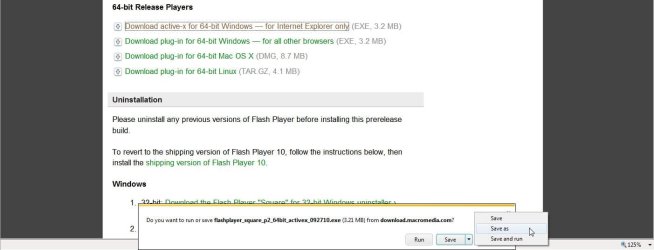
Another thing to mention regarding toolbars is how they are making that a change in seeing a modular toolbar appear for multiple purposes rather then seeing the usual popup in the middle of the screen. When going for a download like an update you now see the "run" and "save, save as, save and run" buttons on the same bar shown earlier for remembering passwords.
 

Attachments

  • Popup Download Bar.jpg
    Popup Download Bar.jpg
    60.5 KB · Views: 3

My Computers My Computers

System One System Two

  • Computer type
    PC/Desktop
    Computer Manufacturer/Model Number
    Custom builds = 2
    OS
    W7 Ultimate x64/W10 Pro x64/W11 Pro Triple Boot - Main PC W7 Remote PC Micro ATX W7 Pro x64/W11 Pro
    CPU
    AMD Phenom II X4 975 Deneb 3.6ghz - 965 2nd remote pc
    Motherboard
    Gigabyte GA-790XTA-UD4-Gigabyte GA-880GM-D2H remote pc
    Memory
    Kingston Hyper X DDR3 1600 1.5v 16gb - Hyper X Fury 8gb 2nd
    Graphics Card(s)
    MSI HD Radeon 5750 1gb - MSI HD Radeon 6450 on mini tower
    Sound Card
    Creative Labs X-Fi Xtreme Audio P - Realtek onooard 2nd case
    Monitor(s) Displays
    ASUS VW199T-P 19" HP 2082a Main-HP 2082a 20" remote pc
    Screen Resolution
    Asus 1440x900 - HP 1600x900
    Hard Drives
    WD Black 1TB HD per OS W7, W10, and pending W11 presently on 500gb OS Drive - Pending Triple 1TB HDs for Spanned Storage/backup volume
    Single 2TB external USB enclosure, single 1TB System 7 Host/Boot drive, Pending 8TB external HD for system image b
    PSU
    Corsair 750TX - primary / Corsair CX600 - second
    Case
    Antec 900-2 - SSD compatible / NZXT Vulcan mini tower
    Cooling
    Zalman CNPS9900A
    Keyboard
    AZIO L70 Backlit Letters Gaming - ONN Cordless/USB
    Mouse
    MSI DS200 Programmable, Logitech Cordless
    Internet Speed
    30mbps upgrade - primary hard wired - mini tower usb WiFi
    Antivirus
    GFI VIPRE Internet Security 2014 on W7 2016 beta on W10,
    Browser
    Cyberfox, WaterFox 64bit FF variants, FireFox x64, Pale Moon
    Other Info
    Accomdata fan cooled usb 2.0 PIDE/Sata II, III external enclosure.
    Sambient usb/eSata PATA/Sata II, III external enclosure.
  • Computer type
    PC/Desktop
    System Manufacturer/Model Number
    CUSTOM ASSEMBLY
    OS
    W7 Pro x64/W11 Pro
    CPU
    AMD Deneb 3.6ghz - 965
    Motherboard
    Gigabyte GA-880GM-D2H remote pc
    Memory
    Kingston Hyper X Fury 8gb
    Graphics Card(s)
    MSI HD Radeon 6450 DVI Output
    Sound Card
    Realtek onooard Creative or Other separate PENDING
    Monitor(s) Displays
    VIZIO 32" LCD TV Separate LCD Pending
    Screen Resolution
    1600x1080
    Hard Drives
    WD 500GB OS Host/Boot WD Green 1TB Storage/Backup
    PSU
    Corsair 600W - THERMALTAKE 600W spare case
    Case
    NZXT Vulcan mini tower
    Cooling
    Twin 120mm Top Fans - 240mm Side Cover
    Keyboard
    ONN Cordless/USB Logitech Cordless
    Mouse
    ONN USB/Cordless - Logitech Cordless
    Internet Speed
    DSL 5G
    Browser
    MS Edge, FireFox, WaterFox x64, FireFox Nightly
    Other Info
    OS Testing-Remote Access to Main TeamViewer
nice one, heh, heh..

you heard it here first, folks..!!

you can unlock the toolbars to move those little icons on the top right of the screen
I shoved mine over to the left - then re-locked it to keep them there.. :geek:


I can't seem to get that to work. :(
 

My Computer My Computer

Computer Manufacturer/Model Number
HP p7-1254
OS
7 64 bit Home Premium
nice one, heh, heh..

you heard it here first, folks..!!

you can unlock the toolbars to move those little icons on the top right of the screen
I shoved mine over to the left - then re-locked it to keep them there.. :geek:


I can't seem to get that to work. :(

The favorites open on the right side by default. Instead of only seeing the X to close there's also a small green arrow you click to move everything over to the left side. You are not able to move them back and forth however and they still open on the right the next time you go to click on them.

The one thing noticed right off about the favorites list in the IE 9 beta was no longer seeing them drop down over the present page you are on but squeeze the web page being viewed so as not cover over the left side of the page. I thought that was a consideration made by MS for the upcoming version.
 

My Computers My Computers

System One System Two

  • Computer type
    PC/Desktop
    Computer Manufacturer/Model Number
    Custom builds = 2
    OS
    W7 Ultimate x64/W10 Pro x64/W11 Pro Triple Boot - Main PC W7 Remote PC Micro ATX W7 Pro x64/W11 Pro
    CPU
    AMD Phenom II X4 975 Deneb 3.6ghz - 965 2nd remote pc
    Motherboard
    Gigabyte GA-790XTA-UD4-Gigabyte GA-880GM-D2H remote pc
    Memory
    Kingston Hyper X DDR3 1600 1.5v 16gb - Hyper X Fury 8gb 2nd
    Graphics Card(s)
    MSI HD Radeon 5750 1gb - MSI HD Radeon 6450 on mini tower
    Sound Card
    Creative Labs X-Fi Xtreme Audio P - Realtek onooard 2nd case
    Monitor(s) Displays
    ASUS VW199T-P 19" HP 2082a Main-HP 2082a 20" remote pc
    Screen Resolution
    Asus 1440x900 - HP 1600x900
    Hard Drives
    WD Black 1TB HD per OS W7, W10, and pending W11 presently on 500gb OS Drive - Pending Triple 1TB HDs for Spanned Storage/backup volume
    Single 2TB external USB enclosure, single 1TB System 7 Host/Boot drive, Pending 8TB external HD for system image b
    PSU
    Corsair 750TX - primary / Corsair CX600 - second
    Case
    Antec 900-2 - SSD compatible / NZXT Vulcan mini tower
    Cooling
    Zalman CNPS9900A
    Keyboard
    AZIO L70 Backlit Letters Gaming - ONN Cordless/USB
    Mouse
    MSI DS200 Programmable, Logitech Cordless
    Internet Speed
    30mbps upgrade - primary hard wired - mini tower usb WiFi
    Antivirus
    GFI VIPRE Internet Security 2014 on W7 2016 beta on W10,
    Browser
    Cyberfox, WaterFox 64bit FF variants, FireFox x64, Pale Moon
    Other Info
    Accomdata fan cooled usb 2.0 PIDE/Sata II, III external enclosure.
    Sambient usb/eSata PATA/Sata II, III external enclosure.
  • Computer type
    PC/Desktop
    System Manufacturer/Model Number
    CUSTOM ASSEMBLY
    OS
    W7 Pro x64/W11 Pro
    CPU
    AMD Deneb 3.6ghz - 965
    Motherboard
    Gigabyte GA-880GM-D2H remote pc
    Memory
    Kingston Hyper X Fury 8gb
    Graphics Card(s)
    MSI HD Radeon 6450 DVI Output
    Sound Card
    Realtek onooard Creative or Other separate PENDING
    Monitor(s) Displays
    VIZIO 32" LCD TV Separate LCD Pending
    Screen Resolution
    1600x1080
    Hard Drives
    WD 500GB OS Host/Boot WD Green 1TB Storage/Backup
    PSU
    Corsair 600W - THERMALTAKE 600W spare case
    Case
    NZXT Vulcan mini tower
    Cooling
    Twin 120mm Top Fans - 240mm Side Cover
    Keyboard
    ONN Cordless/USB Logitech Cordless
    Mouse
    ONN USB/Cordless - Logitech Cordless
    Internet Speed
    DSL 5G
    Browser
    MS Edge, FireFox, WaterFox x64, FireFox Nightly
    Other Info
    OS Testing-Remote Access to Main TeamViewer
I've never been a fan of IE and honestly, I don't think they will ever be better then some of the other browsers. But then again, maybe the time has come for IE to shoot up, who knows. :)
 

My Computer My Computer

Computer Manufacturer/Model Number
DELL
OS
windows 7
Since installing IE9 beta, I now get a 100% result and no longer have an insecure browser ;)
IE8/9 are the most secure browsers available for Windows Vista/7, thanks to Protected Mode (UAC must be active) that works like a sandbox isolating the browser and its tasks, including plugins. This means that also if exploited, malware will have so big restrictions that will be harmless and fail the infection...
Chrome too has a Protected Mode using Integrity Levels (new feauture of kernel NT6.x since Vista) but won't isolate plugins that will run in Medium Integrity (same user account privileges).
FFox instead is still missing a PM at all and is the most unsecure, even if it is updated regularly.

For this reason IE is the most secure browser with pro-active protection against unknown scripts/malware execution. If you don't belive me consider that also Charlie Miller (winner of Pwn2Own) suggested IE/Chrome (with UAC + protected mode ON).
 

My Computer My Computer

Computer type
Laptop
Computer Manufacturer/Model Number
MSI GX660-262it
OS
Windows 7 Home Premium x64 SP1
CPU
Intel Core i7 840QM
Memory
8GB DDR3 1333MHz
Graphics Card(s)
ATI Mobility HD 7970M 2GB DDR5
Screen Resolution
1920x1080
Hard Drives
Intel SSDSA2CT040G3
Hybrid ST750LX0ST750LX003
Antivirus
360 Internet Security
Browser
IE10
So, when will the next version of IE9 beta come out? Are they still on that new beta every 8 weeks plan?
 

My Computer My Computer

OS
Windows 7 Professional x64
CPU
AMD A8-3870K
Motherboard
ECS A75F-M2
Memory
8GB DDR3
Graphics Card(s)
Radeon HD 6550D, Radeon HD 5850
Hard Drives
1TB
PSU
750W
I've never been a fan of IE and honestly, I don't think they will ever be better then some of the other browsers. But then again, maybe the time has come for IE to shoot up, who knows. :)

I've tried just about all that could be found and still end up with IE windows open! :D

Except for IE 6! where many looked for an alternate to avoid all the security holes seen in the old version there IE7 was an improvement but upto par with IE 8 and now looking forward to IE 9 once final.

So, when will the next version of IE9 beta come out? Are they still on that new beta every 8 weeks plan?

You have this release confused with the previous Previews for IE 9. This is the actual beta release before the finished version is seen in Q1 2011. MS will want this ready before the SP1 is final.
 

My Computers My Computers

System One System Two

  • Computer type
    PC/Desktop
    Computer Manufacturer/Model Number
    Custom builds = 2
    OS
    W7 Ultimate x64/W10 Pro x64/W11 Pro Triple Boot - Main PC W7 Remote PC Micro ATX W7 Pro x64/W11 Pro
    CPU
    AMD Phenom II X4 975 Deneb 3.6ghz - 965 2nd remote pc
    Motherboard
    Gigabyte GA-790XTA-UD4-Gigabyte GA-880GM-D2H remote pc
    Memory
    Kingston Hyper X DDR3 1600 1.5v 16gb - Hyper X Fury 8gb 2nd
    Graphics Card(s)
    MSI HD Radeon 5750 1gb - MSI HD Radeon 6450 on mini tower
    Sound Card
    Creative Labs X-Fi Xtreme Audio P - Realtek onooard 2nd case
    Monitor(s) Displays
    ASUS VW199T-P 19" HP 2082a Main-HP 2082a 20" remote pc
    Screen Resolution
    Asus 1440x900 - HP 1600x900
    Hard Drives
    WD Black 1TB HD per OS W7, W10, and pending W11 presently on 500gb OS Drive - Pending Triple 1TB HDs for Spanned Storage/backup volume
    Single 2TB external USB enclosure, single 1TB System 7 Host/Boot drive, Pending 8TB external HD for system image b
    PSU
    Corsair 750TX - primary / Corsair CX600 - second
    Case
    Antec 900-2 - SSD compatible / NZXT Vulcan mini tower
    Cooling
    Zalman CNPS9900A
    Keyboard
    AZIO L70 Backlit Letters Gaming - ONN Cordless/USB
    Mouse
    MSI DS200 Programmable, Logitech Cordless
    Internet Speed
    30mbps upgrade - primary hard wired - mini tower usb WiFi
    Antivirus
    GFI VIPRE Internet Security 2014 on W7 2016 beta on W10,
    Browser
    Cyberfox, WaterFox 64bit FF variants, FireFox x64, Pale Moon
    Other Info
    Accomdata fan cooled usb 2.0 PIDE/Sata II, III external enclosure.
    Sambient usb/eSata PATA/Sata II, III external enclosure.
  • Computer type
    PC/Desktop
    System Manufacturer/Model Number
    CUSTOM ASSEMBLY
    OS
    W7 Pro x64/W11 Pro
    CPU
    AMD Deneb 3.6ghz - 965
    Motherboard
    Gigabyte GA-880GM-D2H remote pc
    Memory
    Kingston Hyper X Fury 8gb
    Graphics Card(s)
    MSI HD Radeon 6450 DVI Output
    Sound Card
    Realtek onooard Creative or Other separate PENDING
    Monitor(s) Displays
    VIZIO 32" LCD TV Separate LCD Pending
    Screen Resolution
    1600x1080
    Hard Drives
    WD 500GB OS Host/Boot WD Green 1TB Storage/Backup
    PSU
    Corsair 600W - THERMALTAKE 600W spare case
    Case
    NZXT Vulcan mini tower
    Cooling
    Twin 120mm Top Fans - 240mm Side Cover
    Keyboard
    ONN Cordless/USB Logitech Cordless
    Mouse
    ONN USB/Cordless - Logitech Cordless
    Internet Speed
    DSL 5G
    Browser
    MS Edge, FireFox, WaterFox x64, FireFox Nightly
    Other Info
    OS Testing-Remote Access to Main TeamViewer
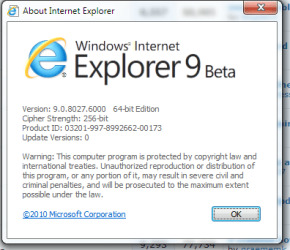
New build leaked (9.0.8027.6000) based on PP7

-Improved stability
-Bug fixes
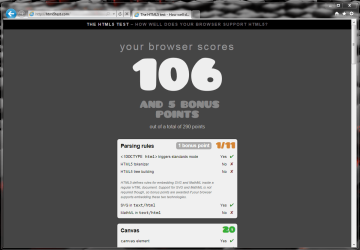
-Scores higher on the HTML5 test
-Improved H/W acceleration
-Feedback tool is now functional
x32 x64
 

Attachments

  • Capture.PNG
    Capture.PNG
    17 KB · Views: 4
  • ddd.PNG
    ddd.PNG
    54.1 KB · Views: 5
Last edited:

My Computer My Computer

Computer type
PC/Desktop
Computer Manufacturer/Model Number
Custom Build
OS
Windows 10 Pro x64, Arch Linux
CPU
Intel Core 2 Quad Q8200 OC'd 3.08GHz
Motherboard
Asus Rampage formula LGA775
Memory
8GB DDR2 900Mhz
Graphics Card(s)
MSI GT730 2GB GDDR5 (Kepler)
Sound Card
Supreme FX2
Monitor(s) Displays
Samsung LS22F350 LED
Screen Resolution
1080P
Hard Drives
Kingston SSDNow UV400 120GB, 500GB Hitachi, 2TB Samsung, 500GB Seagate FreeAgent, 640GB Samsung, 160GB Toshiba (Arch)
PSU
AeroCool 500W Bronze
Cooling
Cooler Master V6 + 3X fans
Keyboard
Prolink keyboard
Mouse
Logitech M705
Internet Speed
1MiB/s
Browser
Chrome Beta
New build leaked (9.0.8027.6000) based on PP7

-Improved stability
-Bug fixes
-Scores higher on the HTML5 test
-Improved H/W acceleration
-Feedback tool is now functional

I've been running 32 & 64 since the public BETA was announced - does this update happen on its own or sneak in with Windows updates, or does one have to uninstall and re-install the BETA? I've never seen anything about IE9 updates pop up anywhere since using it.

Thanks.
 

My Computer My Computer

Computer type
PC/Desktop
Computer Manufacturer/Model Number
CyberPower PC / Custom Intel X79 PC
OS
Windows 8.1 Professional x64
CPU
Intel Core i7-3930K 3.2 gHz Hex-Core (Turbo Boost 3.8 gHz)
Motherboard
ASUS P9X79 Pro (BIOS rev 4801)
Memory
8GB Corsair Vengeance DDR3-1600MHz 8-8-8-24
Graphics Card(s)
EVGA Superclocked GeForce GTX-580 1536MB
Sound Card
On-board 7.1 Realtek ALC898 HD Audio
Monitor(s) Displays
ASUS 27" 1080p MT276E
Screen Resolution
1920 x 1080
Hard Drives
Intel Cherryville 520 SSD 120GB (Main drive for OS)
WD Caviar Black 1TB 7200RPM 64MB Cache SATA 6
WD Caviar Blue 1TB 7200RPM 64MB Cache SATA 6
PSU
Corsair Professional Series AX850 80+ Gold
Case
Corsair Carbide 400R
Cooling
Corsair Hydro Series H60 / 9 x 120mm Thunderblade case fans
Keyboard
Microsoft Wireless Keyboard 3000 v2
Mouse
Microsoft Wireless Mouse 5000 - BlueTrack
Internet Speed
TWC Road Runner 30 Mbps
Antivirus
MS Security Essentials / Malwarebytes
Browser
IE 11
Other Info
LG Black 12X SATA BD-RW
Sony Optiarc Black 24X SATA DVD Burner
Logitech Web Cam Pro 9000
Panasonic 5.1 Surround System
Epson XP-310 Color Printer
Xbox One Controller
Xbox 360 PC Controller
I think the key word there is "Leaked". You won't get it unless you go searching around for it, and where you might end up downloading it from might not be a good idea. for example I personally wouldn't be in a big hurry to download it from a Bit Torrent site. If somebody here comes up with a good link I might go for it though. Eventually it may show up on for download from Microsoft, but I think at the moment what you get is an older build.
 

My Computer My Computer

Computer type
PC/Desktop
Computer Manufacturer/Model Number
Home Built
OS
Windows 10 Education 64 bit
CPU
AMD Phenom II X4 980 Black Edition Deneb 3.7GHz
Motherboard
Asus M4N68T-M V2 µATX Motherboard
Memory
8GB 4GBx2 Kingston PC10600 DDR3 1333 Memory
Graphics Card(s)
Zotac NVIDIA Geforce GT640 2 Gig DDR3 PCIe
Sound Card
VIA VT1708s High Definition Audio 8-channel Onboard
Monitor(s) Displays
22" LG E2242 1080p and 2 19" I-INC AG191D
Screen Resolution
1280x1024 - 1920x1080 - 1280x1024
Hard Drives
Crucial M100 256 GB SSD and 500 GB WD Blue SATA
PSU
Thermaltake TR 620
Case
Power Up Black ATX Mid-Tower Case
Cooling
Stock heatsink and fan
Keyboard
Logitech Wireless K350 Wave
Mouse
Logitech Wireless M570 Trackman Wheel
Internet Speed
80 Mbps Down 30 Mbps Up
Antivirus
Windows Defender
Browser
Internet Explorer 11
Other Info
HP DVD1040e Lightscribe - External USB2
Agreed - no, I was just more wondering if there had already been updates to the beta browser and I just never saw it happen and if users will have to uninstall and reinstall when this update becomes official... just curious :)
 

My Computer My Computer

Computer type
PC/Desktop
Computer Manufacturer/Model Number
CyberPower PC / Custom Intel X79 PC
OS
Windows 8.1 Professional x64
CPU
Intel Core i7-3930K 3.2 gHz Hex-Core (Turbo Boost 3.8 gHz)
Motherboard
ASUS P9X79 Pro (BIOS rev 4801)
Memory
8GB Corsair Vengeance DDR3-1600MHz 8-8-8-24
Graphics Card(s)
EVGA Superclocked GeForce GTX-580 1536MB
Sound Card
On-board 7.1 Realtek ALC898 HD Audio
Monitor(s) Displays
ASUS 27" 1080p MT276E
Screen Resolution
1920 x 1080
Hard Drives
Intel Cherryville 520 SSD 120GB (Main drive for OS)
WD Caviar Black 1TB 7200RPM 64MB Cache SATA 6
WD Caviar Blue 1TB 7200RPM 64MB Cache SATA 6
PSU
Corsair Professional Series AX850 80+ Gold
Case
Corsair Carbide 400R
Cooling
Corsair Hydro Series H60 / 9 x 120mm Thunderblade case fans
Keyboard
Microsoft Wireless Keyboard 3000 v2
Mouse
Microsoft Wireless Mouse 5000 - BlueTrack
Internet Speed
TWC Road Runner 30 Mbps
Antivirus
MS Security Essentials / Malwarebytes
Browser
IE 11
Other Info
LG Black 12X SATA BD-RW
Sony Optiarc Black 24X SATA DVD Burner
Logitech Web Cam Pro 9000
Panasonic 5.1 Surround System
Epson XP-310 Color Printer
Xbox One Controller
Xbox 360 PC Controller
New build leaked (9.0.8027.6000) based on PP7

-Improved stability
-Bug fixes
-Scores higher on the HTML5 test
-Improved H/W acceleration
-Feedback tool is now functional

I've been running 32 & 64 since the public BETA was announced - does this update happen on its own or sneak in with Windows updates, or does one have to uninstall and re-install the BETA? I've never seen anything about IE9 updates pop up anywhere since using it.

Thanks.

Theres no need to uninstall the previous version, the update might come to WU in a few days
 

My Computer My Computer

Computer type
PC/Desktop
Computer Manufacturer/Model Number
Custom Build
OS
Windows 10 Pro x64, Arch Linux
CPU
Intel Core 2 Quad Q8200 OC'd 3.08GHz
Motherboard
Asus Rampage formula LGA775
Memory
8GB DDR2 900Mhz
Graphics Card(s)
MSI GT730 2GB GDDR5 (Kepler)
Sound Card
Supreme FX2
Monitor(s) Displays
Samsung LS22F350 LED
Screen Resolution
1080P
Hard Drives
Kingston SSDNow UV400 120GB, 500GB Hitachi, 2TB Samsung, 500GB Seagate FreeAgent, 640GB Samsung, 160GB Toshiba (Arch)
PSU
AeroCool 500W Bronze
Cooling
Cooler Master V6 + 3X fans
Keyboard
Prolink keyboard
Mouse
Logitech M705
Internet Speed
1MiB/s
Browser
Chrome Beta
It appears that IE9 is now up to Build 9.0.8027.6000 (according to one source), a development release which supersedes Internet Explorer 9 Platform Preview 7 which was released recently, labeled 9.0.8023.6000.

And as users would expect, IE9 Build 9.0.8027.6000 doesn’t bring anything new to the table, being instead just a refined version of what early adopters can themselves download from Microsoft.

IE9 PP7 was released on November 17th, 2010, two months after the Beta Build was offered to testers, and exactly one year after Microsoft first demoed Internet Explorer 9 to the participants at the Professional Developers Conference 2009 and to the world.

Following the release of the Beta, the Redmond company continued harvesting feedback from developers and testers running IE9.

In this regard, the Platform Preview 7 and Platform Preview 6 release, both of which have been provided since the Beta went live, are in fact designed to integrate feedback from testers as well as soften all the rough edges of IE9’s core.


IE9 Up to Build 9.0.8027.6000 - Softpedia
 

My Computer My Computer

Computer type
PC/Desktop
Computer Manufacturer/Model Number
Custom Build
OS
Windows 10 Pro x64, Arch Linux
CPU
Intel Core 2 Quad Q8200 OC'd 3.08GHz
Motherboard
Asus Rampage formula LGA775
Memory
8GB DDR2 900Mhz
Graphics Card(s)
MSI GT730 2GB GDDR5 (Kepler)
Sound Card
Supreme FX2
Monitor(s) Displays
Samsung LS22F350 LED
Screen Resolution
1080P
Hard Drives
Kingston SSDNow UV400 120GB, 500GB Hitachi, 2TB Samsung, 500GB Seagate FreeAgent, 640GB Samsung, 160GB Toshiba (Arch)
PSU
AeroCool 500W Bronze
Cooling
Cooler Master V6 + 3X fans
Keyboard
Prolink keyboard
Mouse
Logitech M705
Internet Speed
1MiB/s
Browser
Chrome Beta
I have downloaded IE 9 Beta from the Softpedia link but haven't installed it yet. Looking at the properties for the downloaded files shows a Product Version of 9.0.7930.16406. Isn't that an older build?
 

My Computer My Computer

Computer type
PC/Desktop
Computer Manufacturer/Model Number
Home Built
OS
Windows 10 Education 64 bit
CPU
AMD Phenom II X4 980 Black Edition Deneb 3.7GHz
Motherboard
Asus M4N68T-M V2 µATX Motherboard
Memory
8GB 4GBx2 Kingston PC10600 DDR3 1333 Memory
Graphics Card(s)
Zotac NVIDIA Geforce GT640 2 Gig DDR3 PCIe
Sound Card
VIA VT1708s High Definition Audio 8-channel Onboard
Monitor(s) Displays
22" LG E2242 1080p and 2 19" I-INC AG191D
Screen Resolution
1280x1024 - 1920x1080 - 1280x1024
Hard Drives
Crucial M100 256 GB SSD and 500 GB WD Blue SATA
PSU
Thermaltake TR 620
Case
Power Up Black ATX Mid-Tower Case
Cooling
Stock heatsink and fan
Keyboard
Logitech Wireless K350 Wave
Mouse
Logitech Wireless M570 Trackman Wheel
Internet Speed
80 Mbps Down 30 Mbps Up
Antivirus
Windows Defender
Browser
Internet Explorer 11
Other Info
HP DVD1040e Lightscribe - External USB2
I have downloaded IE 9 Beta from the Softpedia link but haven't installed it yet. Looking at the properties for the downloaded files shows a Product Version of 9.0.7930.16406. Isn't that an older build?

The new build hasn't been posted yet on softpedia, see post 594 for the link
 

My Computer My Computer

Computer type
PC/Desktop
Computer Manufacturer/Model Number
Custom Build
OS
Windows 10 Pro x64, Arch Linux
CPU
Intel Core 2 Quad Q8200 OC'd 3.08GHz
Motherboard
Asus Rampage formula LGA775
Memory
8GB DDR2 900Mhz
Graphics Card(s)
MSI GT730 2GB GDDR5 (Kepler)
Sound Card
Supreme FX2
Monitor(s) Displays
Samsung LS22F350 LED
Screen Resolution
1080P
Hard Drives
Kingston SSDNow UV400 120GB, 500GB Hitachi, 2TB Samsung, 500GB Seagate FreeAgent, 640GB Samsung, 160GB Toshiba (Arch)
PSU
AeroCool 500W Bronze
Cooling
Cooler Master V6 + 3X fans
Keyboard
Prolink keyboard
Mouse
Logitech M705
Internet Speed
1MiB/s
Browser
Chrome Beta
Back
Top