MBR - Restore Windows 7 Master Boot Record

How to Restore the Windows 7 MBR (Master Boot Record)

   Information
If you have been dual booting with Linux, then you probably know one of the Linux boot managers like Grub or LILO has been installed in the MBR of your hard drive. What can you do when you no longer want Linux on that hard drive? This tutorial will show you how to use your 7 DVD and BOOTSECT.EXE to restore the "bootsector code" of the MBR and allow you to begin booting to Windows 7 again.
   Tip
You can use this method to update the bootsector code for Windows 7, Vista, XP, 2000 or switch between Bootmgr and NTLDR. Just check the Microsoft TechNet site for the correct command.


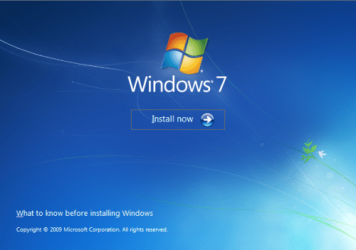
Here's How:1. Boot your computer to the Windows 7 DVD (or to a "Repair CD"). At this screen choose to install now.
25672d1251414873-mbr-restore-windows-7-master-boot-record-mbr_02.png


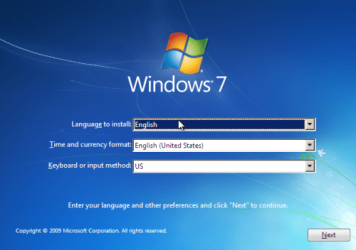
2. Select your language and click next.
25673d1251414836-mbr-restore-windows-7-master-boot-record-mbr_03.png


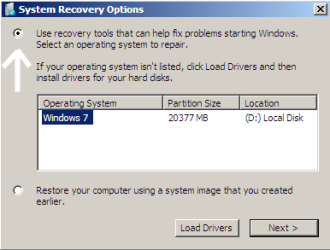
3. Click the button for "Use recovery tools".
25674d1251414836-mbr-restore-windows-7-master-boot-record-mbr_04.png


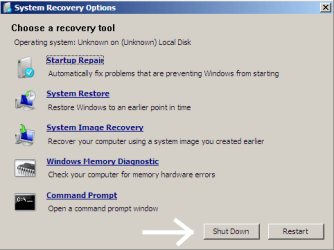
4. Then select "Command Prompt".
25675d1251414836-mbr-restore-windows-7-master-boot-record-mbr_05.png


5. When open, the command prompt will look like this:
53598d1251414836-mbr-restore-windows-7-master-boot-record-mbr_16.png


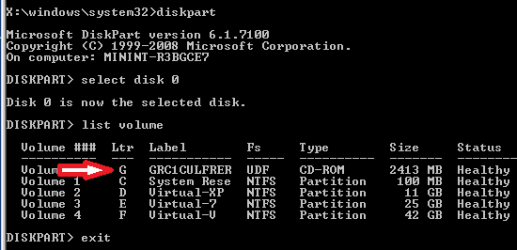
6. The command we will use, bootsect.exe, is in a folder (named boot) on the DVD.We need to know what drive letter has been assigned the DVD drive to access the folder.

Code:
Type: [B]diskpart[/B]
and press [B]Enter[/B]
 
Type: [B]select disk 0[/B] (zero)
and press [B]Enter[/B]
 
type: [B]list volume[/B]
and press [B]Enter[/B]
In this screen shot, the 7 DVD is letter: G
53599d1251414836-mbr-restore-windows-7-master-boot-record-mbr_17a.png


7. Use your DVD drive letter and

Code:
Type: [B]exit[/B]
and press [B]Enter[/B]
 
to close Diskpart
 
Type: [B]G:[/B] (use the letter of your DVD drive)
and press [B]Enter[/B]
 
Type: [B]cd boot[/B]
and press [B]Enter[/B]
 
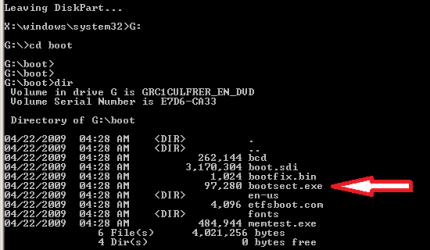
Type: [B]dir[/B]
and press [B]Enter[/B]
to verify that bootcect.exe is there (if you really need to)
53600d1251414836-mbr-restore-windows-7-master-boot-record-mbr_18a.png


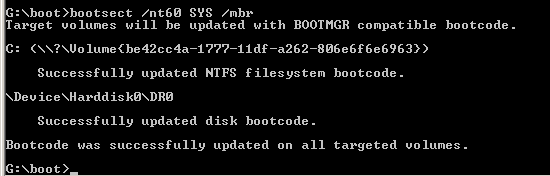
8. To restore the "bootsector code":

Code:
TYPE: [B]bootsect /nt60 SYS /mbr[/B]
and press [B]Enter[/B]
53601d1251414836-mbr-restore-windows-7-master-boot-record-mbr_19.png


NOTE: If this method fails to restore the MBR, you can try the bootrec command as it is also a tool for repairing the MBR.


9. When completed successfully,

Code:
Type: [B]exit[/B]
and press [B]Enter[/B]
This will close the command prompt window.

10. Now select Shut Down or Restart
25680d1251414836-mbr-restore-windows-7-master-boot-record-mbr_10.png


11. Then you can reboot your computer into Windows.
25681d1251414836-mbr-restore-windows-7-master-boot-record-mbr_12.png


Attachments

  • mbr_02.png
    mbr_02.png
    53.7 KB · Views: 1,640,315
  • mbr_03.png
    mbr_03.png
    54.3 KB · Views: 1,635,478
  • mbr_04.png
    mbr_04.png
    6.9 KB · Views: 1,633,763
  • mbr_05.png
    mbr_05.png
    10.5 KB · Views: 1,579,666
  • mbr_10.png
    mbr_10.png
    10.4 KB · Views: 1,576,678
  • mbr_12.png
    mbr_12.png
    5.3 KB · Views: 1,552,307
  • mbr_17a.png
    mbr_17a.png
    3.8 KB · Views: 1,565,873
  • mbr_18a.png
    mbr_18a.png
    3.7 KB · Views: 1,620,585
  • mbr_19.png
    mbr_19.png
    2.4 KB · Views: 1,569,958
  • mbr_16.png
    mbr_16.png
    3.3 KB · Views: 1,554,623
Last edited by a moderator:
Hi. I recently installed Ubuntu and it sort of took over.
On STEP 4, there is no 'boot' in the list.

Why not?

:sarc:
Hello Acc1999;

Your question is a little vague. At the bottom right of the "Step 4" pic, there are buttons to "Shut down" or "Restart" (reboot). If you could explain a little further, perhaps we could provide a better answer?

Cheers!
Robert
 
Last edited:

My Computer

OS
...
Re: No BOOT

I mean, in step 4. I the cmd window, where it lists 'boot' in the right column. Mine doesn't. Is this because my disk is an Upgrade version? If so, where can I get a full version? Free? I have the product key.
 

My Computer

Computer Manufacturer/Model Number
Sony
OS
Windows 7 Professional x64
CPU
Intel Pentium Dual-Core
Screen Resolution
1366 x 768
Other Info
Splashtop
I mean, in step 4. I the cmd window, where it lists 'boot' in the right column. Mine doesn't. Is this because my disk is an Upgrade version? If so, where can I get a full version? Free? I have the product key.

Does this help? They sent me a link to this page.

Link: [ubuntu] Removing A Full Install of Ubuntu 9.10 - Ubuntu Forums

Acc1999
Yes the additional info helps very much. Just for me to be sure, you want to (or already have) removed the Ubuntu partition from your laptop and want to restore the Windows bootmgr?

If you find this Tutorial somewhat confusing, which I totally understand as I try to avoid command line stuff whenever possible, I would ask / suggest you try the "Startup Repair" from your 7 install DVD or the "System Repair" CD 7 will create and burn for you?

Questions: Do you have a DVD CD to use?

Can you boot into anything now? Windows 7 or Ubuntu?

.
 

My Computer

OS
...
Re: No BOOT

Still no luck...
I did this:
Opened CMD
Typed: bootsect /nt60 SYS
Press: ENTER
Success!
Typed: exit
Press: ENTER
CMD Closed
Restart
Still the same error!

Instead of Windows, I get the Ubuntu GRUB loader menu. I want to just load Windows so I can delete Ubuntu forever and not have to loose a single Windows file... Is that even possible?

I have:
64-bit Ubuntu 9.10 Desktop
64-bit Windows 7 Pro
Splashtop (Comes with VAIO computers... If you don't know what it is that is OK)
64-bit Sony VAIO
Dual-CPU

Acc1999
 

My Computer

Computer Manufacturer/Model Number
Sony
OS
Windows 7 Professional x64
CPU
Intel Pentium Dual-Core
Screen Resolution
1366 x 768
Other Info
Splashtop
I mean, in step 4. I the cmd window, where it lists 'boot' in the right column. Mine doesn't. Is this because my disk is an Upgrade version? If so, where can I get a full version? Free? I have the product key.

Does this help? They sent me a link to this page.

Link: [ubuntu] Removing A Full Install of Ubuntu 9.10 - Ubuntu Forums

Acc1999
Yes the additional info helps very much. Just for me to be sure, you want to (or already have) removed the Ubuntu partition from your laptop and want to restore the Windows bootmgr?

If you find this Tutorial somewhat confusing, which I totally understand as I try to avoid command line stuff whenever possible, I would ask / suggest you try the "Startup Repair" from your 7 install DVD or the "System Repair" CD 7 will create and burn for you?

Questions: Do you have a DVD CD to use?

Can you boot into anything now? Windows 7 or Ubuntu?

.

No. If I do, Windows will go Bye-Bye with it, because GRUB took over it. Yes, I do want to remove it. That is why I am looking around for a way.
 

My Computer

Computer Manufacturer/Model Number
Sony
OS
Windows 7 Professional x64
CPU
Intel Pentium Dual-Core
Screen Resolution
1366 x 768
Other Info
Splashtop
bootsect /nt60 all /mbr
 

My Computers

System One System Two

  • Computer type
    PC/Desktop
    OS
    7 X64
    CPU
    i5 8400
    Motherboard
    gigabyte b365m ds3h
    Memory
    2x8gb 3200mhz
    Hard Drives
    various
    PSU
    pure power 11 400w cm
    Case
    Coolermaster
    Cooling
    cryorig m9i
  • Computer type
    PC/Desktop
    OS
    7x64
    CPU
    g5400
    Motherboard
    ga b365m ds3h
    Memory
    8gb ddr4 2400
    PSU
    xfx pro 450w
Questions: Do you have a DVD CD to use?

Can you boot into anything now? Windows 7 or Ubuntu?

.

No. If I do, Windows will go Bye-Bye with it, because GRUB took over it. Yes, I do want to remove it. That is why I am looking around for a way.
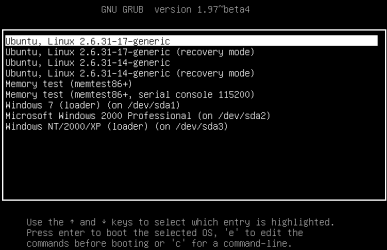
Please explain what you mean by "go Bye-Bye with it"? Here is my Grub boot loader:

boot_grub_11.PNG

Grub is very friendly. You can see where my Grub will boot not only to Ubuntu but to Windows 7, Windows 2000, or Windows XP with out any problems. I can start any of these OS with Grub with no problems.

Yes, you can restore your Windows "boot loader" by following this tutorial, but there is an easier way even than this.

.
 

My Computer

OS
...
Yes

I can boot into any OS, but I want to remove Ubuntu and Grub and all that. How do you take a screenshot of the boot? Cool! What I mean is, on my old laptop, I removed Ubuntu and Windows went away too. I got a "No OS found" error.
 

My Computer

Computer Manufacturer/Model Number
Sony
OS
Windows 7 Professional x64
CPU
Intel Pentium Dual-Core
Screen Resolution
1366 x 768
Other Info
Splashtop
There is? Tell me!

Questions: Do you have a DVD CD to use?

Can you boot into anything now? Windows 7 or Ubuntu?

.

No. If I do, Windows will go Bye-Bye with it, because GRUB took over it. Yes, I do want to remove it. That is why I am looking around for a way.
Please explain what you mean by "go Bye-Bye with it"? Here is my Grub boot loader:

View attachment 49178

Grub is very friendly. You can see where my Grub will boot not only to Ubuntu but to Windows 7, Windows 2000, or Windows XP with out any problems. I can start any of these OS with Grub with no problems.

Yes, you can restore your Windows "boot loader" by following this tutorial, but there is an easier way even than this.

.

Another way?
 

My Computer

Computer Manufacturer/Model Number
Sony
OS
Windows 7 Professional x64
CPU
Intel Pentium Dual-Core
Screen Resolution
1366 x 768
Other Info
Splashtop
I can boot into any OS, but I want to remove Ubuntu and Grub and all that. How do you take a screenshot of the boot? Cool! What I mean is, on my old laptop, I removed Ubuntu and Windows went away too. I got a "No OS found" error.
Yes, you can remove Grub and Ubuntu. And you can restore the Windows boot loader.

Do you have a Windows 7 install DVD?
 

My Computer

OS
...
Funny Quote

"Ubuntu does not play nice with Windows."
 

My Computer

Computer Manufacturer/Model Number
Sony
OS
Windows 7 Professional x64
CPU
Intel Pentium Dual-Core
Screen Resolution
1366 x 768
Other Info
Splashtop
I can boot into any OS, but I want to remove Ubuntu and Grub and all that. How do you take a screenshot of the boot? Cool! What I mean is, on my old laptop, I removed Ubuntu and Windows went away too. I got a "No OS found" error.
Yes, you can remove Grub and Ubuntu. And you can restore the Windows boot loader.

Do you have a Windows 7 install DVD?

Well, yes, and no. I have the Upgrade version. How do you take the boot snapshots? How do I remove Ubuntu and Grub?
 

My Computer

Computer Manufacturer/Model Number
Sony
OS
Windows 7 Professional x64
CPU
Intel Pentium Dual-Core
Screen Resolution
1366 x 768
Other Info
Splashtop
I can boot into any OS, but I want to remove Ubuntu and Grub and all that. How do you take a screenshot of the boot? Cool! What I mean is, on my old laptop, I removed Ubuntu and Windows went away too. I got a "No OS found" error.
Yes, you can remove Grub and Ubuntu. And you can restore the Windows boot loader.

Do you have a Windows 7 install DVD?

Well, yes, and no. I have the Upgrade version. How do you take the boot snapshots? How do I remove Ubuntu and Grub?
Good. That is what I have as well, Windows 7 Home Premium Upgrade.

You can use your Upgrade DVD to fix the "Startup". Please look here: http://www.sevenforums.com/performance-maintenance/51100-repair-cd-system-repair-disk.html
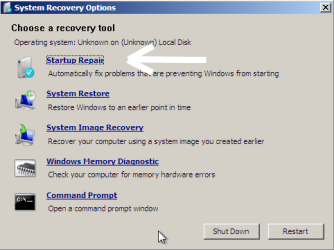
at the steps pictured. What you will do is boot to your Upgrade DVD and follow the steps until you get here:
Start_Repiar_01.png

When you get to this screen click on the "Startup repair". When done, restart and do it a second time, restart and do it a third time. Then see if you can boot into Windows 7?

.
 

My Computer

OS
...
Remove Ubuntu

Great. I will try that. But how do I remove Ubuntu and Grub first?
 

My Computer

Computer Manufacturer/Model Number
Sony
OS
Windows 7 Professional x64
CPU
Intel Pentium Dual-Core
Screen Resolution
1366 x 768
Other Info
Splashtop
Screenshots

Sorry for asking so much, but how do you take boot screenshots?
 

My Computer

Computer Manufacturer/Model Number
Sony
OS
Windows 7 Professional x64
CPU
Intel Pentium Dual-Core
Screen Resolution
1366 x 768
Other Info
Splashtop
?

See if I can boot? [Shiver]
 

My Computer

Computer Manufacturer/Model Number
Sony
OS
Windows 7 Professional x64
CPU
Intel Pentium Dual-Core
Screen Resolution
1366 x 768
Other Info
Splashtop
Great. I will try that. But how do I remove Ubuntu and Grub first?
Doing the "Startup Repair" three times in a row will remove the Grub bootloader and replace it with the Windows boot loader. When that is done, it is easy to remove Ubuntu from Windows 7. But do this first and I promise to answer you other questions as well.

Cheers!
Robert
 

My Computer

OS
...
Ok

Ok, I'l do it. Stay on so I can post when I am done.
 

My Computer

Computer Manufacturer/Model Number
Sony
OS
Windows 7 Professional x64
CPU
Intel Pentium Dual-Core
Screen Resolution
1366 x 768
Other Info
Splashtop
Back
Top