Mozilla Firefox errors

I got your email notification, so I must have done it right.
When I said I couldn't get emails that is when I have to reboot and then I get them. And yes, I still get these errors. I am not sure what to give you a screenshot of. I told you exactly what the error says.
I gave you all the troubles I am having - not sure what else you want.
Thanks.
 

My Computer

Computer Manufacturer/Model Number
Vostro 220 Mini Tower Desktop Details | Dell
OS
Windows 7 Home Premium SP 1, 32-bit
CPU
Intel(R) Core(TM)2 Duo CPU E7400 @ 2.80GHz
Motherboard
Dell Inc. 0P301D
Memory
3.00 GB
Graphics Card(s)
(1) Intel(R) G45/G43 Express Chipset (2) Intel(R) G45/G43
Sound Card
(1) High Definition Audio Device (2) High Definition Audio
Monitor(s) Displays
Dell 22" wide E228WFP Analog flat panelq
Mouse
Dell optical usb mouse vostro
Other Info
OPTICAL READER, MOUSE,SPEAKERS, MONITOR, MODEM
Glad the email notifications are working. Also, forget about the screenshots... As I've said in this post: http://www.sevenforums.com/browsers-mail/200378-mozilla-firefox-errors-6.html#post1728477 I probably won't be able to help you with those errors as they relate specifically with Yahoo, something I know next to nothing about. As suggested, any Yahoo forum may know more about the program than I would and why you might be getting those errors. Try and ask them for an answer to Yahoo related problems.

You might try creating an email account with a web email provider to test if you get similar errors, or to switch to and use as your primary account. I would recommend hotmail if interested, as it seems pretty easy to use, and shouldn't give you any errors. It is supposed to be the most widely used email provider there is. This is up to you if you'd like to try it out.

Now to try and fix your problems 3, 4, and 9. Please give me some time to prepare, I'll post back soon as possible.
 

My Computer

Computer type
PC/Desktop
Computer Manufacturer/Model Number
Custom Asus Build
OS
Microsoft Windows 8.1 Pro 64-bit
CPU
Intel(R) Core(TM) i3-4130 CPU @ 3.40GHz
Motherboard
B85M-E
Memory
8.00 GB
Graphics Card(s)
None
Sound Card
Realtek High Definition Audio
Monitor(s) Displays
Asus 23.6" Monitor
Screen Resolution
1920 x 1080 x 32 bits (4294967296 colors) @ 60 Hz
Hard Drives
INTEL SSDSC2BW180A4
Samsung SSD 840 PRO Series
PSU
Seasonic S12II-380Bronze
Case
Lian Li
Cooling
Fan, Passive
Keyboard
Logitech K120
Mouse
Microsoft Touch Mouse
Internet Speed
4ms Ping, 19.0 Mbps Download, 19.0 Mbps Upload
Antivirus
Eset Endpoint
Browser
Internet Explorer, Chrome
3. Adobe flash plugin crashes a lot and I finally uninstalled and reinstalled a new one, but every once in a while it says that again.
4. "Firefox can't find server at us.mg6.mail.yahoo.com"
9. Every so often, not a lot, but XoftspySE will pop up and says to reinstall because of missing components. I thought we had gotten rid of that a long time ago. This doesn't affect anything, I just skip it and go on.
3. This is a hard one for me. You've uninstalled it and replaced it with a new version, and you've uninstalled Firefox with the most recent version. I would think the problem would be with some of your add-ons, but I could be wrong. Remember how to disable add-ons? Try disabling all add-ons except for adobe flash, think it is called shockwave flash object. Let me know if you get any further crashes, after this. I know this can be inconvenient with add-ons disabled, but this way we can know if add-ons are indeed causing the problems
4. This may be a Yahoo issue, and their servers may be down. I honestly have no idea. When I said I'll help you with 4, I meant 5. sorry for the mix up on my part.
5. This could be anything from hardware to software problems. I will make a seperate post to help you with this issue.
9. XoftspySE is an antivirus program, and you are only supposed to have 1 of those installed at a time (You also have Microsoft Security Essentials if I'm not mistaken). This may also be a reason your computer is freezing. You also have Revo uninstaller installed, yes? To remove XoftspySE, use Revo uninstaller. If you need to, download it here: Download Revo Uninstaller Freeware - Free and Full Download - Uninstall software, remove programs, solve uninstall problems

Before we do this, create a restore point. Here are the images so you can follow along visually:

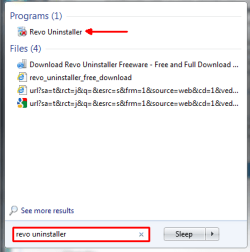
a. How to find Revo uninstaller by typing it into the start menu search:
revo uninstaller1png.png

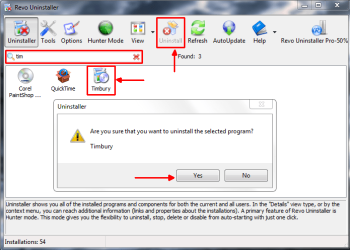
b. Type "Xoft" or "spy" into that search bar (in the picture, it has a red box around it) and find the program XoftspySE. Click the antivirus program called XoftspySE and at the top, click uninstall. I've installed Timbury to show you how to uninstall a program.
uninstallusingrevos2png.png

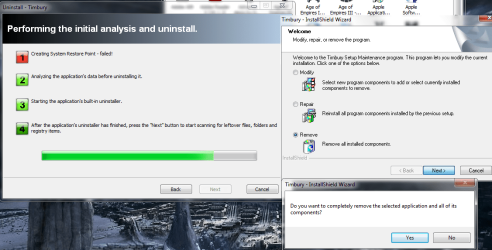
c. There will be some nexts, yeses, and finishes that you will need to click
Click nextpng.PNGnextthenyes4png.PNG

d. When this page pops up, only select the items in the list at the bottom of the files, don't select any of those files. Only the weird registry looking bolded icon should be checked, as the picture says, but select all of the bold icons to delete them
Registrypng.PNG

Let me know how this goes and if you need more help.
 

My Computer

Computer type
PC/Desktop
Computer Manufacturer/Model Number
Custom Asus Build
OS
Microsoft Windows 8.1 Pro 64-bit
CPU
Intel(R) Core(TM) i3-4130 CPU @ 3.40GHz
Motherboard
B85M-E
Memory
8.00 GB
Graphics Card(s)
None
Sound Card
Realtek High Definition Audio
Monitor(s) Displays
Asus 23.6" Monitor
Screen Resolution
1920 x 1080 x 32 bits (4294967296 colors) @ 60 Hz
Hard Drives
INTEL SSDSC2BW180A4
Samsung SSD 840 PRO Series
PSU
Seasonic S12II-380Bronze
Case
Lian Li
Cooling
Fan, Passive
Keyboard
Logitech K120
Mouse
Microsoft Touch Mouse
Internet Speed
4ms Ping, 19.0 Mbps Download, 19.0 Mbps Upload
Antivirus
Eset Endpoint
Browser
Internet Explorer, Chrome
ok, I didn't get notifications of these last two emails!!!!!
 

My Computer

Computer Manufacturer/Model Number
Vostro 220 Mini Tower Desktop Details | Dell
OS
Windows 7 Home Premium SP 1, 32-bit
CPU
Intel(R) Core(TM)2 Duo CPU E7400 @ 2.80GHz
Motherboard
Dell Inc. 0P301D
Memory
3.00 GB
Graphics Card(s)
(1) Intel(R) G45/G43 Express Chipset (2) Intel(R) G45/G43
Sound Card
(1) High Definition Audio Device (2) High Definition Audio
Monitor(s) Displays
Dell 22" wide E228WFP Analog flat panelq
Mouse
Dell optical usb mouse vostro
Other Info
OPTICAL READER, MOUSE,SPEAKERS, MONITOR, MODEM
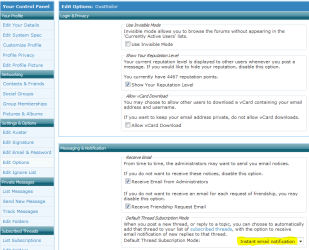
Alright, Up at the top where it says "subscriptions", along the same line, left of it should be "User CP". Click it. A new screen will pop up. To the far left a little lower, it says" Your Control Panel" (the picture will show it to you if you need help), and it lists a bunch of stuff like "Your Profile" and "Edit your Details", etc. Go down past "settings & Options" and click "Edit Options". You will see this:
Capture.PNG

Click the Highlighted box and select "Instant email notification". Now go back to this post and follow these steps all over again: http://www.sevenforums.com/browsers-mail/200378-mozilla-firefox-errors-6.html#post1727387

Make sure "Mozilla Firefox errors" is set to instant like this:
Captured.PNG

:info::info::warn: Patti, how is everything else going? Were you able to uninstall that antivirus, do you need more help, are you stuck somewhere? Keep me updated!
 

My Computer

Computer type
PC/Desktop
Computer Manufacturer/Model Number
Custom Asus Build
OS
Microsoft Windows 8.1 Pro 64-bit
CPU
Intel(R) Core(TM) i3-4130 CPU @ 3.40GHz
Motherboard
B85M-E
Memory
8.00 GB
Graphics Card(s)
None
Sound Card
Realtek High Definition Audio
Monitor(s) Displays
Asus 23.6" Monitor
Screen Resolution
1920 x 1080 x 32 bits (4294967296 colors) @ 60 Hz
Hard Drives
INTEL SSDSC2BW180A4
Samsung SSD 840 PRO Series
PSU
Seasonic S12II-380Bronze
Case
Lian Li
Cooling
Fan, Passive
Keyboard
Logitech K120
Mouse
Microsoft Touch Mouse
Internet Speed
4ms Ping, 19.0 Mbps Download, 19.0 Mbps Upload
Antivirus
Eset Endpoint
Browser
Internet Explorer, Chrome
Ok, I didn't get your email notifications in the mail, keep checking back. So I do have revo and there is not that Xoftspy anywhere that I could find, unless it is a hidden file. I think I only got that twice and the computer went on. The not being able to load email and it freezing computer are the bothersome.
I have to tell you, I am divorced, live by myself, have no money and this computer is my only lifeline to the outside world, that is why I have to keep in in top notch order. Unless I marry some rich guy I will have to keep it forever. I wish you could just come here and fix it all for a case of beer (or whatever). So I have done nothing. None of your screenshots made sense to me - sorry to be in such a bad mood, I am just very upset and crying that my life sucks right now. The computer is the only thing that brings me joy. There, how do you like being a psychologist?? I know you will fix this and I will be patient. Whenever you can work on it is fine. At least the computer itself is working good and at a good speed. I download "nothing", which must help.
Thanks Dusty
 

My Computer

Computer Manufacturer/Model Number
Vostro 220 Mini Tower Desktop Details | Dell
OS
Windows 7 Home Premium SP 1, 32-bit
CPU
Intel(R) Core(TM)2 Duo CPU E7400 @ 2.80GHz
Motherboard
Dell Inc. 0P301D
Memory
3.00 GB
Graphics Card(s)
(1) Intel(R) G45/G43 Express Chipset (2) Intel(R) G45/G43
Sound Card
(1) High Definition Audio Device (2) High Definition Audio
Monitor(s) Displays
Dell 22" wide E228WFP Analog flat panelq
Mouse
Dell optical usb mouse vostro
Other Info
OPTICAL READER, MOUSE,SPEAKERS, MONITOR, MODEM
Ah, just got your email notification,for just the above email, so maybe it works afterall. I will work on it
 

My Computer

Computer Manufacturer/Model Number
Vostro 220 Mini Tower Desktop Details | Dell
OS
Windows 7 Home Premium SP 1, 32-bit
CPU
Intel(R) Core(TM)2 Duo CPU E7400 @ 2.80GHz
Motherboard
Dell Inc. 0P301D
Memory
3.00 GB
Graphics Card(s)
(1) Intel(R) G45/G43 Express Chipset (2) Intel(R) G45/G43
Sound Card
(1) High Definition Audio Device (2) High Definition Audio
Monitor(s) Displays
Dell 22" wide E228WFP Analog flat panelq
Mouse
Dell optical usb mouse vostro
Other Info
OPTICAL READER, MOUSE,SPEAKERS, MONITOR, MODEM
Ok, I think I have the email notification done - yeah! Just curious how that got undone. Could not find xsoftspy, so bits and pieces are there somewhere.
Now did you say you could help with some of the other problems in my list?
 

My Computer

Computer Manufacturer/Model Number
Vostro 220 Mini Tower Desktop Details | Dell
OS
Windows 7 Home Premium SP 1, 32-bit
CPU
Intel(R) Core(TM)2 Duo CPU E7400 @ 2.80GHz
Motherboard
Dell Inc. 0P301D
Memory
3.00 GB
Graphics Card(s)
(1) Intel(R) G45/G43 Express Chipset (2) Intel(R) G45/G43
Sound Card
(1) High Definition Audio Device (2) High Definition Audio
Monitor(s) Displays
Dell 22" wide E228WFP Analog flat panelq
Mouse
Dell optical usb mouse vostro
Other Info
OPTICAL READER, MOUSE,SPEAKERS, MONITOR, MODEM
If you are getting error popups from XoftspySE AV then it needs to be rooted out because it could be causing other unseen issues.

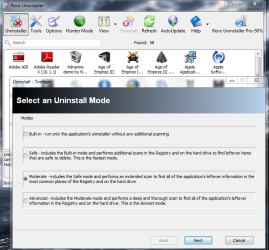
I would do this by installing it again and then uninstalling it using Revo in Advanced Mode as shown above by Dusty.

How is performance otherwise?
 
Hey Greg. Seems like her computer performance is good, but the computer freezes at times, but I'm not sure if it freezes when she works within Yahoo or if it freezes randomly o.0

Patti, no problem, none of your posts seemed rude to me. This is a hard issue to solve, but we'll get there eventually. Please try not to make an object so easily broken and taken away what you are all about. Life gets hard at times, but keep going and you will get stronger and find what you've been missing. Don't give up! :)

I mentioned to someone that if I had your computer here, I could fix it easy, but we can only work with what we have.

What Greg said seems like a good idea. install XoftSpy again and use the Revo method in a post above (#63) for removing it.

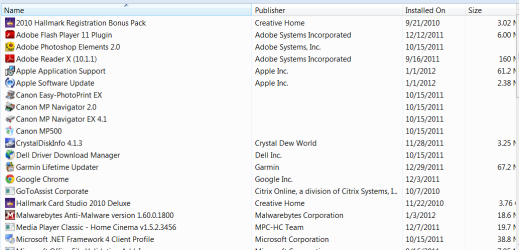
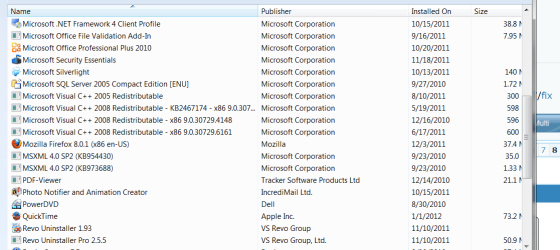
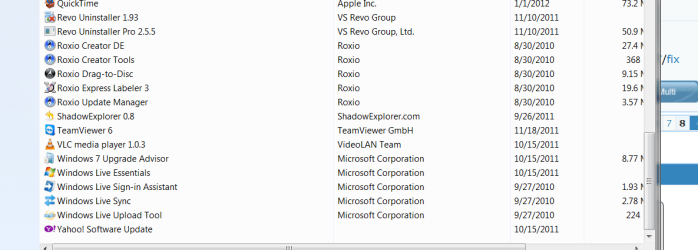
After you remove it, we'll see if your computer freezes anymore. It would help if, once again, you could post a picture to this thread of all your installed programs from control panel. Let me know if you need help posting it again.

I'll work on the freezing issue after all of this is complete so I don't rush you past important steps.
 

My Computer

Computer type
PC/Desktop
Computer Manufacturer/Model Number
Custom Asus Build
OS
Microsoft Windows 8.1 Pro 64-bit
CPU
Intel(R) Core(TM) i3-4130 CPU @ 3.40GHz
Motherboard
B85M-E
Memory
8.00 GB
Graphics Card(s)
None
Sound Card
Realtek High Definition Audio
Monitor(s) Displays
Asus 23.6" Monitor
Screen Resolution
1920 x 1080 x 32 bits (4294967296 colors) @ 60 Hz
Hard Drives
INTEL SSDSC2BW180A4
Samsung SSD 840 PRO Series
PSU
Seasonic S12II-380Bronze
Case
Lian Li
Cooling
Fan, Passive
Keyboard
Logitech K120
Mouse
Microsoft Touch Mouse
Internet Speed
4ms Ping, 19.0 Mbps Download, 19.0 Mbps Upload
Antivirus
Eset Endpoint
Browser
Internet Explorer, Chrome
Ok, I installed and then removed xoftspy using revo installer advanced. I will have to see if the computer freezes up anymore. Ok, what is next?
 

My Computer

Computer Manufacturer/Model Number
Vostro 220 Mini Tower Desktop Details | Dell
OS
Windows 7 Home Premium SP 1, 32-bit
CPU
Intel(R) Core(TM)2 Duo CPU E7400 @ 2.80GHz
Motherboard
Dell Inc. 0P301D
Memory
3.00 GB
Graphics Card(s)
(1) Intel(R) G45/G43 Express Chipset (2) Intel(R) G45/G43
Sound Card
(1) High Definition Audio Device (2) High Definition Audio
Monitor(s) Displays
Dell 22" wide E228WFP Analog flat panelq
Mouse
Dell optical usb mouse vostro
Other Info
OPTICAL READER, MOUSE,SPEAKERS, MONITOR, MODEM
For a little while, disable all add-ons except for adobe shockwave flash, so that we can test if add-ons are causing any trouble. Then only time will tell if you experience any more freezes or adobe shockwave flash freezes.

And post a picture of control panel programs so I can see any more programs that might be interfering with stuff. You might also post a pic of add-ons again. I will tell you which i think should be removed, but I'll try not to pressure you, as the final decision will be yours what you do with the programs.

Make sure you include all the programs and add-ons!

How to "snip" pictures: http://www.vistax64.com/tutorials/148532-how-use-snipping-tool-vista.html
How to upload them here: http://www.sevenforums.com/tutorials/9733-screenshots-files-upload-post-seven-forums.html
 

My Computer

Computer type
PC/Desktop
Computer Manufacturer/Model Number
Custom Asus Build
OS
Microsoft Windows 8.1 Pro 64-bit
CPU
Intel(R) Core(TM) i3-4130 CPU @ 3.40GHz
Motherboard
B85M-E
Memory
8.00 GB
Graphics Card(s)
None
Sound Card
Realtek High Definition Audio
Monitor(s) Displays
Asus 23.6" Monitor
Screen Resolution
1920 x 1080 x 32 bits (4294967296 colors) @ 60 Hz
Hard Drives
INTEL SSDSC2BW180A4
Samsung SSD 840 PRO Series
PSU
Seasonic S12II-380Bronze
Case
Lian Li
Cooling
Fan, Passive
Keyboard
Logitech K120
Mouse
Microsoft Touch Mouse
Internet Speed
4ms Ping, 19.0 Mbps Download, 19.0 Mbps Upload
Antivirus
Eset Endpoint
Browser
Internet Explorer, Chrome
I'd wait to disable the add-ons til you see if you get any hangs after the erroring program uninstall.

If you get any hangs, how exactly do they occur? What happens, or doesn't happen?
 
I'd wait to disable the add-ons til you see if you get any hangs after the erroring program uninstall.

If you get any hangs, how exactly do they occur? What happens, or doesn't happen?
Greg, didn't think the add-ons had anything much to do with the windows environment, but it might help with her numerous Yahoo errors. But I will defer to you as you are more knowledgeable here than I. Perhaps some of these errors will go away with the extra bits of the Antivirus gone.
 

My Computer

Computer type
PC/Desktop
Computer Manufacturer/Model Number
Custom Asus Build
OS
Microsoft Windows 8.1 Pro 64-bit
CPU
Intel(R) Core(TM) i3-4130 CPU @ 3.40GHz
Motherboard
B85M-E
Memory
8.00 GB
Graphics Card(s)
None
Sound Card
Realtek High Definition Audio
Monitor(s) Displays
Asus 23.6" Monitor
Screen Resolution
1920 x 1080 x 32 bits (4294967296 colors) @ 60 Hz
Hard Drives
INTEL SSDSC2BW180A4
Samsung SSD 840 PRO Series
PSU
Seasonic S12II-380Bronze
Case
Lian Li
Cooling
Fan, Passive
Keyboard
Logitech K120
Mouse
Microsoft Touch Mouse
Internet Speed
4ms Ping, 19.0 Mbps Download, 19.0 Mbps Upload
Antivirus
Eset Endpoint
Browser
Internet Explorer, Chrome
People on the Mozilla FF forum are saying to use Chrome.

Well these people might be the promoter of Google Chrome 'cause I never had such problems if I had any I'm still gonna stick with Mozilla FireFox because it's the best.
 

My Computer

Computer Manufacturer/Model Number
Custom
OS
Windows 7 Ultimate 64 Bit
CPU
Intel 2.6GHz Core 2 Duo
Motherboard
Intel DG41TY
Memory
4GB
Graphics Card(s)
BuiltIn
Sound Card
Realtek HD Audio
Monitor(s) Displays
Philips
Screen Resolution
1280x1024
Case
Gateway E Series
Dusty, I cannot get a picture of the control panel. I will have the list of programs in there and when I go to snipping tool the control panel closes. I also cannot cut and paste it, any more ideas?
And according to Greg did not do the add ons.
 

My Computer

Computer Manufacturer/Model Number
Vostro 220 Mini Tower Desktop Details | Dell
OS
Windows 7 Home Premium SP 1, 32-bit
CPU
Intel(R) Core(TM)2 Duo CPU E7400 @ 2.80GHz
Motherboard
Dell Inc. 0P301D
Memory
3.00 GB
Graphics Card(s)
(1) Intel(R) G45/G43 Express Chipset (2) Intel(R) G45/G43
Sound Card
(1) High Definition Audio Device (2) High Definition Audio
Monitor(s) Displays
Dell 22" wide E228WFP Analog flat panelq
Mouse
Dell optical usb mouse vostro
Other Info
OPTICAL READER, MOUSE,SPEAKERS, MONITOR, MODEM
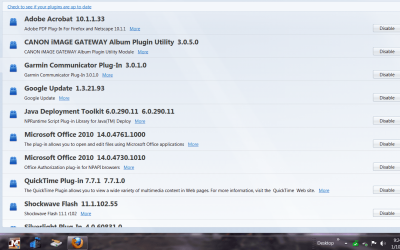
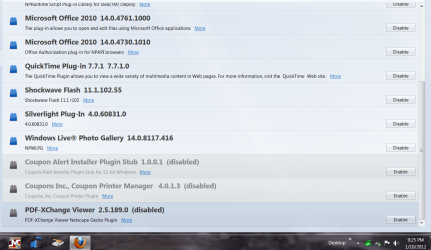
I have no add ons - these are my pluginsCapture.PNG

Capture1.PNG
 

My Computer

Computer Manufacturer/Model Number
Vostro 220 Mini Tower Desktop Details | Dell
OS
Windows 7 Home Premium SP 1, 32-bit
CPU
Intel(R) Core(TM)2 Duo CPU E7400 @ 2.80GHz
Motherboard
Dell Inc. 0P301D
Memory
3.00 GB
Graphics Card(s)
(1) Intel(R) G45/G43 Express Chipset (2) Intel(R) G45/G43
Sound Card
(1) High Definition Audio Device (2) High Definition Audio
Monitor(s) Displays
Dell 22" wide E228WFP Analog flat panelq
Mouse
Dell optical usb mouse vostro
Other Info
OPTICAL READER, MOUSE,SPEAKERS, MONITOR, MODEM

I'd disable all but Adobe, Silverlight, Shockwave, and Java.

I'd also uninstall Google Updater and any toolbars or search services. Only use the stable Google search box built into the Firefox browser.

We've now done this several times as I recall. It's not hard to figure why you have system hangs and slowdowns when you can collect this much junkware about a month after all of it was stripped out.
 
Hello again Patti,

add-ons are just another name for plug-ins for firefox. It is good that you uploaded that screenshot. :tip: Very Important: Are you having any further issues with the computer freezing? Please let us know! After you follow Greg's advice in the post above mine, do you still get errors from Yahoo?

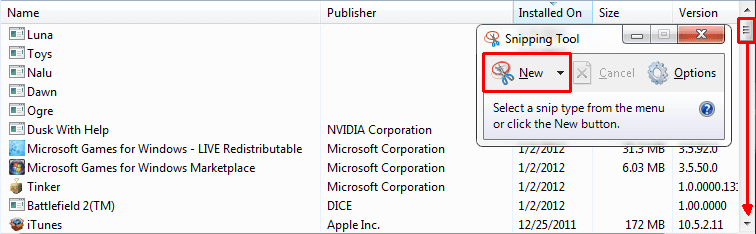
If you are still having problems, remember how to do a windows update? Do one of those, then use your microsoft security essentials antivirus and do a full scan for anything bad. Then upload the control panel snip. Follow these pictures to find how to do it:

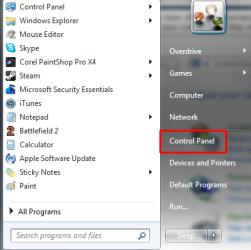
Find and click on Control Panel
Find and click control panelpng.png

Click "Uninstall Programs" under "Programs" :info: Don't worry it will not uninstall anything automatically
click uninstall programspng.png

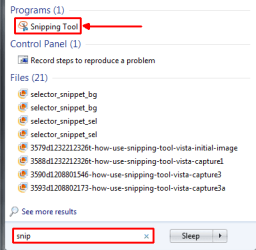
Now find the Snipping Tool
Find snippng.png

Snip it, save it, and then scroll down in Control Panel and take another snip of the rest of the programs, save that snip, and upload them here
snip it, save, and scroll down for morepng.png
 

My Computer

Computer type
PC/Desktop
Computer Manufacturer/Model Number
Custom Asus Build
OS
Microsoft Windows 8.1 Pro 64-bit
CPU
Intel(R) Core(TM) i3-4130 CPU @ 3.40GHz
Motherboard
B85M-E
Memory
8.00 GB
Graphics Card(s)
None
Sound Card
Realtek High Definition Audio
Monitor(s) Displays
Asus 23.6" Monitor
Screen Resolution
1920 x 1080 x 32 bits (4294967296 colors) @ 60 Hz
Hard Drives
INTEL SSDSC2BW180A4
Samsung SSD 840 PRO Series
PSU
Seasonic S12II-380Bronze
Case
Lian Li
Cooling
Fan, Passive
Keyboard
Logitech K120
Mouse
Microsoft Touch Mouse
Internet Speed
4ms Ping, 19.0 Mbps Download, 19.0 Mbps Upload
Antivirus
Eset Endpoint
Browser
Internet Explorer, Chrome
CP1.PNG

CP2.PNG

CP3.PNG
 

My Computer

Computer Manufacturer/Model Number
Vostro 220 Mini Tower Desktop Details | Dell
OS
Windows 7 Home Premium SP 1, 32-bit
CPU
Intel(R) Core(TM)2 Duo CPU E7400 @ 2.80GHz
Motherboard
Dell Inc. 0P301D
Memory
3.00 GB
Graphics Card(s)
(1) Intel(R) G45/G43 Express Chipset (2) Intel(R) G45/G43
Sound Card
(1) High Definition Audio Device (2) High Definition Audio
Monitor(s) Displays
Dell 22" wide E228WFP Analog flat panelq
Mouse
Dell optical usb mouse vostro
Other Info
OPTICAL READER, MOUSE,SPEAKERS, MONITOR, MODEM
Back
Top