Apologies for double posting but maybe I wasn't understood before
about the services checking thing- then again maybe it's exactly the
same thing and I don't know it.
If it isn't the same thing (and from the screenshots before I didn't recognise those windows as that is
not the way I entered into local services) then please try this because God forbid
we should miss anything at this stage of the game:
Click the Windows orb (start button)
Type in Admin
Select Administrative Tools
Select component services
Select Services (Local)
Find the Power service in this list
Check the setting - it should be set to autostart
Is it the same thing - i profess not to know - however it looks nothing like
the screenshots posted before of the services you were checking.
Give it a go- it can't hurt right!
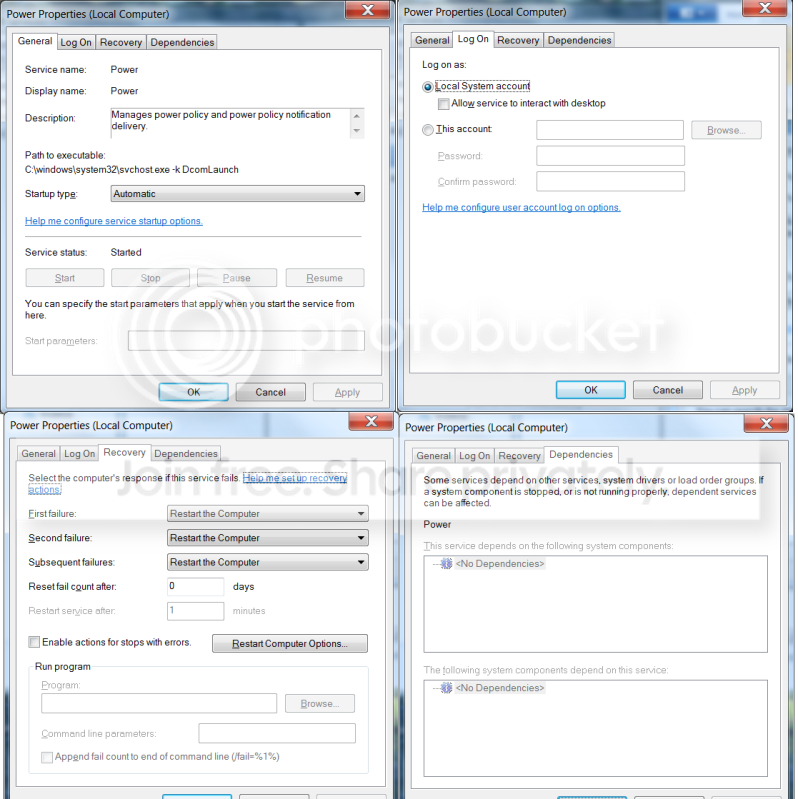
What I am saying is that if the OP entered services (local) where I did as recommended through this
No sound in Windows 7 Pro 64 bit - Audio Service not started - Audio - Microsoft Answers
informational page then the screenshot should have looked something like this:
View attachment 186391



 offers any drivers for it.
 ) but yes its set properly did you have to start it or did it just look like that when you got to it?