OSX and Windows 7 Dual Boot

1. In disk management, assign a drive letter for your 200MB hidden partition.
Could you please tell me how to do that!

Right click on the System Reserved (200 MB or 100 MB) , select "change drive letters and paths" and the next window click "add", you would be able to add a drive letter.

But about the rest of the os x installation on a pc, all of my stories are of damn failures. According to insanelymac, my hardware is ok , but either they are cheating, making it believe an impossible .... or my bad luck :mad: :( :confused:
 

My Computer My Computer

At a glance

Microsoft Windows 10 Pro Insider Preview 64-bitIntel(R) Core(TM) i3-4130 CPU @ 3.40GHzCorsair Vengence 4GB x2 (8.00GB Dual-Channel ...2047MB GeForce GTS 450 (ZOTAC International)
Computer type
PC/Desktop
Computer Manufacturer/Model Number
Self Assembled
OS
Microsoft Windows 10 Pro Insider Preview 64-bit
CPU
Intel(R) Core(TM) i3-4130 CPU @ 3.40GHz
Motherboard
Gigabyte Technology Co., Ltd. B85M-D3H
Memory
Corsair Vengence 4GB x2 (8.00GB Dual-Channel DDR3 @ 798MHz)
Graphics Card(s)
2047MB GeForce GTS 450 (ZOTAC International)
Sound Card
Onboard (Realtek High Definition Audio)
Monitor(s) Displays
LG Flatron E2040T
Screen Resolution
1600x900
Hard Drives
Western Digital 1 TB
Seagate 500 GB
PSU
Corsair VS550
Case
Cooler Master K380
Cooling
Cooler Master Seidon 120V Plus
Keyboard
Logitech MK260r
Mouse
Logitech MK260r
Internet Speed
PMPL Broadband
Antivirus
Windows Defender + MBAM
Browser
Firefox
Other Info
Dell Studio 15" Laptop
How?

Hello pmcgarr

I have dual boot W7 and OSX 10.5.6.

All you need to do is first , install W7. Then, create a new partition for your osx within W7 , format it as fat32 or ntfs and set to to be "active".

Then run the osx installation and before you start the install, go to Utilities and "disk utility" , select the partition you created from W7 and format it as Journaled (don't delete it!).

Then, install as you would normally, selecting this partition as your installation target. (don't forget to customize your OSX installation with the necessary drivers for you system.)

After installation is complete, you will need to repair your W7 boot loader, cause you probably won't be able to boot W7.
Insert the W7 installation DVD, at the first installation screen select your language etc, and at the second screen select "repair computer".
This will bring the W7 boot loader back, so you can boot W7.

Now you won't be able to load osx!
So boot in Windows 7, and unhide your hidden 200MB partition:

1. In disk management, assign a drive letter for your 200MB hidden partition.

2.Download EasyBCD and add a new boot entry, select MacOS, Generic X86, Add, Save. That's it.

You can now have dual boot with W7 and OSX

Can you tell exactly where you got your Mac OS X??

I currently have Windows 7 Ult. as my main boot drive and I only have one harddrive. 500gb 5400rpm. I have an amd x64 bit dual core processor and 4gb ramI have dualbooted before just not with OS X. I have already made an extra 101gb ntfs partition for MAC OS X PLEASE HELP!!!!(I know that a lot of people say you cant do it with and amd processor. I have had several people do it before I would just like to know EXACTLY how you did it. where you got everything to dit, etc.) Thanks in advance!:D
 

My Computer My Computer

At a glance

Windows 7 Ultimate x64 bitAMD Turion X2 ULTRA Dual Core Mobile ZM-824gb DDR2ATI Display Adapter (0x9612) 2gb RAM
Computer Manufacturer/Model Number
HP Pavillion Dv7 1451nr Entertainment Laptop
OS
Windows 7 Ultimate x64 bit
CPU
AMD Turion X2 ULTRA Dual Core Mobile ZM-82
Memory
4gb DDR2
Graphics Card(s)
ATI Display Adapter (0x9612) 2gb RAM
Sound Card
HD Audio
Monitor(s) Displays
17.3" HP Brightview 1440x900 Res
Hard Drives
WDC WD5000BEVT-22A0RT0 ATA DEVICE (500 GB) (5400 RPM)
Hello Guru Limneos,

Your post for dual booting osx86 and win 7 is the best out of all the tutorials i have seen. Please many thanx to Limeos I have been able to fix the dual booting. I have been struggling with it for weeks now, but I think I'm really happy hackintosh user.
ALL the best and thanks again

Joepolask
GH.
 

My Computer My Computer

At a glance

Windos 7
OS
Windos 7
Hello pmcgarr

I have dual boot W7 and OSX 10.5.6.

All you need to do is first , install W7. Then, create a new partition for your osx within W7 , format it as fat32 or ntfs and set to to be "active".

Then run the osx installation and before you start the install, go to Utilities and "disk utility" , select the partition you created from W7 and format it as Journaled (don't delete it!).

Then, install as you would normally, selecting this partition as your installation target. (don't forget to customize your OSX installation with the necessary drivers for you system.)

After installation is complete, you will need to repair your W7 boot loader, cause you probably won't be able to boot W7.
Insert the W7 installation DVD, at the first installation screen select your language etc, and at the second screen select "repair computer".
This will bring the W7 boot loader back, so you can boot W7.

Now you won't be able to load osx!
So boot in Windows 7, and unhide your hidden 200MB partition:

1. In disk management, assign a drive letter for your 200MB hidden partition.

2.Download EasyBCD and add a new boot entry, select MacOS, Generic X86, Add, Save. That's it.

You can now have dual boot with W7 and OSX


Thanks sir for the step by step guide but how can i do the RED part?
 

My Computer My Computer

At a glance

Windows 7 UltimateAMD Athlon 7750 Dual Core4GB KingstonNVIDEA GF 9400GT 1GB
OS
Windows 7 Ultimate
CPU
AMD Athlon 7750 Dual Core
Motherboard
AUS M2N68-AM SE2
Memory
4GB Kingston
Graphics Card(s)
NVIDEA GF 9400GT 1GB
Monitor(s) Displays
AOC 22" WideScreen
Hard Drives
(1) 160GB Seagate SATA
were do people find these copies of OSX

i really want one!
 

My Computer My Computer

At a glance

Windows 7 Professional 64bitIntel Core i5 - 2500K @ 3.30GHz4GB DDR3EVGA Nvidia GeForce GT 740 2GB DDR3
Computer type
PC/Desktop
Computer Manufacturer/Model Number
Custom Build
OS
Windows 7 Professional 64bit
CPU
Intel Core i5 - 2500K @ 3.30GHz
Motherboard
Gigabyte Z77-HD3
Memory
4GB DDR3
Graphics Card(s)
EVGA Nvidia GeForce GT 740 2GB DDR3
Screen Resolution
1680 x 1050
Hard Drives
1T Samaung HD/ 1T toshiba external drive/ 1T western digital external drive/ 2T seagate external drive/ 250gb samaung SSD
PSU
Antec 430W
Keyboard
Microsoft Wireless Keyboard 800
Mouse
Microsoft Wireless Mouse 1000
Antivirus
AVG
Browser
Internet Explorer
were do people find these copies of OSX

i really want one!

You can buy a copy of OSx from any Apple store. Be aware the EULA requires you to install it only on Apple hardware (but that doesn't seem to bother most hackintoshers).
 

My Computer My Computer

At a glance

Windows 7 Ultimate 32 & 64 -(Boot Camped Snow...AMD Athlon A64 X2 6000+ 3.1GHz4GB Corsair XMS RAMGigabyte ATI Radeon HD4550/512MB/DDR3 passive...
Computer Manufacturer/Model Number
Self built
OS
Windows 7 Ultimate 32 & 64 -(Boot Camped Snow Leopard on a Mac Mini)
CPU
AMD Athlon A64 X2 6000+ 3.1GHz
Motherboard
DFI LanParty Jr 790GX M2RS
Memory
4GB Corsair XMS RAM
Graphics Card(s)
Gigabyte ATI Radeon HD4550/512MB/DDR3 passive cooled
Sound Card
latest RealTek HD/HDMI drivers
Monitor(s) Displays
Samsung LN40A550 (primary); Zalman 7" LCD (secondary)
Screen Resolution
1920x1080 ; 800x600
Hard Drives
WD Raptor for OS
Seagate 7211 640GB
Two Samsung EcoGreens for TV in RAID 0 = 3TB
Two WD MyBook 1TB externals for B/U and Movies
Optical Drive:
LG GGC-H20L Super Multi Blue BluRay/HD-DVD internal
PSU
Corsair HX520W
Case
Zalman HD160XT
Cooling
Zalman CNPS9500Cu on processor - Four Nexus case fans
Keyboard
Gyration wireless Media Center Keyboard
Mouse
Gyration Cordless Optical Air Mouse
Internet Speed
6344 kbps Down/1043 kbps Up (Comcast cable)
Other Info
HDMI audio/video out to Yamaha RX-V1065 receiver.
All controlled by a Harmony One universal remote.

Four other home built computers plus a Mac Mini, but this is my main Win7 testbed.
hi again everyone i'v got a PANIC after installing the OSX 10.5.6 iPC Final
warning: invalid kernel ip, won't attempt to handle trap
Please contact the Voodoo Kernel dev-team with a photo of the information printed below, along with a description of your
system configuration and what you were doing at the time that the kernel panic occurred. We apologize for the inconvenience.
panic(cpu 0 caller 0x001A8FFD): Kernel trap at 0x0019a8c2, type 14=page fault, registers:
CR0: 0x8001003b, CR2: 0x0000001c, CR3: 0x00f4f000, CR4: 0x000006e0
EAX: 0x286ab2e5, EBX: 0x0000001c, ECX: 0x03b27d60, EDX: 0x0000001c
CR2: 0x000001c, EBP: 0x2e2afe18, ESI: 0x0000001c, EDI: 0x340fe000
EFL: 0x00010002, EIP: 0x0019a8c2, CS: 0x00000008, DS: 0x0000000c
Error code: 0x00000000
Debugger called: <panic>
Backtrace (CPU 0), Frame : Return Address (4 potential args on stack)
0x2e2afc68 : 0x12b0bvbo mapping exists for frame pointer
blahblahblahblah
blahblahblahblah
blahblahblahblah
blahblahblahblah
Backtrace terminated-invalid frame pointer 0xbffff628
BSD process name corresponding to current thread: Launchd
Mac OS version:
9E25
Kernel version:
Darwin Kernel Version 9.5.0@ Sat Dec 6 19:39:54 IST 2008; Voodoo; Release 1.0 :xnu-1228.7.58/BUILD/obj/RELEASE_I386
Any help? thanks again :D
 

My Computer My Computer

At a glance

Windows 7 UltimateAMD Athlon 7750 Dual Core4GB KingstonNVIDEA GF 9400GT 1GB
OS
Windows 7 Ultimate
CPU
AMD Athlon 7750 Dual Core
Motherboard
AUS M2N68-AM SE2
Memory
4GB Kingston
Graphics Card(s)
NVIDEA GF 9400GT 1GB
Monitor(s) Displays
AOC 22" WideScreen
Hard Drives
(1) 160GB Seagate SATA
hi again everyone i'v got a PANIC after installing the OSX 10.5.6 iPC Final
warning: invalid kernel ip, won't attempt to handle trap
Please contact the Voodoo Kernel dev-team with a photo of the information printed below, along with a description of your
system configuration and what you were doing at the time that the kernel panic occurred. We apologize for the inconvenience.
panic(cpu 0 caller 0x001A8FFD): Kernel trap at 0x0019a8c2, type 14=page fault, registers:
CR0: 0x8001003b, CR2: 0x0000001c, CR3: 0x00f4f000, CR4: 0x000006e0
EAX: 0x286ab2e5, EBX: 0x0000001c, ECX: 0x03b27d60, EDX: 0x0000001c
CR2: 0x000001c, EBP: 0x2e2afe18, ESI: 0x0000001c, EDI: 0x340fe000
EFL: 0x00010002, EIP: 0x0019a8c2, CS: 0x00000008, DS: 0x0000000c
Error code: 0x00000000
Debugger called: <panic>
Backtrace (CPU 0), Frame : Return Address (4 potential args on stack)
0x2e2afc68 : 0x12b0bvbo mapping exists for frame pointer
blahblahblahblah
blahblahblahblah
blahblahblahblah
blahblahblahblah
Backtrace terminated-invalid frame pointer 0xbffff628
BSD process name corresponding to current thread: Launchd
Mac OS version:
9E25
Kernel version:
Darwin Kernel Version 9.5.0@ Sat Dec 6 19:39:54 IST 2008; Voodoo; Release 1.0 :xnu-1228.7.58/BUILD/obj/RELEASE_I386
Any help? thanks again :D

That,s (not exactly, but almost) what I got with iATKOS v5
 

My Computer My Computer

At a glance

Microsoft Windows 10 Pro Insider Preview 64-bitIntel(R) Core(TM) i3-4130 CPU @ 3.40GHzCorsair Vengence 4GB x2 (8.00GB Dual-Channel ...2047MB GeForce GTS 450 (ZOTAC International)
Computer type
PC/Desktop
Computer Manufacturer/Model Number
Self Assembled
OS
Microsoft Windows 10 Pro Insider Preview 64-bit
CPU
Intel(R) Core(TM) i3-4130 CPU @ 3.40GHz
Motherboard
Gigabyte Technology Co., Ltd. B85M-D3H
Memory
Corsair Vengence 4GB x2 (8.00GB Dual-Channel DDR3 @ 798MHz)
Graphics Card(s)
2047MB GeForce GTS 450 (ZOTAC International)
Sound Card
Onboard (Realtek High Definition Audio)
Monitor(s) Displays
LG Flatron E2040T
Screen Resolution
1600x900
Hard Drives
Western Digital 1 TB
Seagate 500 GB
PSU
Corsair VS550
Case
Cooler Master K380
Cooling
Cooler Master Seidon 120V Plus
Keyboard
Logitech MK260r
Mouse
Logitech MK260r
Internet Speed
PMPL Broadband
Antivirus
Windows Defender + MBAM
Browser
Firefox
Other Info
Dell Studio 15" Laptop
Hello pmcgarr

I have dual boot W7 and OSX 10.5.6.

All you need to do is first , install W7. Then, create a new partition for your osx within W7 , format it as fat32 or ntfs and set to to be "active".

Then run the osx installation and before you start the install, go to Utilities and "disk utility" , select the partition you created from W7 and format it as Journaled (don't delete it!).

Then, install as you would normally, selecting this partition as your installation target. (don't forget to customize your OSX installation with the necessary drivers for you system.)

After installation is complete, you will need to repair your W7 boot loader, cause you probably won't be able to boot W7.
Insert the W7 installation DVD, at the first installation screen select your language etc, and at the second screen select "repair computer".
This will bring the W7 boot loader back, so you can boot W7.

Now you won't be able to load osx!
So boot in Windows 7, and unhide your hidden 200MB partition:

1. In disk management, assign a drive letter for your 200MB hidden partition.

2.Download EasyBCD and add a new boot entry, select MacOS, Generic X86, Add, Save. That's it.

You can now have dual boot with W7 and OSX
Me again, how do i unhide the hidden partition? anyone? thanks..
 

My Computer My Computer

At a glance

Windows 7 UltimateAMD Athlon 7750 Dual Core4GB KingstonNVIDEA GF 9400GT 1GB
OS
Windows 7 Ultimate
CPU
AMD Athlon 7750 Dual Core
Motherboard
AUS M2N68-AM SE2
Memory
4GB Kingston
Graphics Card(s)
NVIDEA GF 9400GT 1GB
Monitor(s) Displays
AOC 22" WideScreen
Hard Drives
(1) 160GB Seagate SATA
Me again, how do i unhide the hidden partition? anyone? thanks..

As no drive letter is assigned to the system reserved partition, it doesnot show in explorer. So you are to assign a drive letter to it.

Right click on my computer icon on desktop and select "manage". The computer management window will open up. Now click on the "disk management " on the left side pane. Your hard disks and partitions thereof will be displayed.

Now right click on the "system reserved" partition, and click on"change drive letter and paths" . A dialog box named "change drive letter and paths for system reserved" will appear then.Click on the "add" button thereof. in the upcoming " add drive letter or path" dialog box, you will see "assign the following drive letter" is automatically checked, and the drive letter next to your last one is automatically there. Just click on ok.

But friend, if you really want to do it, do at your own risk, and make a backup of your system before doing it.
 

My Computer My Computer

At a glance

Microsoft Windows 10 Pro Insider Preview 64-bitIntel(R) Core(TM) i3-4130 CPU @ 3.40GHzCorsair Vengence 4GB x2 (8.00GB Dual-Channel ...2047MB GeForce GTS 450 (ZOTAC International)
Computer type
PC/Desktop
Computer Manufacturer/Model Number
Self Assembled
OS
Microsoft Windows 10 Pro Insider Preview 64-bit
CPU
Intel(R) Core(TM) i3-4130 CPU @ 3.40GHz
Motherboard
Gigabyte Technology Co., Ltd. B85M-D3H
Memory
Corsair Vengence 4GB x2 (8.00GB Dual-Channel DDR3 @ 798MHz)
Graphics Card(s)
2047MB GeForce GTS 450 (ZOTAC International)
Sound Card
Onboard (Realtek High Definition Audio)
Monitor(s) Displays
LG Flatron E2040T
Screen Resolution
1600x900
Hard Drives
Western Digital 1 TB
Seagate 500 GB
PSU
Corsair VS550
Case
Cooler Master K380
Cooling
Cooler Master Seidon 120V Plus
Keyboard
Logitech MK260r
Mouse
Logitech MK260r
Internet Speed
PMPL Broadband
Antivirus
Windows Defender + MBAM
Browser
Firefox
Other Info
Dell Studio 15" Laptop
whooaaa.. i got it thanks thanks thanks :D
 

My Computer My Computer

At a glance

Windows 7 UltimateAMD Athlon 7750 Dual Core4GB KingstonNVIDEA GF 9400GT 1GB
OS
Windows 7 Ultimate
CPU
AMD Athlon 7750 Dual Core
Motherboard
AUS M2N68-AM SE2
Memory
4GB Kingston
Graphics Card(s)
NVIDEA GF 9400GT 1GB
Monitor(s) Displays
AOC 22" WideScreen
Hard Drives
(1) 160GB Seagate SATA
i canty wait to try this myself!
 

My Computer My Computer

At a glance

Windows 7 ultimate or xp Professional
OS
Windows 7 ultimate or xp Professional
Hello pmcgarr

I have dual boot W7 and OSX 10.5.6.

All you need to do is first , install W7. Then, create a new partition for your osx within W7 , format it as fat32 or ntfs and set to to be "active".

Then run the osx installation and before you start the install, go to Utilities and "disk utility" , select the partition you created from W7 and format it as Journaled (don't delete it!).

Then, install as you would normally, selecting this partition as your installation target. (don't forget to customize your OSX installation with the necessary drivers for you system.)

After installation is complete, you will need to repair your W7 boot loader, cause you probably won't be able to boot W7.
Insert the W7 installation DVD, at the first installation screen select your language etc, and at the second screen select "repair computer".
This will bring the W7 boot loader back, so you can boot W7.

Now you won't be able to load osx!
So boot in Windows 7, and unhide your hidden 200MB partition:

1. In disk management, assign a drive letter for your 200MB hidden partition.

2.Download EasyBCD and add a new boot entry, select MacOS, Generic X86, Add, Save. That's it.

You can now have dual boot with W7 and OSX

Thanks
 

My Computer My Computer

At a glance

Windows XP , Windows 7Intel Core i7 920G.Skill Tripple Channel 2GB x 6ASUS NVIDIA GTS250
OS
Windows XP , Windows 7
CPU
Intel Core i7 920
Motherboard
Gigabyte EX58-UD5
Memory
G.Skill Tripple Channel 2GB x 6
Graphics Card(s)
ASUS NVIDIA GTS250
Sound Card
Realtek (on board chipset)
Monitor(s) Displays
SAMSUNG LA26B450C4D
Hard Drives
Seagate 1TB
Case
NZXT
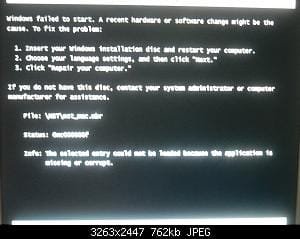
I have an HP Pavillion a1530n desktop and I have successfully installed OS X, but when I restart and the windows boot loader comes up, I select os x and this comes up21471d1249481105t-osx-windows-7-dual-boot-dscn4059.jpg

Any help?
 

My Computer My Computer

At a glance

Windows 7
OS
Windows 7
I have an HP Pavillion a1530n desktop and I have successfully installed OS X, but when I restart and the windows boot loader comes up, I select os x and this comes upView attachment 80612

Any help?
Each and every time I have tried it .... I got something like it :mad:
 

My Computer My Computer

At a glance

Microsoft Windows 10 Pro Insider Preview 64-bitIntel(R) Core(TM) i3-4130 CPU @ 3.40GHzCorsair Vengence 4GB x2 (8.00GB Dual-Channel ...2047MB GeForce GTS 450 (ZOTAC International)
Computer type
PC/Desktop
Computer Manufacturer/Model Number
Self Assembled
OS
Microsoft Windows 10 Pro Insider Preview 64-bit
CPU
Intel(R) Core(TM) i3-4130 CPU @ 3.40GHz
Motherboard
Gigabyte Technology Co., Ltd. B85M-D3H
Memory
Corsair Vengence 4GB x2 (8.00GB Dual-Channel DDR3 @ 798MHz)
Graphics Card(s)
2047MB GeForce GTS 450 (ZOTAC International)
Sound Card
Onboard (Realtek High Definition Audio)
Monitor(s) Displays
LG Flatron E2040T
Screen Resolution
1600x900
Hard Drives
Western Digital 1 TB
Seagate 500 GB
PSU
Corsair VS550
Case
Cooler Master K380
Cooling
Cooler Master Seidon 120V Plus
Keyboard
Logitech MK260r
Mouse
Logitech MK260r
Internet Speed
PMPL Broadband
Antivirus
Windows Defender + MBAM
Browser
Firefox
Other Info
Dell Studio 15" Laptop
Dual Boot

Hi, first off...im a noob.. i want to dul boot Windows 7 (Which im currently using), and Mac OS X. My processor is an AMD Athlon and im just concerned that the aformentioned steps wont work. alot of sources say that you cant dual boot mac on an AMD. i was just wondering if it was true and if there is anything i could do to make it happen... thanks
 

My Computer My Computer

At a glance

Windows 7
Computer Manufacturer/Model Number
Toshiba
OS
Windows 7
Haha Dual booting OSX and Windows is illegal on a PC but anyways i did it too.I think some of the FAQ is that, after i finished installing mac os x and setting up all the things, i get an "couldn't uncompress plist at archive kext 0" something like that,I hoep someone here with experience could help me.
 

My Computer My Computer

At a glance

Windows 7/Windows XP/Mac OS X/Debian GNU/
OS
Windows 7/Windows XP/Mac OS X/Debian GNU/
Hello pmcgarr

I have dual boot W7 and OSX 10.5.6.

All you need to do is first , install W7. Then, create a new partition for your osx within W7 , format it as fat32 or ntfs and set to to be "active".

Then run the osx installation and before you start the install, go to Utilities and "disk utility" , select the partition you created from W7 and format it as Journaled (don't delete it!).

Then, install as you would normally, selecting this partition as your installation target. (don't forget to customize your OSX installation with the necessary drivers for you system.)

After installation is complete, you will need to repair your W7 boot loader, cause you probably won't be able to boot W7.
Insert the W7 installation DVD, at the first installation screen select your language etc, and at the second screen select "repair computer".
This will bring the W7 boot loader back, so you can boot W7.

Now you won't be able to load osx!
So boot in Windows 7, and unhide your hidden 200MB partition:

1. In disk management, assign a drive letter for your 200MB hidden partition.

2.Download EasyBCD and add a new boot entry, select MacOS, Generic X86, Add, Save. That's it.

You can now have dual boot with W7 and OSX

This would work with Snow Leopard also, correct? Also, before I open and make it impossible to return my disc, is the $29 upgrade disc sufficient to install OS X in this manner.
 

My Computer My Computer

At a glance

Windows 7 Ultimate 64-bitIntel Core 2 Duo T93003GBNVIDIA Quadro FX 570M
Computer Manufacturer/Model Number
LENOVO/6457B64
OS
Windows 7 Ultimate 64-bit
CPU
Intel Core 2 Duo T9300
Memory
3GB
Graphics Card(s)
NVIDIA Quadro FX 570M
It's interesting that this board normally stops any discussion of matters illegal, but this conversation has gone on for 11 pages, when it blatantly encourages an illegal activity (installing Mac OSX on a PC).
 

My Computer My Computer

At a glance

Windows 7 Ultimate RTM (Technet)3.00 gigahertz Intel Core2 Duo E84004GBATI Radeon X1950 Pro
Computer Manufacturer/Model Number
Custom
OS
Windows 7 Ultimate RTM (Technet)
CPU
3.00 gigahertz Intel Core2 Duo E8400
Motherboard
ASUSTeK Computer INC. P5K/EPU Rev 1.xx
Memory
4GB
Graphics Card(s)
ATI Radeon X1950 Pro
Sound Card
Built in HD Audio
Monitor(s) Displays
22" Gateway LCD
Screen Resolution
1920 x 1200
Hard Drives
ST3160023A [Hard drive] (160.04 GB) -- drive 0, rev 8.01, ST3500630AS [Hard drive] (500.11 GB) -- drive 2, rev 3.AAK
ST3500630AS [Hard drive] (500.11 GB) -- drive 1, rev 3.AAK
Keyboard
Logitech G11
Mouse
Microsoft Wireless Laser Mouse 5000
Internet Speed
13.44 Mbps
It's interesting that this board normally stops any discussion of matters illegal, but this conversation has gone on for 11 pages, when it blatantly encourages an illegal activity (installing Mac OSX on a PC).

so do you know how to do it or not??
 

My Computer My Computer

At a glance

Windows 7
Computer Manufacturer/Model Number
Toshiba
OS
Windows 7
Back
Top