Overclocking help; your suggestions, please.

Yeah, the paste will fill that easily. You won't be needing to add any extra for those scuff marks... but... :) be more gentle.
 

My Computer My Computer

OS
7 Ultimate x64
CPU
i5-2500k
Motherboard
Asus P8P67 Pro
Memory
8GB G.Skill Ripjaws X F3-12800CL7D-8GBXH 1866MHz 8-9-8-24
Graphics Card(s)
EVGA GTX 570 SC
Sound Card
X-Fi Titanium Fatality
Monitor(s) Displays
Samsung S27A550H 27" LED
Screen Resolution
1920x1080
Hard Drives
OCZ Vertex 3 120GB.
1TB Samsung F3.
2TB Samsung F4.
PSU
PC Power & Cooling Silencer 760
Case
Lian Li Lancool K62
Cooling
Thermalright Venomous X Black/Scythe S-Flex/Shin-Etsu X23
Keyboard
MS Natural Elite 4000 Ergonomic
Mouse
Logitech G500
Internet Speed
6MB/768
Other Info
Logitech Z-5500 505 watts.
D-Link DGL-4500.
Tripp-Lite Smart Pro 1500.
Yeah, the paste will fill that easily. You won't be needing to add any extra for those scuff marks... but... :) be more gentle.

OK. Paste on!;)
 

My Computer My Computer

Computer type
PC/Desktop
Computer Manufacturer/Model Number
Custom built 2011
OS
Windows 7 64-bit
CPU
Intel Core i5-2500K 3300 Mhz
Motherboard
Gigabyte P67A-UD3-B3
Memory
16Gb Patriot PC3-12800 1600 Mhz
Graphics Card(s)
EVGA GeForce GTX 560 Ti (Fermi)
Sound Card
On Motherboard
Monitor(s) Displays
Dell U2412M & NEC EA232WMi
Screen Resolution
DELL 1920x1200 - NEC 1920x1080
Hard Drives
Crucial 128 Gb SSD
Hitachi Deskstar 2Tb 7200 RPM 32MB Cache
Seagate Barracuda 500Gb 7200 RPM
Hitachi GST Deskstar 1.5TB 7200 RPM 64MB Cache
PSU
Seasonic M1211-620 Bronze
Case
Antec Solo
Cooling
Tuniq Tower 120 Extreme Rev 1
Keyboard
Apple
Mouse
Microsoft
Internet Speed
5mbs
Other Info
Sunbeam PL-RS-3 Rheosmart 3 Fan Controller 3.5" Bay 3 Channel 30W Fan Controller Panel
I used the HS paste this time instead of Arctic Cool. I put a small amount of paste on the HS (about 1/2 of that used last time) & used the scoff marks on the HS as a guide where to wipe the paste with a latex glove. I got it as smooth & thin as I could.

For whatever reason the HS installed easier this time. There is one pin I could of swore was pressed in 100%. But a comparison to the other 3 pins indicated it needed to go down more. It did put up a fight but in the end it "clicked" into place. This may have the case before. I did check with the wiggle test & it seemed OK.

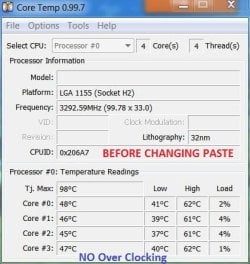
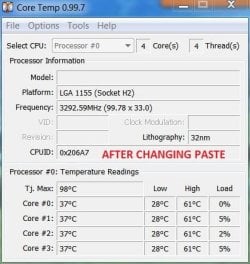
As of now its been booted for 20 minutes. The idle temps are 35-38C; or about the same as before. While rendering the same video test as before it peaked @ 61C. This is an improvement but I'm not OCed at the moment. I'm sure it will rise close to 70C if I OC. I've included 2 pics; one before & one today. Don't let the 28C fool anyone as that's right after booting. They are nearly identical. :eek:
 

Attachments

  • Temps after RT at 3.3.JPG
    Temps after RT at 3.3.JPG
    41.5 KB · Views: 1
  • After paste change.JPG
    After paste change.JPG
    41 KB · Views: 1

My Computer My Computer

Computer type
PC/Desktop
Computer Manufacturer/Model Number
Custom built 2011
OS
Windows 7 64-bit
CPU
Intel Core i5-2500K 3300 Mhz
Motherboard
Gigabyte P67A-UD3-B3
Memory
16Gb Patriot PC3-12800 1600 Mhz
Graphics Card(s)
EVGA GeForce GTX 560 Ti (Fermi)
Sound Card
On Motherboard
Monitor(s) Displays
Dell U2412M & NEC EA232WMi
Screen Resolution
DELL 1920x1200 - NEC 1920x1080
Hard Drives
Crucial 128 Gb SSD
Hitachi Deskstar 2Tb 7200 RPM 32MB Cache
Seagate Barracuda 500Gb 7200 RPM
Hitachi GST Deskstar 1.5TB 7200 RPM 64MB Cache
PSU
Seasonic M1211-620 Bronze
Case
Antec Solo
Cooling
Tuniq Tower 120 Extreme Rev 1
Keyboard
Apple
Mouse
Microsoft
Internet Speed
5mbs
Other Info
Sunbeam PL-RS-3 Rheosmart 3 Fan Controller 3.5" Bay 3 Channel 30W Fan Controller Panel
Nearly identical? :shock:

Look again. The after picture shows lows of 28C; before lows are 37-40C. A 10C drop is significant... seriously, you did good.

That load temps are still in the 60's is a function of the heatsink. I would not be surprised if you could now overclock a bit and remain in the 60's. Of course, a more efficient heatsink is always better, but it looks to me like you're headed in the right direction.
 

My Computer My Computer

OS
7 Ultimate x64
CPU
i5-2500k
Motherboard
Asus P8P67 Pro
Memory
8GB G.Skill Ripjaws X F3-12800CL7D-8GBXH 1866MHz 8-9-8-24
Graphics Card(s)
EVGA GTX 570 SC
Sound Card
X-Fi Titanium Fatality
Monitor(s) Displays
Samsung S27A550H 27" LED
Screen Resolution
1920x1080
Hard Drives
OCZ Vertex 3 120GB.
1TB Samsung F3.
2TB Samsung F4.
PSU
PC Power & Cooling Silencer 760
Case
Lian Li Lancool K62
Cooling
Thermalright Venomous X Black/Scythe S-Flex/Shin-Etsu X23
Keyboard
MS Natural Elite 4000 Ergonomic
Mouse
Logitech G500
Internet Speed
6MB/768
Other Info
Logitech Z-5500 505 watts.
D-Link DGL-4500.
Tripp-Lite Smart Pro 1500.
Nearly identical? :shock:

Look again. The after picture shows lows of 28C; before lows are 37-40C. A 10C drop is significant... seriously, you did good.

That load temps are still in the 60's is a function of the heatsink. I would not be surprised if you could now overclock a bit and remain in the 60's. Of course, a more efficient heatsink is always better, but it looks to me like you're headed in the right direction.

28C is from a cold start that gradually increases to 35-38C (as it is now) while idle 20-30 minutes after booting & remains there. This is exactly as it was before. Nothing has changed.

As ignatzatsonic pointed out, I need to decide if I want a quiet PC or to OC which would require higher fan speeds to keep thing cool. I don't know if one can have their cake & eat it too. I guess I'm willing to have a little more noise to gain faster render times. http://www.sevenforums.com/member.php?u=21149
 

My Computer My Computer

Computer type
PC/Desktop
Computer Manufacturer/Model Number
Custom built 2011
OS
Windows 7 64-bit
CPU
Intel Core i5-2500K 3300 Mhz
Motherboard
Gigabyte P67A-UD3-B3
Memory
16Gb Patriot PC3-12800 1600 Mhz
Graphics Card(s)
EVGA GeForce GTX 560 Ti (Fermi)
Sound Card
On Motherboard
Monitor(s) Displays
Dell U2412M & NEC EA232WMi
Screen Resolution
DELL 1920x1200 - NEC 1920x1080
Hard Drives
Crucial 128 Gb SSD
Hitachi Deskstar 2Tb 7200 RPM 32MB Cache
Seagate Barracuda 500Gb 7200 RPM
Hitachi GST Deskstar 1.5TB 7200 RPM 64MB Cache
PSU
Seasonic M1211-620 Bronze
Case
Antec Solo
Cooling
Tuniq Tower 120 Extreme Rev 1
Keyboard
Apple
Mouse
Microsoft
Internet Speed
5mbs
Other Info
Sunbeam PL-RS-3 Rheosmart 3 Fan Controller 3.5" Bay 3 Channel 30W Fan Controller Panel
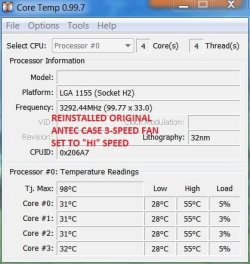
I have concerns about my new 120mm Cooler Master rear fan. It's a 4-pin that fits into PWR_FAN2 on the MB. My concern was that it's fan speed seemed too slow & maybe wasn't blowing out enough hot air (I thought these fan types would be regulated by the MB). But, perhaps there's a BIOS setting that turns this on & I have overlooked it.

At any rate, I've posted a new core temp with the old Antec case fan, a 3 speed set to HI that is plugged into a Molex connector, not the MB. It maxed out 6C less & the idle speed is 30-33C after warm-up. 28C is right after boot. Compare this pic to "After changing paste" that had the Cooler Mater fan.

If nothing else, this indicates more ventilation helps. :)
 

Attachments

  • After pc - old fan.JPG
    After pc - old fan.JPG
    41.8 KB · Views: 1
  • After paste change.JPG
    After paste change.JPG
    41 KB · Views: 2

My Computer My Computer

Computer type
PC/Desktop
Computer Manufacturer/Model Number
Custom built 2011
OS
Windows 7 64-bit
CPU
Intel Core i5-2500K 3300 Mhz
Motherboard
Gigabyte P67A-UD3-B3
Memory
16Gb Patriot PC3-12800 1600 Mhz
Graphics Card(s)
EVGA GeForce GTX 560 Ti (Fermi)
Sound Card
On Motherboard
Monitor(s) Displays
Dell U2412M & NEC EA232WMi
Screen Resolution
DELL 1920x1200 - NEC 1920x1080
Hard Drives
Crucial 128 Gb SSD
Hitachi Deskstar 2Tb 7200 RPM 32MB Cache
Seagate Barracuda 500Gb 7200 RPM
Hitachi GST Deskstar 1.5TB 7200 RPM 64MB Cache
PSU
Seasonic M1211-620 Bronze
Case
Antec Solo
Cooling
Tuniq Tower 120 Extreme Rev 1
Keyboard
Apple
Mouse
Microsoft
Internet Speed
5mbs
Other Info
Sunbeam PL-RS-3 Rheosmart 3 Fan Controller 3.5" Bay 3 Channel 30W Fan Controller Panel
One other thing to consider is the thermal paste curing.

Iirc it takes a fair few heat ups and cool downs to work at its best.

On my new build I noticed the temps drop by around 8 degrees after a week of use.
 

My Computer My Computer

OS
Windows 7 Professional 64 bit
This is exactly as it was before. Nothing has changed.

As ignatzatsonic pointed out, I need to decide if I want a quiet PC or to OC which would require higher fan speeds to keep thing cool. I don't know if one can have their cake & eat it too. I guess I'm willing to have a little more noise to gain faster render times.
Ahh, that's too bad. Thought we were onto something? :(

You don't need to choose between loud and cool or quiet and hot. Fan speed is important for quiet, true, but what's more important is how much air does that fan push. Different blades on the same rpm fan will push different amounts of air. What fan do you have now?

I'm not sure I'd be focused only on the fan. Here we have 2 guys with the same heatsink who report, at stock, the same high temps. There's only so much a fan can do to bring that down.

Just a side note to illustrate a really efficient heatsink: I recently worked with Indigo Xtreme. Part of the process is "reflow". You're supposed to detach the fan from the heatsink, boot up and stress all the cores. This happens ~ 80-90C. I could never get that stuff to work because I could never get my cpu that hot... even after 15 minutes of dual instances of Orthos with the fan across the room. :confused:

Your case is fairly small... so yes, improve everything including case flow, just don't stop before exploring a better heatsink.
 

My Computer My Computer

OS
7 Ultimate x64
CPU
i5-2500k
Motherboard
Asus P8P67 Pro
Memory
8GB G.Skill Ripjaws X F3-12800CL7D-8GBXH 1866MHz 8-9-8-24
Graphics Card(s)
EVGA GTX 570 SC
Sound Card
X-Fi Titanium Fatality
Monitor(s) Displays
Samsung S27A550H 27" LED
Screen Resolution
1920x1080
Hard Drives
OCZ Vertex 3 120GB.
1TB Samsung F3.
2TB Samsung F4.
PSU
PC Power & Cooling Silencer 760
Case
Lian Li Lancool K62
Cooling
Thermalright Venomous X Black/Scythe S-Flex/Shin-Etsu X23
Keyboard
MS Natural Elite 4000 Ergonomic
Mouse
Logitech G500
Internet Speed
6MB/768
Other Info
Logitech Z-5500 505 watts.
D-Link DGL-4500.
Tripp-Lite Smart Pro 1500.
One other thing to consider is the thermal paste curing.

Iirc it takes a fair few heat ups and cool downs to work at its best.

On my new build I noticed the temps drop by around 8 degrees after a week of use.

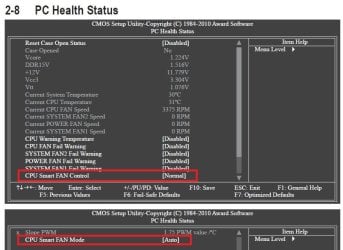
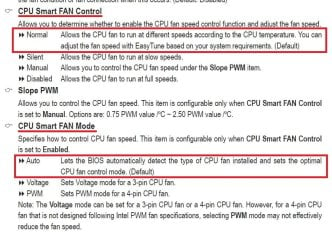
Thanks, Paul. Yes, the paste is new, but, the only difference in the pics (see my last post above) is the rear case fan has been changed back to the original Antec case fan (core temp pic on left in above post). The newer CM fan (core temp pic on right in above post) is plugged into PWR_FAN2 & it's speed is very slow & not increasing with higher case temps. I have BIOS set to Defaults (shown in pics). It would seem that rear case fan plugged into PWR_FAN2 would be controlled by the MB as temps increase. The original Antec case fan is plugged into a Molex connector & not regulated other than its 3 speed adjustment.
 

Attachments

  • Capture.JPG
    Capture.JPG
    72.7 KB · Views: 4
  • Capture 2.JPG
    Capture 2.JPG
    101.9 KB · Views: 3

My Computer My Computer

Computer type
PC/Desktop
Computer Manufacturer/Model Number
Custom built 2011
OS
Windows 7 64-bit
CPU
Intel Core i5-2500K 3300 Mhz
Motherboard
Gigabyte P67A-UD3-B3
Memory
16Gb Patriot PC3-12800 1600 Mhz
Graphics Card(s)
EVGA GeForce GTX 560 Ti (Fermi)
Sound Card
On Motherboard
Monitor(s) Displays
Dell U2412M & NEC EA232WMi
Screen Resolution
DELL 1920x1200 - NEC 1920x1080
Hard Drives
Crucial 128 Gb SSD
Hitachi Deskstar 2Tb 7200 RPM 32MB Cache
Seagate Barracuda 500Gb 7200 RPM
Hitachi GST Deskstar 1.5TB 7200 RPM 64MB Cache
PSU
Seasonic M1211-620 Bronze
Case
Antec Solo
Cooling
Tuniq Tower 120 Extreme Rev 1
Keyboard
Apple
Mouse
Microsoft
Internet Speed
5mbs
Other Info
Sunbeam PL-RS-3 Rheosmart 3 Fan Controller 3.5" Bay 3 Channel 30W Fan Controller Panel
Typically case fans don't spin too fast... they don't really need to. Their job isn't to reduce heat as much as it is to maintain a steady flow of air.... which accomplishes the same thing I know, but still, there's a subtle difference.

Cleaning up your wiring can often have the same effect as increasing case fan speed; after all, it's more difficult for air to move through a bee-hive than it is through empty space. How's your wiring?

How fast your fans spin really is up to the fan. Is yours a variable? If it's not, then it really doesn't matter where you plug them in, if they're not designed to spin at different rpms, then they're not going to.

I know we... err, I , am sitting here spending your money, but there's no substitute for good hardware. Mediocre works, but... well... I'm sure like me you want your stuff to be running as well as it can?

There are tons of guys who make fans; I'm tossing this link up only because it's what I use and have bookmarked, but check the rpms and db levels to see if maybe there's a better fan than the one you've got? Scythe Fan Spec Comparison Chart
 

My Computer My Computer

OS
7 Ultimate x64
CPU
i5-2500k
Motherboard
Asus P8P67 Pro
Memory
8GB G.Skill Ripjaws X F3-12800CL7D-8GBXH 1866MHz 8-9-8-24
Graphics Card(s)
EVGA GTX 570 SC
Sound Card
X-Fi Titanium Fatality
Monitor(s) Displays
Samsung S27A550H 27" LED
Screen Resolution
1920x1080
Hard Drives
OCZ Vertex 3 120GB.
1TB Samsung F3.
2TB Samsung F4.
PSU
PC Power & Cooling Silencer 760
Case
Lian Li Lancool K62
Cooling
Thermalright Venomous X Black/Scythe S-Flex/Shin-Etsu X23
Keyboard
MS Natural Elite 4000 Ergonomic
Mouse
Logitech G500
Internet Speed
6MB/768
Other Info
Logitech Z-5500 505 watts.
D-Link DGL-4500.
Tripp-Lite Smart Pro 1500.
I guess I'm willing to have a little more noise to gain faster render times. http://www.sevenforums.com/member.php?u=21149

You have already overclocked with this heatsink and I thought you thought your temps were acceptable. Your rendering speed was improved 11%. Temps were what?? around 60?

What specifically is wrong with that??

Is it that you want to improve rendering times by more than 11%??

Or is it that you think 60 degree temps are dangerous?

Or do you have the overclocking itch and want to find out how low you can drive temps using a Pratt and Whitney cooler while operating in a walk-in refrigerator? eg--hobbyist tinkering and experimentation. I originally thought you were not in this camp.

Or???

If it isn't hobbyist tinkering but a more practical concern, then more info needed as to the source of your dissatisfaction. What are you concerned about?

If you definitely want significantly faster rendering, then crank up your overclock to see where temps go with current setup. If temps get legitimately "too high", then buy another cooler---case closed. You've satisfied me that nothing is wrong with your paste or mounting technique, so this cooler isn't going to suddenly improve. The CPU will throttle itself before you do any damage, so experimentation costs you nothing but time.


Scythe and others have numerous mid-profile coolers that are well under 150mm tall. One Scythe you might look at is called the Rasetsu(??) I think. The heatsink section is horizontal rather than vertical, so it has less height. The fan lays down on the fins like on the Shuriken, but the sink section is larger with many more fins.

Here at Amazon:

http://www.amazon.com/SCYTHE-SCRT-1...f=sr_1_56?s=pc&ie=UTF8&qid=1305589355&sr=1-56

Reviewed at Frostytech:

http://www.frostytech.com/articleview.cfm?articleID=2554

It's got an 1800 rpm Scythe fan (Slipstream I think) and an included controller that lets you run at 800 or 1800. So you could switch to 1800 when rendering??

Frosty's conclusion:

As Frostytech alluded to in the beginning of this review, the Scythe Rasetsu heatsink is clearly able to operate within the relm of performance heatsinks. Yet while the Rasetsu is a very good heatsink in this respect (just 3°C off the top, coolest heatsink tested to date) it is louder than several other heatsinks which offer slightly improved thermal performance.

However, amongst 130mm tall or shorter heatsinks the Scythe Rasetsu is the best performing heatsink tested to date. The next three closest options if you wish to draw comparisons are; Zerotherm Core 92 at 18.4°C over ambient, Thermaltake Bigtyp 14pro at 18.8°C over ambient and Zerotherm BTF92 OC ed. heatsink at 19.0°C over ambient (150W Intel synthetic test platform).

Bottom line, the Scythe Rasetsu is a very good performance-class heatsink that while moderately loud with its fan at default speed, offers users very good thermal performance options and direct dial fan speed adjustment for good cooling performance when lower noise, lower fan speed operation is desired. Recommended.

 
Last edited:

My Computer My Computer

Computer type
PC/Desktop
Computer Manufacturer/Model Number
Ignatz Special; 4 speed manual gearbox; factory air conditioning; one of one
OS
Windows 7 Home Premium SP1, 64-bit
CPU
Intel Skylake i5-6600K, not overclocked
Motherboard
AsRock Z170M Extreme 4, micro ATX
Memory
8 GB HyperX DDR4-2666 (2 x 4 GB)
Graphics Card(s)
none; graphics are integrated on CPU
Sound Card
onboard: Realtek ALC1150; external: USB Behringer UF0-202
Monitor(s) Displays
Dell S2340M 23 inch IPS
Screen Resolution
1600 x 900
Hard Drives
System: Crucial MX100 series SSD, 128 GB;
Data: Samsung Spinpoint 103SJ, 1 TB;
Backup: WD Caviar Green WD30EZRX-00D8PB0, 3 TB
PSU
Rosewill SilentNight 500 watt fanless, semi-modular
Case
Antec Solo II
Cooling
Noctua NH-U12S; Noctua F12 intake, Noctua S12A exhaust
Keyboard
Microsoft 200 6JH-00001 USB
Mouse
Dell or Microsoft optical wired; USB
Antivirus
Microsoft Security Essentials and Malwarebytes Premium
Browser
Pale Moon
Other Info
All fans PWM; speeds at idle: CPU circa 500 rpm; intake circa 600 rpm; exhaust circa 600 rpm; CPU temps 27 idle and 47 C load in a warm room (27 C/81 F) when running Intel Extreme Tuning Utility stress test.
+=1

I don;t understand why your finicking over a perfectly acceptable temperature. Enjoy your computer - don't obsess :D
 

My Computer My Computer

Computer type
PC/Desktop
Computer Manufacturer/Model Number
Home built (GeneO industries)/Model 4
OS
Windows 10 Pro. EFI boot partition, full EFI boot
CPU
i7 4770k 4.4GHz (44-44-43-43 turbo) @ 1.248V
Motherboard
ASUS Maximus VI Hero
Memory
16GB (8GBx2) @2200 MHz G.skill Sniper 10-11-10-30-1, 1.6V
Graphics Card(s)
MSI GTX 970 Gaming 4G
Sound Card
Onboard SupremeFX Audio
Monitor(s) Displays
NEC Spectraview 2490WUXi-SV
Screen Resolution
1920 x 1200
Hard Drives
Samsung 850 Pro 256GB (OS), Samsung 2x 128GB 840 Pro SSD in RAID0, 3x WD Blue 6Gb/s 1TB RAID0, WD 2TB Black external USB 3.0, 2TB WD20EARS Green external USB 3.0, 2x 500GB Seagate and 1 750 GB external USB, 1x 350GB external USB3
PSU
Seasonic X-850 (2012 KM3 model)
Case
Fractal Design Define R4
Cooling
NH-D14, NF-F12, NF-A15; NF-P14, NF-P12,NF-A14, S12A PWM
Keyboard
Cooler Master Storm Quickfire Rapid - Brown
Mouse
Logitech G602
Internet Speed
126.4 Mb/s down, 24.3 Mb/s up
Other Info
USB 3.0 x8 , SATA III x8, eSATA, USB 2.0 x6. Samsung DVD R/W drive.

WEI: CPU 7.8, Memory 7.9, Graphics 7.9, Disk 7.9
You have already overclocked with this heatsink and I thought you thought your temps were acceptable. Your rendering speed was improved 11%. Temps were what?? around 60?

What specifically is wrong with that??

Is it that you want to improve rendering times by more than 11%??

Or is it that you think 60 degree temps are dangerous?

Or do you have the overclocking itch and want to find out how low you can drive temps using a Pratt and Whitney cooler while operating in a walk-in refrigerator? eg--hobbyist tinkering and experimentation. I originally thought you were not in this camp.

Or???

If it isn't hobbyist tinkering but a more practical concern, then more info needed as to the source of your dissatisfaction. What are you concerned about?

Everything you said is true. I started out & built a quiet PC. Then got the urge to experiment with OC. Now I realize I can't do both. If & when I render I don't want the CPU smoking while OC'ing. :zip: I'm still not sure what temps are safe but it seems mid 60's to max of 70C is OK.
Here's my dilemma. I don't render video very often but when I do, assuming I have OC engaged, 1 hour of high def video will = 3 hours to render time.

For my personal testing purposes, I rendered a 20 second HD video clip which took 3 minutes to render & temps increased to the high 60s & reached 70C. I'm assuming it will rise even higher for a 3 hour render. That's my dilemma. Do I need more ventilation or is 65-70C for 3 hours OK.

But, to answer your question, I guess I'm really confused. After my post...

I guess I'm willing to have a little more noise to gain faster render times.

...I got these post...

You're temps are way too hot, even stock... something is amiss. At 4.5GHz I can dual Orthos for 8 hours and my highest temps are 53, idle 29-32.

Perhaps you might consider reapplying thermal paste (read: less, or better), or a different heatsink? Even the stock cooler does better than this. :huh:

I have had a quick look at it and it appears to be quite a poor cooler. On the list of approx 50 coolers it was in the bottom 5...this could certainly be a possible cause of the high temps , its usually that and voltage to blame anyway.

Your idle temps with no OC should be below 30°C, if your first snip low value is with the system at idle then the temps are too high by more than 10°C.
If your ambient temp is 22°C, your idle temps should be 27°C, 30°C max.

Re-apply your thermal paste, or consider a different cooler.

...They suggested my idle temps were too high, even without OC'ing. I became concerned that either my HS wasn't seated properly or I used too much paste or that my HS is quiet but insufficient for any type of OC; even at a conservative level.

I warned everyone that I've never built a PC before. Any concerns raised at all & I'm assuming that it's likely that I've installed something wrong. The paste is a good example. I read most everyone's suggestions how to apply it, watched numerous how-to's on YouTube & downloaded a pdf file from Arctic Silver's website & followed that; figuring they ought to know how to apply their own paste. But, it seems, applying paste is conditional to the type of HS. I posted pics of the HS & CPU, then reapplied. Thick or thin, it made little difference in temps. Like I said, I don't know but I'm eager to learn.

So, here's where I'm at. I'm extremely confident that the HS reinstall proved I probably used too much paste but too much paste wasn't the cause of high idle temps.

If there is an issue it would be with ventilation. The original Antec fan was a 3 speed & didn't connect to the MB. I purchased & installed the Cooler Master 120mm fan because it could be plugged into the MB's 4-pin connector & be controlled by the MB as temps increased. But, my idle temps went from low 30s to high 30s. I'm not so sure that this fan is working properly or if the MB is regulating the speeds. My last post has pics of how the MB BIOS is set & it would seem to be correct.

By replacing the CM fan with the original Antec 120mm 3 speed (set to HI) proves ventilation helps as idle temps dropped to 28-31C (set fan to Low & temps are 31-33 idle). I assumed the CM fan would kick into HIGH & keep temps like the Antec on HI. Perhaps the MB deems the temps to be perfectly acceptable with the CM fan. It's easy to be confused when you don't have experience. :confused:
 

My Computer My Computer

Computer type
PC/Desktop
Computer Manufacturer/Model Number
Custom built 2011
OS
Windows 7 64-bit
CPU
Intel Core i5-2500K 3300 Mhz
Motherboard
Gigabyte P67A-UD3-B3
Memory
16Gb Patriot PC3-12800 1600 Mhz
Graphics Card(s)
EVGA GeForce GTX 560 Ti (Fermi)
Sound Card
On Motherboard
Monitor(s) Displays
Dell U2412M & NEC EA232WMi
Screen Resolution
DELL 1920x1200 - NEC 1920x1080
Hard Drives
Crucial 128 Gb SSD
Hitachi Deskstar 2Tb 7200 RPM 32MB Cache
Seagate Barracuda 500Gb 7200 RPM
Hitachi GST Deskstar 1.5TB 7200 RPM 64MB Cache
PSU
Seasonic M1211-620 Bronze
Case
Antec Solo
Cooling
Tuniq Tower 120 Extreme Rev 1
Keyboard
Apple
Mouse
Microsoft
Internet Speed
5mbs
Other Info
Sunbeam PL-RS-3 Rheosmart 3 Fan Controller 3.5" Bay 3 Channel 30W Fan Controller Panel
My advice:

Do a render of 1 hour of video with the settings that gave you an 11% improvement in render time. Let it go for the full 3 hours. Watch the temps. If temps get "too high" (let's say above 70), then you have a simple decision:

A: back off the overclock or give up overclocking
B: get another cooler that will probably let you push temps down 10 and may let you boost rendering improvement to 20% or more.

Period. I don't see any other factors. You and I are the only people to use this processor/cooler and you are the only guy to overclock it. You have tried two combinations of paste. You have mounted the sink twice. You have documented what you have done. I don't think this cooler is going to improve. Your idle temps and my idle temps are quite close--the Shuriken fan spins quite slowly unless you begin to put a load on the PC. It just isn't going to idle in the 20s and so what? SO WHAT?

Nor do I think rear fan considerations are critical. The rear fan, changing paste brands, and cable management (airflow) are factors, but minor factors. The big factors are paste, proper mounting, ambient temp, heatsink, and CPU fan. It looks to me like you have done all you can do with the big factors, given your hardware.

So change the heatsink assuming you don't want to give up overclocking and don't want to keep overclocking within whatever boundaries a 3 hour rendering test might reveal.

You state: That's my dilemma. Do I need more ventilation or is 65-70C for 3 hours OK.

Find out the answer to your own question. If you stay under 70, I'd say OK, but find out if you exceed that.

I'm thinking you have the overclock itch, so the path of least resistance/least worry is to change heatsinks. But maybe I misread you and you are not attached to OC'ing. At any rate, do a 3 hour render and observe temps.
 

My Computer My Computer

Computer type
PC/Desktop
Computer Manufacturer/Model Number
Ignatz Special; 4 speed manual gearbox; factory air conditioning; one of one
OS
Windows 7 Home Premium SP1, 64-bit
CPU
Intel Skylake i5-6600K, not overclocked
Motherboard
AsRock Z170M Extreme 4, micro ATX
Memory
8 GB HyperX DDR4-2666 (2 x 4 GB)
Graphics Card(s)
none; graphics are integrated on CPU
Sound Card
onboard: Realtek ALC1150; external: USB Behringer UF0-202
Monitor(s) Displays
Dell S2340M 23 inch IPS
Screen Resolution
1600 x 900
Hard Drives
System: Crucial MX100 series SSD, 128 GB;
Data: Samsung Spinpoint 103SJ, 1 TB;
Backup: WD Caviar Green WD30EZRX-00D8PB0, 3 TB
PSU
Rosewill SilentNight 500 watt fanless, semi-modular
Case
Antec Solo II
Cooling
Noctua NH-U12S; Noctua F12 intake, Noctua S12A exhaust
Keyboard
Microsoft 200 6JH-00001 USB
Mouse
Dell or Microsoft optical wired; USB
Antivirus
Microsoft Security Essentials and Malwarebytes Premium
Browser
Pale Moon
Other Info
All fans PWM; speeds at idle: CPU circa 500 rpm; intake circa 600 rpm; exhaust circa 600 rpm; CPU temps 27 idle and 47 C load in a warm room (27 C/81 F) when running Intel Extreme Tuning Utility stress test.
Good idea. I'll do a 3 hour render OC'ed.
 

My Computer My Computer

Computer type
PC/Desktop
Computer Manufacturer/Model Number
Custom built 2011
OS
Windows 7 64-bit
CPU
Intel Core i5-2500K 3300 Mhz
Motherboard
Gigabyte P67A-UD3-B3
Memory
16Gb Patriot PC3-12800 1600 Mhz
Graphics Card(s)
EVGA GeForce GTX 560 Ti (Fermi)
Sound Card
On Motherboard
Monitor(s) Displays
Dell U2412M & NEC EA232WMi
Screen Resolution
DELL 1920x1200 - NEC 1920x1080
Hard Drives
Crucial 128 Gb SSD
Hitachi Deskstar 2Tb 7200 RPM 32MB Cache
Seagate Barracuda 500Gb 7200 RPM
Hitachi GST Deskstar 1.5TB 7200 RPM 64MB Cache
PSU
Seasonic M1211-620 Bronze
Case
Antec Solo
Cooling
Tuniq Tower 120 Extreme Rev 1
Keyboard
Apple
Mouse
Microsoft
Internet Speed
5mbs
Other Info
Sunbeam PL-RS-3 Rheosmart 3 Fan Controller 3.5" Bay 3 Channel 30W Fan Controller Panel
Clearly, there are two schools of thought on this issue, and I think you're getting a good representation of both. It is up to you to decide which parts you want to keep, and which you want to reject. 95% of the time when Ignatzatsonic recommends someone avoid overclocking, I'm right there with him in agreement; some guys just should not overclock.... this just isn't one of those times. :) You're careful and deliberate... the perfect temperament.

On a side note, your case is 8.1" wide (205.74mm). I thought the case was smaller, but knowing this opens up your heatsink options a bit. Personally, I ignore heatsink reviews that don't pit the heatsink up against the known big boys... so if I read a review and there's no Thermalright, Tuniq Tower, Prolimatech Megahalems, Noctua, or some of the nicer Zalman's... well, since it doesn't tell me how good the heatsink performs relative to the best, it really tells me very little, only how it performs relative to other lesser coolers.

Two options for your consideration:

Noctua NH-C14, 130mm tall, top mounted.

Thermalright Silver Arrow, 166 mm, side mount.

You're really not going to better than either Noctua or Thermalright.
 

My Computer My Computer

OS
7 Ultimate x64
CPU
i5-2500k
Motherboard
Asus P8P67 Pro
Memory
8GB G.Skill Ripjaws X F3-12800CL7D-8GBXH 1866MHz 8-9-8-24
Graphics Card(s)
EVGA GTX 570 SC
Sound Card
X-Fi Titanium Fatality
Monitor(s) Displays
Samsung S27A550H 27" LED
Screen Resolution
1920x1080
Hard Drives
OCZ Vertex 3 120GB.
1TB Samsung F3.
2TB Samsung F4.
PSU
PC Power & Cooling Silencer 760
Case
Lian Li Lancool K62
Cooling
Thermalright Venomous X Black/Scythe S-Flex/Shin-Etsu X23
Keyboard
MS Natural Elite 4000 Ergonomic
Mouse
Logitech G500
Internet Speed
6MB/768
Other Info
Logitech Z-5500 505 watts.
D-Link DGL-4500.
Tripp-Lite Smart Pro 1500.
Cooler Master Hyper 212Plus is 160mm tall which makes it close to the side panel. Zalman makes some that are well within 135mm range but don't know the quality + Zalman doesn't have a website (that I can find & open) so it makes me wonder if they're still in business.

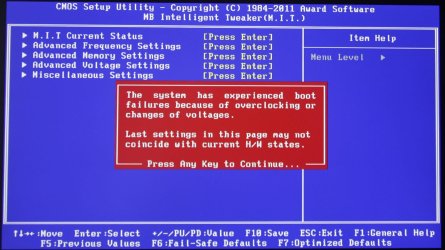
But, I have a new problem (see pic). This greeted me as I went to change BIOS for my video test mentioned earlier. When I OC I never messed with voltages. All I did was use Intel's Turbo Boost Tech; then afterwards manually set everything back to AUTO. That's it.

Yesterday, after putting everything back together, I noticed the case fan starting & stopping so I shut the PC abruptly off a time or two. Maybe this has something to do with the warning. Don't know what to check.

Do I need to reset something?:eek:
 

Attachments

  • What's this.jpg
    What's this.jpg
    170.9 KB · Views: 5

My Computer My Computer

Computer type
PC/Desktop
Computer Manufacturer/Model Number
Custom built 2011
OS
Windows 7 64-bit
CPU
Intel Core i5-2500K 3300 Mhz
Motherboard
Gigabyte P67A-UD3-B3
Memory
16Gb Patriot PC3-12800 1600 Mhz
Graphics Card(s)
EVGA GeForce GTX 560 Ti (Fermi)
Sound Card
On Motherboard
Monitor(s) Displays
Dell U2412M & NEC EA232WMi
Screen Resolution
DELL 1920x1200 - NEC 1920x1080
Hard Drives
Crucial 128 Gb SSD
Hitachi Deskstar 2Tb 7200 RPM 32MB Cache
Seagate Barracuda 500Gb 7200 RPM
Hitachi GST Deskstar 1.5TB 7200 RPM 64MB Cache
PSU
Seasonic M1211-620 Bronze
Case
Antec Solo
Cooling
Tuniq Tower 120 Extreme Rev 1
Keyboard
Apple
Mouse
Microsoft
Internet Speed
5mbs
Other Info
Sunbeam PL-RS-3 Rheosmart 3 Fan Controller 3.5" Bay 3 Channel 30W Fan Controller Panel
Cooler Master Hyper 212Plus is 160mm tall which makes it close to the side panel. Zalman makes some that are well within 135mm range but don't know the quality + Zalman doesn't have a website (that I can find & open) so it makes me wonder if they're still in business.

But, I have a new problem (see pic). This greeted me as I went to change BIOS for my video test mentioned earlier. When I OC I never messed with voltages. All I did was use Intel's Turbo Boost Tech; then afterwards manually set everything back to AUTO. That's it.

Yesterday, after putting everything back together, I noticed the case fan starting & stopping so I shut the PC abruptly off a time or two. Maybe this has something to do with the warning. Don't know what to check.

Do I need to reset something?:eek:

I would probably do an F7 as referred to at the bottom of the picture to "load optimized defaults". That should set you back to harmless non-OC settings and then you can restart from there.

Incidentally--I've done a little research and from what I can tell, the shutdown temp of the CPU is circa 98; it should begin throttling before that. The "Tcase" temp is supposedly 72 and that is Intel's recommended max LONG TERM temp. I assume that Tcase refers to cores????

According to my brief googling anyway. You could run down the tech documents on Intel.com for the sordid details.
 

My Computer My Computer

Computer type
PC/Desktop
Computer Manufacturer/Model Number
Ignatz Special; 4 speed manual gearbox; factory air conditioning; one of one
OS
Windows 7 Home Premium SP1, 64-bit
CPU
Intel Skylake i5-6600K, not overclocked
Motherboard
AsRock Z170M Extreme 4, micro ATX
Memory
8 GB HyperX DDR4-2666 (2 x 4 GB)
Graphics Card(s)
none; graphics are integrated on CPU
Sound Card
onboard: Realtek ALC1150; external: USB Behringer UF0-202
Monitor(s) Displays
Dell S2340M 23 inch IPS
Screen Resolution
1600 x 900
Hard Drives
System: Crucial MX100 series SSD, 128 GB;
Data: Samsung Spinpoint 103SJ, 1 TB;
Backup: WD Caviar Green WD30EZRX-00D8PB0, 3 TB
PSU
Rosewill SilentNight 500 watt fanless, semi-modular
Case
Antec Solo II
Cooling
Noctua NH-U12S; Noctua F12 intake, Noctua S12A exhaust
Keyboard
Microsoft 200 6JH-00001 USB
Mouse
Dell or Microsoft optical wired; USB
Antivirus
Microsoft Security Essentials and Malwarebytes Premium
Browser
Pale Moon
Other Info
All fans PWM; speeds at idle: CPU circa 500 rpm; intake circa 600 rpm; exhaust circa 600 rpm; CPU temps 27 idle and 47 C load in a warm room (27 C/81 F) when running Intel Extreme Tuning Utility stress test.
Further research: Tcase temp is 72.6 and is NOT equal to core temps. Rather it is taken from the case surrounding the processor and should be the number referred to as "CPU" in HWInfo32. It's quite close to the core temps, but is a single number rather than 4. Intel apparently does not specify a throttle temp or an absolute shutdown temp, but those temps are believed to be 98-100.

Tcase is max OK long term use temp.
 

My Computer My Computer

Computer type
PC/Desktop
Computer Manufacturer/Model Number
Ignatz Special; 4 speed manual gearbox; factory air conditioning; one of one
OS
Windows 7 Home Premium SP1, 64-bit
CPU
Intel Skylake i5-6600K, not overclocked
Motherboard
AsRock Z170M Extreme 4, micro ATX
Memory
8 GB HyperX DDR4-2666 (2 x 4 GB)
Graphics Card(s)
none; graphics are integrated on CPU
Sound Card
onboard: Realtek ALC1150; external: USB Behringer UF0-202
Monitor(s) Displays
Dell S2340M 23 inch IPS
Screen Resolution
1600 x 900
Hard Drives
System: Crucial MX100 series SSD, 128 GB;
Data: Samsung Spinpoint 103SJ, 1 TB;
Backup: WD Caviar Green WD30EZRX-00D8PB0, 3 TB
PSU
Rosewill SilentNight 500 watt fanless, semi-modular
Case
Antec Solo II
Cooling
Noctua NH-U12S; Noctua F12 intake, Noctua S12A exhaust
Keyboard
Microsoft 200 6JH-00001 USB
Mouse
Dell or Microsoft optical wired; USB
Antivirus
Microsoft Security Essentials and Malwarebytes Premium
Browser
Pale Moon
Other Info
All fans PWM; speeds at idle: CPU circa 500 rpm; intake circa 600 rpm; exhaust circa 600 rpm; CPU temps 27 idle and 47 C load in a warm room (27 C/81 F) when running Intel Extreme Tuning Utility stress test.
But, I have a new problem (see pic). This greeted me as I went to change BIOS for my video test mentioned earlier. When I OC I never messed with voltages. All I did was use Intel's Turbo Boost Tech; then afterwards manually set everything back to AUTO. That's it.

Yesterday, after putting everything back together, I noticed the case fan starting & stopping so I shut the PC abruptly off a time or two. Maybe this has something to do with the warning. Don't know what to check.

ASSUMING THE COOLER IS PROPERLY INSTALLED -
When you say the case fan was starting and stopping, was that during startup from a cold boot (power button ON)? If so, that is not so unusual for some manufacturers - there was another thread about that maybe a month ago. My Gigabyte mobo has alwas done that (so does my Asus).

I would go back into your BIOS and reset to the default settings then start your OC over.

Regards,
GEWB
(25 years of overclocking and never fried a CPU)
 

My Computer My Computer

Computer type
PC/Desktop
Computer Manufacturer/Model Number
(7 different computers booting up to 10 systems)
OS
Linux Mint / XP / Win7 Home, Pro, Ultimate / Win8.1 / Win10
Other Info
Four desktops, two laptops, one notebook and one tablet
Back
Top