
Post Your Overclock! [2]

For AddRam

Here are shots from Click Bios. I have everything pretty much on Auto except the Core voltage @ +.06. I do not have some of the other settings you have such as vdroop and digi something. I set my Bios like this and can boot at 4.6 at the highest, the other overclocks I have are software assisted with Intel Extreme Tuning Utility. I hope this helps you

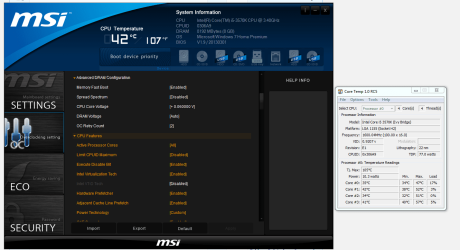
bios 1.PNG Bios 2.PNG

bios 3.PNG
 

My Computer

Computer type
PC/Desktop
Computer Manufacturer/Model Number
Dude Build
OS
Windows 10 Pro X64
CPU
Intel(R) Core(TM) i5-3570K CPU OC@ 4.5GHZ Turbo
Motherboard
MSI Z77A-G45 Gaming
Memory
8.00 GB DDR3 1600Mhz
Graphics Card(s)
MSI Gaming X GTX 1070
Sound Card
Realtek High Definition
Monitor(s) Displays
Dell S23O9W, HP L1710
Screen Resolution
DELL-1920 x 1080 HP-1280 x1024
Hard Drives
Crucial m4 256 SSD, WD 7200RPM 500GB WD 1TB
PSU
Seasonic X650 GOLD
Case
Zalman Z12
Cooling
Antec Kuhler 920
Keyboard
Logitech
Mouse
MSI DS100 Interceptor
Internet Speed
50 down and 5 up
Antivirus
MSE
Browser
Chrome, IE 11
Other Info
Logitech X-620 Speakers
Here are shots from Click Bios. I have everything pretty much on Auto except the Core voltage @ +.06. I do not have some of the other settings you have such as vdroop and digi something. I set my Bios like this and can boot at 4.6 at the highest, the other overclocks I have are software assisted with Intel Extreme Tuning Utility. I hope this helps you
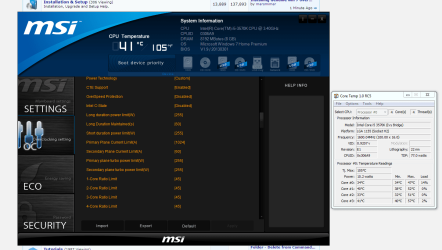
View attachment 285333 View attachment 285334

View attachment 285335


Ahh good old MSI Bios don't miss it one Bit looking good Doug ;)
 

My Computer

Computer type
PC/Desktop
Computer Manufacturer/Model Number
CoreI7-6700K MrFingerIII Special Builds
OS
Windows 10 Home Premium 64bit sp1
CPU
Intel I7-6700K @ 4.6 Ghz 1.344 volts everyday OC
Motherboard
Asrock Fatality K6 Z170 Socket 1151
Memory
32GB G-Skill TridentZ 3200mhz 16-18-18-38 DDR4
Graphics Card(s)
Sli Gigabyte Windforce GTX 980 G1
Sound Card
AC97 Creative Rage Tactic 3D Headphones Bluetooth
Monitor(s) Displays
27" Asus ROG Swift PG278Q G-Sync 48" Vizio Smart HD TV
Screen Resolution
2560x1440p 27"- 48" Currently Gaming at 2560x1440p Res 2K
Hard Drives
250GB Samsung Evo840SSD Seagate baracuda 500 GB WD Mybook 500Gb 1TB Seagate Barracuda
PSU
HX1050w Corsair Silver 80plus certified crosfire/sli
Case
Enthod Pro Full Tower
Cooling
Corsair H110i GT 280 mm High Performance WaterBlock
Keyboard
Logitech wireless keyboard
Mouse
Logitech wireless mouse
Internet Speed
Cox Cable 100+ mb
Antivirus
WebRoot Spysweeper with Antivirus
Browser
IE-10, Chrome, Opera
Other Info
My Other Rig is a AMD FX8320E @4.6Ghz 16GB Ballistic Sport Ram
Mobo Asrock Fatality 990FX 120GB OCZ SSD 1TB Seagate Barracuda Corsair H75 Cooling PSU Corsair CX750
GPU GTX Gigabyte 970G1
Here are shots from Click Bios. I have everything pretty much on Auto except the Core voltage @ +.06. I do not have some of the other settings you have such as vdroop and digi something. I set my Bios like this and can boot at 4.6 at the highest, the other overclocks I have are software assisted with Intel Extreme Tuning Utility. I hope this helps you

View attachment 285333 View attachment 285334

View attachment 285335


Ahh good old MSI Bios don't miss it one Bit looking good Doug ;)

Yeah it is frustrating. I did not know they took out offset, and went with vdroop on the last few board generations. They might have brought it back for Haswell, but I'm not going that route, I am happy with my mighty little board, but will go Asus as soon as I can. Guess I was out of the game for a little to long and didn't do enough research before I came back in. I was really suprised I could get the OC I did, even though it was software induced. I prefer being able to do it from the BIOS. The other settings that AddRam has in his Bios should be able to let him OC higher. Here is some info from the MSI forums

http://forum-en.msi.com/index.php?topic=161966.0
 

My Computer

Computer type
PC/Desktop
Computer Manufacturer/Model Number
Dude Build
OS
Windows 10 Pro X64
CPU
Intel(R) Core(TM) i5-3570K CPU OC@ 4.5GHZ Turbo
Motherboard
MSI Z77A-G45 Gaming
Memory
8.00 GB DDR3 1600Mhz
Graphics Card(s)
MSI Gaming X GTX 1070
Sound Card
Realtek High Definition
Monitor(s) Displays
Dell S23O9W, HP L1710
Screen Resolution
DELL-1920 x 1080 HP-1280 x1024
Hard Drives
Crucial m4 256 SSD, WD 7200RPM 500GB WD 1TB
PSU
Seasonic X650 GOLD
Case
Zalman Z12
Cooling
Antec Kuhler 920
Keyboard
Logitech
Mouse
MSI DS100 Interceptor
Internet Speed
50 down and 5 up
Antivirus
MSE
Browser
Chrome, IE 11
Other Info
Logitech X-620 Speakers
Here are shots from Click Bios. I have everything pretty much on Auto except the Core voltage @ +.06. I do not have some of the other settings you have such as vdroop and digi something. I set my Bios like this and can boot at 4.6 at the highest, the other overclocks I have are software assisted with Intel Extreme Tuning Utility. I hope this helps you

View attachment 285333 View attachment 285334

View attachment 285335


Ahh good old MSI Bios don't miss it one Bit looking good Doug ;)

Yeah it is frustrating. I did not know they took out offset, and went with vdroop on the last few board generations. They might have brought it back for Haswell, but I'm not going that route, I am happy with my mighty little board, but will go Asus as soon as I can. Guess I was out of the game for a little to long and didn't do enough research before I came back in. I was really suprised I could get the OC I did, even though it was software induced. I prefer being able to do it from the BIOS. The other settings that AddRam has in his Bios should be able to let him OC higher. Here is some info from the MSI forums

WHY No Vcore voltage Offsets?

I never used the Oc Genie or MSI control center just seemed wrong and the actual bios was locked at 1.44volts it was killing me I couldn't get a stable 4.5ghz on a 8120 without maxing the bios voltage and putting on APS on ACTIVE PHASE SWITHCING
 

My Computer

Computer type
PC/Desktop
Computer Manufacturer/Model Number
CoreI7-6700K MrFingerIII Special Builds
OS
Windows 10 Home Premium 64bit sp1
CPU
Intel I7-6700K @ 4.6 Ghz 1.344 volts everyday OC
Motherboard
Asrock Fatality K6 Z170 Socket 1151
Memory
32GB G-Skill TridentZ 3200mhz 16-18-18-38 DDR4
Graphics Card(s)
Sli Gigabyte Windforce GTX 980 G1
Sound Card
AC97 Creative Rage Tactic 3D Headphones Bluetooth
Monitor(s) Displays
27" Asus ROG Swift PG278Q G-Sync 48" Vizio Smart HD TV
Screen Resolution
2560x1440p 27"- 48" Currently Gaming at 2560x1440p Res 2K
Hard Drives
250GB Samsung Evo840SSD Seagate baracuda 500 GB WD Mybook 500Gb 1TB Seagate Barracuda
PSU
HX1050w Corsair Silver 80plus certified crosfire/sli
Case
Enthod Pro Full Tower
Cooling
Corsair H110i GT 280 mm High Performance WaterBlock
Keyboard
Logitech wireless keyboard
Mouse
Logitech wireless mouse
Internet Speed
Cox Cable 100+ mb
Antivirus
WebRoot Spysweeper with Antivirus
Browser
IE-10, Chrome, Opera
Other Info
My Other Rig is a AMD FX8320E @4.6Ghz 16GB Ballistic Sport Ram
Mobo Asrock Fatality 990FX 120GB OCZ SSD 1TB Seagate Barracuda Corsair H75 Cooling PSU Corsair CX750
GPU GTX Gigabyte 970G1
I don't use OC genie, it will only go to 4.2 anyway. Control center works somewhat, but the Intel Extreme Tuning utillity allowed me to add some voltage, that is the only way I could OC to 5ghz. But I can use auto settings in the bios and run 4.6 which isn't bad
 

My Computer

Computer type
PC/Desktop
Computer Manufacturer/Model Number
Dude Build
OS
Windows 10 Pro X64
CPU
Intel(R) Core(TM) i5-3570K CPU OC@ 4.5GHZ Turbo
Motherboard
MSI Z77A-G45 Gaming
Memory
8.00 GB DDR3 1600Mhz
Graphics Card(s)
MSI Gaming X GTX 1070
Sound Card
Realtek High Definition
Monitor(s) Displays
Dell S23O9W, HP L1710
Screen Resolution
DELL-1920 x 1080 HP-1280 x1024
Hard Drives
Crucial m4 256 SSD, WD 7200RPM 500GB WD 1TB
PSU
Seasonic X650 GOLD
Case
Zalman Z12
Cooling
Antec Kuhler 920
Keyboard
Logitech
Mouse
MSI DS100 Interceptor
Internet Speed
50 down and 5 up
Antivirus
MSE
Browser
Chrome, IE 11
Other Info
Logitech X-620 Speakers
What board does AddRam have?

EDIT: never mind. I did what I should have done in the first place, I looked it up.
 

My Computers

System One System Two

  • Computer type
    PC/Desktop
    Computer Manufacturer/Model Number
    ALWAYS UNDER CONSTRUCTION
    OS
    Windows 11 Pro
    CPU
    Ryzen 9 5900X
    Motherboard
    Asus X570 Crosshair Viii Hero
    Memory
    32GB G Skill DDR4-3600
    Graphics Card(s)
    EVGA RTX 3080 FTW 3 Ultra
    Sound Card
    On Board/Sennheiser PC37X Headset
    Monitor(s) Displays
    3 X Asus 27"
    Screen Resolution
    2560x1440
    Hard Drives
    2 X 1 TB NVME drives
    PSU
    EVGA 850
    Case
    Phanteks Eclipse P400A
    Cooling
    EVGA 280 AIO
    Keyboard
    Logitech G510s/ Logitech G13
    Mouse
    Logitech G502
    Internet Speed
    24/1
    Antivirus
    ESET/MBAM Pro/SAS Pro
    Browser
    Chrome/ Firefox/ Edge
  • Computer type
    Laptop
    System Manufacturer/Model Number
    Dell 16 Plus
    OS
    Windows 11 Pro
    CPU
    Intel Ultra 9 288V
    Memory
    32 GB LPDDR5X 8533
    Monitor(s) Displays
    16" Mini-LED HDR600 Touch 90 Hz
    Screen Resolution
    2560X1600
    Hard Drives
    1 TB NVME
SO... Mr. Dude, this is where you come to hang out I see! LOL :) Not sure I have ever posted here and if I have it was YEARTS AGO... I'm a lurker, hanging out in the shadows. And now that I know your secret, I'll give XTU a try.

I agree with you, I have been pretty impressed by this little board but really wish they hadn't of skimped on some of the BIOS access to adjustable voltages. And IF, Social Security paid a little more, I could have afforded an Asus Mobo. OH WELL, it is what it is.

I'll work on my respectful 4.4 GHz OC later today maybe. Thanks for all of your help. I appreciate you NOT making me feel small and foolish with my stupid questions. At my age diapers, drool and stupid questions are about all I have left! LOL Well, not that old, just brain damaged from the accident.

Have a great day guys!

Mr. Bill

Playing4.png

Elko, Nevada
 

My Computer

Computer type
PC/Desktop
Computer Manufacturer/Model Number
Custom Build "Of Sort's"
OS
Windows 7 Professional 64 bit
CPU
Intel i5-3570k
Motherboard
MSI Z77MA-G45
Memory
16 Gig G.Skill DDR3-1600 CL7-8-8-24-2N
Graphics Card(s)
XFX Radeon HD6670
Monitor(s) Displays
Asus VE247
Screen Resolution
1920x1080
Hard Drives
Toshiba 128 GB SSD
WD Black 1 TB
PSU
Ultra LSP 550W
Case
Dell XPS 8300
Cooling
Thermalright True Spirit 120M
Keyboard
Logitech K800
Mouse
Logitech M570
Internet Speed
DSL
Antivirus
Kaspersky Internet Security 2013
Browser
IE 10
Last edited:

My Computers

System One System Two

  • Computer type
    PC/Desktop
    Computer Manufacturer/Model Number
    ALWAYS UNDER CONSTRUCTION
    OS
    Windows 11 Pro
    CPU
    Ryzen 9 5900X
    Motherboard
    Asus X570 Crosshair Viii Hero
    Memory
    32GB G Skill DDR4-3600
    Graphics Card(s)
    EVGA RTX 3080 FTW 3 Ultra
    Sound Card
    On Board/Sennheiser PC37X Headset
    Monitor(s) Displays
    3 X Asus 27"
    Screen Resolution
    2560x1440
    Hard Drives
    2 X 1 TB NVME drives
    PSU
    EVGA 850
    Case
    Phanteks Eclipse P400A
    Cooling
    EVGA 280 AIO
    Keyboard
    Logitech G510s/ Logitech G13
    Mouse
    Logitech G502
    Internet Speed
    24/1
    Antivirus
    ESET/MBAM Pro/SAS Pro
    Browser
    Chrome/ Firefox/ Edge
  • Computer type
    Laptop
    System Manufacturer/Model Number
    Dell 16 Plus
    OS
    Windows 11 Pro
    CPU
    Intel Ultra 9 288V
    Memory
    32 GB LPDDR5X 8533
    Monitor(s) Displays
    16" Mini-LED HDR600 Touch 90 Hz
    Screen Resolution
    2560X1600
    Hard Drives
    1 TB NVME
Ello Bulldog and welcome to Seven Forums :thumbsup:
Nice oc mate, there's noubt wrong with 4.4Ghz :D
 

My Computer

Computer type
PC/Desktop
Computer Manufacturer/Model Number
Custom build
OS
Win7 Home Premium x64 SP1
CPU
i7 4770k
Motherboard
Asus maximus VI Hero
Memory
8Gb Kingston HyperX Beast 2400MHz @2133MHz 11-12-11-30
Graphics Card(s)
MSI GTX 780ti Gaming Oc x2
Sound Card
Onboard ROG SupremeFX
Monitor(s) Displays
Asus VG248QE
Screen Resolution
3840X1080 144Hz
Hard Drives
Samung Evo 256Gb, OCZ Agility4 128Gb
1x1TB hitachi storage
PSU
EVGA Supernova 1000w Platinum
Case
Corsair Air 540
Cooling
Corsair H100i
Keyboard
Coolermaster Quickfire Pro
Mouse
Corsair M65 RGB
Internet Speed
74mb dwn/16up
Antivirus
MSE,Malwarebytes
Browser
Chrome
Hiya Mr. Bill. It takes a bit of craziness to overclock anyway, you'll be fine here.:D

4948 Ivy.PNG
 

My Computer

Computer type
PC/Desktop
Computer Manufacturer/Model Number
Home Built Desktop By DataTech
OS
Windows 7 Ultimate X64 SP1
CPU
Intel i5-2550K, Differing ~4.4-4.8GHz No built in GPU
Motherboard
ASUS P8Z68-V PRO/GEN3
Memory
16GB G.Skill Sniper 1866MHz @ 2133MHz 2x8GB
Graphics Card(s)
ASUS GTX650TIB-DC2OC-2GD5, (650TI Boost)
Sound Card
Onboard Realtek 5-1
Monitor(s) Displays
Samsung P2570HD
Screen Resolution
1920x1080
Hard Drives
Samsung 840 Pro 256GB SSD for OS, 500GB Seagate Constellation (Enterprise drive) for Data
PSU
Corsair HX650W
Case
Inwin Dragon Rider
Cooling
Hyper 212 EVO w/two Noctua fans, push-pull, @1300 RPM
Keyboard
E-Z Eyes, bright yellow keys with large characters
Mouse
steelseries SENSEI Laser Pro Gaming
Internet Speed
48-51Mbs Mbs down, 11 Mbs up Xfinity Cable
Antivirus
Norton Internet Security 2013
Browser
IE 10, Opera, Pale Moon if needed
Other Info
4 case fans, LG BluRay-RE, ASUS DVD-RW, Mr. Fusion power supply, 1.21 gigawatts.
Nice 1 Gary :thumbsup:
 

My Computer

Computer type
PC/Desktop
Computer Manufacturer/Model Number
Custom build
OS
Win7 Home Premium x64 SP1
CPU
i7 4770k
Motherboard
Asus maximus VI Hero
Memory
8Gb Kingston HyperX Beast 2400MHz @2133MHz 11-12-11-30
Graphics Card(s)
MSI GTX 780ti Gaming Oc x2
Sound Card
Onboard ROG SupremeFX
Monitor(s) Displays
Asus VG248QE
Screen Resolution
3840X1080 144Hz
Hard Drives
Samung Evo 256Gb, OCZ Agility4 128Gb
1x1TB hitachi storage
PSU
EVGA Supernova 1000w Platinum
Case
Corsair Air 540
Cooling
Corsair H100i
Keyboard
Coolermaster Quickfire Pro
Mouse
Corsair M65 RGB
Internet Speed
74mb dwn/16up
Antivirus
MSE,Malwarebytes
Browser
Chrome

My Computer

Computer type
PC/Desktop
OS
Windows 10 Home x64
CPU
INTEL Core i5-750 Quad-Core 3.37GHz
Motherboard
ASUS P7P55D
Memory
HyperX Fury Black Series 8GB (2 x 4GB) 1866Mhz
Graphics Card(s)
EVGA GeForce GTX 750 Superclocked 1GB 128-Bit GDDR5
Monitor(s) Displays
LG 32MA68HY 32" IPS
Screen Resolution
1920 x 1080
Hard Drives
Samsung 840 Evo 120GB, SEAGATE 500GB Barracuda® 7200.12, SATA 3 Gb/s, 7200 RPM, 16MB cache
PSU
ANTEC TruePower New TP-550, 80 PLUS, 550W
Case
ANTEC Three Hundred Illusion
Cooling
COOLER MASTER Hyper 212 Plus, 4 x 120mm 1 x 140mm Noctua's
Internet Speed
85 + Mbps
Antivirus
Avast
Browser
Vivaldi

My Computer

Computer type
PC/Desktop
Computer Manufacturer/Model Number
Dude Build
OS
Windows 10 Pro X64
CPU
Intel(R) Core(TM) i5-3570K CPU OC@ 4.5GHZ Turbo
Motherboard
MSI Z77A-G45 Gaming
Memory
8.00 GB DDR3 1600Mhz
Graphics Card(s)
MSI Gaming X GTX 1070
Sound Card
Realtek High Definition
Monitor(s) Displays
Dell S23O9W, HP L1710
Screen Resolution
DELL-1920 x 1080 HP-1280 x1024
Hard Drives
Crucial m4 256 SSD, WD 7200RPM 500GB WD 1TB
PSU
Seasonic X650 GOLD
Case
Zalman Z12
Cooling
Antec Kuhler 920
Keyboard
Logitech
Mouse
MSI DS100 Interceptor
Internet Speed
50 down and 5 up
Antivirus
MSE
Browser
Chrome, IE 11
Other Info
Logitech X-620 Speakers
Thanks for the WELCOME everyone and thanks "essenbe" for the link to the OC guide. I will give it a read later today BEFORE I start the OC process over AGAIN.

Taking the unorthodox approach of adjusting the BCLK as I did finally caught up with me last night in the form of a corrupted BIOS. So I'll use a more standard approach this time around and see what I come up with.

Trust me, I'm sure I will be buggin y'all for guidance very soon! Glad to be aboard!
 

My Computer

Computer type
PC/Desktop
Computer Manufacturer/Model Number
Custom Build "Of Sort's"
OS
Windows 7 Professional 64 bit
CPU
Intel i5-3570k
Motherboard
MSI Z77MA-G45
Memory
16 Gig G.Skill DDR3-1600 CL7-8-8-24-2N
Graphics Card(s)
XFX Radeon HD6670
Monitor(s) Displays
Asus VE247
Screen Resolution
1920x1080
Hard Drives
Toshiba 128 GB SSD
WD Black 1 TB
PSU
Ultra LSP 550W
Case
Dell XPS 8300
Cooling
Thermalright True Spirit 120M
Keyboard
Logitech K800
Mouse
Logitech M570
Internet Speed
DSL
Antivirus
Kaspersky Internet Security 2013
Browser
IE 10
Bulldog, that guide works well. You look like you have an excellent CPU. You could go a long way with it. You really should change your system specs though. That guide won't help with a Core2Duo. , Here is another guide http://www.overclock.net/t/1291703/ivy-bridge-overclocking-guide-asus-motherboards# But, it's a very long read but there is a tremendous amount of info in the thread that follows the guide as well as the first one I gave. The first one really isn't a guide, but there is a lot to learn in the discussions.
 

My Computers

System One System Two

  • Computer type
    PC/Desktop
    Computer Manufacturer/Model Number
    ALWAYS UNDER CONSTRUCTION
    OS
    Windows 11 Pro
    CPU
    Ryzen 9 5900X
    Motherboard
    Asus X570 Crosshair Viii Hero
    Memory
    32GB G Skill DDR4-3600
    Graphics Card(s)
    EVGA RTX 3080 FTW 3 Ultra
    Sound Card
    On Board/Sennheiser PC37X Headset
    Monitor(s) Displays
    3 X Asus 27"
    Screen Resolution
    2560x1440
    Hard Drives
    2 X 1 TB NVME drives
    PSU
    EVGA 850
    Case
    Phanteks Eclipse P400A
    Cooling
    EVGA 280 AIO
    Keyboard
    Logitech G510s/ Logitech G13
    Mouse
    Logitech G502
    Internet Speed
    24/1
    Antivirus
    ESET/MBAM Pro/SAS Pro
    Browser
    Chrome/ Firefox/ Edge
  • Computer type
    Laptop
    System Manufacturer/Model Number
    Dell 16 Plus
    OS
    Windows 11 Pro
    CPU
    Intel Ultra 9 288V
    Memory
    32 GB LPDDR5X 8533
    Monitor(s) Displays
    16" Mini-LED HDR600 Touch 90 Hz
    Screen Resolution
    2560X1600
    Hard Drives
    1 TB NVME
Really???

Here are shots from Click Bios. I have everything pretty much on Auto except the Core voltage @ +.06. I do not have some of the other settings you have such as vdroop and digi something. I set my Bios like this and can boot at 4.6 at the highest, the other overclocks I have are software assisted with Intel Extreme Tuning Utility. I hope this helps you

View attachment 285333 View attachment 285334

View attachment 285335

Sup Dude,

If I attempt to use your BIOS settings on my system, I can boot up but as soon as I go to run any tests the system crashes. And the crashes are not consistent either, it can be as simple as just a system reboot or a BSOD that points towards a hardware or temperature issue. I think it's a low voltage issue to the CPU.

With the BIOS architecture of this MSI board and the lack of proper access to adjust CPU voltages and setting I still cannot break the x43 barrier without getting to creative. And we see where that has gotten me! :cry:

I haven't looked at the Intel XTU program yet. I hope to this weekend. I have to many doctors appointments this week, both here in Elko and Reno. I get to go do the Botox injections in my neck head and spine today. I am so NOT looking forward to that. SORRY, I drifted off track there. Anyways, if you would be so kind as to enlighten me as to WHICH setting you played with in XTU I would greatly appreciate that.

Thanks Y'all,

Mr. Bill
Elko, Nevada
The_Mr_Bill_Show.jpg
 

My Computer

Computer type
PC/Desktop
Computer Manufacturer/Model Number
Custom Build "Of Sort's"
OS
Windows 7 Professional 64 bit
CPU
Intel i5-3570k
Motherboard
MSI Z77MA-G45
Memory
16 Gig G.Skill DDR3-1600 CL7-8-8-24-2N
Graphics Card(s)
XFX Radeon HD6670
Monitor(s) Displays
Asus VE247
Screen Resolution
1920x1080
Hard Drives
Toshiba 128 GB SSD
WD Black 1 TB
PSU
Ultra LSP 550W
Case
Dell XPS 8300
Cooling
Thermalright True Spirit 120M
Keyboard
Logitech K800
Mouse
Logitech M570
Internet Speed
DSL
Antivirus
Kaspersky Internet Security 2013
Browser
IE 10
I would be happy to, Bill, but I have never used the XTU that Dude has talked about. I have used an Asus Utility, but that's all. If you are searching for an everyday overclock, I seriously recommend you not use any software. Use the bios settings only, and only the ones you put in. The only time I use a tuning utility is when I'm 'playing', just seeing how high an overclock I can get with no intention of leaving it there. Whatever you do, you have to have sufficient cooling, as these chips do get hot.

Dude can probably help you more with the MSI settings, but to me it sounds like you are having trouble with your Vdroop. I have my LLC set to Ultra High to avoid that, I think MSI calls it turbo. Just please understand, any advice on overclocking or overclocking in any way is taking a big risk. It puts a great deal of strain on the system as a whole. The best advice I ever got was, if you can't replace it, don't overclock it. From what little I know about MSI boards is your bios settings are rather limited compared to Asus boards. Just please understand it is a risk.

Sorry to hear about your medical issues. I hope everything goes well for you. Trust me, I know very well about medical issues.
 

My Computers

System One System Two

  • Computer type
    PC/Desktop
    Computer Manufacturer/Model Number
    ALWAYS UNDER CONSTRUCTION
    OS
    Windows 11 Pro
    CPU
    Ryzen 9 5900X
    Motherboard
    Asus X570 Crosshair Viii Hero
    Memory
    32GB G Skill DDR4-3600
    Graphics Card(s)
    EVGA RTX 3080 FTW 3 Ultra
    Sound Card
    On Board/Sennheiser PC37X Headset
    Monitor(s) Displays
    3 X Asus 27"
    Screen Resolution
    2560x1440
    Hard Drives
    2 X 1 TB NVME drives
    PSU
    EVGA 850
    Case
    Phanteks Eclipse P400A
    Cooling
    EVGA 280 AIO
    Keyboard
    Logitech G510s/ Logitech G13
    Mouse
    Logitech G502
    Internet Speed
    24/1
    Antivirus
    ESET/MBAM Pro/SAS Pro
    Browser
    Chrome/ Firefox/ Edge
  • Computer type
    Laptop
    System Manufacturer/Model Number
    Dell 16 Plus
    OS
    Windows 11 Pro
    CPU
    Intel Ultra 9 288V
    Memory
    32 GB LPDDR5X 8533
    Monitor(s) Displays
    16" Mini-LED HDR600 Touch 90 Hz
    Screen Resolution
    2560X1600
    Hard Drives
    1 TB NVME
Bulldog, that guide works well. You look like you have an excellent CPU. You could go a long way with it. You really should change your system specs though. That guide won't help with a Core2Duo. , Here is another guide Ivy Bridge Overclocking Guide But, it's a very long read but there is a tremendous amount of info in the thread that follows the guide as well as the first one I gave. The first one really isn't a guide, but there is a lot to learn in the discussions.

LOL... I saw that and have made the changes... As you can see I joined way back in 2009 and never posted until now. I live my life like a mushroom, always in the dark and covered in pooh!

The i5-3570k is a nice entry level CPU however just like "Dude", our choice of Mobo's leaves much room for improvement. Don't get me wrong, the MSI Z77MA-G45 is a cute board and it is my first exposure to an MSI product. I have always been an Asus fan. It is a good quality board that is just lacking in the OC adjustment area.

Beggars cant be choosy. I needed a CPU and Mobo right at that moment and that's all I could afford. I haven't been disappointed. I've, never been into OC'ing but, once you peek under the covers at a beautiful woman it's to hard to walk away. :o Um, maybe that was a little to much but, you know what I mean!
 

My Computer

Computer type
PC/Desktop
Computer Manufacturer/Model Number
Custom Build "Of Sort's"
OS
Windows 7 Professional 64 bit
CPU
Intel i5-3570k
Motherboard
MSI Z77MA-G45
Memory
16 Gig G.Skill DDR3-1600 CL7-8-8-24-2N
Graphics Card(s)
XFX Radeon HD6670
Monitor(s) Displays
Asus VE247
Screen Resolution
1920x1080
Hard Drives
Toshiba 128 GB SSD
WD Black 1 TB
PSU
Ultra LSP 550W
Case
Dell XPS 8300
Cooling
Thermalright True Spirit 120M
Keyboard
Logitech K800
Mouse
Logitech M570
Internet Speed
DSL
Antivirus
Kaspersky Internet Security 2013
Browser
IE 10
I understand completely. First thing you need to know about overclocking is, you don't have to be crazy, but it helps a lot. Second thing is, that woman you looked at can be very dangerous. Overclocking is too. I would spend a lot of time reading and understanding what each setting is and what it does. I also, at tis point, would leave your base clock alone. 100 Is enough. These CPUs are not like your last one. Just be careful and there are a lot of people that are more than willing to help here.
 

My Computers

System One System Two

  • Computer type
    PC/Desktop
    Computer Manufacturer/Model Number
    ALWAYS UNDER CONSTRUCTION
    OS
    Windows 11 Pro
    CPU
    Ryzen 9 5900X
    Motherboard
    Asus X570 Crosshair Viii Hero
    Memory
    32GB G Skill DDR4-3600
    Graphics Card(s)
    EVGA RTX 3080 FTW 3 Ultra
    Sound Card
    On Board/Sennheiser PC37X Headset
    Monitor(s) Displays
    3 X Asus 27"
    Screen Resolution
    2560x1440
    Hard Drives
    2 X 1 TB NVME drives
    PSU
    EVGA 850
    Case
    Phanteks Eclipse P400A
    Cooling
    EVGA 280 AIO
    Keyboard
    Logitech G510s/ Logitech G13
    Mouse
    Logitech G502
    Internet Speed
    24/1
    Antivirus
    ESET/MBAM Pro/SAS Pro
    Browser
    Chrome/ Firefox/ Edge
  • Computer type
    Laptop
    System Manufacturer/Model Number
    Dell 16 Plus
    OS
    Windows 11 Pro
    CPU
    Intel Ultra 9 288V
    Memory
    32 GB LPDDR5X 8533
    Monitor(s) Displays
    16" Mini-LED HDR600 Touch 90 Hz
    Screen Resolution
    2560X1600
    Hard Drives
    1 TB NVME
Bill, your OC at 4.4 was a very good one. I only use the XTU for "fun runs" at a higher OC. I would never try to leave it clocked that high as it would melt my system. I have showed you the BIOS settings I use so let me explain how I used the XTU. First to use it you have to enable ocing in the os through your bios. When booted in it will run at stock speeds 3.4-3.8 ..I would have cpu-z open, have the validation window up and ready. Then I open XTU and adjust the additional turbo boost value up by about 250-300 millivolts. Then open command center, change the cpu ratio to a higher value. I started with 4.7 an worked up to 5.0 and higher. I would run super pi 1m to kick in the turbo. At 5.0- 5.2 I can run for a while, but the temps start to rise quick so I only do it long enough for validations.

You have been seeking a stable OC, thats why I never mentioned the XTU. It may be fun for a benchmark, but is not for everyday use.

As far as yours hitting 4.3 to 4.4 stable through BIOS compared to my 4.5 and 4.6, that is due to luck of the draw on chips, and possibly the power supply. I was running a corsair 550, but upgraded to a Seasonic X650 gold.

Remember don't push it to far, if you see smoke you've gone to far.
 

My Computer

Computer type
PC/Desktop
Computer Manufacturer/Model Number
Dude Build
OS
Windows 10 Pro X64
CPU
Intel(R) Core(TM) i5-3570K CPU OC@ 4.5GHZ Turbo
Motherboard
MSI Z77A-G45 Gaming
Memory
8.00 GB DDR3 1600Mhz
Graphics Card(s)
MSI Gaming X GTX 1070
Sound Card
Realtek High Definition
Monitor(s) Displays
Dell S23O9W, HP L1710
Screen Resolution
DELL-1920 x 1080 HP-1280 x1024
Hard Drives
Crucial m4 256 SSD, WD 7200RPM 500GB WD 1TB
PSU
Seasonic X650 GOLD
Case
Zalman Z12
Cooling
Antec Kuhler 920
Keyboard
Logitech
Mouse
MSI DS100 Interceptor
Internet Speed
50 down and 5 up
Antivirus
MSE
Browser
Chrome, IE 11
Other Info
Logitech X-620 Speakers
Back
Top