Previous Versions doesn't work (System restore)

trogne

New member
Member
Local time
2:11 PM
Messages
60
Hello,

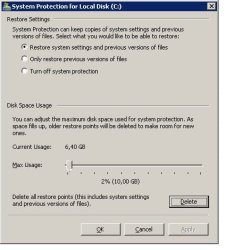
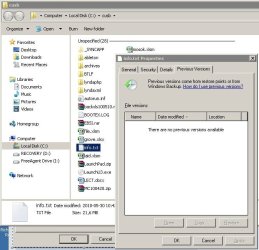
I'm doing everything as said, and the "previous versions" doesn't work. Why?
I also did manually a system restore, and it doesn't create a copy of files (for previous versions).
What can I do?

Thank you,
Patrick
 

Attachments

  • restore.jpg
    restore.jpg
    28 KB · Views: 33
  • restore2.jpg
    restore2.jpg
    55.6 KB · Views: 42

My Computer My Computer

At a glance

Microsoft Windows 7 Home Premium 64-bit 7601 ...Intel(R) Core(TM)2 Duo CPU T6600 @ 2.20GHz4,00 GB(1) ATI Mobility Radeon HD 4530 (2) LogMeIn M...
Computer type
PC/Desktop
OS
Microsoft Windows 7 Home Premium 64-bit 7601 Multiprocessor Free Service Pack 1
CPU
Intel(R) Core(TM)2 Duo CPU T6600 @ 2.20GHz
Motherboard
Hewlett-Packard 3628
Memory
4,00 GB
Graphics Card(s)
(1) ATI Mobility Radeon HD 4530 (2) LogMeIn Mirror Driver
Sound Card
(1) IDT High Definition Audio CODEC (2) High Definition Au
Screen Resolution
1366 x 768 x 32 bits (4294967296 colors) @ 59 Hz
Hard Drives
(1) ST9500420AS (2) Iomega E xternal HD USB Device
Try Shadow Explorer, The link says Vista but it works for Windows 7 as well. You may find your file that way.
 

My Computer My Computer

At a glance

Windows 10 Pro X64Intel Quad Core i7-4770 @ 3.4Ghz16.0GB PC3-12800 DDR3 SDRAM 1600 MHzIntel Integrated HD Graphics
Computer type
PC/Desktop
Computer Manufacturer/Model Number
Lenovo IdeaCenter 450
OS
Windows 10 Pro X64
CPU
Intel Quad Core i7-4770 @ 3.4Ghz
Memory
16.0GB PC3-12800 DDR3 SDRAM 1600 MHz
Graphics Card(s)
Intel Integrated HD Graphics
Sound Card
Realtek HD Audio
Monitor(s) Displays
HP 22" LCD
Screen Resolution
1680 x 1050
Hard Drives
250GB Samsung EVO SATA-3 SSD
2TB Seagate ST2000DM001 SATA-2
1.5TB Seagate ST3150041AS SATA
Keyboard
Dell USB
Mouse
Lenovo USB
Internet Speed
Cable via Road Runner 3MB Upload, 30MB Download
Antivirus
Windows Defender, MBAM Pro, MBAE
Browser
Seamonkey
Other Info
UEFI/GPT
PLDS DVD-RW DH16AERSH
Try Shadow Explorer, The link says Vista but it works for Windows 7 as well. You may find your file that way.
Shadow Explorer is a good idea. Here are a couple of tutorials that I published long time ago - just in case you need to orient yourself. But it is really simple. Navigate to your file and right click on it, then "Export" back into your system.

Recover Files with Shadow Copies on Any Version of Windows Vista - How-To Geek

Recover lost files with Shadow Explorer - Windows Help Forum


BTW: The windows backup facilities are relatively erratic. I always suggest to use imaging, e.g. with free Macrium. That is a lot more reliable and very simple to use. All you need is another (external) drive.
 

My Computer My Computer

At a glance

Vista, Windows7, Mint Mate, Zorin, Windows 8from 1.6GHz Duo to i7
Computer Manufacturer/Model Number
HP, Dell, Gateway, Toshiba - 4 laptops and 2 desktops
OS
Vista, Windows7, Mint Mate, Zorin, Windows 8
CPU
from 1.6GHz Duo to i7
Monitor(s) Displays
2x HP w2207
Hard Drives
5x HDD, 7x SSD, 12x Externals
Keyboard
with trackball - no mices
Mouse
Trackball mice
Internet Speed
DSL 6000
OK thanks,

But why my windows 7 "previous files" fonction doesn't work anymore?
It was working before.

How can I make this work again?

Thanks,
Patrick
 

My Computer My Computer

At a glance

Microsoft Windows 7 Home Premium 64-bit 7601 ...Intel(R) Core(TM)2 Duo CPU T6600 @ 2.20GHz4,00 GB(1) ATI Mobility Radeon HD 4530 (2) LogMeIn M...
Computer type
PC/Desktop
OS
Microsoft Windows 7 Home Premium 64-bit 7601 Multiprocessor Free Service Pack 1
CPU
Intel(R) Core(TM)2 Duo CPU T6600 @ 2.20GHz
Motherboard
Hewlett-Packard 3628
Memory
4,00 GB
Graphics Card(s)
(1) ATI Mobility Radeon HD 4530 (2) LogMeIn Mirror Driver
Sound Card
(1) IDT High Definition Audio CODEC (2) High Definition Au
Screen Resolution
1366 x 768 x 32 bits (4294967296 colors) @ 59 Hz
Hard Drives
(1) ST9500420AS (2) Iomega E xternal HD USB Device
System Restore creates Previous versions copies only if the file in question is accessed and changed between two restore points. Can you check whether any of the files in that screenshot has a previous version. Or you can manually change one, and create a restore point.
 

My Computer My Computer

At a glance

Windows 7 x64 Ultimate SP1Core i7-2630QM6 GB DDR3Nvidia GT 540M / Intel HD 3000 - Optimus swit...
Computer Manufacturer/Model Number
Asus N73SV
OS
Windows 7 x64 Ultimate SP1
CPU
Core i7-2630QM
Motherboard
Intel HM 65
Memory
6 GB DDR3
Graphics Card(s)
Nvidia GT 540M / Intel HD 3000 - Optimus switching
Sound Card
HD Audio (Intel Azalia/Realtek) ALC269
Monitor(s) Displays
LED flat panel
Screen Resolution
1920 x 1080
Hard Drives
2x Seagate Momentus 640 GB - 1,28 TB in total
Internet Speed
4 MB/256 kbps
Other Info
External HDs

WD Elements 1,5 TB
WD MyBook 500 GB

My Computer My Computer

At a glance

Windows 10 Pro (x64)Intel Core i7-3930K (3.2GHz - 4.5GHz)4x Samsung 4GB PC3-12800 DDR3 (16GB 1600MHz)Nvidia Geforce GTX 690
Computer type
PC/Desktop
Computer Manufacturer/Model Number
Alienware Aurora ALX R4
OS
Windows 10 Pro (x64)
CPU
Intel Core i7-3930K (3.2GHz - 4.5GHz)
Motherboard
Alienware Aurora-R4 x79
Memory
4x Samsung 4GB PC3-12800 DDR3 (16GB 1600MHz)
Graphics Card(s)
Nvidia Geforce GTX 690
Sound Card
SteelSeries Siberia Elite
Monitor(s) Displays
Dell UltraSharp U3011
Screen Resolution
2560x1600
Hard Drives
Samsung 850 Pro 256 GB, Seagate 1TB Desktop Hybrid HDD, 2x Western Digital 4TB Green HDD
PSU
875W Some Dell PSU <.<
Case
Alienware Aurora ALX
Cooling
Custom Liquid Cooling (EK CPU & GPU blocks) dual EK 480RAD
Keyboard
Logitech G710+ Mechanical
Mouse
Logitech G700s
Internet Speed
Verizon Fios (50 mbps average)
Other Info
Server: Intel NUC D54250WYK: i5-4250U, 16GB, 256 GB mSATA, Windows Server 2012 R2
System Restore creates Previous versions copies only if the file in question is accessed and changed between two restore points. Can you check whether any of the files in that screenshot has a previous version. Or you can manually change one, and create a restore point.

Yes.
I did one manual system restore.
Then change one file.
Then another system restore.
No previous versions available for the file.

Where can I configure when the automatic system restore occure?
Like, once a day, once a week...
I think that my system restore is not automatic.

Thanks,
Patrick
 

My Computer My Computer

At a glance

Microsoft Windows 7 Home Premium 64-bit 7601 ...Intel(R) Core(TM)2 Duo CPU T6600 @ 2.20GHz4,00 GB(1) ATI Mobility Radeon HD 4530 (2) LogMeIn M...
Computer type
PC/Desktop
OS
Microsoft Windows 7 Home Premium 64-bit 7601 Multiprocessor Free Service Pack 1
CPU
Intel(R) Core(TM)2 Duo CPU T6600 @ 2.20GHz
Motherboard
Hewlett-Packard 3628
Memory
4,00 GB
Graphics Card(s)
(1) ATI Mobility Radeon HD 4530 (2) LogMeIn Mirror Driver
Sound Card
(1) IDT High Definition Audio CODEC (2) High Definition Au
Screen Resolution
1366 x 768 x 32 bits (4294967296 colors) @ 59 Hz
Hard Drives
(1) ST9500420AS (2) Iomega E xternal HD USB Device

My Computer My Computer

At a glance

window's 7core 2 quad2gb corsairati hd4850
OS
window's 7
CPU
core 2 quad
Motherboard
gigabyte
Memory
2gb corsair
Graphics Card(s)
ati hd4850
Monitor(s) Displays
lg
Screen Resolution
1600 X 900
Case
power logic
Other Info
none of the spec above is accurate
"Felt it was time to refine my search term since I was just using the message itself. This problem was happening after I used Tuneup Utillites to alter a few settings. It was such a little thing too, Administrative Shares must be turned on. The one setting thats required for Previous Versions I had off."

Thank you logicearth!! I use TuneUpUtilities! I will turn on Admin Shares (hoping it's off now).
Where can I turn that on?

Also, I still want to know how I configure when the automatic system restore occure.

Patrick
 

My Computer My Computer

At a glance

Microsoft Windows 7 Home Premium 64-bit 7601 ...Intel(R) Core(TM)2 Duo CPU T6600 @ 2.20GHz4,00 GB(1) ATI Mobility Radeon HD 4530 (2) LogMeIn M...
Computer type
PC/Desktop
OS
Microsoft Windows 7 Home Premium 64-bit 7601 Multiprocessor Free Service Pack 1
CPU
Intel(R) Core(TM)2 Duo CPU T6600 @ 2.20GHz
Motherboard
Hewlett-Packard 3628
Memory
4,00 GB
Graphics Card(s)
(1) ATI Mobility Radeon HD 4530 (2) LogMeIn Mirror Driver
Sound Card
(1) IDT High Definition Audio CODEC (2) High Definition Au
Screen Resolution
1366 x 768 x 32 bits (4294967296 colors) @ 59 Hz
Hard Drives
(1) ST9500420AS (2) Iomega E xternal HD USB Device
it's automatic when you turn it On on the specified drive :)
 

My Computer My Computer

At a glance

window's 7core 2 quad2gb corsairati hd4850
OS
window's 7
CPU
core 2 quad
Motherboard
gigabyte
Memory
2gb corsair
Graphics Card(s)
ati hd4850
Monitor(s) Displays
lg
Screen Resolution
1600 X 900
Case
power logic
Other Info
none of the spec above is accurate

My Computer My Computer

At a glance

Windows 10 Pro X64Intel Quad Core i7-4770 @ 3.4Ghz16.0GB PC3-12800 DDR3 SDRAM 1600 MHzIntel Integrated HD Graphics
Computer type
PC/Desktop
Computer Manufacturer/Model Number
Lenovo IdeaCenter 450
OS
Windows 10 Pro X64
CPU
Intel Quad Core i7-4770 @ 3.4Ghz
Memory
16.0GB PC3-12800 DDR3 SDRAM 1600 MHz
Graphics Card(s)
Intel Integrated HD Graphics
Sound Card
Realtek HD Audio
Monitor(s) Displays
HP 22" LCD
Screen Resolution
1680 x 1050
Hard Drives
250GB Samsung EVO SATA-3 SSD
2TB Seagate ST2000DM001 SATA-2
1.5TB Seagate ST3150041AS SATA
Keyboard
Dell USB
Mouse
Lenovo USB
Internet Speed
Cable via Road Runner 3MB Upload, 30MB Download
Antivirus
Windows Defender, MBAM Pro, MBAE
Browser
Seamonkey
Other Info
UEFI/GPT
PLDS DVD-RW DH16AERSH
Hello,
Tuneup was uninstalled.
And I follow the " Administrative Shares in Windows 7." instructions.
Still no "previous versions".
Please, how can I make "previous versions" work again?
Patrick
 

My Computer My Computer

At a glance

Microsoft Windows 7 Home Premium 64-bit 7601 ...Intel(R) Core(TM)2 Duo CPU T6600 @ 2.20GHz4,00 GB(1) ATI Mobility Radeon HD 4530 (2) LogMeIn M...
Computer type
PC/Desktop
OS
Microsoft Windows 7 Home Premium 64-bit 7601 Multiprocessor Free Service Pack 1
CPU
Intel(R) Core(TM)2 Duo CPU T6600 @ 2.20GHz
Motherboard
Hewlett-Packard 3628
Memory
4,00 GB
Graphics Card(s)
(1) ATI Mobility Radeon HD 4530 (2) LogMeIn Mirror Driver
Sound Card
(1) IDT High Definition Audio CODEC (2) High Definition Au
Screen Resolution
1366 x 768 x 32 bits (4294967296 colors) @ 59 Hz
Hard Drives
(1) ST9500420AS (2) Iomega E xternal HD USB Device
It's turned on for C:
Not work. What can I do?
 

My Computer My Computer

At a glance

Microsoft Windows 7 Home Premium 64-bit 7601 ...Intel(R) Core(TM)2 Duo CPU T6600 @ 2.20GHz4,00 GB(1) ATI Mobility Radeon HD 4530 (2) LogMeIn M...
Computer type
PC/Desktop
OS
Microsoft Windows 7 Home Premium 64-bit 7601 Multiprocessor Free Service Pack 1
CPU
Intel(R) Core(TM)2 Duo CPU T6600 @ 2.20GHz
Motherboard
Hewlett-Packard 3628
Memory
4,00 GB
Graphics Card(s)
(1) ATI Mobility Radeon HD 4530 (2) LogMeIn Mirror Driver
Sound Card
(1) IDT High Definition Audio CODEC (2) High Definition Au
Screen Resolution
1366 x 768 x 32 bits (4294967296 colors) @ 59 Hz
Hard Drives
(1) ST9500420AS (2) Iomega E xternal HD USB Device
Did you follow all 3 steps, including leaving the homegroup?

If you open a Command Prompt and type net share what response do you get. On my Win 7 Pro system, I show an Administrative share for each partition, C: through G:

C$ C:\ Default share
D$ D:\ Default share
E$ E:\ Default share
F$ F:\ Default share
G$ G:\ Default share
 

My Computer My Computer

At a glance

Windows 10 Pro X64Intel Quad Core i7-4770 @ 3.4Ghz16.0GB PC3-12800 DDR3 SDRAM 1600 MHzIntel Integrated HD Graphics
Computer type
PC/Desktop
Computer Manufacturer/Model Number
Lenovo IdeaCenter 450
OS
Windows 10 Pro X64
CPU
Intel Quad Core i7-4770 @ 3.4Ghz
Memory
16.0GB PC3-12800 DDR3 SDRAM 1600 MHz
Graphics Card(s)
Intel Integrated HD Graphics
Sound Card
Realtek HD Audio
Monitor(s) Displays
HP 22" LCD
Screen Resolution
1680 x 1050
Hard Drives
250GB Samsung EVO SATA-3 SSD
2TB Seagate ST2000DM001 SATA-2
1.5TB Seagate ST3150041AS SATA
Keyboard
Dell USB
Mouse
Lenovo USB
Internet Speed
Cable via Road Runner 3MB Upload, 30MB Download
Antivirus
Windows Defender, MBAM Pro, MBAE
Browser
Seamonkey
Other Info
UEFI/GPT
PLDS DVD-RW DH16AERSH
I followed all the steps.
Here's what I got for cmd net share.
Is that normal?
 

Attachments

  • netshare.jpg
    netshare.jpg
    22.9 KB · Views: 50

My Computer My Computer

At a glance

Microsoft Windows 7 Home Premium 64-bit 7601 ...Intel(R) Core(TM)2 Duo CPU T6600 @ 2.20GHz4,00 GB(1) ATI Mobility Radeon HD 4530 (2) LogMeIn M...
Computer type
PC/Desktop
OS
Microsoft Windows 7 Home Premium 64-bit 7601 Multiprocessor Free Service Pack 1
CPU
Intel(R) Core(TM)2 Duo CPU T6600 @ 2.20GHz
Motherboard
Hewlett-Packard 3628
Memory
4,00 GB
Graphics Card(s)
(1) ATI Mobility Radeon HD 4530 (2) LogMeIn Mirror Driver
Sound Card
(1) IDT High Definition Audio CODEC (2) High Definition Au
Screen Resolution
1366 x 768 x 32 bits (4294967296 colors) @ 59 Hz
Hard Drives
(1) ST9500420AS (2) Iomega E xternal HD USB Device

My Computer My Computer

At a glance

Windows 10 Pro X64Intel Quad Core i7-4770 @ 3.4Ghz16.0GB PC3-12800 DDR3 SDRAM 1600 MHzIntel Integrated HD Graphics
Computer type
PC/Desktop
Computer Manufacturer/Model Number
Lenovo IdeaCenter 450
OS
Windows 10 Pro X64
CPU
Intel Quad Core i7-4770 @ 3.4Ghz
Memory
16.0GB PC3-12800 DDR3 SDRAM 1600 MHz
Graphics Card(s)
Intel Integrated HD Graphics
Sound Card
Realtek HD Audio
Monitor(s) Displays
HP 22" LCD
Screen Resolution
1680 x 1050
Hard Drives
250GB Samsung EVO SATA-3 SSD
2TB Seagate ST2000DM001 SATA-2
1.5TB Seagate ST3150041AS SATA
Keyboard
Dell USB
Mouse
Lenovo USB
Internet Speed
Cable via Road Runner 3MB Upload, 30MB Download
Antivirus
Windows Defender, MBAM Pro, MBAE
Browser
Seamonkey
Other Info
UEFI/GPT
PLDS DVD-RW DH16AERSH
The article it doesn't help.
Any other idea how I can get net share back for C$?
 

My Computer My Computer

At a glance

Microsoft Windows 7 Home Premium 64-bit 7601 ...Intel(R) Core(TM)2 Duo CPU T6600 @ 2.20GHz4,00 GB(1) ATI Mobility Radeon HD 4530 (2) LogMeIn M...
Computer type
PC/Desktop
OS
Microsoft Windows 7 Home Premium 64-bit 7601 Multiprocessor Free Service Pack 1
CPU
Intel(R) Core(TM)2 Duo CPU T6600 @ 2.20GHz
Motherboard
Hewlett-Packard 3628
Memory
4,00 GB
Graphics Card(s)
(1) ATI Mobility Radeon HD 4530 (2) LogMeIn Mirror Driver
Sound Card
(1) IDT High Definition Audio CODEC (2) High Definition Au
Screen Resolution
1366 x 768 x 32 bits (4294967296 colors) @ 59 Hz
Hard Drives
(1) ST9500420AS (2) Iomega E xternal HD USB Device
No, I'm sorry but I don't know what else to do. Hopefully someone else has some ideas.
 

My Computer My Computer

At a glance

Windows 10 Pro X64Intel Quad Core i7-4770 @ 3.4Ghz16.0GB PC3-12800 DDR3 SDRAM 1600 MHzIntel Integrated HD Graphics
Computer type
PC/Desktop
Computer Manufacturer/Model Number
Lenovo IdeaCenter 450
OS
Windows 10 Pro X64
CPU
Intel Quad Core i7-4770 @ 3.4Ghz
Memory
16.0GB PC3-12800 DDR3 SDRAM 1600 MHz
Graphics Card(s)
Intel Integrated HD Graphics
Sound Card
Realtek HD Audio
Monitor(s) Displays
HP 22" LCD
Screen Resolution
1680 x 1050
Hard Drives
250GB Samsung EVO SATA-3 SSD
2TB Seagate ST2000DM001 SATA-2
1.5TB Seagate ST3150041AS SATA
Keyboard
Dell USB
Mouse
Lenovo USB
Internet Speed
Cable via Road Runner 3MB Upload, 30MB Download
Antivirus
Windows Defender, MBAM Pro, MBAE
Browser
Seamonkey
Other Info
UEFI/GPT
PLDS DVD-RW DH16AERSH
I'm still waiting to know how I can make "previous versions" work on my pc.
Any new idea?
 

My Computer My Computer

At a glance

Microsoft Windows 7 Home Premium 64-bit 7601 ...Intel(R) Core(TM)2 Duo CPU T6600 @ 2.20GHz4,00 GB(1) ATI Mobility Radeon HD 4530 (2) LogMeIn M...
Computer type
PC/Desktop
OS
Microsoft Windows 7 Home Premium 64-bit 7601 Multiprocessor Free Service Pack 1
CPU
Intel(R) Core(TM)2 Duo CPU T6600 @ 2.20GHz
Motherboard
Hewlett-Packard 3628
Memory
4,00 GB
Graphics Card(s)
(1) ATI Mobility Radeon HD 4530 (2) LogMeIn Mirror Driver
Sound Card
(1) IDT High Definition Audio CODEC (2) High Definition Au
Screen Resolution
1366 x 768 x 32 bits (4294967296 colors) @ 59 Hz
Hard Drives
(1) ST9500420AS (2) Iomega E xternal HD USB Device
Previous Versions are now working!

I'm happy to report that using the info from the two articles reference previously in this thread have enabled Restore Previous Versions (RPV) on my system. I'm going to try to lay this out for everyone, but realize that since I tried all of the suggested solutions, my summary may not represent the shortest path.

First, my relevant system specs (in case yours are different and this doesn't work, we may have a clue why):

  • Windows 7 Pro x64 SP1 with all recommended patches installed (per Patch Watch)
  • File and printer sharing on (which may be important)
  • HomeGroup connections off (which may be important); I.e., set to "Use user accounts and passwords..."
The key does seem to be that network shares (aka administrative shares or disk shares) must be enabled for RPV to work.

Here's my best guess at the simplest troubleshooting and resolution process:

  1. Open the Computer Management control panel; expand System Tools\Shared Folders\ and select Shares.
  2. You should see something like this, where all of your logical drives are present in the center-panel list with the "$" behind them:

    If you already see that "shares" exist for all of your logical drives: You can try going to the Network & Sharing control panel, selecting "Change advanced sharing settings," and verifying that "File and printer sharing" is on and "HomeGroup connections" is set to "Use user accounts..." (assuming that you're willing to live with those settings). After making any necessary changes, restart Windows, cross your fingers, and retry Restore Previous Versions from any logical drive that has System Protection enabled.
    If you already had those settings in place, skip to step 7.
    Otherwise, continue with step 3.
  3. Go to the Microsoft Support article "Overview of problems that may occur when administrative shares are missing".
    Note: This article has a lot of scary things to say about possible malware infections; don't necessary assume that this is your problem. If following all the remaining steps in thie procedure doesn't restore your disk shares, however, you may want to consider this possibility and follow the recommended actions for detecting and removing malware infections.
  4. Scroll down to the "Resolution" section.
  5. Under "To verify whether a computer is affected by this issue...," follow steps 1 and 2.
  6. After rebooting, restart the Computer Management control panel; expand System Tools\Shared Folders\ and select Shares.
    If your disk shares now exist, retry Restore Previous Versions from any logical drive that has System Protection enabled.
    If your disk shares still don't exist, or if they do, but RPV still doesn't work, continue with step 7 of this procedure.
  7. Disclaimer: I cannot vouch for the helpfulness of this step (but I did it, so it may help you).
    Go to the blog article "Administrative Shares In Windows 7" and complete the second procedure (just below the
    biggrin.png
    ; what he confusingly calls "step 2") and restart Windows; note that you've already done everything else that he recommends.
Hopefully, if you've gotten this far, RPV is now working for you.

Why shares were turned off on my system to begin with is beyond me. Perhaps some other third-party utility that I've installed turned them off (I'll be looking for a consequential malfunction) or else a decision I made during the initial Windows 7 install is at fault (I did my own clean install on a bare drive). I'm sure that malware wasn't at the root of the missing shares on my system, as the significant behavior in that instance would be that shares wouldn't automatically turn on on system start-up, even after making the above changes (and that, as a former IT manager, I practice the system and network security philosophy of "it's not paranoia if they really are out to get you").

 
Last edited by a moderator:

My Computer My Computer

At a glance

Windows 7 Pro x64Core i7-9306 GB DDR3XFX Radeon HD 5700
Computer Manufacturer/Model Number
Digital Storm (custom)
OS
Windows 7 Pro x64
CPU
Core i7-930
Motherboard
ASUS P6X58D Premium
Memory
6 GB DDR3
Graphics Card(s)
XFX Radeon HD 5700
Case
CoolerMaster Storm Sniper
Back
Top