Problem with RAM

zungul

New member
Member
VIP
Local time
9:59 AM
Messages
176
Hi,

My OS is Windows 7 x64 Ultimate and In the BIOS it says I have 4096MB, so the BIOS detects , but when I checked in the System in Windows I've got 4.00 GB (2.62 GB usable).
I don't know what is a problem and how to solve it.
Please, someone with bigger knowledge help me.
Thank you in advance !!!

P.S.

I tried to change amount of ram in Advanced options using msconfig.exe in boot section but when I marked Maximum memory and restarted computer everything was the same.
 

My Computer

OS
Windows 7 Ultimate x64
CPU
Intel(R) Core(TM)2 Quad Q6600
Motherboard
ASUS P5K Deluxe/WiFi-AP
Memory
4.00 GB
Graphics Card(s)
NVIDIA GEForce 8800 GTX
Sound Card
SoundMAX Intergrated Digital HD Audio
Monitor(s) Displays
LG Flatron Wide 22"
Often some goes to video ram it may be set in the bios
 

My Computer

Computer type
PC/Desktop
OS
win 8 32 bit

My Computer

Computer type
PC/Desktop
Computer Manufacturer/Model Number
diy
OS
Win7 pro x64
CPU
stock i7 7700k
Motherboard
Gigabyte Z270N-WIFI mini-ITX
Memory
Corsair Vengeance LPX 16GB (2x8GB) DDR4 @ 3200MHz
Graphics Card(s)
integrated Intel HD 630
Sound Card
onboard Realtek ALC1220
Monitor(s) Displays
two vertically mounted samsung 55" 4k un55mu8000
Screen Resolution
1920x1280
Hard Drives
256GB Samsung EVO 960 M.2 pci-e NVMe SSD
PSU
SilverStone Nightjar ST45NF 450Watt Fanless
Case
No case. Motherboard is mounted directly onto power supply
Cooling
Evercool low profile 815EP with Panaflow 12L fan at 7v
Keyboard
Ortek MCK-86 mini
Mouse
Belkin 5-button USB
Internet Speed
spectrum 400mbps
There is no problem, there`s nothing to solve, you are fine.

If you want, post a snip of Resource Monitor showing the Memory tab.
 

My Computer

Computer type
PC/Desktop
Computer Manufacturer/Model Number
Skylake Special #666
OS
Windows 10 Pro x64
CPU
Intel Core i7 6700K
Motherboard
Asus Sabertooth Z170 Mark 1
Memory
GSkill TridentZ RGB 16GB 3600 16-16-16-36
Graphics Card(s)
EVGA GTX 980 Ti SC x2
Sound Card
Realtek High Definition
Monitor(s) Displays
AOC G2460PG
Screen Resolution
1920 x 1080 144Hz
Hard Drives
Samsung 860 Pro 256GB, Seagate Barracuda 4TB x2
PSU
EVGA 1000 P2, EVGA White Custom Braided Cables
Case
Corsair Vengeance C70 Gunmetal Black
Cooling
Corsair H100i v2, Corsair ML120 x2, Thermal Grizzly Kryonaut
Keyboard
Logitech G910 Orion Spectrum
Mouse
Logitech G700s
Internet Speed
Verizon Fios Quantum Gateway 75/75
Antivirus
Windows Defender, Malwarebytes Free 3.8.3
Browser
Chrome
Other Info
Corsair SP120 x4, LG Blu-ray Drive, Durabrand HT-395 100 Watt Dolby Digital Amp, Corsair H2100 Wireless 7.1 Headset
HI Guys,

I checked and did everything what this link "said" and it didn't help.
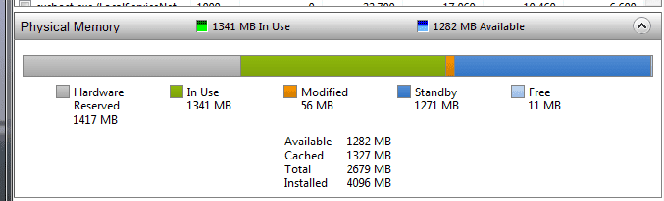
Another thing I know that can be a little less Ram than exactly is installed by in my situation it shows Total 2579
and Installed 4096. I think that is not right.
 

My Computer

OS
Windows 7 Ultimate x64
CPU
Intel(R) Core(TM)2 Quad Q6600
Motherboard
ASUS P5K Deluxe/WiFi-AP
Memory
4.00 GB
Graphics Card(s)
NVIDIA GEForce 8800 GTX
Sound Card
SoundMAX Intergrated Digital HD Audio
Monitor(s) Displays
LG Flatron Wide 22"
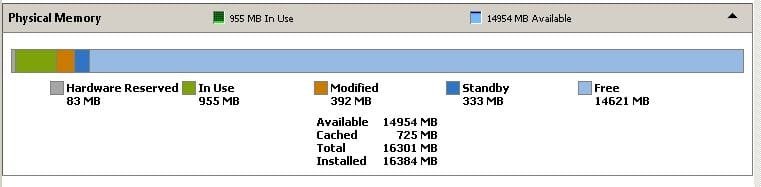
can you boot to the desktop, do start > run > resmon > memory and post a screenshot? Here's mine to show what I mean..
 

Attachments

  • tr.jpg
    tr.jpg
    19.5 KB · Views: 1

My Computer

Computer type
PC/Desktop
Computer Manufacturer/Model Number
diy
OS
Win7 pro x64
CPU
stock i7 7700k
Motherboard
Gigabyte Z270N-WIFI mini-ITX
Memory
Corsair Vengeance LPX 16GB (2x8GB) DDR4 @ 3200MHz
Graphics Card(s)
integrated Intel HD 630
Sound Card
onboard Realtek ALC1220
Monitor(s) Displays
two vertically mounted samsung 55" 4k un55mu8000
Screen Resolution
1920x1280
Hard Drives
256GB Samsung EVO 960 M.2 pci-e NVMe SSD
PSU
SilverStone Nightjar ST45NF 450Watt Fanless
Case
No case. Motherboard is mounted directly onto power supply
Cooling
Evercool low profile 815EP with Panaflow 12L fan at 7v
Keyboard
Ortek MCK-86 mini
Mouse
Belkin 5-button USB
Internet Speed
spectrum 400mbps
Ram

It is.
 

Attachments

  • Untitled.png
    Untitled.png
    11.5 KB · Views: 55

My Computer

OS
Windows 7 Ultimate x64
CPU
Intel(R) Core(TM)2 Quad Q6600
Motherboard
ASUS P5K Deluxe/WiFi-AP
Memory
4.00 GB
Graphics Card(s)
NVIDIA GEForce 8800 GTX
Sound Card
SoundMAX Intergrated Digital HD Audio
Monitor(s) Displays
LG Flatron Wide 22"
Hi,
It's a large hardware reserved soaking the rest up :/
 

My Computer

Computer type
PC/Desktop
Computer Manufacturer/Model Number
Custom assembled by me :}
OS
Win-7-Pro64bit 7-H-Prem-64bit
CPU
i7-5930K 2nd i9-9940x both water blocked VRM's too
Motherboard
ASUS SABERTOOTH X99 2nd ASUS x299 Apex
Memory
Trident-z 3200C14 2nd Trident-z 3600C16
Graphics Card(s)
EVGA 1080ti ftw3 2nd Titan Xp both water blocked
Sound Card
Built-in Realtek
Monitor(s) Displays
1-AOC G2460PG 24"G-Sync 144Hz/ 2nd 1-ASUS VG248QE 24" 144Hz
Screen Resolution
1920 x 1080 144Hz
Hard Drives
2-Samsung M.2 Evo & Evo Plus
2-Samsung 850 EVO 500GB SSD's/ 3-2.5 W.D. Black 1tb-&3-1tb/3-3.5 WD Black 1tb hdd's
PSU
EVGA SuperNOVA 1000-P2 2nd 1200-P2
Case
2-Corsair Obsidian Series 450D Black ATX Mid Tower
Cooling
Custom water loops
Keyboard
Logitech G710+/ 2nd Logitech G910
Mouse
2-RedDragon M901 Perdition 16400 dpi Gaming mouse = wired
Internet Speed
Comcast Ping 19ms 89.31mbps download speed 6.12mbps upload
Antivirus
Malwarebytes Pro/ Superantispyware Pro
Browser
FireFox & Pale moon
Other Info
2nd ASUS X299 Apex/Intel i9-9940x with Custom water loop/7H-Prem-x64/Corsair 450D case/Ram Trident-z 3600C16 4x8gb / Samsung970Evo plus 500gb SSD/Dual ssd EZ swap evo/PSU EVGA SuperNova 1200w-P2 80+Platinum/GPU Titan Xp /8-ML-140 on push-pull on 2-280GTX rads
!

and what I supposed to do with this?:banghead:
 

My Computer

OS
Windows 7 Ultimate x64
CPU
Intel(R) Core(TM)2 Quad Q6600
Motherboard
ASUS P5K Deluxe/WiFi-AP
Memory
4.00 GB
Graphics Card(s)
NVIDIA GEForce 8800 GTX
Sound Card
SoundMAX Intergrated Digital HD Audio
Monitor(s) Displays
LG Flatron Wide 22"
The amount available is within reason, considering you at using a 64 bit OS, which uses more of the available RAM than a 32 bit OS does, along with other hardware RAM requirements. With a 32 bit OS generally 3 to 3.5 GB out of 4 GB is available (but can be less than 3GB depending on hardware).

If the PC hardware will accept more than 4GB of RAM, increasing the RAM should be considered (and the best option).
 

My Computer

Computer type
PC/Desktop
Computer Manufacturer/Model Number
My Own Build
OS
Windows 10 64 bit
CPU
Intel i7 6700K
Motherboard
ASUS ROG Maximus VIII Hero
Memory
16GB Corsair Dominator
Graphics Card(s)
Intel CPU Graphics
Sound Card
RealTek
Monitor(s) Displays
27" Dell S2719dgf
Screen Resolution
2560X1440
Hard Drives
1 TB Samsung 850 EVO SSD for Win 10 Pro
500GB Samsung 850 EVO SSD for Win 10 Insider
2 TB drive for backup
PSU
EVGA Supernova 750G2
Case
BeQuiet Silent Base 600
Cooling
Deepcool Captain 120EX
Keyboard
Microsoft Wireless 2000
Mouse
Microsoft wireless
Internet Speed
100 MB/sec (Cable)
Antivirus
Microsoft Defender and Malwarebytes
Browser
Edge/Firefox
Other Info
Cakewalk (Sonar) by BandLab and Studio One 4.1 Pro recording studio software. MOTU 896Mk3 Hybrid recording interface, Frontier Tranzport wireless control unit, Behringer X-Touch Control Surface.
Five USB connected optical drives for CD Audio production using Nero BurningROM
google "hardware reserved memory" to find troubleshooting ideas.

motherboard's are picky about dimm order AND dimm types. try swapping out dimms and rebooting to recheck hardware reserved. also try changing order. also check memory compatibility info on motherboard type for your specific dimms. also check motherboard manual for dimm order info.

freeware cpu-z under memory > spd will show you specific dimm info for each memory stick
 

My Computer

Computer type
PC/Desktop
Computer Manufacturer/Model Number
diy
OS
Win7 pro x64
CPU
stock i7 7700k
Motherboard
Gigabyte Z270N-WIFI mini-ITX
Memory
Corsair Vengeance LPX 16GB (2x8GB) DDR4 @ 3200MHz
Graphics Card(s)
integrated Intel HD 630
Sound Card
onboard Realtek ALC1220
Monitor(s) Displays
two vertically mounted samsung 55" 4k un55mu8000
Screen Resolution
1920x1280
Hard Drives
256GB Samsung EVO 960 M.2 pci-e NVMe SSD
PSU
SilverStone Nightjar ST45NF 450Watt Fanless
Case
No case. Motherboard is mounted directly onto power supply
Cooling
Evercool low profile 815EP with Panaflow 12L fan at 7v
Keyboard
Ortek MCK-86 mini
Mouse
Belkin 5-button USB
Internet Speed
spectrum 400mbps
!

I swap a dimms already before. It didn't help. My Memory sticks there are identical (the same company, the same kind, each of them is 1GB) and order how they will be install on motherboard is not important, but still I try to put them in different slots and again nothing. .
 

My Computer

OS
Windows 7 Ultimate x64
CPU
Intel(R) Core(TM)2 Quad Q6600
Motherboard
ASUS P5K Deluxe/WiFi-AP
Memory
4.00 GB
Graphics Card(s)
NVIDIA GEForce 8800 GTX
Sound Card
SoundMAX Intergrated Digital HD Audio
Monitor(s) Displays
LG Flatron Wide 22"
check here to see if your specific dimms are listed. If you cannot find them on this page, you are using memory that is not supported for your motherboard. Usually that is not a big deal, but sometimes it is

http://dlcdnet.asus.com/pub/ASUS/mb/socket775/P5K%20Deluxe/P5K_Deluxe_WiFi-AP_QVL.pdf

I believe its likely that your dimms and motherboard are not getting along. What you need to do is take some time to swap out dimms and try several configurations of them. Like boot with just two, then check resource monitor, make a note of what you see. Then boot with just the other two, check resmon again. MAKE SURE you are using the slots exactly as your motherboard manual says to. If you do this over and over with different dimm configurations and keep getting the same results, you can rule out the dimms/motherboard hardware compatibility as the issue.

I get that you have already tried different orders for dimm placement, but that's not the problem since they are all the same like you said. The problem is probably just with one or two of the dimms so you need to try them two at a time using the motherboard placement instructions, then one at a time, and keep checking resmon each time, to find out which dimms your motherboard likes and which ones it does not like.

Have you tried booting from a usb with memtest86 on it? It may take a few hours to run.

MemTest86 - Download now!
 

My Computer

Computer type
PC/Desktop
Computer Manufacturer/Model Number
diy
OS
Win7 pro x64
CPU
stock i7 7700k
Motherboard
Gigabyte Z270N-WIFI mini-ITX
Memory
Corsair Vengeance LPX 16GB (2x8GB) DDR4 @ 3200MHz
Graphics Card(s)
integrated Intel HD 630
Sound Card
onboard Realtek ALC1220
Monitor(s) Displays
two vertically mounted samsung 55" 4k un55mu8000
Screen Resolution
1920x1280
Hard Drives
256GB Samsung EVO 960 M.2 pci-e NVMe SSD
PSU
SilverStone Nightjar ST45NF 450Watt Fanless
Case
No case. Motherboard is mounted directly onto power supply
Cooling
Evercool low profile 815EP with Panaflow 12L fan at 7v
Keyboard
Ortek MCK-86 mini
Mouse
Belkin 5-button USB
Internet Speed
spectrum 400mbps
OK, I'm going to try again. I didn't mention this, I didn't notice in which moment but everything was ok (I never checked Ram) because everything was working perfect but in one moment my computer start to work strange and slow, and this was when I started to look for reason and I checked Ram. My Memory sticks Are The same and my motherboard is taking them doesn't matter which way and before when I bought them I check which one is good for my motherboard.

P.S.
They were working perfect without problems before and I'm not pro but I think that maybe I did or somehow something happened in the configuration.
This is no my original computer this is another one which I can use now.
My motherboard is a Asus PTGD1-LA (Goldfish3) and know is old one but this is what I can use now and I need to solve this problem.
 

My Computer

OS
Windows 7 Ultimate x64
CPU
Intel(R) Core(TM)2 Quad Q6600
Motherboard
ASUS P5K Deluxe/WiFi-AP
Memory
4.00 GB
Graphics Card(s)
NVIDIA GEForce 8800 GTX
Sound Card
SoundMAX Intergrated Digital HD Audio
Monitor(s) Displays
LG Flatron Wide 22"
!

The same "story".:cry:
 

My Computer

OS
Windows 7 Ultimate x64
CPU
Intel(R) Core(TM)2 Quad Q6600
Motherboard
ASUS P5K Deluxe/WiFi-AP
Memory
4.00 GB
Graphics Card(s)
NVIDIA GEForce 8800 GTX
Sound Card
SoundMAX Intergrated Digital HD Audio
Monitor(s) Displays
LG Flatron Wide 22"
That much hardware reserve can be caused by mismatch ram, ram installed incorrectly, bad ram slots or bad ram.

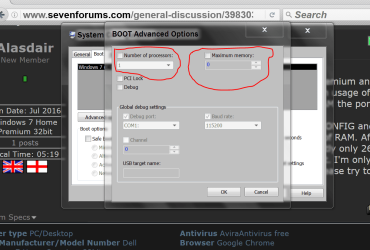
Check this on your system. It should be as mine.


msconfig Boot advanced options.PNG


Jack
 

My Computer

Computer type
PC/Desktop
Computer Manufacturer/Model Number
Home made Desktop
OS
Windows 10 Pro. 64/ version 1709 Windows 7 Pro/64
CPU
Intel i7-6800K @ 4.3
Motherboard
ASUS X-99 Deluxe II
Memory
Corsair Platinum 16 gig @2400
Graphics Card(s)
EVGA GTX 1070 OC
Monitor(s) Displays
Asus 27" LED LCD/VE278Q
Screen Resolution
1920-1080 or 1280-720 HDMI
Hard Drives
INTEL SSD 730-240 Gb Sata 3.0/
PSU
EVGA Platium 1200W
Case
Phanteks Luxe Tempered Glass 8 fans/ one radiator
Cooling
XSPC/ Water Cooled CPU
Keyboard
Das 4 Professional
Mouse
Logitech M705/MX Anywhere 2-S
Internet Speed
100 mbits
Antivirus
Microsoft Security Essentials/ Malwarebytes Premium 3.0/ SAS
Browser
I.E. 11 default/Firefox/ ISP Time Warner Cable/Spectrum
Other Info
LG BluRay Burner/
Sound system-KLipsch-THX/
Icy Dock ssd Hot Swap bays.
!

What I suppose to do?
 

My Computer

OS
Windows 7 Ultimate x64
CPU
Intel(R) Core(TM)2 Quad Q6600
Motherboard
ASUS P5K Deluxe/WiFi-AP
Memory
4.00 GB
Graphics Card(s)
NVIDIA GEForce 8800 GTX
Sound Card
SoundMAX Intergrated Digital HD Audio
Monitor(s) Displays
LG Flatron Wide 22"
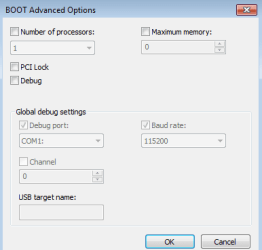
Check your Boot Advanced Option as per my picture.

Post a picture as I did of your Boot Advance Options.

Jack
 

My Computer

Computer type
PC/Desktop
Computer Manufacturer/Model Number
Home made Desktop
OS
Windows 10 Pro. 64/ version 1709 Windows 7 Pro/64
CPU
Intel i7-6800K @ 4.3
Motherboard
ASUS X-99 Deluxe II
Memory
Corsair Platinum 16 gig @2400
Graphics Card(s)
EVGA GTX 1070 OC
Monitor(s) Displays
Asus 27" LED LCD/VE278Q
Screen Resolution
1920-1080 or 1280-720 HDMI
Hard Drives
INTEL SSD 730-240 Gb Sata 3.0/
PSU
EVGA Platium 1200W
Case
Phanteks Luxe Tempered Glass 8 fans/ one radiator
Cooling
XSPC/ Water Cooled CPU
Keyboard
Das 4 Professional
Mouse
Logitech M705/MX Anywhere 2-S
Internet Speed
100 mbits
Antivirus
Microsoft Security Essentials/ Malwarebytes Premium 3.0/ SAS
Browser
I.E. 11 default/Firefox/ ISP Time Warner Cable/Spectrum
Other Info
LG BluRay Burner/
Sound system-KLipsch-THX/
Icy Dock ssd Hot Swap bays.
!

When was unchecked was O
When was checked was 4096
 

Attachments

  • 1.png
    1.png
    12.3 KB · Views: 32
  • 2.png
    2.png
    9 KB · Views: 32

My Computer

OS
Windows 7 Ultimate x64
CPU
Intel(R) Core(TM)2 Quad Q6600
Motherboard
ASUS P5K Deluxe/WiFi-AP
Memory
4.00 GB
Graphics Card(s)
NVIDIA GEForce 8800 GTX
Sound Card
SoundMAX Intergrated Digital HD Audio
Monitor(s) Displays
LG Flatron Wide 22"
Leave them unchecked. That should help.
Reboot and post another picture like your post #7.

Jack
 

My Computer

Computer type
PC/Desktop
Computer Manufacturer/Model Number
Home made Desktop
OS
Windows 10 Pro. 64/ version 1709 Windows 7 Pro/64
CPU
Intel i7-6800K @ 4.3
Motherboard
ASUS X-99 Deluxe II
Memory
Corsair Platinum 16 gig @2400
Graphics Card(s)
EVGA GTX 1070 OC
Monitor(s) Displays
Asus 27" LED LCD/VE278Q
Screen Resolution
1920-1080 or 1280-720 HDMI
Hard Drives
INTEL SSD 730-240 Gb Sata 3.0/
PSU
EVGA Platium 1200W
Case
Phanteks Luxe Tempered Glass 8 fans/ one radiator
Cooling
XSPC/ Water Cooled CPU
Keyboard
Das 4 Professional
Mouse
Logitech M705/MX Anywhere 2-S
Internet Speed
100 mbits
Antivirus
Microsoft Security Essentials/ Malwarebytes Premium 3.0/ SAS
Browser
I.E. 11 default/Firefox/ ISP Time Warner Cable/Spectrum
Other Info
LG BluRay Burner/
Sound system-KLipsch-THX/
Icy Dock ssd Hot Swap bays.
Back
Top