- Local time
- 3:44 PM
- Messages
- 4,563
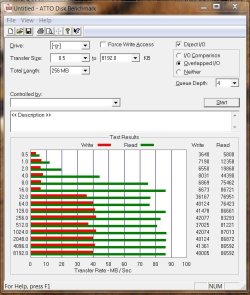
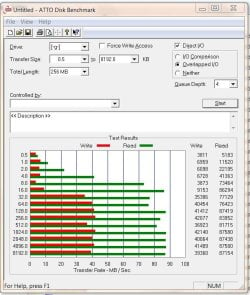
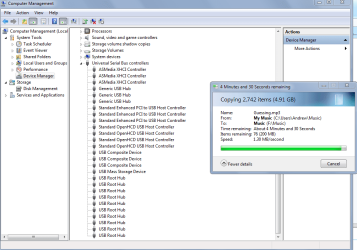
Hi everyone. I am having a major issue with slow USB speeds (1.30MB/second usb 3.0). I thought I had solved it but apparently not. Slow speeds occur on every USB port.
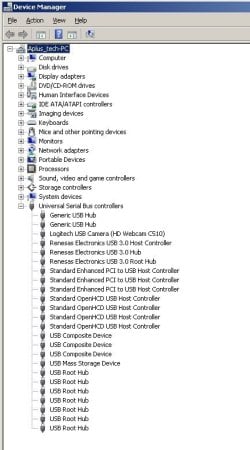
I have attached a screenshot of my device manger and the usb ports that are no my system.
Note: I have no hubs or anything installed like that. All usb ports are built in on motherboard except my four front ports on my case, that is directly connected to usb 3.0 adapter on the motherboard.
*Yes there are a mix of usb3.0 and usb 2.0 sorry.*
Anyways, this is what I have done:
1.) Selected better performance for flash drives and my external hard drive.
2.) Disabled usb selective suspend. Set power options to performance before that.
3.) Uninstalled ALL (including hidden devices ones) usb devices.
4.) Made sure bios is up to date - it is. Made sure settings for usb devices was all enabled and set to fastest setting.
5.) Reinstalled Windows 7 pro sp1 x64
6.) Have all windows updates and optional.
7.) USB drivers are up to date for both times before reinstall and after.
8.) I have tried disabling my avast antivirus when copying files, still no luck.
9.) Under device manager I have checked power management tab for ALL usb devices and disabled it from turning off the device to save power...
Anyone have any ideas? I am out of them....
PS Thanks again.
I have attached a screenshot of my device manger and the usb ports that are no my system.
Note: I have no hubs or anything installed like that. All usb ports are built in on motherboard except my four front ports on my case, that is directly connected to usb 3.0 adapter on the motherboard.
*Yes there are a mix of usb3.0 and usb 2.0 sorry.*
Anyways, this is what I have done:
1.) Selected better performance for flash drives and my external hard drive.
2.) Disabled usb selective suspend. Set power options to performance before that.
3.) Uninstalled ALL (including hidden devices ones) usb devices.
4.) Made sure bios is up to date - it is. Made sure settings for usb devices was all enabled and set to fastest setting.
5.) Reinstalled Windows 7 pro sp1 x64
6.) Have all windows updates and optional.
7.) USB drivers are up to date for both times before reinstall and after.
8.) I have tried disabling my avast antivirus when copying files, still no luck.
9.) Under device manager I have checked power management tab for ALL usb devices and disabled it from turning off the device to save power...
Anyone have any ideas? I am out of them....
PS Thanks again.
Attachments
Last edited:
My Computer
- Computer type
- PC/Desktop
- Computer Manufacturer/Model Number
- Custom Built
- OS
- Windows 10 Pro
- CPU
- AMD Ryzen 5 2400G Processor with Radeon RX Vega 11 Graphics
- Motherboard
- ASRock X470 Master SLI/AC AM4 AMD Promontory X470 SATA 6Gb/s
- Memory
- G.SKILL Ripjaws V Series 16GB (2 x 8GB) 288-Pin DDR4 SDRAM D
- Graphics Card(s)
- 2047MB NVIDIA GeForce GTX 1060 6GB (EVGA)
- Sound Card
- Motherboard Built in
- Monitor(s) Displays
- Acer R240HY bidx 23.8-Inch IPS HDMI DVI VGA (1920 x 1080) Wi
- Screen Resolution
- 1920 x 1080
- Hard Drives
- 1TB Sandisk SSD PLUS (Main drive)
500 GB Seagate 7200 RPM (Games)
500 GB Western Digital 7200 RPM (Virtual Machines)
- PSU
- CORSAIR TX Series TX650M 650W 80+ Gold Modular Power Supply
- Case
- CORSAIR CARBIDE SPEC-02 Mid-Tower Gaming Case, Red LED Fan
- Cooling
- 220mm, two 120mm, and four 60mm fans
- Keyboard
- Wired Dell keyboard
- Mouse
- Wireless Logitech mouse
- Internet Speed
- 250mb down, 30mb up
- Antivirus
- Panda Cloud Antivirus
- Browser
- Chrome-ish x64
- Other Info
- Your awesome for reading this.