Solved Reinstalled Windows 7 Multi-Partition Drive (Basic Disk now Dynamic)

From earlier in the thread. You should read it. Show me where he says he doesn't have an OS on the HD. :confused: It looks alike any other Win7 HD that's been converted to Dynamic.

The solution is to boot PW 4.2 to delete the extra partition which tipped it to Dynamic and then convert the Disk back to Basic.

OP didn't delete the partition first so got PW error when trying to Convert, plugged in another Win7 HD to install Easeus which Home Edition also will convert to Basic. This has caused great confusion.

I was waiting to see if he wants to start up the disk he converted back to Basic.
 
I did read it, funnyman, I was talking about this pic from post #12, according to that, there is no longer an OS on the drive that was converted to dynamic and back again to basic. I was just telling him how to cleanup drive 1.
 
Last edited:

My Computer

Computer type
PC/Desktop
Computer Manufacturer/Model Number
Skylake Special #666
OS
Windows 10 Pro x64
CPU
Intel Core i7 6700K
Motherboard
Asus Sabertooth Z170 Mark 1
Memory
GSkill TridentZ RGB 16GB 3600 16-16-16-36
Graphics Card(s)
EVGA GTX 980 Ti SC x2
Sound Card
Realtek High Definition
Monitor(s) Displays
AOC G2460PG
Screen Resolution
1920 x 1080 144Hz
Hard Drives
Samsung 860 Pro 256GB, Seagate Barracuda 4TB x2
PSU
EVGA 1000 P2, EVGA White Custom Braided Cables
Case
Corsair Vengeance C70 Gunmetal Black
Cooling
Corsair H100i v2, Corsair ML120 x2, Thermal Grizzly Kryonaut
Keyboard
Logitech G910 Orion Spectrum
Mouse
Logitech G700s
Internet Speed
Verizon Fios Quantum Gateway 75/75
Antivirus
Windows Defender, Malwarebytes Free 3.8.3
Browser
Chrome
Other Info
Corsair SP120 x4, LG Blu-ray Drive, Durabrand HT-395 100 Watt Dolby Digital Amp, Corsair H2100 Wireless 7.1 Headset
The pic does not show that there is no longer an OS on Disk1. It shows that the former C is now Logical after conversion. That does not mean it cannot still have Win7 on it, or that it cannot boot. It needs the System flag returned to SysReserved to boot however - it may merely not be showing, or it may require Startup Repair with Disk0 unplugged and marked Active. I gave him these steps earlier in Post 14 and was waiting to see if he'd gotten around to them.

We get 3-4 of these per week, every week for nearly 4 years. So it is not unfamilar territory and always is recoverable if the OP will work with us.
 
Ok guys I just saw what gregrocker mentioned.

Disk1 still has Windows7 on WD1TB_C, but apprently after running EaseUS, it has become a logical drive and lost the (Boot, Page File, Crash Dump, Primary Partition) flag? Is that correct gregrocker?

Rather then continue to recover, since I have the drive backed up, I would like your advice on how to partition Disk1 going forward.

Disk0 is just an additional drive I keep around when installing a new OS so lets remove that from the equation.

I have another hard drive that once I solve the windows 7 install issue I will be reconnecting. This drive has Windows XP x64, its my backup drive. In the case of something failing with Disk1, I boot into this via the bios and still be able to do work.

Now back to Disk1.
I would like to have 4 partitions,
1. OS
2. Programs
3. Docs
4. Docs

Which now leads me to this question. If I setup 4 partitions as stated above, does the "System Reserved" which windows 7 creates, count against the 4 limit?
 

My Computer

OS
Windows XP
CPU
Q9550
Motherboard
Gigabyte UD3P
Memory
8GB
Graphics Card(s)
ATI 3850
Sound Card
Audigy
No, what was lost somehow was the System flag on Disk1's System Reserved drive which tells us it was booting C. The other flags you mention are not there now because it is not booted, in fact another Drives' OS is booted from its System Reserved partition.

Did you read the steps I gave you to start it up again: in Disk mgmt mark System Reserved on Disk1 Active, unplug Disk0 then run http://www.sevenforums.com/tutorials/105541-startup-repair-run-3-separate-times.html?. This is likely all you need to start it now since Win7 can be on a Logical partiiton as long as the System Reserved boot partition is Primary.

You have no worries about partition limitations if you're using Logical partitions, which can have as many adjacent Logical partitions as you want.
 
Question 1. do all those partitions have data you want to keep on them ?
 

My Computer

Computer type
PC/Desktop
Computer Manufacturer/Model Number
Skylake Special #666
OS
Windows 10 Pro x64
CPU
Intel Core i7 6700K
Motherboard
Asus Sabertooth Z170 Mark 1
Memory
GSkill TridentZ RGB 16GB 3600 16-16-16-36
Graphics Card(s)
EVGA GTX 980 Ti SC x2
Sound Card
Realtek High Definition
Monitor(s) Displays
AOC G2460PG
Screen Resolution
1920 x 1080 144Hz
Hard Drives
Samsung 860 Pro 256GB, Seagate Barracuda 4TB x2
PSU
EVGA 1000 P2, EVGA White Custom Braided Cables
Case
Corsair Vengeance C70 Gunmetal Black
Cooling
Corsair H100i v2, Corsair ML120 x2, Thermal Grizzly Kryonaut
Keyboard
Logitech G910 Orion Spectrum
Mouse
Logitech G700s
Internet Speed
Verizon Fios Quantum Gateway 75/75
Antivirus
Windows Defender, Malwarebytes Free 3.8.3
Browser
Chrome
Other Info
Corsair SP120 x4, LG Blu-ray Drive, Durabrand HT-395 100 Watt Dolby Digital Amp, Corsair H2100 Wireless 7.1 Headset
AddRam, yes Disk1 and all the partitions have data on them I would like to keep. But I do have them backed up externally so I could blank the whole drive and start fresh.

greg, I am in disk management and when I right clock on Disk1 "System Reserved" the "Mark Partition as Active" is greyed out.

Question: Does the "System Reserved" which windows 7 creates, count against the 4 limit?
 

My Computer

OS
Windows XP
CPU
Q9550
Motherboard
Gigabyte UD3P
Memory
8GB
Graphics Card(s)
ATI 3850
Sound Card
Audigy
Of course it counts, it`s a primary partition. You can`t have more then 4 primarys on a windows hard drive.

Well, if you want I would install partition wizard on your original C windows partition and use it to delete disk 1 down to unallocated space. Then make 4 new primary partitions ( and please make the 1st one at least 150 GB ). And mark the 1st partition active using Partition Wizard. Then unplug the C D drive ( disk 0 ) and then install windows to the first 150 GB partrition. It should then be perfect and you will have 4 primary partitions.

When done make sure the new drive is plugged into ide 1 port or sata 1 port, on the motherboard.
 

My Computer

Computer type
PC/Desktop
Computer Manufacturer/Model Number
Skylake Special #666
OS
Windows 10 Pro x64
CPU
Intel Core i7 6700K
Motherboard
Asus Sabertooth Z170 Mark 1
Memory
GSkill TridentZ RGB 16GB 3600 16-16-16-36
Graphics Card(s)
EVGA GTX 980 Ti SC x2
Sound Card
Realtek High Definition
Monitor(s) Displays
AOC G2460PG
Screen Resolution
1920 x 1080 144Hz
Hard Drives
Samsung 860 Pro 256GB, Seagate Barracuda 4TB x2
PSU
EVGA 1000 P2, EVGA White Custom Braided Cables
Case
Corsair Vengeance C70 Gunmetal Black
Cooling
Corsair H100i v2, Corsair ML120 x2, Thermal Grizzly Kryonaut
Keyboard
Logitech G910 Orion Spectrum
Mouse
Logitech G700s
Internet Speed
Verizon Fios Quantum Gateway 75/75
Antivirus
Windows Defender, Malwarebytes Free 3.8.3
Browser
Chrome
Other Info
Corsair SP120 x4, LG Blu-ray Drive, Durabrand HT-395 100 Watt Dolby Digital Amp, Corsair H2100 Wireless 7.1 Headset
Yes, System Reserved must be Primary so it counts as one of the maximum four Primary you may have, before one must be converted to Logical so you can add as many Logical as you want.

Unplug Disk0 and attempt to boot Disk1 now. Make sure it's set first HD to boot in BIOS setup, after DVD drive.

If it won't boot, boot into WIn7 DVD, on second screen select Repair My Computer. Does it find a WIn7 installation to Repair? If not click through to http://www.sevenforums.com/tutorials/668-system-recovery-options.html to open a Command Line, type:

DISKPART
LIST DISK
SEL DIS # (Win7 HD # from list)
LIST PARTITION
SEL Part # (System Reserved partition # from list - should be first)
ACTIVE
EXIT

Now close Command Box and from Recovery Options run Startup Repair up to 3 separate times with reboots until Win7 starts.
 
AddRam,

Just want to review so I understand what you are saying. Install Partition Wizard on Disk0, Delete Disk1 to unallocated space. Then make 4 new Primary Partitions (C D E F) and make (C:OS7) 150 GB and mark it ACTIVE using partition wizard.

^ The above should all be done from within my current windows setup.

Now you mentioned unplugging (Disk0) and then installing windows to the first 150GB partition. I am assuming I would shut down windows and then unplug and the boot from the Windows 7 boot DVD.

I have been reading about the "System Reserved", with the setup above I would lose that. Can you tell me what the pro's and con's are if I go this route? Not sure how recovery would work.

After I finish setting up the drive (Install Windows 7 and updates and drivers), I plan on running Acronis Media Rescue Disk 2011, and making a full copy of Disk1 C Drive.
 

My Computer

OS
Windows XP
CPU
Q9550
Motherboard
Gigabyte UD3P
Memory
8GB
Graphics Card(s)
ATI 3850
Sound Card
Audigy
Yes that`s correct. You don`t have any recovery on that drive, you don`t need a system reserved partition.

Nite :sleepy:
 

My Computer

Computer type
PC/Desktop
Computer Manufacturer/Model Number
Skylake Special #666
OS
Windows 10 Pro x64
CPU
Intel Core i7 6700K
Motherboard
Asus Sabertooth Z170 Mark 1
Memory
GSkill TridentZ RGB 16GB 3600 16-16-16-36
Graphics Card(s)
EVGA GTX 980 Ti SC x2
Sound Card
Realtek High Definition
Monitor(s) Displays
AOC G2460PG
Screen Resolution
1920 x 1080 144Hz
Hard Drives
Samsung 860 Pro 256GB, Seagate Barracuda 4TB x2
PSU
EVGA 1000 P2, EVGA White Custom Braided Cables
Case
Corsair Vengeance C70 Gunmetal Black
Cooling
Corsair H100i v2, Corsair ML120 x2, Thermal Grizzly Kryonaut
Keyboard
Logitech G910 Orion Spectrum
Mouse
Logitech G700s
Internet Speed
Verizon Fios Quantum Gateway 75/75
Antivirus
Windows Defender, Malwarebytes Free 3.8.3
Browser
Chrome
Other Info
Corsair SP120 x4, LG Blu-ray Drive, Durabrand HT-395 100 Watt Dolby Digital Amp, Corsair H2100 Wireless 7.1 Headset
You have decided to abandon Win7 we were trying to help you save?

I want you to understand clearly that this is not necessary. It is fully recoverable as has been every accidental conversion to Dynamic we have helped with here, 3-4 per week for four years.

However not one of these hundreds of users we've helped has been as impossible as you have been to help, so if you want to give up just realize it's only necessary because of that.
 
Gregrocker, I am going to give your last post a try right now. I'll post once I am back up.

If the System Recovery counts as one of the 4 max limit, then since I started using Windows 7 my drive must have been "Dynamic". This is what is very confusing to me. Originally when I did Disk1 everything went smooth. I then ran Acronis and backed up the drive. Now I am pretty sure, Acronis DOES NOT recognize Dynamic disks without one of there add-on packs. Which I didn't have. I really should have taken a look at Windows "Disk Management" after I did the drive. 50/50 hinde sight.
 

My Computer

OS
Windows XP
CPU
Q9550
Motherboard
Gigabyte UD3P
Memory
8GB
Graphics Card(s)
ATI 3850
Sound Card
Audigy
It will not normally boot if it's converted to Dynamic. Something must have tipped it to convert, which is almost always adding the fifth partition in Disk Mgmt.

If you are going to try to repair it then I will wait to hear back from you. I stayed in for my Saturday night to help you. It' is 1:30 am here.
 
AddRam, Yes sorry I should have used the current partition names, I will be making the above changes to "WD1TB_C" it might not be C: untill all is said and done.

I am going to try to save the drive as per gregrockers instructions first.
 

My Computer

OS
Windows XP
CPU
Q9550
Motherboard
Gigabyte UD3P
Memory
8GB
Graphics Card(s)
ATI 3850
Sound Card
Audigy
Repair

Ok so posting from my laptop.

Disconnected Disk0, and now only Disk1 is connected.

Booted and Windows 7 gave me:
Windows failed to start. A recent hardware or software change might be the cause.
1. Insert your Windows installation disc and restart the computer.
2. Choose your language settings and click next.
3. Click "repair your computer"
...
Status:0xc0000225
Info: The boot device failed because a required device is inaccessible.

Inserted Windows 7 DVD and rebooted.
Got to the "Repair your computer" option.
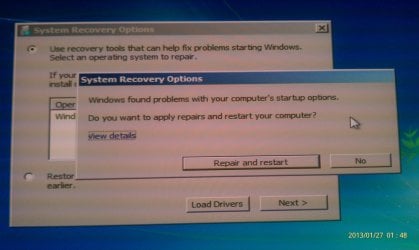
It scanned and is giving me a pop up saying:
System Recovery Options
- Windows found problems with your computer's startup options. Do you want to apply repairs and restart your computer? View Details
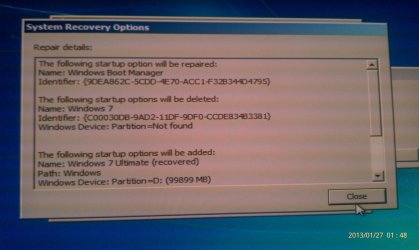
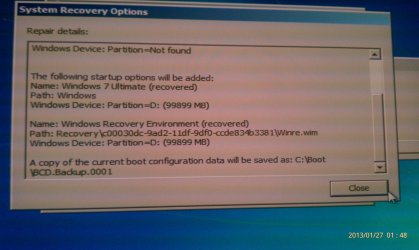
-View Details Gives me a bunch messages.

I am going to put up the screen shots. Not sure what to do next.
 

Attachments

  • IMAG1163.jpg
    IMAG1163.jpg
    460.6 KB · Views: 1
  • IMAG1164.jpg
    IMAG1164.jpg
    422 KB · Views: 1
  • IMAG1165.jpg
    IMAG1165.jpg
    439.9 KB · Views: 0

My Computer

OS
Windows XP
CPU
Q9550
Motherboard
Gigabyte UD3P
Memory
8GB
Graphics Card(s)
ATI 3850
Sound Card
Audigy
That may work, so accept Repair and restart to see.

If not it is Repair 1 of possibly 3 Startup Repairs with reboots needed, no matter what it reports. It is writing or rewriting the System boot files, then testing all parameters with each step.
 
hey greg,

So it rebooted into Windows 7. All partitions are showing up. The "System Reserved" is showing up as Primary. The other partitions (C D E F) are all showing up as Logical drives.

What should I do now? PS and I am seeing a little unallocated box after all the partitions too.
 

My Computer

OS
Windows XP
CPU
Q9550
Motherboard
Gigabyte UD3P
Memory
8GB
Graphics Card(s)
ATI 3850
Sound Card
Audigy
This is with all other HD's unplugged correct?

System Reserved should read System Active in Disk Mgmt. Check that now.

You can leave C Logical since WIn7 only requires its boot partition to be Primary, and it already is.

With Logical drives you can shrink to create as many new as you want, resize, extend, etc. I recommend Partition Wizard boot CD to work with Logical drives. The coolest new feature will let you redistribute space from any partition to/from any other partition or unallocated space, whether its adjacent or not: How to extend partition easily with Partition Wizard - video help.
 
greg, yes the other drive is unplugged. System Reserve is reading as "System Active"

I booted off of Partition Wizard cd and it gave me the option to change C & D into primary partitions but it would not let me do E or F.

Leaving them as a logical partitions sounds attractive. But let me ask you is there greater chance of data loss if a logical partition fails as opposed to a primary? I have been setting up my partitions as primary since XP becuase it seemed it was fully isolated if one of the other partitions was damaged.

Gredrocker and AddRam, thanks for all your help. I am sure this thread will help others out as well.
 

My Computer

OS
Windows XP
CPU
Q9550
Motherboard
Gigabyte UD3P
Memory
8GB
Graphics Card(s)
ATI 3850
Sound Card
Audigy
Back
Top