Repair Windows 7

1. make an image

2. Attempt data recovery

3. If there is something wrong with the partition parameters attempt a fix.

In that order.

There are some data recovery tools in hirens, I am not overly familiar with them. I would try the mintool powerdatarecovery but i dont see it in hirens.

I think I included it in my 17514 media.
 

My Computers

System One System Two

  • Computer type
    PC/Desktop
    OS
    7 X64
    CPU
    i5 8400
    Motherboard
    gigabyte b365m ds3h
    Memory
    2x8gb 3200mhz
    Hard Drives
    various
    PSU
    pure power 11 400w cm
    Case
    Coolermaster
    Cooling
    cryorig m9i
  • Computer type
    PC/Desktop
    OS
    7x64
    CPU
    g5400
    Motherboard
    ga b365m ds3h
    Memory
    8gb ddr4 2400
    PSU
    xfx pro 450w
@SIW2, thank you also for your time, patience and help. Okay, I will do that, just to make an image on my drive, or if I just check parameters for my raw partition, will not affect my drive? Because I guess will take some time to make an image of it.
 

My Computers

System One System Two

  • Computer type
    Laptop
    Computer Manufacturer/Model Number
    Dell
    OS
    Windows 7 Ultimate 64x
    CPU
    i5
    Memory
    8 gb
    Hard Drives
    Hdd
  • Computer type
    PC/Desktop
    Antivirus
    Avast
make an image first.

after that post a screenshot of the parameters
.will not affect my drive
no it reads the info, it does not write unless you tell it to make change.
 

My Computers

System One System Two

  • Computer type
    PC/Desktop
    OS
    7 X64
    CPU
    i5 8400
    Motherboard
    gigabyte b365m ds3h
    Memory
    2x8gb 3200mhz
    Hard Drives
    various
    PSU
    pure power 11 400w cm
    Case
    Coolermaster
    Cooling
    cryorig m9i
  • Computer type
    PC/Desktop
    OS
    7x64
    CPU
    g5400
    Motherboard
    ga b365m ds3h
    Memory
    8gb ddr4 2400
    PSU
    xfx pro 450w
Please, bare with me, just initializing Hirens, and I dont know why, each time take to much to intialized. One more thing, If I pull out hdd, and copy to computer, directly, partition C? Will be much better? Now I wrote from computer.

- - - Updated - - -

@SIW2, thanks, when I boot, I will took picture and post it here, do you need other pictures/screenshot from hiren? While initializing
 

My Computers

System One System Two

  • Computer type
    Laptop
    Computer Manufacturer/Model Number
    Dell
    OS
    Windows 7 Ultimate 64x
    CPU
    i5
    Memory
    8 gb
    Hard Drives
    Hdd
  • Computer type
    PC/Desktop
    Antivirus
    Avast
going for a workout. back in an hour or two.
 

My Computers

System One System Two

  • Computer type
    PC/Desktop
    OS
    7 X64
    CPU
    i5 8400
    Motherboard
    gigabyte b365m ds3h
    Memory
    2x8gb 3200mhz
    Hard Drives
    various
    PSU
    pure power 11 400w cm
    Case
    Coolermaster
    Cooling
    cryorig m9i
  • Computer type
    PC/Desktop
    OS
    7x64
    CPU
    g5400
    Motherboard
    ga b365m ds3h
    Memory
    8gb ddr4 2400
    PSU
    xfx pro 450w
@SIW2, okay, onjoy your workout and take care.

- - - Updated - - -

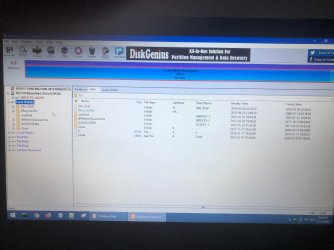
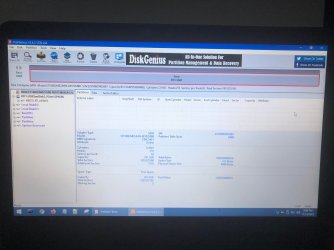
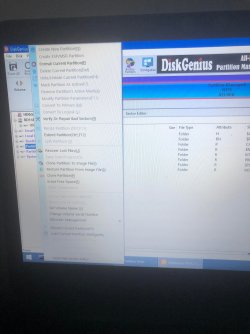
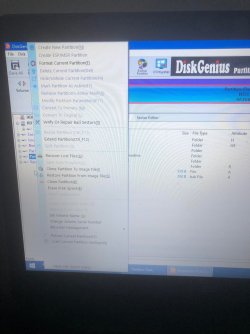
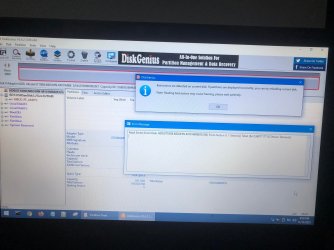
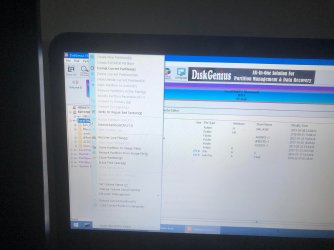
@SIW2, what Hiren do you have? Can you give me? Your program is a new version that I have. Because mine is loading very hard, I waiting for Diskgenius also few minutes :( This is what I got there, but no partition parameter option.
 

Attachments

  • 21.jpg
    21.jpg
    1.3 MB · Views: 2
  • 22.jpg
    22.jpg
    1.3 MB · Views: 1
  • 23.jpg
    23.jpg
    1.5 MB · Views: 0
  • 24.jpg
    24.jpg
    1 MB · Views: 1

My Computers

System One System Two

  • Computer type
    Laptop
    Computer Manufacturer/Model Number
    Dell
    OS
    Windows 7 Ultimate 64x
    CPU
    i5
    Memory
    8 gb
    Hard Drives
    Hdd
  • Computer type
    PC/Desktop
    Antivirus
    Avast
Rt click on the windows partition not on the disk
 

My Computers

System One System Two

  • Computer type
    PC/Desktop
    OS
    7 X64
    CPU
    i5 8400
    Motherboard
    gigabyte b365m ds3h
    Memory
    2x8gb 3200mhz
    Hard Drives
    various
    PSU
    pure power 11 400w cm
    Case
    Coolermaster
    Cooling
    cryorig m9i
  • Computer type
    PC/Desktop
    OS
    7x64
    CPU
    g5400
    Motherboard
    ga b365m ds3h
    Memory
    8gb ddr4 2400
    PSU
    xfx pro 450w
What is the best program to scan for recovery deteled files and what is the best way or program to copy files, instead of windows copy and paste, thanks :(

- - - Updated - - -

Here it is, from both partition.
 

Attachments

  • 555555.jpg
    555555.jpg
    1.4 MB · Views: 0
  • 5555555.jpg
    5555555.jpg
    1.5 MB · Views: 1

My Computers

System One System Two

  • Computer type
    Laptop
    Computer Manufacturer/Model Number
    Dell
    OS
    Windows 7 Ultimate 64x
    CPU
    i5
    Memory
    8 gb
    Hard Drives
    Hdd
  • Computer type
    PC/Desktop
    Antivirus
    Avast
Looks like diskgenius doesnt want to modify anything because it has detected bad sectors.

Have you made an image?

After that try coping out files/folders. If you cant see your files\folders the next thing is to try a data recovery program.

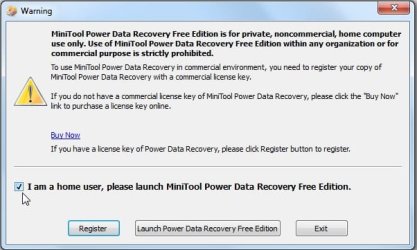
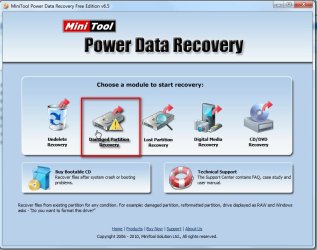
I would try this one:

pdr1.jpg

pdr2.jpg

Ther are different ones in hirens you can try.
 

My Computers

System One System Two

  • Computer type
    PC/Desktop
    OS
    7 X64
    CPU
    i5 8400
    Motherboard
    gigabyte b365m ds3h
    Memory
    2x8gb 3200mhz
    Hard Drives
    various
    PSU
    pure power 11 400w cm
    Case
    Coolermaster
    Cooling
    cryorig m9i
  • Computer type
    PC/Desktop
    OS
    7x64
    CPU
    g5400
    Motherboard
    ga b365m ds3h
    Memory
    8gb ddr4 2400
    PSU
    xfx pro 450w
No, just did that photos, and waiting for you and other answers. If I took it out, and copy files directly in other pc, would be better?
 

My Computers

System One System Two

  • Computer type
    Laptop
    Computer Manufacturer/Model Number
    Dell
    OS
    Windows 7 Ultimate 64x
    CPU
    i5
    Memory
    8 gb
    Hard Drives
    Hdd
  • Computer type
    PC/Desktop
    Antivirus
    Avast
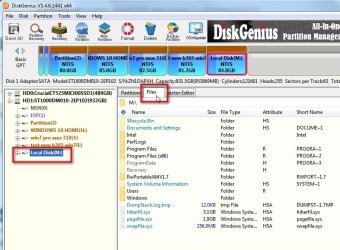
Can you see your files and folders if you click the Files tab in disk genius ?

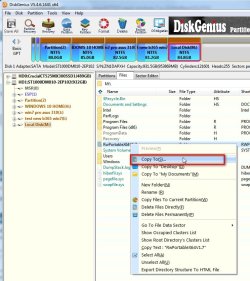
If you can see them they can be copied out by rt click any file/folder and select to copy it to your destination

dg-files1.jpg

dg-files2.jpg


If you cant see them, then you will need to try a data recovery program
 

My Computers

System One System Two

  • Computer type
    PC/Desktop
    OS
    7 X64
    CPU
    i5 8400
    Motherboard
    gigabyte b365m ds3h
    Memory
    2x8gb 3200mhz
    Hard Drives
    various
    PSU
    pure power 11 400w cm
    Case
    Coolermaster
    Cooling
    cryorig m9i
  • Computer type
    PC/Desktop
    OS
    7x64
    CPU
    g5400
    Motherboard
    ga b365m ds3h
    Memory
    8gb ddr4 2400
    PSU
    xfx pro 450w
I can see them, but not all, I dont know what else to do ... I havent sleep, just a bit. This is to much for me. And about my question?
 

My Computers

System One System Two

  • Computer type
    Laptop
    Computer Manufacturer/Model Number
    Dell
    OS
    Windows 7 Ultimate 64x
    CPU
    i5
    Memory
    8 gb
    Hard Drives
    Hdd
  • Computer type
    PC/Desktop
    Antivirus
    Avast
what question?

I think it is the same hiren that you have. I am posting my diskgenius screenhots from my current operating system, just to show you how it works.

It is probably taking a long time to load for you because of the sector damage.
 

My Computers

System One System Two

  • Computer type
    PC/Desktop
    OS
    7 X64
    CPU
    i5 8400
    Motherboard
    gigabyte b365m ds3h
    Memory
    2x8gb 3200mhz
    Hard Drives
    various
    PSU
    pure power 11 400w cm
    Case
    Coolermaster
    Cooling
    cryorig m9i
  • Computer type
    PC/Desktop
    OS
    7x64
    CPU
    g5400
    Motherboard
    ga b365m ds3h
    Memory
    8gb ddr4 2400
    PSU
    xfx pro 450w
Those: One more thing, If I pull out hdd, and copy to computer, directly, partition C? Will be much better? Now I wrote from computer. and What is the best program to scan for recovery deteled files and what is the best way or program to copy files, instead of windows copy and paste, thanks :(

- - - Updated - - -

Maybe if I try your win 7 Pe, will see al files? Because this Hiren, had windows 10.
 

My Computers

System One System Two

  • Computer type
    Laptop
    Computer Manufacturer/Model Number
    Dell
    OS
    Windows 7 Ultimate 64x
    CPU
    i5
    Memory
    8 gb
    Hard Drives
    Hdd
  • Computer type
    PC/Desktop
    Antivirus
    Avast
Maybe if I try your win 7 Pe

try it and see.

hopefully you will be able to copy directly because data recovery scan takes a long time.
 

My Computers

System One System Two

  • Computer type
    PC/Desktop
    OS
    7 X64
    CPU
    i5 8400
    Motherboard
    gigabyte b365m ds3h
    Memory
    2x8gb 3200mhz
    Hard Drives
    various
    PSU
    pure power 11 400w cm
    Case
    Coolermaster
    Cooling
    cryorig m9i
  • Computer type
    PC/Desktop
    OS
    7x64
    CPU
    g5400
    Motherboard
    ga b365m ds3h
    Memory
    8gb ddr4 2400
    PSU
    xfx pro 450w
Its okay to use Rufus for boot your Win Pe? And other 2 question, please?
 

My Computers

System One System Two

  • Computer type
    Laptop
    Computer Manufacturer/Model Number
    Dell
    OS
    Windows 7 Ultimate 64x
    CPU
    i5
    Memory
    8 gb
    Hard Drives
    Hdd
  • Computer type
    PC/Desktop
    Antivirus
    Avast
To make SIW2 Win 7 PE a boot able drive:

Open a CMD window as administrator and type:

diskpart
list disk (it will list all drives. Identify the USB drive number)
select disk n (replace n by the USB drive number obtained with list disk)
clean
convert mbr
create part primary
select part 1
format fs=fat32 quick
assign
active
exit (to exit diskpart)

On Win 7 use 7Zip to extract all files and folders from the SIW2 Win 7 PE iso file to the USB drive.
On Win 10, mount the iso file and copy all files and folders to the USB drive.

- - - Updated - - -

Your disk is dying as it has bad sectors and it can't be repaired. It is time to save all the data that is on it to an external drive.
You mentioned a Live Linux. You can use it.
 

My Computers

System One System Two

  • Computer type
    PC/Desktop
    Computer Manufacturer/Model Number
    custom build
    OS
    Windows 7 HP 64
    CPU
    i5 6600K - 800MHz to 4200MHz
    Motherboard
    GA-Z170-HD3P
    Memory
    4+4G GSkill DDR4 3000
    Graphics Card(s)
    IG - Intel 530
    Monitor(s) Displays
    Samsung 226BW
    Screen Resolution
    1680x1050
    Hard Drives
    (1) -1 SM951 – 128GB M.2 AHCI PCIe SSD drive for Windows 7 and Lubuntu
    (2) -1 WD SATA 3 - 1T for Data
    (3) -1 WD SATA 3 - 1T for backup
    PSU
    Thermaltake 450W TR2 gold
    Keyboard
    Old and good Chicony mechanical keyboard
    Mouse
    Logitech mX performance - 9 buttons (had to disable some)
    Internet Speed
    500Mb/s
    Browser
    Firefox 64
    Other Info
    TinyWall firewall
  • Computer type
    Laptop
    System Manufacturer/Model Number
    Asus Q550LF
    OS
    Windows 7 Pro
    CPU
    i7-4500U 800MHz to 3.0GHz
    Motherboard
    Asus Q550LF
    Memory
    (4+4)G DDR3 1600
    Graphics Card(s)
    IG intel 4400 + NVIDIA GeForce GT 745M
    Sound Card
    Realtek
    Monitor(s) Displays
    LG Display LP156WF4-SPH1
    Screen Resolution
    1920 x 1080
    Hard Drives
    BX500 120G SSD for Windows and programs +
    1T HDD for data
    Internet Speed
    500 Mb/s
    Browser
    Firefox
    Other Info
    TinyWall firewall
@Megahertz07, good morning, strage, because some programse show me 100% life. I will try to save files to other disk, and after hope you will help me to repair C, to try to boot in windows to save data and info from programs. Can you answer to to this? And do you know if Jumani is okay? :( One more thing, If I pull out hdd, and copy to computer, directly, partition C? Will be much better? Now I wrote from computer. and What is the best program to scan for recovery deteled files and what is the best way or program to copy files, instead of windows copy and paste, thanks :(

- - - Updated - - -

I did win 7 with Rufus, it is okay?
 

My Computers

System One System Two

  • Computer type
    Laptop
    Computer Manufacturer/Model Number
    Dell
    OS
    Windows 7 Ultimate 64x
    CPU
    i5
    Memory
    8 gb
    Hard Drives
    Hdd
  • Computer type
    PC/Desktop
    Antivirus
    Avast
Hi @sabrina,

I just had a look at this thread this morning a few hours back., say four hours back.

I think that it will not be possible to repair your System drive and make it bootable. Yes, from what I infer your disk has developed bad sectors on the C: and destroyed the master file table.

You can only try to recover data, Be aware that you will not be able to recover all data since data in bad sectors is already lost.

You had in your first post said "I managed to enter with Linux Live and it found both partitions from the hdd" Then what prevents you from copying the data to another drive?

If you are able to access the partition and see your data, copy them ASAP to another drive.

Have you cloned the whole drive?

If you have cloned the whole drive where is it now and how are you accessing it?
 

My Computer

OS
Windows 7 Home Premium 32 bit
@jumanji, good morning to you, I want first to save my files to other hdd, then if you able to help to try to rapair C, to boot again in Windows, to save data from programs. It is good if I took out hdd and mount it to a computer? And copy directly, use copy paste files and folders? Yes, I use Linux Live, and I see there data, but I didnt had stick or hdd with big capacity to save all data at that moment. And I am not frendly with Linux. I didnt copy then, because I was hopped to boot my windows again and I read something that if I use hdd, tbe MBR will overwriting so is much better to live hdd alone to find some help from profesional like you and your colleague from this forum.
What do you mean by "Have you loned the whole drive?" Sorry, my english isn`t perfect.
I did not clone it yet, how to do that? Thank you for time and help, I am very sad ...
 

My Computers

System One System Two

  • Computer type
    Laptop
    Computer Manufacturer/Model Number
    Dell
    OS
    Windows 7 Ultimate 64x
    CPU
    i5
    Memory
    8 gb
    Hard Drives
    Hdd
  • Computer type
    PC/Desktop
    Antivirus
    Avast
Back
Top