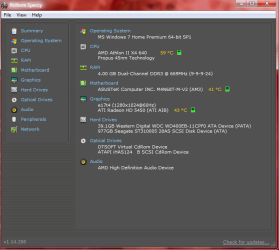
Slow to start up

So if I create a system image recovery now then go to advanced settings and "use a system image you created earlier to restore your computer" will that now just reinstall the laptop to the way it is now

Yes.

But, I think Greg meant for you to make an image as a precaution to recover from if necessary.

Then download the ISO and burn it to a DVD. Then do a clean install from that burned disc.
 

My Computer My Computer

Computer type
PC/Desktop
Computer Manufacturer/Model Number
Ignatz Special; 4 speed manual gearbox; factory air conditioning; one of one
OS
Windows 7 Home Premium SP1, 64-bit
CPU
Intel Skylake i5-6600K, not overclocked
Motherboard
AsRock Z170M Extreme 4, micro ATX
Memory
8 GB HyperX DDR4-2666 (2 x 4 GB)
Graphics Card(s)
none; graphics are integrated on CPU
Sound Card
onboard: Realtek ALC1150; external: USB Behringer UF0-202
Monitor(s) Displays
Dell S2340M 23 inch IPS
Screen Resolution
1600 x 900
Hard Drives
System: Crucial MX100 series SSD, 128 GB;
Data: Samsung Spinpoint 103SJ, 1 TB;
Backup: WD Caviar Green WD30EZRX-00D8PB0, 3 TB
PSU
Rosewill SilentNight 500 watt fanless, semi-modular
Case
Antec Solo II
Cooling
Noctua NH-U12S; Noctua F12 intake, Noctua S12A exhaust
Keyboard
Microsoft 200 6JH-00001 USB
Mouse
Dell or Microsoft optical wired; USB
Antivirus
Microsoft Security Essentials and Malwarebytes Premium
Browser
Pale Moon
Other Info
All fans PWM; speeds at idle: CPU circa 500 rpm; intake circa 600 rpm; exhaust circa 600 rpm; CPU temps 27 idle and 47 C load in a warm room (27 C/81 F) when running Intel Extreme Tuning Utility stress test.
Download ISO? What's this?
 

My Computer My Computer

OS
Windows 7 ultimate 64 bit
I just created a sys image recovery and a repair disk?
 

My Computer My Computer

OS
Windows 7 ultimate 64 bit
Save a backup image so you can start over if necessary: Backup Complete Computer - Create an Image Backup

I linked the ISO (image) file for the latest Win7 installer to download and burn to DVD or write to flash stick with the Download tool. Then follow the steps for Reinstalling Windows 7, ask back if you have any more questions.

Also remember to make your Recovery Disks so you have a path back to factory condition if you ever need it and the Recovery partition fails to run at boot using it's hotkey. This gives you two backup methods - the image and Recov Disks.

Please fill in your System Specs.
 
Last edited:
Correct. A restore from an image will always set your system back to the time the image was taken - and also your data if it was in the C: partition. That is why we recommend to store your data in a separate partition - separate from the OS partition. Then you can backup and restore dependently.

Note however, if you restore your system from a restore point (shadow), the use data will not be effected or changed.
 

My Computer My Computer

Computer Manufacturer/Model Number
HP, Dell, Gateway, Toshiba - 4 laptops and 2 desktops
OS
Vista, Windows7, Mint Mate, Zorin, Windows 8
CPU
from 1.6GHz Duo to i7
Monitor(s) Displays
2x HP w2207
Hard Drives
5x HDD, 7x SSD, 12x Externals
Keyboard
with trackball - no mices
Mouse
Trackball mice
Internet Speed
DSL 6000
Getting a bit overwhelmed here. I can't follow those instruction. This is so frustrating. It still take 4 mins to restart.

So many instructions. Can anyone dumb it down for me
 

My Computer My Computer

OS
Windows 7 ultimate 64 bit
Did you run Soluto to find out which processes are holding you up?
 

My Computer My Computer

Computer Manufacturer/Model Number
HP, Dell, Gateway, Toshiba - 4 laptops and 2 desktops
OS
Vista, Windows7, Mint Mate, Zorin, Windows 8
CPU
from 1.6GHz Duo to i7
Monitor(s) Displays
2x HP w2207
Hard Drives
5x HDD, 7x SSD, 12x Externals
Keyboard
with trackball - no mices
Mouse
Trackball mice
Internet Speed
DSL 6000
Yes, I did. I removed the things it recommended then I restarted with restart check time which said it still took 4 minutes
 

My Computer My Computer

OS
Windows 7 ultimate 64 bit
And with what instructions do you have difficulties.
 

My Computer My Computer

Computer Manufacturer/Model Number
HP, Dell, Gateway, Toshiba - 4 laptops and 2 desktops
OS
Vista, Windows7, Mint Mate, Zorin, Windows 8
CPU
from 1.6GHz Duo to i7
Monitor(s) Displays
2x HP w2207
Hard Drives
5x HDD, 7x SSD, 12x Externals
Keyboard
with trackball - no mices
Mouse
Trackball mice
Internet Speed
DSL 6000

Attachments

  • Untitled.png
    Untitled.png
    26.8 KB · Views: 7

My Computer My Computer

Computer type
PC/Desktop
Computer Manufacturer/Model Number
custom build
OS
Windows 10 64bit
CPU
AMD Phenom II X4 925 (Deneb)(2.8GHz) OC 3.4GHz
Motherboard
M5A78L-MLX Plus
Memory
Corsair Vengeance DDR3 4GBX2 (8192MB)
Graphics Card(s)
XFX HD 6870 1GB (OC)- 940MHz core, mem 1150MHz
Monitor(s) Displays
Vizio 26' 1920x1080 / Acer 1336x768
Screen Resolution
1920x1080 60Hz /1336x768
Hard Drives
Kingston Digital 60GB SSDNow V300/500gb HDD Western Digital 7200rpm (/WD 160GB HDD 7200rpm
PSU
CORSAIR CX600 600w
Case
AZZA Orion 202 EVO
Cooling
cooler master hyper TX3 cpu cooler
Keyboard
Razer DeathStalker
Mouse
Logitech Optical Gaming Mouse G400
Antivirus
Defualt on win 10
Browser
Firefox
Other Info
cpu is overclocked in bios

My Computer My Computer

Computer type
PC/Desktop
Computer Manufacturer/Model Number
Novatech iRush Pro
OS
Windows 7 Ultimate SP1 - 64 Bit
CPU
Intel Core i5 2500k
Motherboard
Foxconn H67M-S/H67M-V/H67
Memory
2x4GB DDR3 1333Hz
Graphics Card(s)
Ati Radeon 6770
Sound Card
None
Monitor(s) Displays
Samsung S22B150
Screen Resolution
1920x1080
Hard Drives
2x500GB
PSU
500W
Cooling
Fan
Keyboard
HP KU0316
Mouse
Wireless Logitech M185
Internet Speed
20MB/s
Antivirus
Avast Free
Browser
Google Chrome
Other Info
Logitech M185 Mouse
KU-M316 Keyboard
Twardy:

Decide if you want to try to repair what you have or give up on it and reinstall Windows. That's your first choice.


If you decide to do a clean install, you have several choices:

1: Reinstall with your current Windows installation disc if you have one. I'm guessing you don't.

2: Restore to factory specifications using a recovery partition or recovery disks, if you have either. I'm guessing you don't have recovery disks, but I don't know about a recovery partition.

3: Reinstall using a Windows installation disc burned from a downloaded ISO. You download the ISO from MyDigitalLife.info.

If you choose to repair rather than do a fresh installation, there are numerous possibilities and the various posts above are an attempt to troubleshoot your existing installation.
 

My Computer My Computer

Computer type
PC/Desktop
Computer Manufacturer/Model Number
Ignatz Special; 4 speed manual gearbox; factory air conditioning; one of one
OS
Windows 7 Home Premium SP1, 64-bit
CPU
Intel Skylake i5-6600K, not overclocked
Motherboard
AsRock Z170M Extreme 4, micro ATX
Memory
8 GB HyperX DDR4-2666 (2 x 4 GB)
Graphics Card(s)
none; graphics are integrated on CPU
Sound Card
onboard: Realtek ALC1150; external: USB Behringer UF0-202
Monitor(s) Displays
Dell S2340M 23 inch IPS
Screen Resolution
1600 x 900
Hard Drives
System: Crucial MX100 series SSD, 128 GB;
Data: Samsung Spinpoint 103SJ, 1 TB;
Backup: WD Caviar Green WD30EZRX-00D8PB0, 3 TB
PSU
Rosewill SilentNight 500 watt fanless, semi-modular
Case
Antec Solo II
Cooling
Noctua NH-U12S; Noctua F12 intake, Noctua S12A exhaust
Keyboard
Microsoft 200 6JH-00001 USB
Mouse
Dell or Microsoft optical wired; USB
Antivirus
Microsoft Security Essentials and Malwarebytes Premium
Browser
Pale Moon
Other Info
All fans PWM; speeds at idle: CPU circa 500 rpm; intake circa 600 rpm; exhaust circa 600 rpm; CPU temps 27 idle and 47 C load in a warm room (27 C/81 F) when running Intel Extreme Tuning Utility stress test.
To add on to what ignatzatsonic said, if you do not have a Disk you can either Burn one to a disk using Windows Built In Disk Burner or ImgBurn. Or use WinRAR/7-Zip to open the setup.exe and install without a disk, but if someone goes wrong during the install, you do not have a disk to reinstall over the faulty install unless you install to a new partition so you have a backup of your previous OS and then try installing again and deleting the partition after a successful install.

But you will need your current activation key:
Use Magic Jellybean Keyfinder or look for a sticker on your PC/Laptop.
 

My Computer My Computer

Computer type
PC/Desktop
Computer Manufacturer/Model Number
Novatech iRush Pro
OS
Windows 7 Ultimate SP1 - 64 Bit
CPU
Intel Core i5 2500k
Motherboard
Foxconn H67M-S/H67M-V/H67
Memory
2x4GB DDR3 1333Hz
Graphics Card(s)
Ati Radeon 6770
Sound Card
None
Monitor(s) Displays
Samsung S22B150
Screen Resolution
1920x1080
Hard Drives
2x500GB
PSU
500W
Cooling
Fan
Keyboard
HP KU0316
Mouse
Wireless Logitech M185
Internet Speed
20MB/s
Antivirus
Avast Free
Browser
Google Chrome
Other Info
Logitech M185 Mouse
KU-M316 Keyboard
Thanks everyone. Will have another good read and maybe have a crack. I know how to restore to factory settings
 

My Computer My Computer

OS
Windows 7 ultimate 64 bit
If I restore back to factory settings do I need to do anything to the laptop? Install any Windows 7 discs or anything or can I just start using it like its a new laptop and install updates?
 

My Computer My Computer

OS
Windows 7 ultimate 64 bit
If you are using HP Recovery or DELL Recovery from Recovery Partition, no, just make sure to back everything up.
 

My Computer My Computer

Computer type
PC/Desktop
Computer Manufacturer/Model Number
Novatech iRush Pro
OS
Windows 7 Ultimate SP1 - 64 Bit
CPU
Intel Core i5 2500k
Motherboard
Foxconn H67M-S/H67M-V/H67
Memory
2x4GB DDR3 1333Hz
Graphics Card(s)
Ati Radeon 6770
Sound Card
None
Monitor(s) Displays
Samsung S22B150
Screen Resolution
1920x1080
Hard Drives
2x500GB
PSU
500W
Cooling
Fan
Keyboard
HP KU0316
Mouse
Wireless Logitech M185
Internet Speed
20MB/s
Antivirus
Avast Free
Browser
Google Chrome
Other Info
Logitech M185 Mouse
KU-M316 Keyboard
  • Like
Reactions: JMH
Running Factory Recovery from its partition or disks will auto-activate with the factory SLP mass-activation key embedded in the Recovery partition or disks.

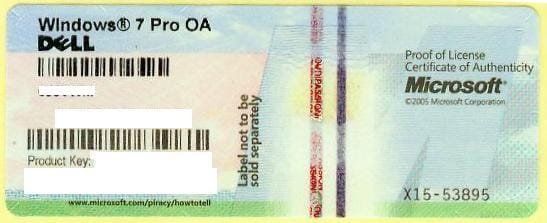
This is not the same as the key on the COA sticker which you would manually input if you clean reinstall with a Win7 installation DVD:
1270558000_86224332_1-Pictures-of--Buying-Windows-7-Prof-COA-Sticker-Only-100pcs-up-Needed.jpg

Which method you choose depends upon whether you want the preinstalled factory bloatware which came with the laptop, or want only the OS in a more lean install which is described here: Reinstalling Windows 7

Do you understand the difference? Feel free to ask back if not.

If you post your System specs as requested we could link you to the steps for running Recovery.
 
HP dv7t i7-2630 2.00ghz 8g Ram 64x bit

Thanks guys
 

My Computer My Computer

OS
Windows 7 ultimate 64 bit
Back
Top