Speeding up windows start?

Davidk101

New member
Member
Local time
9:25 AM
Messages
47
Starting windows typically takes over 3 minutes, and even then I find that occasionally,on my main desktop that seems to hangup in terms of network access, and a re-start and patience is needed.


When the start hangup happens, it's usually because I haven't waited the full 3 minutes+ before trying to do something: the PC itself seems to work, but anything on the LAN - network storage and of course the internet (modem) for browsing or mail are just not responsive. Other laptops on the same network seem able to access both these things when the desktop can't, so it seems that some part of the windows start on the desktop involving network access is being interrupted: speeding that up may avoid the network (in)access issue.


Is there any way to speed the start process up?? Or is patience the only way . . .
 

My Computer

Computer type
PC/Desktop
Computer Manufacturer/Model Number
custom build
OS
windows 7 home premium 64bit
CPU
Intel core i3-4700
Motherboard
Gigabyte GA-H97M-d3H
Memory
8gb
Hard Drives
1x256gb SSD
3x500gb HDD
Speeding up Windows start wont speed up network access. To speed up network access, you need to know what network connection your computer has (ethernet or wifi), and what router you have. It might be one of these is causing a bottleneck. What Internet service do you have (Fibre or Cable)? Have you ever done an online Broadband Speed Test?
 

My Computer

Computer type
PC/Desktop
OS
Windows 7 x64, Vista x64, 8.1 smartphone
CPU
Intel E8400 65W 64-bit
Motherboard
Gigabyte EP45-UD3LR
Memory
DDR2 2 x 2GB, 1GB x 2
Graphics Card(s)
XFX Radeon HD5750
Sound Card
AMD High Definition Audio; Realtek High Definition Audio
Monitor(s) Displays
iiyama prolite X2377HDS
Screen Resolution
1920 x 1080
Hard Drives
500GB 7200 rpm Seagate ST3500413AS 16MB, 500GB 5400 rpm Toshiba MQ02ABF050H 32MB, 200GB 7200 rpm Seagate ST3200820AS 8MB, 2TB 7200 rpm Western Digital WD20EZRX 64MB
PSU
Enermax Liberty Modular
Case
Antec P193 Midi Tower
Keyboard
Mionix ZIBAL 60
Mouse
Razer USB 2.0 Diamondback Mouse or Huion Graphics Tablet
Browser
Internet Explorer, Lunascape, Firefox, Opera, Avast Safezone
Hi,
Well that makes sense. To answer the questions;
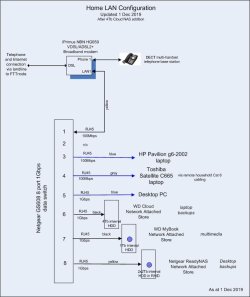
1. it's a 1gbps ethernet connection from the desktop to a netgear GS608 8-port data switch, and from there (other ports on the switch) to either network storage or the internet modem, a Huawei HG659 unit which combines both broadband data, phone and local network connections. Wifi is an allowed connection method, but it's turned off; only wired cat 6 connectivity active. A network diagram attached, data rates for individual connections shown there; the laptops mentioned in the initial post also seen there.
2. The technology of the internet service is a 'Fibre to the Node' broadband connection: copper phone cable a few hundred metres from house to the node, and then fibre from there into the deeps of the internet.

3. yes, I regularly do a speedtest on the internet connection. The service is a nominal 50mbps service, and just before writing this response it tested out (at 1540 in the afternoon, during easing pandemic restrictions when work from home/home schooling is easing off and the network loads are reducing) at 36.68mbps download, 12.43mbps upload (speedtest.net ID9496487369). Which is a pretty reasonable result given the circumstances. Pre-pandemic at the same time in the day, the numbers would have more like 41-43mbps down, 13mbps up.


Commentary:
I mentioned no apparent impact on the laptops in the initial post. To clarify that; several times a week all the PC's are active on the LAN at the same time, but starting at different times. Recently - what inspired this thread - the desktop started last but did not connect to the network storage (mapped drives in explorer) or to the internet: however the laptops could all do that at the same time. So whatever is the issue with the desktop connecting to the network, it isn't in the switch, data stores or the internet modem. The evidence was in the apps on the desktop: opening explorer to view any of the mapped drive data stores, and altho the main drives could be seen no sub-folders were evident; opening the firefox browser latest version and click on a website - displays the web address but that's it - no data or pages opening, a timeout page after a while


From this condition the only option is a re-start, and patient waiting. After 3 mins + following the appearance of the desktop wallpaper, icons and windows chime, my check-item is to open explorer, click on a mapped drive and if the sub-folders are displayed, we are good to go. Browsing to a website works fine after this.


Which got irritating after a while and thus the question, can it be speeded up?
 

Attachments

  • Home LAN 20191201.jpg
    Home LAN 20191201.jpg
    43.6 KB · Views: 1

My Computer

Computer type
PC/Desktop
Computer Manufacturer/Model Number
custom build
OS
windows 7 home premium 64bit
CPU
Intel core i3-4700
Motherboard
Gigabyte GA-H97M-d3H
Memory
8gb
Hard Drives
1x256gb SSD
3x500gb HDD
All looks good on your network connections.

Hi, ...
To clarify that; several times a week all the PC's are active on the LAN at the same time, but starting at different times. Recently - what inspired this thread - the desktop started last but did not connect to the network storage (mapped drives in explorer) or to the internet: however the laptops could all do that at the same time. So whatever is the issue with the desktop connecting to the network, it isn't in the switch, data stores or the internet modem. The evidence was in the apps on the desktop: opening explorer to view any of the mapped drive data stores, and altho the main drives could be seen no sub-folders were evident; opening the firefox browser latest version and click on a website - displays the web address but that's it - no data or pages opening, a timeout page after a while

From this condition the only option is a re-start, and patient waiting. After 3 mins + following the appearance of the desktop wallpaper, icons and windows chime, my check-item is to open explorer, click on a mapped drive and if the sub-folders are displayed, we are good to go. Browsing to a website works fine after this.

Which got irritating after a while and thus the question, can it be speeded up?

It is odd that the desktop is the device that is hanging, given that both the laptops bandwidth are lower. The question on whether the desktop can be speeded up depends on spotting where the fault lies.

Are all three computers running Windows 7?

When the desktop hangs, perhaps you could try the network troubleshooter?

When you get url address and blank page in browser, then run TRACECERT from a CMD prompt window. Run TRACECERT once when the browser hangs, and run it again when everything is up and working. Compare the two results, and that could indicate where the holdups are.
 

My Computer

Computer type
PC/Desktop
OS
Windows 7 x64, Vista x64, 8.1 smartphone
CPU
Intel E8400 65W 64-bit
Motherboard
Gigabyte EP45-UD3LR
Memory
DDR2 2 x 2GB, 1GB x 2
Graphics Card(s)
XFX Radeon HD5750
Sound Card
AMD High Definition Audio; Realtek High Definition Audio
Monitor(s) Displays
iiyama prolite X2377HDS
Screen Resolution
1920 x 1080
Hard Drives
500GB 7200 rpm Seagate ST3500413AS 16MB, 500GB 5400 rpm Toshiba MQ02ABF050H 32MB, 200GB 7200 rpm Seagate ST3200820AS 8MB, 2TB 7200 rpm Western Digital WD20EZRX 64MB
PSU
Enermax Liberty Modular
Case
Antec P193 Midi Tower
Keyboard
Mionix ZIBAL 60
Mouse
Razer USB 2.0 Diamondback Mouse or Huion Graphics Tablet
Browser
Internet Explorer, Lunascape, Firefox, Opera, Avast Safezone
Hi,
All 3 PC's run windows 7 (makes it easy for admin me), with all the recommended/critical patches as at 20 Jan. Not all of them have the optional updates applied: eg, the update for currency symbol in afghanistan, not really applicable.


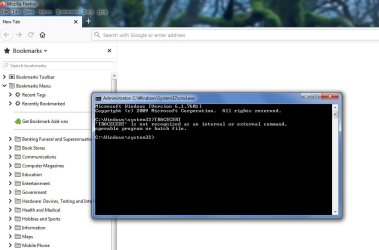
Running tracecert with cmd running as admin was a bust - that command not valid, screenshot attached.


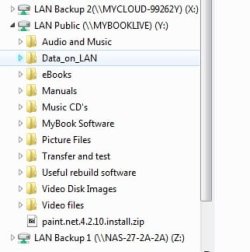
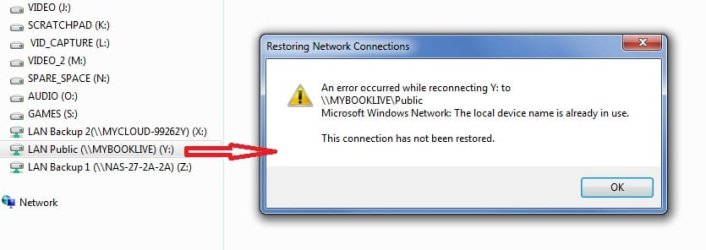
Two screenshots of the connected and unconnected network state for mapped drives in explorer attached, maybe there is a something those.
 

Attachments

  • mapped drive LAN connected.jpg
    mapped drive LAN connected.jpg
    15.9 KB · Views: 28
  • mapped drive LAN unconnected.jpg
    mapped drive LAN unconnected.jpg
    28.3 KB · Views: 1
  • TRACECERTnot recognised.jpg
    TRACECERTnot recognised.jpg
    57.5 KB · Views: 1

My Computer

Computer type
PC/Desktop
Computer Manufacturer/Model Number
custom build
OS
windows 7 home premium 64bit
CPU
Intel core i3-4700
Motherboard
Gigabyte GA-H97M-d3H
Memory
8gb
Hard Drives
1x256gb SSD
3x500gb HDD
1) That error "... the local device name is already in use. the connection has not been restored" occurs when mapping a network share to a drive letter and the share is not available.

2) TRACECERT - my typo error, sorry. It should be TRACERT, you use it in conjunction with an internet address, like this TRACERT bing.com , or TRACERT 13.107.21.300

3) CLEAN BOOT - perform STEP 1 from this tutorial instructions Troubleshoot Application Conflicts by Performing a Clean Startup. That will speed up the boot time by reducing the number of background services from third party software installed on the machine. The computer will then be able to dedicate more resource to making Network Connections.

4) DEVCICE MANAGER yellow exclamation marks and duplicate drivers - on the problem machine, go into Device Manager, open the Network adapters node and look for devices marked by a yellow triangle containing an exclamation mark. Delete these. Look also for duplicate Microsoft ISATAP adapter, or duplicate Teredo Tunneling Adatpers, and delete the duplicates. Re-boot the computer after changes are made.
 

My Computer

Computer type
PC/Desktop
OS
Windows 7 x64, Vista x64, 8.1 smartphone
CPU
Intel E8400 65W 64-bit
Motherboard
Gigabyte EP45-UD3LR
Memory
DDR2 2 x 2GB, 1GB x 2
Graphics Card(s)
XFX Radeon HD5750
Sound Card
AMD High Definition Audio; Realtek High Definition Audio
Monitor(s) Displays
iiyama prolite X2377HDS
Screen Resolution
1920 x 1080
Hard Drives
500GB 7200 rpm Seagate ST3500413AS 16MB, 500GB 5400 rpm Toshiba MQ02ABF050H 32MB, 200GB 7200 rpm Seagate ST3200820AS 8MB, 2TB 7200 rpm Western Digital WD20EZRX 64MB
PSU
Enermax Liberty Modular
Case
Antec P193 Midi Tower
Keyboard
Mionix ZIBAL 60
Mouse
Razer USB 2.0 Diamondback Mouse or Huion Graphics Tablet
Browser
Internet Explorer, Lunascape, Firefox, Opera, Avast Safezone
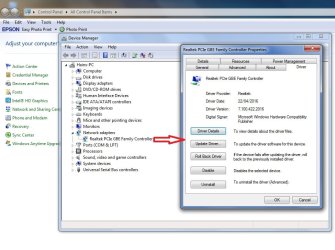
There are no yellow flag items in the device manager, screenshot attached, including the driver details.


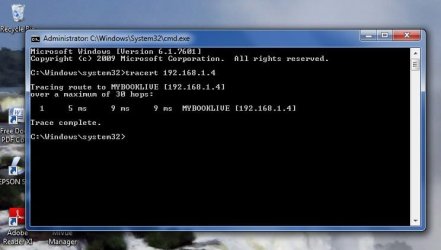
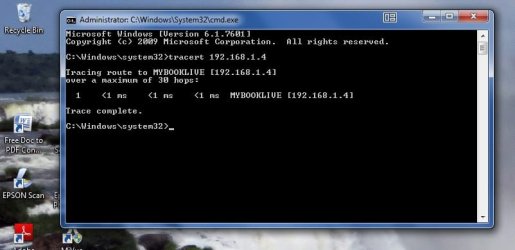
I have tried the tracert approach again, using the network store I previously supplied data on. Reason for this was a) the internet and local LAN worked - or not - in parallel, and b) using the local store avoided any issues with network access, bandwidth etc. Two screenshots attached - with the network store 'connected' in explorer, and with it unconnected. The unconnected one has much faster ping times, which seems really odd. The fact that pings are returned in both cases indicates the network link to the device is active in both cases: if it wasn't, the ping time would be forever. So, in the unconnected case the "process" (?? using that word to differentiate between the two results) that manages the network signal responses isn't "alive" - when it is connected, the process is alive and the ping time is 10 times longer.


I haven't done any clean start tests yet - still digesting what that web page says. But 2 observations and then a question about this:
- observation 1: the start of the computer itself seems pretty quick, up to the point when the windows chimes sound and the rotating activity maker on a displayed desktop+icons disappears. At this point, I can get a local application - like explorer or paint - to run as long as it doesn't do anything on any network, local or distant.
- observation 2: there is clearly a time component to this, like a response timeout of some sort which affects every pending network action. And interrupting it with any commanded app action, like opening explorer, just cancels whatever it is, and network access is then history (I haven't seen it catch up ever) until the next start.
- the question: what part of start or services would this characterise???
 

Attachments

  • Device mgr network adapter 26 May.jpg
    Device mgr network adapter 26 May.jpg
    89.2 KB · Views: 1
  • tracert mybooklive connected 26 may.jpg
    tracert mybooklive connected 26 may.jpg
    34.4 KB · Views: 21
  • tracert mybooklive unconnected 26 may.jpg
    tracert mybooklive unconnected 26 may.jpg
    36.8 KB · Views: 1

My Computer

Computer type
PC/Desktop
Computer Manufacturer/Model Number
custom build
OS
windows 7 home premium 64bit
CPU
Intel core i3-4700
Motherboard
Gigabyte GA-H97M-d3H
Memory
8gb
Hard Drives
1x256gb SSD
3x500gb HDD
I haven't done any clean start tests yet - still digesting what that web page says.
In your own time ...

- observation 1: the start of the computer itself seems pretty quick, up to the point when the windows chimes sound and the rotating activity maker on a displayed desktop+icons disappears. At this point, I can get a local application - like explorer or paint - to run as long as it doesn't do anything on any network, local or distant.
There still are background services starting up, even if the user has control of the desktop.
- observation 2: there is clearly a time component to this, like a response timeout of some sort which affects every pending network action. And interrupting it with any commanded app action, like opening explorer, just cancels whatever it is, and network access is then history (I haven't seen it catch up ever) until the next start.
- the question: what part of start or services would this characterise???
Network Connections | Black Viper and all the service's dependent services.
 

My Computer

Computer type
PC/Desktop
OS
Windows 7 x64, Vista x64, 8.1 smartphone
CPU
Intel E8400 65W 64-bit
Motherboard
Gigabyte EP45-UD3LR
Memory
DDR2 2 x 2GB, 1GB x 2
Graphics Card(s)
XFX Radeon HD5750
Sound Card
AMD High Definition Audio; Realtek High Definition Audio
Monitor(s) Displays
iiyama prolite X2377HDS
Screen Resolution
1920 x 1080
Hard Drives
500GB 7200 rpm Seagate ST3500413AS 16MB, 500GB 5400 rpm Toshiba MQ02ABF050H 32MB, 200GB 7200 rpm Seagate ST3200820AS 8MB, 2TB 7200 rpm Western Digital WD20EZRX 64MB
PSU
Enermax Liberty Modular
Case
Antec P193 Midi Tower
Keyboard
Mionix ZIBAL 60
Mouse
Razer USB 2.0 Diamondback Mouse or Huion Graphics Tablet
Browser
Internet Explorer, Lunascape, Firefox, Opera, Avast Safezone
I reviewed the BlackViper page. The services needed for networks in windows 7 are listed, but the annotations (S, HB, P, U, E) are unexplained. Can you interpret them??


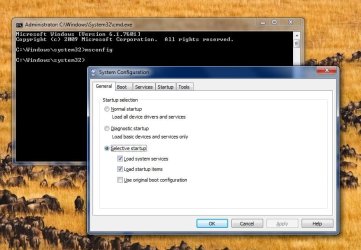
Thinking about trouble shooting, this case seems like a case of reviewing the network services in the "not connected" condition for those that are not running. In that context, I ran msconfig experimentally in the "connected" condition to see what it looked like, with results:
- in the services tab, the service names in the BlackViper page re networks for win 7 don't seem to be listed: see next item

- the services list is not sorted alphabetically - running thru the list to find one or several by specific name looks difficult without that. Is there away to setup msconfig so that the service and start names are alpha listed?
- the general tab revealed that the current config was for selective start, see screenshot attached. But every item in the services and start tabs is selected (box ticked against name). In that condition, it looks to be the same as a normal start (every item started). Can you confirm??
 

Attachments

  • msconfig 25may.jpg
    msconfig 25may.jpg
    69.5 KB · Views: 1

My Computer

Computer type
PC/Desktop
Computer Manufacturer/Model Number
custom build
OS
windows 7 home premium 64bit
CPU
Intel core i3-4700
Motherboard
Gigabyte GA-H97M-d3H
Memory
8gb
Hard Drives
1x256gb SSD
3x500gb HDD
To sort services alphabetically, first click on "services" tab, then under that tab, click on "service".
So, to confirm, click on "services" followed by clicking on "service", then everything in the list will be sorted.
 

My Computer

Computer type
PC/Desktop
OS
Windows 7 x64, Vista x64, 8.1 smartphone
CPU
Intel E8400 65W 64-bit
Motherboard
Gigabyte EP45-UD3LR
Memory
DDR2 2 x 2GB, 1GB x 2
Graphics Card(s)
XFX Radeon HD5750
Sound Card
AMD High Definition Audio; Realtek High Definition Audio
Monitor(s) Displays
iiyama prolite X2377HDS
Screen Resolution
1920 x 1080
Hard Drives
500GB 7200 rpm Seagate ST3500413AS 16MB, 500GB 5400 rpm Toshiba MQ02ABF050H 32MB, 200GB 7200 rpm Seagate ST3200820AS 8MB, 2TB 7200 rpm Western Digital WD20EZRX 64MB
PSU
Enermax Liberty Modular
Case
Antec P193 Midi Tower
Keyboard
Mionix ZIBAL 60
Mouse
Razer USB 2.0 Diamondback Mouse or Huion Graphics Tablet
Browser
Internet Explorer, Lunascape, Firefox, Opera, Avast Safezone
Hi,
Yes, thanks that works - but it seems to be needed on every open of msconfig.


So, I used it to review what the network services specified by BlackViper for windows 7 - those that are specified in the dependencies section of the document - looked like on the desktop, when all the network connections had been made and (obviously, I am here) working. What I found was (by service name):
*Network Store interface - running
*NSI proxy service driver - absent from the list. I run my browser in "no proxy" mode, so whilst this by relevance might be present and stopped, why is it absent??
* Remote procedure Call (RPC) with the word "Locator" added to the service name - stopped.
* DCOM Server Process Launcher - absent from the list
* RPC Endpoint Mapper - running
* Internet Connection Sharing (ICS) - absent


:huh:
 

My Computer

Computer type
PC/Desktop
Computer Manufacturer/Model Number
custom build
OS
windows 7 home premium 64bit
CPU
Intel core i3-4700
Motherboard
Gigabyte GA-H97M-d3H
Memory
8gb
Hard Drives
1x256gb SSD
3x500gb HDD
I reviewed the BlackViper page. The services needed for networks in windows 7 are listed, but the annotations (S, HB, P, U, E) are unexplained. Can you interpret them??

S ~ Windows 7 Starter
HB ~ Windows 7 Home Basic
HP ~ Windows 7 Home Premium
P ~ Windows 7 Professional
U ~ Windows 7 Ultimate
E ~ Windows 7 Enterprise

refers to the editions of windows that the service is available. See black viper
 

My Computer

Computer type
PC/Desktop
OS
Windows 7 x64, Vista x64, 8.1 smartphone
CPU
Intel E8400 65W 64-bit
Motherboard
Gigabyte EP45-UD3LR
Memory
DDR2 2 x 2GB, 1GB x 2
Graphics Card(s)
XFX Radeon HD5750
Sound Card
AMD High Definition Audio; Realtek High Definition Audio
Monitor(s) Displays
iiyama prolite X2377HDS
Screen Resolution
1920 x 1080
Hard Drives
500GB 7200 rpm Seagate ST3500413AS 16MB, 500GB 5400 rpm Toshiba MQ02ABF050H 32MB, 200GB 7200 rpm Seagate ST3200820AS 8MB, 2TB 7200 rpm Western Digital WD20EZRX 64MB
PSU
Enermax Liberty Modular
Case
Antec P193 Midi Tower
Keyboard
Mionix ZIBAL 60
Mouse
Razer USB 2.0 Diamondback Mouse or Huion Graphics Tablet
Browser
Internet Explorer, Lunascape, Firefox, Opera, Avast Safezone
The edition of windows 7 I am using for all my PC's is home premium.
 

My Computer

Computer type
PC/Desktop
Computer Manufacturer/Model Number
custom build
OS
windows 7 home premium 64bit
CPU
Intel core i3-4700
Motherboard
Gigabyte GA-H97M-d3H
Memory
8gb
Hard Drives
1x256gb SSD
3x500gb HDD
Check again for the Services. If you still are unable to locate them in services.msc, then check Event Viewer for any "Error" and "Warning" messages.
 

My Computer

Computer type
PC/Desktop
OS
Windows 7 x64, Vista x64, 8.1 smartphone
CPU
Intel E8400 65W 64-bit
Motherboard
Gigabyte EP45-UD3LR
Memory
DDR2 2 x 2GB, 1GB x 2
Graphics Card(s)
XFX Radeon HD5750
Sound Card
AMD High Definition Audio; Realtek High Definition Audio
Monitor(s) Displays
iiyama prolite X2377HDS
Screen Resolution
1920 x 1080
Hard Drives
500GB 7200 rpm Seagate ST3500413AS 16MB, 500GB 5400 rpm Toshiba MQ02ABF050H 32MB, 200GB 7200 rpm Seagate ST3200820AS 8MB, 2TB 7200 rpm Western Digital WD20EZRX 64MB
PSU
Enermax Liberty Modular
Case
Antec P193 Midi Tower
Keyboard
Mionix ZIBAL 60
Mouse
Razer USB 2.0 Diamondback Mouse or Huion Graphics Tablet
Browser
Internet Explorer, Lunascape, Firefox, Opera, Avast Safezone
Sorry for the delayed reply. Just before I read your last response, I got the system into a confused knot of start and shutdown, by pushing the startup more quickly, noting it had not worked and then trying to re-start. THEN noted the event viewer timelines, so decided to wait 24 hours and do only patient restarts in that period.


Meanwhile, I reviewed the BlackViper page link for windows 7, and in particular followed the links for those services I mentioned as not listed in msconfig. Specifically:
- ICS. The link specifies that this is only for an integral (within the PC case, plugged into the system motherboard) modem, not recommended for situations of external modems, as is the case here. So, absence in the service list is not applicable or an issue
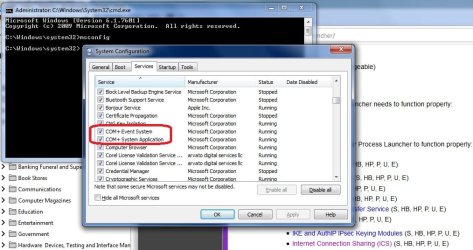
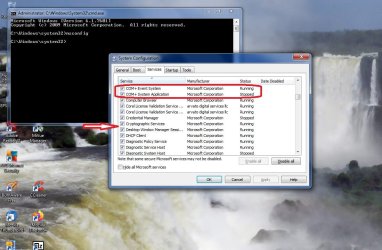
- DCOM. Confusion here, because altho BlackViper says it's essential for network connections to function properly, it's absence from the services list did not seem to impact network connection for browsing (for anything) or mail when everything was 'up'. However, by following the specific service link, shown by BlackViper as a subset of the RPC service, running, the link description indicates that DCOM is alternative to the COM service, which is running. See commentary and screenshots. So the absence of DCOM from the services list is also probably not a problem.


Commentary
There is no DCOM service in the services alpha-sorted list (shown particularly in screenshot 2, where the arrow indicates where it should be in a sorted list. BUT there are 2 COM services: screenshot 1 on 28 May shows both running, screenshot 2 on 29 May shows 1 running and 1 stopped. And by relevance - the internet is still working to enable me to post this reply - the running one on both days must the important one.


Event Viewer
Screenshot taken today 29May at about 1045 local time after 24hrs of no problems patient starts (5 in total). I had to minimise the other items to get all these into one screen.
 

My Computer

Computer type
PC/Desktop
Computer Manufacturer/Model Number
custom build
OS
windows 7 home premium 64bit
CPU
Intel core i3-4700
Motherboard
Gigabyte GA-H97M-d3H
Memory
8gb
Hard Drives
1x256gb SSD
3x500gb HDD
OOps - didn't upload the images. here they are
 

Attachments

  • msc services1_28 May20.jpg
    msc services1_28 May20.jpg
    89.3 KB · Views: 1
  • msc services2_29May20.jpg
    msc services2_29May20.jpg
    101.7 KB · Views: 0
  • event viewer 29May20.jpg
    event viewer 29May20.jpg
    81.7 KB · Views: 1

My Computer

Computer type
PC/Desktop
Computer Manufacturer/Model Number
custom build
OS
windows 7 home premium 64bit
CPU
Intel core i3-4700
Motherboard
Gigabyte GA-H97M-d3H
Memory
8gb
Hard Drives
1x256gb SSD
3x500gb HDD
It is possible the DCOM service is disabled in registry.

To check, open regedit, and navigate to
HKEY_LOCAL_MACHINE\Software\Microsoft\OLE

and when you select that node, in the right-side pane of regedit, you will see
EnableDCOM REG_SZ
What is the data field?
If the field contains letter Y, then that is good.
If the field contains letter N, then do the following:
From :orb: type DCOMCNFG.EXE, and select from list.
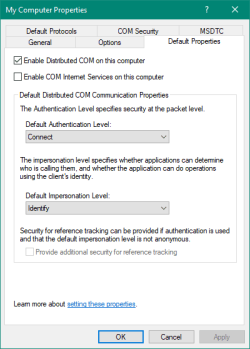
The Components Services snap-in should appear.
In the left-pane, under Console Root, select Component Services, then select Computers folder
Under Computers folder, you should see My Computer.
Right-mouse click My Computer, and select Properties, then select Default Properties Tab.
Under the Default Properties Tab is a checkbox labelled Enable Distributed COM on this computer.
Make sure the checkbox is ticked. See image:​
Enable DCOM on this computer checkbox.PNG
Click OK, then restart the computer.
 

My Computer

Computer type
PC/Desktop
OS
Windows 7 x64, Vista x64, 8.1 smartphone
CPU
Intel E8400 65W 64-bit
Motherboard
Gigabyte EP45-UD3LR
Memory
DDR2 2 x 2GB, 1GB x 2
Graphics Card(s)
XFX Radeon HD5750
Sound Card
AMD High Definition Audio; Realtek High Definition Audio
Monitor(s) Displays
iiyama prolite X2377HDS
Screen Resolution
1920 x 1080
Hard Drives
500GB 7200 rpm Seagate ST3500413AS 16MB, 500GB 5400 rpm Toshiba MQ02ABF050H 32MB, 200GB 7200 rpm Seagate ST3200820AS 8MB, 2TB 7200 rpm Western Digital WD20EZRX 64MB
PSU
Enermax Liberty Modular
Case
Antec P193 Midi Tower
Keyboard
Mionix ZIBAL 60
Mouse
Razer USB 2.0 Diamondback Mouse or Huion Graphics Tablet
Browser
Internet Explorer, Lunascape, Firefox, Opera, Avast Safezone
I would start with the basic:
- Run chkdsk c: /f
- Run sfc /scannow

Then do a clean boot using msconfig:
- On services tab, hide all MS services and disable all others
- On startup disable all programs and applications.

How long does it take to boot in a clean boot?
 

My Computers

System One System Two

  • Computer type
    PC/Desktop
    Computer Manufacturer/Model Number
    custom build
    OS
    Windows 7 HP 64
    CPU
    i5 6600K - 800MHz to 4200MHz
    Motherboard
    GA-Z170-HD3P
    Memory
    4+4G GSkill DDR4 3000
    Graphics Card(s)
    IG - Intel 530
    Monitor(s) Displays
    Samsung 226BW
    Screen Resolution
    1680x1050
    Hard Drives
    (1) -1 SM951 – 128GB M.2 AHCI PCIe SSD drive for Windows 7 and Lubuntu
    (2) -1 WD SATA 3 - 1T for Data
    (3) -1 WD SATA 3 - 1T for backup
    PSU
    Thermaltake 450W TR2 gold
    Keyboard
    Old and good Chicony mechanical keyboard
    Mouse
    Logitech mX performance - 9 buttons (had to disable some)
    Internet Speed
    500Mb/s
    Browser
    Firefox 64
    Other Info
    TinyWall firewall
  • Computer type
    Laptop
    System Manufacturer/Model Number
    Asus Q550LF
    OS
    Windows 7 Pro
    CPU
    i7-4500U 800MHz to 3.0GHz
    Motherboard
    Asus Q550LF
    Memory
    (4+4)G DDR3 1600
    Graphics Card(s)
    IG intel 4400 + NVIDIA GeForce GT 745M
    Sound Card
    Realtek
    Monitor(s) Displays
    LG Display LP156WF4-SPH1
    Screen Resolution
    1920 x 1080
    Hard Drives
    BX500 120G SSD for Windows and programs +
    1T HDD for data
    Internet Speed
    500 Mb/s
    Browser
    Firefox
    Other Info
    TinyWall firewall
Hi,
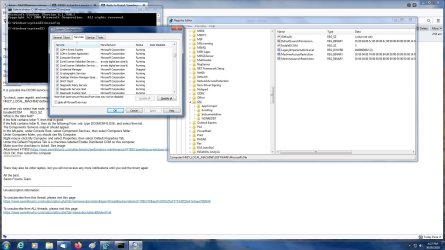
Regedit says that DCOM is enabled - see screenshot. I combined the regedit view with an image of the services tab of msconfig, that shows the COM services both running but no DCOM in the list.


I also tried to view that additional page you listed, but even tho I was logged in the forum would not let me see it:mad:
 

Attachments

  • enable DCOM=Y.jpg
    enable DCOM=Y.jpg
    219.5 KB · Views: 1

My Computer

Computer type
PC/Desktop
Computer Manufacturer/Model Number
custom build
OS
windows 7 home premium 64bit
CPU
Intel core i3-4700
Motherboard
Gigabyte GA-H97M-d3H
Memory
8gb
Hard Drives
1x256gb SSD
3x500gb HDD
Here it is again. Tick checkbox labelled Enable Distributed COM on this computer

Enable DCOM on this computer checkbox.PNG
 

My Computer

Computer type
PC/Desktop
OS
Windows 7 x64, Vista x64, 8.1 smartphone
CPU
Intel E8400 65W 64-bit
Motherboard
Gigabyte EP45-UD3LR
Memory
DDR2 2 x 2GB, 1GB x 2
Graphics Card(s)
XFX Radeon HD5750
Sound Card
AMD High Definition Audio; Realtek High Definition Audio
Monitor(s) Displays
iiyama prolite X2377HDS
Screen Resolution
1920 x 1080
Hard Drives
500GB 7200 rpm Seagate ST3500413AS 16MB, 500GB 5400 rpm Toshiba MQ02ABF050H 32MB, 200GB 7200 rpm Seagate ST3200820AS 8MB, 2TB 7200 rpm Western Digital WD20EZRX 64MB
PSU
Enermax Liberty Modular
Case
Antec P193 Midi Tower
Keyboard
Mionix ZIBAL 60
Mouse
Razer USB 2.0 Diamondback Mouse or Huion Graphics Tablet
Browser
Internet Explorer, Lunascape, Firefox, Opera, Avast Safezone
Back
Top