
Startup Repair

How to Run a Startup Repair in Windows 7

   Information
Startup Repair is a system recovery tool that automates common diagnostic and repair tasks of unbootable Windows 7 installations. If the computer fails over into Windows RE because of a detected boot failure, Startup Repair launches automatically. If automatic failover to an on-disk Windows RE is not available, Startup Repair can also be launched as a manual recovery tool from a Windows RE CD/DVD.

This tutorial will show you how to run Startup Repair to allow it to scan your Windows 7 computer for a startup problem and try to fix it so your computer can start correctly.

Startup Repair is located on the System Recovery Options menu, which is on the Windows 7 installation disc. If your computer manufacturer (OEM) has preinstalled recovery options, Startup Repair might also be installed on your hard disk. If your computer does not include Startup Repair, your computer manufacturer (OEM) might have customized or replaced the tool. Check the information that came with your computer or go to the manufacturer's website.

   Note
Startup Repair Process

Startup Repair will try to repair computers that are unbootable because of the following reasons:
  • Registry corruption
  • Missing or damaged system and driver files
  • Disk metadata corruption (MBR, partition table, and boot sector)
  • File system metadata corruption
  • Installation of problematic or incompatible drivers
  • Installation of incompatible Windows service packs and patches
  • Corrupt boot configuration data
  • Bad memory and hard disk hardware (detection only)
Startup Repair will not repair unbootable systems caused by the following issues:
  • Malfunctioning firmware and other hardware components
  • Problems with clean Windows installations or Windows upgrades (for example, from Windows XP to Windows Vista)
  • Windows logon errors
  • Viruses and malicious software

After Startup Repair has run, a text log with diagnostic information and repair results is generated. The log file is located at: C:\Windows\System32\Logfiles\Srt\SrtTrail.txt


For more information, see: How Windows RE Works

   Warning
Startup Repair cannot fix hardware failures, such as a failing hard disk or incompatible memory, nor does it protect against virus attacks. Startup Repair is not designed to fix Windows installation problems. Startup Repair is not a backup tool, so it cannot help you recover personal files, such as photos or documents. To help protect your computer, back up your system and files regularly.


:note: For the updated Windows 10 tutorial, please see - Startup Repair - Run in Windows 10 - Windows 10 Tutorials

Here's How:
1. Boot to the System Recovery Options screen using your retail Windows 7 installation disk or system repair disc.

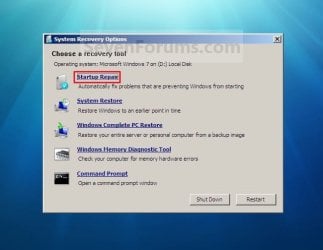
2. Select the Startup Repair option. (See screenshot below) Repair.jpg
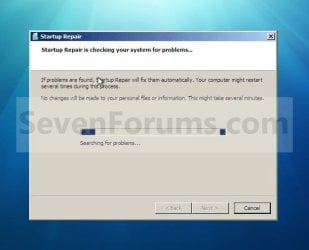
3. Startup Repair will now scan your computer to attempt to find and fix any startup problems. (See screenshot below)
NOTE: Startup Repair might prompt you to make choices as it tries to fix the problem, and if necessary, it might restart your computer as it makes repairs. If repairs are not successful, you'll see a summary of the problem and links to contact information for support. Your computer manufacturer might include additional assistance information. Startup_Repair-1.jpg
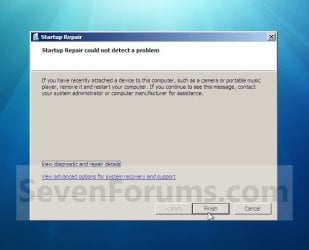
4. If problems cannot be found, then click on Finish. (See screenshot below)
NOTE: You can click on the View diagnostic and repair details link to see a detailed summary of what Startup Repair has done. Startup_Repair-2.jpg
A) Click on the Restart button to return to the Windows 7 log on screen. (See screenshot below step 2)
   Tip
Sometimes it may take running a startup repair (3) separate times with restarting the computer after each time before it fully fixes the startup issue.


That's it,
Shawn


Last edited:
I am having this issue, but it keeps saying that it cannot recover itself.
 

My Computer

OS
Windows Vista Home Edition x64
Hello, and welcome to Seven Forums.

Depending on what issue you are having, you should be able to do a repair install to fix this also.

Hope this helps,
Shawn
 

My Computer

Computer type
PC/Desktop
Computer Manufacturer/Model Number
Self built custom
OS
64-bit Windows 11 Pro for Workstations
CPU
Intel i7-8700K OC'd to 5 GHz
Motherboard
ASUS ROG Maximus XI Formula Z390
Memory
64 GB (4x16GB) G.SKILL TridentZ RGB DDR4 3600 MHz
Graphics Card(s)
ASUS ROG-STRIX-GTX1080TI-O11G-GAMING
Sound Card
Integrated
Monitor(s) Displays
2 x Samsung Odyssey G7 27"
Screen Resolution
2560x1440
Hard Drives
1TB Samsung 990 PRO M.2,
4TB Samsung 990 PRO PRO M.2,
TerraMaster F8 SSD Plus NAS
PSU
Seasonic Prime Titanium 850W
Case
Thermaltake Core P3
Cooling
Corsair Hydro H115i
Keyboard
Logitech wireless K800
Mouse
Logitech MX Master 4
Internet Speed
2 Gb/s Download and 100 Mb/s Upload
Antivirus
Malwarebyte Anti-Malware Premium
Browser
Google Chrome
Other Info
Logitech Z625 speaker system,
Logitech BRIO 4K Pro webcam,
HP Color LaserJet Pro MFP M477fdn,
APC SMART-UPS RT 1000 XL - SURT1000XLI,
Galaxy S23 Plus phone
One thing I tried out here on both RCs lately is using the upgrade option while booted in each to perform a repair install. Each went well from the start. So you know the guide there does work.
 

My Computers

System One System Two

  • Computer type
    PC/Desktop
    Computer Manufacturer/Model Number
    Custom builds = 2
    OS
    W7 Ultimate x64/W10 Pro x64/W11 Pro Triple Boot - Main PC W7 Remote PC Micro ATX W7 Pro x64/W11 Pro
    CPU
    AMD Phenom II X4 975 Deneb 3.6ghz - 965 2nd remote pc
    Motherboard
    Gigabyte GA-790XTA-UD4-Gigabyte GA-880GM-D2H remote pc
    Memory
    Kingston Hyper X DDR3 1600 1.5v 16gb - Hyper X Fury 8gb 2nd
    Graphics Card(s)
    MSI HD Radeon 5750 1gb - MSI HD Radeon 6450 on mini tower
    Sound Card
    Creative Labs X-Fi Xtreme Audio P - Realtek onooard 2nd case
    Monitor(s) Displays
    ASUS VW199T-P 19" HP 2082a Main-HP 2082a 20" remote pc
    Screen Resolution
    Asus 1440x900 - HP 1600x900
    Hard Drives
    WD Black 1TB HD per OS W7, W10, and pending W11 presently on 500gb OS Drive - Pending Triple 1TB HDs for Spanned Storage/backup volume
    Single 2TB external USB enclosure, single 1TB System 7 Host/Boot drive, Pending 8TB external HD for system image b
    PSU
    Corsair 750TX - primary / Corsair CX600 - second
    Case
    Antec 900-2 - SSD compatible / NZXT Vulcan mini tower
    Cooling
    Zalman CNPS9900A
    Keyboard
    AZIO L70 Backlit Letters Gaming - ONN Cordless/USB
    Mouse
    MSI DS200 Programmable, Logitech Cordless
    Internet Speed
    30mbps upgrade - primary hard wired - mini tower usb WiFi
    Antivirus
    GFI VIPRE Internet Security 2014 on W7 2016 beta on W10,
    Browser
    Cyberfox, WaterFox 64bit FF variants, FireFox x64, Pale Moon
    Other Info
    Accomdata fan cooled usb 2.0 PIDE/Sata II, III external enclosure.
    Sambient usb/eSata PATA/Sata II, III external enclosure.
  • Computer type
    PC/Desktop
    System Manufacturer/Model Number
    CUSTOM ASSEMBLY
    OS
    W7 Pro x64/W11 Pro
    CPU
    AMD Deneb 3.6ghz - 965
    Motherboard
    Gigabyte GA-880GM-D2H remote pc
    Memory
    Kingston Hyper X Fury 8gb
    Graphics Card(s)
    MSI HD Radeon 6450 DVI Output
    Sound Card
    Realtek onooard Creative or Other separate PENDING
    Monitor(s) Displays
    VIZIO 32" LCD TV Separate LCD Pending
    Screen Resolution
    1600x1080
    Hard Drives
    WD 500GB OS Host/Boot WD Green 1TB Storage/Backup
    PSU
    Corsair 600W - THERMALTAKE 600W spare case
    Case
    NZXT Vulcan mini tower
    Cooling
    Twin 120mm Top Fans - 240mm Side Cover
    Keyboard
    ONN Cordless/USB Logitech Cordless
    Mouse
    ONN USB/Cordless - Logitech Cordless
    Internet Speed
    DSL 5G
    Browser
    MS Edge, FireFox, WaterFox x64, FireFox Nightly
    Other Info
    OS Testing-Remote Access to Main TeamViewer
You can boot from your Windows 7 installation disc to perform a repair install instead without losing anything. :)
 

My Computer

Computer type
PC/Desktop
Computer Manufacturer/Model Number
Self built custom
OS
64-bit Windows 11 Pro for Workstations
CPU
Intel i7-8700K OC'd to 5 GHz
Motherboard
ASUS ROG Maximus XI Formula Z390
Memory
64 GB (4x16GB) G.SKILL TridentZ RGB DDR4 3600 MHz
Graphics Card(s)
ASUS ROG-STRIX-GTX1080TI-O11G-GAMING
Sound Card
Integrated
Monitor(s) Displays
2 x Samsung Odyssey G7 27"
Screen Resolution
2560x1440
Hard Drives
1TB Samsung 990 PRO M.2,
4TB Samsung 990 PRO PRO M.2,
TerraMaster F8 SSD Plus NAS
PSU
Seasonic Prime Titanium 850W
Case
Thermaltake Core P3
Cooling
Corsair Hydro H115i
Keyboard
Logitech wireless K800
Mouse
Logitech MX Master 4
Internet Speed
2 Gb/s Download and 100 Mb/s Upload
Antivirus
Malwarebyte Anti-Malware Premium
Browser
Google Chrome
Other Info
Logitech Z625 speaker system,
Logitech BRIO 4K Pro webcam,
HP Color LaserJet Pro MFP M477fdn,
APC SMART-UPS RT 1000 XL - SURT1000XLI,
Galaxy S23 Plus phone
That would remove Windows out of the equation entirely when booting from the 7 dvd. You can still use the same user name for the new administrator account created through the upgrade process.
 

My Computers

System One System Two

  • Computer type
    PC/Desktop
    Computer Manufacturer/Model Number
    Custom builds = 2
    OS
    W7 Ultimate x64/W10 Pro x64/W11 Pro Triple Boot - Main PC W7 Remote PC Micro ATX W7 Pro x64/W11 Pro
    CPU
    AMD Phenom II X4 975 Deneb 3.6ghz - 965 2nd remote pc
    Motherboard
    Gigabyte GA-790XTA-UD4-Gigabyte GA-880GM-D2H remote pc
    Memory
    Kingston Hyper X DDR3 1600 1.5v 16gb - Hyper X Fury 8gb 2nd
    Graphics Card(s)
    MSI HD Radeon 5750 1gb - MSI HD Radeon 6450 on mini tower
    Sound Card
    Creative Labs X-Fi Xtreme Audio P - Realtek onooard 2nd case
    Monitor(s) Displays
    ASUS VW199T-P 19" HP 2082a Main-HP 2082a 20" remote pc
    Screen Resolution
    Asus 1440x900 - HP 1600x900
    Hard Drives
    WD Black 1TB HD per OS W7, W10, and pending W11 presently on 500gb OS Drive - Pending Triple 1TB HDs for Spanned Storage/backup volume
    Single 2TB external USB enclosure, single 1TB System 7 Host/Boot drive, Pending 8TB external HD for system image b
    PSU
    Corsair 750TX - primary / Corsair CX600 - second
    Case
    Antec 900-2 - SSD compatible / NZXT Vulcan mini tower
    Cooling
    Zalman CNPS9900A
    Keyboard
    AZIO L70 Backlit Letters Gaming - ONN Cordless/USB
    Mouse
    MSI DS200 Programmable, Logitech Cordless
    Internet Speed
    30mbps upgrade - primary hard wired - mini tower usb WiFi
    Antivirus
    GFI VIPRE Internet Security 2014 on W7 2016 beta on W10,
    Browser
    Cyberfox, WaterFox 64bit FF variants, FireFox x64, Pale Moon
    Other Info
    Accomdata fan cooled usb 2.0 PIDE/Sata II, III external enclosure.
    Sambient usb/eSata PATA/Sata II, III external enclosure.
  • Computer type
    PC/Desktop
    System Manufacturer/Model Number
    CUSTOM ASSEMBLY
    OS
    W7 Pro x64/W11 Pro
    CPU
    AMD Deneb 3.6ghz - 965
    Motherboard
    Gigabyte GA-880GM-D2H remote pc
    Memory
    Kingston Hyper X Fury 8gb
    Graphics Card(s)
    MSI HD Radeon 6450 DVI Output
    Sound Card
    Realtek onooard Creative or Other separate PENDING
    Monitor(s) Displays
    VIZIO 32" LCD TV Separate LCD Pending
    Screen Resolution
    1600x1080
    Hard Drives
    WD 500GB OS Host/Boot WD Green 1TB Storage/Backup
    PSU
    Corsair 600W - THERMALTAKE 600W spare case
    Case
    NZXT Vulcan mini tower
    Cooling
    Twin 120mm Top Fans - 240mm Side Cover
    Keyboard
    ONN Cordless/USB Logitech Cordless
    Mouse
    ONN USB/Cordless - Logitech Cordless
    Internet Speed
    DSL 5G
    Browser
    MS Edge, FireFox, WaterFox x64, FireFox Nightly
    Other Info
    OS Testing-Remote Access to Main TeamViewer
startup recovery tool from cmd

guys,

can anyone give me some clues how to recover an installation using Startup Recovery tool from command line?

my issue is, i have windows 7 installation disk on USB, and there is no option to repair the installation. Dont ask how did this happen i just dont have it.

i have an image i am reapplying to the partition, but the system just wont start. black screen and nothing happens.
clean installation results in a black screen on the first reboot as well.

i had windows 7 installed on this disk before, but it just failed to start one beautiful day. i do also suspect the disk, but the fact that files are copied successfuly makes me wonder...
anyone found how to call the tool from a PE boot???

thanks
 
Last edited:

My Computer

OS
windows 7
Welcome to the Se7enforums! svyatko

Were you installing from the external or to it? Installations on external drives are advised against since they are simply too fragile. One boot runs the next won't when the configuration is off.

To avoid that hassle I simply yanked the drives out of external enclosures and see them installed internally solving a list of problems. There you would have to rebuild the BCD store every other time. Plus booting from the dvd won't be much help for any repairs on an external usb drive to start with.

"Boot Configuration Data Editor Frequently Asked Questions" Boot Configuration Data Editor Frequently Asked Questions

I don't think the
Step Four: Nuclear Holocaust approach will work for you there not because the information on that was originally written for Vista but where the installation is to start with. Recovering the Vista Bootloader from the DVD - NeoSmart Technologies Wiki

7 and Server 2008 also use the same type of BCD store as seen with Vista.
 

My Computers

System One System Two

  • Computer type
    PC/Desktop
    Computer Manufacturer/Model Number
    Custom builds = 2
    OS
    W7 Ultimate x64/W10 Pro x64/W11 Pro Triple Boot - Main PC W7 Remote PC Micro ATX W7 Pro x64/W11 Pro
    CPU
    AMD Phenom II X4 975 Deneb 3.6ghz - 965 2nd remote pc
    Motherboard
    Gigabyte GA-790XTA-UD4-Gigabyte GA-880GM-D2H remote pc
    Memory
    Kingston Hyper X DDR3 1600 1.5v 16gb - Hyper X Fury 8gb 2nd
    Graphics Card(s)
    MSI HD Radeon 5750 1gb - MSI HD Radeon 6450 on mini tower
    Sound Card
    Creative Labs X-Fi Xtreme Audio P - Realtek onooard 2nd case
    Monitor(s) Displays
    ASUS VW199T-P 19" HP 2082a Main-HP 2082a 20" remote pc
    Screen Resolution
    Asus 1440x900 - HP 1600x900
    Hard Drives
    WD Black 1TB HD per OS W7, W10, and pending W11 presently on 500gb OS Drive - Pending Triple 1TB HDs for Spanned Storage/backup volume
    Single 2TB external USB enclosure, single 1TB System 7 Host/Boot drive, Pending 8TB external HD for system image b
    PSU
    Corsair 750TX - primary / Corsair CX600 - second
    Case
    Antec 900-2 - SSD compatible / NZXT Vulcan mini tower
    Cooling
    Zalman CNPS9900A
    Keyboard
    AZIO L70 Backlit Letters Gaming - ONN Cordless/USB
    Mouse
    MSI DS200 Programmable, Logitech Cordless
    Internet Speed
    30mbps upgrade - primary hard wired - mini tower usb WiFi
    Antivirus
    GFI VIPRE Internet Security 2014 on W7 2016 beta on W10,
    Browser
    Cyberfox, WaterFox 64bit FF variants, FireFox x64, Pale Moon
    Other Info
    Accomdata fan cooled usb 2.0 PIDE/Sata II, III external enclosure.
    Sambient usb/eSata PATA/Sata II, III external enclosure.
  • Computer type
    PC/Desktop
    System Manufacturer/Model Number
    CUSTOM ASSEMBLY
    OS
    W7 Pro x64/W11 Pro
    CPU
    AMD Deneb 3.6ghz - 965
    Motherboard
    Gigabyte GA-880GM-D2H remote pc
    Memory
    Kingston Hyper X Fury 8gb
    Graphics Card(s)
    MSI HD Radeon 6450 DVI Output
    Sound Card
    Realtek onooard Creative or Other separate PENDING
    Monitor(s) Displays
    VIZIO 32" LCD TV Separate LCD Pending
    Screen Resolution
    1600x1080
    Hard Drives
    WD 500GB OS Host/Boot WD Green 1TB Storage/Backup
    PSU
    Corsair 600W - THERMALTAKE 600W spare case
    Case
    NZXT Vulcan mini tower
    Cooling
    Twin 120mm Top Fans - 240mm Side Cover
    Keyboard
    ONN Cordless/USB Logitech Cordless
    Mouse
    ONN USB/Cordless - Logitech Cordless
    Internet Speed
    DSL 5G
    Browser
    MS Edge, FireFox, WaterFox x64, FireFox Nightly
    Other Info
    OS Testing-Remote Access to Main TeamViewer
Windows failed to start

Hi, new to this forum and didn't know if I should of made a new thread.

I have a problem with windows 7 failing to start.

The computer reboots itself every time it gets to the windows logo, and upon restart I get the 'windows has failed to start' message, which it then asks me to repair. Which I have tried several times. The computer runs fine as I am using it now (boot from Unbuntu CD).

Has anyone come across this problem yet?

Just moved my computer from one house to the other, it stays on for days on end and I only restart when I need to, so chances are something I installed has messed it up but I cant think off what.

Only thing I have installed that I can remember is latest nVidia drivers, but others have not had any problems, have they?

Normally I would say oh well and just wipe over it but one of the files on there I would rather not loose.

Appreciate the help dudes and any suggestions.
biggrin.gif
 
Last edited by a moderator:

My Computer

OS
Windows 7 64 bit
CPU
Intel core 2 quad Q6600
Motherboard
Msi P7n Diamond
Memory
6Gb (2x2gb + 2x1gb) DDR2 800 Corsair XMS2
Graphics Card(s)
2x XFX 260GTX's
Sound Card
X-Fi soundblaster
Monitor(s) Displays
LGV23
Screen Resolution
1920x1080
Hard Drives
2x Western digital Raptor 74Gb Raid0
Seagate barracuda 7200.10 750Gb
PSU
Antec EA 650W
Case
Antec 900
Cooling
Coolermaster V8
Keyboard
Cheap Microsoft
Mouse
Microsoft Intellimouse explorer 3.0
Internet Speed
Slowwwwww
Hello TheRepearWaits, and welcome to Seven Forum.

Have you already tried a Startup Repair to see if it can fix this for you?

If you did, then you can do a repair install without losing anything.

Hope this helps,
Shawn
 

My Computer

Computer type
PC/Desktop
Computer Manufacturer/Model Number
Self built custom
OS
64-bit Windows 11 Pro for Workstations
CPU
Intel i7-8700K OC'd to 5 GHz
Motherboard
ASUS ROG Maximus XI Formula Z390
Memory
64 GB (4x16GB) G.SKILL TridentZ RGB DDR4 3600 MHz
Graphics Card(s)
ASUS ROG-STRIX-GTX1080TI-O11G-GAMING
Sound Card
Integrated
Monitor(s) Displays
2 x Samsung Odyssey G7 27"
Screen Resolution
2560x1440
Hard Drives
1TB Samsung 990 PRO M.2,
4TB Samsung 990 PRO PRO M.2,
TerraMaster F8 SSD Plus NAS
PSU
Seasonic Prime Titanium 850W
Case
Thermaltake Core P3
Cooling
Corsair Hydro H115i
Keyboard
Logitech wireless K800
Mouse
Logitech MX Master 4
Internet Speed
2 Gb/s Download and 100 Mb/s Upload
Antivirus
Malwarebyte Anti-Malware Premium
Browser
Google Chrome
Other Info
Logitech Z625 speaker system,
Logitech BRIO 4K Pro webcam,
HP Color LaserJet Pro MFP M477fdn,
APC SMART-UPS RT 1000 XL - SURT1000XLI,
Galaxy S23 Plus phone
Hi, thanks for replying. :)

Windows will not start at all so there is no way I can get to the desktop to run the repair install. I have tried booting to the disk and doing the repair install that way but it says I need to be logged into windows.

Is there a command prompt I can use to get it to repair the install?

Thanks for your help thus far.
 

My Computer

OS
Windows 7 64 bit
CPU
Intel core 2 quad Q6600
Motherboard
Msi P7n Diamond
Memory
6Gb (2x2gb + 2x1gb) DDR2 800 Corsair XMS2
Graphics Card(s)
2x XFX 260GTX's
Sound Card
X-Fi soundblaster
Monitor(s) Displays
LGV23
Screen Resolution
1920x1080
Hard Drives
2x Western digital Raptor 74Gb Raid0
Seagate barracuda 7200.10 750Gb
PSU
Antec EA 650W
Case
Antec 900
Cooling
Coolermaster V8
Keyboard
Cheap Microsoft
Mouse
Microsoft Intellimouse explorer 3.0
Internet Speed
Slowwwwww
You do not need to be logged in to boot from the Windows 7 installation DVD. You would just need to do the "Press any key to boot from CD or DVD" message during boot to instead. Are you getting this message at boot?
 

My Computer

Computer type
PC/Desktop
Computer Manufacturer/Model Number
Self built custom
OS
64-bit Windows 11 Pro for Workstations
CPU
Intel i7-8700K OC'd to 5 GHz
Motherboard
ASUS ROG Maximus XI Formula Z390
Memory
64 GB (4x16GB) G.SKILL TridentZ RGB DDR4 3600 MHz
Graphics Card(s)
ASUS ROG-STRIX-GTX1080TI-O11G-GAMING
Sound Card
Integrated
Monitor(s) Displays
2 x Samsung Odyssey G7 27"
Screen Resolution
2560x1440
Hard Drives
1TB Samsung 990 PRO M.2,
4TB Samsung 990 PRO PRO M.2,
TerraMaster F8 SSD Plus NAS
PSU
Seasonic Prime Titanium 850W
Case
Thermaltake Core P3
Cooling
Corsair Hydro H115i
Keyboard
Logitech wireless K800
Mouse
Logitech MX Master 4
Internet Speed
2 Gb/s Download and 100 Mb/s Upload
Antivirus
Malwarebyte Anti-Malware Premium
Browser
Google Chrome
Other Info
Logitech Z625 speaker system,
Logitech BRIO 4K Pro webcam,
HP Color LaserJet Pro MFP M477fdn,
APC SMART-UPS RT 1000 XL - SURT1000XLI,
Galaxy S23 Plus phone
Yes I get the boot message the disk loads up and asks me to select language etc. Then I go to the upgrade option rather than the format and install option. That is when it gives me the message that I have to restart and boot to windows to do this.

Aaron.
 

My Computer

OS
Windows 7 64 bit
CPU
Intel core 2 quad Q6600
Motherboard
Msi P7n Diamond
Memory
6Gb (2x2gb + 2x1gb) DDR2 800 Corsair XMS2
Graphics Card(s)
2x XFX 260GTX's
Sound Card
X-Fi soundblaster
Monitor(s) Displays
LGV23
Screen Resolution
1920x1080
Hard Drives
2x Western digital Raptor 74Gb Raid0
Seagate barracuda 7200.10 750Gb
PSU
Antec EA 650W
Case
Antec 900
Cooling
Coolermaster V8
Keyboard
Cheap Microsoft
Mouse
Microsoft Intellimouse explorer 3.0
Internet Speed
Slowwwwww
Aaron,

You might see if you will be able to boot into Safe Mode instead to run the Repair install.
 

My Computer

Computer type
PC/Desktop
Computer Manufacturer/Model Number
Self built custom
OS
64-bit Windows 11 Pro for Workstations
CPU
Intel i7-8700K OC'd to 5 GHz
Motherboard
ASUS ROG Maximus XI Formula Z390
Memory
64 GB (4x16GB) G.SKILL TridentZ RGB DDR4 3600 MHz
Graphics Card(s)
ASUS ROG-STRIX-GTX1080TI-O11G-GAMING
Sound Card
Integrated
Monitor(s) Displays
2 x Samsung Odyssey G7 27"
Screen Resolution
2560x1440
Hard Drives
1TB Samsung 990 PRO M.2,
4TB Samsung 990 PRO PRO M.2,
TerraMaster F8 SSD Plus NAS
PSU
Seasonic Prime Titanium 850W
Case
Thermaltake Core P3
Cooling
Corsair Hydro H115i
Keyboard
Logitech wireless K800
Mouse
Logitech MX Master 4
Internet Speed
2 Gb/s Download and 100 Mb/s Upload
Antivirus
Malwarebyte Anti-Malware Premium
Browser
Google Chrome
Other Info
Logitech Z625 speaker system,
Logitech BRIO 4K Pro webcam,
HP Color LaserJet Pro MFP M477fdn,
APC SMART-UPS RT 1000 XL - SURT1000XLI,
Galaxy S23 Plus phone
Booting into safe mode yields same results I have tried all I can think of.

Aaron.
 

My Computer

OS
Windows 7 64 bit
CPU
Intel core 2 quad Q6600
Motherboard
Msi P7n Diamond
Memory
6Gb (2x2gb + 2x1gb) DDR2 800 Corsair XMS2
Graphics Card(s)
2x XFX 260GTX's
Sound Card
X-Fi soundblaster
Monitor(s) Displays
LGV23
Screen Resolution
1920x1080
Hard Drives
2x Western digital Raptor 74Gb Raid0
Seagate barracuda 7200.10 750Gb
PSU
Antec EA 650W
Case
Antec 900
Cooling
Coolermaster V8
Keyboard
Cheap Microsoft
Mouse
Microsoft Intellimouse explorer 3.0
Internet Speed
Slowwwwww
It looks like you may need to do a clean reinstall instead then. :(
 

My Computer

Computer type
PC/Desktop
Computer Manufacturer/Model Number
Self built custom
OS
64-bit Windows 11 Pro for Workstations
CPU
Intel i7-8700K OC'd to 5 GHz
Motherboard
ASUS ROG Maximus XI Formula Z390
Memory
64 GB (4x16GB) G.SKILL TridentZ RGB DDR4 3600 MHz
Graphics Card(s)
ASUS ROG-STRIX-GTX1080TI-O11G-GAMING
Sound Card
Integrated
Monitor(s) Displays
2 x Samsung Odyssey G7 27"
Screen Resolution
2560x1440
Hard Drives
1TB Samsung 990 PRO M.2,
4TB Samsung 990 PRO PRO M.2,
TerraMaster F8 SSD Plus NAS
PSU
Seasonic Prime Titanium 850W
Case
Thermaltake Core P3
Cooling
Corsair Hydro H115i
Keyboard
Logitech wireless K800
Mouse
Logitech MX Master 4
Internet Speed
2 Gb/s Download and 100 Mb/s Upload
Antivirus
Malwarebyte Anti-Malware Premium
Browser
Google Chrome
Other Info
Logitech Z625 speaker system,
Logitech BRIO 4K Pro webcam,
HP Color LaserJet Pro MFP M477fdn,
APC SMART-UPS RT 1000 XL - SURT1000XLI,
Galaxy S23 Plus phone
Yes this is what I was fearing. There is just one file on it I really need unfortunately it is on a raid0 array which will make file retrieval difficult. So I came here to see if there was another solution.

Thank you for your help. :)
 

My Computer

OS
Windows 7 64 bit
CPU
Intel core 2 quad Q6600
Motherboard
Msi P7n Diamond
Memory
6Gb (2x2gb + 2x1gb) DDR2 800 Corsair XMS2
Graphics Card(s)
2x XFX 260GTX's
Sound Card
X-Fi soundblaster
Monitor(s) Displays
LGV23
Screen Resolution
1920x1080
Hard Drives
2x Western digital Raptor 74Gb Raid0
Seagate barracuda 7200.10 750Gb
PSU
Antec EA 650W
Case
Antec 900
Cooling
Coolermaster V8
Keyboard
Cheap Microsoft
Mouse
Microsoft Intellimouse explorer 3.0
Internet Speed
Slowwwwww
You're welcome. I wish I knew of something else that would work for you. :(
 

My Computer

Computer type
PC/Desktop
Computer Manufacturer/Model Number
Self built custom
OS
64-bit Windows 11 Pro for Workstations
CPU
Intel i7-8700K OC'd to 5 GHz
Motherboard
ASUS ROG Maximus XI Formula Z390
Memory
64 GB (4x16GB) G.SKILL TridentZ RGB DDR4 3600 MHz
Graphics Card(s)
ASUS ROG-STRIX-GTX1080TI-O11G-GAMING
Sound Card
Integrated
Monitor(s) Displays
2 x Samsung Odyssey G7 27"
Screen Resolution
2560x1440
Hard Drives
1TB Samsung 990 PRO M.2,
4TB Samsung 990 PRO PRO M.2,
TerraMaster F8 SSD Plus NAS
PSU
Seasonic Prime Titanium 850W
Case
Thermaltake Core P3
Cooling
Corsair Hydro H115i
Keyboard
Logitech wireless K800
Mouse
Logitech MX Master 4
Internet Speed
2 Gb/s Download and 100 Mb/s Upload
Antivirus
Malwarebyte Anti-Malware Premium
Browser
Google Chrome
Other Info
Logitech Z625 speaker system,
Logitech BRIO 4K Pro webcam,
HP Color LaserJet Pro MFP M477fdn,
APC SMART-UPS RT 1000 XL - SURT1000XLI,
Galaxy S23 Plus phone
Back
Top