Startup Repair

How to Run a Startup Repair in Windows 7

   Information
Startup Repair is a system recovery tool that automates common diagnostic and repair tasks of unbootable Windows 7 installations. If the computer fails over into Windows RE because of a detected boot failure, Startup Repair launches automatically. If automatic failover to an on-disk Windows RE is not available, Startup Repair can also be launched as a manual recovery tool from a Windows RE CD/DVD.

This tutorial will show you how to run Startup Repair to allow it to scan your Windows 7 computer for a startup problem and try to fix it so your computer can start correctly.

Startup Repair is located on the System Recovery Options menu, which is on the Windows 7 installation disc. If your computer manufacturer (OEM) has preinstalled recovery options, Startup Repair might also be installed on your hard disk. If your computer does not include Startup Repair, your computer manufacturer (OEM) might have customized or replaced the tool. Check the information that came with your computer or go to the manufacturer's website.

   Note
Startup Repair Process

Startup Repair will try to repair computers that are unbootable because of the following reasons:
  • Registry corruption
  • Missing or damaged system and driver files
  • Disk metadata corruption (MBR, partition table, and boot sector)
  • File system metadata corruption
  • Installation of problematic or incompatible drivers
  • Installation of incompatible Windows service packs and patches
  • Corrupt boot configuration data
  • Bad memory and hard disk hardware (detection only)
Startup Repair will not repair unbootable systems caused by the following issues:
  • Malfunctioning firmware and other hardware components
  • Problems with clean Windows installations or Windows upgrades (for example, from Windows XP to Windows Vista)
  • Windows logon errors
  • Viruses and malicious software

After Startup Repair has run, a text log with diagnostic information and repair results is generated. The log file is located at: C:\Windows\System32\Logfiles\Srt\SrtTrail.txt


For more information, see: How Windows RE Works

   Warning
Startup Repair cannot fix hardware failures, such as a failing hard disk or incompatible memory, nor does it protect against virus attacks. Startup Repair is not designed to fix Windows installation problems. Startup Repair is not a backup tool, so it cannot help you recover personal files, such as photos or documents. To help protect your computer, back up your system and files regularly.


:note: For the updated Windows 10 tutorial, please see - Startup Repair - Run in Windows 10 - Windows 10 Tutorials

Here's How:
1. Boot to the System Recovery Options screen using your retail Windows 7 installation disk or system repair disc.

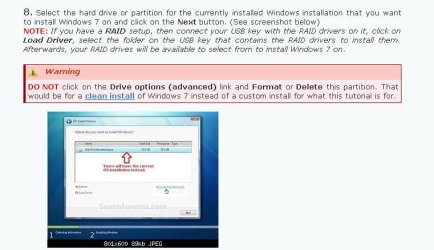
2. Select the Startup Repair option. (See screenshot below) Repair.jpg
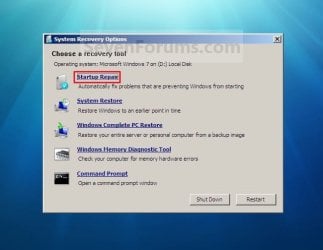
3. Startup Repair will now scan your computer to attempt to find and fix any startup problems. (See screenshot below)
NOTE: Startup Repair might prompt you to make choices as it tries to fix the problem, and if necessary, it might restart your computer as it makes repairs. If repairs are not successful, you'll see a summary of the problem and links to contact information for support. Your computer manufacturer might include additional assistance information. Startup_Repair-1.jpg
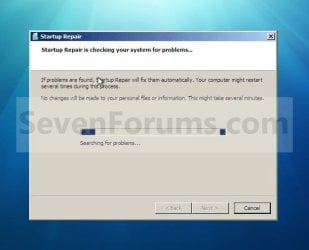
4. If problems cannot be found, then click on Finish. (See screenshot below)
NOTE: You can click on the View diagnostic and repair details link to see a detailed summary of what Startup Repair has done. Startup_Repair-2.jpg
A) Click on the Restart button to return to the Windows 7 log on screen. (See screenshot below step 2)
   Tip
Sometimes it may take running a startup repair (3) separate times with restarting the computer after each time before it fully fixes the startup issue.


That's it,
Shawn


Last edited:
This my own method for doing it - don't go making tutorials out of it please.

Boot your 7 recovery cd. Go to command prompt.

Type :

notepad

(then press enter )

when notepad pops up, click File >Save

Navigate to Windows\system32\config\regback

(It's a pain , but you will need to keep selecting "All Files" in notepad dropdown. )

Rt click and copy SOFTWARE (file with no extension )

then navigate to Windows\system32\config rt click and paste - overwrite the existing SOFTWARE .

Now go back to Windows\system32\config\regback , copy SYSTEM

then navigate to Windows\system32\config rt click and paste - overwrite the existing SYSTEM

repeat for DEFAULT, SAM and SECURITY .

Then try startup repair and reboot.

Can you follow that ?

Ican try that. In case it works, where would this lead me? to the same point before the crashdown, or somwhere else? just to be sure

thanks
 

My Computer

OS
windows 7 ultimate x64
It always works for me - I did it just the day before yesterday on my own system.

You should be able to boot straight back into windows.

You might find you need to download a couple of the most recent updates -depends how recent those backup hives are. It will take you back to the time the backup hives were updated - a few days, probably.
 

My Computers

System One System Two

  • Computer type
    PC/Desktop
    OS
    7 X64
    CPU
    i5 8400
    Motherboard
    gigabyte b365m ds3h
    Memory
    2x8gb 3200mhz
    Hard Drives
    various
    PSU
    pure power 11 400w cm
    Case
    Coolermaster
    Cooling
    cryorig m9i
  • Computer type
    PC/Desktop
    OS
    7x64
    CPU
    g5400
    Motherboard
    ga b365m ds3h
    Memory
    8gb ddr4 2400
    PSU
    xfx pro 450w
when notepad pops up, click File >Save

Navigate to Windows\system32\config\regback

tried to do this, but when I get the window to save, I can´t get to windows\system32
I only can choose disc C, and then only a folder called temp, that´s all I can navigate, Am I doing something wrong here?
thanks a lot again
 

My Computer

OS
windows 7 ultimate x64
Never come across that before.

Unless you have already begun some kind of reinstall proces and deleted everything already.
 

My Computers

System One System Two

  • Computer type
    PC/Desktop
    OS
    7 X64
    CPU
    i5 8400
    Motherboard
    gigabyte b365m ds3h
    Memory
    2x8gb 3200mhz
    Hard Drives
    various
    PSU
    pure power 11 400w cm
    Case
    Coolermaster
    Cooling
    cryorig m9i
  • Computer type
    PC/Desktop
    OS
    7x64
    CPU
    g5400
    Motherboard
    ga b365m ds3h
    Memory
    8gb ddr4 2400
    PSU
    xfx pro 450w
Never come across that before.

Unless you have already begun some kind of reinstall proces and deleted everything already.

Ok sorry, I find now that I find that folder, but it is located in a disc called BOOT X:
is it normal? will it work if I do it there, or if I cant find anything on C i´m in trouble

thanks a lot
 

My Computer

OS
windows 7 ultimate x64
Looks like the partition table is damaged.

First you could try and recover the partitions.

It worth a go as it is free and quick .

Download Partition Wizard Bootable CD allows user to boot computer directly to manage partition. boot it up, select Partition Recovery,select Full Disk, do a Quick Scan, Tick ALL the partitions you want keep and click APPLY.

If that works - you will be exactly as you were before the incident.

If it doesn't, then you will have to try a custom install - but if the windows7 installer only sees that one partition ( c) and the rest as raw/unallocated then not sure you will be able to save anything into Windows.old.

You might be able to reinstall onto that one partition ( if it's big enough ) , then recover the others - and get your data that way.
 

My Computers

System One System Two

  • Computer type
    PC/Desktop
    OS
    7 X64
    CPU
    i5 8400
    Motherboard
    gigabyte b365m ds3h
    Memory
    2x8gb 3200mhz
    Hard Drives
    various
    PSU
    pure power 11 400w cm
    Case
    Coolermaster
    Cooling
    cryorig m9i
  • Computer type
    PC/Desktop
    OS
    7x64
    CPU
    g5400
    Motherboard
    ga b365m ds3h
    Memory
    8gb ddr4 2400
    PSU
    xfx pro 450w
Looks like the partition table is damaged.

First you could try and recover the partitions.

It worth a go as it is free and quick .

Download Partition Wizard Bootable CD allows user to boot computer directly to manage partition. boot it up, select Partition Recovery,select Full Disk, do a Quick Scan, Tick ALL the partitions you want keep and click APPLY.

If that works - you will be exactly as you were before the incident.

If it doesn't, then you will have to try a custom install - but if the windows7 installer only sees that one partition ( c) and the rest as raw/unallocated then not sure you will be able to save anything into Windows.old.

You might be able to reinstall onto that one partition ( if it's big enough ) , then recover the others - and get your data that way.

Ok, I tried but it doesn´t seem to be working.
The thing is whit the PARTITION WIZARD, it finds two partitions, but both are c: as I didn´t have any other partitions in my disk. Everything was on c:
And it show it divided in two parts, a small one which sais "sistem reserved" and a big big one, with all 1340 gb of the disk, when I select both, I have only a FINISH button, and that´s it, it doesnt seem like anything has happened,
Am I making any mistake here?

thanks
 
Last edited:

My Computer

OS
windows 7 ultimate x64
Tick both , click Finish, click APPLY at the top left of the main window.


PW-APPLY.jpg

Assuming it recovers them - you will be fine - should be able to boot back in.

[ If the APPLY button is greyed out - then those partitions already exist.

If that is the case - go ahead and do a custom install - but don't format the partitions - that should save most of your data into a folder called Windows .old. You can then copy it back after the windows 7 reinstall is complete. You will have some setting up and reinstalling of programs to do.]
 

My Computers

System One System Two

  • Computer type
    PC/Desktop
    OS
    7 X64
    CPU
    i5 8400
    Motherboard
    gigabyte b365m ds3h
    Memory
    2x8gb 3200mhz
    Hard Drives
    various
    PSU
    pure power 11 400w cm
    Case
    Coolermaster
    Cooling
    cryorig m9i
  • Computer type
    PC/Desktop
    OS
    7x64
    CPU
    g5400
    Motherboard
    ga b365m ds3h
    Memory
    8gb ddr4 2400
    PSU
    xfx pro 450w
Tick both , click Finish, click APPLY

[ If the APPLY button is greyed out - then those partitions already exist.

If that is the case - go ahead and do a custom install - but don't format the partitions - that should save most of your data into a folder called Windows .old.

You can then copy it back after the windows 7 reinstall is complete.

You will have some setting up and reinstalling of programs to do.]

ok,. so apply button is indeed greyed out.
so now I come with a few last questions before you start to hate me,
first, when I´m running the recovery boot cd, in the step when it tries to find the operating system, it finds WIN7 on a disc E:, not in C:, and it sais PARTITION SIZE 0 MB
That looks strange for me, is it?

then, when I try to do the notepad step you mentioned, I have this options
C: SYSTEM RESERVED which only have a temp folder, and sais 70 mb free of 99 mb
D: LOCAL DISK , says nothing about space, and can´t access it
X: BOOT 28.9 mb free of 31.4 mb

I don´t know if this clears anything else up for you.

Anyway, as I see, I will have to do a custom install. Hope it works.
Just a last question, will I have to reinstall ALL the programs and drivers, or is there any chance of not losing some of that information. Just to be aware.

thanks again, and again, for your help and patience
 

My Computer

OS
windows 7 ultimate x64
7 will install it's own drivers.

You will need to reinstall all programs ( except those that don't need installers and run as executables )
 

My Computers

System One System Two

  • Computer type
    PC/Desktop
    OS
    7 X64
    CPU
    i5 8400
    Motherboard
    gigabyte b365m ds3h
    Memory
    2x8gb 3200mhz
    Hard Drives
    various
    PSU
    pure power 11 400w cm
    Case
    Coolermaster
    Cooling
    cryorig m9i
  • Computer type
    PC/Desktop
    OS
    7x64
    CPU
    g5400
    Motherboard
    ga b365m ds3h
    Memory
    8gb ddr4 2400
    PSU
    xfx pro 450w
Hey guys, when I get to this screen

I don´t have any disk/partition/installation/item to choose.

I asume this means I have to do a clean install, and lost all my info, am I right?
EDIT - while attempting to do a clean install I find the same problem, it says there are no controller for any disk or device, and gives me the choice to load a controller, should I find my hard disk controller or driver?

EDIT 2- there isn´t any driver to download . I have a wd15ears .
please if someone can help me, at least tell me if there is any way to make it work, or my hard disk is lost for good.

thanks to all
 

Attachments

  • printscreen.jpg
    printscreen.jpg
    46.9 KB · Views: 290
Last edited:

My Computer

OS
windows 7 ultimate x64
There is one thing you other you can try.

Boot up something that sees the partitions - try PW as you already have it. ( Not usre it will do the job , but try it as you have already downloaded it .I would use gparted )

Delete the small 100mb partition.

Rt click the larger partition Modify>mark as active.

Apply.

If that works , it should rewrite the entries and then windows boot disc may be able to see it.
 

My Computers

System One System Two

  • Computer type
    PC/Desktop
    OS
    7 X64
    CPU
    i5 8400
    Motherboard
    gigabyte b365m ds3h
    Memory
    2x8gb 3200mhz
    Hard Drives
    various
    PSU
    pure power 11 400w cm
    Case
    Coolermaster
    Cooling
    cryorig m9i
  • Computer type
    PC/Desktop
    OS
    7x64
    CPU
    g5400
    Motherboard
    ga b365m ds3h
    Memory
    8gb ddr4 2400
    PSU
    xfx pro 450w
There is one thing you other you can try.

Boot up something that sees the partitions - try PW as you already have it. ( Not usre it will do the job , but try it as you have already downloaded it .I would use gparted )

Delete the small 100mb partition.

Rt click the larger partition Modify>mark as active.

Apply.

If that works , it should rewrite the entries and then windows boot disc may be able to see it.

Hey there, well just before you post this, I googled a bit and many people said it could be a problem with installation dvd, although it didn´t seem very credible, I tried burning a new dvd, and, who knows why, now the partitions appeared

I have two of them,
DISK 0 PARTITION 1: SYSTEM RESERVED 100 MB , 70 MB FREE, TYPE: SYSTEM
DISK 0 PARITION 2 TOTAL SIZE 1397.2 GB FREE 1397.2 TYPE PRINCIPAL

don´t want to mess things up, so I preffer to wait for your advice on what to do

thanks,
 

My Computer

OS
windows 7 ultimate x64
Casiopea,

Are you able to run a startup repair using the new installation disc now with it finishing, and able to boot into Windows 7 without issue now?
 

My Computer

Computer type
PC/Desktop
Computer Manufacturer/Model Number
Self built custom
OS
64-bit Windows 11 Pro for Workstations
CPU
Intel i7-8700K OC'd to 5 GHz
Motherboard
ASUS ROG Maximus XI Formula Z390
Memory
64 GB (4x16GB) G.SKILL TridentZ RGB DDR4 3600 MHz
Graphics Card(s)
ASUS ROG-STRIX-GTX1080TI-O11G-GAMING
Sound Card
Integrated
Monitor(s) Displays
2 x Samsung Odyssey G7 27"
Screen Resolution
2560x1440
Hard Drives
1TB Samsung 990 PRO M.2,
4TB Samsung 990 PRO PRO M.2,
TerraMaster F8 SSD Plus NAS
PSU
Seasonic Prime Titanium 850W
Case
Thermaltake Core P3
Cooling
Corsair Hydro H115i
Keyboard
Logitech wireless K800
Mouse
Logitech MX Master 4
Internet Speed
2 Gb/s Download and 100 Mb/s Upload
Antivirus
Malwarebyte Anti-Malware Premium
Browser
Google Chrome
Other Info
Logitech Z625 speaker system,
Logitech BRIO 4K Pro webcam,
HP Color LaserJet Pro MFP M477fdn,
APC SMART-UPS RT 1000 XL - SURT1000XLI,
Galaxy S23 Plus phone
That looks better - try startup repair now - you may be lucky
 

My Computers

System One System Two

  • Computer type
    PC/Desktop
    OS
    7 X64
    CPU
    i5 8400
    Motherboard
    gigabyte b365m ds3h
    Memory
    2x8gb 3200mhz
    Hard Drives
    various
    PSU
    pure power 11 400w cm
    Case
    Coolermaster
    Cooling
    cryorig m9i
  • Computer type
    PC/Desktop
    OS
    7x64
    CPU
    g5400
    Motherboard
    ga b365m ds3h
    Memory
    8gb ddr4 2400
    PSU
    xfx pro 450w
Hi guys, sorry if my questions seems simple, but as I said, I´m no expert.
How should I run a startup repair with the installation cd?
 

My Computer

OS
windows 7 ultimate x64
Boot it up, you will get a scrren saying "Install Now"

Click at bottom left where it says Repair My computer.
 

My Computers

System One System Two

  • Computer type
    PC/Desktop
    OS
    7 X64
    CPU
    i5 8400
    Motherboard
    gigabyte b365m ds3h
    Memory
    2x8gb 3200mhz
    Hard Drives
    various
    PSU
    pure power 11 400w cm
    Case
    Coolermaster
    Cooling
    cryorig m9i
  • Computer type
    PC/Desktop
    OS
    7x64
    CPU
    g5400
    Motherboard
    ga b365m ds3h
    Memory
    8gb ddr4 2400
    PSU
    xfx pro 450w
Hi guys, sorry if my questions seems simple, but as I said, I´m no expert.
How should I run a startup repair with the installation cd?

It's no problem at all. The steps in the tutorial on the first page of this thread can help give full details on how to. :)
 

My Computer

Computer type
PC/Desktop
Computer Manufacturer/Model Number
Self built custom
OS
64-bit Windows 11 Pro for Workstations
CPU
Intel i7-8700K OC'd to 5 GHz
Motherboard
ASUS ROG Maximus XI Formula Z390
Memory
64 GB (4x16GB) G.SKILL TridentZ RGB DDR4 3600 MHz
Graphics Card(s)
ASUS ROG-STRIX-GTX1080TI-O11G-GAMING
Sound Card
Integrated
Monitor(s) Displays
2 x Samsung Odyssey G7 27"
Screen Resolution
2560x1440
Hard Drives
1TB Samsung 990 PRO M.2,
4TB Samsung 990 PRO PRO M.2,
TerraMaster F8 SSD Plus NAS
PSU
Seasonic Prime Titanium 850W
Case
Thermaltake Core P3
Cooling
Corsair Hydro H115i
Keyboard
Logitech wireless K800
Mouse
Logitech MX Master 4
Internet Speed
2 Gb/s Download and 100 Mb/s Upload
Antivirus
Malwarebyte Anti-Malware Premium
Browser
Google Chrome
Other Info
Logitech Z625 speaker system,
Logitech BRIO 4K Pro webcam,
HP Color LaserJet Pro MFP M477fdn,
APC SMART-UPS RT 1000 XL - SURT1000XLI,
Galaxy S23 Plus phone
thanks! will try that and let you know

edit

hey guys, I´m running the startup repair now, hope it can work.
but in case it doesn´t, if I go for a custom or clean install, I should do it on this partition ¿right?

DISK 0 PARTITION 2 TOTAL SIZE 1397.2 GB FREE 1397.2 TYPE PRINCIPAL


thanks
 
Last edited:

My Computer

OS
windows 7 ultimate x64
yes.

If startup repair doesn't work , scroll down thru the list it gives all the way and see what it tells you.
 

My Computers

System One System Two

  • Computer type
    PC/Desktop
    OS
    7 X64
    CPU
    i5 8400
    Motherboard
    gigabyte b365m ds3h
    Memory
    2x8gb 3200mhz
    Hard Drives
    various
    PSU
    pure power 11 400w cm
    Case
    Coolermaster
    Cooling
    cryorig m9i
  • Computer type
    PC/Desktop
    OS
    7x64
    CPU
    g5400
    Motherboard
    ga b365m ds3h
    Memory
    8gb ddr4 2400
    PSU
    xfx pro 450w
Back
Top