sys image fails

Don't select the System Reserved (System) partition.
 

My Computer My Computer

At a glance

Windows 7 Ultimate x64 SP1Core i7-2670QM8GB DDR3 PC3-10600Intel HD Graphics 3000 + GeForce GT 540M
Computer Manufacturer/Model Number
Dell XPS 15 L502x
OS
Windows 7 Ultimate x64 SP1
CPU
Core i7-2670QM
Memory
8GB DDR3 PC3-10600
Graphics Card(s)
Intel HD Graphics 3000 + GeForce GT 540M
Screen Resolution
1920x1080
Hard Drives
1TB 5400RPM Seagate
Don't select the System Reserved (System) partition.


Even if i don't select it, it still fails for some reason. I just reinstalled Windows without the extra 100mb partition and now creating a system image works just fine
 

My Computer My Computer

At a glance

Windows 7 Pro 64-bitAMD Phenom II X2 550 BEA-Data DDR3 1600 4gbHIS Radeon HD 4670
Computer Manufacturer/Model Number
Custom Built
OS
Windows 7 Pro 64-bit
CPU
AMD Phenom II X2 550 BE
Motherboard
ASUS M4A79XTD EVO
Memory
A-Data DDR3 1600 4gb
Graphics Card(s)
HIS Radeon HD 4670
Sound Card
VIA VT1708S (8 channel onboard)
Monitor(s) Displays
Dell 23" S2309W
Screen Resolution
1920 x 1080
Hard Drives
WD 320,750gb, Seagate 500gb External Backup
PSU
Rosewill Green Series 430W
Case
Coolermaster
Cooling
Scythe SCKTN-3000
I had the same issue - I just assigned a drive letter to the reserved partition and it let me back up fine after that! :)
 

My Computer My Computer

At a glance

Windows 7 Professional 64 bitIntel i7 920 DO @4Ghz6Gb OCZ PC16000ATI Radeon HD5870
OS
Windows 7 Professional 64 bit
CPU
Intel i7 920 DO @4Ghz
Motherboard
ASUS Rampage II Extreme
Memory
6Gb OCZ PC16000
Graphics Card(s)
ATI Radeon HD5870
Sound Card
SupremeFX X-Fi
Monitor(s) Displays
26" Samsung T260
Hard Drives
64Gb Corsair Extreme SSD
2 x 1Tb Samsung Spinpoint
PSU
Corsair 750w modular
Case
Coolermaster Cosmos RC-1000
Cooling
Noctua NH-U12P
Create System Image Failture

I have the same problem. I received, repeatly, failure error code '2155348249' (lack of space). I tried to create a system image from C drive to Y Drive. The C drive has 194 GB free our of 232 GB. The Y drive has 698 GB free of 698 GB. On a new Maxtor "One Touch" drive, I am unable to create a system image. It makes no sense.
 

My Computer My Computer

At a glance

Windows 7 UltimateAMD Athlon 64X2 Dual Core Processor 5600+ 2.8...4 gb
Computer Manufacturer/Model Number
Cyberpower
OS
Windows 7 Ultimate
CPU
AMD Athlon 64X2 Dual Core Processor 5600+ 2.81 GHz(32Bit OS)
Memory
4 gb
Monitor(s) Displays
2, 20 inch Displays
Hard Drives
C: 698 GB free of 194 GB free 232 GB ; Y: 698 GB free of 698 GB free
Case
Desk Top
Do you have at least 50mb of free space on your System partition in Disk management?

If not, re-read the thread above to learn how to work around this.
 
You were right. I only had 39 GB space of free space in the "system Reserved" in Disk management for my C Drive. I assigned a letter drive to the Sys. Reserved space, rebooted my PC and then tried to create an image.

But, it failed again for the same reason?
 

My Computer My Computer

At a glance

Windows 7 UltimateAMD Athlon 64X2 Dual Core Processor 5600+ 2.8...4 gb
Computer Manufacturer/Model Number
Cyberpower
OS
Windows 7 Ultimate
CPU
AMD Athlon 64X2 Dual Core Processor 5600+ 2.81 GHz(32Bit OS)
Memory
4 gb
Monitor(s) Displays
2, 20 inch Displays
Hard Drives
C: 698 GB free of 194 GB free 232 GB ; Y: 698 GB free of 698 GB free
Case
Desk Top
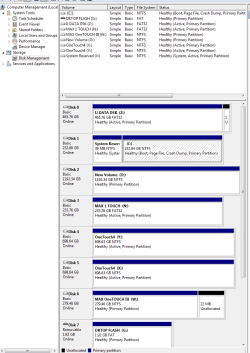
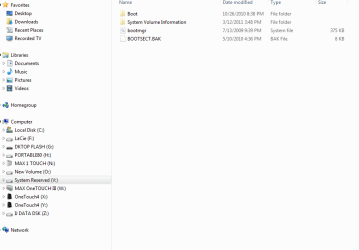
Please post back a screenshot of the contents of the System Reserved partition with window maximized, after unhiding System and hidden files in Control Panel>Folder Options>View. We can see what might have written itself there.

Also post a screenshot of your full maximized Disk Mgmt drive map with listings, so we can check your disk configuration and possibly advise enlarging the System Reserved partition some which has solved this problem in the past.

Use the Snipping TOol in Start Menu; attach file using Paper Clip in Reply box.
 
[FONT=&quot]I did the screenshots as you requested. However, I could not figure out how to use the paperclip to post the screenshot reply. When right-click on the paperclip, all the options seem to work for copying, saving, etc, for items on the website back to my desktop. I did not see how to save anything from my desktop to the website[/FONT]
moz-screenshot.png
moz-screenshot-1.png
 

My Computer My Computer

At a glance

Windows 7 UltimateAMD Athlon 64X2 Dual Core Processor 5600+ 2.8...4 gb
Computer Manufacturer/Model Number
Cyberpower
OS
Windows 7 Ultimate
CPU
AMD Athlon 64X2 Dual Core Processor 5600+ 2.81 GHz(32Bit OS)
Memory
4 gb
Monitor(s) Displays
2, 20 inch Displays
Hard Drives
C: 698 GB free of 194 GB free 232 GB ; Y: 698 GB free of 698 GB free
Case
Desk Top
Normally when I click on a paperclip Icon or attachment Icon, it will ask for the path to the document. When I just click on this paperclip, nothing at all happens. I have no way to associate the document to the reply that I know of? The Icon seem to highlight and appears to be working.
Disk%20Mangement%20Scan.PNG
 

My Computer My Computer

At a glance

Windows 7 UltimateAMD Athlon 64X2 Dual Core Processor 5600+ 2.8...4 gb
Computer Manufacturer/Model Number
Cyberpower
OS
Windows 7 Ultimate
CPU
AMD Athlon 64X2 Dual Core Processor 5600+ 2.81 GHz(32Bit OS)
Memory
4 gb
Monitor(s) Displays
2, 20 inch Displays
Hard Drives
C: 698 GB free of 194 GB free 232 GB ; Y: 698 GB free of 698 GB free
Case
Desk Top
Your 100MB system reserved is almost certainly your problem (as indicated earlier in the thread). It needs ideally 50MB free for a shadow copy when imaging. 38MB is way under.

1) Temporarily assign a letter to system reserved in Disk Management
2) enable show hidden and system files
3) You can now see it's contents. Post a screen shot of the contents

Depending what's in there, there is a cleanup operation that can be used.
 

My Computer My Computer

At a glance

Windows 7x64 Home Premium SP1Intel i7 2600kG.Skill Ripjaws (DDR3-1600) 2x4GBNvidia GeForce GTS 450; Intel HD Graphics 300...
Computer type
PC/Desktop
Computer Manufacturer/Model Number
Own build
OS
Windows 7x64 Home Premium SP1
CPU
Intel i7 2600k
Motherboard
ASUS P8Z68 Deluxe
Memory
G.Skill Ripjaws (DDR3-1600) 2x4GB
Graphics Card(s)
Nvidia GeForce GTS 450; Intel HD Graphics 3000(GT2+)
Monitor(s) Displays
Dell Ultrasharp IPS panel U2311H, Samsung SyncMaster P2350
Screen Resolution
1920x1080
Hard Drives
Samsung 850 Pro SSD 256GB, Samsung SSD 840 120GB, Seagates 1TB Barracuda ST31000528AS x2
PSU
Seasonic M12II 520W
Case
Lian Li Lancool PC-K60
Cooling
Case: 1x120mm, 3x140mm CPU: Hyper 212+
Keyboard
Logitech MK520 (wireless)
Mouse
Logitech MK520
Internet Speed
6-7 Mbps
Antivirus
Norton Security Premium, Malwarebytes on 2 (MSE on 3rd PC)
Browser
FireFox
Other Info
Audio: Logitech Z523 2.1
You may need to enable popups from this site as clicking on the paperclip opens an attachment utility. If not, try the down arrow next to the Paper Clip.
 
Did you make a backup as offered by Ccleaner registry module?

Try restoring the backup it made.

I don't recommend using the registry cleaner part of Ccleaner

Never had a single problem with the registery cleaner. I only use it when I have problems though.
 

My Computer My Computer

At a glance

Windows 10 Professional 64-bitRyzen 9 5900XG.Skill 3600Mhz CL16 16GB × 4EVGA GeForce RTX 3070 Ti FTW3 Ultra Gaming
Computer type
PC/Desktop
Computer Manufacturer/Model Number
Custom build
OS
Windows 10 Professional 64-bit
CPU
Ryzen 9 5900X
Motherboard
Gigabyte X570 Aorus Master
Memory
G.Skill 3600Mhz CL16 16GB × 4
Graphics Card(s)
EVGA GeForce RTX 3070 Ti FTW3 Ultra Gaming
Sound Card
On-board
Monitor(s) Displays
Dell Alienware AW3418DW
Screen Resolution
3440x1440
Hard Drives
1×Sabrent Rocket 4 Plus 2TB nvme SSD (System, internal)
2x4TB Western Digital Blue (Internal)
1x4TB HDST 7200RPM (Internal)
PSU
Seasonic Focus Plus 850W Platinum
Case
Corsair 680X
Cooling
Stock fans + 3× Corsair QL120, Corsair H100i Platinum
Keyboard
Logitech K350
Mouse
Logitech M510
Internet Speed
120Mbits dl - 20Mbits up
Antivirus
ESET NOD32 Antivirus
Browser
Firefox (latest version)
Other Info
Headphones : Audio-Technica ATH-M50x
Scanner : Canon Canoscan LiDE 220 + Plustek OptiBook 4800
The post was from 2 1/2 years ago, when CCleaner still got blamed for registry tweakers' problems.

No longer.

The app was finessed to final perfection about two years ago when it's issues trickled down to nothing. It is a genius app still maintained by some of the world's top geniuses.
 
This problem is not uncommon and doesn't involve CCleaner.
You either move the system partition and make it larger or clean it out (using the correct tool).
 

My Computer My Computer

At a glance

Windows 7x64 Home Premium SP1Intel i7 2600kG.Skill Ripjaws (DDR3-1600) 2x4GBNvidia GeForce GTS 450; Intel HD Graphics 300...
Computer type
PC/Desktop
Computer Manufacturer/Model Number
Own build
OS
Windows 7x64 Home Premium SP1
CPU
Intel i7 2600k
Motherboard
ASUS P8Z68 Deluxe
Memory
G.Skill Ripjaws (DDR3-1600) 2x4GB
Graphics Card(s)
Nvidia GeForce GTS 450; Intel HD Graphics 3000(GT2+)
Monitor(s) Displays
Dell Ultrasharp IPS panel U2311H, Samsung SyncMaster P2350
Screen Resolution
1920x1080
Hard Drives
Samsung 850 Pro SSD 256GB, Samsung SSD 840 120GB, Seagates 1TB Barracuda ST31000528AS x2
PSU
Seasonic M12II 520W
Case
Lian Li Lancool PC-K60
Cooling
Case: 1x120mm, 3x140mm CPU: Hyper 212+
Keyboard
Logitech MK520 (wireless)
Mouse
Logitech MK520
Internet Speed
6-7 Mbps
Antivirus
Norton Security Premium, Malwarebytes on 2 (MSE on 3rd PC)
Browser
FireFox
Other Info
Audio: Logitech Z523 2.1
I went to another browser. The Upload tool did come up with this browser when clicked on paperclip. I hope this provides the information you need. The system reserve does not appear to hve very much.

Capture Disk Mangement.PNG

C Drive Reserve Area.PNG
 

My Computer My Computer

At a glance

Windows 7 UltimateAMD Athlon 64X2 Dual Core Processor 5600+ 2.8...4 gb
Computer Manufacturer/Model Number
Cyberpower
OS
Windows 7 Ultimate
CPU
AMD Athlon 64X2 Dual Core Processor 5600+ 2.81 GHz(32Bit OS)
Memory
4 gb
Monitor(s) Displays
2, 20 inch Displays
Hard Drives
C: 698 GB free of 194 GB free 232 GB ; Y: 698 GB free of 698 GB free
Case
Desk Top
Your SysReserved partition is showing only 39mb size when it's supposed to be 100mb minimum. We cannot confirm this because the Disk Management window is not maximized so we can't see the Listings columns showing sizes.

If your System Reserved partition is truly only 39mb then your options are to expand your System Reserved partition to make it spacious enough it doesn't cause any more problems, or delete it to recover its space and the System boot files into Win7.

Back up your files and backup image so you can start over if necessary: http://www.sevenforums.com/tutorials/663-backup-complete-computer-create-image-backup.html Make a Repair CD if you don't already have a Win7 DVD. System Repair Disc - Create - Windows 7 Forums

To expand SysReserved use free Partition Wizard bootable CD to rightclick>Resize Win7 partition, drag left grey border to the right to free up enough space to add to your SysReserved to make it 200mb, click OK.

Next rightclick System Reserved>Resize, drag right grey border to the right to add the extra space you made, OK. Apply all Steps. If Win7 won't start, boot the DVD/REpair CD to http://www.sevenforums.com/tutorials/105541-startup-repair-run-3-separate-times.html

To delete SysReserved and recover its space and System boot files into Win7, boot PW CD, rightclick SysReserved to Delete, OK. Then rightclick Win7 to Resize, drag left grey border all the way to left, OK, again rightclick Win7 partition to Modify>Set to Active, OK, Apply all Steps.

Now boot the Win7 DVD/Repair CD, accept any offered Repair, if it doesn't start boot back in to http://www.sevenforums.com/tutorials/105541-startup-repair-run-3-separate-times.html

 
Last edited:
@Fat John
It certainly looks like your total system reserved is 39MB. Enough to hold the boot files but would be surprised if you could ever make a Windows image.
Even 100MB can present problems at times. 200MB is a better size.
 

My Computer My Computer

At a glance

Windows 7x64 Home Premium SP1Intel i7 2600kG.Skill Ripjaws (DDR3-1600) 2x4GBNvidia GeForce GTS 450; Intel HD Graphics 300...
Computer type
PC/Desktop
Computer Manufacturer/Model Number
Own build
OS
Windows 7x64 Home Premium SP1
CPU
Intel i7 2600k
Motherboard
ASUS P8Z68 Deluxe
Memory
G.Skill Ripjaws (DDR3-1600) 2x4GB
Graphics Card(s)
Nvidia GeForce GTS 450; Intel HD Graphics 3000(GT2+)
Monitor(s) Displays
Dell Ultrasharp IPS panel U2311H, Samsung SyncMaster P2350
Screen Resolution
1920x1080
Hard Drives
Samsung 850 Pro SSD 256GB, Samsung SSD 840 120GB, Seagates 1TB Barracuda ST31000528AS x2
PSU
Seasonic M12II 520W
Case
Lian Li Lancool PC-K60
Cooling
Case: 1x120mm, 3x140mm CPU: Hyper 212+
Keyboard
Logitech MK520 (wireless)
Mouse
Logitech MK520
Internet Speed
6-7 Mbps
Antivirus
Norton Security Premium, Malwarebytes on 2 (MSE on 3rd PC)
Browser
FireFox
Other Info
Audio: Logitech Z523 2.1
Ok. It is only 39 MB. I assume there is some good reason for the System Reserved. So, I am going to try to keep it. I can not do a Win7 backup image to backup because that is my probleim. I could not create a backup image to an exterial drive because my C drive System Reserved partition is too small to create an image.

It appears I need to do this without a Operating System backup because I do not have a choice. I will use my Win7 DVD if action cause the system to not start.

I assume that "free Partition Wizard bootable CD" is a free program I can download and then use. I will have to buy a writable CD to copy it to.

As noted above, I will need to make it 200 MB. I think that is all I need. This will be a week job. So, I will have time to find out how to use the new Partition software and fix system if things go wrong.

Thanks for the help
 

My Computer My Computer

At a glance

Windows 7 UltimateAMD Athlon 64X2 Dual Core Processor 5600+ 2.8...4 gb
Computer Manufacturer/Model Number
Cyberpower
OS
Windows 7 Ultimate
CPU
AMD Athlon 64X2 Dual Core Processor 5600+ 2.81 GHz(32Bit OS)
Memory
4 gb
Monitor(s) Displays
2, 20 inch Displays
Hard Drives
C: 698 GB free of 194 GB free 232 GB ; Y: 698 GB free of 698 GB free
Case
Desk Top
Back
Top