Solved System reserved is C: and OS is D:?

stuckstuck

New member
Member
VIP
Local time
10:24 AM
Messages
168
Hi, so I've been having boot issues and I finally think I know what's up.
I'm currently in the cmd right now and I've found that the system reserved partition is my C:, and my OS D: .
Anybody know how I fix this?

Guide me.

*UPDATE*

Now the local disk is on F:
I'm unable to make my OS partition the C:
Everytime I remove the C: letter from the system reserved partition and re-assign the F: local disk back to C: then restart, it doesn't work, I enter the repair disk and everything goes back to before.
The OS is sitll F: drive and the system reserved partition reverts back to C: drive.
I have no idea how to fix this!
 
Last edited:

My Computer My Computer

At a glance

Microsoft Windows 7 Professional 64-bit5960X @ 4.4GHz16.0 GBNVIDIA GeForce GTX 980 Ti
Computer type
PC/Desktop
Computer Manufacturer/Model Number
Custom
OS
Microsoft Windows 7 Professional 64-bit
CPU
5960X @ 4.4GHz
Motherboard
X99 SABERTOOTH
Memory
16.0 GB
Graphics Card(s)
NVIDIA GeForce GTX 980 Ti
Hard Drives
(1) OCZ-VERT EX460 SCSI Disk Device
(2) WDC WD1002FAEX-00Z3A SCSI Disk Device
(3) WDC WD1003FZEX-00MK2 SCSI Disk Device
Internet Speed
God Speed.
Antivirus
Glock 9
A reinstall will be needed. I ended up with the "D" drive as the main OS drive on an install several years ago. I searched and asked about how to correct it and never found a way. When I built a new PC and did a new install it got corrected.
 

My Computer My Computer

At a glance

Windows 10 64 bitIntel i7 6700K16GB Corsair DominatorIntel CPU Graphics
Computer type
PC/Desktop
Computer Manufacturer/Model Number
My Own Build
OS
Windows 10 64 bit
CPU
Intel i7 6700K
Motherboard
ASUS ROG Maximus VIII Hero
Memory
16GB Corsair Dominator
Graphics Card(s)
Intel CPU Graphics
Sound Card
RealTek
Monitor(s) Displays
27" Dell S2719dgf
Screen Resolution
2560X1440
Hard Drives
1 TB Samsung 850 EVO SSD for Win 10 Pro
500GB Samsung 850 EVO SSD for Win 10 Insider
2 TB drive for backup
PSU
EVGA Supernova 750G2
Case
BeQuiet Silent Base 600
Cooling
Deepcool Captain 120EX
Keyboard
Microsoft Wireless 2000
Mouse
Microsoft wireless
Internet Speed
100 MB/sec (Cable)
Antivirus
Microsoft Defender and Malwarebytes
Browser
Edge/Firefox
Other Info
Cakewalk (Sonar) by BandLab and Studio One 4.1 Pro recording studio software. MOTU 896Mk3 Hybrid recording interface, Frontier Tranzport wireless control unit, Behringer X-Touch Control Surface.
Five USB connected optical drives for CD Audio production using Nero BurningROM
You can't be serious. So there's absolutely nothing I can do to fix this? I find that hard to believe.
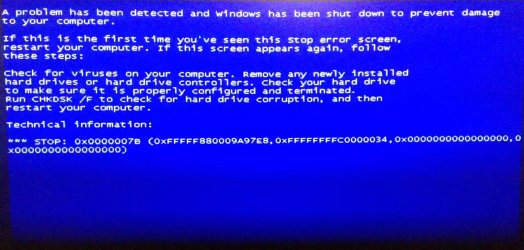
How unfortunate, I forget to mention that the startup issue that I'm having is that whenever I attempt to boot into the OS I get a split-second BSOD that's preventing me from actually entering.
It flashed way too fast for me to see the BSOD so I decided to record it as it was happening with my phone, here was the screen...


*REMINDER*

Now the local disk is on F:
I'm unable to turn the OS partition to C:
Everytime I remove the C: letter from the system reserved partition and re-assign the F: local disk back to C: then restart, it doesn't work, I enter the repair disk and everything goes back to what it was before.
The OS is still F: drive and the system reserved partition reverts back to C: drive.
 

Attachments

  • bsod.jpg
    bsod.jpg
    187.4 KB · Views: 1

My Computer My Computer

At a glance

Microsoft Windows 7 Professional 64-bit5960X @ 4.4GHz16.0 GBNVIDIA GeForce GTX 980 Ti
Computer type
PC/Desktop
Computer Manufacturer/Model Number
Custom
OS
Microsoft Windows 7 Professional 64-bit
CPU
5960X @ 4.4GHz
Motherboard
X99 SABERTOOTH
Memory
16.0 GB
Graphics Card(s)
NVIDIA GeForce GTX 980 Ti
Hard Drives
(1) OCZ-VERT EX460 SCSI Disk Device
(2) WDC WD1002FAEX-00Z3A SCSI Disk Device
(3) WDC WD1003FZEX-00MK2 SCSI Disk Device
Internet Speed
God Speed.
Antivirus
Glock 9
The blue screen halt has nothing to do with the OS being on the D drive. Two separate issues.

But I looked long and hard for a way to get the OS back to C and could never find one.
 

My Computer My Computer

At a glance

Windows 10 64 bitIntel i7 6700K16GB Corsair DominatorIntel CPU Graphics
Computer type
PC/Desktop
Computer Manufacturer/Model Number
My Own Build
OS
Windows 10 64 bit
CPU
Intel i7 6700K
Motherboard
ASUS ROG Maximus VIII Hero
Memory
16GB Corsair Dominator
Graphics Card(s)
Intel CPU Graphics
Sound Card
RealTek
Monitor(s) Displays
27" Dell S2719dgf
Screen Resolution
2560X1440
Hard Drives
1 TB Samsung 850 EVO SSD for Win 10 Pro
500GB Samsung 850 EVO SSD for Win 10 Insider
2 TB drive for backup
PSU
EVGA Supernova 750G2
Case
BeQuiet Silent Base 600
Cooling
Deepcool Captain 120EX
Keyboard
Microsoft Wireless 2000
Mouse
Microsoft wireless
Internet Speed
100 MB/sec (Cable)
Antivirus
Microsoft Defender and Malwarebytes
Browser
Edge/Firefox
Other Info
Cakewalk (Sonar) by BandLab and Studio One 4.1 Pro recording studio software. MOTU 896Mk3 Hybrid recording interface, Frontier Tranzport wireless control unit, Behringer X-Touch Control Surface.
Five USB connected optical drives for CD Audio production using Nero BurningROM
The blue screen halt has nothing to do with the OS being on the D drive. Two separate issues.

But I looked long and hard for a way to get the OS back to C and could never find one.

If that's actually the case, then this sounds almost too ridiculous.
I forgot to mention that everything was fine before I installed a new motherboard, CPU and RAM.
Something I should've mentioned from the beginning.
I had checked twice to make sure everything within my computer was fixated properly into the tower etc.
Everything is fine, everything is where it should be.
But... everything did start going problematic when I installed all that new hardware.
 

My Computer My Computer

At a glance

Microsoft Windows 7 Professional 64-bit5960X @ 4.4GHz16.0 GBNVIDIA GeForce GTX 980 Ti
Computer type
PC/Desktop
Computer Manufacturer/Model Number
Custom
OS
Microsoft Windows 7 Professional 64-bit
CPU
5960X @ 4.4GHz
Motherboard
X99 SABERTOOTH
Memory
16.0 GB
Graphics Card(s)
NVIDIA GeForce GTX 980 Ti
Hard Drives
(1) OCZ-VERT EX460 SCSI Disk Device
(2) WDC WD1002FAEX-00Z3A SCSI Disk Device
(3) WDC WD1003FZEX-00MK2 SCSI Disk Device
Internet Speed
God Speed.
Antivirus
Glock 9
I would suspect something to do with the new hardware. the Stop 0xxx7B is a hardware problem.

Are you saying the "D" drive occurred when you installed the new hardware? My "D" drive problem happened as I had a C drive with Vista on it and when I installed Windows 7 on a separate drive, because the Vista drive (C) was connected the install set it up as the "D" drive. If I had disconnected the Vista drive before installing Windows 7 I wouldn't have had a problem. I didn't want to reinstall Win 7 so I just used it as the D drive - didn't hurt anything or make any difference. When I built a new system and did a complete new (clean) install of Windows 7, I made sure only the drive I wanted Win 7 on was connected and I got the C drive back.
 

My Computer My Computer

At a glance

Windows 10 64 bitIntel i7 6700K16GB Corsair DominatorIntel CPU Graphics
Computer type
PC/Desktop
Computer Manufacturer/Model Number
My Own Build
OS
Windows 10 64 bit
CPU
Intel i7 6700K
Motherboard
ASUS ROG Maximus VIII Hero
Memory
16GB Corsair Dominator
Graphics Card(s)
Intel CPU Graphics
Sound Card
RealTek
Monitor(s) Displays
27" Dell S2719dgf
Screen Resolution
2560X1440
Hard Drives
1 TB Samsung 850 EVO SSD for Win 10 Pro
500GB Samsung 850 EVO SSD for Win 10 Insider
2 TB drive for backup
PSU
EVGA Supernova 750G2
Case
BeQuiet Silent Base 600
Cooling
Deepcool Captain 120EX
Keyboard
Microsoft Wireless 2000
Mouse
Microsoft wireless
Internet Speed
100 MB/sec (Cable)
Antivirus
Microsoft Defender and Malwarebytes
Browser
Edge/Firefox
Other Info
Cakewalk (Sonar) by BandLab and Studio One 4.1 Pro recording studio software. MOTU 896Mk3 Hybrid recording interface, Frontier Tranzport wireless control unit, Behringer X-Touch Control Surface.
Five USB connected optical drives for CD Audio production using Nero BurningROM
All my hard drives are slave drives except the one SSD that has my OS on it.
The system reserved partition is the C: for some reason whilst the OS partition is F: ( Which was once D: ).
Why is it that I'm unable to fix this within cmd??
 

My Computer My Computer

At a glance

Microsoft Windows 7 Professional 64-bit5960X @ 4.4GHz16.0 GBNVIDIA GeForce GTX 980 Ti
Computer type
PC/Desktop
Computer Manufacturer/Model Number
Custom
OS
Microsoft Windows 7 Professional 64-bit
CPU
5960X @ 4.4GHz
Motherboard
X99 SABERTOOTH
Memory
16.0 GB
Graphics Card(s)
NVIDIA GeForce GTX 980 Ti
Hard Drives
(1) OCZ-VERT EX460 SCSI Disk Device
(2) WDC WD1002FAEX-00Z3A SCSI Disk Device
(3) WDC WD1003FZEX-00MK2 SCSI Disk Device
Internet Speed
God Speed.
Antivirus
Glock 9
I don't know why it can't be fixed but as I stated I did a lot of searching and asking, including here on the Win 7 forum, and could never come up with a way to change it.
 

My Computer My Computer

At a glance

Windows 10 64 bitIntel i7 6700K16GB Corsair DominatorIntel CPU Graphics
Computer type
PC/Desktop
Computer Manufacturer/Model Number
My Own Build
OS
Windows 10 64 bit
CPU
Intel i7 6700K
Motherboard
ASUS ROG Maximus VIII Hero
Memory
16GB Corsair Dominator
Graphics Card(s)
Intel CPU Graphics
Sound Card
RealTek
Monitor(s) Displays
27" Dell S2719dgf
Screen Resolution
2560X1440
Hard Drives
1 TB Samsung 850 EVO SSD for Win 10 Pro
500GB Samsung 850 EVO SSD for Win 10 Insider
2 TB drive for backup
PSU
EVGA Supernova 750G2
Case
BeQuiet Silent Base 600
Cooling
Deepcool Captain 120EX
Keyboard
Microsoft Wireless 2000
Mouse
Microsoft wireless
Internet Speed
100 MB/sec (Cable)
Antivirus
Microsoft Defender and Malwarebytes
Browser
Edge/Firefox
Other Info
Cakewalk (Sonar) by BandLab and Studio One 4.1 Pro recording studio software. MOTU 896Mk3 Hybrid recording interface, Frontier Tranzport wireless control unit, Behringer X-Touch Control Surface.
Five USB connected optical drives for CD Audio production using Nero BurningROM
I don't know why it can't be fixed but as I stated I did a lot of searching and asking, including here on the Win 7 forum, and could never come up with a way to change it.

Jesus...
 

My Computer My Computer

At a glance

Microsoft Windows 7 Professional 64-bit5960X @ 4.4GHz16.0 GBNVIDIA GeForce GTX 980 Ti
Computer type
PC/Desktop
Computer Manufacturer/Model Number
Custom
OS
Microsoft Windows 7 Professional 64-bit
CPU
5960X @ 4.4GHz
Motherboard
X99 SABERTOOTH
Memory
16.0 GB
Graphics Card(s)
NVIDIA GeForce GTX 980 Ti
Hard Drives
(1) OCZ-VERT EX460 SCSI Disk Device
(2) WDC WD1002FAEX-00Z3A SCSI Disk Device
(3) WDC WD1003FZEX-00MK2 SCSI Disk Device
Internet Speed
God Speed.
Antivirus
Glock 9
Changing the drive letter of an installed OS is very difficult and time consuming. Reinstalling the OS is the easy way.
 

My Computer My Computer

At a glance

Windows 7 Pro 64 bitXeon W35208 GBNvidia Geforce 210
Computer type
PC/Desktop
Computer Manufacturer/Model Number
HP
OS
Windows 7 Pro 64 bit
CPU
Xeon W3520
Memory
8 GB
Graphics Card(s)
Nvidia Geforce 210
Changing the drive letter of an installed OS is very difficult and time consuming. Reinstalling the OS is the easy way.

It's not difficult at all, I did it in cmd?
The problem is when I restart, ( Failing to boot again ) return to the cmd in the repair disk and check the disks and letters etc, everything was back to what it once was, as if I never changed the letter to C: etc.
So the changes I make to the letters just doesn't stay.
 

My Computer My Computer

At a glance

Microsoft Windows 7 Professional 64-bit5960X @ 4.4GHz16.0 GBNVIDIA GeForce GTX 980 Ti
Computer type
PC/Desktop
Computer Manufacturer/Model Number
Custom
OS
Microsoft Windows 7 Professional 64-bit
CPU
5960X @ 4.4GHz
Motherboard
X99 SABERTOOTH
Memory
16.0 GB
Graphics Card(s)
NVIDIA GeForce GTX 980 Ti
Hard Drives
(1) OCZ-VERT EX460 SCSI Disk Device
(2) WDC WD1002FAEX-00Z3A SCSI Disk Device
(3) WDC WD1003FZEX-00MK2 SCSI Disk Device
Internet Speed
God Speed.
Antivirus
Glock 9
One thing I have in mind is to delete the system reserved partition, then re-create a brand new system reserved?
I'm pretty sure people have done that before when they accidentally deleted their system reserved or something.
Is this a good idea?
 

My Computer My Computer

At a glance

Microsoft Windows 7 Professional 64-bit5960X @ 4.4GHz16.0 GBNVIDIA GeForce GTX 980 Ti
Computer type
PC/Desktop
Computer Manufacturer/Model Number
Custom
OS
Microsoft Windows 7 Professional 64-bit
CPU
5960X @ 4.4GHz
Motherboard
X99 SABERTOOTH
Memory
16.0 GB
Graphics Card(s)
NVIDIA GeForce GTX 980 Ti
Hard Drives
(1) OCZ-VERT EX460 SCSI Disk Device
(2) WDC WD1002FAEX-00Z3A SCSI Disk Device
(3) WDC WD1003FZEX-00MK2 SCSI Disk Device
Internet Speed
God Speed.
Antivirus
Glock 9

My Computer My Computer

At a glance

Windows 10 Pro. 64/ version 1709 Windows 7 Pr...Intel i7-6800K @ 4.3Corsair Platinum 16 gig @2400EVGA GTX 1070 OC
Computer type
PC/Desktop
Computer Manufacturer/Model Number
Home made Desktop
OS
Windows 10 Pro. 64/ version 1709 Windows 7 Pro/64
CPU
Intel i7-6800K @ 4.3
Motherboard
ASUS X-99 Deluxe II
Memory
Corsair Platinum 16 gig @2400
Graphics Card(s)
EVGA GTX 1070 OC
Monitor(s) Displays
Asus 27" LED LCD/VE278Q
Screen Resolution
1920-1080 or 1280-720 HDMI
Hard Drives
INTEL SSD 730-240 Gb Sata 3.0/
PSU
EVGA Platium 1200W
Case
Phanteks Luxe Tempered Glass 8 fans/ one radiator
Cooling
XSPC/ Water Cooled CPU
Keyboard
Das 4 Professional
Mouse
Logitech M705/MX Anywhere 2-S
Internet Speed
100 mbits
Antivirus
Microsoft Security Essentials/ Malwarebytes Premium 3.0/ SAS
Browser
I.E. 11 default/Firefox/ ISP Time Warner Cable/Spectrum
Other Info
LG BluRay Burner/
Sound system-KLipsch-THX/
Icy Dock ssd Hot Swap bays.

My Computer My Computer

At a glance

Win 10 Pro x64, Win 7 Pro x64Intel Core i7-6700HQ Skylake16gb Crucial DDR4NVIDIA GeForce GTX 960M 2 GB
Computer type
Laptop
Computer Manufacturer/Model Number
MSI PE60 6QE
OS
Win 10 Pro x64, Win 7 Pro x64
CPU
Intel Core i7-6700HQ Skylake
Motherboard
MSI MS-16J5
Memory
16gb Crucial DDR4
Graphics Card(s)
NVIDIA GeForce GTX 960M 2 GB
Screen Resolution
1920 x 1080
Hard Drives
Samsung 850 EVO 250 GB M.2 SSD (MZ-N5E250BW)
HGST 1TB @7200 RPM HTS721010A9E630
Case
Plastic
Keyboard
Got one...
Mouse
Yep, one of those too.
Internet Speed
FIOS 75/75
Antivirus
Defender
Browser
Chrome/FFox/Ex-PLODE-r/(L)Edge
Other Info
Defender, Custom Hosts, uBlock, regular backups w/ Macrium (Free)

My Computer My Computer

At a glance

Microsoft Windows 7 Professional 64-bit5960X @ 4.4GHz16.0 GBNVIDIA GeForce GTX 980 Ti
Computer type
PC/Desktop
Computer Manufacturer/Model Number
Custom
OS
Microsoft Windows 7 Professional 64-bit
CPU
5960X @ 4.4GHz
Motherboard
X99 SABERTOOTH
Memory
16.0 GB
Graphics Card(s)
NVIDIA GeForce GTX 980 Ti
Hard Drives
(1) OCZ-VERT EX460 SCSI Disk Device
(2) WDC WD1002FAEX-00Z3A SCSI Disk Device
(3) WDC WD1003FZEX-00MK2 SCSI Disk Device
Internet Speed
God Speed.
Antivirus
Glock 9
How are you going about seeing all these partition and drives?

Do you have a new install of Windows 7 after you installed your new motherboard and other hardware?

After you completed your build update has Window 7 ever booted?

If and when you did a fresh install of Windows did you have just the one drive you wanted Windows installed hooked up?

I'm just trying to figure out what you have done and in what order.
 

My Computer My Computer

At a glance

Windows 10 Pro. 64/ version 1709 Windows 7 Pr...Intel i7-6800K @ 4.3Corsair Platinum 16 gig @2400EVGA GTX 1070 OC
Computer type
PC/Desktop
Computer Manufacturer/Model Number
Home made Desktop
OS
Windows 10 Pro. 64/ version 1709 Windows 7 Pro/64
CPU
Intel i7-6800K @ 4.3
Motherboard
ASUS X-99 Deluxe II
Memory
Corsair Platinum 16 gig @2400
Graphics Card(s)
EVGA GTX 1070 OC
Monitor(s) Displays
Asus 27" LED LCD/VE278Q
Screen Resolution
1920-1080 or 1280-720 HDMI
Hard Drives
INTEL SSD 730-240 Gb Sata 3.0/
PSU
EVGA Platium 1200W
Case
Phanteks Luxe Tempered Glass 8 fans/ one radiator
Cooling
XSPC/ Water Cooled CPU
Keyboard
Das 4 Professional
Mouse
Logitech M705/MX Anywhere 2-S
Internet Speed
100 mbits
Antivirus
Microsoft Security Essentials/ Malwarebytes Premium 3.0/ SAS
Browser
I.E. 11 default/Firefox/ ISP Time Warner Cable/Spectrum
Other Info
LG BluRay Burner/
Sound system-KLipsch-THX/
Icy Dock ssd Hot Swap bays.
via cmd. I'm using the windows installation disk to access the startup repair etc.


Okay okay. So in order.

1. My computer with whatever was inside it at the time, works fine.

2. I had bought a brand new motherboard, CPU and RAM and had upgraded computer components.

3. I'm here on my laptop seeking guidance aha.

I haven't done anything with my drives, no new windows installation, no installing anything, simply just connected everything back up to my new motherboard and here I am.
 

My Computer My Computer

At a glance

Microsoft Windows 7 Professional 64-bit5960X @ 4.4GHz16.0 GBNVIDIA GeForce GTX 980 Ti
Computer type
PC/Desktop
Computer Manufacturer/Model Number
Custom
OS
Microsoft Windows 7 Professional 64-bit
CPU
5960X @ 4.4GHz
Motherboard
X99 SABERTOOTH
Memory
16.0 GB
Graphics Card(s)
NVIDIA GeForce GTX 980 Ti
Hard Drives
(1) OCZ-VERT EX460 SCSI Disk Device
(2) WDC WD1002FAEX-00Z3A SCSI Disk Device
(3) WDC WD1003FZEX-00MK2 SCSI Disk Device
Internet Speed
God Speed.
Antivirus
Glock 9
Changing the drive letter of an installed OS is very difficult and time consuming. Reinstalling the OS is the easy way.

It's not difficult at all, I did it in cmd?
The problem is when I restart, ( Failing to boot again ) return to the cmd in the repair disk and check the disks and letters etc, everything was back to what it once was, as if I never changed the letter to C: etc.
So the changes I make to the letters just doesn't stay.

Changing the drive letter is easy. But changing it so things actually work, that is the hard part.
 

My Computer My Computer

At a glance

Windows 7 Pro 64 bitXeon W35208 GBNvidia Geforce 210
Computer type
PC/Desktop
Computer Manufacturer/Model Number
HP
OS
Windows 7 Pro 64 bit
CPU
Xeon W3520
Memory
8 GB
Graphics Card(s)
Nvidia Geforce 210
Changing the drive letter of an installed OS is very difficult and time consuming. Reinstalling the OS is the easy way.

It's not difficult at all, I did it in cmd?
The problem is when I restart, ( Failing to boot again ) return to the cmd in the repair disk and check the disks and letters etc, everything was back to what it once was, as if I never changed the letter to C: etc.
So the changes I make to the letters just doesn't stay.

Changing the drive letter is easy. But changing it so things actually work, that is the hard part.

True. I mean it works, but then it reverts back for some reason, I'll change everything around in cmd but then when I restart and go back into the cmd ( via windows installation disk ), nothing stays the same.
 

My Computer My Computer

At a glance

Microsoft Windows 7 Professional 64-bit5960X @ 4.4GHz16.0 GBNVIDIA GeForce GTX 980 Ti
Computer type
PC/Desktop
Computer Manufacturer/Model Number
Custom
OS
Microsoft Windows 7 Professional 64-bit
CPU
5960X @ 4.4GHz
Motherboard
X99 SABERTOOTH
Memory
16.0 GB
Graphics Card(s)
NVIDIA GeForce GTX 980 Ti
Hard Drives
(1) OCZ-VERT EX460 SCSI Disk Device
(2) WDC WD1002FAEX-00Z3A SCSI Disk Device
(3) WDC WD1003FZEX-00MK2 SCSI Disk Device
Internet Speed
God Speed.
Antivirus
Glock 9
Once you change the motherboard it always best to do a Clean Install of Windows 7.

Here is a tutorial by Brink that will help. Be sure you only have the drive you want Windows 7 on hooked up.

Make sure you have the COA activation key handy.
With a new motherboard you will need either a Retail key or a new OEM Builders key.
 

My Computer My Computer

At a glance

Windows 10 Pro. 64/ version 1709 Windows 7 Pr...Intel i7-6800K @ 4.3Corsair Platinum 16 gig @2400EVGA GTX 1070 OC
Computer type
PC/Desktop
Computer Manufacturer/Model Number
Home made Desktop
OS
Windows 10 Pro. 64/ version 1709 Windows 7 Pro/64
CPU
Intel i7-6800K @ 4.3
Motherboard
ASUS X-99 Deluxe II
Memory
Corsair Platinum 16 gig @2400
Graphics Card(s)
EVGA GTX 1070 OC
Monitor(s) Displays
Asus 27" LED LCD/VE278Q
Screen Resolution
1920-1080 or 1280-720 HDMI
Hard Drives
INTEL SSD 730-240 Gb Sata 3.0/
PSU
EVGA Platium 1200W
Case
Phanteks Luxe Tempered Glass 8 fans/ one radiator
Cooling
XSPC/ Water Cooled CPU
Keyboard
Das 4 Professional
Mouse
Logitech M705/MX Anywhere 2-S
Internet Speed
100 mbits
Antivirus
Microsoft Security Essentials/ Malwarebytes Premium 3.0/ SAS
Browser
I.E. 11 default/Firefox/ ISP Time Warner Cable/Spectrum
Other Info
LG BluRay Burner/
Sound system-KLipsch-THX/
Icy Dock ssd Hot Swap bays.
Back
Top