System Reserved Partition - Delete

How to Remove the 100MB "System Reserved" Partition in Windows 7


   Information
The 100 MB System Reserved partition is included when doing a clean install of Windows 7 on an unallocated disk. The System Reserved partition serves two functions. First, it holds the Boot Manager code and the Boot Configuration Database. Second, it reserves space for the startup files required by the BitLocker Drive Encryption feature. If you ever decide to encrypt your system drive using BitLocker, you won’t have to repartition your system drive to make it possible.

This tutorial will show you how to delete the 100MB System Reserved partition created during the installation of Windows 7.


   Warning
This involves deleting the boot partition, then repairing. Failure to follow these instructions exactly may leave your computer in a non-bootable state.
   Note

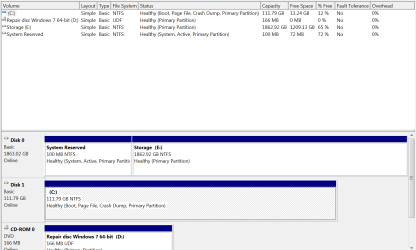
  • Make sure the C drive is a Primary partition before you begin. Type diskmgmt.msc into the start menu to access the above window.
  • You must have a Windows 7 Installation or Repair disc to do this. If you do not have a DVD, you can create a Repair Disc.
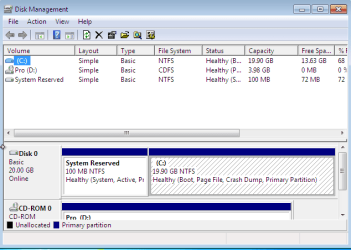
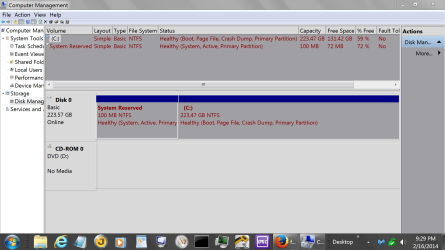
EXAMPLE: 100 MB System Reserved Partition
Capture.PNG

Here's How:

   Note
Press enter between each of these commands.

1. Boot from your installation or repair disc.

2. When you get to the language screen, press Shift+F10.
Capture1.PNG
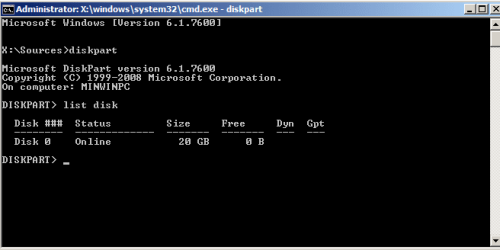
3. Enter diskpart, then list disk after diskpart is loaded.
Capture2.PNG
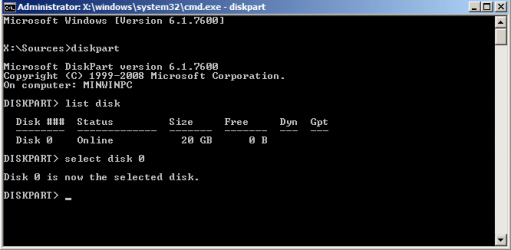
4. Enter select disk [Windows disk number].
Capture3.PNG
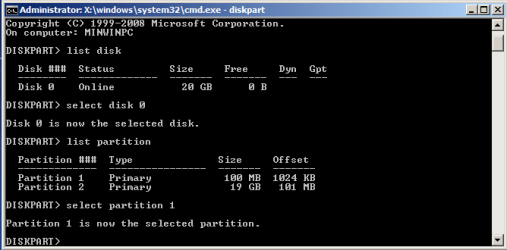
5. Enter list partition, followed by select partition [100MB partition number].
Capture4.PNG
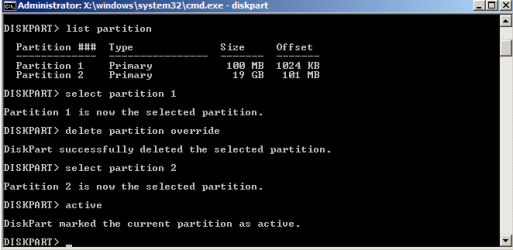
6. Enter delete partition override.

7. Enter select partition [Windows partition from step 5], then enter active.
Capture5.PNG
8. Close the command prompt.
We have deleted the partition, and Windows will be unable to boot at this point. Now it is time to write a new boot loader and BCD to the Windows partition.
9. Follow the instructions in Brink's tutorial for running a startup repair.
That should do it! If you have any problems, feel free to ask for help below.


Last edited by a moderator:

My Computer

Computer type
PC/Desktop
Computer Manufacturer/Model Number
Self built custom
OS
64-bit Windows 11 Pro for Workstations
CPU
Intel i7-8700K OC'd to 5 GHz
Motherboard
ASUS ROG Maximus XI Formula Z390
Memory
64 GB (4x16GB) G.SKILL TridentZ RGB DDR4 3600 MHz
Graphics Card(s)
ASUS ROG-STRIX-GTX1080TI-O11G-GAMING
Sound Card
Integrated
Monitor(s) Displays
2 x Samsung Odyssey G7 27"
Screen Resolution
2560x1440
Hard Drives
1TB Samsung 990 PRO M.2,
4TB Samsung 990 PRO PRO M.2,
TerraMaster F8 SSD Plus NAS
PSU
Seasonic Prime Titanium 850W
Case
Thermaltake Core P3
Cooling
Corsair Hydro H115i
Keyboard
Logitech wireless K800
Mouse
Logitech MX Master 4
Internet Speed
2 Gb/s Download and 100 Mb/s Upload
Antivirus
Malwarebyte Anti-Malware Premium
Browser
Google Chrome
Other Info
Logitech Z625 speaker system,
Logitech BRIO 4K Pro webcam,
HP Color LaserJet Pro MFP M477fdn,
APC SMART-UPS RT 1000 XL - SURT1000XLI,
Galaxy S23 Plus phone
Attached
 

Attachments

  • disk management.PNG
    disk management.PNG
    77.5 KB · Views: 126

My Computer

Computer type
PC/Desktop
Computer Manufacturer/Model Number
Custom Build
OS
Win 7 Home Premium
CPU
Intel i5 3570
Motherboard
Intel
Memory
GSkill
Graphics Card(s)
None
Hard Drives
Intel 120GB SSD
WD Green 2TB HD
Antivirus
Kapersky
Browser
Chrome
Ok. Mark C: as active, remove disk 0, and try the startup repair again to see if it's able to repair the boot manager after a few runs.

In addition, double check your BIOS settings to make sure that C: is listed first in the boot priority, or second after the CD/DVD drive.
 

My Computer

Computer type
PC/Desktop
Computer Manufacturer/Model Number
Self built custom
OS
64-bit Windows 11 Pro for Workstations
CPU
Intel i7-8700K OC'd to 5 GHz
Motherboard
ASUS ROG Maximus XI Formula Z390
Memory
64 GB (4x16GB) G.SKILL TridentZ RGB DDR4 3600 MHz
Graphics Card(s)
ASUS ROG-STRIX-GTX1080TI-O11G-GAMING
Sound Card
Integrated
Monitor(s) Displays
2 x Samsung Odyssey G7 27"
Screen Resolution
2560x1440
Hard Drives
1TB Samsung 990 PRO M.2,
4TB Samsung 990 PRO PRO M.2,
TerraMaster F8 SSD Plus NAS
PSU
Seasonic Prime Titanium 850W
Case
Thermaltake Core P3
Cooling
Corsair Hydro H115i
Keyboard
Logitech wireless K800
Mouse
Logitech MX Master 4
Internet Speed
2 Gb/s Download and 100 Mb/s Upload
Antivirus
Malwarebyte Anti-Malware Premium
Browser
Google Chrome
Other Info
Logitech Z625 speaker system,
Logitech BRIO 4K Pro webcam,
HP Color LaserJet Pro MFP M477fdn,
APC SMART-UPS RT 1000 XL - SURT1000XLI,
Galaxy S23 Plus phone
That did it. Rock and rolla. Thanks!
 

My Computer

Computer type
PC/Desktop
Computer Manufacturer/Model Number
Custom Build
OS
Win 7 Home Premium
CPU
Intel i5 3570
Motherboard
Intel
Memory
GSkill
Graphics Card(s)
None
Hard Drives
Intel 120GB SSD
WD Green 2TB HD
Antivirus
Kapersky
Browser
Chrome
You're most welcome. :)
 

My Computer

Computer type
PC/Desktop
Computer Manufacturer/Model Number
Self built custom
OS
64-bit Windows 11 Pro for Workstations
CPU
Intel i7-8700K OC'd to 5 GHz
Motherboard
ASUS ROG Maximus XI Formula Z390
Memory
64 GB (4x16GB) G.SKILL TridentZ RGB DDR4 3600 MHz
Graphics Card(s)
ASUS ROG-STRIX-GTX1080TI-O11G-GAMING
Sound Card
Integrated
Monitor(s) Displays
2 x Samsung Odyssey G7 27"
Screen Resolution
2560x1440
Hard Drives
1TB Samsung 990 PRO M.2,
4TB Samsung 990 PRO PRO M.2,
TerraMaster F8 SSD Plus NAS
PSU
Seasonic Prime Titanium 850W
Case
Thermaltake Core P3
Cooling
Corsair Hydro H115i
Keyboard
Logitech wireless K800
Mouse
Logitech MX Master 4
Internet Speed
2 Gb/s Download and 100 Mb/s Upload
Antivirus
Malwarebyte Anti-Malware Premium
Browser
Google Chrome
Other Info
Logitech Z625 speaker system,
Logitech BRIO 4K Pro webcam,
HP Color LaserJet Pro MFP M477fdn,
APC SMART-UPS RT 1000 XL - SURT1000XLI,
Galaxy S23 Plus phone
I have a question or 2.
1. If one encrypts their C drive and then removes the the System Reserve will they be able to get back to the encrypted C drive?

2. If a computer has a finger print recognition program or a program that works in that fashion will removing the System Reserve have a effect?
 

My Computer

Computer type
PC/Desktop
Computer Manufacturer/Model Number
Home made Desktop
OS
Windows 10 Pro. 64/ version 1709 Windows 7 Pro/64
CPU
Intel i7-6800K @ 4.3
Motherboard
ASUS X-99 Deluxe II
Memory
Corsair Platinum 16 gig @2400
Graphics Card(s)
EVGA GTX 1070 OC
Monitor(s) Displays
Asus 27" LED LCD/VE278Q
Screen Resolution
1920-1080 or 1280-720 HDMI
Hard Drives
INTEL SSD 730-240 Gb Sata 3.0/
PSU
EVGA Platium 1200W
Case
Phanteks Luxe Tempered Glass 8 fans/ one radiator
Cooling
XSPC/ Water Cooled CPU
Keyboard
Das 4 Professional
Mouse
Logitech M705/MX Anywhere 2-S
Internet Speed
100 mbits
Antivirus
Microsoft Security Essentials/ Malwarebytes Premium 3.0/ SAS
Browser
I.E. 11 default/Firefox/ ISP Time Warner Cable/Spectrum
Other Info
LG BluRay Burner/
Sound system-KLipsch-THX/
Icy Dock ssd Hot Swap bays.
Hey Jack,

Q1) The system reserved partition is required to encrypt an OS drive with BitLocker. You would need to decrypt the OS drive before removing the system reserved partition.

Q2) I don't have a fingerprint reader to test with, but if it saves on or uses the system reserved partition, then it could be an issue if you didn't remove the fingerprint first.
 

My Computer

Computer type
PC/Desktop
Computer Manufacturer/Model Number
Self built custom
OS
64-bit Windows 11 Pro for Workstations
CPU
Intel i7-8700K OC'd to 5 GHz
Motherboard
ASUS ROG Maximus XI Formula Z390
Memory
64 GB (4x16GB) G.SKILL TridentZ RGB DDR4 3600 MHz
Graphics Card(s)
ASUS ROG-STRIX-GTX1080TI-O11G-GAMING
Sound Card
Integrated
Monitor(s) Displays
2 x Samsung Odyssey G7 27"
Screen Resolution
2560x1440
Hard Drives
1TB Samsung 990 PRO M.2,
4TB Samsung 990 PRO PRO M.2,
TerraMaster F8 SSD Plus NAS
PSU
Seasonic Prime Titanium 850W
Case
Thermaltake Core P3
Cooling
Corsair Hydro H115i
Keyboard
Logitech wireless K800
Mouse
Logitech MX Master 4
Internet Speed
2 Gb/s Download and 100 Mb/s Upload
Antivirus
Malwarebyte Anti-Malware Premium
Browser
Google Chrome
Other Info
Logitech Z625 speaker system,
Logitech BRIO 4K Pro webcam,
HP Color LaserJet Pro MFP M477fdn,
APC SMART-UPS RT 1000 XL - SURT1000XLI,
Galaxy S23 Plus phone
Thank you Shawn.
What made me think of such questions was some people are so concerned about removing that little 100mb partition they might not think far enough ahead before they remove it. That 100mb being removed could cause one huge head ache.
 

My Computer

Computer type
PC/Desktop
Computer Manufacturer/Model Number
Home made Desktop
OS
Windows 10 Pro. 64/ version 1709 Windows 7 Pro/64
CPU
Intel i7-6800K @ 4.3
Motherboard
ASUS X-99 Deluxe II
Memory
Corsair Platinum 16 gig @2400
Graphics Card(s)
EVGA GTX 1070 OC
Monitor(s) Displays
Asus 27" LED LCD/VE278Q
Screen Resolution
1920-1080 or 1280-720 HDMI
Hard Drives
INTEL SSD 730-240 Gb Sata 3.0/
PSU
EVGA Platium 1200W
Case
Phanteks Luxe Tempered Glass 8 fans/ one radiator
Cooling
XSPC/ Water Cooled CPU
Keyboard
Das 4 Professional
Mouse
Logitech M705/MX Anywhere 2-S
Internet Speed
100 mbits
Antivirus
Microsoft Security Essentials/ Malwarebytes Premium 3.0/ SAS
Browser
I.E. 11 default/Firefox/ ISP Time Warner Cable/Spectrum
Other Info
LG BluRay Burner/
Sound system-KLipsch-THX/
Icy Dock ssd Hot Swap bays.
You got that right.
 

My Computer

Computer type
PC/Desktop
Computer Manufacturer/Model Number
Self built custom
OS
64-bit Windows 11 Pro for Workstations
CPU
Intel i7-8700K OC'd to 5 GHz
Motherboard
ASUS ROG Maximus XI Formula Z390
Memory
64 GB (4x16GB) G.SKILL TridentZ RGB DDR4 3600 MHz
Graphics Card(s)
ASUS ROG-STRIX-GTX1080TI-O11G-GAMING
Sound Card
Integrated
Monitor(s) Displays
2 x Samsung Odyssey G7 27"
Screen Resolution
2560x1440
Hard Drives
1TB Samsung 990 PRO M.2,
4TB Samsung 990 PRO PRO M.2,
TerraMaster F8 SSD Plus NAS
PSU
Seasonic Prime Titanium 850W
Case
Thermaltake Core P3
Cooling
Corsair Hydro H115i
Keyboard
Logitech wireless K800
Mouse
Logitech MX Master 4
Internet Speed
2 Gb/s Download and 100 Mb/s Upload
Antivirus
Malwarebyte Anti-Malware Premium
Browser
Google Chrome
Other Info
Logitech Z625 speaker system,
Logitech BRIO 4K Pro webcam,
HP Color LaserJet Pro MFP M477fdn,
APC SMART-UPS RT 1000 XL - SURT1000XLI,
Galaxy S23 Plus phone
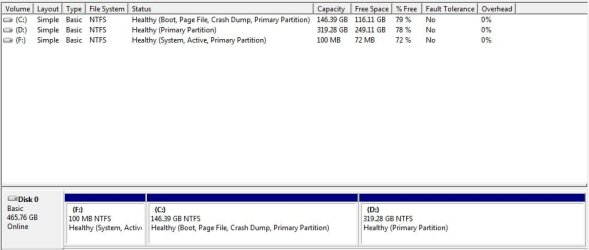
Hi. I have the same problem with unnecessary partition. I tried step by step how its written in first post. But when i do step 6. Enter delete partition override. Its don't let me do that. Then i looked in Disk Management and was wondering if partition (F:) 100 MB is the same as System Reserved Partition 100 MB. Attached screenshot. And if its different, how can i delete it? Installed fresh Windows 7 Ultimate x32 and this partition is really annoying me :rolleyes: hope for someone to respond.
Thank You!
 

Attachments

  • PartitionF.jpg
    PartitionF.jpg
    76.5 KB · Views: 101

My Computer

Computer type
Laptop
Computer Manufacturer/Model Number
Asus
OS
Windows 7 Ultimate x32
CPU
Intel(R) Core(TM) i3-3110M CPU @ 2.40GHz, 2400 Mhz
Motherboard
ASUSTeK COMPUTER INC. X55C
Memory
4GB
Graphics Card(s)
Intel(R) HD Graphics 4000
Sound Card
VIA High Definition Audio
Hard Drives
TOSHIBA MQ01ABD050 ATA Device 500GB
System reserve shouldn't have a drive letter.

Disk management.PNG
 

My Computer

Computer type
PC/Desktop
Computer Manufacturer/Model Number
Home made Desktop
OS
Windows 10 Pro. 64/ version 1709 Windows 7 Pro/64
CPU
Intel i7-6800K @ 4.3
Motherboard
ASUS X-99 Deluxe II
Memory
Corsair Platinum 16 gig @2400
Graphics Card(s)
EVGA GTX 1070 OC
Monitor(s) Displays
Asus 27" LED LCD/VE278Q
Screen Resolution
1920-1080 or 1280-720 HDMI
Hard Drives
INTEL SSD 730-240 Gb Sata 3.0/
PSU
EVGA Platium 1200W
Case
Phanteks Luxe Tempered Glass 8 fans/ one radiator
Cooling
XSPC/ Water Cooled CPU
Keyboard
Das 4 Professional
Mouse
Logitech M705/MX Anywhere 2-S
Internet Speed
100 mbits
Antivirus
Microsoft Security Essentials/ Malwarebytes Premium 3.0/ SAS
Browser
I.E. 11 default/Firefox/ ISP Time Warner Cable/Spectrum
Other Info
LG BluRay Burner/
Sound system-KLipsch-THX/
Icy Dock ssd Hot Swap bays.
I tried step by step how its written in first post. But when i do step 6. Enter delete partition override. Its don't let me do that.
Did you do Step 1. That is, are you booting from a System Repair or Installation CD/DVD.
 

My Computer

Computer type
PC/Desktop
Computer Manufacturer/Model Number
Own build
OS
Windows 7x64 Home Premium SP1
CPU
Intel i7 2600k
Motherboard
ASUS P8Z68 Deluxe
Memory
G.Skill Ripjaws (DDR3-1600) 2x4GB
Graphics Card(s)
Nvidia GeForce GTS 450; Intel HD Graphics 3000(GT2+)
Monitor(s) Displays
Dell Ultrasharp IPS panel U2311H, Samsung SyncMaster P2350
Screen Resolution
1920x1080
Hard Drives
Samsung 850 Pro SSD 256GB, Samsung SSD 840 120GB, Seagates 1TB Barracuda ST31000528AS x2
PSU
Seasonic M12II 520W
Case
Lian Li Lancool PC-K60
Cooling
Case: 1x120mm, 3x140mm CPU: Hyper 212+
Keyboard
Logitech MK520 (wireless)
Mouse
Logitech MK520
Internet Speed
6-7 Mbps
Antivirus
Norton Security Premium, Malwarebytes on 2 (MSE on 3rd PC)
Browser
FireFox
Other Info
Audio: Logitech Z523 2.1
System reserve shouldn't have a drive letter.

View attachment 311168

Ya! that's why i wondering how to delete this partition.Is it System reserved or not.How to delete it? Is there way without re-install windows delete this partition.!? No offence Layback Bear but how exactly your post answer to my questions? ;o
 

My Computer

Computer type
Laptop
Computer Manufacturer/Model Number
Asus
OS
Windows 7 Ultimate x32
CPU
Intel(R) Core(TM) i3-3110M CPU @ 2.40GHz, 2400 Mhz
Motherboard
ASUSTeK COMPUTER INC. X55C
Memory
4GB
Graphics Card(s)
Intel(R) HD Graphics 4000
Sound Card
VIA High Definition Audio
Hard Drives
TOSHIBA MQ01ABD050 ATA Device 500GB
I tried step by step how its written in first post. But when i do step 6. Enter delete partition override. Its don't let me do that.
Did you do Step 1. That is, are you booting from a System Repair or Installation CD/DVD.

Yes! I did everything like in manual and from installation CD. : )
 

My Computer

Computer type
Laptop
Computer Manufacturer/Model Number
Asus
OS
Windows 7 Ultimate x32
CPU
Intel(R) Core(TM) i3-3110M CPU @ 2.40GHz, 2400 Mhz
Motherboard
ASUSTeK COMPUTER INC. X55C
Memory
4GB
Graphics Card(s)
Intel(R) HD Graphics 4000
Sound Card
VIA High Definition Audio
Hard Drives
TOSHIBA MQ01ABD050 ATA Device 500GB
Yes it is the system reserved partition. If you followed the tutorial exactly then I don't know why you are experiencing problems. As you probably know, using Diskpart you have to be very precise.

Here is another approach
http://www.sevenforums.com/tutorials/209885-bootmgr-move-c-easybcd.html

A final point. I have system reserved on 2 builds and decided not to bother on a 3rd build. Unless it's causing you grief with say Windows inbuilt system imaging or taking up a needed partition slot then I'd just leave it alone.
 

My Computer

Computer type
PC/Desktop
Computer Manufacturer/Model Number
Own build
OS
Windows 7x64 Home Premium SP1
CPU
Intel i7 2600k
Motherboard
ASUS P8Z68 Deluxe
Memory
G.Skill Ripjaws (DDR3-1600) 2x4GB
Graphics Card(s)
Nvidia GeForce GTS 450; Intel HD Graphics 3000(GT2+)
Monitor(s) Displays
Dell Ultrasharp IPS panel U2311H, Samsung SyncMaster P2350
Screen Resolution
1920x1080
Hard Drives
Samsung 850 Pro SSD 256GB, Samsung SSD 840 120GB, Seagates 1TB Barracuda ST31000528AS x2
PSU
Seasonic M12II 520W
Case
Lian Li Lancool PC-K60
Cooling
Case: 1x120mm, 3x140mm CPU: Hyper 212+
Keyboard
Logitech MK520 (wireless)
Mouse
Logitech MK520
Internet Speed
6-7 Mbps
Antivirus
Norton Security Premium, Malwarebytes on 2 (MSE on 3rd PC)
Browser
FireFox
Other Info
Audio: Logitech Z523 2.1
Yes it is the system reserved partition. If you followed the tutorial exactly then I don't know why you are experiencing problems. As you probably know, using Diskpart you have to be very precise.

Here is another approach
http://www.sevenforums.com/tutorials/209885-bootmgr-move-c-easybcd.html

A final point. I have system reserved on 2 builds and decided not to bother on a 3rd build. Unless it's causing you grief with say Windows inbuilt system imaging or taking up a needed partition slot then I'd just leave it alone.

I am not pro in those things, but i know how to follow tutorials. Normally i find out by myself how to deal with problems witch i get during the time i use my PC/Laptop. But this time i just don't understand why it shows Partition F instead of System reserved. I will try one more time tomorrow do this steps to delete reserved partition.
Thanks for this other tutorial i guess i will find it useful sooner or later.
This third partition isn't bothering me too much, just was wondering why everyone can easily delete but i have problems with that. I like at least to try fix this small things..witch sometimes annoying me ;D
 

My Computer

Computer type
Laptop
Computer Manufacturer/Model Number
Asus
OS
Windows 7 Ultimate x32
CPU
Intel(R) Core(TM) i3-3110M CPU @ 2.40GHz, 2400 Mhz
Motherboard
ASUSTeK COMPUTER INC. X55C
Memory
4GB
Graphics Card(s)
Intel(R) HD Graphics 4000
Sound Card
VIA High Definition Audio
Hard Drives
TOSHIBA MQ01ABD050 ATA Device 500GB

My Computer

Computer type
PC/Desktop
Computer Manufacturer/Model Number
Home made Desktop
OS
Windows 10 Pro. 64/ version 1709 Windows 7 Pro/64
CPU
Intel i7-6800K @ 4.3
Motherboard
ASUS X-99 Deluxe II
Memory
Corsair Platinum 16 gig @2400
Graphics Card(s)
EVGA GTX 1070 OC
Monitor(s) Displays
Asus 27" LED LCD/VE278Q
Screen Resolution
1920-1080 or 1280-720 HDMI
Hard Drives
INTEL SSD 730-240 Gb Sata 3.0/
PSU
EVGA Platium 1200W
Case
Phanteks Luxe Tempered Glass 8 fans/ one radiator
Cooling
XSPC/ Water Cooled CPU
Keyboard
Das 4 Professional
Mouse
Logitech M705/MX Anywhere 2-S
Internet Speed
100 mbits
Antivirus
Microsoft Security Essentials/ Malwarebytes Premium 3.0/ SAS
Browser
I.E. 11 default/Firefox/ ISP Time Warner Cable/Spectrum
Other Info
LG BluRay Burner/
Sound system-KLipsch-THX/
Icy Dock ssd Hot Swap bays.
It is necessary to delete the primary partition "System" comes from the my new laptop manufacturer in order to create logical parts for backup files. I have followed what King told with either the 'system repair disk' or 'installation disk' thumb drive, but there is nothing come out with shift-F10 pressed after the language options screen appeared. It means cannot get into the diskpart mode. How can I keep on things go as said?
 

My Computer

Computer type
Laptop
Computer Manufacturer/Model Number
HP
OS
Windows 7 Ultimate x64
Back
Top