System Support Information

Add and Change System OEM Support Information in Windows 7 and Windows 8

   Information
This tutorial will show you how to customize your System properties window by adding a logo, manufacturer, model, hours, phone, and website support OEM information of your choice in Windows 7 and Windows 8.


EXAMPLE: System Support Information
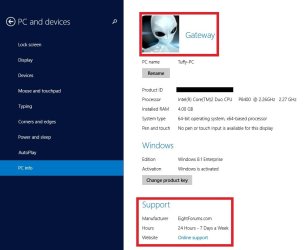
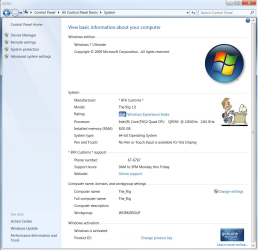
NOTE: This is the default (left screenshot) and custom (right screenshot) System window when you right click on Computer in the Start Menu and click on Properties, or when you open the Control Panel (icons view) and click on the System icon. Custom.jpg
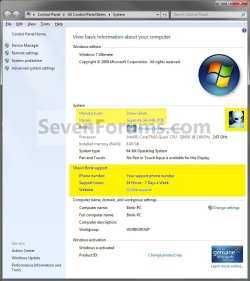
Windows_8.1_OEM_Information.jpg

PC_info.jpg


OPTION ONE

Add and Change System Support Information using "WinBubble"

1. Download and install WinBubble here: WinBubble, "Customization and Tweaks, Not Just for Geek's But For ALL" - UnlockForUs
2. Run WinBubble, and fill out the OEM info, and click/tap on Apply. Image1.jpg
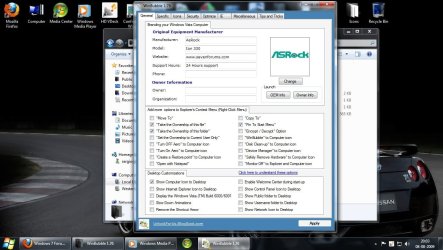
3. The newly added info should be there now. Image2.jpg
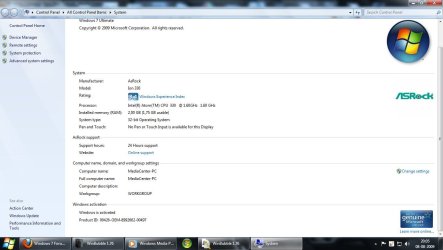


OPTION TWO

Add and Change System Support Information in Registry Editor

1. Press the Windows + R keys to open the Run dialog, type regedit, and press Enter. 2. If prompted by UAC, then click/tap on Yes.

3. In regedit, go to: (See screenshot below)

Code:
HKEY_LOCAL_MACHINE\SOFTWARE\Microsoft\Windows\CurrentVersion\OEMInformation
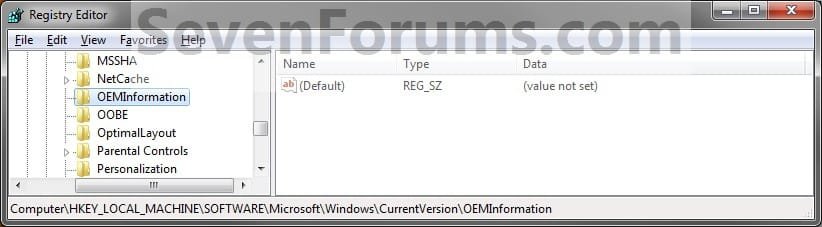
Step1.jpg
4. To Add a Logo Image
NOTE: The logo must be a BMP image file and cannot be larger than 120x120 pixels in size. The logo must stay in the location specified by you in step 4D below for it to continue to be used, so store it somewhere it will not get deleted. A) In the right pane, right click on an empty area, and click on New and String Value. (see screenshot below)

B) Type Logo, and press Enter. (see screenshot above)
NOTE: To undo this, right click on Logo, click on Delete, and on OK to confirm. Step2.jpg
C) Right click on Logo, and click on Modify.

D) Type in the full path of the logo (BMP file) location, and click/tap on OK. (see screenshot below)
EXAMPLE: C:\Windows\System32\Seven_Forums.bmp Step3.jpg
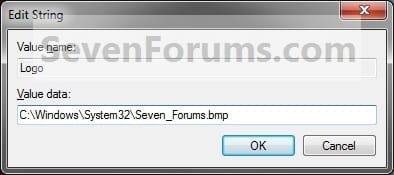
5. To Add a Manufacturer Name A) In the right pane, right click on an empty area, and click on New and String Value. (see screenshot below)

B) Type Manufacturer, and press Enter.
NOTE: To undo this, right click on Manufacturer, and click on Delete and on OK to confirm. Step4.jpg
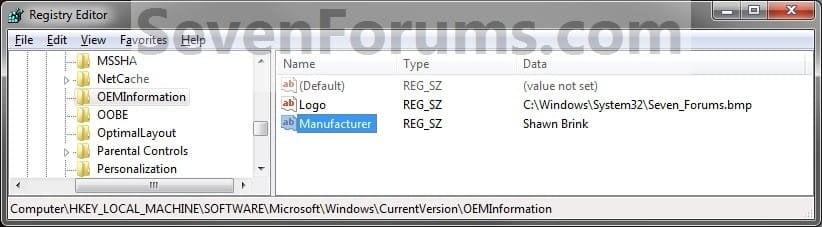
C) Right click on Manufacturer, and click/tap on Modify.

D) Type in a manufacturer name (ex: Shawn Brink), and click/tap on OK. (see screenshot below) Step5.jpg
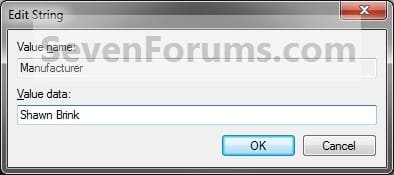
6. To Add a Model Number A) In the right pane, right click on an empty area, and click on New and String Value. (see screenshot below)

B) Type in Model, and press Enter.
NOTE: To undo this, right click on Model, and click on Delete and on OK to confirm. Step6.jpg
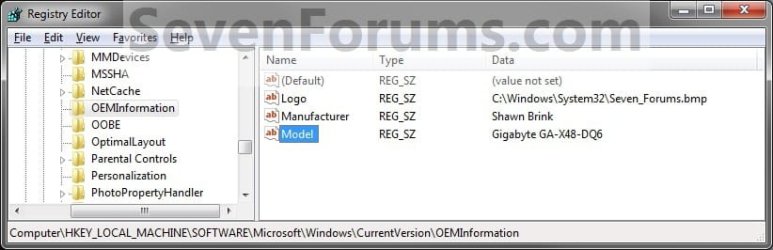
C) Right click on Model, and click on Modify.

D) Type in a your computer's model number, and click on OK. (see screenshot below) Step7.jpg
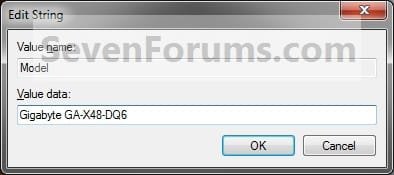
7. To Add Support Hours A) In the right pane, right click on an empty area, and click on New and String Value. (see screenshot below)

B) Type in SupportHours, and press Enter.
NOTE: To undo this, right click on SupportHours and click on Delete. Click on OK to confirm. Step8.jpg
C) Right click on SupportHours, and click on Modify.

D) Type in your support hours, and click on OK. (See screenshot below)
EXAMPLE: 24 Hours - 7 Days a Week Step9.jpg
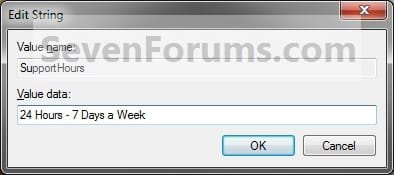
8. To Add a Support Phone Number A) In the right pane, right click on an empty area, and click on New and String Value. (see screenshot below)

B) Type SupportPhone, and press Enter.
NOTE: To undo this, right click on SupportPhone,and click on Delete. Click on OK to confirm. Step10.jpg
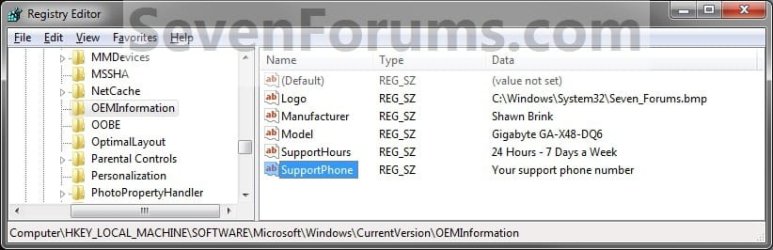
C) Right click on SupportPhone, and click on Modify.

D) Type in a phone number, and click on OK. (see screenshot below) Step11.jpg
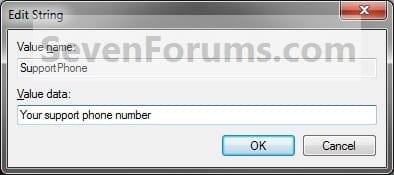
9. To Add a Support Website URL Address A) In the right pane, right click on an empty area, and click on New and String Value. (see screenshot below)

B) Type SupportURL, and press Enter.
NOTE: To undo this, right click on SupportURL,and click on Delete. Click on OK to confirm. Step12.jpg
C) Right click on SupportURL, and click on Modify.

D) Type in your support URL web address, and click on OK. (see screenshot below)
NOTE: In System, it will be a URL link that says Online Support, but will go to the address you typed in. Step13.jpg
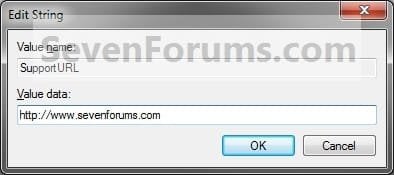
10. Close Regedit.

11. Close and reopen the System window to see your changes.
That's it,
Shawn


Attachments
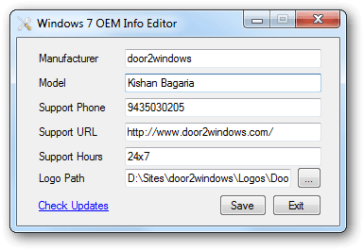
  • oem-info-editor.png
    oem-info-editor.png
    8.8 KB · Views: 1,349
Last edited:
Thanks Shawn nice tutorial, I've been waiting for this; here's what I've done with it. ;)


System Support.png
 

My Computer

Computer Manufacturer/Model Number
* BFK Customs *
OS
W 7 64-bit Ultimate
CPU
Intel Q9550 Yorkfield
Motherboard
ASUS P5Q Pro
Memory
8GB Dominator 8500C5D
Graphics Card(s)
ATI : XFX 5870
Sound Card
Realtek HD Audio 7-1
Monitor(s) Displays
1x 47" LCD HDMI & 3x 26" LCD HDMI
Screen Resolution
1920x1080P & 1920x1200
Hard Drives
1x 80GB Intel X25-M G2 SSD : 1x 500GB & 1x 640GB WD Caviar Black(s)
PSU
Corsair 620HX
Case
Cooler Master RC-690
Cooling
Tuniq Tower 120, 2x 140mm and 3x 120mm case fans
Keyboard
Microsoft 500
Mouse
Razer Diamondback 3G
Internet Speed
14 Mb/s
Other Info
1x Koutech 3Gb/s SATA HDD Hot Swap Rack
You're welcome Ted.

LOL, that avatar of yours looks great there.
 

My Computer

Computer type
PC/Desktop
Computer Manufacturer/Model Number
Self built custom
OS
64-bit Windows 11 Pro for Workstations
CPU
Intel i7-8700K OC'd to 5 GHz
Motherboard
ASUS ROG Maximus XI Formula Z390
Memory
64 GB (4x16GB) G.SKILL TridentZ RGB DDR4 3600 MHz
Graphics Card(s)
ASUS ROG-STRIX-GTX1080TI-O11G-GAMING
Sound Card
Integrated
Monitor(s) Displays
2 x Samsung Odyssey G7 27"
Screen Resolution
2560x1440
Hard Drives
1TB Samsung 990 PRO M.2,
4TB Samsung 990 PRO PRO M.2,
TerraMaster F8 SSD Plus NAS
PSU
Seasonic Prime Titanium 850W
Case
Thermaltake Core P3
Cooling
Corsair Hydro H115i
Keyboard
Logitech wireless K800
Mouse
Logitech MX Master 4
Internet Speed
2 Gb/s Download and 100 Mb/s Upload
Antivirus
Malwarebyte Anti-Malware Premium
Browser
Google Chrome
Other Info
Logitech Z625 speaker system,
Logitech BRIO 4K Pro webcam,
HP Color LaserJet Pro MFP M477fdn,
APC SMART-UPS RT 1000 XL - SURT1000XLI,
Galaxy S23 Plus phone
You're welcome Ted.

LOL, that avatar of yours looks great there.


Thanks Shawn, I really like it, Barman58 made it for me, I just had to resize/rename it in W7 Paint for this. :)
 

My Computer

Computer Manufacturer/Model Number
* BFK Customs *
OS
W 7 64-bit Ultimate
CPU
Intel Q9550 Yorkfield
Motherboard
ASUS P5Q Pro
Memory
8GB Dominator 8500C5D
Graphics Card(s)
ATI : XFX 5870
Sound Card
Realtek HD Audio 7-1
Monitor(s) Displays
1x 47" LCD HDMI & 3x 26" LCD HDMI
Screen Resolution
1920x1080P & 1920x1200
Hard Drives
1x 80GB Intel X25-M G2 SSD : 1x 500GB & 1x 640GB WD Caviar Black(s)
PSU
Corsair 620HX
Case
Cooler Master RC-690
Cooling
Tuniq Tower 120, 2x 140mm and 3x 120mm case fans
Keyboard
Microsoft 500
Mouse
Razer Diamondback 3G
Internet Speed
14 Mb/s
Other Info
1x Koutech 3Gb/s SATA HDD Hot Swap Rack
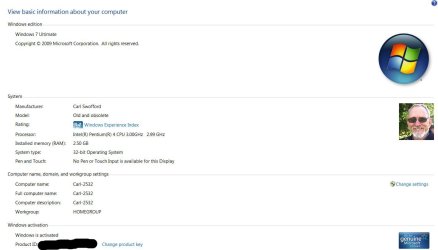
Shawn, thank you very much. I followed your instructions before I got to the post saying there was a tutorial. It was easy to follow and worked like a charm.
 

Attachments

  • System information1.JPG
    System information1.JPG
    58.9 KB · Views: 1,687

My Computer

Computer Manufacturer/Model Number
Home built
OS
Windows 7 Ultimate 32 bit
CPU
Intel(R) Pentium(R) 4 CPU 3.00GHz
Motherboard
ASUS P4P800-VM Motherboard Chipset: Intel 865G + ICH5
Memory
2.50 GB RAM
Graphics Card(s)
NVIDIA GeForce 7600 GS
Sound Card
SoundMax Integrated Digital Audio (Chip)
Monitor(s) Displays
ViewSonic VX 1962 wm
Screen Resolution
1680 X 1050
Hard Drives
Seagate Barracuda 7200.10 80 GB
ST380215A ATA Device 18.6 GB
Western Digital "My Book" external hard drive 750 GB
Cooling
Fan based
Keyboard
Microsoft Comfort Curve Keyboard 2000 v10 USB
Mouse
Logitec optic USB
Internet Speed
3.01 Mb/s download 0.64 Mb/s upload
You're most welcome Carl. :)
 

My Computer

Computer type
PC/Desktop
Computer Manufacturer/Model Number
Self built custom
OS
64-bit Windows 11 Pro for Workstations
CPU
Intel i7-8700K OC'd to 5 GHz
Motherboard
ASUS ROG Maximus XI Formula Z390
Memory
64 GB (4x16GB) G.SKILL TridentZ RGB DDR4 3600 MHz
Graphics Card(s)
ASUS ROG-STRIX-GTX1080TI-O11G-GAMING
Sound Card
Integrated
Monitor(s) Displays
2 x Samsung Odyssey G7 27"
Screen Resolution
2560x1440
Hard Drives
1TB Samsung 990 PRO M.2,
4TB Samsung 990 PRO PRO M.2,
TerraMaster F8 SSD Plus NAS
PSU
Seasonic Prime Titanium 850W
Case
Thermaltake Core P3
Cooling
Corsair Hydro H115i
Keyboard
Logitech wireless K800
Mouse
Logitech MX Master 4
Internet Speed
2 Gb/s Download and 100 Mb/s Upload
Antivirus
Malwarebyte Anti-Malware Premium
Browser
Google Chrome
Other Info
Logitech Z625 speaker system,
Logitech BRIO 4K Pro webcam,
HP Color LaserJet Pro MFP M477fdn,
APC SMART-UPS RT 1000 XL - SURT1000XLI,
Galaxy S23 Plus phone
Sorry - I Posted a "double hit" on this one!

Hi Brink,
Sorry, but I didn't see that you already had this info, Love Texas BTW, have relatives in downtown Dallas near Fort Worth.
We once took a holiday there, and drove an RV down to Florida and the Gulf Coast (Panama City Beach), and Orlando Via Louisiana, and Alabama, great month that was.
Shame on BP for ruining the beloved Shell Island area, but I do laugh at this silly youtube video (hope it doesnt offend). YouTube - BP Spills Coffee
Also, see youre a Technet subscriber, I am too, and a Beta Tester for new MS products.
Can't say too much about it, but my company ( Kontron UK), builds a huge inventory of embedded components for a variety of military and government plus private industries , one of our customers is predominately involved in Flight simulation and training, and recieves A3xxx Airbus training equipment from us, would love to have a go in one of these (must be the ultimate "big boys toy" - I believe the sultan of Brunai has one at his palace).
Awsome system specs btw - I'm so into my "Pocket Rocket" diesel car, that I couldn't afford an I7 just yet, but I will upgrade someday

All the best - Baron210 - South Coast :cool:(UK).
 

Attachments

  • PR.jpg
    PR.jpg
    42.2 KB · Views: 24,609

My Computer

Computer Manufacturer/Model Number
Myself (home brewed - I'm a PC Systems Integrator by trade)
OS
Windows 7 Ultimate 64 bit
CPU
q6600 Intel
Motherboard
DFI Lanparty P45 (socket 775)
Memory
4GB DDR2
Graphics Card(s)
Nvidia GTX260 & GTX8800 in ATI Xfire slots (for 3 outputs)
Sound Card
HDA Mystique(speaker) & Realtek Onboard in use(4 headphones)
Monitor(s) Displays
V7 4.3 20" LCD / Hans-G 17" LCD & Kontron Industrial 17" LCD
Hard Drives
6 X Seagate 500GB SATA2 / 2 Western Digital Raptor 74GB SATA1's (in Small Hardware Firewall Linux PC / Media Streamer).
PSU
Had a Corsair 650Watt but changing for a OCZ 700Watt Modular
Case
Thermaltake Tsunami (HUGE btw)
Cooling
Thermalright 120 Extreme Heatsink,Air cooled with 2 120 fans
Keyboard
Logitech IR Remote(battery life = 2+ years / man I love it)
Mouse
Microsoft Wired 2 button Optical with Wheel (sweet).
Internet Speed
O2 16MB (great provider too/on a fast LLU/local loop unbind)
Other Info
Love my local store Novatech - great products & customer service at reasonable prices too / returns RMA's never a hassle!
http://www.novatech.co.uk/novatech
Hello Baron,

It's not problem. LOL, funny video. :)
 

My Computer

Computer type
PC/Desktop
Computer Manufacturer/Model Number
Self built custom
OS
64-bit Windows 11 Pro for Workstations
CPU
Intel i7-8700K OC'd to 5 GHz
Motherboard
ASUS ROG Maximus XI Formula Z390
Memory
64 GB (4x16GB) G.SKILL TridentZ RGB DDR4 3600 MHz
Graphics Card(s)
ASUS ROG-STRIX-GTX1080TI-O11G-GAMING
Sound Card
Integrated
Monitor(s) Displays
2 x Samsung Odyssey G7 27"
Screen Resolution
2560x1440
Hard Drives
1TB Samsung 990 PRO M.2,
4TB Samsung 990 PRO PRO M.2,
TerraMaster F8 SSD Plus NAS
PSU
Seasonic Prime Titanium 850W
Case
Thermaltake Core P3
Cooling
Corsair Hydro H115i
Keyboard
Logitech wireless K800
Mouse
Logitech MX Master 4
Internet Speed
2 Gb/s Download and 100 Mb/s Upload
Antivirus
Malwarebyte Anti-Malware Premium
Browser
Google Chrome
Other Info
Logitech Z625 speaker system,
Logitech BRIO 4K Pro webcam,
HP Color LaserJet Pro MFP M477fdn,
APC SMART-UPS RT 1000 XL - SURT1000XLI,
Galaxy S23 Plus phone
Fantastic! What a nice little gem of a tutorial! Amazing what you can find just browsing these.........
 

My Computer

Computer type
PC/Desktop
Computer Manufacturer/Model Number
Golden Mk. I.4
OS
Windows 10 Pro x64 ; Xubuntu x64
CPU
Intel i7 860 @ 2.80 GHz O/C'ed to 4.0GHz
Motherboard
Gigabyte P55A-UD3R Rev.1. Award BIOS F13
Memory
16GB Corsair Vengance DDR3 @ 661 MHz Dual Channel (9-9-9-24)
Graphics Card(s)
EVGA NVidia GTX 560 1024MB
Sound Card
Realtek Integrated
Monitor(s) Displays
Dual Samsung SyncMaster 2494HS
Screen Resolution
1920*1080 and 1920*1080
Hard Drives
1*Samsung 840 EVO 120GB SSD;
1*OCZ Vertex 2 60GB SSD;
2*Samsung F3 SpinPoint 1TB in RAID0;
1*Samsung F1 SpinPoint 1TB;
2*Western Digital 1TB External USB 3.0
1*Western Digital 500GB External USB 3.0
1*Seagate 500GB External USB 2.0
PSU
Thermaltake ToughPower QFan 750W
Case
Thermaltake Element S VK60001W2Z
Cooling
Corsair H60 Water Cooling, 2*230mm and 2*80mm case fans
Keyboard
Logitech G110
Mouse
Logitech MX518
You're most welcome Golden. Thank you. :)
 

My Computer

Computer type
PC/Desktop
Computer Manufacturer/Model Number
Self built custom
OS
64-bit Windows 11 Pro for Workstations
CPU
Intel i7-8700K OC'd to 5 GHz
Motherboard
ASUS ROG Maximus XI Formula Z390
Memory
64 GB (4x16GB) G.SKILL TridentZ RGB DDR4 3600 MHz
Graphics Card(s)
ASUS ROG-STRIX-GTX1080TI-O11G-GAMING
Sound Card
Integrated
Monitor(s) Displays
2 x Samsung Odyssey G7 27"
Screen Resolution
2560x1440
Hard Drives
1TB Samsung 990 PRO M.2,
4TB Samsung 990 PRO PRO M.2,
TerraMaster F8 SSD Plus NAS
PSU
Seasonic Prime Titanium 850W
Case
Thermaltake Core P3
Cooling
Corsair Hydro H115i
Keyboard
Logitech wireless K800
Mouse
Logitech MX Master 4
Internet Speed
2 Gb/s Download and 100 Mb/s Upload
Antivirus
Malwarebyte Anti-Malware Premium
Browser
Google Chrome
Other Info
Logitech Z625 speaker system,
Logitech BRIO 4K Pro webcam,
HP Color LaserJet Pro MFP M477fdn,
APC SMART-UPS RT 1000 XL - SURT1000XLI,
Galaxy S23 Plus phone
YEEEEEHAAAAAA love my new info screen hehe tyvm Shawn you are awesome !! :-)
 

My Computer

Computer type
PC/Desktop
Computer Manufacturer/Model Number
Custom Build
OS
Windows 7 Ultimate x64 SP1
CPU
AMD Athlon II X4 645 quad core
Memory
6gig DDR3
Graphics Card(s)
Nvidia geforce GT 630
Sound Card
On Board
Monitor(s) Displays
Samsung LED 19"
Screen Resolution
ULTRA HD 1080p 1920 x 1080
Hard Drives
5 x 2tb
ATA Devices x 2
USB x 5
PSU
850 watt something or other forgot name
Case
Custom Build
Cooling
6 fan in out system with cold air blown through the in
Keyboard
Steelseries
Mouse
GM.M6800 optical mouse 5 button model
Internet Speed
80 gig on a good day 60 to 80 on a bad
Antivirus
not disclosed
Browser
not disclosed
Other Info
My Desktop is in a custom built airflow casing over the case. I still have the power button available etc . but the rest is cool controlled cold air going through the in and theoretically hot air out of the out. But it never gets hot enough for hot air to come out :-P
automated

is it possible to automate the process so you can send a .exe for example and it will automatically collect the infomation it needs without manual interaction?
 

My Computer

OS
windows 7 64 bit
Hello Rapidfire, and welcome to Seven Forums.

When you have it finished, you could right click on the OEMInformation registry key and click on Export to have a .reg file. Afterwards, you could just merge (run) the merge the .reg file to set all of this automatically.

Hope this helps, :)
Shawn
 

My Computer

Computer type
PC/Desktop
Computer Manufacturer/Model Number
Self built custom
OS
64-bit Windows 11 Pro for Workstations
CPU
Intel i7-8700K OC'd to 5 GHz
Motherboard
ASUS ROG Maximus XI Formula Z390
Memory
64 GB (4x16GB) G.SKILL TridentZ RGB DDR4 3600 MHz
Graphics Card(s)
ASUS ROG-STRIX-GTX1080TI-O11G-GAMING
Sound Card
Integrated
Monitor(s) Displays
2 x Samsung Odyssey G7 27"
Screen Resolution
2560x1440
Hard Drives
1TB Samsung 990 PRO M.2,
4TB Samsung 990 PRO PRO M.2,
TerraMaster F8 SSD Plus NAS
PSU
Seasonic Prime Titanium 850W
Case
Thermaltake Core P3
Cooling
Corsair Hydro H115i
Keyboard
Logitech wireless K800
Mouse
Logitech MX Master 4
Internet Speed
2 Gb/s Download and 100 Mb/s Upload
Antivirus
Malwarebyte Anti-Malware Premium
Browser
Google Chrome
Other Info
Logitech Z625 speaker system,
Logitech BRIO 4K Pro webcam,
HP Color LaserJet Pro MFP M477fdn,
APC SMART-UPS RT 1000 XL - SURT1000XLI,
Galaxy S23 Plus phone
so if i export the .reg file and push it out to say 5 computers will it automatically change the make and model depending on the computer or is that not possible?
 

My Computer

OS
windows 7 64 bit
No. It will only change them all to whatever it was set as before exporting.

However, you could either edit the .reg file to change that entry then merge it, or change it in the registry per computer afterwards.
 

My Computer

Computer type
PC/Desktop
Computer Manufacturer/Model Number
Self built custom
OS
64-bit Windows 11 Pro for Workstations
CPU
Intel i7-8700K OC'd to 5 GHz
Motherboard
ASUS ROG Maximus XI Formula Z390
Memory
64 GB (4x16GB) G.SKILL TridentZ RGB DDR4 3600 MHz
Graphics Card(s)
ASUS ROG-STRIX-GTX1080TI-O11G-GAMING
Sound Card
Integrated
Monitor(s) Displays
2 x Samsung Odyssey G7 27"
Screen Resolution
2560x1440
Hard Drives
1TB Samsung 990 PRO M.2,
4TB Samsung 990 PRO PRO M.2,
TerraMaster F8 SSD Plus NAS
PSU
Seasonic Prime Titanium 850W
Case
Thermaltake Core P3
Cooling
Corsair Hydro H115i
Keyboard
Logitech wireless K800
Mouse
Logitech MX Master 4
Internet Speed
2 Gb/s Download and 100 Mb/s Upload
Antivirus
Malwarebyte Anti-Malware Premium
Browser
Google Chrome
Other Info
Logitech Z625 speaker system,
Logitech BRIO 4K Pro webcam,
HP Color LaserJet Pro MFP M477fdn,
APC SMART-UPS RT 1000 XL - SURT1000XLI,
Galaxy S23 Plus phone
ok. that should be relativly easy to do.
where do i find the .reg file that contains the settings for it?
 

My Computer

OS
windows 7 64 bit
That would be the .reg file created when you export the OEMInformation registry key to say your desktop. :)
 

My Computer

Computer type
PC/Desktop
Computer Manufacturer/Model Number
Self built custom
OS
64-bit Windows 11 Pro for Workstations
CPU
Intel i7-8700K OC'd to 5 GHz
Motherboard
ASUS ROG Maximus XI Formula Z390
Memory
64 GB (4x16GB) G.SKILL TridentZ RGB DDR4 3600 MHz
Graphics Card(s)
ASUS ROG-STRIX-GTX1080TI-O11G-GAMING
Sound Card
Integrated
Monitor(s) Displays
2 x Samsung Odyssey G7 27"
Screen Resolution
2560x1440
Hard Drives
1TB Samsung 990 PRO M.2,
4TB Samsung 990 PRO PRO M.2,
TerraMaster F8 SSD Plus NAS
PSU
Seasonic Prime Titanium 850W
Case
Thermaltake Core P3
Cooling
Corsair Hydro H115i
Keyboard
Logitech wireless K800
Mouse
Logitech MX Master 4
Internet Speed
2 Gb/s Download and 100 Mb/s Upload
Antivirus
Malwarebyte Anti-Malware Premium
Browser
Google Chrome
Other Info
Logitech Z625 speaker system,
Logitech BRIO 4K Pro webcam,
HP Color LaserJet Pro MFP M477fdn,
APC SMART-UPS RT 1000 XL - SURT1000XLI,
Galaxy S23 Plus phone
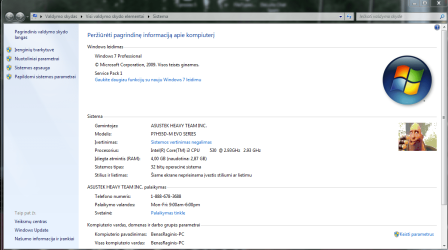
Done brink
Theres the review of my OEM Info
 

Attachments

  • Fiksavimas.PNG
    Fiksavimas.PNG
    64.3 KB · Views: 189

My Computer

Computer type
PC/Desktop
Computer Manufacturer/Model Number
heavydoooevil computer inc
OS
Microsoft Windows 7 Professional 32-bit 7601 Multiprocessor Free Service Pack 1
CPU
Intel(R) Core(TM) i3 CPU 530 @ 2.93GHz
Motherboard
ASUSTeK Computer INC. P7H55D-M EVO
Memory
4,00 GB
Graphics Card(s)
LogMeIn Mirror Driver, Intel(R) HD Graphics
Sound Card
High Definition Audio Device
Monitor(s) Displays
Sony XV TV
Screen Resolution
1920x1080
Hard Drives
1 ST3250620AS ATA Device, 2 WDC WD20EARS-00MVWB0 ATA Device
Keyboard
Logitech Washable K310
Mouse
Logitech USB M305
Internet Speed
YOU SHOULD SEE IN MY SIG BELOW
Antivirus
avast! Internet Security
Browser
Mozilla Firefox
Other Info
Samsung ML-2165 series printer
Sennheiser HDR 170
American Megatrend ASUS BIOS
Looking good Ben. :)
 

My Computer

Computer type
PC/Desktop
Computer Manufacturer/Model Number
Self built custom
OS
64-bit Windows 11 Pro for Workstations
CPU
Intel i7-8700K OC'd to 5 GHz
Motherboard
ASUS ROG Maximus XI Formula Z390
Memory
64 GB (4x16GB) G.SKILL TridentZ RGB DDR4 3600 MHz
Graphics Card(s)
ASUS ROG-STRIX-GTX1080TI-O11G-GAMING
Sound Card
Integrated
Monitor(s) Displays
2 x Samsung Odyssey G7 27"
Screen Resolution
2560x1440
Hard Drives
1TB Samsung 990 PRO M.2,
4TB Samsung 990 PRO PRO M.2,
TerraMaster F8 SSD Plus NAS
PSU
Seasonic Prime Titanium 850W
Case
Thermaltake Core P3
Cooling
Corsair Hydro H115i
Keyboard
Logitech wireless K800
Mouse
Logitech MX Master 4
Internet Speed
2 Gb/s Download and 100 Mb/s Upload
Antivirus
Malwarebyte Anti-Malware Premium
Browser
Google Chrome
Other Info
Logitech Z625 speaker system,
Logitech BRIO 4K Pro webcam,
HP Color LaserJet Pro MFP M477fdn,
APC SMART-UPS RT 1000 XL - SURT1000XLI,
Galaxy S23 Plus phone
I`m trying to change the Manufacturer and Model in the 1st two screen shots below, not the manufacturer and model in Computer Properties, I`ve already done that, shown in the 3rd shot. Is there a way to do it ? For some reason it won`t change in those 2 areas.
 
Last edited:

My Computer

Computer type
PC/Desktop
Computer Manufacturer/Model Number
Skylake Special #666
OS
Windows 10 Pro x64
CPU
Intel Core i7 6700K
Motherboard
Asus Sabertooth Z170 Mark 1
Memory
GSkill TridentZ RGB 16GB 3600 16-16-16-36
Graphics Card(s)
EVGA GTX 980 Ti SC x2
Sound Card
Realtek High Definition
Monitor(s) Displays
AOC G2460PG
Screen Resolution
1920 x 1080 144Hz
Hard Drives
Samsung 860 Pro 256GB, Seagate Barracuda 4TB x2
PSU
EVGA 1000 P2, EVGA White Custom Braided Cables
Case
Corsair Vengeance C70 Gunmetal Black
Cooling
Corsair H100i v2, Corsair ML120 x2, Thermal Grizzly Kryonaut
Keyboard
Logitech G910 Orion Spectrum
Mouse
Logitech G700s
Internet Speed
Verizon Fios Quantum Gateway 75/75
Antivirus
Windows Defender, Malwarebytes Free 3.8.3
Browser
Chrome
Other Info
Corsair SP120 x4, LG Blu-ray Drive, Durabrand HT-395 100 Watt Dolby Digital Amp, Corsair H2100 Wireless 7.1 Headset
Back
Top