Thanks Anak for coming back to me

Do you mind me asking things before I do your instructions? Only that now I can think of it and later I will forget.
You're welcome Thelma,
I do not mind at all if you have questions, it is better to write or post them when they are fresh in your thoughts.
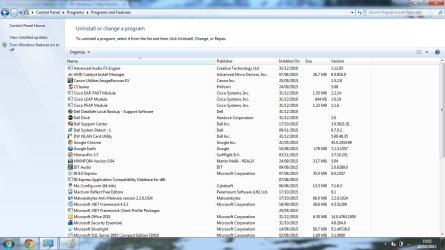
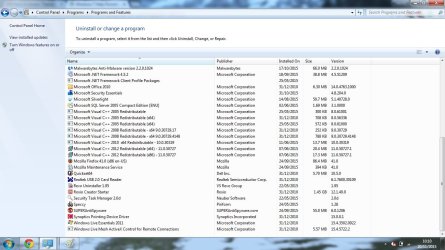
Both Avast and Avira are not in my programs and Features because I removed them ( I thought ) From my laptop.
I was afraid of that. I finally found an Avast uninstall utility:
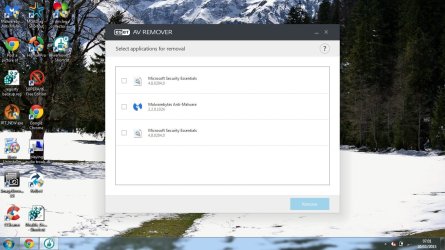
https://www.avast.com/uninstall-utility, and for Avira this Eset tool should work:
ESET AV Remover | support.eset.com/kb3527/
When I don't want a program anymore ( free antivirus I used to change after a while because I was told, they all work different and get sort of blind for some problems ) I used to uninstall them first from my programs and features, if possible with their own de-instal program. Now, when you click right on a program on this page, it sometimes gives you the possibility to uninstall or change and sometimes not, why is that?
All good programs come with their own installer and uninstaller that the Windows operating system (OS) works with to initially install a program onto your machine and the OS will invoke the uninstaller when you decide to remove the program, it is best to use Programs and Features first and if that fails try the programs uninstaller.
I have the same uninstall or change behaviour when I right click on some programs in Programs and Features there is also a third option, Repair.
- Uninstall does what it says, uninstalls the program.
- Change will give you the option to add or remove (change) various features of a program.
- Repair gives the option to repair damage to a program if it is not working properly.
When you say:
'and sometimes not': Are you saying that
sometimes there is no little block that appears giving you options?
Then after that I would use Revo to search for bits left in the register and Ccleaner.
With iTunes ( could not stand that ) I spend hours searching through the register with " edit > find> delete.
I think I got really all of iTunes away, so does that mean, that if there is nothing left over in the register, it's really gone? Clean ?
I would say yes, but with a caveat; Since the uninstall was done manually one can never be absolutely sure that all the remnants were removed because some program files do not reflect the programs name or it is intertwined with other OS Processes and Services.
It is always best to allow Programs and Features or the uninstaller to do the uninstall because every folder and file that was installed is in a list of where it was installed and, Programs and Features or the uninstaller will follow that list during removal.
Do I understand it right that those are all not the good ways of getting rid of something completely?
You see, this way I also learn not to use bad habits anymore, I need to understand!
The registry editor, Revo and CCleaner are the three best tools I would and have used, but be careful and only delete what you are searching for because some file names can be misleading, if you are unsure ask before you do.
It is never a good thing to use brute force, but sometimes if you really want the files gone, you have to rip them out.
I follow your instructions tomorrow morning when I am fresh, and report on that.
Thanks a lot, Anak,
Cheers.
PS glad you like my Sig! Think it's really good ( funny face of Einstein )

Okay, but let's try an easy way first, instead of the instructions in my last post try this instead:
ESET AV Remover | support.eset.com/kb3527/, download the 64bit version for your machine.
According to the instructions it should find any leftovers of either avast or avira antivirus program. When its done searching it will offer a list to pick from, just don't pick hitman pro or microsoft security essentials if they're there because you want to keep them, right?
If you are unsure what to pick, post a screenshot, if it doesn't offer any picks we will have to try another way.
My pleasure Thelma, I'm usually online around 6am my time, noon, yours.
Cheers!