Transfer to new drive?

Ummmmm only problem with that is when he puts in the new disk it won't have an operating system on it so he's not going to be able to boot the thing up to clone or declone anything...


Ghost, when It clones, or backs up, backs up the ENTIRE DISK, including the OS, so when it clones that includes the OS, and when i cloned back to the drive, it copied my OS over with a new System Volume Info folder.
 

My Computer My Computer

At a glance

Windows 7 Home Premium x64, Mac OS X 10.6.2 x64AMD Athlon X2 Dual-Core 2.1 GHz4 GB DDR2 800 MHzATI Radeon HD Mobility 3100 Graphics 256MB to...
Computer Manufacturer/Model Number
Toshiba Satellite L505D-S9565
OS
Windows 7 Home Premium x64, Mac OS X 10.6.2 x64
CPU
AMD Athlon X2 Dual-Core 2.1 GHz
Motherboard
Toshiba Built-In with Insyde H20 BIOS 1.40
Memory
4 GB DDR2 800 MHz
Graphics Card(s)
ATI Radeon HD Mobility 3100 Graphics 256MB to 1468 MB Shared
Sound Card
Realtek Mobile ALC272 HD Audio
Monitor(s) Displays
15.6" TFT LCD with TruBrite, Samsung 1080p HDTV
Screen Resolution
1366x768, 1920x1080
Hard Drives
❶:Main: Toshiba 250 GB SATA 5400 RPM
PSU
N/A
Case
N/A
Cooling
Built-in/Open window in winter :P
Keyboard
Built-in
Mouse
Build-in Symantics SmartTouch Pad
Internet Speed
55 MB/sec Down, 9 MB/sec Up
Other Info
❷:Backup: Seagate FreeAgent Desk USB 2.0 5400 RPM
❸:Media: Toshiba 640 GB USB 2.0 5400 RPM Portable Edition
Yes, that's about it. Clone your OS (with Ghost COPY) to your external drive. Then install your new disk, run the Ghost recovery disk and pull the clone into your new disk. I suggest you clone to a predifined folder on your external disk rather than to the disk address. If you give the folder a meaningful name, it will be easier to id when you work off the recovery disk. And make sure you also restore the MBR (you will be prompted for that option).

Ummmmm only problem with that is when he puts in the new disk it won't have an operating system on it so he's not going to be able to boot the thing up to clone or declone anything...

Why is that? Btw: In the meantime the OP reported back to me saying: " your idea worked flawlessly ".
 

My Computer My Computer

At a glance

Vista, Windows7, Mint Mate, Zorin, Windows 8from 1.6GHz Duo to i7
Computer Manufacturer/Model Number
HP, Dell, Gateway, Toshiba - 4 laptops and 2 desktops
OS
Vista, Windows7, Mint Mate, Zorin, Windows 8
CPU
from 1.6GHz Duo to i7
Monitor(s) Displays
2x HP w2207
Hard Drives
5x HDD, 7x SSD, 12x Externals
Keyboard
with trackball - no mices
Mouse
Trackball mice
Internet Speed
DSL 6000
Yes, its true. I upgraded from the built in toshiba 250GB drive.

Cloned it to my Seagate EHD, removed drive, inserted new Seagate Momentus 500 GB, booted from cd, cloned back, then rebooted. It booted into my OS fine, with a found new hardware wizard, and it installed some kind of driver.
 

My Computer My Computer

At a glance

Windows 7 Home Premium x64, Mac OS X 10.6.2 x64AMD Athlon X2 Dual-Core 2.1 GHz4 GB DDR2 800 MHzATI Radeon HD Mobility 3100 Graphics 256MB to...
Computer Manufacturer/Model Number
Toshiba Satellite L505D-S9565
OS
Windows 7 Home Premium x64, Mac OS X 10.6.2 x64
CPU
AMD Athlon X2 Dual-Core 2.1 GHz
Motherboard
Toshiba Built-In with Insyde H20 BIOS 1.40
Memory
4 GB DDR2 800 MHz
Graphics Card(s)
ATI Radeon HD Mobility 3100 Graphics 256MB to 1468 MB Shared
Sound Card
Realtek Mobile ALC272 HD Audio
Monitor(s) Displays
15.6" TFT LCD with TruBrite, Samsung 1080p HDTV
Screen Resolution
1366x768, 1920x1080
Hard Drives
❶:Main: Toshiba 250 GB SATA 5400 RPM
PSU
N/A
Case
N/A
Cooling
Built-in/Open window in winter :P
Keyboard
Built-in
Mouse
Build-in Symantics SmartTouch Pad
Internet Speed
55 MB/sec Down, 9 MB/sec Up
Other Info
❷:Backup: Seagate FreeAgent Desk USB 2.0 5400 RPM
❸:Media: Toshiba 640 GB USB 2.0 5400 RPM Portable Edition
Yes, its true. I upgraded from the built in toshiba 250GB drive.

Cloned it to my Seagate EHD, removed drive, inserted new Seagate Momentus 500 GB, booted from cd, cloned back, then rebooted. It booted into my OS fine, with a found new hardware wizard, and it installed some kind of driver.
Amen.
 

My Computer My Computer

At a glance

Vista, Windows7, Mint Mate, Zorin, Windows 8from 1.6GHz Duo to i7
Computer Manufacturer/Model Number
HP, Dell, Gateway, Toshiba - 4 laptops and 2 desktops
OS
Vista, Windows7, Mint Mate, Zorin, Windows 8
CPU
from 1.6GHz Duo to i7
Monitor(s) Displays
2x HP w2207
Hard Drives
5x HDD, 7x SSD, 12x Externals
Keyboard
with trackball - no mices
Mouse
Trackball mice
Internet Speed
DSL 6000
The drive have to be clean of any files or he will have to part it the same amount "Gb" as the original drive (prefered a little more Gb).

That is not so. All you need to do is to define a new folder for the clone - but, of course, there must be enough room on the drive to hold the image.

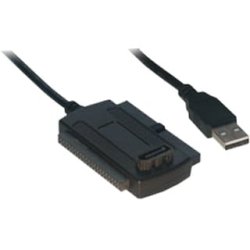
Strange whs...I'm about to do soon as cclloyd9785 to swap on another laptop a new drive...For that i'm using Paragon Software and the Usb 2.0 to Ide/Sata 2,5" converter plug & play.

I did a test before on another external drive, and Paragon asked to format the drive before any actions and couldn't go any futher, without partitioning the drive.

I didn't had enough space to do it when testing with Paragon and usb adapter...

So when i'll soon bought the new replacement HDD 2,5", it will be free of any files and i know it will work smooth during the process, as Paragon will recognize the drive when it will be connected to the laptop. I might only need to format the drive first before starting any actions in the Paragon Software.

I'll be able to do all that directly from the laptop (ghost then image it)...when finished i'll have just to swap Hdd inside the machine then boot and activate the copy of Windows.

It is not only creating a new folder...to image the new OS.
 

My Computer My Computer

At a glance

Windows 7 Professional SP1 - x64 [Non-UEFI Boot]Ivy Bridge Core i5 3570K (Delidded)G.Skill "Ares" DDR3 PC3-12800 - 1600MHz (16Gb)Asus Dual-RX480-O4G
Computer type
PC/Desktop
Computer Manufacturer/Model Number
Custom Build
OS
Windows 7 Professional SP1 - x64 [Non-UEFI Boot]
CPU
Ivy Bridge Core i5 3570K (Delidded)
Motherboard
Asus P8Z77-V LE PLUS
Memory
G.Skill "Ares" DDR3 PC3-12800 - 1600MHz (16Gb)
Graphics Card(s)
Asus Dual-RX480-O4G
Sound Card
Creative Sound Blaster Z w/5.1 sound system
Monitor(s) Displays
Asus IPS 23"
Screen Resolution
16/9
Hard Drives
Internal:
500Go Sata 6Gb/s (x2)
500Go Sata 3Gb/s (x2)
SSD 60Go Sata 6Gb/s
PSU
In Win C 900W Series 80+ Platinum
Case
Thermaltake Chaser A71
Cooling
Custom Water Cooling Loop
Keyboard
Cooler Master QuickFire XTi
Mouse
Razer Imperator 2012 (4G)
Antivirus
MSE
Browser
IE 11.0.xxx Rtm
Other Info
"Raid0" with Intel Smart Response Technology (HDD/SSD)
The drive have to be clean of any files or he will have to part it the same amount "Gb" as the original drive (prefered a little more Gb).

That is not so. All you need to do is to define a new folder for the clone - but, of course, there must be enough room on the drive to hold the image.

Strange whs...I'm about to do soon as cclloyd9785 to swap on another laptop a new drive...For that i'm using Paragon Software and the Usb 2.0 to Ide/Sata 2,5" converter plug & play.

I did a test before on another external drive, and Paragon asked to format the drive before any actions and couldn't go any futher, without partitioning the drive.

I didn't had enough space to do it when testing with Paragon and usb adapter...

So when i'll soon bought the new replacement HDD 2,5", it will be free of any files and i know it will work smooth during the process, as Paragon will recognize the drive when it will be connected to the laptop. I might only need to format the drive first before starting any action in the Paragon Software.

It is not only creating a new folder...to image.

Maybe I misunderstood. I was taking about the external drive where you park the clone. Maybe you are talking about the new HDD which is the ultimate target for the clone - not sure. And there you are right. That has to be formatted.
 

My Computer My Computer

At a glance

Vista, Windows7, Mint Mate, Zorin, Windows 8from 1.6GHz Duo to i7
Computer Manufacturer/Model Number
HP, Dell, Gateway, Toshiba - 4 laptops and 2 desktops
OS
Vista, Windows7, Mint Mate, Zorin, Windows 8
CPU
from 1.6GHz Duo to i7
Monitor(s) Displays
2x HP w2207
Hard Drives
5x HDD, 7x SSD, 12x Externals
Keyboard
with trackball - no mices
Mouse
Trackball mice
Internet Speed
DSL 6000
That is not so. All you need to do is to define a new folder for the clone - but, of course, there must be enough room on the drive to hold the image.

Strange whs...I'm about to do soon as cclloyd9785 to swap on another laptop a new drive...For that i'm using Paragon Software and the Usb 2.0 to Ide/Sata 2,5" converter plug & play.

I did a test before on another external drive, and Paragon asked to format the drive before any actions and couldn't go any futher, without partitioning the drive.

I didn't had enough space to do it when testing with Paragon and usb adapter...

So when i'll soon bought the new replacement HDD 2,5", it will be free of any files and i know it will work smooth during the process, as Paragon will recognize the drive when it will be connected to the laptop. I might only need to format the drive first before starting any action in the Paragon Software.

It is not only creating a new folder...to image.

Maybe I misunderstood. I was taking about the external drive where you park the clone. Maybe you are talking about the new HDD which is the ultimate target for the clone - not sure. And there you are right. That has to be formatted.

Yes the Adapter Usb 2.0 to Ide/Sata accept the new Hdd 2.5" drive to park the clone directly from the laptop.... and yes it will have to be format before cloning, with Paragon. Handy Stuff!!:D

Just a long process taking your time....
 

My Computer My Computer

At a glance

Windows 7 Professional SP1 - x64 [Non-UEFI Boot]Ivy Bridge Core i5 3570K (Delidded)G.Skill "Ares" DDR3 PC3-12800 - 1600MHz (16Gb)Asus Dual-RX480-O4G
Computer type
PC/Desktop
Computer Manufacturer/Model Number
Custom Build
OS
Windows 7 Professional SP1 - x64 [Non-UEFI Boot]
CPU
Ivy Bridge Core i5 3570K (Delidded)
Motherboard
Asus P8Z77-V LE PLUS
Memory
G.Skill "Ares" DDR3 PC3-12800 - 1600MHz (16Gb)
Graphics Card(s)
Asus Dual-RX480-O4G
Sound Card
Creative Sound Blaster Z w/5.1 sound system
Monitor(s) Displays
Asus IPS 23"
Screen Resolution
16/9
Hard Drives
Internal:
500Go Sata 6Gb/s (x2)
500Go Sata 3Gb/s (x2)
SSD 60Go Sata 6Gb/s
PSU
In Win C 900W Series 80+ Platinum
Case
Thermaltake Chaser A71
Cooling
Custom Water Cooling Loop
Keyboard
Cooler Master QuickFire XTi
Mouse
Razer Imperator 2012 (4G)
Antivirus
MSE
Browser
IE 11.0.xxx Rtm
Other Info
"Raid0" with Intel Smart Response Technology (HDD/SSD)
I have not yet used Paragon for that. I have used Migrate Easy 7.0 which is from Acronis. With it you can also directly clone to a USB attached drive. But this works only for Vista, not Win7. Else I have used Ghost Copy. There you need an interim external drive.
 

My Computer My Computer

At a glance

Vista, Windows7, Mint Mate, Zorin, Windows 8from 1.6GHz Duo to i7
Computer Manufacturer/Model Number
HP, Dell, Gateway, Toshiba - 4 laptops and 2 desktops
OS
Vista, Windows7, Mint Mate, Zorin, Windows 8
CPU
from 1.6GHz Duo to i7
Monitor(s) Displays
2x HP w2207
Hard Drives
5x HDD, 7x SSD, 12x Externals
Keyboard
with trackball - no mices
Mouse
Trackball mice
Internet Speed
DSL 6000
I have not yet used Paragon for that. I have used Migrate Easy 7.0 which is from Acronis. With it you can also directly clone to a USB attached drive. But this works only for Vista, not Win7. Else I have used Ghost Copy. There you need an interim external drive.

I'm doing this on an XP Sp3, not 7 but i beleive all works the same... (Paragon do the job, not 7).

That's just magic and time now!

I was amaze by this solution. Adapter + new replacement drive + Paragon.

That's the one i use for:
 

Attachments

  • z9640532.jpg
    z9640532.jpg
    5.5 KB · Views: 23
Last edited:

My Computer My Computer

At a glance

Windows 7 Professional SP1 - x64 [Non-UEFI Boot]Ivy Bridge Core i5 3570K (Delidded)G.Skill "Ares" DDR3 PC3-12800 - 1600MHz (16Gb)Asus Dual-RX480-O4G
Computer type
PC/Desktop
Computer Manufacturer/Model Number
Custom Build
OS
Windows 7 Professional SP1 - x64 [Non-UEFI Boot]
CPU
Ivy Bridge Core i5 3570K (Delidded)
Motherboard
Asus P8Z77-V LE PLUS
Memory
G.Skill "Ares" DDR3 PC3-12800 - 1600MHz (16Gb)
Graphics Card(s)
Asus Dual-RX480-O4G
Sound Card
Creative Sound Blaster Z w/5.1 sound system
Monitor(s) Displays
Asus IPS 23"
Screen Resolution
16/9
Hard Drives
Internal:
500Go Sata 6Gb/s (x2)
500Go Sata 3Gb/s (x2)
SSD 60Go Sata 6Gb/s
PSU
In Win C 900W Series 80+ Platinum
Case
Thermaltake Chaser A71
Cooling
Custom Water Cooling Loop
Keyboard
Cooler Master QuickFire XTi
Mouse
Razer Imperator 2012 (4G)
Antivirus
MSE
Browser
IE 11.0.xxx Rtm
Other Info
"Raid0" with Intel Smart Response Technology (HDD/SSD)
Back
Top