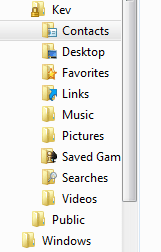
User Folders - Change Default Location

How to Change the Default Location of User Folders in Windows 7 and Windows 8

   Information
This will show you how to change (move) the default location of your account's C:\Users\(user-name) folders to another location of your choice instead in Windows 7 and Windows 8, and still have access to the user folder from the Start Menu (Windows 7 only) location.

   Tip
If you are just wanting to save HDD space, then you might consider this below to be able to access the files from your libraries with the files actually located where you like instead. This way you will not have to worry about any potential issues that come with moving user folder locations. For example, whatever partition you move your user folders to will now be included in a system image in Windows 7 and Windows 8.

  • Create a new folder at any location you want.
  • Move any files you want into the new folder.
  • Include the new folder into a library (Windows 7 or Windows 8) of your choice.
  • If you like, you can also set the new folder to be the default save to location (Windows 7 or Windows 8) for the library as well.
   Warning
If you change the default location of your Favorites folder in Windows 8 or 8.1, your Favorites in Internet Explorer will no longer be available until you move your Favorites back to the default "C:\Users\(user-name)" location.


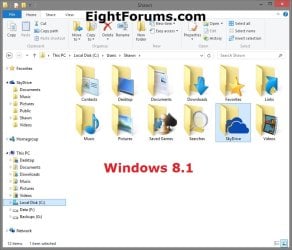
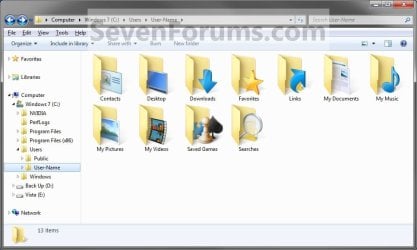
EXAMPLE: User Folders
NOTE: This is at the default C:\Users\(user-name) location.
Example1.jpg

Windows_8.1.jpg


OPTION ONE

To Change Main User Profile Folder Location


1. For how, see:
http://www.sevenforums.com/tutorials/87555-user-profile-change-default-location.html

OR

How to Relocate User Profiles to another Partition or Disk in Windows 8


OPTION TWO

To Change User Folders Location from within User Profile Folder


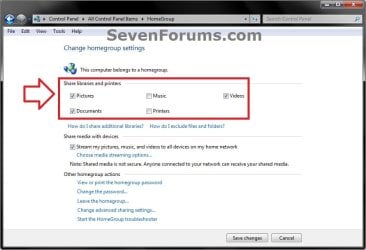
1. If you a part of a homegroup, then you will need to change the homegroup settings to no longer share the user folder (ex: My Music) that you want to move first by unchecking the folder and clicking on Save Changes. (see screenshot below)
NOTE: This is so the user folder (ex: My Music) will not be shared on the homegroup anymore.
Homegroup.jpg
2. In Windows Explorer, navigate to where (ex: D: drive) you want to move the default user folder (ex: My Music) location to.

3. Create a New Folder by right clicking or press and hold on a empty space in the main window there, and click/tap on New and Folder. Name the new folder without spaces (ex: "Music" for My Music) for the user folder that you want to move there. (See screenshots below)
NOTE: The name that you type in for the new folder will be what you see as the user folder name in the Start Menu (shell:UsersFilesFolder) location when finished with all of these steps. It would be best to use the same name as the user folder to avoid confusion.
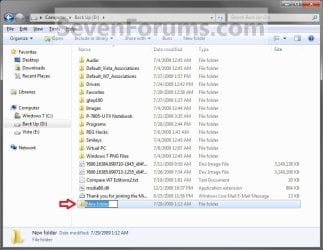
Rename1.jpg

Rename2.jpg

4. Close this window. (See screenshots above)

5. Press the Windows+R keys to open the Run dialog, type shell:UsersFilesFolder, and press enter.
NOTE: This will open your C:\Users\(user-name) folder.

6. Right click or press and hold on a user folder (ex: My Music, My Documents, My Pictures, etc.....) that you want to move the default location for, and click/tap on Properties. (See screenshot below)
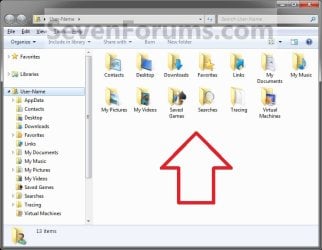
Right_Click_On_A_User_Folder.jpg
7. Click/tap on the Location tab, and Move button. (See screenshot below)
Properties1.jpg
8. Navigate to the same location as in step 2 and 3 above, then select the renamed new folder (ex: Music), and click/tap on the Select Folder button. (See screenshot below)
Properties2.jpg
9. Click/tap on OK. (See screenshot below)
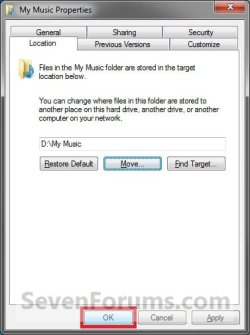
Properties3.jpg
10. Click/tap on Yes. (See screenshot below)
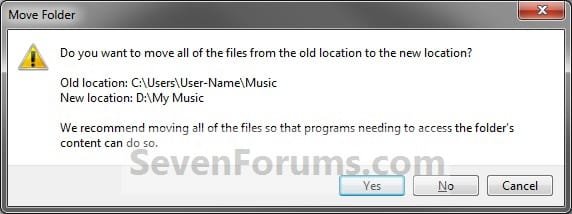
Properties4.jpg
11. After a few seconds when the location has been changed, the Properties window (screenshot under step 9) will then close.

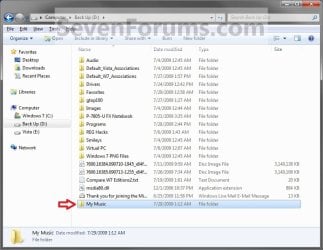
12. Check back at the C:\Users\(user-name) location to make sure that the old user folder (ex: My Music) that you moved is no longer there. If it is, then make sure that the contents of the folder were moved to the new location, and delete it. (See screenshot below)
NOTE: If you are unable to delete the folder, then restart the computer and try again.
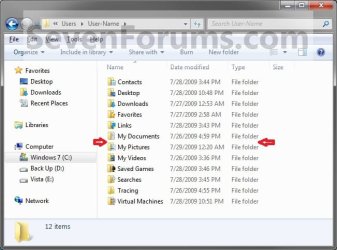
Finished2.jpg
13. You will notice that the folder at the shell:UsersFilesFolder location and the new location (ex: D drive) you moved the user folder to, now has the default user folder (ex: My Music) icon. (See screenshot below)
NOTE: The Start Menu in Windows 7 now opens the user folder from the new location (ex: D: drive) that you moved the user folder to.
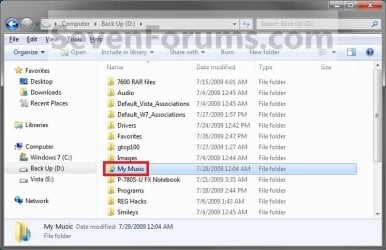
Finished.jpg
14. If you a part of a homegroup, then you can now change the homegroup settings back to share the user folder (ex: My Music) again if you like by checking the folder, and click/tap on Save Changes. (see screenshot below)
Homegroup.jpg
   Tip
If you wanted to restore the default location of the user folder, then see:

How to Restore the Default Location of User Folders in Windows 7 and Windows 8


That's it,
Shawn


Last edited:
  • Like
Reactions: Lee
jsetton, I suggest you also delete the hibefile - provided you do not use hibernation. Open a Command Prompt as admin and type or paste:

powercfg.exe -h off

Then press enter. That will free up a few GBs (equivalent to the size of your RAM).
 
Last edited:

My Computer

Computer Manufacturer/Model Number
HP, Dell, Gateway, Toshiba - 4 laptops and 2 desktops
OS
Vista, Windows7, Mint Mate, Zorin, Windows 8
CPU
from 1.6GHz Duo to i7
Monitor(s) Displays
2x HP w2207
Hard Drives
5x HDD, 7x SSD, 12x Externals
Keyboard
with trackball - no mices
Mouse
Trackball mice
Internet Speed
DSL 6000
I have got this to work fine, but now that I have moved locations, Windows search can no longer search the files. I have rebuilt the index, restored to original settings, confrmed and individuallys selected the folders in the search index options.
Any ideas on how to get windows to be able to find files in these folders? Right now I have switched to using "everything" because I can't get it to work. Thanks.
 
Last edited:

My Computer

OS
windows 7

My Computer

Computer type
PC/Desktop
Computer Manufacturer/Model Number
Self built custom
OS
64-bit Windows 11 Pro for Workstations
CPU
Intel i7-8700K OC'd to 5 GHz
Motherboard
ASUS ROG Maximus XI Formula Z390
Memory
64 GB (4x16GB) G.SKILL TridentZ RGB DDR4 3600 MHz
Graphics Card(s)
ASUS ROG-STRIX-GTX1080TI-O11G-GAMING
Sound Card
Integrated
Monitor(s) Displays
2 x Samsung Odyssey G7 27"
Screen Resolution
2560x1440
Hard Drives
1TB Samsung 990 PRO M.2,
4TB Samsung 990 PRO PRO M.2,
TerraMaster F8 SSD Plus NAS
PSU
Seasonic Prime Titanium 850W
Case
Thermaltake Core P3
Cooling
Corsair Hydro H115i
Keyboard
Logitech wireless K800
Mouse
Logitech MX Master 4
Internet Speed
2 Gb/s Download and 100 Mb/s Upload
Antivirus
Malwarebyte Anti-Malware Premium
Browser
Google Chrome
Other Info
Logitech Z625 speaker system,
Logitech BRIO 4K Pro webcam,
HP Color LaserJet Pro MFP M477fdn,
APC SMART-UPS RT 1000 XL - SURT1000XLI,
Galaxy S23 Plus phone
Thanks for the response. yes they are all listed there. Each of the folder that are not indexed search just fine, but just slowly. All the folders that are indexed that have been moved can't be searched though. Any other suggestions. I have had the same problem on 3 different computers.

Has anyone done this move and actually had the search function work properly? I tried it on a friends computer as well and it didn't work for him.

thanks for any help
 

My Computer

OS
windows 7
777jam,

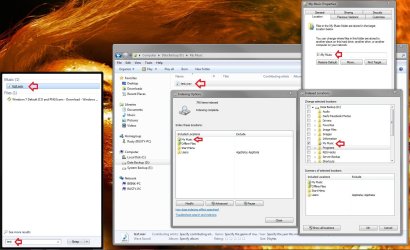
I was able to move the user folder (ex: My Music), add it to the index, rebuild the index until completed, then be able to search for a file in the new folder from the Start Menu.

Index.jpg
 

My Computer

Computer type
PC/Desktop
Computer Manufacturer/Model Number
Self built custom
OS
64-bit Windows 11 Pro for Workstations
CPU
Intel i7-8700K OC'd to 5 GHz
Motherboard
ASUS ROG Maximus XI Formula Z390
Memory
64 GB (4x16GB) G.SKILL TridentZ RGB DDR4 3600 MHz
Graphics Card(s)
ASUS ROG-STRIX-GTX1080TI-O11G-GAMING
Sound Card
Integrated
Monitor(s) Displays
2 x Samsung Odyssey G7 27"
Screen Resolution
2560x1440
Hard Drives
1TB Samsung 990 PRO M.2,
4TB Samsung 990 PRO PRO M.2,
TerraMaster F8 SSD Plus NAS
PSU
Seasonic Prime Titanium 850W
Case
Thermaltake Core P3
Cooling
Corsair Hydro H115i
Keyboard
Logitech wireless K800
Mouse
Logitech MX Master 4
Internet Speed
2 Gb/s Download and 100 Mb/s Upload
Antivirus
Malwarebyte Anti-Malware Premium
Browser
Google Chrome
Other Info
Logitech Z625 speaker system,
Logitech BRIO 4K Pro webcam,
HP Color LaserJet Pro MFP M477fdn,
APC SMART-UPS RT 1000 XL - SURT1000XLI,
Galaxy S23 Plus phone
Hi,
me again digging out old threads (for me there are new)

As I can see and read in all the forums this way of moving user files is the most popular
but I don't see any mention about the correction of the junctions initiated by the creation of the first account
on installing Seven!
as I said,the folders are moved,no doubt about it,but the original junctions of this folders are not changed in
" C:\Users\Default\NTUSER.DAT"
A Belgium author " Alain Quarré " made an authomatic script to move these folders and even more ,as you can edit the ini file and choose the folders you want to migrate.after the moves done a prompt command will automatiquely rebuild the junctions in the "Ruche" approximatively the heart of the registery
I don't know the name in English.
But the main difference is that this is done for the next new account created and not the actually one
But this is the finest way when you install or reinstall Seven
you just name the first account "Test" for exemple and right after you arrive on seven desk then you run the script with administrator rights
as your test account is still " Like a virgin " you just have to create a new account and delete the test one without regrets
of course you will find the choiced files in the new place as if this was done by Seven installation
this is not my script but if you want I can make a presentation and all explanations as original but in English
as it is in French of course
this script is just amazing and deserve to be known by all
just ring me and I will make a thread ;)

voilà
 

My Computer

Computer Manufacturer/Model Number
Home made Pc
OS
Windows 7 Ultimate x64
CPU
I7 930
Motherboard
Gigabyte Ga-X58A-UD3R
Memory
OCZ 3x2 12800 memory set
Graphics Card(s)
gigabyte GTX 460 OC 1Go
Sound Card
on Board
Monitor(s) Displays
Ilyama 24' 1920x1080
Hard Drives
OCZ Vertex 2 60 G0
2x Samsung F3 1To
PSU
Cooler Master Silent Pro Gold 600 W
Case
Cooler Master 692 II Advanced
Cooling
Noctua NH-D14
a tip for the lazy - rather than type or paste shell:UsersFilesFolder into the search-box, you can just right-click on your user name at the top of the start-menu, and click 'Open'.

apologies if this has already been suggested, but i couldn't see it in the original tutorial.

*edit* don't even bother with the right-click, just click the user-name.
 
Last edited:

My Computer

Computer Manufacturer/Model Number
mickey megabyte 1234
OS
ultimate 64 sp1
CPU
i5 2500K [email protected]
Motherboard
MSI P67A-GD53
Memory
8 gigs GSkill Ripjaws 1600
Graphics Card(s)
amd hd6950
Sound Card
creative x-fi gamer
Monitor(s) Displays
samsung 24"
Screen Resolution
1920x1080
Hard Drives
ocz vertex 2e 60 gig, samsung f3 1tb, buffalo 2tb ext
PSU
antec 550
Case
antec three hundred
Cooling
i'm a cooling fan
Keyboard
saitek eclipse ii
Mouse
logitech g3
Internet Speed
about 4 Mbps
Other Info
i love win7
  • Like
Reactions: whs
Thanks for this tutorial. One question though.

I just did a clean install of win7. I'm setting up accounts for me and my wife. Is there a trick to pulling this off with multiple accounts? The first account went just like the tutorial showed. But on the second, I ended up with 2 "my music" folders on my E drive. Is this okay? It didn't seem right so made a folder in E labled me to put my relocated folders into. But when I moved the user folder, it changed the folder labeled me to my music. Also, e was now visible when clicked on my user account name along with my videos etc. Do I have to partion? Thanks for the tutorial BTW.
 

My Computer

Computer Manufacturer/Model Number
Self
OS
Windows7 Home Premium 64bit
CPU
i7 920
Motherboard
Asus Formula Rampage III
Memory
OCZ
Graphics Card(s)
GTX285
Sound Card
X fi
Monitor(s) Displays
LG L227WTG
Hard Drives
X25M G2
1TB Caviar Black x2
PSU
PC power and cooling 750W
Case
HAF932
Cooling
Air

My Computer

Computer type
PC/Desktop
Computer Manufacturer/Model Number
Self built custom
OS
64-bit Windows 11 Pro for Workstations
CPU
Intel i7-8700K OC'd to 5 GHz
Motherboard
ASUS ROG Maximus XI Formula Z390
Memory
64 GB (4x16GB) G.SKILL TridentZ RGB DDR4 3600 MHz
Graphics Card(s)
ASUS ROG-STRIX-GTX1080TI-O11G-GAMING
Sound Card
Integrated
Monitor(s) Displays
2 x Samsung Odyssey G7 27"
Screen Resolution
2560x1440
Hard Drives
1TB Samsung 990 PRO M.2,
4TB Samsung 990 PRO PRO M.2,
TerraMaster F8 SSD Plus NAS
PSU
Seasonic Prime Titanium 850W
Case
Thermaltake Core P3
Cooling
Corsair Hydro H115i
Keyboard
Logitech wireless K800
Mouse
Logitech MX Master 4
Internet Speed
2 Gb/s Download and 100 Mb/s Upload
Antivirus
Malwarebyte Anti-Malware Premium
Browser
Google Chrome
Other Info
Logitech Z625 speaker system,
Logitech BRIO 4K Pro webcam,
HP Color LaserJet Pro MFP M477fdn,
APC SMART-UPS RT 1000 XL - SURT1000XLI,
Galaxy S23 Plus phone
Hi brink, thanks for replying. I'm probably over thinking this, but what should I see in my E drive after relocating both sets of user files? Would it be 2 my music, my video etc. folders?

Thanks for taking the time to reply.
 

My Computer

Computer Manufacturer/Model Number
Self
OS
Windows7 Home Premium 64bit
CPU
i7 920
Motherboard
Asus Formula Rampage III
Memory
OCZ
Graphics Card(s)
GTX285
Sound Card
X fi
Monitor(s) Displays
LG L227WTG
Hard Drives
X25M G2
1TB Caviar Black x2
PSU
PC power and cooling 750W
Case
HAF932
Cooling
Air
No, it should just be one copy of each and appear just as it did in the C:\Users\(user-name) folder except at E:\Users\(user-name) instead.

If you are seeing 2 of each, then move the user folder back to C: , then use the tutorial below to fix your individual user folders to have only one copy of them again. Next, try moving the C:\Users\(user-name) again as in the tutorial on the first page to see if it will move properly for you this time.

http://www.sevenforums.com/tutorials/18583-user-folders-restore-default-location.html
 

My Computer

Computer type
PC/Desktop
Computer Manufacturer/Model Number
Self built custom
OS
64-bit Windows 11 Pro for Workstations
CPU
Intel i7-8700K OC'd to 5 GHz
Motherboard
ASUS ROG Maximus XI Formula Z390
Memory
64 GB (4x16GB) G.SKILL TridentZ RGB DDR4 3600 MHz
Graphics Card(s)
ASUS ROG-STRIX-GTX1080TI-O11G-GAMING
Sound Card
Integrated
Monitor(s) Displays
2 x Samsung Odyssey G7 27"
Screen Resolution
2560x1440
Hard Drives
1TB Samsung 990 PRO M.2,
4TB Samsung 990 PRO PRO M.2,
TerraMaster F8 SSD Plus NAS
PSU
Seasonic Prime Titanium 850W
Case
Thermaltake Core P3
Cooling
Corsair Hydro H115i
Keyboard
Logitech wireless K800
Mouse
Logitech MX Master 4
Internet Speed
2 Gb/s Download and 100 Mb/s Upload
Antivirus
Malwarebyte Anti-Malware Premium
Browser
Google Chrome
Other Info
Logitech Z625 speaker system,
Logitech BRIO 4K Pro webcam,
HP Color LaserJet Pro MFP M477fdn,
APC SMART-UPS RT 1000 XL - SURT1000XLI,
Galaxy S23 Plus phone
First, thanks again for taking the time to reply. Now that I had my morning coffee, let try and explain myself better.

What would the proper way to change the default location of 2 users to the same drive? I wasn't very clear earlier. I had no problems moving the first user as shown in your helpful tutorial. When I start relocating on the second account, there are 2 My Music folders on my E drive. Is this okay?

I tried to make a folder named Me on drive E to put my user folders in to keep them separate. I ended up with 2 my music folders on E. Im not sure if that's okay. What should I do?

Thanks
 

My Computer

Computer Manufacturer/Model Number
Self
OS
Windows7 Home Premium 64bit
CPU
i7 920
Motherboard
Asus Formula Rampage III
Memory
OCZ
Graphics Card(s)
GTX285
Sound Card
X fi
Monitor(s) Displays
LG L227WTG
Hard Drives
X25M G2
1TB Caviar Black x2
PSU
PC power and cooling 750W
Case
HAF932
Cooling
Air
Sorry,

As long as each My Music folder is one for each user, then it's fine. If there are 2 each in the "Me" folder for the same account, then something is wrong and you need to restore the folders back to the default location and try moving them again afterwards.
 

My Computer

Computer type
PC/Desktop
Computer Manufacturer/Model Number
Self built custom
OS
64-bit Windows 11 Pro for Workstations
CPU
Intel i7-8700K OC'd to 5 GHz
Motherboard
ASUS ROG Maximus XI Formula Z390
Memory
64 GB (4x16GB) G.SKILL TridentZ RGB DDR4 3600 MHz
Graphics Card(s)
ASUS ROG-STRIX-GTX1080TI-O11G-GAMING
Sound Card
Integrated
Monitor(s) Displays
2 x Samsung Odyssey G7 27"
Screen Resolution
2560x1440
Hard Drives
1TB Samsung 990 PRO M.2,
4TB Samsung 990 PRO PRO M.2,
TerraMaster F8 SSD Plus NAS
PSU
Seasonic Prime Titanium 850W
Case
Thermaltake Core P3
Cooling
Corsair Hydro H115i
Keyboard
Logitech wireless K800
Mouse
Logitech MX Master 4
Internet Speed
2 Gb/s Download and 100 Mb/s Upload
Antivirus
Malwarebyte Anti-Malware Premium
Browser
Google Chrome
Other Info
Logitech Z625 speaker system,
Logitech BRIO 4K Pro webcam,
HP Color LaserJet Pro MFP M477fdn,
APC SMART-UPS RT 1000 XL - SURT1000XLI,
Galaxy S23 Plus phone
Terrific, I'll try it again tomorrow. The 2 My music folders kinda made me nervous. Ill post back how it went. Thanks!
 

My Computer

Computer Manufacturer/Model Number
Self
OS
Windows7 Home Premium 64bit
CPU
i7 920
Motherboard
Asus Formula Rampage III
Memory
OCZ
Graphics Card(s)
GTX285
Sound Card
X fi
Monitor(s) Displays
LG L227WTG
Hard Drives
X25M G2
1TB Caviar Black x2
PSU
PC power and cooling 750W
Case
HAF932
Cooling
Air
You're welcome. Please keep us posted. :)
 

My Computer

Computer type
PC/Desktop
Computer Manufacturer/Model Number
Self built custom
OS
64-bit Windows 11 Pro for Workstations
CPU
Intel i7-8700K OC'd to 5 GHz
Motherboard
ASUS ROG Maximus XI Formula Z390
Memory
64 GB (4x16GB) G.SKILL TridentZ RGB DDR4 3600 MHz
Graphics Card(s)
ASUS ROG-STRIX-GTX1080TI-O11G-GAMING
Sound Card
Integrated
Monitor(s) Displays
2 x Samsung Odyssey G7 27"
Screen Resolution
2560x1440
Hard Drives
1TB Samsung 990 PRO M.2,
4TB Samsung 990 PRO PRO M.2,
TerraMaster F8 SSD Plus NAS
PSU
Seasonic Prime Titanium 850W
Case
Thermaltake Core P3
Cooling
Corsair Hydro H115i
Keyboard
Logitech wireless K800
Mouse
Logitech MX Master 4
Internet Speed
2 Gb/s Download and 100 Mb/s Upload
Antivirus
Malwarebyte Anti-Malware Premium
Browser
Google Chrome
Other Info
Logitech Z625 speaker system,
Logitech BRIO 4K Pro webcam,
HP Color LaserJet Pro MFP M477fdn,
APC SMART-UPS RT 1000 XL - SURT1000XLI,
Galaxy S23 Plus phone
It worked!

Just posting back to say it worked. I ended up putting my user folders in a folder in E just so I can keep track of them. I think earlier I goofed up and maybe selected the the folder that contained my new user folders instead of the actual target folder. I'll blame lack of coffee......

I'll have to browse this forum for some more good pointers.

Thanks a bunch Brink!
 

My Computer

Computer Manufacturer/Model Number
Self
OS
Windows7 Home Premium 64bit
CPU
i7 920
Motherboard
Asus Formula Rampage III
Memory
OCZ
Graphics Card(s)
GTX285
Sound Card
X fi
Monitor(s) Displays
LG L227WTG
Hard Drives
X25M G2
1TB Caviar Black x2
PSU
PC power and cooling 750W
Case
HAF932
Cooling
Air
You're most welcome Ginsu. I'm happy to hear that you got it sorted. :)
 

My Computer

Computer type
PC/Desktop
Computer Manufacturer/Model Number
Self built custom
OS
64-bit Windows 11 Pro for Workstations
CPU
Intel i7-8700K OC'd to 5 GHz
Motherboard
ASUS ROG Maximus XI Formula Z390
Memory
64 GB (4x16GB) G.SKILL TridentZ RGB DDR4 3600 MHz
Graphics Card(s)
ASUS ROG-STRIX-GTX1080TI-O11G-GAMING
Sound Card
Integrated
Monitor(s) Displays
2 x Samsung Odyssey G7 27"
Screen Resolution
2560x1440
Hard Drives
1TB Samsung 990 PRO M.2,
4TB Samsung 990 PRO PRO M.2,
TerraMaster F8 SSD Plus NAS
PSU
Seasonic Prime Titanium 850W
Case
Thermaltake Core P3
Cooling
Corsair Hydro H115i
Keyboard
Logitech wireless K800
Mouse
Logitech MX Master 4
Internet Speed
2 Gb/s Download and 100 Mb/s Upload
Antivirus
Malwarebyte Anti-Malware Premium
Browser
Google Chrome
Other Info
Logitech Z625 speaker system,
Logitech BRIO 4K Pro webcam,
HP Color LaserJet Pro MFP M477fdn,
APC SMART-UPS RT 1000 XL - SURT1000XLI,
Galaxy S23 Plus phone
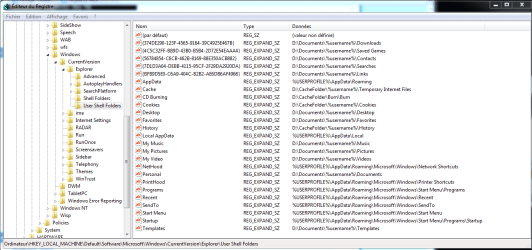
Hello Everybody
as you can do to move the user profile for All New User Accounts Created,
you can modify registry to setup new position for all new user.

to do that, you must modify the default user registry hive


this hive is there:
C:\Users\Default\ntuser.dat


  1. Load default user registry hive:
    Open administrator command prompt.
    Type: reg load hklm\Default C:\users\default\ntuser.dat
  2. Open regedit
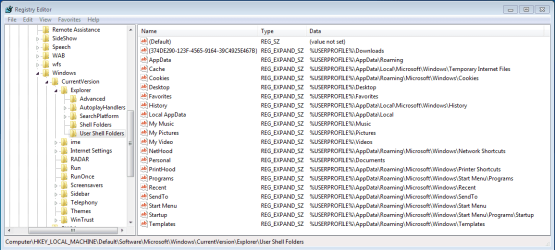
  3. Go to
    HKEY_LOCAL_MACHINE\Default\Software\Microsoft\Windows\CurrentVersion\Explorer\User Shell Folders
    and export them to save place
    That key is used to build new user account
    01.PNG
  4. Modify these value > to change folder position
    Personal > My Documents
    My Music > My Music
    My Pictures > My Pictures
    My Video > My Video
    Desktop > Desktop
    {374DE290-123F-4565-9164-39C4925E467B} Downloads

    Favorites > Favorites
    Templates > Templates
    Cache > Temporary Internet Files
    Cookies > Cookies
    History > History
  5. These value are not present in original hive.
    You can add :
    {4C5C32FF-BB9D-43B0-B5B4-2D72E54EAAA4} > Saved Games
    {56784854-C6CB-462B-8169-88E350ACB882} > Contacts
    {7D1D3A04-DEBB-4115-95CF-2F29DA2920DA} > Searches
    {BFB9D5E0-C6A9-404C-B2B2-AE6DB6AF4968} > Links
    CD Burning > Burn
  6. Uload registry hive
    Open administrator command prompt.
    Type: reg unload hklm\Default
    You must unload the registry hive.
Eg:
To place My Documents Folder in D:\Documents\username\Documents,
modify Personal value with D:\Documents\%username%\Documents

Caution: Pay attention to variable %username%
If you forget it, All new users will have a common My Documents folder.

Modification result:
02.PNG

to restore original values, use your exported key created in point 3, or:

http://www.sevenforums.com/tutorials/18583-user-folders-restore-default-location.html

You can also use this script to do all with few clic:
User Folders - Moving User Folders by Modular Script - Windows 7 Forums

Bye
 
Last edited by a moderator:

My Computer

Computer Manufacturer/Model Number
Fujitsu X9525
OS
Genuine Windows 7 Ultimate x64
CPU
Intel Core 2 Duo P8700 @ 2.53GHz
Memory
4 G DDR2
Graphics Card(s)
nVidia GeForce 9200M GS
Sound Card
Realtek HD
Monitor(s) Displays
WSXGA 15,4"
Screen Resolution
1680X1050
Hard Drives
WD WD5000BEVT 500G
Mouse
Logitech M555b Bluetooth
Internet Speed
VDSL2 16Mbs / 2Mbs
Just to make sure I did this right, are the music, pictures and video folders suppose to still be under my c:\user?
 

Attachments

  • win7 user.PNG
    win7 user.PNG
    10.3 KB · Views: 1,991
Last edited:

My Computer

Computer Manufacturer/Model Number
HP G60 120US Laptop
OS
7 home premium 64 bit
CPU
AMD Turion X2 64 bit 2 ghz
Motherboard
Whatever HP puts inside
Memory
3 gig
Graphics Card(s)
NVIDIA GeForce 8200M G
Sound Card
Conexent High Definition SmartAudio 221
Monitor(s) Displays
One attached to the laptop
Screen Resolution
1366X768
Hard Drives
Hitachi HTS543225L9A300 ATA 232 gb
Keyboard
attached
Mouse
touch pad attached
Hello KBZ,

Sorry, but no you shouldn't have the user folders listed anymore at the C:\User\(user-name) location once it has been moved.

Since you do, then it looks like the WARNING under step 9 in OPTION ONE of this tutorial happened to you. You can fix this, be restoring the default locations of the user folders, and moving them again being careful of the warning.
 

My Computer

Computer type
PC/Desktop
Computer Manufacturer/Model Number
Self built custom
OS
64-bit Windows 11 Pro for Workstations
CPU
Intel i7-8700K OC'd to 5 GHz
Motherboard
ASUS ROG Maximus XI Formula Z390
Memory
64 GB (4x16GB) G.SKILL TridentZ RGB DDR4 3600 MHz
Graphics Card(s)
ASUS ROG-STRIX-GTX1080TI-O11G-GAMING
Sound Card
Integrated
Monitor(s) Displays
2 x Samsung Odyssey G7 27"
Screen Resolution
2560x1440
Hard Drives
1TB Samsung 990 PRO M.2,
4TB Samsung 990 PRO PRO M.2,
TerraMaster F8 SSD Plus NAS
PSU
Seasonic Prime Titanium 850W
Case
Thermaltake Core P3
Cooling
Corsair Hydro H115i
Keyboard
Logitech wireless K800
Mouse
Logitech MX Master 4
Internet Speed
2 Gb/s Download and 100 Mb/s Upload
Antivirus
Malwarebyte Anti-Malware Premium
Browser
Google Chrome
Other Info
Logitech Z625 speaker system,
Logitech BRIO 4K Pro webcam,
HP Color LaserJet Pro MFP M477fdn,
APC SMART-UPS RT 1000 XL - SURT1000XLI,
Galaxy S23 Plus phone
Back
Top