Solved What backup & relocation strategy for User profiles and Program Data

Thank you both again :)

So you don't burn DVDs for every OS image you make right?


If I store the image on an external hard disk, will Macrium FREE be able to restore it ?


And a third question: I don't seem to have a boot partition. Is that possible? I have :
- factory recovery 25GB
- C (os) 100 GB NTFS
- D (data) 500 GB NTFS
- unallocated space 73GB - in case i'd like to install another OS
1. The recovery DVD (actually a CD works too)is usually good for quite some time. If they update Macrium, they will alert you (in the release change log) if you need to burn a new recovery CD. But that is rare. The CD I am currentlly using is at least a year old.

2. You initiate the restore process with the recovery CD (WinPE version). That is fully self contained with it's own mini Windows 7.

3. Yes it is possible that you do not have the 100MB system partition. In that case your C partition is the active partition containing the bootmgr. You can check that in Disk Management.
 

My Computer My Computer

Computer Manufacturer/Model Number
HP, Dell, Gateway, Toshiba - 4 laptops and 2 desktops
OS
Vista, Windows7, Mint Mate, Zorin, Windows 8
CPU
from 1.6GHz Duo to i7
Monitor(s) Displays
2x HP w2207
Hard Drives
5x HDD, 7x SSD, 12x Externals
Keyboard
with trackball - no mices
Mouse
Trackball mice
Internet Speed
DSL 6000
Hello,

In a configuration with a single HDD with 2 partitions (one for OS+Progs and one for data), how do we properly back up the OS and progs given the fact that the ProgramData and Users folders have been relocated to the Data partition ?
If you have used sysprep to relocate your system folders Users and ProgramData (as described in this tutorial), you need to include those in your image, too.

They are both system folders. If you leave them on C:, they would automatically be included in system image anyway. If they are relocated you need to be sure they are included.

I've used the sysprep method for years now on every Windows computer I have. As it is a one time procedure taking a minute to do and does not involve any manual folder location changes in folder properties or changes in library settings, one by one, but is instead done by changing the value of one Windows internal environment variable, it easily beats every other relocation method and makes changing settings manually obscure.

Both Windows' own Backup & Restore and third party tools like Macrium have no issues in creating images when these two system folders are moved from their original place.

Kari

Hi and thank you fo your reply,

I don't understand though, say I use the method in the tutorial and do relocate these two folders. Will the backup program create only one image? containing the whole OS partition + these two folders?

Second question: Given the fact that these two folders are on another partition, how will they be put to the right place again since that partition would have evolved over time? Will the present-time files in these two folders be overwitten? (that would be ok actually).

We are over thinking things here; it doesn't need to be this complicated. Just drag the data folders only from the C: partition to the data partition. Everything else stays on the C: partition and that is all that is needed for an image. Keep it simple.
 

My Computer My Computer

Computer type
PC/Desktop
Computer Manufacturer/Model Number
Custom Build
OS
Win 7 Ultimate 64 bit
CPU
Intel i7-3930K
Motherboard
ASUS P9X79 WS
Memory
Kingston HyperX Genesis 32GB Kit (8x4GB Modules) 1600MHz DDR
Graphics Card(s)
MSI R7850 Twin Frozr 2GD5/OC Radeon HD 7850 2GB 256-bit GDDR
Sound Card
Asus Xonar Essence STX
Monitor(s) Displays
3x Asus VG248QE 24", Vizio 32" TV
Screen Resolution
1920 x 1080, ?
Hard Drives
Samsung 128GB 840 Pro SSD (1),
Samsung 4TB 850 EVO SSDs (4)
Samsung 4TB 850 EVO SSDs (16) external backup drives used in 2.5" hot swap bays in the computer.
PSU
Corsair HX750w
Case
Antec Two Hundred v2 (modified)
Cooling
Cooler Master GeminII S524 120mm (fan replaced with a 140mm)
Keyboard
Logitech G510s
Mouse
Logitech M525 (two in use)
Internet Speed
=< 32Mbps down, 8Mbps up
Antivirus
AVAST!, MBAM, SAS, Spybot S&D (all but MBAM free) Glary Util
Browser
IE11
Other Info
LSI 9211-8i HBA card (8 SATA III ports), 2.5" & 3.5" Hot Swap Bays, HooToo HT-CR001 PCI-E to USB 3.0 Internal Hub + 6 Slot Card Reader, and LG Model CH12LS28 BD-ROM Optical Drive. Also, ScanSnap S1500 ADF duplexing scanner, Canon 9000F flat bed scanner, Corsair SP2500 2.1 speakers, Samsung CLP 415nw laser color printer, Cyberpower PP2200SW UPS
Thank you both again :)

So you don't burn DVDs for every OS image you make right?...

:what: Ohmigosh no! That would take too long and too many disks!
...If I store the image on an external hard disk, will Macrium FREE be able to restore it ?...

Absolutely. I do it all the time. If you don't already have one, you will need a rescue CD or USB stick.

...And a third question: I don't seem to have a boot partition. Is that possible? I have :
- factory recovery 25GB
- C (os) 100 GB NTFS
- D (data) 500 GB NTFS
- unallocated space 73GB - in case i'd like to install another OS

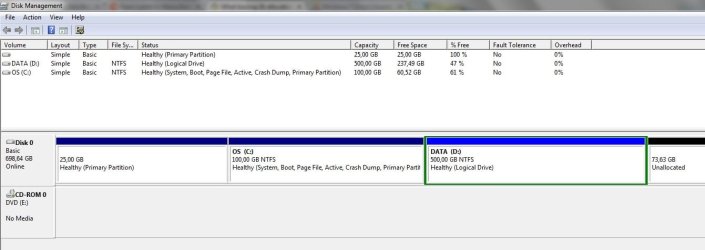
"Curiouser and curiouser," said Jeannie (apologies to Lewis Carroll). It's possible but a bit unusual with those figures. Where did you get those figures? My Computer or Disk Management? Can you show us a screen shot?

Attached is my Disk Management screenshot.
It says that the C partition is also boot.

Is or could that be an issue?
 

Attachments

  • diskm.jpg
    diskm.jpg
    53.2 KB · Views: 5

My Computer My Computer

Computer type
Laptop
Computer Manufacturer/Model Number
Asus N55SF
OS
Windows 7 Home Premium 64 bit
CPU
Intel Core i5 2410M @ 2.30GHz Sandy Bridge 32nm Technology
Motherboard
ASUSTeK Computer Inc. N55SF
Memory
8,00 GB Dual-Channel DDR3 @ 1333 MHz (PC3-10600)
Graphics Card(s)
NVIDIA GeForce GT 555M, Intel HD Graphics 3000
Sound Card
Realtek High Definition Audio
Screen Resolution
1600x900@60Hz
Hard Drives
699GB Seagate ST9750423AS (SATA) 5400rpm
Other Info
Optical drive: Slimtype DVD A DS8A5SH
All I did when I set up my computers was to drag the data folders to the new location on the other drive. Easy peasy and it works just fine for me.
You mean you dragged and dropped the CONTENT of the data folders? or the fodlers themselves?

For example,
did you dragged and dropped the whole My Music folder?
Or only its content to another folder (called Music-2 for example, as whs did) and kept the original My Music folder on the OS partition?
 

My Computer My Computer

Computer type
Laptop
Computer Manufacturer/Model Number
Asus N55SF
OS
Windows 7 Home Premium 64 bit
CPU
Intel Core i5 2410M @ 2.30GHz Sandy Bridge 32nm Technology
Motherboard
ASUSTeK Computer Inc. N55SF
Memory
8,00 GB Dual-Channel DDR3 @ 1333 MHz (PC3-10600)
Graphics Card(s)
NVIDIA GeForce GT 555M, Intel HD Graphics 3000
Sound Card
Realtek High Definition Audio
Screen Resolution
1600x900@60Hz
Hard Drives
699GB Seagate ST9750423AS (SATA) 5400rpm
Other Info
Optical drive: Slimtype DVD A DS8A5SH
Hi and thank you fo your reply,

I don't understand though, say I use the method in the tutorial and do relocate these two folders. Will the backup program create only one image? containing the whole OS partition + these two folders?

Second question: Given the fact that these two folders are on another partition, how will they be put to the right place again since that partition would have evolved over time? Will the present-time files in these two folders be overwitten? (that would be ok actually).

Using Windows Backup to create a system image, they are or rather the partition or drive where they are located is automatically included in your system image.

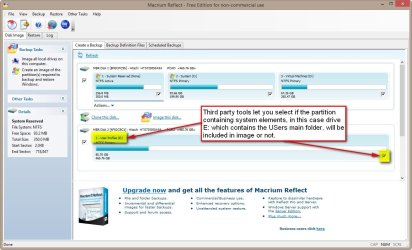
Using a third party imaging tool, you need to include the partition or drive manually:

2013-11-18_000044.jpg

We are over thinking things here; it doesn't need to be this complicated. Just drag the data folders only from the C: partition to the data partition. Everything else stays on the C: partition and that is all that is needed for an image. Keep it simple.
The comment above just shows how little knowledge leads you easily to wrong conclusions. Obviously you do not know what sysprep does and how the relocation is done. Using the sysprep ONCE to change a value of an environment variable versus dragging and dropping several folders and changing library pointers, it's obvious which method I choose!

One more reason why I most definitely do not agree with Lady's comment: In todays SSD era, quite a many users have relatively small SSD as system / Windows installation drive. The AppData (a hidden subfolder of Users) and its subfolders can really fill the SSD too fast. Running a simple answer file with sysprep and the whole Users fiolder, with everything it has and will in the future have, is moved and will never be an issue again regarding space on C:.

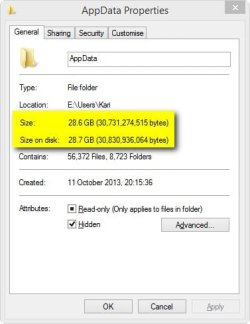
Here, a fairly normal, quite new installation on my laptop. Not much installed but yet the AppData is almost 30 GB. At least for me it's a big deal to have this, and everything else on Users, relocated on in my case E:. Simply and fast, with one command:

2013-11-17_235448.jpg

Lady, you cannot drag AppData to another drive. You need Sysprep.

Kari
 

My Computer My Computer

Computer type
Laptop
Computer Manufacturer/Model Number
HP ENVY 17-1150eg
OS
Windows 10 Pro x64 EN-GB
CPU
1.6 GHz Intel Core i7-720QM Processor
Memory
6 GB
Graphics Card(s)
ATI Mobility Radeon HD 5850 Graphics
Sound Card
Beats sound system with integrated subwoofer
Monitor(s) Displays
17" laptop display, 22" LED and 32" Full HD TV through HDMI
Screen Resolution
1600*900 (1), 1920*1080 (2&3)
Hard Drives
Internal: 2 x 500 GB SATA Hard Disk Drive 7200 rpm
External: 2TB for backups, 3TB USB3 network drive for media
Cooling
As Envy runs a bit warm, I have it on a Cooler Master pad
Keyboard
Logitech diNovo Media Desktop Laser (bluetooth)
Mouse
Logitech Performance Mouse MX
Internet Speed
50/10 Mbps VDSL
Antivirus
Windows Defender 4.3.9431.0
Browser
Maxthon 3.5.2., IE11
Thank you both again :)

So you don't burn DVDs for every OS image you make right?...

:what: Ohmigosh no! That would take too long and too many disks!


Absolutely. I do it all the time. If you don't already have one, you will need a rescue CD or USB stick.

...And a third question: I don't seem to have a boot partition. Is that possible? I have :
- factory recovery 25GB
- C (os) 100 GB NTFS
- D (data) 500 GB NTFS
- unallocated space 73GB - in case i'd like to install another OS

"Curiouser and curiouser," said Jeannie (apologies to Lewis Carroll). It's possible but a bit unusual with those figures. Where did you get those figures? My Computer or Disk Management? Can you show us a screen shot?

Attached is my Disk Management screenshot.
It says that the C partition is also boot.

Is or could that be an issue?

No issues. My boot partition is called System Reserved and you don't have that anywhere so yours is apparently incorporated in the C: partition. All you need to image is just the C: partition to back up your OS and Programs. The D: partition would get its own image to backup your data.

I'm curious what that empty 25GB Primary partition is doing there. It's not hurting anything but you might want to look into getting rid of it and adding that space to your D: partition. That would be a topic for another thread after you are comfortable with getting your backups working. Or, you could keep it for a test partition.
 

My Computer My Computer

Computer type
PC/Desktop
Computer Manufacturer/Model Number
Custom Build
OS
Win 7 Ultimate 64 bit
CPU
Intel i7-3930K
Motherboard
ASUS P9X79 WS
Memory
Kingston HyperX Genesis 32GB Kit (8x4GB Modules) 1600MHz DDR
Graphics Card(s)
MSI R7850 Twin Frozr 2GD5/OC Radeon HD 7850 2GB 256-bit GDDR
Sound Card
Asus Xonar Essence STX
Monitor(s) Displays
3x Asus VG248QE 24", Vizio 32" TV
Screen Resolution
1920 x 1080, ?
Hard Drives
Samsung 128GB 840 Pro SSD (1),
Samsung 4TB 850 EVO SSDs (4)
Samsung 4TB 850 EVO SSDs (16) external backup drives used in 2.5" hot swap bays in the computer.
PSU
Corsair HX750w
Case
Antec Two Hundred v2 (modified)
Cooling
Cooler Master GeminII S524 120mm (fan replaced with a 140mm)
Keyboard
Logitech G510s
Mouse
Logitech M525 (two in use)
Internet Speed
=< 32Mbps down, 8Mbps up
Antivirus
AVAST!, MBAM, SAS, Spybot S&D (all but MBAM free) Glary Util
Browser
IE11
Other Info
LSI 9211-8i HBA card (8 SATA III ports), 2.5" & 3.5" Hot Swap Bays, HooToo HT-CR001 PCI-E to USB 3.0 Internal Hub + 6 Slot Card Reader, and LG Model CH12LS28 BD-ROM Optical Drive. Also, ScanSnap S1500 ADF duplexing scanner, Canon 9000F flat bed scanner, Corsair SP2500 2.1 speakers, Samsung CLP 415nw laser color printer, Cyberpower PP2200SW UPS
Hi and thank you fo your reply,

I don't understand though, say I use the method in the tutorial and do relocate these two folders. Will the backup program create only one image? containing the whole OS partition + these two folders?

Second question: Given the fact that these two folders are on another partition, how will they be put to the right place again since that partition would have evolved over time? Will the present-time files in these two folders be overwitten? (that would be ok actually).

Using Windows Backup to create a system image, they are or rather the partition or drive where they are located is automatically included in your system image.

Using a third party imaging tool, you need to include the partition or drive manually:

View attachment 294009

We are over thinking things here; it doesn't need to be this complicated. Just drag the data folders only from the C: partition to the data partition. Everything else stays on the C: partition and that is all that is needed for an image. Keep it simple.
The comment above just shows how little knowledge brings you easily to wrong conclusions. Using the sysprep ONCE to change a value of an environment variable versus dragging and dropping several folders and changing library pointers, it's obvious which method I choose!

One more reason why I most definitely do not agree with Lady's comment: In todays SSD era, quite a many users have relatively small SSD as system / Windows installation drive. The AppData (a hidden subfolder of Users) and its subfolders can really fill the SSD too fast. Running a simple answer file with sysprep and the whole Users fiolder, with everything it has and will in the future have is moved and will never be an issue again regarding space on C:.

Here, a fairly normal, quite new installation on my laptop. Not much installed but yet the AppData is almost 30 GB. At least for me it's a big deal to have this, and everything else on Users, relocated on in my case E:. Simply and fast, with one command:

View attachment 294008

Lady, you cannot drag AppData to another drive. You need Sysprep.

Kari

Kari, I see, it keeps the SSD not too full. BUT, as I wrote in my first post, I don't want to have to image my whole data partition just because the users folders are located there. If I properly understood your post, both Windows Backup and third party programs will have to image the whole data partition too ?
 

My Computer My Computer

Computer type
Laptop
Computer Manufacturer/Model Number
Asus N55SF
OS
Windows 7 Home Premium 64 bit
CPU
Intel Core i5 2410M @ 2.30GHz Sandy Bridge 32nm Technology
Motherboard
ASUSTeK Computer Inc. N55SF
Memory
8,00 GB Dual-Channel DDR3 @ 1333 MHz (PC3-10600)
Graphics Card(s)
NVIDIA GeForce GT 555M, Intel HD Graphics 3000
Sound Card
Realtek High Definition Audio
Screen Resolution
1600x900@60Hz
Hard Drives
699GB Seagate ST9750423AS (SATA) 5400rpm
Other Info
Optical drive: Slimtype DVD A DS8A5SH
I'm curious what that empty 25GB Primary partition is doing there. It's not hurting anything but you might want to look into getting rid of it and adding that space to your D: partition. That would be a topic for another thread after you are comfortable with getting your backups working. Or, you could keep it for a test partition.

The 25GB is the ASUS factory restore partition. Somewhere I read that it's not being given a name so that it's "unusable". Meaning, accessible only for the recovery.
 

My Computer My Computer

Computer type
Laptop
Computer Manufacturer/Model Number
Asus N55SF
OS
Windows 7 Home Premium 64 bit
CPU
Intel Core i5 2410M @ 2.30GHz Sandy Bridge 32nm Technology
Motherboard
ASUSTeK Computer Inc. N55SF
Memory
8,00 GB Dual-Channel DDR3 @ 1333 MHz (PC3-10600)
Graphics Card(s)
NVIDIA GeForce GT 555M, Intel HD Graphics 3000
Sound Card
Realtek High Definition Audio
Screen Resolution
1600x900@60Hz
Hard Drives
699GB Seagate ST9750423AS (SATA) 5400rpm
Other Info
Optical drive: Slimtype DVD A DS8A5SH
Kari, I see, it keeps the SSD not too full. BUT, as I wrote in my first post, I don't want to have to image my whole data partition just because the users folders are located there. If I properly understood your post, both Windows Backup and third party programs will have to image the whole data partition too ?
Let's summarize:

Using Windows Backup & Restore to image your system, all partitions / drives including system folders are included. If Users and ProgramData are relocated to another drive, it will be included.

Third party tools let you deselect partitions, not include them even if they contain system elements. However, as Users and PrograData are system folders they should always be included in a system image.
 

My Computer My Computer

Computer type
Laptop
Computer Manufacturer/Model Number
HP ENVY 17-1150eg
OS
Windows 10 Pro x64 EN-GB
CPU
1.6 GHz Intel Core i7-720QM Processor
Memory
6 GB
Graphics Card(s)
ATI Mobility Radeon HD 5850 Graphics
Sound Card
Beats sound system with integrated subwoofer
Monitor(s) Displays
17" laptop display, 22" LED and 32" Full HD TV through HDMI
Screen Resolution
1600*900 (1), 1920*1080 (2&3)
Hard Drives
Internal: 2 x 500 GB SATA Hard Disk Drive 7200 rpm
External: 2TB for backups, 3TB USB3 network drive for media
Cooling
As Envy runs a bit warm, I have it on a Cooler Master pad
Keyboard
Logitech diNovo Media Desktop Laser (bluetooth)
Mouse
Logitech Performance Mouse MX
Internet Speed
50/10 Mbps VDSL
Antivirus
Windows Defender 4.3.9431.0
Browser
Maxthon 3.5.2., IE11
All I did when I set up my computers was to drag the data folders to the new location on the other drive. Easy peasy and it works just fine for me.
You mean you dragged and dropped the CONTENT of the data folders? or the fodlers themselves?

For example,
did you dragged and dropped the whole My Music folder?
Or only its content to another folder (called Music-2 for example, as whs did) and kept the original My Music folder on the OS partition?

I dragged and dropped the entire folder; more specifically, I dragged My Documents, My Music, My Pictures, and Public Recorded TV from the C: drive to my E: drive. My Videos was dragged and dropped to my F: drive. Considering that you have a bit over 60GB on your C: partition, it would be interesting to know how large your AppData folder is unless you have data also stored in the data folders still on the partition.
 

My Computer My Computer

Computer type
PC/Desktop
Computer Manufacturer/Model Number
Custom Build
OS
Win 7 Ultimate 64 bit
CPU
Intel i7-3930K
Motherboard
ASUS P9X79 WS
Memory
Kingston HyperX Genesis 32GB Kit (8x4GB Modules) 1600MHz DDR
Graphics Card(s)
MSI R7850 Twin Frozr 2GD5/OC Radeon HD 7850 2GB 256-bit GDDR
Sound Card
Asus Xonar Essence STX
Monitor(s) Displays
3x Asus VG248QE 24", Vizio 32" TV
Screen Resolution
1920 x 1080, ?
Hard Drives
Samsung 128GB 840 Pro SSD (1),
Samsung 4TB 850 EVO SSDs (4)
Samsung 4TB 850 EVO SSDs (16) external backup drives used in 2.5" hot swap bays in the computer.
PSU
Corsair HX750w
Case
Antec Two Hundred v2 (modified)
Cooling
Cooler Master GeminII S524 120mm (fan replaced with a 140mm)
Keyboard
Logitech G510s
Mouse
Logitech M525 (two in use)
Internet Speed
=< 32Mbps down, 8Mbps up
Antivirus
AVAST!, MBAM, SAS, Spybot S&D (all but MBAM free) Glary Util
Browser
IE11
Other Info
LSI 9211-8i HBA card (8 SATA III ports), 2.5" & 3.5" Hot Swap Bays, HooToo HT-CR001 PCI-E to USB 3.0 Internal Hub + 6 Slot Card Reader, and LG Model CH12LS28 BD-ROM Optical Drive. Also, ScanSnap S1500 ADF duplexing scanner, Canon 9000F flat bed scanner, Corsair SP2500 2.1 speakers, Samsung CLP 415nw laser color printer, Cyberpower PP2200SW UPS
Kari, I see, it keeps the SSD not too full. BUT, as I wrote in my first post, I don't want to have to image my whole data partition just because the users folders are located there. If I properly understood your post, both Windows Backup and third party programs will have to image the whole data partition too ?
Let's summarize:

Using Windows Backup & Restore to image your system, all partitions / drives including system folders are included. If Users and ProgramData are relocated to another drive, it will be included.

Third party tools let you deselect partitions, not include them even if they contain system elements. However, as Users and PrograData are system folders they should always be included in a system image.

Thank you Kari, this is what I understood, therefore it confirms my thought that I would have to image the WHOLE data partition just because of these two folders being there. Which I personnaly find not practical.

Question 1: Appart from SDD related AppData size reasons, why would you move these folders to a separate partition?


Question 2: Your AppData is almost 30 GB ? Mine is not even 2GB. Yet I have several softs.
30 GB seems huge only for application data.
What kind of software do you use? I mean we all have some media reading software, office, maybe image/video/music editing, "system tools",...
but what else could make that difference between you and me? What do you think an average size for AppData is? Cause if the average is around 5GB, then maybe keeping it the OS partition is OK. If average is 30GB then I can see a reason why moving it, in the case the OS disk is an SSD, therefore expensive, or just a small HDD.
 

My Computer My Computer

Computer type
Laptop
Computer Manufacturer/Model Number
Asus N55SF
OS
Windows 7 Home Premium 64 bit
CPU
Intel Core i5 2410M @ 2.30GHz Sandy Bridge 32nm Technology
Motherboard
ASUSTeK Computer Inc. N55SF
Memory
8,00 GB Dual-Channel DDR3 @ 1333 MHz (PC3-10600)
Graphics Card(s)
NVIDIA GeForce GT 555M, Intel HD Graphics 3000
Sound Card
Realtek High Definition Audio
Screen Resolution
1600x900@60Hz
Hard Drives
699GB Seagate ST9750423AS (SATA) 5400rpm
Other Info
Optical drive: Slimtype DVD A DS8A5SH
I'm curious what that empty 25GB Primary partition is doing there. It's not hurting anything but you might want to look into getting rid of it and adding that space to your D: partition. That would be a topic for another thread after you are comfortable with getting your backups working. Or, you could keep it for a test partition.

The 25GB is the ASUS factory restore partition. Somewhere I read that it's not being given a name so that it's "unusable". Meaning, accessible only for the recovery.

That makes sense.
 

My Computer My Computer

Computer type
PC/Desktop
Computer Manufacturer/Model Number
Custom Build
OS
Win 7 Ultimate 64 bit
CPU
Intel i7-3930K
Motherboard
ASUS P9X79 WS
Memory
Kingston HyperX Genesis 32GB Kit (8x4GB Modules) 1600MHz DDR
Graphics Card(s)
MSI R7850 Twin Frozr 2GD5/OC Radeon HD 7850 2GB 256-bit GDDR
Sound Card
Asus Xonar Essence STX
Monitor(s) Displays
3x Asus VG248QE 24", Vizio 32" TV
Screen Resolution
1920 x 1080, ?
Hard Drives
Samsung 128GB 840 Pro SSD (1),
Samsung 4TB 850 EVO SSDs (4)
Samsung 4TB 850 EVO SSDs (16) external backup drives used in 2.5" hot swap bays in the computer.
PSU
Corsair HX750w
Case
Antec Two Hundred v2 (modified)
Cooling
Cooler Master GeminII S524 120mm (fan replaced with a 140mm)
Keyboard
Logitech G510s
Mouse
Logitech M525 (two in use)
Internet Speed
=< 32Mbps down, 8Mbps up
Antivirus
AVAST!, MBAM, SAS, Spybot S&D (all but MBAM free) Glary Util
Browser
IE11
Other Info
LSI 9211-8i HBA card (8 SATA III ports), 2.5" & 3.5" Hot Swap Bays, HooToo HT-CR001 PCI-E to USB 3.0 Internal Hub + 6 Slot Card Reader, and LG Model CH12LS28 BD-ROM Optical Drive. Also, ScanSnap S1500 ADF duplexing scanner, Canon 9000F flat bed scanner, Corsair SP2500 2.1 speakers, Samsung CLP 415nw laser color printer, Cyberpower PP2200SW UPS
If Users and ProgramData are relocated to another drive, it will be included
Kari, that is only true if you use Windows 7 imaging (who wants that). Here we are discussing free Macrium. It images partitions individually. If you have relocated system files, you have to take care of them yourself.
 

My Computer My Computer

Computer Manufacturer/Model Number
HP, Dell, Gateway, Toshiba - 4 laptops and 2 desktops
OS
Vista, Windows7, Mint Mate, Zorin, Windows 8
CPU
from 1.6GHz Duo to i7
Monitor(s) Displays
2x HP w2207
Hard Drives
5x HDD, 7x SSD, 12x Externals
Keyboard
with trackball - no mices
Mouse
Trackball mice
Internet Speed
DSL 6000
Considering that you have a bit over 60GB on your C: partition, it would be interesting to know how large your AppData folder is unless you have data also stored in the data folders still on the partition.


I'm going to reinstall the whole thing from scratch. That's why I ask all these questions. To see what strategy I'll use this time. All ideas are welcome.

So, now, my ProgramData folder and Users folders are both on the data partition. I did this two years ago and created an image of C(OS) but not of D(data+these two folders). Only thing I did at that time was to back up these two folders manually.. so yesterday.. I put back my OS image on the C drive and copied pasted these two folders to the D drive, but of course it created problems with overriding, ownership and these kind of things. So now i'm rethinking my whole thing. :)

As for my AppData size:
data partition\Users\myname\AppData is 3GB.
I have no data stored on the C(OS) partition. It's 60GB full and still has 40GB free.
I didn't get what you meant..
 

My Computer My Computer

Computer type
Laptop
Computer Manufacturer/Model Number
Asus N55SF
OS
Windows 7 Home Premium 64 bit
CPU
Intel Core i5 2410M @ 2.30GHz Sandy Bridge 32nm Technology
Motherboard
ASUSTeK Computer Inc. N55SF
Memory
8,00 GB Dual-Channel DDR3 @ 1333 MHz (PC3-10600)
Graphics Card(s)
NVIDIA GeForce GT 555M, Intel HD Graphics 3000
Sound Card
Realtek High Definition Audio
Screen Resolution
1600x900@60Hz
Hard Drives
699GB Seagate ST9750423AS (SATA) 5400rpm
Other Info
Optical drive: Slimtype DVD A DS8A5SH
Question 2: Your AppData is almost 30 GB ? Mine is not even 2GB. Yet I have several softs.
30 GB seems huge only for application data.
What kind of software do you use? I mean we all have some media reading software, office, maybe image/video/music editing, "system tools",...
but what else could make that difference between you and me? What do you think an average size for AppData is? Cause if the average is around 5GB, then maybe keeping it the OS partition is OK. If average is 30GB then I can see a reason why moving it, in the case the OS disk is an SSD, therefore expensive, or just a small HDD.
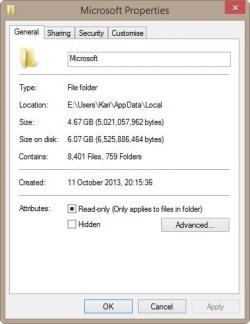
My AppData is quite normal, not counting the about 10 GB taken by various programming tools. For instance mostly due to space needed by Visual Studio and Windows Phone SDK, the Microsoft subfolder in AppData\Local takes over 6 GB disk space:

2013-11-18_005206.jpg

If Users and ProgramData are relocated to another drive, it will be included
Kari, that is only true if you use Windows 7 imaging (who wants that). Here we are discussing free Macrium. It images partitions individually. If you have relocated system files, you have to take care of them yourself.

I have all the time repeatedly mentioned this (see for instance this post): using Windows native imaging all partitions including system folders are automatically included, using Macrium or any other third party tool they can be excluded although I personally recommend including all partitions with system files or folders.

IF you had quoted the whole post of mine instead of just that one misleading sentence, you had noticed it. Here's the whole post, not only that one sentence:
Kari, I see, it keeps the SSD not too full. BUT, as I wrote in my first post, I don't want to have to image my whole data partition just because the users folders are located there. If I properly understood your post, both Windows Backup and third party programs will have to image the whole data partition too ?
Let's summarize:

Using Windows Backup & Restore to image your system, all partitions / drives including system folders are included. If Users and ProgramData are relocated to another drive, it will be included.

Third party tools let you deselect partitions, not include them even if they contain system elements. However, as Users and PrograData are system folders they should always be included in a system image.


Kari
 

My Computer My Computer

Computer type
Laptop
Computer Manufacturer/Model Number
HP ENVY 17-1150eg
OS
Windows 10 Pro x64 EN-GB
CPU
1.6 GHz Intel Core i7-720QM Processor
Memory
6 GB
Graphics Card(s)
ATI Mobility Radeon HD 5850 Graphics
Sound Card
Beats sound system with integrated subwoofer
Monitor(s) Displays
17" laptop display, 22" LED and 32" Full HD TV through HDMI
Screen Resolution
1600*900 (1), 1920*1080 (2&3)
Hard Drives
Internal: 2 x 500 GB SATA Hard Disk Drive 7200 rpm
External: 2TB for backups, 3TB USB3 network drive for media
Cooling
As Envy runs a bit warm, I have it on a Cooler Master pad
Keyboard
Logitech diNovo Media Desktop Laser (bluetooth)
Mouse
Logitech Performance Mouse MX
Internet Speed
50/10 Mbps VDSL
Antivirus
Windows Defender 4.3.9431.0
Browser
Maxthon 3.5.2., IE11
You're correct 3GB is enough to worry about although even that seems a bit big.

What I'm wondering what is causing your C: drive to be taking up 60GB. That seems to be a bit on the big side, like by almost 100%
 

My Computer My Computer

Computer type
PC/Desktop
Computer Manufacturer/Model Number
Custom Build
OS
Win 7 Ultimate 64 bit
CPU
Intel i7-3930K
Motherboard
ASUS P9X79 WS
Memory
Kingston HyperX Genesis 32GB Kit (8x4GB Modules) 1600MHz DDR
Graphics Card(s)
MSI R7850 Twin Frozr 2GD5/OC Radeon HD 7850 2GB 256-bit GDDR
Sound Card
Asus Xonar Essence STX
Monitor(s) Displays
3x Asus VG248QE 24", Vizio 32" TV
Screen Resolution
1920 x 1080, ?
Hard Drives
Samsung 128GB 840 Pro SSD (1),
Samsung 4TB 850 EVO SSDs (4)
Samsung 4TB 850 EVO SSDs (16) external backup drives used in 2.5" hot swap bays in the computer.
PSU
Corsair HX750w
Case
Antec Two Hundred v2 (modified)
Cooling
Cooler Master GeminII S524 120mm (fan replaced with a 140mm)
Keyboard
Logitech G510s
Mouse
Logitech M525 (two in use)
Internet Speed
=< 32Mbps down, 8Mbps up
Antivirus
AVAST!, MBAM, SAS, Spybot S&D (all but MBAM free) Glary Util
Browser
IE11
Other Info
LSI 9211-8i HBA card (8 SATA III ports), 2.5" & 3.5" Hot Swap Bays, HooToo HT-CR001 PCI-E to USB 3.0 Internal Hub + 6 Slot Card Reader, and LG Model CH12LS28 BD-ROM Optical Drive. Also, ScanSnap S1500 ADF duplexing scanner, Canon 9000F flat bed scanner, Corsair SP2500 2.1 speakers, Samsung CLP 415nw laser color printer, Cyberpower PP2200SW UPS
It would be interesting to see how big the AppData files of other users are. I've never seen one as large as Kari's.
 

My Computer My Computer

Computer type
PC/Desktop
Computer Manufacturer/Model Number
Custom Build
OS
Win 7 Ultimate 64 bit
CPU
Intel i7-3930K
Motherboard
ASUS P9X79 WS
Memory
Kingston HyperX Genesis 32GB Kit (8x4GB Modules) 1600MHz DDR
Graphics Card(s)
MSI R7850 Twin Frozr 2GD5/OC Radeon HD 7850 2GB 256-bit GDDR
Sound Card
Asus Xonar Essence STX
Monitor(s) Displays
3x Asus VG248QE 24", Vizio 32" TV
Screen Resolution
1920 x 1080, ?
Hard Drives
Samsung 128GB 840 Pro SSD (1),
Samsung 4TB 850 EVO SSDs (4)
Samsung 4TB 850 EVO SSDs (16) external backup drives used in 2.5" hot swap bays in the computer.
PSU
Corsair HX750w
Case
Antec Two Hundred v2 (modified)
Cooling
Cooler Master GeminII S524 120mm (fan replaced with a 140mm)
Keyboard
Logitech G510s
Mouse
Logitech M525 (two in use)
Internet Speed
=< 32Mbps down, 8Mbps up
Antivirus
AVAST!, MBAM, SAS, Spybot S&D (all but MBAM free) Glary Util
Browser
IE11
Other Info
LSI 9211-8i HBA card (8 SATA III ports), 2.5" & 3.5" Hot Swap Bays, HooToo HT-CR001 PCI-E to USB 3.0 Internal Hub + 6 Slot Card Reader, and LG Model CH12LS28 BD-ROM Optical Drive. Also, ScanSnap S1500 ADF duplexing scanner, Canon 9000F flat bed scanner, Corsair SP2500 2.1 speakers, Samsung CLP 415nw laser color printer, Cyberpower PP2200SW UPS
Kari, I did not want to critisize your post. I just wanted to make sure the difference between Windows imaging and free Macrium is understood. Sorry.

Before you joined the thread, there was only talk about Macrium - not Windows imaging. The OP has obviuosly a lot of questions. So it would help to keep things simple.
 

My Computer My Computer

Computer Manufacturer/Model Number
HP, Dell, Gateway, Toshiba - 4 laptops and 2 desktops
OS
Vista, Windows7, Mint Mate, Zorin, Windows 8
CPU
from 1.6GHz Duo to i7
Monitor(s) Displays
2x HP w2207
Hard Drives
5x HDD, 7x SSD, 12x Externals
Keyboard
with trackball - no mices
Mouse
Trackball mice
Internet Speed
DSL 6000
No hard feelings Wolfgang :). I just felt I need to mention it, as that one sentence out of context gave a misleading idea of the content of my posts.
 

My Computer My Computer

Computer type
Laptop
Computer Manufacturer/Model Number
HP ENVY 17-1150eg
OS
Windows 10 Pro x64 EN-GB
CPU
1.6 GHz Intel Core i7-720QM Processor
Memory
6 GB
Graphics Card(s)
ATI Mobility Radeon HD 5850 Graphics
Sound Card
Beats sound system with integrated subwoofer
Monitor(s) Displays
17" laptop display, 22" LED and 32" Full HD TV through HDMI
Screen Resolution
1600*900 (1), 1920*1080 (2&3)
Hard Drives
Internal: 2 x 500 GB SATA Hard Disk Drive 7200 rpm
External: 2TB for backups, 3TB USB3 network drive for media
Cooling
As Envy runs a bit warm, I have it on a Cooler Master pad
Keyboard
Logitech diNovo Media Desktop Laser (bluetooth)
Mouse
Logitech Performance Mouse MX
Internet Speed
50/10 Mbps VDSL
Antivirus
Windows Defender 4.3.9431.0
Browser
Maxthon 3.5.2., IE11
You're correct 3GB is enough to worry about although even that seems a bit big.

What I'm wondering what is causing your C: drive to be taking up 60GB. That seems to be a bit on the big side, like by almost 100%

You meant 3GB is NOT enough to worry about, right?

I ahve no idea why C is 60GB. And also I don't know how much it's supposed to be as an average size.. ?
Here are some sizes, maybe one is extremely big and you will see it directly?

Windows: 24 GB
Program Files: 1,58 GB
Program Files (x86): 4 GB
pagefile.sys (hidden system file): 3,90 GB
hiberfil.sys (hidden system file): 2,90 GB

NVIDIA: 285MB

That makes around 37 GB..strange..i can't see where are the other 20 GB used.. i didnt mentions some other folders/files cause they are really small.. and I have all the hidden folder shown... any idea?
 

My Computer My Computer

Computer type
Laptop
Computer Manufacturer/Model Number
Asus N55SF
OS
Windows 7 Home Premium 64 bit
CPU
Intel Core i5 2410M @ 2.30GHz Sandy Bridge 32nm Technology
Motherboard
ASUSTeK Computer Inc. N55SF
Memory
8,00 GB Dual-Channel DDR3 @ 1333 MHz (PC3-10600)
Graphics Card(s)
NVIDIA GeForce GT 555M, Intel HD Graphics 3000
Sound Card
Realtek High Definition Audio
Screen Resolution
1600x900@60Hz
Hard Drives
699GB Seagate ST9750423AS (SATA) 5400rpm
Other Info
Optical drive: Slimtype DVD A DS8A5SH
Back
Top