isaac12345
New member
- Local time
- 11:11 PM
- Messages
- 12
Hi all,
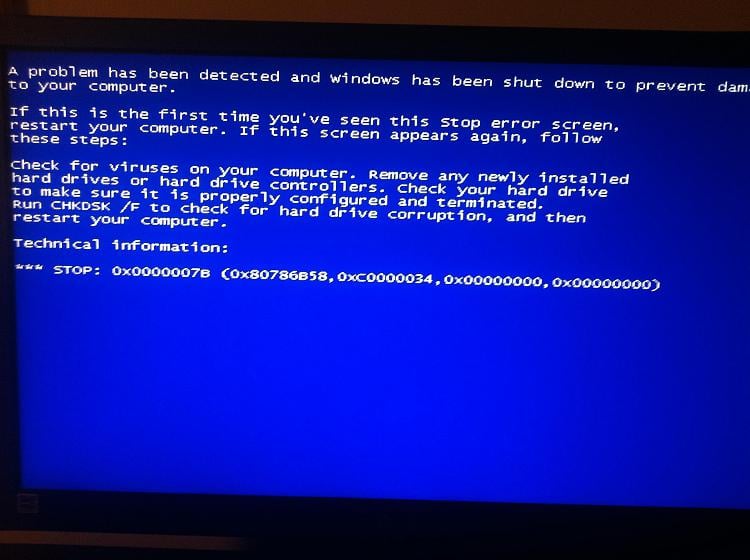
I recently upgraded my motherboard from a Gigabyte P35-S3G to a Gigabyte G41M-ES2L (rev 1.0) with F4 bios. I have 2 hard drives installed on the system, a 320GB with Linux Mint 17.2 64bit and a 1TB with windows 7 professional 32bit and most of my important data. The error I get is the same as - http://www.sevenforums.com/attachme...me-premium-win-7-ultimate-using-usb-photo.jpg It happens just when the windows logo starts animating.
I have no problems booting into linux apart from my soundcard not working after many tries. To check if there is a hardware issue with the sound I would like to check it in windows but it doesn't even boot. I have tried the following to make it boot -
1) Disabled Azalia codec in bios. Didn't work
2) Tried to boot into safe mode but it BSODs after the black and white driver loading screen
3) Tried startup repair but it is not able to fix anything
4) Tried looking for changing the hard drive mode to ahci or sata or ide. The advanced options only have 4 options as listed on page 47 of the manual (GIGABYTE GA-G41M-ES2L USER MANUAL Pdf Download.) and none of them worked.
Now I dont mind re-installing the OS as I need to anyway to find out my key when I upgrade from 32bit to 64bit. However, as the license is tied to the motherboard and I am not sure how many I have left, having already installed win7 on two other motherboards, and whether I would need to RMA this current motherboard, I dont want to end up in a situation in the future where I have a new motherboard but no license available for win 7.
What should I do in this case? Is there any way to find out how many win 7 licenses I have left from the ISO? I got the ISO from my university's MSDNAA page many years ago.
Or is there any way to fix the BSOD? I have a driver CD, so is it possible to install the appropriate drivers from there?
I recently upgraded my motherboard from a Gigabyte P35-S3G to a Gigabyte G41M-ES2L (rev 1.0) with F4 bios. I have 2 hard drives installed on the system, a 320GB with Linux Mint 17.2 64bit and a 1TB with windows 7 professional 32bit and most of my important data. The error I get is the same as - http://www.sevenforums.com/attachme...me-premium-win-7-ultimate-using-usb-photo.jpg It happens just when the windows logo starts animating.
I have no problems booting into linux apart from my soundcard not working after many tries. To check if there is a hardware issue with the sound I would like to check it in windows but it doesn't even boot. I have tried the following to make it boot -
1) Disabled Azalia codec in bios. Didn't work
2) Tried to boot into safe mode but it BSODs after the black and white driver loading screen
3) Tried startup repair but it is not able to fix anything
4) Tried looking for changing the hard drive mode to ahci or sata or ide. The advanced options only have 4 options as listed on page 47 of the manual (GIGABYTE GA-G41M-ES2L USER MANUAL Pdf Download.) and none of them worked.
Now I dont mind re-installing the OS as I need to anyway to find out my key when I upgrade from 32bit to 64bit. However, as the license is tied to the motherboard and I am not sure how many I have left, having already installed win7 on two other motherboards, and whether I would need to RMA this current motherboard, I dont want to end up in a situation in the future where I have a new motherboard but no license available for win 7.
What should I do in this case? Is there any way to find out how many win 7 licenses I have left from the ISO? I got the ISO from my university's MSDNAA page many years ago.
Or is there any way to fix the BSOD? I have a driver CD, so is it possible to install the appropriate drivers from there?
My Computer
At a glance
Windows 7 Professional 32-bit
- Computer type
- PC/Desktop
- OS
- Windows 7 Professional 32-bit